

The ROG Xbox Ally X represents the most aggressive hardware bet yet on making Windows a believable handheld gaming platform, but early reviews — including a full review that recommends considering the Lenovo Legion Go 2 instead — make clear this is still a tradeoff between hardware ambition and software polish.
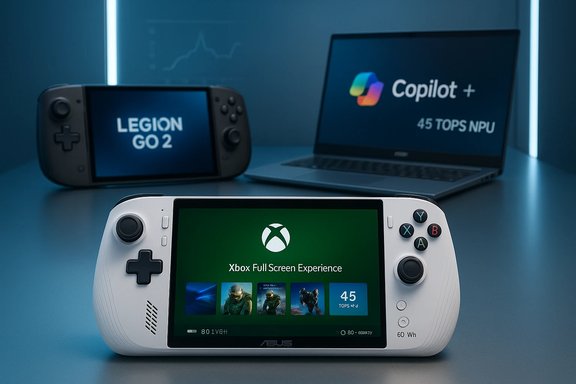
The past two years have accelerated two parallel currents in PC hardware: the maturation of high-performance handhelds for gaming, and the mainstreaming of on-device AI in thin-and-light laptops. ASUS’ ROG Xbox Ally X is a flagship example of the first trend: a Windows 11 handheld engineered with higher sustained thermal headroom, a large battery, and console-style ergonomics that explicitly lean into Xbox Game Pass and an Xbox-branded full‑screen shell layered over Windows. Early reviewers have repeatedly called the Ally X the most capable single‑piece Windows handheld at launch while warning that Windows’ desktop baggage still punctures the “console-like” promise. The other current is visible in Acer’s Swift 14 AI, a Copilot+ PC powered by Qualcomm’s Snapdragon X Series platforms. Acer positions the Swift 14 AI as a thin‑and‑light laptop optimized for on‑device AI tasks — Recall, Cocreator, Auto Super Resolution and Windows Studio Effects — using an integrated NPU rated at 45 TOPS. That product sits at the intersection of battery efficiency and on-device AI convenience: a different type of hardware ambition targeted at productivity and creative workflows rather than local AAA gaming. This feature unpacks both stories: what the Ally X delivers in practice (and why some reviewers point buyers to Lenovo’s Legion Go 2), and what Acer’s Swift 14 AI tells us about how OEMs are shipping Copilot+ hardware today. It cross‑checks major claims against independent coverage, highlights practical strengths, and flags unverifiable or aspirational marketing — especially around NPU/TOPS claims and promised AI benefits.
The Ally X’s combination of ergonomics, sustained performance and USB4 docking makes it the single most capable Windows handheld at launch — but that capability arrives with meaningful software tradeoffs, and external alternatives like the Lenovo Legion Go 2 offer compelling counterpoints in display quality and day‑to‑day UX. Acer’s Swift 14 AI demonstrates how OEMs will sell on‑device AI differently from raw TFLOPS or cores: as a suite of useful features that change daily productivity.
Buyers should treat NPU/TOPS marketing claims with caution, verify real‑world workloads for their needs, and weigh whether the hardware’s unique strengths match their personal workflows — whether that’s multi‑hour docked AAA gaming or all‑day AI‑accelerated productivity. For many consumers, the decisive factor will be software maturity: the Ally X shows where handheld Windows can go, but the Legion Go 2 and Copilot+ laptops show that immediate polish and practical features still win hearts and pockets in 2025–2026.
Source: MSN https://www.msn.com/en-us/news/tech...wift-14-ai-windows-11-copilot-pc-snapdragon/]
 Background / Overview
The past two years have accelerated two parallel currents in PC hardware: the maturation of high-performance handhelds for gaming, and the mainstreaming of on-device AI in thin-and-light laptops. ASUS’ ROG Xbox Ally X is a flagship example of the first trend: a Windows 11 handheld engineered with higher sustained thermal headroom, a large battery, and console-style ergonomics that explicitly lean into Xbox Game Pass and an Xbox-branded full‑screen shell layered over Windows. Early reviewers have repeatedly called the Ally X the most capable single‑piece Windows handheld at launch while warning that Windows’ desktop baggage still punctures the “console-like” promise. The other current is visible in Acer’s Swift 14 AI, a Copilot+ PC powered by Qualcomm’s Snapdragon X Series platforms. Acer positions the Swift 14 AI as a thin‑and‑light laptop optimized for on‑device AI tasks — Recall, Cocreator, Auto Super Resolution and Windows Studio Effects — using an integrated NPU rated at 45 TOPS. That product sits at the intersection of battery efficiency and on-device AI convenience: a different type of hardware ambition targeted at productivity and creative workflows rather than local AAA gaming. This feature unpacks both stories: what the Ally X delivers in practice (and why some reviewers point buyers to Lenovo’s Legion Go 2), and what Acer’s Swift 14 AI tells us about how OEMs are shipping Copilot+ hardware today. It cross‑checks major claims against independent coverage, highlights practical strengths, and flags unverifiable or aspirational marketing — especially around NPU/TOPS claims and promised AI benefits.The ROG Xbox Ally X: hardware first, software later
What the Ally X actually ships with
The Ally X’s hardware is straightforwardly impressive on paper and consistent across hands‑on coverage:- APU: AMD Ryzen AI Z2 Extreme (Z2‑class, higher core count and RDNA‑based GPU).
- Memory & Storage: Up to 24 GB LPDDR5X and user‑serviceable 1TB M.2 2280 NVMe options in top SKUs.
- Display: 7‑inch 1080p, 120 Hz IPS panel (ASUS chose predictable LCD characteristics over OLED).
- Battery: ~80 Wh battery in the Ally X SKU.
- I/O: Dual USB‑C with a USB4/DisplayPort‑capable port on the Ally X for docking scenarios.
- OS & UX: Windows 11 Home with an Xbox Full Screen Experience overlay aimed at a controller‑first workflow.
Where the Ally X scores
- Ergonomics: ASUS rebuilt the chassis to echo Xbox controller geometry — rounded grips, staggered sticks and comfortable palm rests — and reviewers almost unanimously praise multi‑hour comfort relative to many other handhelds.
- Sustained performance & thermal design: With a larger battery and improved cooling, the Ally X sustains higher clocks for longer sessions than many smaller handhelds; reviewers found measurable frame‑rate advantages in GPU‑bound scenarios when compared head‑to‑head with rivals.
- Docking and expandability: A full‑length M.2 2280 slot and USB4/DP on the high‑end Ally X make it credible as a compact mini‑PC when docked — a differentiator that true single‑chassis laptops and many handhelds lack.
Where it hurts: Windows friction and battery tradeoffs
Despite hardware gains, reviewers and early adopters describe consistent soft spots:- Out‑of‑box polish: The Xbox Full Screen Experience is useful but still a “skin on Windows”; initial setup (multiple Windows updates, OEM app setups, firmware patches) can turn unboxing into an all‑day chore. That friction matters when a handheld aims to compete with console‑level pick‑up‑and‑play simplicity.
- Battery life under load: Even with an 80 Wh pack, expect 2–4 hours in demanding AAA workloads, depending on settings and whether you cap framerates or use upscaling. High‑TDP play favors plugged‑in or docked use.
- Software and compatibility quirks: Sleep/resume inconsistencies, UI lag in early firmware, and launcher/anti‑cheat edge cases are still reported; these are fixable via updates but are meaningful at a $999 price point.
The Legion Go 2 comparison — why some reviewers prefer it
Multiple reviews that examined both the Ally X and the Lenovo Legion Go 2 concluded that the Legion Go 2 is a valid alternative — and in certain use cases, the preferred one. The reasons are clear and repeatable:- Display quality and size: The Legion Go 2’s 8.8‑inch OLED is a showstopper for media and visual fidelity, delivering deeper contrast and a more immersive viewing surface than the Ally X’s 7‑inch IPS. Reviews note that OLED’s perceived image quality is a decisive factor for buyers who value visuals over raw Windows‑native performance.
- Value and configuration tradeoffs: When Lenovo’s SKUs are configured aggressively (Z2 Extreme + 32 GB), the Legion Go 2 becomes a high‑end option with a broader set of ergonomic features (detachable controllers, kickstand) that make it feel more like a hybrid device. Engadget and PCWorld pointed out that for some buyers the Legion’s tradeoffs (size, price) still deliver a better, more polished everyday UX.
Acer Swift 14 AI and the Copilot+ wave: AI in an ultraportable
What Acer shipped and why it matters
Acer’s Swift 14 AI is an early Copilot+ PC built around Qualcomm’s Snapdragon X Series (X Elite / X Plus) silicon designed to offload and accelerate on‑device AI tasks. The headline hardware points are:- Processor: Snapdragon X Elite or Snapdragon X Plus platform options, with integrated Adreno GPU (up to 3.8 TFLOPS) and a Hexagon NPU rated at 45 TOPS.
- Memory / Storage: Up to 32 GB LPDDR5X‑8533 and 1 TB PCIe Gen4 NVMe.
- Display & weight: 14.5‑inch WQXGA (2560×1600) panel with 120 Hz refresh and a 1.36 kg (~3 lb) chassis.
- Battery & features: 75 Wh battery with long web/video runtimes, Wi‑Fi 7, PurifiedVoice/ PurifiedView AI camera enhancements, and an integrated Copilot key.
Independent verification and caveats
Acer’s press materials — and BetaNews’ coverage of the Swift 14 AI — present consistent specs. The key marketing claims (45 TOPS NPU, up to 12‑ or 10‑core CPU variants, 3.8 TFLOPS GPU) are stated in Acer and Qualcomm materials and repeated by press outlets. Those numbers are manufacturer‑provided and reflect peak theoretical capabilities rather than delivered application performance, so buyers should treat them as indicators of potential rather than guarantees. Independent benchmarks that measure AI throughput on real workloads and compare to competing platforms (Intel/AMD Oryon/M-series, other Snapdragon X implementations) are still required to understand true user impact.Practical benefits and where the Swift 14 AI will matter
- Battery and always‑on convenience: ARM‑based Snapdragon X silicon emphasizes power efficiency, enabling long web/video runtimes and consistent performance on battery. For users who travel, long battery life plus fast recall/search can be a tangible productivity win.
- On‑device privacy & latency: Local inference avoids sending sensitive data to the cloud for many tasks (real‑time transcripts, background removal), which has real privacy and latency benefits for some users.
- Copilot+ integration: The dedicated Copilot key and Windows Copilot integration make AI features visible and persistent — a UX choice that increases discoverability compared to buried OS features.
Limitations and realistic expectations
- App ecosystem maturity: Windows‑on‑ARM app compatibility continues to be a concern for some specialized software and older games. Apple’s Mac transition and Microsoft’s ARM investments have improved compatibility, but differences remain and buyers should confirm their key apps (creative suites, developer toolchains, virtual machines) will run acceptably.
- NPU marketing vs. real gains: The 45 TOPS figure is a marketing‑friendly metric for raw inference throughput; practical benefits depend on software integration, per‑app optimization, and whether developers make use of the NPU for meaningful tasks. Don’t buy a Copilot+ PC solely for a TOPS number — wait for measured AI workloads and third‑party benchmarks.
Cross‑referenced verification and the cautious reader’s checklist
To be rigorous, several of the major technical claims were verified across independent sources:- Ally X hardware and ergonomics — confirmed by hands‑on reviews and aggregated review roundups (PCWorld, Engadget, Metacritic) reporting the Z2 Extreme SKU, 24 GB LPDDR5X, 80 Wh battery, and USB4 docking capability.
- Legion Go 2 strengths — verified across Engadget, PCWorld and How‑To Geek / Yahoo Tech coverage highlighting the 8.8‑inch OLED, detachable controllers, and strong ergonomics. Those outlets consistently call the Legion Go 2 a premium OLED‑first rival.
- Acer Swift 14 AI specs and Copilot+ messaging — matched against Acer’s official product page and Acer’s press release coverage; BetaNews coverage repeats those official claims, including the 45 TOPS NPU and Snapdragon X Series silicon. These are manufacturer claims and should be treated as such until independent benchmarks appear.
Critical analysis — strengths, risks and downstream implications
Strengths: clear product visions
- Ally X: a credible single‑chassis Windows handheld that actually doubles as a dockable mini‑PC thanks to USB4 and an M.2 slot. It raises the practical ceiling for handheld Windows performance and demonstrates how ergonomics and cooling can be married to meaningful expandability.
- Swift 14 AI: a pragmatic Copilot+ PC that packages on‑device AI for real productivity features and long battery life; it represents how ARM silicon may change the thin‑and‑light category by making on‑device AI a differentiator.
Risks: timing, expectations, and ecosystem tails
- Software maturity risk (Ally X): Windows 11’s desktop heritage makes the UX brittle in some handheld scenarios; the Xbox Full Screen Experience mitigates much of this but cannot eliminate underlying background services, updates, or anti‑cheat behaviors without deeper platform changes. Early units show sleep/resume and pogo‑point polish problems that matter at the price point.
- NPU expectation risk (Swift 14 AI): TOPS metrics are seductive but often unhelpful in isolation. The Swift 14 AI’s NPU enables exciting features, but those features must be implemented thoughtfully and measured in real user tasks; otherwise the NPU becomes an aspirational checkbox. BetaNews and Acer materials highlight the promise, but independent benchmarking is still pending.
- Value and price pressure: Both product groups live in crowded tradeoffs — a $999 handheld must justify itself not just against other handhelds but also against small gaming laptops and the price/utility of Game Pass subscriptions; a $1,099‑plus Copilot+ laptop must show productivity gains that exceed well‑tuned traditional ultrabooks. Prices move sensitivity strongly.
Broader implications
- Handhelds as a category are maturing: The Ally X’s docking and hardware ceiling push the category toward legitimate “portable PC” status rather than novelty. If software polish improves quickly, the hardware-first handheld could become a mainstream companion device.
- Copilot+ PCs may reshape OEM differentiation: When OEMs integrate dedicated keys, reveal activity indicators, and optimize on‑device AI features, the buying story shifts from raw CPU/GPU numbers to an experiential checklist (Recall, Cocreator, Live Captions). That’s strategically significant because it makes hardware choice about workflow, not just specs.
Practical buyer guidance: who should consider what
- Buy the ROG Xbox Ally X if:
- You want the most capable single‑chassis Windows handheld available right now and plan to use it as a dockable mini‑PC.
- You are a Game Pass subscriber or own many Play Anywhere titles and want controller‑first ergonomics with Windows flexibility.
- You accept early‑unit software refinement and are comfortable updating drivers/firmware.
- Choose the Lenovo Legion Go 2 if:
- Display quality, larger screen real‑estate (8.8‑inch OLED) and a polished handheld UX matter most.
- You prefer detachable controllers and a hybrid form factor that doubles as a small media device or portable desktop.
- Consider the Acer Swift 14 AI (Copilot+ PC) if:
- Your daily work benefits from fast, private on‑device AI features (instant recall, live translations, improved video‑call processing).
- You want an ultraportable with long battery life and an emphasis on AI‑enabled productivity rather than raw gaming horsepower.
Step‑by‑step checklist before buying either class of device
- Confirm the exact SKU and regional pricing — small differences in RAM, storage and the presence of USB4 vs USB‑C can change value significantly.
- If buying a Windows handheld: update Windows 11, the Xbox PC app, and Armoury/driver utilities immediately after unboxing; expect multiple firmware updates.
- For handheld gaming: test the titles you play most — verify whether they are Play Anywhere, Handheld‑Optimized, or require launcher tweaks. Check anti‑cheat compatibility for multiplayer titles.
- For Copilot+ PCs: identify the workflows you expect the NPU to accelerate and wait for independent benchmarks demonstrating those specific gains (e.g., recall speed on your app, live caption quality for your language).
- Plan for docking/peripherals: buy a USB4/DisplayPort dock and a high‑wattage PD charger if you intend to use the Ally X as a desktop substitute.
Conclusion
The ROG Xbox Ally X and the Acer Swift 14 AI represent two forward paths in PC hardware: one focused on stretching the boundaries of what a single‑piece handheld can do for native PC gaming and desktop replacement, the other focused on embedding useful, efficient AI into thin‑and‑light productivity machines. Both are defensible engineering statements.The Ally X’s combination of ergonomics, sustained performance and USB4 docking makes it the single most capable Windows handheld at launch — but that capability arrives with meaningful software tradeoffs, and external alternatives like the Lenovo Legion Go 2 offer compelling counterpoints in display quality and day‑to‑day UX. Acer’s Swift 14 AI demonstrates how OEMs will sell on‑device AI differently from raw TFLOPS or cores: as a suite of useful features that change daily productivity.
Buyers should treat NPU/TOPS marketing claims with caution, verify real‑world workloads for their needs, and weigh whether the hardware’s unique strengths match their personal workflows — whether that’s multi‑hour docked AAA gaming or all‑day AI‑accelerated productivity. For many consumers, the decisive factor will be software maturity: the Ally X shows where handheld Windows can go, but the Legion Go 2 and Copilot+ laptops show that immediate polish and practical features still win hearts and pockets in 2025–2026.
Source: MSN https://www.msn.com/en-us/news/tech...wift-14-ai-windows-11-copilot-pc-snapdragon/]
