

The Register reported on May 5, 2026, that a Sainsbury’s self-service checkout in the United Kingdom was displaying an “Activate Windows” watermark over the retailer’s kiosk application, after reader Mark Powell spotted the message at his local store. That is funny in the way all retail tech failures are funny: the machine is still doing its job, but the mask has slipped. The more interesting story is not whether Sainsbury’s forgot to buy a license, but how much of everyday commerce still depends on general-purpose Windows boxes pretending to be appliances. The watermark is a tiny desktop-era confession from a machine designed to look like it has no desktop at all.
Self-service checkouts are built on an illusion. They are supposed to feel like purpose-built terminals: scanner, scale, payment pad, receipt printer, a few stern voice prompts, and a workflow calibrated to keep shoppers moving. The operating system underneath is meant to disappear so completely that nobody thinks about patch cycles, drivers, activation servers, or licensing state.
The “Activate Windows” watermark ruins that act. It drags the shopper out of the supermarket interface and back into the world of product keys, hardware IDs, and Settings pages. Suddenly the checkout is not a sealed retail appliance; it is a PC with a touchscreen, a cash drawer, peripherals, and a very public licensing complaint.
That distinction matters because retail technology is judged less by elegance than by invisibility. A checkout does not need to delight anyone. It needs to scan, weigh, take payment, and not embarrass the operator. A watermark in the corner is not necessarily a functional outage, but it is a reputational one: it tells every customer that the machine has an unresolved administrative problem.
The comedy writes itself because the classic British self-checkout failure phrase, “unexpected item in the bagging area,” already made these machines sound like petty bureaucrats. Now Windows has added its own bureaucratic note: unexpected item in the licensing area. One system nags the shopper about bananas; the other nags the retailer about activation.
That is why so many public-facing systems are not exotic embedded devices at all. They are Windows endpoints wearing branded software on top. The kiosk application may launch full-screen, hide the taskbar, suppress shell access, and lock down user input, but the substrate remains recognizably the same operating system that runs office desktops and gaming rigs.
This is not inherently bad engineering. General-purpose platforms are attractive because they make deployment cheaper and support easier. Retailers can image machines, enroll them in device management, push updates, monitor health, replace components, and hire from a labor market that already understands Windows. For a nationwide chain, those advantages are not theoretical; they are the difference between an estate that can be managed and one that becomes a bespoke museum.
But the price of that convenience is leakage. When the platform has something to say, it may say it in a language intended for an end user rather than a shopper. Activation notices, update prompts, driver errors, crash dialogs, certificates, and network warnings all belong to the layer the retailer hoped customers would never see.
A motherboard replacement is the classic trigger. From Microsoft’s perspective, enough major hardware changes can make a device appear to be a different device. That makes sense for consumer PCs, where activation is meant to prevent a single license from casually migrating across machines. In retail, however, a kiosk may be repaired in the field with swapped boards, storage devices, network adapters, or other components while the business application is restored from an image.
The result can be a machine that boots, runs the checkout software, talks to the payment stack, and still has an activation problem. For operations staff, that creates an awkward hierarchy of urgency. If the lane scans goods and takes payment, the store keeps trading; if the only visible fault is a watermark, the licensing fix may wait for a back-office process.
That is the retail IT dilemma in miniature. The business sees a working checkout with an ugly corner. The platform sees a licensing state that needs attention. The customer sees both and understandably concludes that something has gone a bit feral.
That leniency is rational. Microsoft wants legitimate customers to recover from hardware changes, imaging mistakes, account mismatches, activation-server hiccups, and provisioning errors without turning every device into a brick. A hard stop would be especially destructive in business environments, where a licensing misconfiguration can affect a fleet.
But leniency also creates the exact conditions for public embarrassment. If the OS continues to function, the kiosk continues to serve customers. If the notification is drawn above the retail application, the customer sees the thing that was supposed to be handled by IT.
There is a security and compliance angle here, but it should not be exaggerated without evidence. An activation watermark is not, by itself, proof that the checkout is insecure, unsupported, or pirated. It is proof that the system’s activation state is wrong or at least being reported as wrong. That distinction matters, because the proper reaction is investigation rather than internet sentencing.
In that environment, the first rule is uptime. A supermarket does not want a philosophical debate about operating-system purity while Saturday shoppers queue for milk, bread, and meal deals. If a unit processes transactions, staff may leave it in service until a technician can perform a proper fix.
That triage mentality is defensible, but it also explains why small failures become public artifacts. The self-checkout is not in a server room. It is in front of customers, under fluorescent lights, with a camera-ready screen. Anything that would be a minor helpdesk ticket on a back-office PC becomes a viral moment when it appears beside a card reader.
This is the bargain retailers made when they put increasingly complex systems into customer hands. They reduced cashier labor and increased throughput, but they also moved operational blemishes into public view. The customer is no longer merely buying groceries; the customer is now the front-line witness to the store’s endpoint management hygiene.
There is no need to assume Sainsbury’s is uniquely careless. Large retail estates are sprawling, heterogeneous, and old in places. Even when a company has a modern management strategy, it may still operate hardware generations that arrived under different contracts, different images, different vendors, and different assumptions about Windows lifecycle management.
The awkwardness is that supermarkets have trained customers to view self-checkouts as semi-autonomous authorities. The machine tells you where to put your bag, when to scan, when to wait, when approval is needed, and when you have committed the grave offense of moving a pastry too quickly. When that same machine displays an activation watermark, the authority becomes ridiculous.
That ridicule matters. Trust in automation is brittle. Customers tolerate self-service systems when the convenience outweighs the irritation. Every visible glitch shifts the emotional balance back toward the staffed checkout, where at least the person judging your reduced-price sandwich does not usually display a licensing error in the corner of their face.
This is not limited to supermarkets. Airport check-in terminals, train-ticket machines, digital signage, hotel kiosks, hospital check-in stations, parking meters, and restaurant ordering screens all share the same risk. They present a simplified surface to the public while carrying the complexity of ordinary computing underneath.
When that complexity leaks, the effect is jarring because the user has no agency. On your own PC, an activation warning is annoying but actionable. On a supermarket checkout, it is absurd: the shopper cannot enter a product key, join the machine to a volume activation service, run a troubleshooter, or file a ticket with the estate-management team. The warning is addressed to someone else, but displayed to everyone.
That is why kiosk design needs to treat operating-system messages as hostile to the user experience. A true locked-down retail terminal should not merely launch the right app; it should suppress, redirect, or operationally route platform-level alerts so that customers do not become spectators to back-office maintenance.
Retailers may use OEM licensing, volume licensing, subscription activation, or a mix depending on procurement history and operating model. Those mechanisms work well when the estate is designed cleanly and managed consistently. They become more fragile when hardware is swapped quickly, images are cloned imperfectly, devices sit offline, or the activation path assumes network access that the kiosk does not always have.
This is where consumer assumptions collide with enterprise reality. A home user who changes a motherboard may be told to use an activation troubleshooter or sign in with a Microsoft account linked to a digital license. A retailer operating thousands of locked-down endpoints needs activation to survive service events, replacement workflows, and network segmentation without surfacing drama to shoppers.
The watermark suggests that somewhere along that chain, the machine’s Windows identity and its physical reality diverged. Perhaps a component changed. Perhaps an image was deployed without the expected key. Perhaps a volume activation process failed. Perhaps something more mundane happened and nobody noticed until a reader with a camera did.
Still, public-facing activation failures have a security shadow because they raise questions about governance. If a visible licensing state can drift unnoticed, what else is drifting invisibly? Are patches current? Are kiosk lockdown policies intact? Are remote management agents healthy? Are hardware replacements being reconciled properly? Are exceptions being tracked or merely tolerated?
Those questions are not accusations. They are the questions every mature IT organization asks itself after a small public failure. The operational lesson is that cosmetic platform warnings can be useful signals. They show where monitoring, provisioning, or field processes failed to close the loop.
A good incident review would not stop at “reactivate the box.” It would ask why the business application allowed the watermark to be visible, why monitoring did not catch the state, whether similar devices are affected, and whether repair workflows preserve activation correctly. The comedy is public; the remediation should be boring and private.
“Unexpected item in the bagging area” became a meme because it captures the petty authoritarianism of bad automation. The machine does not explain the physics of its scale or the edge cases of produce lookup; it simply accuses. The customer stands there, watched by a queue, waiting for a staff member to approve the innocence of a cabbage.
An “Activate Windows” watermark reverses that accusation. For once, the machine is the one visibly out of order. It is not the shopper who has introduced an unexpected item; it is the retailer’s IT stack. The customer gets a rare glimpse behind the curtain and finds a familiar Windows nag waiting there.
That reversal is why the story travels. Nobody needs a primer in enterprise licensing to understand the joke. A machine that spends its day demanding compliance from shoppers has been caught failing a compliance check of its own.
The edge is where IT abstractions become physical. A failed update is not an entry in a dashboard; it is a checkout lane with a handwritten “out of order” sign. A driver conflict is not a ticket; it is a scanner that will not scan. An activation issue is not a licensing row; it is a watermark over a grocery transaction.
This is why public endpoints deserve different design discipline from office PCs. They need harsher suppression of irrelevant UI, better health telemetry, more predictable servicing, and recovery paths that assume nobody at the device is qualified or authorized to fix it. They also need procurement models that treat the operating system as part of the appliance lifecycle, not as an afterthought beneath the application.
The future of retail computing may involve more Linux, more Android, more browser-based terminals, more thin clients, or more specialized embedded platforms. But Windows will remain in the mix because the installed base is enormous and the integration ecosystem is sticky. The question is not whether Windows belongs in retail; it is whether retailers can keep it from talking out of turn.
Source: theregister.com Unexpected item in Windows' bagging area
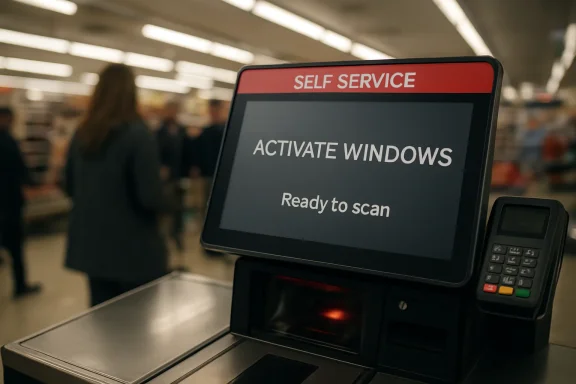 The Kiosk Failed at Being Invisible
Self-service checkouts are built on an illusion. They are supposed to feel like purpose-built terminals: scanner, scale, payment pad, receipt printer, a few stern voice prompts, and a workflow calibrated to keep shoppers moving. The operating system underneath is meant to disappear so completely that nobody thinks about patch cycles, drivers, activation servers, or licensing state.The “Activate Windows” watermark ruins that act. It drags the shopper out of the supermarket interface and back into the world of product keys, hardware IDs, and Settings pages. Suddenly the checkout is not a sealed retail appliance; it is a PC with a touchscreen, a cash drawer, peripherals, and a very public licensing complaint.
That distinction matters because retail technology is judged less by elegance than by invisibility. A checkout does not need to delight anyone. It needs to scan, weigh, take payment, and not embarrass the operator. A watermark in the corner is not necessarily a functional outage, but it is a reputational one: it tells every customer that the machine has an unresolved administrative problem.
The comedy writes itself because the classic British self-checkout failure phrase, “unexpected item in the bagging area,” already made these machines sound like petty bureaucrats. Now Windows has added its own bureaucratic note: unexpected item in the licensing area. One system nags the shopper about bananas; the other nags the retailer about activation.
Windows Is Still the Default Retail Substrate
The sight of Windows peeking through a kiosk interface should not surprise anyone who has spent time around point-of-sale estates. Windows remains deeply embedded in retail because it has accumulated decades of hardware support, peripheral drivers, management tools, vendor integrations, and staff familiarity. In a messy environment full of barcode scanners, payment terminals, scales, receipt printers, cash drawers, loyalty-card readers, and legacy middleware, boring compatibility wins.That is why so many public-facing systems are not exotic embedded devices at all. They are Windows endpoints wearing branded software on top. The kiosk application may launch full-screen, hide the taskbar, suppress shell access, and lock down user input, but the substrate remains recognizably the same operating system that runs office desktops and gaming rigs.
This is not inherently bad engineering. General-purpose platforms are attractive because they make deployment cheaper and support easier. Retailers can image machines, enroll them in device management, push updates, monitor health, replace components, and hire from a labor market that already understands Windows. For a nationwide chain, those advantages are not theoretical; they are the difference between an estate that can be managed and one that becomes a bespoke museum.
But the price of that convenience is leakage. When the platform has something to say, it may say it in a language intended for an end user rather than a shopper. Activation notices, update prompts, driver errors, crash dialogs, certificates, and network warnings all belong to the layer the retailer hoped customers would never see.
The Watermark Is Probably a Symptom, Not the Crime
It is tempting to treat an activation watermark as proof that a business has failed to license Windows properly. That may be true in some cases, but it is not the only plausible explanation, and it is not the most interesting one. Windows activation is tied to a machine’s licensing channel, product key, digital entitlement, volume activation method, and hardware identity; disturb the wrong piece, and a previously compliant endpoint can look suspect.A motherboard replacement is the classic trigger. From Microsoft’s perspective, enough major hardware changes can make a device appear to be a different device. That makes sense for consumer PCs, where activation is meant to prevent a single license from casually migrating across machines. In retail, however, a kiosk may be repaired in the field with swapped boards, storage devices, network adapters, or other components while the business application is restored from an image.
The result can be a machine that boots, runs the checkout software, talks to the payment stack, and still has an activation problem. For operations staff, that creates an awkward hierarchy of urgency. If the lane scans goods and takes payment, the store keeps trading; if the only visible fault is a watermark, the licensing fix may wait for a back-office process.
That is the retail IT dilemma in miniature. The business sees a working checkout with an ugly corner. The platform sees a licensing state that needs attention. The customer sees both and understandably concludes that something has gone a bit feral.
Modern Windows Is Lenient Enough to Make This Visible
The reason this sort of failure can appear in public is that modern Windows does not usually collapse immediately when activation is missing. Microsoft’s current client operating systems are far less theatrical than the Windows XP and Vista era, when activation deadlines and reduced functionality made licensing failures feel more punitive. Windows 10 and Windows 11 generally keep running while applying visible reminders and restricting some personalization features.That leniency is rational. Microsoft wants legitimate customers to recover from hardware changes, imaging mistakes, account mismatches, activation-server hiccups, and provisioning errors without turning every device into a brick. A hard stop would be especially destructive in business environments, where a licensing misconfiguration can affect a fleet.
But leniency also creates the exact conditions for public embarrassment. If the OS continues to function, the kiosk continues to serve customers. If the notification is drawn above the retail application, the customer sees the thing that was supposed to be handled by IT.
There is a security and compliance angle here, but it should not be exaggerated without evidence. An activation watermark is not, by itself, proof that the checkout is insecure, unsupported, or pirated. It is proof that the system’s activation state is wrong or at least being reported as wrong. That distinction matters, because the proper reaction is investigation rather than internet sentencing.
Retail IT Lives in the Gap Between Uptime and Tidiness
The public often sees technology as either working or broken. Retail IT lives in the gray zone between those states. A checkout may have a failing scale, a stuck receipt cutter, a misbehaving payment pin pad, a barcode scanner with intermittent focus issues, a touchscreen calibration problem, or a Windows licensing nag — and only some of those faults stop trading.In that environment, the first rule is uptime. A supermarket does not want a philosophical debate about operating-system purity while Saturday shoppers queue for milk, bread, and meal deals. If a unit processes transactions, staff may leave it in service until a technician can perform a proper fix.
That triage mentality is defensible, but it also explains why small failures become public artifacts. The self-checkout is not in a server room. It is in front of customers, under fluorescent lights, with a camera-ready screen. Anything that would be a minor helpdesk ticket on a back-office PC becomes a viral moment when it appears beside a card reader.
This is the bargain retailers made when they put increasingly complex systems into customer hands. They reduced cashier labor and increased throughput, but they also moved operational blemishes into public view. The customer is no longer merely buying groceries; the customer is now the front-line witness to the store’s endpoint management hygiene.
Sainsbury’s Is the Punchline, But Not the Outlier
Sainsbury’s gets the joke this time because its name is on the screen. That is how public technology failures work: the brand on the bezel owns the embarrassment, even if the real cause sits somewhere in a chain of integrators, device vendors, managed-service providers, licensing contracts, field technicians, and standard operating procedures. Retailers buy systems; customers experience responsibility.There is no need to assume Sainsbury’s is uniquely careless. Large retail estates are sprawling, heterogeneous, and old in places. Even when a company has a modern management strategy, it may still operate hardware generations that arrived under different contracts, different images, different vendors, and different assumptions about Windows lifecycle management.
The awkwardness is that supermarkets have trained customers to view self-checkouts as semi-autonomous authorities. The machine tells you where to put your bag, when to scan, when to wait, when approval is needed, and when you have committed the grave offense of moving a pastry too quickly. When that same machine displays an activation watermark, the authority becomes ridiculous.
That ridicule matters. Trust in automation is brittle. Customers tolerate self-service systems when the convenience outweighs the irritation. Every visible glitch shifts the emotional balance back toward the staffed checkout, where at least the person judging your reduced-price sandwich does not usually display a licensing error in the corner of their face.
The Real Fragility Is the Appliance Fiction
The larger lesson is that many “smart” public systems are appliances only by costume. Under the hood, they are layered stacks of commodity hardware, commodity operating systems, vendor software, remote management agents, device drivers, payment integrations, and network dependencies. The appliance fiction holds only as long as every layer behaves.This is not limited to supermarkets. Airport check-in terminals, train-ticket machines, digital signage, hotel kiosks, hospital check-in stations, parking meters, and restaurant ordering screens all share the same risk. They present a simplified surface to the public while carrying the complexity of ordinary computing underneath.
When that complexity leaks, the effect is jarring because the user has no agency. On your own PC, an activation warning is annoying but actionable. On a supermarket checkout, it is absurd: the shopper cannot enter a product key, join the machine to a volume activation service, run a troubleshooter, or file a ticket with the estate-management team. The warning is addressed to someone else, but displayed to everyone.
That is why kiosk design needs to treat operating-system messages as hostile to the user experience. A true locked-down retail terminal should not merely launch the right app; it should suppress, redirect, or operationally route platform-level alerts so that customers do not become spectators to back-office maintenance.
Microsoft’s Licensing Model Meets the Messy Physical World
Windows activation is built around a defensible premise: software licenses should map to authorized devices. The trouble is that “device” is a slippery concept once hardware becomes modular, repaired, reimaged, and redeployed across a fleet. A kiosk is not a laptop sitting under one person’s Microsoft account. It is an asset in a maintenance pipeline.Retailers may use OEM licensing, volume licensing, subscription activation, or a mix depending on procurement history and operating model. Those mechanisms work well when the estate is designed cleanly and managed consistently. They become more fragile when hardware is swapped quickly, images are cloned imperfectly, devices sit offline, or the activation path assumes network access that the kiosk does not always have.
This is where consumer assumptions collide with enterprise reality. A home user who changes a motherboard may be told to use an activation troubleshooter or sign in with a Microsoft account linked to a digital license. A retailer operating thousands of locked-down endpoints needs activation to survive service events, replacement workflows, and network segmentation without surfacing drama to shoppers.
The watermark suggests that somewhere along that chain, the machine’s Windows identity and its physical reality diverged. Perhaps a component changed. Perhaps an image was deployed without the expected key. Perhaps a volume activation process failed. Perhaps something more mundane happened and nobody noticed until a reader with a camera did.
Security Is Not the Joke, But It Is the Shadow
It would be irresponsible to claim that this one watermark means a payment system is unsafe. Payment processing is usually separated into certified components and controlled flows, and a Windows activation prompt does not prove that card data is exposed. The presence of a watermark is not a breach report.Still, public-facing activation failures have a security shadow because they raise questions about governance. If a visible licensing state can drift unnoticed, what else is drifting invisibly? Are patches current? Are kiosk lockdown policies intact? Are remote management agents healthy? Are hardware replacements being reconciled properly? Are exceptions being tracked or merely tolerated?
Those questions are not accusations. They are the questions every mature IT organization asks itself after a small public failure. The operational lesson is that cosmetic platform warnings can be useful signals. They show where monitoring, provisioning, or field processes failed to close the loop.
A good incident review would not stop at “reactivate the box.” It would ask why the business application allowed the watermark to be visible, why monitoring did not catch the state, whether similar devices are affected, and whether repair workflows preserve activation correctly. The comedy is public; the remediation should be boring and private.
The Self-Checkout Was Already Losing the Room
The activation watermark lands so neatly because self-checkouts are already culturally unpopular in a very specific way. Shoppers use them, but many do not love them. They are convenient until they are not, and when they fail, they fail with a tone that implies the human is at fault.“Unexpected item in the bagging area” became a meme because it captures the petty authoritarianism of bad automation. The machine does not explain the physics of its scale or the edge cases of produce lookup; it simply accuses. The customer stands there, watched by a queue, waiting for a staff member to approve the innocence of a cabbage.
An “Activate Windows” watermark reverses that accusation. For once, the machine is the one visibly out of order. It is not the shopper who has introduced an unexpected item; it is the retailer’s IT stack. The customer gets a rare glimpse behind the curtain and finds a familiar Windows nag waiting there.
That reversal is why the story travels. Nobody needs a primer in enterprise licensing to understand the joke. A machine that spends its day demanding compliance from shoppers has been caught failing a compliance check of its own.
The Windows Desktop Keeps Haunting the Edge
Microsoft has spent years pushing Windows into managed, cloud-connected, policy-driven forms. Enterprises now think in terms of endpoint management, identity, compliance baselines, remote remediation, zero-touch provisioning, and update rings. Yet the old desktop still haunts the edge whenever a shell message appears where a purpose-built interface should be.The edge is where IT abstractions become physical. A failed update is not an entry in a dashboard; it is a checkout lane with a handwritten “out of order” sign. A driver conflict is not a ticket; it is a scanner that will not scan. An activation issue is not a licensing row; it is a watermark over a grocery transaction.
This is why public endpoints deserve different design discipline from office PCs. They need harsher suppression of irrelevant UI, better health telemetry, more predictable servicing, and recovery paths that assume nobody at the device is qualified or authorized to fix it. They also need procurement models that treat the operating system as part of the appliance lifecycle, not as an afterthought beneath the application.
The future of retail computing may involve more Linux, more Android, more browser-based terminals, more thin clients, or more specialized embedded platforms. But Windows will remain in the mix because the installed base is enormous and the integration ecosystem is sticky. The question is not whether Windows belongs in retail; it is whether retailers can keep it from talking out of turn.
A Tiny Watermark Tells IT Exactly Where to Look
The Sainsbury’s incident is minor, but minor incidents are often the most useful because they reveal process without requiring catastrophe. A checkout that still works while displaying a licensing warning is not a disaster; it is a diagnostic postcard from the endpoint estate. The useful response is to treat the laugh as free monitoring.- The watermark shows that a supposedly sealed kiosk environment can still expose operating-system state to customers.
- The most likely causes include hardware replacement, imaging mistakes, activation-path failures, or licensing reconciliation delays rather than a simple refusal to pay Microsoft.
- The operational risk is less about immediate checkout failure and more about whether endpoint health signals are being detected before customers see them.
- The user-experience failure is that a message meant for administrators appeared in a workflow meant for shoppers.
- The broader lesson for retailers is that public-facing Windows systems need appliance-grade lockdown, monitoring, and repair processes, not just a full-screen application.
Source: theregister.com Unexpected item in Windows' bagging area
