

Samsung’s long-running mobile browser has stepped onto Windows desktops: the company opened a region‑gated beta of Samsung Internet for PC on October 30, 2025, bringing cross‑device sync, Samsung Pass credential continuity, and Galaxy AI‑powered helpers such as Browsing Assist to Windows 11 and Windows 10 (version 1809 and later) machines in an initial rollout limited to the United States and South Korea.
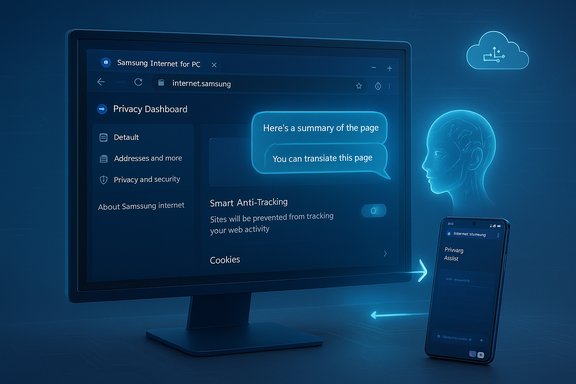
Samsung Internet began life as a mobile‑first, Chromium‑based browser bundled with Galaxy phones more than a decade ago. Its mobile identity has been built around three pillars: privacy defaults (Smart Anti‑Tracking and a Privacy Dashboard), tight integration with Samsung services (Samsung Account and Samsung Pass), and more recently, Galaxy AI features that summarize and translate content on demand. Bringing that browser to Windows is a strategic push to turn Samsung Internet into a continuity layer across phones, tablets, and PCs rather than keeping it strictly mobile‑centric. This relaunch follows a brief, low‑visibility Microsoft Store listing in late 2023 that was pulled; Samsung’s 2025 release is a deliberate beta intended to collect tester feedback while the company scales features and performance for desktop users.
The Samsung Internet beta is now live for enrolled testers in the U.S. and Korea — the rest of us will be watching the rollout, the privacy disclosures, and the update cadence closely as Samsung attempts to make its mobile browser a credible player on Windows.
Source: tesaaworld.com https://www.tesaaworld.com/en/news/...wser-on-windows-to-connect-phone-to-computer/
 Background
Samsung Internet began life as a mobile‑first, Chromium‑based browser bundled with Galaxy phones more than a decade ago. Its mobile identity has been built around three pillars: privacy defaults (Smart Anti‑Tracking and a Privacy Dashboard), tight integration with Samsung services (Samsung Account and Samsung Pass), and more recently, Galaxy AI features that summarize and translate content on demand. Bringing that browser to Windows is a strategic push to turn Samsung Internet into a continuity layer across phones, tablets, and PCs rather than keeping it strictly mobile‑centric. This relaunch follows a brief, low‑visibility Microsoft Store listing in late 2023 that was pulled; Samsung’s 2025 release is a deliberate beta intended to collect tester feedback while the company scales features and performance for desktop users.What Samsung Internet for PC brings to Windows
Headline features (what users will actually see)
- Cross‑device sync of bookmarks, browsing history, and open tabs when signed into the same Samsung Account. This is the core continuity promise that Samsung is using to persuade Galaxy owners to adopt the desktop client.
- Samsung Pass integration for credential autofill and password continuity between phone and PC; Samsung advertises seamless sign‑in when users are logged into their Samsung Account, although parity with mobile password vaults may be staged across beta updates.
- Galaxy AI — Browsing Assist, an on‑page AI helper that provides quick summaries, inline translations, and contextual highlights to speed reading and research tasks. Initial documentation and hands‑on reports indicate heavier inference work for these features runs in Samsung’s cloud services (hybrid processing).
- Privacy‑first defaults, including Smart Anti‑Tracking enabled by default and a Privacy Dashboard that reports blocked trackers and gives per‑site controls. Samsung carries over the browser’s mobile privacy tooling to the PC client.
- Chromium foundation and extension support potential — the desktop client is built on the Chromium engine, meaning it should have good web compatibility and a plausible path to Chrome‑style extensions; practical extension parity will depend on Samsung’s implementation and the beta’s maturity.
System support and distribution
Samsung Internet for PC’s beta is available for Windows 11 and Windows 10 (version 1809 or later) and ships with builds for x86/x64 and ARM‑based Windows devices. The initial beta is region‑gated to the United States and South Korea, and access is managed through Samsung’s beta registration and developer channels.Technical details and architecture
Chromium base, rendering, and extension compatibility
Under the hood, Samsung Internet for PC uses Chromium/Blink, the same core as Google Chrome and Microsoft Edge. That gives Samsung immediate advantages in web standards compatibility and JavaScript performance; it also opens the door to the Chrome Web Store extension ecosystem in principle. However, Chromium ancestry does not guarantee feature parity with Chrome or Edge — the devil is in the update cadence, security patching, extension permission model, and Samsung’s own wrapping layers. Early community reports from Samsung’s previous Windows experiment pointed to rough edges in extension behavior and scrolling performance; the staged beta is Samsung’s engineered response to address those areas before a broad release.Galaxy AI: hybrid processing model and implications
Galaxy AI features such as Browsing Assist are presented as a major differentiator. Samsung’s materials and early reporting indicate a hybrid model: UI and some lighter processing run locally, while heavier inference tasks (summarization, translation, multi‑language models) are performed in Samsung’s cloud. That approach enables richer capabilities today but routes page content through Samsung’s servers for processing — a design decision that raises questions for privacy, compliance, and enterprise use. Samsung’s press release and independent coverage both describe the AI helpers and note that account sign‑in and network access are required to use them.Samsung Pass on Windows: secure vault vs. OS limitations
Samsung Pass on Galaxy phones benefits from device‑level security features such as Knox and secure hardware elements. On generic Windows hardware, those platform‑specific primitives are not uniformly present. Samsung advertises Samsung Pass support on PC for autofill and sign‑in, but early notes from the beta suggest that full parity with mobile password vault features may be staged and dependent on hardware and platform features. Enterprises should treat password sync in the first beta as provisional until Samsung publishes a clear compatibility and security matrix.Privacy and security analysis — strengths and risks
Samsung Internet has historically marketed itself as privacy‑first, and much of that posture is present in the PC beta: Smart Anti‑Tracking is enabled by default, and the Privacy Dashboard makes blocker activity visible. That’s a competitive strength in a landscape where browser defaults increasingly define user privacy. However, the introduction of Galaxy AI features processed in the cloud complicates the privacy story.- Strength: The Privacy Dashboard and Smart Anti‑Tracking provide immediate transparency and user controls, which is a practical win for privacy‑minded users compared with browsers that hide tracking details behind menus.
- Risk: Hybrid AI processing means web page content (or metadata) may be transmitted to Samsung servers for summarization and translation. Without explicit, detailed public documentation on telemetry retention, encryption, and minimization, organizations with sensitive data or regulated workloads should proceed cautiously. Samsung’s initial press materials do not publish a full technical data‑flow specification in the beta announcement; that documentation will be essential for enterprise adoption.
- Risk: Password vault parity depends on platform security primitives. If Samsung must rely on Windows OS features or third‑party libraries for secure key storage, the threat model changes compared with Samsung devices that ship with Knox. Validate how Samsung Pass stores and protects credentials on Windows before using it to sync sensitive corporate accounts.
How Samsung’s strategy fits the market
Browsers are no longer mere rendering tools; they’re platforms for services and AI assistants. Samsung is positioning its PC browser as:- A continuity layer that keeps browsing state aligned between Galaxy phones and Windows PCs.
- An AI front end that can summarize and translate content contextually on the page.
- A privacy‑minded Chromium alternative for users who want first‑party integration with Samsung services.
Installation, beta access, and practical steps
Samsung is operating a controlled beta signup and distribution model; testers must enroll through Samsung’s beta pages or developer channels and sign in with a Samsung Account to enable sync and Galaxy AI features. The company expects to distribute the beta through the Microsoft Store where available and may offer signed installers for enrolled testers. If you plan to test the beta, here is a conservative, step‑by‑step approach:- Confirm your Windows version: Settings → System → About; ensure Windows 11 or Windows 10 (build 1809 or later).
- Export and back up current browser data (bookmarks, passwords) from your primary browser.
- Enroll in Samsung’s beta via the official beta page and download the installer from Samsung or the Microsoft Store (avoid third‑party mirror sites).
- Install on a non‑critical machine or VM for your first tests to avoid disrupting daily workflows.
- Sign into the same Samsung Account on both phone and PC to validate sync flows; test with non‑sensitive accounts if you’re evaluating Samsung Pass behavior.
- Test Galaxy AI features while monitoring network flows, and evaluate whether page content goes to Samsung’s cloud per the UI disclaimers and network telemetry.
Enterprise and IT considerations
Organizations evaluating Samsung Internet for PC should treat the beta as a technical preview rather than a production‑ready deployment. Key considerations:- Patch cadence and Chromium security updates: Ensure Samsung publishes a predictable update and patch cadence for Chromium vulnerabilities; delays in security backports are one of the biggest long‑term risks for independent Chromium browsers.
- Policy and management tools: Check whether Samsung exposes enterprise policy controls (group policy templates or Intune ADMX/OMA‑DM support). Without centralized management, adoption in managed environments will be constrained.
- Data‑flow and compliance documentation: Require Samsung to publish an explicit technical whitepaper detailing which Galaxy AI requests are sent to the cloud, how long transcripts are retained, and how they are encrypted and isolated. Regulatory regimes (GDPR, HIPAA, etc. will need those guarantees before allowing use on regulated data.
- Credential handling: Validate Samsung Pass’s storage model on Windows and whether it integrates with corporate SSO or hardware security modules. Clarify fallback behavior for devices that lack secure elements.
Comparison with other desktop browsers and AI assistants
- Google Chrome and Microsoft Edge: mature desktop features, extensive extension ecosystems, and enterprise management tooling. Edge adds deeper Windows integration and enterprise controls; Chrome benefits from Google account continuity and huge extension breadth.
- Brave, Vivaldi, Firefox: privacy‑focused alternatives with different tradeoffs on extension support and web compatibility.
- Emerging “AI browsers” and sidebar assistants: a growing field of browsers and extensions integrate LLMs for summarization and task automation. Samsung’s differentiator is first‑party integration with Galaxy services and device continuity for Galaxy owners, but rivals often move faster on desktop innovation loops.
What remains unclear (and what to watch for)
- Exact mechanics of Samsung Pass on Windows: how are credentials stored, and what hardware dependencies remain? Early reports caution that feature parity may be staged.
- Detailed telemetry and retention policies for Galaxy AI: Samsung’s beta announcement references cloud processing but does not publish a comprehensive technical whitepaper at launch. Users concerned about data residency or regulatory compliance should await those documents.
- Extension compatibility: Chromium base suggests potential, but real‑world behavior for complex extensions is not guaranteed in the first beta. Test extensions you depend on thoroughly before switching.
Practical verdict and recommendations
- For Galaxy‑centric consumers who value cross‑device continuity and want to test on‑page AI helpers, Samsung Internet for PC’s beta is a compelling preview worth installing on a secondary machine. The resume‑where‑you‑left‑off continuity and Browsing Assist features are genuine productivity wins for heavy phone‑to‑PC users.
- For privacy‑sensitive users and enterprises, this beta should be pilot‑tested in controlled environments only. Explicit, machine‑readable documentation on AI data flows, credential storage, and patching cadence is required before broader adoption. Treat the credential sync and cloud‑based AI features as provisional until Samsung publishes full technical details.
- For general Windows users reliant on extensions, corporate policies, or OS‑level integration with Microsoft services, there is little reason to switch away from Chrome, Edge, or Firefox today; Samsung’s offering is promising but unproven at scale.
Final thoughts
Samsung Internet for PC is more than a browser port — it’s an ecosystem play. By bringing a first‑party, AI‑enabled browser to Windows, Samsung is attempting to make browsing the connective tissue of a broader Galaxy experience. The initial beta delivers a clear set of features that matter to Galaxy owners: sync, Samsung Pass integration, and on‑page Galaxy AI helpers. Those features are already visible in Samsung’s press materials and coverage across industry outlets. But execution matters. The browser’s ultimate success depends on Samsung’s ability to ship timely security updates, offer enterprise management and clear AI/telemetry documentation, and deliver real desktop polish — especially for extensions and performance. The October 30, 2025 beta is an important first step; it opens the door to a future where Samsung’s browser is the hub of a more intelligent, cross‑device web experience. Testers should take the step deliberately, and IT teams should demand the documentation they need to evaluate risk comprehensively.The Samsung Internet beta is now live for enrolled testers in the U.S. and Korea — the rest of us will be watching the rollout, the privacy disclosures, and the update cadence closely as Samsung attempts to make its mobile browser a credible player on Windows.
Source: tesaaworld.com https://www.tesaaworld.com/en/news/...wser-on-windows-to-connect-phone-to-computer/
