Samsung’s long-running mobile browser has finally stepped onto Windows desktops: Samsung Internet for PC is available as a region‑gated beta that brings cross‑device sync, Samsung Pass integration, and Galaxy AI‑powered helpers to Windows 11 and Windows 10 machines, with initial availability restricted to the United States and South Korea.
Samsung Internet began life as a mobile‑first browser bundled with Galaxy phones and tablets more than a decade ago. It earned a reputation for privacy‑forward defaults, an extensible add‑on system on mobile, and deep ties to Samsung services such as Samsung Account and Samsung Pass. For years the product remained primarily mobile; Samsung’s return to the desktop stage with an official PC client signals a strategic shift to unify browsing across Galaxy devices and Windows PCs.
The Windows release is not Samsung’s first flirtation with desktop distribution. A Microsoft Store listing surfaced briefly in 2023 and was later removed; the new beta is a deliberate, publicly announced relaunch intended to test cross‑device sync, AI integrations, and privacy controls before broader expansion. Samsung describes the Windows release as the first step toward an “ambient AI” browsing experience that layers intelligence over web content.
Flag: claims of perfect password parity across every Windows device should be treated as conditional until independent verification on representative hardware is available.
Important technical and privacy questions accompany this functionality:
However, big incumbents have scale advantages: massive extension ecosystems, enterprise management tooling, and mature security programs. Samsung’s route to mainstream adoption therefore depends on execution in four areas: extension compatibility, password/credential security parity, rapid Chromium security updates, and transparent AI governance. If Samsung delivers on those fronts, the Windows client could become a meaningful alternative; if not, it risks being a niche product for Galaxy enthusiasts.
At the same time, the release is an early beta and comes with important caveats. Password sync parity remains uncertain across heterogeneous Windows hardware; AI features create new governance demands; extension compatibility and Chromium patch cadence are execution risks; and enterprise readiness is not yet clear. Until Samsung publishes rigorous documentation and demonstrates operational parity with established desktop browsers, the Windows beta should be treated as a purpose‑built tool for Galaxy ecosystems and early adopters rather than an immediate, universal replacement for Chrome or Edge.
For Windows users who live inside the Galaxy world and value synchronized sessions plus on‑page AI helpers, the beta is worth trying in a controlled way. For IT teams and security‑conscious users, the smartest course is a measured pilot with clear acceptance criteria around credential handling, privacy controls, and update cadence. Samsung has taken an important step — the rest will be decided by engineering discipline, transparency, and the speed at which the company addresses the practical limitations that surface during the beta period.
Samsung’s browser arriving on Windows is more than a product launch: it’s an ecosystem play that makes continuity and ambient AI tangible on the PC. The first impressions are promising; the ultimate verdict will depend on the company’s ability to translate the beta’s promise into persistent security, extension compatibility, and transparent AI governance at scale.
Source: Gizchina.com https://www.gizchina.com/samsung/samsungs-web-browser-is-finally-here-for-windows-users]
 Background
Samsung Internet began life as a mobile‑first browser bundled with Galaxy phones and tablets more than a decade ago. It earned a reputation for privacy‑forward defaults, an extensible add‑on system on mobile, and deep ties to Samsung services such as Samsung Account and Samsung Pass. For years the product remained primarily mobile; Samsung’s return to the desktop stage with an official PC client signals a strategic shift to unify browsing across Galaxy devices and Windows PCs.The Windows release is not Samsung’s first flirtation with desktop distribution. A Microsoft Store listing surfaced briefly in 2023 and was later removed; the new beta is a deliberate, publicly announced relaunch intended to test cross‑device sync, AI integrations, and privacy controls before broader expansion. Samsung describes the Windows release as the first step toward an “ambient AI” browsing experience that layers intelligence over web content.
What’s in the beta: features at a glance
Samsung is positioning the Windows client as a continuity and productivity layer for Galaxy users rather than a direct, one‑for‑one challenge to desktop incumbents. The initial beta delivers a set of headline features:- Cross‑device sync of bookmarks, open tabs, and browsing history tied to a Samsung Account.
- Samsung Pass integration for autofill and saved credentials, intended to bring password continuity from phone to PC (parity may be staged).
- Galaxy AI — Browsing Assist, an on‑page assistant for summarization, inline translation, and contextual highlighting.
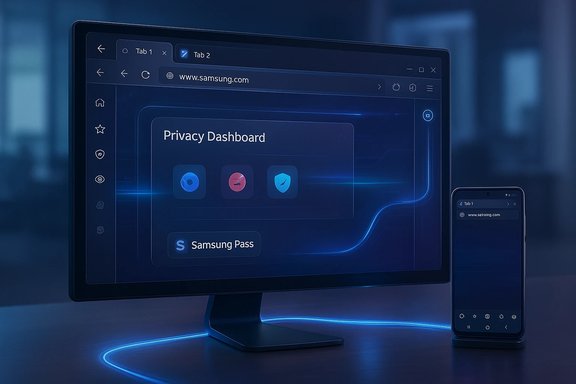
- Privacy tooling, including Smart Anti‑Tracking enabled by default and a visible Privacy Dashboard that reports blocked trackers in real time.
- Desktop‑focused UX additions such as a persistent Sidebar (side panel) for split‑screen multitasking, tab/memory management controls, and a right‑edge AI rail for quick access to helpers.
- Chromium foundation, promising wide web compatibility and potential access to Chrome‑style extensions (extension behavior is beta‑dependent).
System requirements, availability, and distribution model
Supported platforms
The beta officially supports Windows 11 and Windows 10 (version 1809 or later), with initial builds for both x86/x64 and Windows on ARM devices. This breadth is notable: Samsung deliberately targets not only its own Galaxy Book machines but the wider Windows installed base.Regional gating and access
Samsung rolled the beta out in a controlled, region‑gated manner: testers in the United States and South Korea were the first wave. Access typically requires enrollment through Samsung’s beta signup channels and signing into a Samsung Account to unlock full functionality. Samsung has indicated a broader rollout is planned but staged.Distribution paths
Early distribution is being handled via Samsung’s beta program and may include Microsoft Store listings where available or signed direct installers for registered testers. Because the beta is gated, availability can vary by account and region; treat “available now” messaging as rollout‑dependent until the listing appears for your region.Deep dive: how the major features work (and the questions they raise)
Cross‑device sync and Samsung Pass
The promise of a truly synchronized browsing life is powerful: bookmarks, open tabs and browsing history that follow you from phone to PC, plus password autofill via Samsung Pass. Practically, this requires a Samsung Account and enrollment in the beta. Samsung Pass integration is listed as a key differentiator, but full parity for password vault features is likely staged and dependent on platform security capabilities. Mobile Samsung Pass implementations often rely on hardware‑backed attestation (Knox, secure elements) that do not have straightforward equivalents across arbitrary Windows machines, so caution is warranted before relying on the new client for primary credential migration.Flag: claims of perfect password parity across every Windows device should be treated as conditional until independent verification on representative hardware is available.
Galaxy AI — Browsing Assist
Browsing Assist is the marquee AI feature in the beta: on‑page summarization, inline translation, and contextual highlights that aim to reduce information overload and speed research workflows. The user experience blends AI outputs with the normal browsing flow, surfaced through UI elements in the sidebar and the main chrome.Important technical and privacy questions accompany this functionality:
- Where is data processed? Early reporting indicates heavy inference work for summarization and translation is likely to occur in Samsung’s cloud services rather than fully on‑device. That improves capability but has clear privacy and compliance implications.
- Telemetry and personalization: A future ambient AI that learns from behavior implies storage of usage data; users should expect opt‑in controls and clear documentation.
- Accuracy and hallucinations: Automated summaries can omit nuance or introduce errors; critical decisions should not rely solely on AI condensations.
Privacy defaults and the Privacy Dashboard
Samsung carries its mobile privacy posture to the PC client: Smart Anti‑Tracking is enabled by default and a Privacy Dashboard shows blocked trackers in real time. This is a meaningful differentiator for users who want visible controls and feedback about tracking activity, rather than opaque protection toggles. The dashboard’s transparency is a practical plus, but enterprise deployments will want to understand telemetry, data retention and the mechanics of tracker classification.Sidebar multitasking, tab management and memory controls
On the productivity side, Samsung’s Sidebar behaves like a persistent second browser surface rather than a temporary extension panel. Early coverage shows scenarios where users pin a reference app or site in the side panel while writing or researching in the main view — a genuine split‑screen workflow that reduces context switching. The beta also introduces tab/memory controls designed to reduce RAM pressure and lock important sites in memory for reliability. These desktop‑specific UX additions are targeted at power users and those who juggle research and writing tasks.Chromium foundation and extensions
Samsung Internet for PC is Chromium‑based, which facilitates broad web compatibility and potential access to Chrome Web Store extensions. However, extension parity is a practical question in the beta: not all Chrome extensions behave identically across Chromium forks, and permissions or extension APIs may differ. Samsung must demonstrate a reliable extension story to win over users who depend on niche add‑ons.Critical analysis: strengths, practical benefits and strategic intent
Clear strengths
- Ecosystem continuity. For Galaxy owners, the browser closes a long‑standing gap: your phone and PC can now share tabs, bookmarks and sessions in a first‑party way, simplifying cross‑device workflows. This is Samsung’s most defensible advantage.
- Privacy‑first defaults with visible controls. The Privacy Dashboard and Smart Anti‑Tracking make privacy tangible for mainstream users, an increasingly valued trait in browser choice.
- AI features integrated into the browsing experience. Browsing Assist is a practical first step toward an AI‑augmented browsing workflow that can save time on reading and translation. If executed with transparency, it can be a meaningful productivity enhancer.
- Platform breadth at launch. The beta explicitly supports Windows 11, Windows 10 (v1809+), and ARM devices — a broader initial reach than many platform launches.
Material risks and caveats
- Password parity uncertainty. Samsung Pass on mobile relies on hardware‑backed attestation; matching that security model on a heterogenous Windows ecosystem is nontrivial. Until Samsung documents the end‑to‑end security model and third‑party verification appears, treat password sync claims with caution.
- AI data governance. If AI features rely on cloud processing, the company must publish clear policies about which data is sent, how it is stored, for how long, and with what safeguards. Absence of such documentation is a risk for privacy‑sensitive users and regulated organizations.
- Chromium patch cadence and extension compatibility. Maintaining security parity with Chromium upstream is operationally expensive; any lag raises exposure. Similarly, extension compatibility must be proven to avoid frustrating users who rely on specific add‑ons.
- Enterprise management and policy controls. The beta focuses on consumer continuity; enterprise‑grade controls, group policy support and deployment documentation are not yet evident, limiting immediate adoption in corporate environments.
Practical guidance: how to approach the beta (for home users and IT teams)
For curious consumers / Galaxy owners
- Register for the beta via Samsung’s official signup if you live in a supported region.
- Use a secondary device or a non‑mission critical Windows account for initial testing; don’t migrate primary passwords until you verify Samsung Pass behavior.
- Test Browsing Assist on varied content (news, technical docs, multilingual pages) and compare summaries against source material to understand strengths and limits.
- Enable the Privacy Dashboard and review blocked trackers to calibrate your expectations about real‑world tracking mitigation.
For IT teams and security owners
- Run a controlled pilot (10–25 users) on representative hardware across Windows 11, Windows 10 v1809+, and ARM devices. Monitor telemetry and user feedback.
- Validate authentication workflows: ensure Samsung Pass sync behaves as expected, and test conditional access flows (MFA prompts, SSO, enterprise password vault interaction).
- Require explicit opt‑in for AI helpers in corporate profiles until legal and privacy reviews are complete, especially for sensitive workflows.
- Monitor Samsung’s security update cadence and patch notes for Chromium merges; insist on documented timelines for critical security patches.
How Samsung’s entry changes the browser market — and why it may not topple incumbents yet
Samsung’s strategy is not to immediately dethrone Chrome or Edge with a features arms race; it is to offer something incumbents do not: first‑party Galaxy continuity combined with an integrated AI experience that specifically targets Galaxy owners who already value Samsung services. That positioning may shift default choices for millions of users who prioritize seamless cross‑device workflows.However, big incumbents have scale advantages: massive extension ecosystems, enterprise management tooling, and mature security programs. Samsung’s route to mainstream adoption therefore depends on execution in four areas: extension compatibility, password/credential security parity, rapid Chromium security updates, and transparent AI governance. If Samsung delivers on those fronts, the Windows client could become a meaningful alternative; if not, it risks being a niche product for Galaxy enthusiasts.
What to watch next (short‑ to medium‑term roadmap)
- Regional expansion: Wider availability beyond the initial US and South Korea beta windows. Adoption will hinge on a broader distribution schedule.
- Published AI data policies: Concrete documentation describing data flows, retention, model providers and opt‑in controls for Galaxy AI features. This is essential to move from “beta curiosity” to trusted tool.
- Enterprise features: Group policy controls, deployment tooling, and security certifications will determine enterprise viability.
- Extension support maturity: Practical parity with Chrome Web Store extensions and stable behavior across commonly used add‑ons.
- Security update cadence for Chromium merges: Clear timelines and frequent patching to close potential exposure windows.
Final assessment
Samsung Internet for PC is a strategically sound and technically interesting debut: it delivers tangible continuity benefits for Galaxy users, marries privacy defaults with visible controls, and introduces AI helpers in ways that could materially improve productivity for certain workflows. The Sidebar multitasking, Privacy Dashboard and Browsing Assist are practical features that differentiate the product beyond a simple mobile port.At the same time, the release is an early beta and comes with important caveats. Password sync parity remains uncertain across heterogeneous Windows hardware; AI features create new governance demands; extension compatibility and Chromium patch cadence are execution risks; and enterprise readiness is not yet clear. Until Samsung publishes rigorous documentation and demonstrates operational parity with established desktop browsers, the Windows beta should be treated as a purpose‑built tool for Galaxy ecosystems and early adopters rather than an immediate, universal replacement for Chrome or Edge.
For Windows users who live inside the Galaxy world and value synchronized sessions plus on‑page AI helpers, the beta is worth trying in a controlled way. For IT teams and security‑conscious users, the smartest course is a measured pilot with clear acceptance criteria around credential handling, privacy controls, and update cadence. Samsung has taken an important step — the rest will be decided by engineering discipline, transparency, and the speed at which the company addresses the practical limitations that surface during the beta period.
Samsung’s browser arriving on Windows is more than a product launch: it’s an ecosystem play that makes continuity and ambient AI tangible on the PC. The first impressions are promising; the ultimate verdict will depend on the company’s ability to translate the beta’s promise into persistent security, extension compatibility, and transparent AI governance at scale.
Source: Gizchina.com https://www.gizchina.com/samsung/samsungs-web-browser-is-finally-here-for-windows-users]