

Samsung has opened the door between Galaxy phones and Windows PCs: the company launched a region‑gated beta of Samsung Internet for PC on October 30, 2025, bringing cross‑device sync for bookmarks, history and (promised) passwords, plus built‑in Galaxy AI features such as Browsing Assist, to Windows 11 and Windows 10 (version 1809 and later) machines in an initial rollout limited to the United States and South Korea.
Samsung Internet began as a mobile‑first browser bundled on Galaxy phones and tablets, where it developed a reputation for privacy tools, extension support and, more recently, AI‑driven helpers. The Windows beta represents a deliberate strategic shift: Samsung is attempting to turn its mobile browser into a true cross‑device continuity layer that carries browsing state and AI assistance between phones and PCs.
The company positions this release as the “first step” in a broader ambient‑AI strategy: the browser on desktop is meant to be more than a renderer of pages — it should act as an assistant that summarizes, translates and helps you pick up work where you left off on the phone. That messaging is explicit in Samsung’s product framing and repeated across early coverage.
However, there are important implementation caveats:
But privacy questions surface quickly once AI features are involved. Key points to consider:
That said, this release is an early, region‑gated beta and should be treated as such. The critical unknowns — Samsung Pass parity on generic Windows hardware, exact AI data flows and retention, extension parity and enterprise administrative controls — are material to both security posture and usability. Until those are resolved and formally documented, the browser is best evaluated in testing and pilot programs rather than as a production replacement for established enterprise browsers.
Recommended next steps for interested users and IT teams:
Samsung Internet’s arrival on Windows is more than a new browser skin — it signals Samsung’s intent to make browsing a unified, AI‑assisted experience across Galaxy devices and PCs. The promise is clear; the realization will depend on Samsung’s ability to bridge mobile security models to diverse Windows hardware, to be transparent about AI data flows, and to deliver the desktop polish users expect. For now, Galaxy owners have a compelling new option to test — provided they proceed cautiously and validate the crowned jewels of continuity, security and privacy before trusting the beta on critical devices.
Source: hi-Tech.ua Samsung Browser released for Windows
 Background / Overview
Samsung Internet began as a mobile‑first browser bundled on Galaxy phones and tablets, where it developed a reputation for privacy tools, extension support and, more recently, AI‑driven helpers. The Windows beta represents a deliberate strategic shift: Samsung is attempting to turn its mobile browser into a true cross‑device continuity layer that carries browsing state and AI assistance between phones and PCs.The company positions this release as the “first step” in a broader ambient‑AI strategy: the browser on desktop is meant to be more than a renderer of pages — it should act as an assistant that summarizes, translates and helps you pick up work where you left off on the phone. That messaging is explicit in Samsung’s product framing and repeated across early coverage.
What’s shipping in the Windows beta
Samsung’s beta brings a familiar but extended feature set to Windows; the core public features at launch are:- Cross‑device sync of bookmarks, open tabs and browsing history when signed into a Samsung Account.
- Samsung Pass integration for credential autofill and saved passwords, with Samsung positioning the service as the vault for cross‑device sign‑ins (parity caveats discussed below).
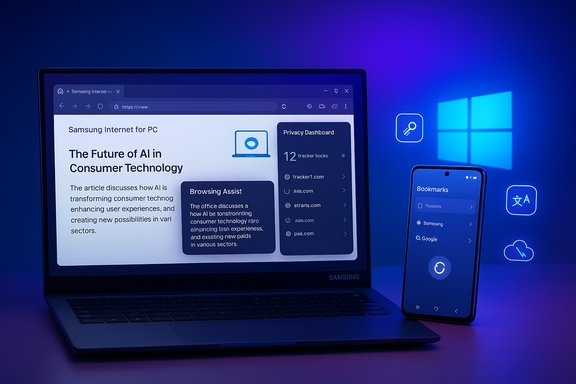
- Galaxy AI — Browsing Assist, an in‑browser assistant that offers on‑page summarization, inline translation and contextual highlights when the user signs in.
- Privacy tooling carried over from mobile: Smart Anti‑Tracking enabled by default and a Privacy Dashboard that reports blocked trackers and protection levels in real time.
- Chromium foundation offering broad web compatibility and a pathway to Chrome‑style extension support (extension parity not guaranteed in beta).
What to expect from Browsing Assist
Browsing Assist is the Galaxy AI‑branded capability that Samsung highlights as a differentiator on desktop. At launch the feature can:- Summarize long webpages into concise overviews to help triage reading.
- Provide inline translations so content can be read without switching apps.
- Surface contextual helpers (definitions, suggested next steps, quick follow‑ups).
Samsung Pass on Windows: capability vs. expectation
Samsung advertises Samsung Pass as the cross‑device credential vault that will enable saved passwords and autofill on Windows clients. In theory this means passwords saved on a Galaxy phone would be available on a PC when the user signs in with the same Samsung Account.However, there are important implementation caveats:
- On Galaxy hardware, Samsung Pass leverages platform security (Knox, secure elements and device‑specific attestation). Transplanting that security model to generic Windows hardware is nontrivial. Early reporting and beta notes indicate full parity for password vaults and secure credential storage may be staged and contingent on specific hardware support. Treat Samsung Pass parity as provisional until Samsung publishes explicit security documentation.
- Enterprises and security‑minded users must validate how keys, tokens and password sync are protected on Windows. The degree to which Samsung relies on Windows Hello, TPMs, or its own cloud vaulting will materially affect risk and compliance decisions. This is precisely the sort of detail that remains partially unresolved in early coverage.
Privacy, telemetry and Galaxy AI: the tradeoffs
Samsung has emphasized user privacy in marketing the browser: Smart Anti‑Tracking is enabled by default, and a Privacy Dashboard gives real‑time visibility into blocked trackers and the browser’s protections. For users seeking a privacy‑minded Chromium alternative on Windows, that’s an attractive baseline.But privacy questions surface quickly once AI features are involved. Key points to consider:
- Hybrid processing: Galaxy AI’s summarization and translation commonly run in the cloud. That means page content — potentially sensitive or proprietary — is transmitted to Samsung’s servers for inference unless local processing is explicitly documented. Multiple reports and product notes flag this hybrid model as a material privacy consideration.
- Telemetry and retention: Early public materials do not yet provide exhaustive detail about what browsing data is retained, how long it is stored, and whether it is used to improve models. Those specifics are essential for enterprises and privacy regulators; their absence should be considered a risk until Samsung publishes clear, auditable policies.
- Account gating: Many Galaxy AI features and sync capabilities require signing into a Samsung Account. That centralization makes account security and 2‑factor authentication critical: a compromised Samsung Account could provide an attacker with cross‑device continuity and AI‑enabled context.
Enterprise and IT perspective: readiness checklist
For IT teams considering trialing Samsung Internet for PC, the beta is interesting but not yet enterprise‑ready. The initial release is a consumer‑facing, region‑gated beta and lacks mature enterprise documentation. Before deploying at scale, validate the following:- Confirm supported OS versions and update policies. Samsung lists Windows 11 and Windows 10 (version 1809 and later) as compatible, and offers builds for x86/x64 and ARM devices. Note that Windows 10 reached end‑of‑support considerations recently, so verify whether your Windows fleet is still receiving OS patches.
- Validate Samsung Pass mechanics and key protection on your hardware — how are credentials stored, and does the implementation rely on a TPM or Windows Hello?
- Confirm AI data flows and telemetry: what is sent to Samsung servers, how long is it retained, and can data be excluded from cloud processing for sensitive domains?
- Test extension compatibility and policies: Samsung Internet is Chromium‑based, but extension parity, permissions and update behavior must be evaluated before adopting critical browser extensions in production.
- Determine update and patch cadence: how will Samsung deliver security updates to the Windows client, and does that integrate with your patch management systems or Microsoft Store policies?
Performance, extensions and desktop polish
Using Chromium as the rendering engine gives Samsung immediate compatibility with modern web standards and a pathway for Chrome Web Store extensions. But practical parity is an engineering challenge:- Early Windows experiments in prior years revealed rough edges around extension installs and scrolling performance. Samsung’s staged beta directly addresses those issues, but real‑world parity and performance still need independent validation across machines.
- Expect differences in UI behavior, extension APIs and permissions compared with Chrome and Edge; power users should test their most used extensions and developer tools.
- ARM builds are included, which is notable for users of ARM‑based Galaxy Books and new ultraportables, but performance on commodity ARM notebooks from other vendors will vary and should be checked.
Installation, availability and how Samsung is distributing the beta
The beta began on October 30, 2025, and is initially limited to the United States and South Korea. Samsung is using a controlled registration model:- Beta access requires a Samsung Account and enrollment in Samsung’s beta channels. Where available, the Microsoft Store is the preferred distribution path; Samsung may also deliver signed direct installers to registered testers.
- If you are outside the initial markets you will likely not see a Store listing until Samsung expands the rollout. Installers mirrored by third parties exist, but downloading executables from non‑official sources carries risk and should be avoided.
- Confirm Windows build: Settings → System → About; ensure Windows 11 or Windows 10 (1809+).
- Export current browser bookmarks and back up password vaults.
- Enroll in Samsung’s official beta and install via Microsoft Store where possible.
- Test cross‑device sync and Samsung Pass behavior with non‑critical accounts first.
Security risks and mitigations
Shipping a browser that ties into an account and cloud AI introduces specific security vectors. Key risks and mitigations follow.- Risk: Account compromise provides access to cross‑device context and synced credentials.
Mitigation: Enforce strong authentication on Samsung Accounts (MFA), monitor for unknown device sign‑ins, and train users to recognise phishing. - Risk: AI cloud processing transmits page content to Samsung servers, potentially exposing private or regulated data.
Mitigation: Segregate access — disable Galaxy AI features for sensitive browsing domains, and confirm corporate policies around cloud processing before allowing the browser on regulated endpoints. - Risk: Unknown patch cadence or delayed vulnerability fixes in a new browser build.
Mitigation: Pilot in a controlled environment, require installs from Microsoft Store for managed updates, and keep OS patching strict.
What Samsung needs to prove to win mainstream adoption
Samsung Internet for PC’s initial pitch — continuity + privacy + AI — is sensible, but the browser will only become a mainstream desktop contender if Samsung addresses four critical areas:- Password parity and secure vaulting: Demonstrate that Samsung Pass on Windows offers equal or stronger protections than mobile implementations without requiring vulnerable cloud shortcuts.
- Extension parity and developer support: Ensure that the extension ecosystem works reliably and that developers are not blocked by API differences.
- Desktop‑grade performance and reliability: Match the scrolling, rendering and memory characteristics users expect from incumbent desktop browsers.
- Transparent AI governance: Publish clear documentation on what data is sent to Samsung servers, retention policies, opt‑outs and enterprise controls for AI processing.
Final assessment and recommendations
Samsung Internet for PC is a logical, strategically significant move that closes a practical continuity gap for Galaxy owners and brings device‑level AI helpers to a platform where they can be useful. The beta’s most valuable features are cross‑device sync, Browsing Assist, and the privacy dashboard — all of which are sensible, user‑focused capabilities that could change day‑to‑day workflows for Galaxy users.That said, this release is an early, region‑gated beta and should be treated as such. The critical unknowns — Samsung Pass parity on generic Windows hardware, exact AI data flows and retention, extension parity and enterprise administrative controls — are material to both security posture and usability. Until those are resolved and formally documented, the browser is best evaluated in testing and pilot programs rather than as a production replacement for established enterprise browsers.
Recommended next steps for interested users and IT teams:
- Enroll in the official beta rather than downloading third‑party installers.
- Start with a controlled pilot: test Samsung Pass sync, Browsing Assist behavior on representative content, and extension compatibility.
- Insist on transparent AI and telemetry documentation from Samsung before adopting the browser in regulated contexts.
Samsung Internet’s arrival on Windows is more than a new browser skin — it signals Samsung’s intent to make browsing a unified, AI‑assisted experience across Galaxy devices and PCs. The promise is clear; the realization will depend on Samsung’s ability to bridge mobile security models to diverse Windows hardware, to be transparent about AI data flows, and to deliver the desktop polish users expect. For now, Galaxy owners have a compelling new option to test — provided they proceed cautiously and validate the crowned jewels of continuity, security and privacy before trusting the beta on critical devices.
Source: hi-Tech.ua Samsung Browser released for Windows
