

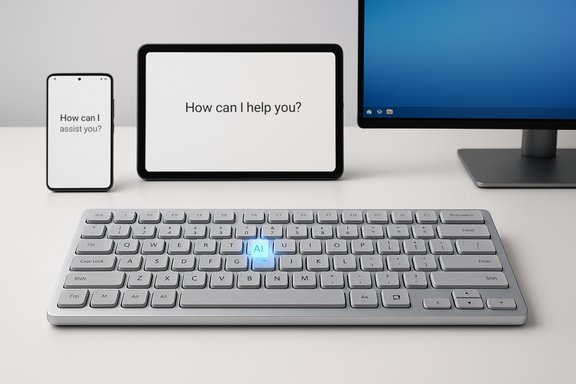
Samsung has quietly expanded its Galaxy accessory lineup with the Smart Keyboard, a compact, aluminum tenkeyless keyboard that puts a single-press AI Short Key and a dedicated DeX key at the center of its proposition — pairing laptop-like typing feel with cross-device convenience for phones, tablets and Windows laptops in the Galaxy ecosystem.
Background
Samsung’s Smart Keyboard is positioned as a lightweight, portable companion for people who work across Samsung phones, tablets and Galaxy Book laptops. The company describes it as a bridge between hardware and on-device assistants: one press summons the right AI assistant for the device you’re paired with, while another dedicated key launches Samsung DeX to convert a phone or tablet into a desktop-style workspace.This release arrives amid a broader industry pivot where hardware makers bake AI access directly into peripherals and devices. Samsung’s approach is notable because it not only offers a dedicated AI shortcut, but explicitly links that physical shortcut to multiple assistants — Bixby and Google Gemini on mobile/tabs, and Microsoft Copilot on Windows machines — depending on the target device. At its advertised U.S. price point just over $100, the Smart Keyboard aims to be a direct competitor to slim wireless keyboards like Apple's Magic Keyboard while adding features tailored for the Galaxy ecosystem.
Overview: what the Smart Keyboard is — and what it isn’t
The Smart Keyboard is a tenkeyless (TKL) wireless keyboard with an aluminum finish and a slim profile. It is designed to emphasize portability, an unobtrusive desk footprint, and direct access to AI and DeX workflows. Key selling points include:- Dedicated AI Short Key that launches device-appropriate assistants.
- DeX key for instant switch to Samsung DeX mode on compatible phones and tablets.
- Bluetooth 5.4 multi-device pairing (up to three devices).
- Replaceable CR2032 coin-cell battery instead of a rechargeable pack.
- 80-key layout with a 19 mm key pitch and low-profile, laptop-style travel.
- It is not a mechanical keyboard; it uses low-profile scissor-style switches aimed at quiet, laptop-like typing.
- It does not include a built-in rechargeable battery or USB charging.
- It lacks a backlight option, making night typing less convenient.
- It is focused on the Galaxy ecosystem and includes platform-specific shortcuts that deliver the most value when paired with Samsung hardware and software.
Design and build: aluminum, tenkeyless and very portable
Samsung designed the Smart Keyboard as a compact, premium-feeling peripheral. The chassis uses an aluminum finish, contributing to a modern, metal aesthetic and a sturdy hand-feel that echoes Samsung’s lightweight laptop styling.Key physical specs confirmed by Samsung’s product listings:
- Dimensions: approximately 280.3 × 111.5 × 4.3 mm.
- Weight: officially listed at around 218 g, making it very light for a metal-bodied keyboard.
- Key layout: tenkeyless (80 keys) with a 19 mm key pitch and 1.0 mm key travel, tuned to mimic Galaxy Book laptop key spacing.
Typing experience
The Smart Keyboard aims for a laptop-like feel: short (1.0 mm) travel, quiet scissor switches, and the same key pitch as Galaxy Book keyboards. That design favors fast, low-effort typing suitable for note-taking, emails and general productivity. It won’t satisfy mechanical-key enthusiasts seeking deep travel, loud audible feedback, or hot-swappable switches, but it should be comfortable for users who prefer Apple Magic Keyboard–style low-profile typing.Connectivity and compatibility: cross-device convenience
Connectivity is a core part of the appeal. Samsung has included modern Bluetooth capabilities to support multi-device workflows:- Bluetooth 5.4 for stable wireless connectivity and multi-device pairing.
- Three-device pairing and a quick-switch key to toggle between devices (for example: smartphone → tablet → PC).
- Platform-aware behavior: when paired with a phone or tablet, some top-row keys map to Android navigation and media; when paired with Windows, they behave like traditional function keys.
- The keyboard is usable with any Bluetooth-equipped device that accepts standard keyboard input, but Samsung has optimized behavior for Galaxy phones, Galaxy Tabs and Galaxy Book laptops.
- Certain AI and DeX features require recent OS versions on the host device (for example, specified One UI versions on phones/tabs or Copilot-enabled Galaxy Book models on Windows).
The AI Short Key: how it works and why it matters
The defining feature is the AI Short Key: a dedicated physical key that invokes the default AI assistant for the active device. Samsung’s implementation adapts which assistant is launched:- On Galaxy phones and tablets the key launches Bixby or Google Gemini, depending on the device and its configuration.
- On Galaxy Book Windows laptops the same key triggers Microsoft Copilot, where Copilot support is enabled.
Practical implications
- For quick lookups, summaries, or drafting text, a hardware AI shortcut reduces context switching.
- In DeX mode, the AI key can be a direct way to access generative tools while working on a larger screen.
- The key’s behavior is device-dependent, which keeps it flexible across Samsung’s mixed-platform strategy.
Remapping and personalization
Samsung advertises customizable app shortcuts mapped to function keys (F1–F3). For the AI Short Key itself, behavior depends on OS-level bindings and the assistant pipeline on the host device. In practice, savvy users have used key-remapper utilities on Android to change AI-button behavior on other keyboards; platform restrictions may limit remapping on some carriers or device builds.DeX support: a physical shortcut to a desktop-like mobile workflow
Samsung DeX turns supported phones and tablets into a desktop interface when connected to a larger display. The Smart Keyboard includes a dedicated DeX key that immediately switches the paired mobile device into that mode when supported.Why that matters:
- DeX is aimed at users who want full-size app windows, multiple apps on screen, and keyboard+mouse control from a mobile device.
- A dedicated DeX key removes a few taps from the DeX activation flow, making mobile-to-desktop transitions faster.
- DeX functionality depends on the phone or tablet model and OS version; older phones and devices with limited DeX support won't receive the same experience.
- DeX is a Samsung platform experience; the DeX key is less meaningful on non-Samsung devices.
Power design choice: CR2032 coin-cell versus rechargeable
Samsung chose to power the Smart Keyboard with replaceable CR2032 coin-cell batteries. The keyboard ships with batteries and an eject pin for replacement.Pros of this choice:
- Simplicity: no need to remember to recharge; swapping a coin cell is quick.
- Long standby life: Samsung’s lab simulations suggest multi-year battery life under light daily use.
- Portability without charging cables.
- Waste and cost: coin cells generate periodic waste and replacement costs over time.
- No rechargeable convenience: users who prefer USB-C charging or built-in rechargables will find this limiting.
- Environmental considerations: rechargeable systems typically have lower lifetime energy and waste footprints.
Software, OS requirements and ecosystem nuances
The Smart Keyboard’s special features rely on software support across platforms. Samsung’s product materials indicate that some features need recent OS revisions and device models:- AI shortcuts and app-key mappings require compatible versions of Samsung’s One UI on phones and tablets.
- Microsoft Copilot support depends on Copilot-enabled Galaxy Book models (some Windows notebook models sold under the Galaxy Book brand and recent Windows versions).
- Some Smart TV and monitor integrations may require modern Tizen releases.
- If your phone is multiple OS upgrades behind or you run custom ROMs, some dedicated keys’ behavior may be limited or nonfunctional.
- Corporate-managed devices with locked-down keys or disabled assistant apps may lose AI-key functionality.
Privacy and security considerations
Embedding an AI activation button on hardware raises privacy and security questions that deserve attention.- A single press may activate assistants that collect audio, contextual device data, or app usage metadata. Users should be mindful of what the assistant is authorized to access.
- Different assistants route data to different providers: Bixby (Samsung), Google Gemini (Google), and Copilot (Microsoft) each have distinct privacy policies and data handling practices.
- Hardware-triggered assistant activation could be accidentally pressed in a pocket or bag if the keyboard is not physically secured, especially on mobile setups where the keyboard is co-located with the phone.
- Remapping or third-party remapper apps may require accessibility or button-capture permissions, which can introduce security considerations if the remapper is untrusted.
- Users should review assistant permissions, microphone settings and connected device privacy settings.
- For corporate or regulated environments, IT teams should confirm whether assistants and hardware shortcuts comply with data governance requirements.
Strengths: why the Smart Keyboard makes sense for many Galaxy users
- Seamless Galaxy integration: Dedicated AI and DeX keys are meaningful for users who already rely on Samsung services and workflows.
- True cross-device convenience: Three-device pairing and quick switching reduce the need for multiple keyboards.
- Premium feel at a modest price: An aluminum body and low-profile typing for roughly $109 puts it in the same design space as more expensive brands.
- Long battery life without charging: For users who dislike charging cables, the CR2032 approach is appealing.
- Compact form factor: The tenkeyless layout and light weight make it travel-friendly.
Risks and trade-offs: what to watch out for
- Ecosystem lock-in: The AI Short Key’s value is greatest inside Samsung’s Galaxy ecosystem. Outside of that, it’s a plain keyboard with extra physical buttons.
- No backlighting or rechargeable battery: Missing features that many competitors include at similar price levels.
- Limited programmability: Beyond F1–F3 app shortcuts, heavy customizers may find fewer built-in remap options compared with enthusiast keyboards.
- Privacy complexity: Tapping into different AI providers raises questions about where and how data is sent and stored.
- Potential for changing assistant defaults: As companies sign distribution deals or change default assistants on phones, the Smart Keyboard’s AI target may shift over time, altering user expectations.
Competition and market positioning
Samsung is taking direct aim at thin, premium wireless keyboards from other ecosystems. The Smart Keyboard’s aluminum finish and low-profile typing position it against:- Apple Magic Keyboard (for Mac and iPad users) — Samsung counters by offering AI and DeX shortcuts that Apple doesn't.
- Third-party Bluetooth TKL keyboards aimed at multi-device users — many of which offer rechargeable batteries, programmable layers, or mechanical switches.
Verified specs and what we double-checked
To avoid confusion from early press reports and inconsistent secondary coverage, the following are manufacturer-confirmed technical details that were verified against official product listings and independent hands-on coverage:- Dimensions: approximately 280.3 × 111.5 × 4.3 mm.
- Weight: ~218 g (official listings show ~218.4 g).
- Keys: 80-key tenkeyless layout, 19 mm key pitch, 1.0 mm key travel.
- Connectivity: Bluetooth 5.4, pairing up to three devices.
- Power: CR2032 coin-cell batteries (with an included battery and eject pin); Samsung lab figures indicate up to about 2 years typical life under light daily typing use.
- Features: AI Short Key, DeX key, customizable app shortcuts (F1–F3), media and Android navigation on top row depending on device.
- Price: listed at about $109.99 in the U.S. markets and rolling out to other major regions.
Who should buy this keyboard?
- Power users in the Galaxy ecosystem who rely on DeX and want quick AI access without touching the screen.
- Mobile-first professionals who need a lightweight, portable keyboard for laptops, tablets and phones.
- Buyers who prefer not to charge peripherals regularly and are happy with replaceable coin cells.
- Users who favor a quiet, low-profile typing experience rather than mechanical key switches.
- Enthusiasts who want mechanical switches, hot-swappable keys or deep programmability.
- Users who require backlighting for low-light work or an integrated rechargeable battery.
- People who work across non-Galaxy ecosystems and won’t use DeX or platform-specific AI shortcuts.
Practical buying guidance
- Confirm your device’s OS version and whether it supports the Smart Keyboard’s advertised AI and DeX integrations; feature behavior varies with One UI and Copilot support.
- If you plan to use the AI Short Key but prefer a different assistant, research whether simple remapping is possible on your host device or if third-party remappers are required.
- Consider battery preference: if you’re a frequent traveler who dislikes packing charging cables, the coin-cell approach is convenient; if you prioritize a tidy, rechargeable setup, a different keyboard may suit you better.
- Compare the price and features with competing thin wireless keyboards to ensure the AI/DeX shortcuts justify the cost for your personal workflow.
Final analysis: incremental innovation with ecosystem intent
The Samsung Smart Keyboard is not a radical reinvention of the wireless keyboard, but it is a pragmatic and thoughtfully executed accessory that nails a specific brief: make AI and mobile-desktop transitions seamless for Galaxy users. It pairs a premium slim design with functional shortcuts that integrate into Samsung’s broader strategy of pushing AI and DeX across its devices.Strengths lie in meaningful hardware conveniences and a polished, portable build at an accessible price point. The most important trade-offs are Samsung’s intentional choices — a reliance on ecosystem services, the CR2032 power model, and a non-mechanical keyset — which will divide buyers along lines of platform loyalty and personal preference.
For Samsung customers who live in the Galaxy universe and use DeX or AI assistants regularly, the Smart Keyboard is a sensible, convenience-focused purchase. For buyers outside that orbit or those who demand more customization and rechargeable convenience, there are alternatives that deliver on those priorities.
Ultimately, the Smart Keyboard is a clear statement: Samsung is treating AI as a first-class feature and is willing to bake assistant access into everyday hardware. That design philosophy will likely shape how peripherals evolve across ecosystems as assistants and device continuity become central productivity primitives.
Source: hi-Tech.ua Samsung Smart Keyboard - compact aluminum keyboard with AI call button and DeX support
