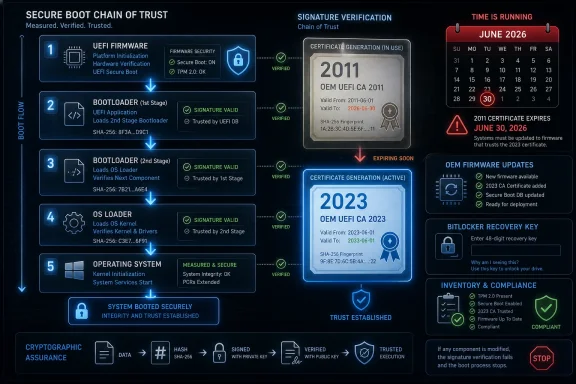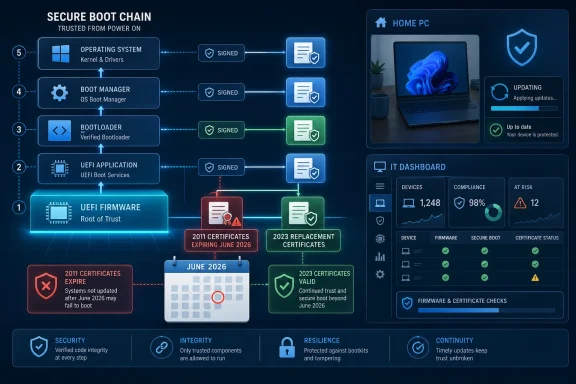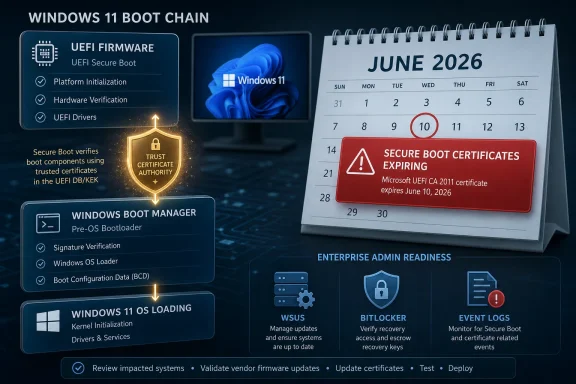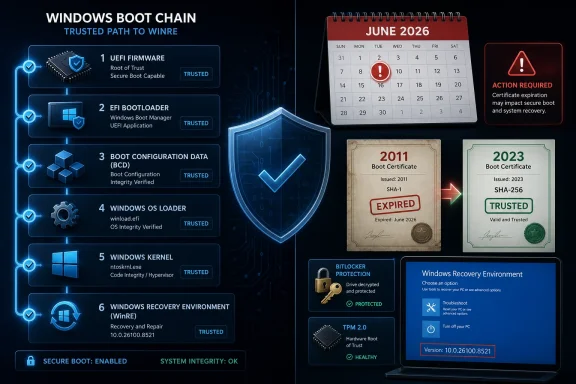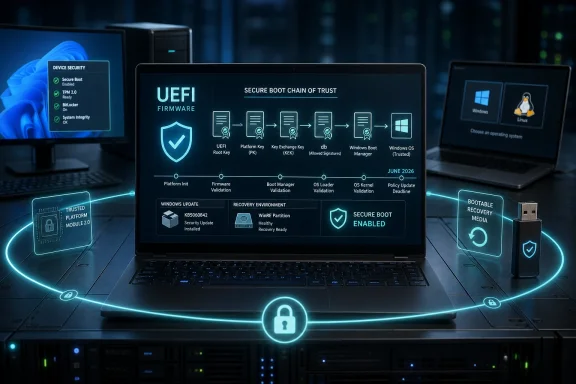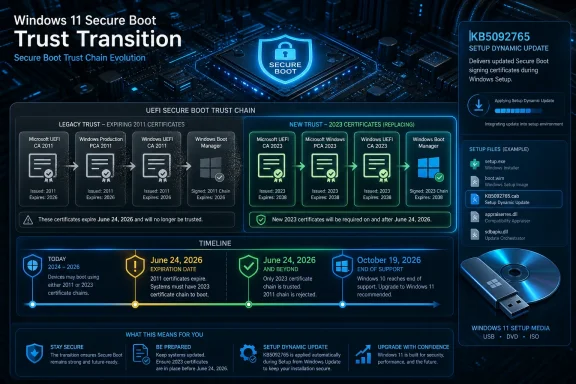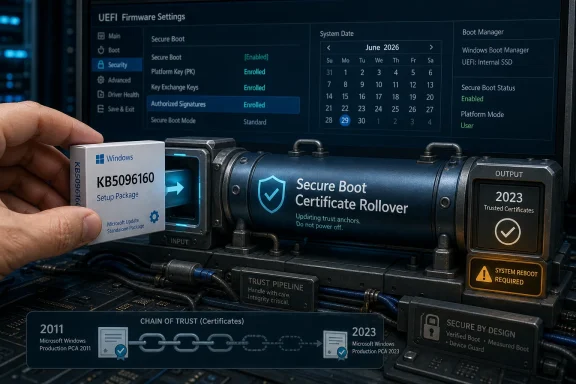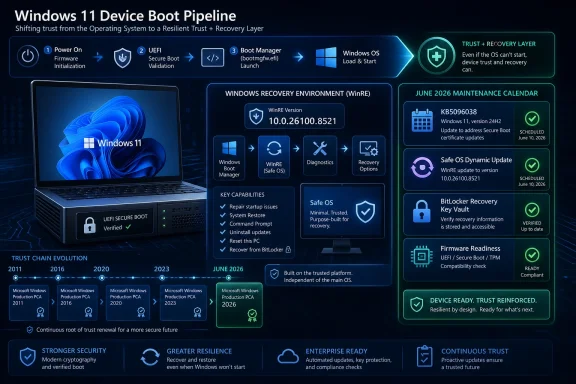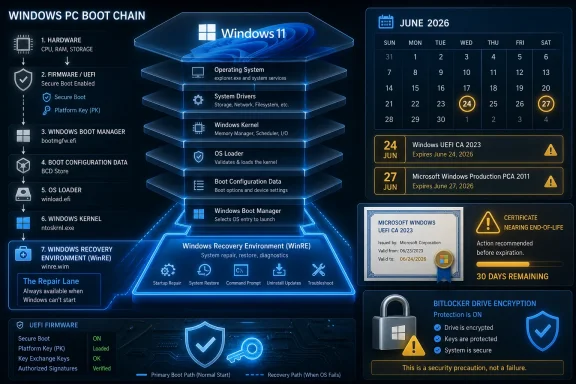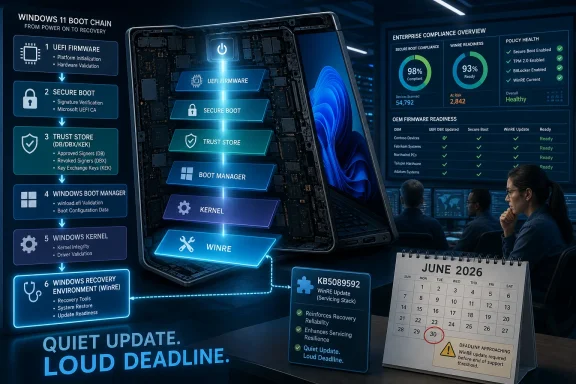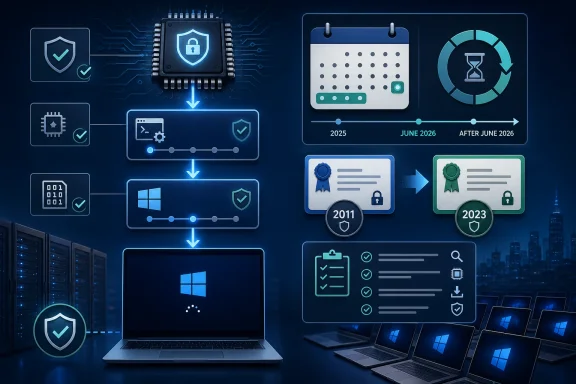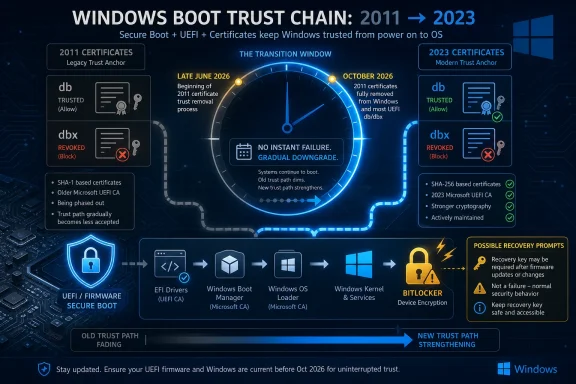
Microsoft’s 2011-era Secure Boot certificates begin expiring on June 24, 2026, and Windows PCs that have not moved to the 2023 certificate chain should still boot, but they may lose future boot-level security protections and eventually hit upgrade or servicing barriers. That is the important distinction Microsoft has been trying to hammer home: this is not a mass bricking event, but it is also not optional hygiene. Secure Boot is the foundation under the operating system, and the certificate rollover is a rare case where Windows Update must coordinate with motherboard firmware, BitLocker, OEM behavior, and enterprise deployment policy. The deadline matters because, once the old trust chain expires, Microsoft cannot keep papering over the gap with the same signing infrastructure that got Windows PCs through the last 15 years.
The easiest misunderstanding to clear up is the scariest one. A Windows 11 PC that misses the Secure Boot certificate transition should not suddenly become a paperweight the morning the 2011 certificates expire. Microsoft’s own guidance says affected systems may continue to start and may continue receiving ordinary Windows updates.
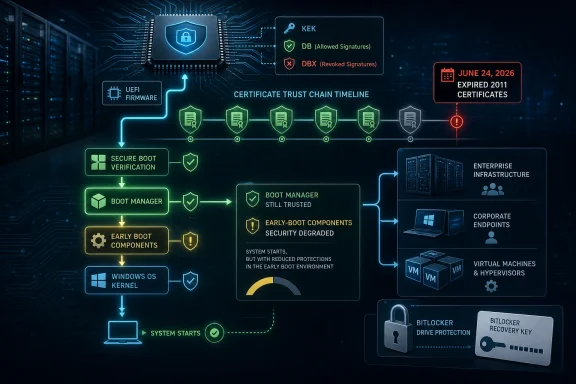
That reassurance, however, is narrower than it sounds. The machine can keep running while losing access to future protections for the earliest and most sensitive phase of startup. That includes the Windows Boot Manager, Secure Boot databases, revocation lists, and other pre-OS components that decide what code is trusted before Windows itself is in control.
That is why Microsoft’s language around this rollout has become more urgent as June 2026 approaches. The risk is not that every unpatched machine fails at once. The risk is that a large installed base quietly slips into a degraded security state, where future bootkit defenses cannot be delivered reliably.
For consumers, that may sound abstract until a future Windows feature update refuses to proceed or a firmware-specific issue blocks remediation. For administrators, it is more concrete: you cannot treat the boot chain like another monthly patch if the signing authority needed to update it is expiring underneath you.
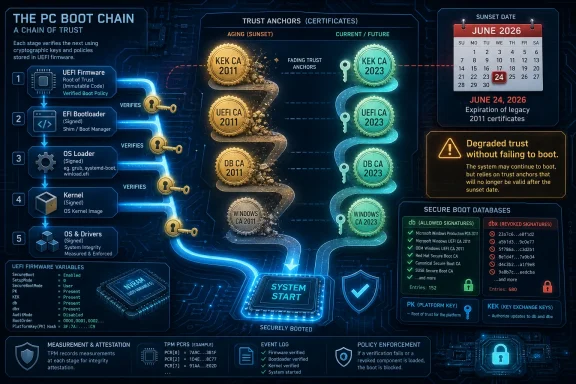
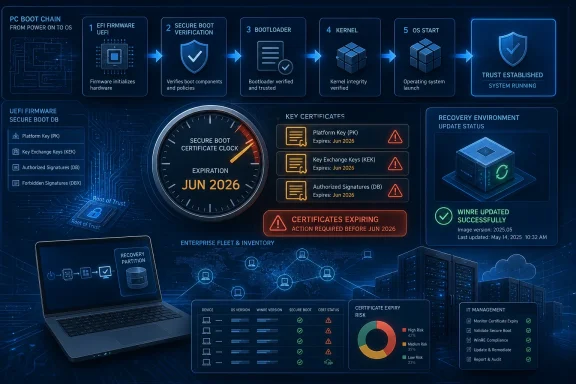
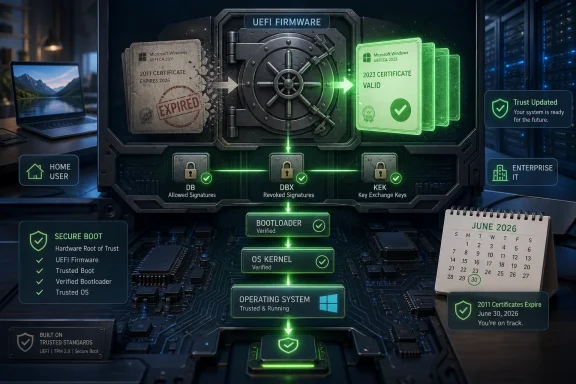
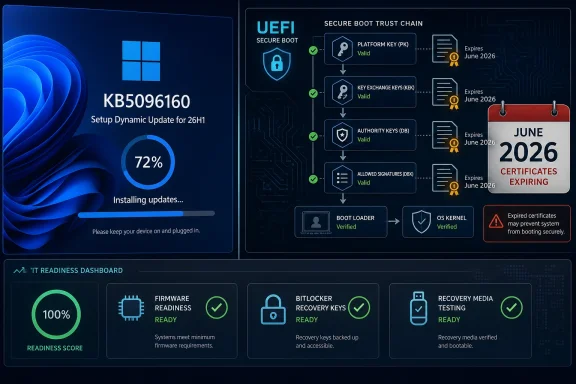
That trust model depends on certificates stored in firmware. The Platform Key, usually controlled by the OEM, governs the top of the Secure Boot hierarchy. The Key Exchange Key authorizes updates to the allow and deny databases. The DB contains trusted signatures and certificates, while the DBX contains revoked signatures and hashes that should no longer be allowed to boot.
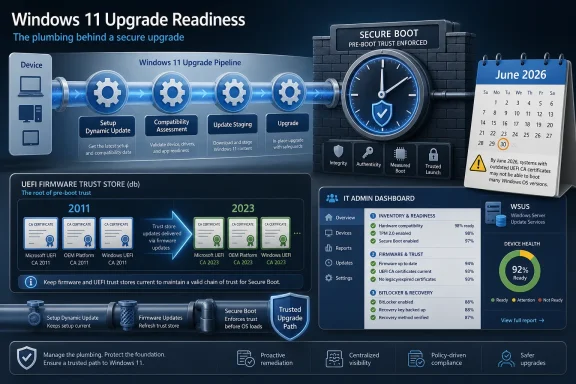
The problem is mundane and enormous at the same time: the Microsoft Secure Boot certificates from 2011 are expiring in 2026. The Microsoft Corporation KEK CA 2011 begins expiring in late June, while other 2011-era boot certificates expire later in the year. The replacement chain is built around Microsoft’s 2023 Secure Boot certificates.
This is the first time the Windows PC ecosystem has had to move a broad Secure Boot installed base across a certificate generation at this scale. That makes the rollout less like a normal Windows patch and more like an infrastructure migration, except the infrastructure is embedded in millions of motherboards, laptops, virtual machines, servers, and recovery environments.
Microsoft has been rolling the change out gradually rather than blasting it across every eligible PC. The company’s high-confidence targeting model depends on telemetry from systems that successfully apply the update without boot failures, BitLocker recovery loops, or other serious regressions. When enough matching hardware looks safe, Microsoft can move more devices in that bucket.
That approach is conservative for a reason. Updating Secure Boot variables is not like replacing Notepad. A bad firmware interaction can strand a device before Windows has a chance to recover it. The diversity of PC firmware remains one of the platform’s strengths and one of its operational liabilities.
This is also why Microsoft’s guidance has repeatedly pushed administrators toward pilots instead of fleet-wide optimism. The correct question is not “Does Windows support the 2023 certificates?” It is “Does this exact hardware model, on this firmware revision, under this boot configuration, with this encryption and recovery posture, survive the transition cleanly?”
The more complicated class is systems with UEFI firmware that are configured in legacy compatibility mode. Some machines use a Compatibility Support Module to boot in a legacy style while still having UEFI and Secure Boot capability underneath. Those systems are not all the same, and their update behavior depends on how the firmware reports its capabilities and how the boot disk is configured.
This matters because a lot of older Windows installations are messy. A machine may have UEFI firmware but an MBR-formatted boot disk, or Secure Boot may be disabled because the system was once dual-booted, cloned, repaired, or upgraded through several Windows generations. Those machines can look deceptively modern until the firmware enforcement path is actually tested.
Microsoft’s decision to avoid forcing updates when Secure Boot is disabled is therefore defensive. Some firmware can update Secure Boot certificates while the feature is off. Other firmware behaves badly or applies changes unexpectedly when Secure Boot is later re-enabled. In a rollout this broad, Microsoft has chosen not to gamble on firmware consistency that does not exist.
Microsoft says the Secure Boot certificate update process is BitLocker-aware. In the normal flow, Windows should reseal the relevant keys and preserve the ability to boot without surprising users with recovery prompts. That is the design, and it is essential if Microsoft expects the consumer installed base to move quietly.
But “BitLocker-aware” is not the same as “immune to every firmware edge case.” Enterprise environments often stack vendor firmware updates, driver packages, endpoint security tools, custom boot paths, and recovery partition changes on top of one another. If an update changes the Platform Key or Key Exchange Key, or if firmware reports boot state inconsistently, the system can still land in recovery.
That is why the sensible operational advice remains boring: back up recovery keys, update firmware, test representative devices, and avoid combining Secure Boot certificate changes with unrelated BIOS maintenance in the same reboot window. The certificates may be Microsoft’s problem, but the recovery call at 7 a.m. belongs to the local IT team.
Automated rollout can hide some of this choreography by scheduling work early in startup or folding it into normal servicing. Manual testing exposes the plumbing. What looks like a machine restarting too many times may simply be the system walking through the firmware handoff and validation steps.
This is one reason server administrators are more cautious than home users. A desktop rebooting twice is annoying. A host, cluster node, or critical VM doing so outside a maintenance window is an incident. The same technical sequence has a very different operational meaning depending on where the device sits.
For WindowsForum readers, the practical lesson is that “reboot required” understates the work being done. The certificates are not just files dropped into a folder. They are part of the trust contract between Windows, firmware, and the code that runs before the OS can defend itself.
PXE is especially unforgiving because a server typically presents a single boot manager to the client. You cannot neatly hand every device both a 2011-signed and 2023-signed boot path and expect firmware to sort out the right answer in all cases. If you move deployment infrastructure too early, unremediated clients may fail. If you move it too late, updated clients may be blocked once revocations become stricter.
That creates a sequencing problem for large estates. Administrators need to know which machines have the 2023 DB certificate in firmware before they swap deployment boot managers. They also need contingency media that matches the state of the hardware they are trying to recover.
This is where the Secure Boot deadline becomes less of a Windows 11 consumer story and more of a systems management story. Imaging pipelines are often built once and then neglected because they work. Certificate rollover turns that neglect into technical debt with an expiration date.
The BlackLotus bootkit made this point painfully clear. The broader mitigation for Secure Boot bypasses depends not only on issuing newer boot managers, but also on preventing rollback to older vulnerable ones. That is where DBX updates and security versioning matter.
This is the point at which many enthusiasts get understandably wary. Revocation can be hard to undo, and mistakes in Secure Boot policy can strand older media or unusual operating systems. Microsoft has therefore staged Secure Boot hardening over time, because revoking trust too broadly before the ecosystem is ready would be its own outage generator.
But without revocation, the certificate rollover would be mostly theater. A system that trusts new boot code while continuing to accept vulnerable old boot code has not really closed the door. It has merely installed a newer lock next to the old one.
Microsoft’s server guidance therefore emphasizes administrator action. Server operators need to identify affected machines, validate firmware support, deploy the updates through supported methods, and troubleshoot failures explicitly. The burden shifts from Microsoft’s telemetry system to the organization’s change-management process.
Virtualization adds another layer. Hyper-V Generation 2 VMs, Trusted Launch VMs, confidential VMs, and third-party hypervisors each introduce their own firmware abstraction. A VM’s Secure Boot state is not merely a guest Windows property; it depends on the virtual firmware and the host platform’s ability to expose and update the relevant keys.
That makes the phrase “my server is patched” dangerously incomplete. The host may be patched while the guest cannot update its KEK. The guest may be current while the virtual firmware blocks writes. The estate may look compliant at the OS layer while Secure Boot variables remain stuck in a pre-2023 state.
Event ID 1801 has become a particular magnet for confusion. In many cases, it means Windows has the updated certificate material available but has not yet applied it to firmware. The reason may be benign, such as waiting for a reboot or high-confidence targeting. It may also indicate that firmware needs an OEM update or that the machine is in a configuration Microsoft will not automatically touch.
The problem is that the event is not a universal instruction. “More data needed” does not necessarily mean the user should start forcing registry keys. “Available but not applied” does not automatically mean the machine is broken. It means the Secure Boot transition is in a staged state, and the next step depends on the hardware, firmware, management policy, and risk tolerance.
For home users, that argues for patience unless Windows or the OEM provides a clear remediation path. For administrators, it argues for inventory. You cannot manage this transition by spot-checking Event Viewer on a handful of machines and hoping the rest of the fleet looks the same.
That is not simply an indictment of vendors. Secure Boot spans years of platform evolution, chipsets, BIOS teams, business laptops, gaming boards, servers, embedded systems, and virtual platforms. Some devices were designed when 2026 sounded comfortably distant. Some are still in service long after their original firmware maintenance window should have ended.
The result is a familiar PC ecosystem split. Newer Windows 11 systems, especially those still actively supported by OEMs, are likely to make the transition with little drama. Older or enthusiast-built systems may require BIOS updates, manual checks, or a more cautious approach. Rare platforms may not generate enough telemetry to land quickly in Microsoft’s high-confidence bucket.
That last point matters. Microsoft’s confidence model can use telemetry from other devices of the same hardware class, but rare configurations are harder to bless automatically. The less common the system, the more the owner or administrator may need to verify the state directly.
But the cost of inaction compounds. A device that cannot trust the 2023 chain cannot reliably consume future boot-level fixes signed for that chain. A device that cannot receive future DBX updates remains exposed when the next bootkit technique needs revocation. A device stuck on old assumptions may eventually hit a feature update that refuses to install because proceeding would risk an unbootable system.
The danger is not theatrical failure. It is gradual exclusion from the security maintenance path. That is how infrastructure ages out in the real world: first nothing happens, then a narrow exception appears, then the exception becomes a permanent unsupported state.
Microsoft’s messaging is therefore more sober than sensational. It is telling users that ignoring the deadline does not instantly destroy the machine, while also warning that the machine’s boot security posture will be increasingly obsolete. Both statements can be true.
The machines most likely to cause pain are also predictable. They are old but still useful desktops, custom-built PCs with neglected BIOS updates, servers with conservative change windows, VMs whose virtual firmware has not kept up, and deployment environments that assume a 2011-signed boot manager will be trusted forever.
The Deadline Is Not a Kill Switch, but It Is a Security Cliff
The easiest misunderstanding to clear up is the scariest one. A Windows 11 PC that misses the Secure Boot certificate transition should not suddenly become a paperweight the morning the 2011 certificates expire. Microsoft’s own guidance says affected systems may continue to start and may continue receiving ordinary Windows updates.That reassurance, however, is narrower than it sounds. The machine can keep running while losing access to future protections for the earliest and most sensitive phase of startup. That includes the Windows Boot Manager, Secure Boot databases, revocation lists, and other pre-OS components that decide what code is trusted before Windows itself is in control.
That is why Microsoft’s language around this rollout has become more urgent as June 2026 approaches. The risk is not that every unpatched machine fails at once. The risk is that a large installed base quietly slips into a degraded security state, where future bootkit defenses cannot be delivered reliably.
For consumers, that may sound abstract until a future Windows feature update refuses to proceed or a firmware-specific issue blocks remediation. For administrators, it is more concrete: you cannot treat the boot chain like another monthly patch if the signing authority needed to update it is expiring underneath you.
Secure Boot’s 2011 Trust Chain Has Finally Aged Out
Secure Boot exists to stop a compromised or unauthorized boot path from taking control before Windows loads. On a modern PC, UEFI firmware checks signatures for bootloaders, UEFI drivers, EFI applications, and other startup components. If the signatures are trusted, the system hands off to the operating system; if they are not, the boot should fail.That trust model depends on certificates stored in firmware. The Platform Key, usually controlled by the OEM, governs the top of the Secure Boot hierarchy. The Key Exchange Key authorizes updates to the allow and deny databases. The DB contains trusted signatures and certificates, while the DBX contains revoked signatures and hashes that should no longer be allowed to boot.
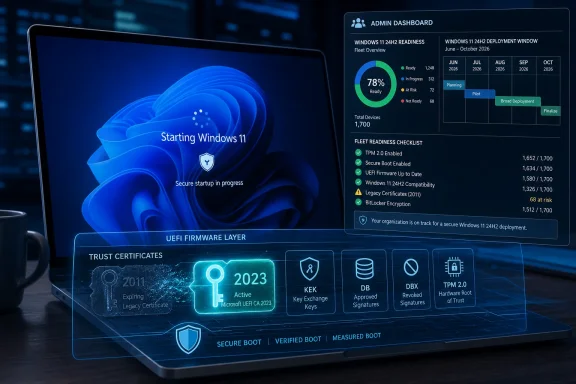
The problem is mundane and enormous at the same time: the Microsoft Secure Boot certificates from 2011 are expiring in 2026. The Microsoft Corporation KEK CA 2011 begins expiring in late June, while other 2011-era boot certificates expire later in the year. The replacement chain is built around Microsoft’s 2023 Secure Boot certificates.
This is the first time the Windows PC ecosystem has had to move a broad Secure Boot installed base across a certificate generation at this scale. That makes the rollout less like a normal Windows patch and more like an infrastructure migration, except the infrastructure is embedded in millions of motherboards, laptops, virtual machines, servers, and recovery environments.
Microsoft Is Updating Firmware Because Windows Alone Cannot Solve This
The awkward part of the transition is that the new trust anchors must end up in UEFI firmware. Windows can stage files, schedule tasks, write events, and coordinate the update flow, but the firmware ultimately owns Secure Boot variables. That is why the same Windows cumulative update can behave differently across systems with different BIOS versions, OEM policies, or virtualization stacks.Microsoft has been rolling the change out gradually rather than blasting it across every eligible PC. The company’s high-confidence targeting model depends on telemetry from systems that successfully apply the update without boot failures, BitLocker recovery loops, or other serious regressions. When enough matching hardware looks safe, Microsoft can move more devices in that bucket.
That approach is conservative for a reason. Updating Secure Boot variables is not like replacing Notepad. A bad firmware interaction can strand a device before Windows has a chance to recover it. The diversity of PC firmware remains one of the platform’s strengths and one of its operational liabilities.
This is also why Microsoft’s guidance has repeatedly pushed administrators toward pilots instead of fleet-wide optimism. The correct question is not “Does Windows support the 2023 certificates?” It is “Does this exact hardware model, on this firmware revision, under this boot configuration, with this encryption and recovery posture, survive the transition cleanly?”
Legacy BIOS Machines Are Outside the Blast Radius
One useful clarification from Microsoft is that machines running true legacy BIOS are not candidates for this Secure Boot update. If a system is not Secure Boot-capable, Windows should recognize that and skip the certificate application path. A PC with no UEFI Secure Boot implementation cannot be remediated into one by registry policy.The more complicated class is systems with UEFI firmware that are configured in legacy compatibility mode. Some machines use a Compatibility Support Module to boot in a legacy style while still having UEFI and Secure Boot capability underneath. Those systems are not all the same, and their update behavior depends on how the firmware reports its capabilities and how the boot disk is configured.
This matters because a lot of older Windows installations are messy. A machine may have UEFI firmware but an MBR-formatted boot disk, or Secure Boot may be disabled because the system was once dual-booted, cloned, repaired, or upgraded through several Windows generations. Those machines can look deceptively modern until the firmware enforcement path is actually tested.
Microsoft’s decision to avoid forcing updates when Secure Boot is disabled is therefore defensive. Some firmware can update Secure Boot certificates while the feature is off. Other firmware behaves badly or applies changes unexpectedly when Secure Boot is later re-enabled. In a rollout this broad, Microsoft has chosen not to gamble on firmware consistency that does not exist.
BitLocker Is Supposed to Be Protected, but Firmware Still Makes Admins Nervous
BitLocker is the other reason this transition feels more dangerous than a standard update. Secure Boot, TPM measurements, Virtualization-based Security, and Windows Hello all lean on assumptions about the boot path. Change the trust chain carelessly, and the system may decide that something fundamental has changed.Microsoft says the Secure Boot certificate update process is BitLocker-aware. In the normal flow, Windows should reseal the relevant keys and preserve the ability to boot without surprising users with recovery prompts. That is the design, and it is essential if Microsoft expects the consumer installed base to move quietly.
But “BitLocker-aware” is not the same as “immune to every firmware edge case.” Enterprise environments often stack vendor firmware updates, driver packages, endpoint security tools, custom boot paths, and recovery partition changes on top of one another. If an update changes the Platform Key or Key Exchange Key, or if firmware reports boot state inconsistently, the system can still land in recovery.
That is why the sensible operational advice remains boring: back up recovery keys, update firmware, test representative devices, and avoid combining Secure Boot certificate changes with unrelated BIOS maintenance in the same reboot window. The certificates may be Microsoft’s problem, but the recovery call at 7 a.m. belongs to the local IT team.
The Multiple Reboots Are a Symptom of Where the Update Lands
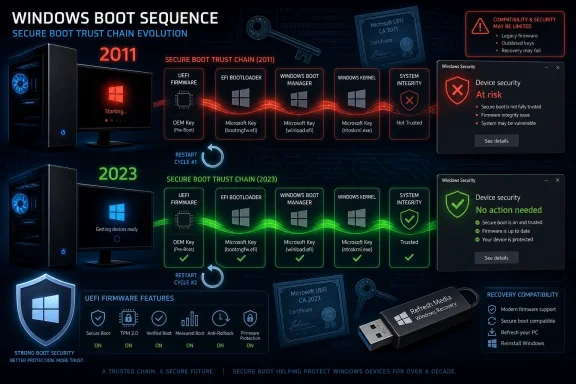
Some users have noticed unusual reboot behavior after manually triggering the Secure Boot update tasks. That is not surprising. The update has to stage new certificate material, allow firmware to apply it, then boot through the newly trusted path with a boot manager signed under the new chain.Automated rollout can hide some of this choreography by scheduling work early in startup or folding it into normal servicing. Manual testing exposes the plumbing. What looks like a machine restarting too many times may simply be the system walking through the firmware handoff and validation steps.
This is one reason server administrators are more cautious than home users. A desktop rebooting twice is annoying. A host, cluster node, or critical VM doing so outside a maintenance window is an incident. The same technical sequence has a very different operational meaning depending on where the device sits.
For WindowsForum readers, the practical lesson is that “reboot required” understates the work being done. The certificates are not just files dropped into a folder. They are part of the trust contract between Windows, firmware, and the code that runs before the OS can defend itself.
PXE, Recovery Media, and Imaging Pipelines Are the Hidden Enterprise Trap
The client PC story is only half the rollout. Enterprises also have to think about boot media, network deployment, recovery environments, and bare-metal provisioning. Those workflows often depend on Windows PE images, boot.wim files, and PXE servers that may still assume the 2011 trust chain.PXE is especially unforgiving because a server typically presents a single boot manager to the client. You cannot neatly hand every device both a 2011-signed and 2023-signed boot path and expect firmware to sort out the right answer in all cases. If you move deployment infrastructure too early, unremediated clients may fail. If you move it too late, updated clients may be blocked once revocations become stricter.
That creates a sequencing problem for large estates. Administrators need to know which machines have the 2023 DB certificate in firmware before they swap deployment boot managers. They also need contingency media that matches the state of the hardware they are trying to recover.
This is where the Secure Boot deadline becomes less of a Windows 11 consumer story and more of a systems management story. Imaging pipelines are often built once and then neglected because they work. Certificate rollover turns that neglect into technical debt with an expiration date.
Revocation Is the Part That Turns Compatibility Into Security
Adding the 2023 certificates is only one side of the transition. The other side is revocation. Secure Boot is not just a list of things allowed to run; it is also a mechanism for blocking boot components that have become unsafe.The BlackLotus bootkit made this point painfully clear. The broader mitigation for Secure Boot bypasses depends not only on issuing newer boot managers, but also on preventing rollback to older vulnerable ones. That is where DBX updates and security versioning matter.
This is the point at which many enthusiasts get understandably wary. Revocation can be hard to undo, and mistakes in Secure Boot policy can strand older media or unusual operating systems. Microsoft has therefore staged Secure Boot hardening over time, because revoking trust too broadly before the ecosystem is ready would be its own outage generator.
But without revocation, the certificate rollover would be mostly theater. A system that trusts new boot code while continuing to accept vulnerable old boot code has not really closed the door. It has merely installed a newer lock next to the old one.
Servers Are Not Just Bigger Clients
Windows Server deserves separate attention because Microsoft is not treating it like consumer Windows. Servers are often isolated, telemetry-light, tightly change-controlled, and attached to business processes where surprise reboot behavior is unacceptable. Automatic confidence-based rollout is a poor fit for that world.Microsoft’s server guidance therefore emphasizes administrator action. Server operators need to identify affected machines, validate firmware support, deploy the updates through supported methods, and troubleshoot failures explicitly. The burden shifts from Microsoft’s telemetry system to the organization’s change-management process.
Virtualization adds another layer. Hyper-V Generation 2 VMs, Trusted Launch VMs, confidential VMs, and third-party hypervisors each introduce their own firmware abstraction. A VM’s Secure Boot state is not merely a guest Windows property; it depends on the virtual firmware and the host platform’s ability to expose and update the relevant keys.
That makes the phrase “my server is patched” dangerously incomplete. The host may be patched while the guest cannot update its KEK. The guest may be current while the virtual firmware blocks writes. The estate may look compliant at the OS layer while Secure Boot variables remain stuck in a pre-2023 state.
Event ID 1801 Is a Warning Light, Not a Diagnosis
One reason this story has spread among enthusiasts is that Windows has started surfacing Secure Boot certificate state more visibly. Event Viewer entries, registry values, PowerShell checks, and Intune remediations can now show whether updated certificates are available, applied, pending, blocked, or waiting for more confidence data.Event ID 1801 has become a particular magnet for confusion. In many cases, it means Windows has the updated certificate material available but has not yet applied it to firmware. The reason may be benign, such as waiting for a reboot or high-confidence targeting. It may also indicate that firmware needs an OEM update or that the machine is in a configuration Microsoft will not automatically touch.
The problem is that the event is not a universal instruction. “More data needed” does not necessarily mean the user should start forcing registry keys. “Available but not applied” does not automatically mean the machine is broken. It means the Secure Boot transition is in a staged state, and the next step depends on the hardware, firmware, management policy, and risk tolerance.
For home users, that argues for patience unless Windows or the OEM provides a clear remediation path. For administrators, it argues for inventory. You cannot manage this transition by spot-checking Event Viewer on a handful of machines and hoping the rest of the fleet looks the same.
OEM Firmware Is the Variable Microsoft Cannot Fully Control
Microsoft can sign boot managers, publish guidance, ship cumulative updates, and provide scripts. It cannot retroactively make every motherboard firmware implementation behave well. OEM firmware remains the largest uncontrolled variable in this transition.That is not simply an indictment of vendors. Secure Boot spans years of platform evolution, chipsets, BIOS teams, business laptops, gaming boards, servers, embedded systems, and virtual platforms. Some devices were designed when 2026 sounded comfortably distant. Some are still in service long after their original firmware maintenance window should have ended.
The result is a familiar PC ecosystem split. Newer Windows 11 systems, especially those still actively supported by OEMs, are likely to make the transition with little drama. Older or enthusiast-built systems may require BIOS updates, manual checks, or a more cautious approach. Rare platforms may not generate enough telemetry to land quickly in Microsoft’s high-confidence bucket.
That last point matters. Microsoft’s confidence model can use telemetry from other devices of the same hardware class, but rare configurations are harder to bless automatically. The less common the system, the more the owner or administrator may need to verify the state directly.
The “Do Nothing” Option Gets Worse Over Time
The central temptation is to treat all of this as another deadline that will move. PCs still boot. Windows still updates. The world does not end on June 24. That makes inaction feel rational, especially for users who have been burned by BIOS updates or BitLocker recovery prompts.But the cost of inaction compounds. A device that cannot trust the 2023 chain cannot reliably consume future boot-level fixes signed for that chain. A device that cannot receive future DBX updates remains exposed when the next bootkit technique needs revocation. A device stuck on old assumptions may eventually hit a feature update that refuses to install because proceeding would risk an unbootable system.
The danger is not theatrical failure. It is gradual exclusion from the security maintenance path. That is how infrastructure ages out in the real world: first nothing happens, then a narrow exception appears, then the exception becomes a permanent unsupported state.
Microsoft’s messaging is therefore more sober than sensational. It is telling users that ignoring the deadline does not instantly destroy the machine, while also warning that the machine’s boot security posture will be increasingly obsolete. Both statements can be true.
The June 2026 Rollover Leaves a Short Checklist, Not a Shortcut
The Secure Boot certificate transition is too firmware-specific for a universal one-click fix, but the practical shape of the work is now clear. The machines most likely to glide through are the ones already on supported Windows builds, current firmware, UEFI boot, GPT disks, enabled Secure Boot, and standard Microsoft-managed boot paths.The machines most likely to cause pain are also predictable. They are old but still useful desktops, custom-built PCs with neglected BIOS updates, servers with conservative change windows, VMs whose virtual firmware has not kept up, and deployment environments that assume a 2011-signed boot manager will be trusted forever.
- Windows PCs that miss the 2023 Secure Boot certificate update should generally keep booting, but they may stop receiving future protections for early boot components.
- Secure Boot must be treated as a firmware-and-operating-system transition, not merely a Windows Update payload.
- BitLocker recovery keys should be backed up before administrators test or force certificate deployment across managed devices.
- PXE, WinPE, recovery media, and imaging workflows need their own migration plan because boot media signed for the wrong trust chain can fail at the worst moment.
- Servers and virtual machines require deliberate validation because they do not always participate in the same automatic rollout path as consumer Windows clients.
- Event logs and registry status are useful signals, but they must be interpreted in the context of firmware support, reboot state, and Microsoft’s confidence targeting.
References
- Primary source: Windows Latest
Published: Mon, 25 May 2026 19:05:14 GMT
Microsoft reveals what happens to Windows 11 PCs if you ignore the Secure Boot deadline in June 2026
Microsoft warns Windows 11 PCs without the new Secure Boot certificates may lose future protections, boot security updates, and upgrades.
www.windowslatest.com
- Official source: support.microsoft.com
- Official source: microsoft.com
Prepare your servers for Secure Boot certificate updates | Microsoft Windows Server Blog
The original Secure Boot certificates introduced in 2011 are approaching the end of their planned lifecycle, with expirations beginning in late June 2026.
www.microsoft.com
- Official source: learn.microsoft.com
why don't i have the 2023 secure boot keys - Microsoft Q&A
when i check event manager error 1801 is still showing even when ive updated windows and my bios is on the latest versionlearn.microsoft.com - Related coverage: dell.com
- Official source: techcommunity.microsoft.com
Act now: Secure Boot certificates expire in June 2026 - Windows IT Pro Blog
Get tips to prepare for the rollout of updated certificates across your organization.
techcommunity.microsoft.com
- Related coverage: notebookcheck.net
Windows Secure Boot 2026: Microsoft issues final warning over expiring certificates
Microsoft warns that 2011 Secure Boot certificates expire in June 2026. Is your PC ready? We look at the OEM roadmap and how to verify your firmware status.
www.notebookcheck.net
- Related coverage: windowscentral.com
Microsoft warns Secure Boot certificates will expire soon — what to expect
After 15 years, the original Secure Boot certificates that keep your PC secure during boot are expiring. Here's what you need to know.
www.windowscentral.com
- Related coverage: tomshardware.com
Microsoft is refreshing Secure Boot certificates to plug security holes before they happen — if you bought a PC last year, you should be set
Be sure to keep Windows 11 systems updated to get refreshed security certificates.www.tomshardware.com
- Related coverage: pcgamer.com
- Related coverage: cisco.com