

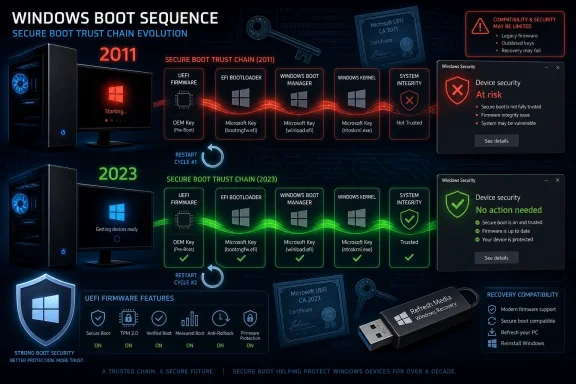
Microsoft will begin running into the first expirations of its original 2011 Secure Boot certificate chain in June 2026, forcing Windows PCs, servers, recovery media, and firmware ecosystems to move to newer 2023 certificates through a staged Windows Update process. The practical sign for many users will be mundane but unnerving: extra restarts, new Windows Security warnings, and a boot-security status that suddenly matters. The deeper story is that one of Windows’ least visible trust systems is becoming a live operational dependency. Microsoft is not merely patching Windows here; it is trying to rotate the cryptographic roots beneath the operating system without making millions of machines unbootable.
Secure Boot was supposed to be boring. Its job is to make sure a PC starts only with firmware, bootloaders, and early-boot components that are trusted before Windows ever gets a chance to defend itself. For more than a decade, that trust has leaned heavily on certificates issued in 2011, when UEFI Secure Boot was becoming a normal part of the Windows PC ecosystem.
Those certificates are now aging out. Microsoft’s current guidance says some of the original Secure Boot certificates begin expiring in June 2026, with other parts of the chain following later. That means the company has to move the ecosystem from the 2011-era trust anchors to newer 2023 certificates while preserving the ability of existing Windows installations, recovery environments, install media, and firmware implementations to start cleanly.
This is the sort of security maintenance that sounds simple until it touches firmware. A browser certificate expires, the browser gets a new trust store, and most users never notice. A Secure Boot certificate expires in the wrong place, and a device can lose the ability to validate boot components at the exact moment when no full operating system is available to help.
That is why Microsoft is moving cautiously. The update is not just another cumulative patch that drops files into
That does not mean Windows Update is broken. It means the update has to cross a boundary that normal patches rarely cross. Microsoft has described a multi-step sequence in which Windows pushes data toward firmware, then starts again to load newly signed boot components, then starts again so firmware can apply or recognize the updated trust state. Depending on the device, there may be more than one cycle before the system lands in the desired configuration.
The important distinction is between annoying and alarming. A PC that restarts more than once during a normal monthly patch cycle is usually a red flag for users trained by years of update mishaps. In this case, repeated restarts can be expected behavior, especially as the Secure Boot 2023 certificate update is rolled through cumulative updates and controlled targeting.
Still, Microsoft has a messaging problem. Telling people not to panic when their machine reboots repeatedly only works if the status reporting is clear, the failure modes are rare, and the recovery path is understandable. Firmware updates have a long history of making even experienced admins tense, and for good reason: when the boot chain is the object being changed, a bad outcome is not a broken app. It is a machine that may not start.
Windows has now reached that cliff. The original Secure Boot authorities were issued when Windows 8 was the new operating system, before Windows 10, before Windows 11, before today’s firmware security expectations, and before years of boot-level attacks forced the industry to take pre-OS security more seriously. The trust model persisted because changing it was disruptive.
That is the hidden bargain of platform security. A certificate that works for 15 years gives PC makers, OS vendors, Linux distributions, recovery-tool vendors, anti-cheat systems, enterprise imaging teams, and hardware accessory makers a stable target. But the longer that stability lasts, the more assumptions accumulate around it.
Now those assumptions have to be audited. Old boot media may not boot on future systems if it depends on retired trust anchors. Some devices may need firmware updates before Windows can safely apply the new certificates. Unsupported Windows versions may not receive the updates they need. Systems that sit offline in closets, disaster-recovery cabinets, classrooms, labs, or warehouses may age into a problem without anyone touching them.
A machine can have Secure Boot enabled and still be relying on an older boot trust configuration. It can have updated certificates available but not yet applied to firmware. It can be in a warning state that asks for action, or it can show a more serious status that suggests the device is not positioned to keep receiving boot-security updates normally.
For home users, the advice is blunt: install current Windows updates, let the system restart as needed, and check Windows Security if a warning appears. For IT pros, the dashboard is only the visible end of a larger inventory problem. Administrators need to know which devices are on supported Windows builds, which firmware revisions are current, which devices are managed by Windows Update or enterprise tooling, and which hardware models have known caveats.
The phrase “Secure Boot is on” is no longer sufficient evidence. The better question is whether the machine has moved to the newer trust chain and remains eligible for future boot-critical servicing, including revocation updates that block known-bad boot components.
The more realistic risk is quieter. Machines that do not receive or cannot apply the new certificates may continue to run, but with a degraded security posture. They may stop receiving certain boot-critical updates or revocation list updates that Secure Boot relies on to distrust compromised or vulnerable components.
That is arguably worse from a security perspective because it looks like normal operation. A user sees Windows load, opens a browser, checks email, and assumes the machine is fine. But the foundation that validates the earliest stages of the boot process may be stuck in an obsolete state.
Secure Boot is not magic, and it has never been a complete defense against all boot-level attacks. But it is one of the few controls that operates before Windows itself is alive. Letting its trust data stagnate is like keeping the front door locked while ignoring that the locksmith stopped updating the list of stolen keys.
A Windows 10 PC enrolled in an eligible Extended Security Updates path should be positioned to receive the relevant servicing, assuming the hardware and firmware cooperate. A Windows 10 PC outside that supported path is a different story. If it does not get the certificate update, it may be left behind as boot-security servicing moves forward.
That distinction will be easy for enthusiasts to understand and easy for ordinary users to miss. Many Windows 10 machines are perfectly capable PCs from a performance standpoint. Their owners may see no immediate reason to replace them, especially if Windows 11 hardware requirements already felt arbitrary or poorly explained.
But Secure Boot is not about whether a CPU can run the Start menu smoothly. It is about whether the device can participate in the current Windows trust ecosystem. That makes the ESU decision more than a monthly patch question; it becomes part of whether the machine can keep its pre-boot defenses current.
Microsoft’s controlled rollout is designed to reduce broad breakage, but it also means administrators need visibility into state, not just patch compliance. A device can be “up to date” by one dashboard and still not have completed the Secure Boot certificate workflow. Reboot deferrals, maintenance windows, BitLocker policies, and firmware readiness all matter.
The BitLocker angle deserves particular caution. Any change to boot measurements can interact with BitLocker recovery behavior, especially on systems with specific PCR and Secure Boot configurations. Microsoft and OEMs have been working around known issues, but admins should not assume that a certificate rotation touching the boot chain is operationally identical to a .NET patch.
The right enterprise playbook is boring but necessary: pilot representative hardware, validate BitLocker recovery readiness, update firmware where required, monitor Windows Security or management signals, and avoid doing the first real test on an executive laptop Monday morning.
That does not mean every USB stick in a drawer becomes useless overnight. It does mean organizations should stop assuming that a recovery drive created years ago will remain compatible with a refreshed trust chain. The failure mode here is brutal because recovery media is usually needed when something else has already gone wrong.
This is where IT hygiene meets security reality. Disaster recovery plans often document which image to deploy, which server to restore, or which account can retrieve a BitLocker key. They less often document whether the bootable media itself is signed in a way the target firmware will trust after a certificate transition.
For WindowsForum readers, this is a good week to remake critical install and recovery media from current sources, not because panic is warranted, but because stale boot media is the kind of problem that hides until the worst possible day.
For most mainstream Linux users, the major distributions have had years of experience working within Secure Boot constraints. But dual-boot systems are always more fragile than single-OS configurations because they depend on multiple vendors, shims, bootloaders, and firmware behaviors lining up. A certificate transition increases the number of things that can be almost right but not quite.
Gamers may see this through the anti-cheat lens. Some competitive titles and anti-cheat systems rely on Secure Boot or related platform-integrity signals to decide whether a machine is in a trusted state. A PC stuck on old certificates may not fail immediately, but the direction of travel is obvious: more software will treat modern Secure Boot posture as part of the baseline.
That is uncomfortable for users who dislike firmware-enforced trust chains, and there are legitimate debates about control, repairability, and alternative operating systems. But the mainstream PC market has already chosen Secure Boot as a default defense. The certificate rotation is not creating that reality; it is exposing how dependent the ecosystem has become on it.
It is also inherently opaque. Users want a clean answer: “Will my PC be updated before the certificates expire?” Administrators want a reportable state: “Which devices are done, which are pending, and which are blocked?” Microsoft can provide some of that through Windows Security and enterprise tooling, but controlled rollouts always create a gray zone between “not yet targeted” and “unable to update.”
This is where trust in Windows Update becomes part of the story. Microsoft is asking users to accept multiple restarts, new warnings, and firmware-adjacent changes because the alternative is worse. That request lands in a market where Windows Update’s reputation is mixed, to put it gently.
The company can reduce anxiety by being precise. A restart loop is different from a planned sequence of reboots. A yellow warning is different from a red failure state. A device waiting for rollout is different from a device that will never be serviced. The more Microsoft compresses those distinctions into generic update language, the more users will fill the gaps with fear.
Newer PCs, especially systems shipped with updated certificates or recent firmware, should be in the best shape. Older machines may need BIOS or UEFI updates from the manufacturer. Some niche devices may be dependent on vendors that are slow, vague, or no longer interested in supporting products that are still in use but no longer profitable.
This is not new. Firmware has always been the least consumer-friendly layer of PC maintenance. Update tools vary wildly, release notes can be thin, and many users are understandably reluctant to flash a BIOS unless something is visibly broken.
But Secure Boot certificate expiration makes firmware maintenance a security dependency rather than a performance tweak. The PC industry has spent years pushing more trust into hardware-backed and firmware-mediated systems. It now has to prove that the maintenance culture around those systems is mature enough to handle routine cryptographic turnover.
That invisibility was a success until it wasn’t. Secure Boot worked best when nobody had to know which certificate signed which boot component. But as soon as the trust chain changes, the abstraction leaks. Suddenly users are checking Windows Security badges, admins are auditing firmware versions, and tech sites are explaining why three restarts may be normal.
Microsoft’s challenge is to make the transition feel like maintenance rather than emergency surgery. That means minimizing failures, surfacing clear status, and giving unsupported users an honest account of their risk. It also means not pretending that every affected machine will glide through the process automatically.
The broader lesson is that security features age. A PC that was secure by 2016 assumptions is not necessarily secure by 2026 assumptions. Trust is not a static setting in firmware; it is a relationship among keys, vendors, operating systems, and update channels that has to be renewed.
 Microsoft Is Replacing the Locks While the House Is Occupied
Secure Boot was supposed to be boring. Its job is to make sure a PC starts only with firmware, bootloaders, and early-boot components that are trusted before Windows ever gets a chance to defend itself. For more than a decade, that trust has leaned heavily on certificates issued in 2011, when UEFI Secure Boot was becoming a normal part of the Windows PC ecosystem.Those certificates are now aging out. Microsoft’s current guidance says some of the original Secure Boot certificates begin expiring in June 2026, with other parts of the chain following later. That means the company has to move the ecosystem from the 2011-era trust anchors to newer 2023 certificates while preserving the ability of existing Windows installations, recovery environments, install media, and firmware implementations to start cleanly.
This is the sort of security maintenance that sounds simple until it touches firmware. A browser certificate expires, the browser gets a new trust store, and most users never notice. A Secure Boot certificate expires in the wrong place, and a device can lose the ability to validate boot components at the exact moment when no full operating system is available to help.
That is why Microsoft is moving cautiously. The update is not just another cumulative patch that drops files into
System32 and calls it a day. It involves Windows, the boot manager, UEFI firmware variables, OEM implementation details, BitLocker behavior, revocation lists, and a phased rollout mechanism that tries to decide which machines are ready to absorb the change.The Extra Restart Is a Symptom, Not the Disease
The headline-grabbing change is the restart behavior. Earlier messaging around the Secure Boot certificate refresh had prepared users for an extra reboot on some systems. The newer warning is broader: some Windows 11 systems may restart multiple times as Windows stages and applies the new Secure Boot material.That does not mean Windows Update is broken. It means the update has to cross a boundary that normal patches rarely cross. Microsoft has described a multi-step sequence in which Windows pushes data toward firmware, then starts again to load newly signed boot components, then starts again so firmware can apply or recognize the updated trust state. Depending on the device, there may be more than one cycle before the system lands in the desired configuration.
The important distinction is between annoying and alarming. A PC that restarts more than once during a normal monthly patch cycle is usually a red flag for users trained by years of update mishaps. In this case, repeated restarts can be expected behavior, especially as the Secure Boot 2023 certificate update is rolled through cumulative updates and controlled targeting.
Still, Microsoft has a messaging problem. Telling people not to panic when their machine reboots repeatedly only works if the status reporting is clear, the failure modes are rare, and the recovery path is understandable. Firmware updates have a long history of making even experienced admins tense, and for good reason: when the boot chain is the object being changed, a bad outcome is not a broken app. It is a machine that may not start.
The 2011 Trust Chain Was Always Going to Become Technical Debt
The fact that Microsoft is rotating Secure Boot certificates after roughly 15 years should not be read as a surprise failure. Cryptographic infrastructure expires by design. Long-lived certificates are convenient because they reduce churn across hardware, software, and vendors, but they also create a future cliff where the entire ecosystem has to move.Windows has now reached that cliff. The original Secure Boot authorities were issued when Windows 8 was the new operating system, before Windows 10, before Windows 11, before today’s firmware security expectations, and before years of boot-level attacks forced the industry to take pre-OS security more seriously. The trust model persisted because changing it was disruptive.
That is the hidden bargain of platform security. A certificate that works for 15 years gives PC makers, OS vendors, Linux distributions, recovery-tool vendors, anti-cheat systems, enterprise imaging teams, and hardware accessory makers a stable target. But the longer that stability lasts, the more assumptions accumulate around it.
Now those assumptions have to be audited. Old boot media may not boot on future systems if it depends on retired trust anchors. Some devices may need firmware updates before Windows can safely apply the new certificates. Unsupported Windows versions may not receive the updates they need. Systems that sit offline in closets, disaster-recovery cabinets, classrooms, labs, or warehouses may age into a problem without anyone touching them.
The Windows Security App Becomes the New Dashboard for a Firmware Problem
One useful change is that Microsoft has updated the Windows Security app to show Secure Boot certificate update status. That matters because the old user experience around Secure Boot was mostly binary: either Secure Boot was on, or it was off. That was never enough detail for this transition.A machine can have Secure Boot enabled and still be relying on an older boot trust configuration. It can have updated certificates available but not yet applied to firmware. It can be in a warning state that asks for action, or it can show a more serious status that suggests the device is not positioned to keep receiving boot-security updates normally.
For home users, the advice is blunt: install current Windows updates, let the system restart as needed, and check Windows Security if a warning appears. For IT pros, the dashboard is only the visible end of a larger inventory problem. Administrators need to know which devices are on supported Windows builds, which firmware revisions are current, which devices are managed by Windows Update or enterprise tooling, and which hardware models have known caveats.
The phrase “Secure Boot is on” is no longer sufficient evidence. The better question is whether the machine has moved to the newer trust chain and remains eligible for future boot-critical servicing, including revocation updates that block known-bad boot components.
The Real Risk Is Not Instant Failure; It Is Security Decay
The scariest version of this story is that millions of PCs suddenly fail to boot in June. That is not the most likely outcome for a normal, patched, supported Windows 11 machine. Microsoft has been preparing the update path, OEMs have had time to ship firmware support, and the rollout is being governed rather than blasted indiscriminately to every PC at once.The more realistic risk is quieter. Machines that do not receive or cannot apply the new certificates may continue to run, but with a degraded security posture. They may stop receiving certain boot-critical updates or revocation list updates that Secure Boot relies on to distrust compromised or vulnerable components.
That is arguably worse from a security perspective because it looks like normal operation. A user sees Windows load, opens a browser, checks email, and assumes the machine is fine. But the foundation that validates the earliest stages of the boot process may be stuck in an obsolete state.
Secure Boot is not magic, and it has never been a complete defense against all boot-level attacks. But it is one of the few controls that operates before Windows itself is alive. Letting its trust data stagnate is like keeping the front door locked while ignoring that the locksmith stopped updating the list of stolen keys.
Windows 10 Turns This Into a Support-Status Test
The Secure Boot deadline lands at an awkward moment for Windows 10. Microsoft’s mainstream support lifecycle has already pushed many users toward Windows 11, while Extended Security Updates remain the bridge for organizations and individuals who cannot move immediately. The Secure Boot certificate transition adds another reason unsupported Windows 10 machines should not be treated as merely “old but fine.”A Windows 10 PC enrolled in an eligible Extended Security Updates path should be positioned to receive the relevant servicing, assuming the hardware and firmware cooperate. A Windows 10 PC outside that supported path is a different story. If it does not get the certificate update, it may be left behind as boot-security servicing moves forward.
That distinction will be easy for enthusiasts to understand and easy for ordinary users to miss. Many Windows 10 machines are perfectly capable PCs from a performance standpoint. Their owners may see no immediate reason to replace them, especially if Windows 11 hardware requirements already felt arbitrary or poorly explained.
But Secure Boot is not about whether a CPU can run the Start menu smoothly. It is about whether the device can participate in the current Windows trust ecosystem. That makes the ESU decision more than a monthly patch question; it becomes part of whether the machine can keep its pre-boot defenses current.
Enterprises Have a Firmware Change Disguised as a Windows Update
For enterprise IT, the certificate rotation is less a Windows Update event than a fleet-management exercise. The dangerous machines are not necessarily the everyday laptops that check in daily, reboot regularly, and run a supported OS. They are the edge cases: devices in storage, kiosks, lab machines, dual-boot systems, servers with conservative reboot windows, specialized hardware with vendor-controlled images, and endpoints where firmware updates have been deferred for years.Microsoft’s controlled rollout is designed to reduce broad breakage, but it also means administrators need visibility into state, not just patch compliance. A device can be “up to date” by one dashboard and still not have completed the Secure Boot certificate workflow. Reboot deferrals, maintenance windows, BitLocker policies, and firmware readiness all matter.
The BitLocker angle deserves particular caution. Any change to boot measurements can interact with BitLocker recovery behavior, especially on systems with specific PCR and Secure Boot configurations. Microsoft and OEMs have been working around known issues, but admins should not assume that a certificate rotation touching the boot chain is operationally identical to a .NET patch.
The right enterprise playbook is boring but necessary: pilot representative hardware, validate BitLocker recovery readiness, update firmware where required, monitor Windows Security or management signals, and avoid doing the first real test on an executive laptop Monday morning.
Recovery Media Is Where the Past Comes Back to Bite
One of the least glamorous but most important parts of the transition is bootable media. Recovery drives, old Windows installation ISOs, imaging tools, rescue environments, and vendor utilities may depend on older Secure Boot signing assumptions. As the ecosystem moves to 2023 certificates, some old media may not boot under Secure Boot on newly updated or newly shipped systems.That does not mean every USB stick in a drawer becomes useless overnight. It does mean organizations should stop assuming that a recovery drive created years ago will remain compatible with a refreshed trust chain. The failure mode here is brutal because recovery media is usually needed when something else has already gone wrong.
This is where IT hygiene meets security reality. Disaster recovery plans often document which image to deploy, which server to restore, or which account can retrieve a BitLocker key. They less often document whether the bootable media itself is signed in a way the target firmware will trust after a certificate transition.
For WindowsForum readers, this is a good week to remake critical install and recovery media from current sources, not because panic is warranted, but because stale boot media is the kind of problem that hides until the worst possible day.
Linux, Anti-Cheat, and Dual-Boot Users Are Part of the Blast Radius
Although this is framed as a Windows story, Secure Boot is not used only by Windows. Linux distributions, third-party bootloaders, kernel-level anti-cheat systems, endpoint security products, and specialized boot tools all operate around the same trust terrain. The move from 2011 to 2023 certificates therefore has consequences outside Microsoft’s own boot manager.For most mainstream Linux users, the major distributions have had years of experience working within Secure Boot constraints. But dual-boot systems are always more fragile than single-OS configurations because they depend on multiple vendors, shims, bootloaders, and firmware behaviors lining up. A certificate transition increases the number of things that can be almost right but not quite.
Gamers may see this through the anti-cheat lens. Some competitive titles and anti-cheat systems rely on Secure Boot or related platform-integrity signals to decide whether a machine is in a trusted state. A PC stuck on old certificates may not fail immediately, but the direction of travel is obvious: more software will treat modern Secure Boot posture as part of the baseline.
That is uncomfortable for users who dislike firmware-enforced trust chains, and there are legitimate debates about control, repairability, and alternative operating systems. But the mainstream PC market has already chosen Secure Boot as a default defense. The certificate rotation is not creating that reality; it is exposing how dependent the ecosystem has become on it.
Microsoft’s Controlled Rollout Is Both Sensible and Opaque
Microsoft is using signals from devices to decide when and how to deliver the Secure Boot certificate updates. In plain English, the company is trying to avoid handing a firmware-touching update to machines that are not ready for it. That is the right instinct.It is also inherently opaque. Users want a clean answer: “Will my PC be updated before the certificates expire?” Administrators want a reportable state: “Which devices are done, which are pending, and which are blocked?” Microsoft can provide some of that through Windows Security and enterprise tooling, but controlled rollouts always create a gray zone between “not yet targeted” and “unable to update.”
This is where trust in Windows Update becomes part of the story. Microsoft is asking users to accept multiple restarts, new warnings, and firmware-adjacent changes because the alternative is worse. That request lands in a market where Windows Update’s reputation is mixed, to put it gently.
The company can reduce anxiety by being precise. A restart loop is different from a planned sequence of reboots. A yellow warning is different from a red failure state. A device waiting for rollout is different from a device that will never be serviced. The more Microsoft compresses those distinctions into generic update language, the more users will fill the gaps with fear.
The PC Industry’s Security Model Depends on Vendors Not Disappearing
The certificate rotation also highlights a structural weakness in the Windows hardware ecosystem: firmware support is uneven. Microsoft can ship Windows updates, but the firmware that stores and enforces Secure Boot variables comes from OEMs and platform vendors. If that firmware is old, buggy, or abandoned, Windows can only do so much.Newer PCs, especially systems shipped with updated certificates or recent firmware, should be in the best shape. Older machines may need BIOS or UEFI updates from the manufacturer. Some niche devices may be dependent on vendors that are slow, vague, or no longer interested in supporting products that are still in use but no longer profitable.
This is not new. Firmware has always been the least consumer-friendly layer of PC maintenance. Update tools vary wildly, release notes can be thin, and many users are understandably reluctant to flash a BIOS unless something is visibly broken.
But Secure Boot certificate expiration makes firmware maintenance a security dependency rather than a performance tweak. The PC industry has spent years pushing more trust into hardware-backed and firmware-mediated systems. It now has to prove that the maintenance culture around those systems is mature enough to handle routine cryptographic turnover.
The Calendar Finally Catches Up With Invisible Infrastructure
The most useful way to understand this moment is not as a Windows crisis, but as a calendar-driven reckoning for invisible infrastructure. Certificates expire. Revocation lists grow. Bootloaders are replaced. Attackers adapt. The strange part is not that Microsoft has to rotate Secure Boot trust; the strange part is that the PC ecosystem went so long without most users needing to think about it.That invisibility was a success until it wasn’t. Secure Boot worked best when nobody had to know which certificate signed which boot component. But as soon as the trust chain changes, the abstraction leaks. Suddenly users are checking Windows Security badges, admins are auditing firmware versions, and tech sites are explaining why three restarts may be normal.
Microsoft’s challenge is to make the transition feel like maintenance rather than emergency surgery. That means minimizing failures, surfacing clear status, and giving unsupported users an honest account of their risk. It also means not pretending that every affected machine will glide through the process automatically.
The broader lesson is that security features age. A PC that was secure by 2016 assumptions is not necessarily secure by 2026 assumptions. Trust is not a static setting in firmware; it is a relationship among keys, vendors, operating systems, and update channels that has to be renewed.
The June Secure Boot Deadline Leaves Users With Practical Homework
The immediate task is not to panic-reinstall Windows or disable Secure Boot. It is to make sure the machine is supported, updated, and allowed to finish the certificate workflow. For most users, that means the boring advice is also the correct advice: install updates, reboot when asked, and check the Windows Security app if it raises a Secure Boot certificate warning.- Windows PCs using the older 2011 Secure Boot certificates need to move to the newer 2023 trust chain as certificate expirations begin in June 2026.
- Multiple restarts after recent or upcoming Windows updates can be expected on some systems because the update has to coordinate Windows boot components with UEFI firmware.
- A green Secure Boot status in Windows Security is the state users want, while amber or red warnings should be treated as prompts to update, reboot, or investigate firmware readiness.
- Windows 10 machines outside an eligible Extended Security Updates path are at greater risk of being left with degraded boot-security servicing.
- IT administrators should validate firmware, BitLocker recovery readiness, recovery media, and pilot-device behavior before assuming fleetwide compliance.
- Old installation or rescue media should be refreshed from current sources so that recovery plans do not depend on retired Secure Boot assumptions.
References
- Primary source: Forbes
Published: Tue, 26 May 2026 06:45:26 GMT
Loading…
www.forbes.com - Official source: support.microsoft.com
Surface Secure Boot Certificates | Microsoft Support
Secure Boot in UEFI firmware verifies pre-boot software using trusted certificates. Microsoft will update expiring Windows Secure Boot certificates starting June 2026 to maintain device protection. support.microsoft.com
- Official source: learn.microsoft.com

Update Secure Boot Certificates for Windows Devices - Windows Client
Update your Windows devices to maintain Secure Boot protection with 2023 certificates before they expire in June 2026.learn.microsoft.com - Official source: microsoft.com

Prepare your servers for Secure Boot certificate updates | Microsoft Windows Server Blog
The original Secure Boot certificates introduced in 2011 are approaching the end of their planned lifecycle, with expirations beginning in late June 2026. www.microsoft.com
- Related coverage: windowslatest.com

Microsoft reveals what happens to Windows 11 PCs if you ignore the Secure Boot deadline in June 2026
Microsoft warns Windows 11 PCs without the new Secure Boot certificates may lose future protections, boot security updates, and upgrades. www.windowslatest.com
- Related coverage: pcworld.com

Windows 11 restarts several times after a recent update? Don't panic
Microsoft says it's normal if Windows 11 restarts two or three times after recent or upcoming updates. Here's what you should do afterwards. www.pcworld.com
- Related coverage: allthings.how
Windows 11 KB5083631 Extra Restart Explained (Secure Boot Certificate Update)
Why the April 2026 preview update can reboot twice on some PCs, plus the BitLocker recovery prompt to watch for. allthings.how
- Related coverage: windowscentral.com
Microsoft warns Secure Boot certificates will expire soon — what to expect
After 15 years, the original Secure Boot certificates that keep your PC secure during boot are expiring. Here's what you need to know. www.windowscentral.com
- Related coverage: tomshardware.com
Microsoft is refreshing Secure Boot certificates to plug security holes before they happen — if you bought a PC last year, you should be set
Be sure to keep Windows 11 systems updated to get refreshed security certificates.www.tomshardware.com
- Related coverage: techradar.com
Loading…
www.techradar.com - Related coverage: pcgamer.com
