

Admins should not blindly block all external Microsoft Teams communication in response to fake IT support calls pushing EtherRAT-style malware; they should restrict high-risk external chat and calling paths, enable user call reporting where licensing allows, and add helpdesk verification before remote support is approved.
That is the practical answer because the attack is not really “Teams malware.” It is social engineering using Teams as a trusted delivery channel, then leaning on the victim’s assumption that a call inside the work collaboration app must be legitimate. Microsoft’s own documentation already gives administrators several levers: external-chat warnings, accept-or-block prompts for outside conversations, call reporting for eligible Defender customers, and policy controls around calling. The hard part is deciding which levers to pull without turning Teams into a walled garden that breaks vendor support, customer collaboration, and incident response.
The fake IT support call is effective because Teams occupies a privileged mental space. Users may distrust random email, unknown SMS messages, and browser pop-ups, but a Teams call feels like work. It carries the visual grammar of internal collaboration even when the caller is external.
That makes a blanket “educate users better” response inadequate. Training helps, but the interface still delivers the attacker to the user’s desk with a ring, a name, and a plausible pretext. If a tenant allows broad external communication, the organization has effectively decided that strangers can request real-time attention from employees inside a business-critical app.
The opposite answer, however, is also too crude. Many organizations use Teams for legitimate vendor support, managed service provider communication, customer meetings, recruiting, partner engineering, legal coordination, and emergency troubleshooting. Blocking all external chat and calling may reduce one attack path while pushing employees toward personal email, unsanctioned messaging apps, or ad hoc screen-sharing tools with weaker oversight.
So the decision is not whether Teams is safe or unsafe. The decision is which users need external reachability, which external domains deserve trust, and which interactions should require verification before they become remote support.
Microsoft also says users can report suspicious Teams calls as a security concern in organizations with Microsoft Defender for Office 365 Plan 2 or Microsoft Defender XDR. The reporting path is not a substitute for prevention, but it turns scattered user suspicion into a security signal. For admins, that is the difference between “someone in accounting got a weird call” and a trackable event that security staff can review.
Teams support documentation also makes clear why this channel is attractive to attackers. Calls can be placed from chat, and external callers can still reach users in many common workflows. A collaboration tool designed to reduce friction between people can also reduce friction for impersonation.
Microsoft’s scam guidance supplies the simplest user-facing rule: Microsoft will not call users to offer unsolicited tech support. That statement should be written into every helpdesk verification script and every Teams security awareness message. If the caller claims to be Microsoft, the answer is not “let me check”; it is “hang up and report.”
For many tenants, the best default is to allow external collaboration only where there is a business reason and to narrow that reason as much as possible. That can mean domain allow lists for known vendors and partners, tighter policy assignments for sensitive departments, or disabling external communication for groups that have no operational need to receive it. The goal is not purity; it is exposure management.
High-risk groups deserve special treatment. Finance, HR, executive assistants, service desk staff, privileged administrators, and employees with access to payment, payroll, identity, or endpoint management systems are all attractive targets. If those users need vendor interaction, give them a controlled path rather than broad external reachability.
The trade-off is real. Over-restrict external chat and business teams will complain that Teams no longer reflects how they work. Under-restrict it and security teams will be left investigating why unknown outsiders could repeatedly reach employees inside a trusted communications surface.
Admins should treat external calling as a higher-risk capability than external chat. If users do not need to receive calls from outside the organization, they should not have that ability merely because the default collaboration model made it convenient. If they do need it, the organization should decide what verification must happen before the call turns into remote troubleshooting, credential discussion, file download, or screen sharing.
This is where many security programs fail. They debate whether to block Teams calls but leave the remote-support ritual untouched. The attacker does not need Teams to be malicious; the attacker needs the user to accept the premise that “IT” is calling and that the next step is normal.
A better model separates communication from authorization. External callers may be allowed to speak with users, but they are not allowed to initiate support actions unless the user can verify the request through an internal ticket, an approved helpdesk number, or a known vendor contact method. That distinction preserves legitimate support while removing the attacker’s favorite shortcut.
That matters because employees often do not know where to send ambiguous security concerns. They may message a manager, ignore the event, or tell a nearby coworker. A reporting option in the same app where the suspicious interaction occurred lowers the effort required to raise the alarm.
But reporting should not be oversold. It does not prevent the first call, and it does not guarantee that a user will report before following instructions. It is a detection and feedback mechanism. It helps security teams identify patterns, tune policy, and respond when a campaign is testing the tenant.
The best use of call reporting is cultural as much as technical. Tell users, plainly, that reporting a suspicious call is not overreacting and will not get them blamed. A security program that punishes embarrassment will receive fewer reports than one that treats early reporting as a successful control.
Every organization should have a simple rule: unsolicited support contacts must be verified out of band before the user takes action. That means the employee ends the call or pauses the interaction, then contacts the helpdesk through a known internal channel. If the support request is real, the helpdesk can confirm it.
This is not just user training; it is process design. The legitimate helpdesk must be willing to tolerate verification pauses. Vendors must know that employees are instructed not to proceed on cold contact alone. Managers must stop treating skepticism as obstruction.
The policy should be concrete. Users should not install software, approve remote access, share codes, disclose credentials, change security settings, or run commands because someone called them on Teams. If support is legitimate, it can survive a verification step.
The answer is to formalize vendor support instead of leaving it to improvisation. Known vendor domains can be treated differently from unknown external contacts. Specific users or groups can be allowed to communicate externally because their role requires it. Support sessions can be tied to tickets, named contacts, and expected windows.
That approach accepts some risk in exchange for business continuity. It also makes the accepted risk visible. A tenant where everyone can receive external support calls is not agile; it is undefined. A tenant where only designated users can do so, under a verification process, is making a defensible trade.
The key is to avoid security theater. If the vendor allow list is never reviewed, if shared mailboxes receive support requests with no ownership, or if employees are told to “verify” without being given a working verification channel, the policy will collapse under operational pressure.
That is why the strongest organizations will treat Teams hardening as an identity and endpoint problem, not merely a communications problem. Who can receive external contact? Who can approve remote support? Who has local admin rights? Who can access sensitive systems from a device after a suspicious interaction? Those questions matter more than whether the first lure arrived by email, chat, or voice.
WindowsForum readers have already been circling this broader pattern in discussions of Teams social engineering, Quick Assist abuse, and RAT delivery. The common thread is not one malware family or one app setting. It is the attacker’s ability to move from a trusted communication surface into hands-on-keyboard influence over a Windows endpoint.
That is why the decision framework should start with Teams but not end there. If a user can be talked into granting remote access and then the endpoint allows dangerous follow-on actions, a communications control has merely shifted the problem downstream.
That distinction matters for admins. If the response is framed as a specific malware emergency, organizations may chase indicators while leaving the workflow exposed. If the response is framed as a collaboration-trust problem, they can improve defenses against the next RAT, the next remote-support pretext, and the next impersonation campaign.
The most durable fix is not a signature. It is a decision model. External chat and calls should exist where they serve a business purpose, reporting should be available where the licensing supports it, and support actions should require independent verification.
This is also why the old tech-support-scam warning remains relevant. Microsoft’s guidance that it will not make unsolicited support calls may sound basic, but basic rules are useful when attackers rely on confusion. The user does not need to identify EtherRAT during a live call; the user needs to know that unsolicited “Microsoft support” contact is not a valid reason to cooperate.
For low-exposure users, blocking or heavily restricting external chat and calls is often the cleanest choice. If their job does not involve external collaboration, there is little benefit in letting unknown outsiders reach them through Teams. Convenience is not a security requirement.
For business-facing users, allow external communication but narrow it. Prefer known domains, expected relationships, and documented workflows. Give these users a clear script: if a caller asks for support actions, stop and verify through the internal helpdesk.
For IT, security, and executive-support workflows, assume impersonation attempts will happen. These groups should have the strongest verification rules because attackers have the most to gain from convincing them. A Teams call from an outsider should never be enough to authorize remote access or sensitive changes.
That last clause is the difference between policy and defense. A verification process that requires users to find an obscure intranet page during a live social-engineering call will fail. A process that says “hang up, call the internal helpdesk number, and reference the ticket” is memorable.
Security teams should also test the workflow. Ask a sample of users what they would do if “Microsoft support” called them in Teams. If the answer is hesitation, the organization has work to do. If the answer is “I would report it and verify through helpdesk,” the control is becoming culture.
This is where admins can move faster than the news cycle. You do not need to wait for a complete campaign teardown to reduce exposure. The vendor documentation already describes enough of the relevant Teams behavior and reporting controls to justify a measured hardening pass.
The trick is adding friction at the moments attackers need speed. Force unknown external contacts through user acceptance and warning surfaces. Limit who can receive external calls. Require helpdesk verification before remote support. Encourage one-click reporting where Microsoft’s licensing and configuration support it.
That friction should be visible to users, not hidden in administrative abstraction. If employees understand why an external caller is treated differently, they are more likely to respect the boundary. If they only experience broken workflows, they will route around the control.
Admins should therefore measure the policy by two outcomes. First, can legitimate vendors still support the business through approved channels? Second, would a fake IT support caller have to overcome multiple independent checks before touching a Windows endpoint? If the answer to both is yes, the organization has likely found the right middle.
That is the practical answer because the attack is not really “Teams malware.” It is social engineering using Teams as a trusted delivery channel, then leaning on the victim’s assumption that a call inside the work collaboration app must be legitimate. Microsoft’s own documentation already gives administrators several levers: external-chat warnings, accept-or-block prompts for outside conversations, call reporting for eligible Defender customers, and policy controls around calling. The hard part is deciding which levers to pull without turning Teams into a walled garden that breaks vendor support, customer collaboration, and incident response.
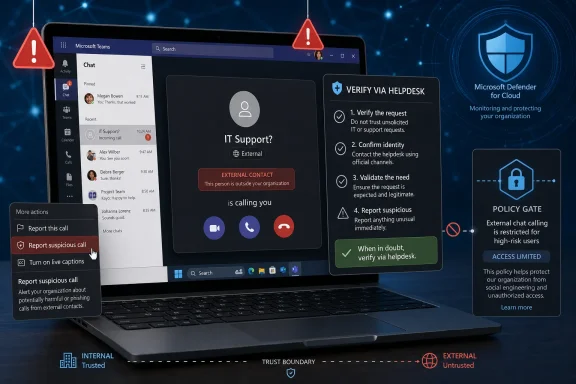 The Right Default Is Not “Allow Everything” or “Block Everything”
The fake IT support call is effective because Teams occupies a privileged mental space. Users may distrust random email, unknown SMS messages, and browser pop-ups, but a Teams call feels like work. It carries the visual grammar of internal collaboration even when the caller is external.That makes a blanket “educate users better” response inadequate. Training helps, but the interface still delivers the attacker to the user’s desk with a ring, a name, and a plausible pretext. If a tenant allows broad external communication, the organization has effectively decided that strangers can request real-time attention from employees inside a business-critical app.
The opposite answer, however, is also too crude. Many organizations use Teams for legitimate vendor support, managed service provider communication, customer meetings, recruiting, partner engineering, legal coordination, and emergency troubleshooting. Blocking all external chat and calling may reduce one attack path while pushing employees toward personal email, unsanctioned messaging apps, or ad hoc screen-sharing tools with weaker oversight.
So the decision is not whether Teams is safe or unsafe. The decision is which users need external reachability, which external domains deserve trust, and which interactions should require verification before they become remote support.
Microsoft’s Own Controls Point to a Middle Path
Microsoft documents protections for external Teams chats, including warnings for spam or phishing and the ability for users to accept or block outside conversations. That matters because the first defensive moment is not at malware execution; it is at contact initiation. If an unknown external user can start a conversation and escalate to a call, the tenant’s policy has already shaped the attack surface.Microsoft also says users can report suspicious Teams calls as a security concern in organizations with Microsoft Defender for Office 365 Plan 2 or Microsoft Defender XDR. The reporting path is not a substitute for prevention, but it turns scattered user suspicion into a security signal. For admins, that is the difference between “someone in accounting got a weird call” and a trackable event that security staff can review.
Teams support documentation also makes clear why this channel is attractive to attackers. Calls can be placed from chat, and external callers can still reach users in many common workflows. A collaboration tool designed to reduce friction between people can also reduce friction for impersonation.
Microsoft’s scam guidance supplies the simplest user-facing rule: Microsoft will not call users to offer unsolicited tech support. That statement should be written into every helpdesk verification script and every Teams security awareness message. If the caller claims to be Microsoft, the answer is not “let me check”; it is “hang up and report.”
Tighten External Chat First Because It Is the Doorbell
External chat is the natural first control to examine because it is often the attacker’s opening move. A chat message creates context, establishes a pretext, and gives the attacker a way to push the user toward a call. Once a conversation exists, the eventual voice or video call feels less random.For many tenants, the best default is to allow external collaboration only where there is a business reason and to narrow that reason as much as possible. That can mean domain allow lists for known vendors and partners, tighter policy assignments for sensitive departments, or disabling external communication for groups that have no operational need to receive it. The goal is not purity; it is exposure management.
High-risk groups deserve special treatment. Finance, HR, executive assistants, service desk staff, privileged administrators, and employees with access to payment, payroll, identity, or endpoint management systems are all attractive targets. If those users need vendor interaction, give them a controlled path rather than broad external reachability.
The trade-off is real. Over-restrict external chat and business teams will complain that Teams no longer reflects how they work. Under-restrict it and security teams will be left investigating why unknown outsiders could repeatedly reach employees inside a trusted communications surface.
Keep External Calling Only Where the Business Can Defend It
Teams calling is more psychologically powerful than chat because it compresses the decision cycle. A user can ignore a suspicious message, forward it, or think about it. A call demands a live response, and social engineers use that immediacy to manufacture urgency.Admins should treat external calling as a higher-risk capability than external chat. If users do not need to receive calls from outside the organization, they should not have that ability merely because the default collaboration model made it convenient. If they do need it, the organization should decide what verification must happen before the call turns into remote troubleshooting, credential discussion, file download, or screen sharing.
This is where many security programs fail. They debate whether to block Teams calls but leave the remote-support ritual untouched. The attacker does not need Teams to be malicious; the attacker needs the user to accept the premise that “IT” is calling and that the next step is normal.
A better model separates communication from authorization. External callers may be allowed to speak with users, but they are not allowed to initiate support actions unless the user can verify the request through an internal ticket, an approved helpdesk number, or a known vendor contact method. That distinction preserves legitimate support while removing the attacker’s favorite shortcut.
User Call Reporting Is a Sensor, Not a Shield
If the tenant has Microsoft Defender for Office 365 Plan 2 or Microsoft Defender XDR, admins should enable Teams call reporting unless there is a specific operational reason not to. Microsoft describes this as a way for users to report malicious or suspicious calls, and for security admins to gain visibility into those reports. In practical terms, it gives users a sanctioned button to press when something feels wrong.That matters because employees often do not know where to send ambiguous security concerns. They may message a manager, ignore the event, or tell a nearby coworker. A reporting option in the same app where the suspicious interaction occurred lowers the effort required to raise the alarm.
But reporting should not be oversold. It does not prevent the first call, and it does not guarantee that a user will report before following instructions. It is a detection and feedback mechanism. It helps security teams identify patterns, tune policy, and respond when a campaign is testing the tenant.
The best use of call reporting is cultural as much as technical. Tell users, plainly, that reporting a suspicious call is not overreacting and will not get them blamed. A security program that punishes embarrassment will receive fewer reports than one that treats early reporting as a successful control.
The Helpdesk Verification Step Is Where the Attack Either Dies or Wins
The most important control may not be in Teams at all. It is the helpdesk verification process. Fake IT support calls work because users are conditioned to cooperate with technical authority, especially when the caller appears to know the company, the tool, or the supposed incident.Every organization should have a simple rule: unsolicited support contacts must be verified out of band before the user takes action. That means the employee ends the call or pauses the interaction, then contacts the helpdesk through a known internal channel. If the support request is real, the helpdesk can confirm it.
This is not just user training; it is process design. The legitimate helpdesk must be willing to tolerate verification pauses. Vendors must know that employees are instructed not to proceed on cold contact alone. Managers must stop treating skepticism as obstruction.
The policy should be concrete. Users should not install software, approve remote access, share codes, disclose credentials, change security settings, or run commands because someone called them on Teams. If support is legitimate, it can survive a verification step.
Vendor Support Needs a Gate, Not a Blindfold
The strongest argument against tightening Teams is that outside support is real. Managed service providers, software vendors, consultants, and hardware support teams often need to reach employees quickly. A security policy that ignores that reality will be bypassed.The answer is to formalize vendor support instead of leaving it to improvisation. Known vendor domains can be treated differently from unknown external contacts. Specific users or groups can be allowed to communicate externally because their role requires it. Support sessions can be tied to tickets, named contacts, and expected windows.
That approach accepts some risk in exchange for business continuity. It also makes the accepted risk visible. A tenant where everyone can receive external support calls is not agile; it is undefined. A tenant where only designated users can do so, under a verification process, is making a defensible trade.
The key is to avoid security theater. If the vendor allow list is never reviewed, if shared mailboxes receive support requests with no ownership, or if employees are told to “verify” without being given a working verification channel, the policy will collapse under operational pressure.
Windows Admins Should Think Like Identity Teams, Not Phone Teams
A Teams call that leads to malware is usually part of a chain. The call establishes trust. The attacker asks the user to take an action. That action may involve remote support, file access, credential entry, or configuration changes. The real target is not the ringing notification; it is the user’s authority.That is why the strongest organizations will treat Teams hardening as an identity and endpoint problem, not merely a communications problem. Who can receive external contact? Who can approve remote support? Who has local admin rights? Who can access sensitive systems from a device after a suspicious interaction? Those questions matter more than whether the first lure arrived by email, chat, or voice.
WindowsForum readers have already been circling this broader pattern in discussions of Teams social engineering, Quick Assist abuse, and RAT delivery. The common thread is not one malware family or one app setting. It is the attacker’s ability to move from a trusted communication surface into hands-on-keyboard influence over a Windows endpoint.
That is why the decision framework should start with Teams but not end there. If a user can be talked into granting remote access and then the endpoint allows dangerous follow-on actions, a communications control has merely shifted the problem downstream.
The Thin Facts Are a Warning Against Overfitting
The public facts around fake Teams IT support calls pushing EtherRAT-style malware are enough to justify action, but not enough to justify theatrical certainty. The safe conclusion is that attackers are abusing Teams-like trust and external communication paths to run support-scam playbooks. The unsafe conclusion would be to invent precise campaign mechanics, victim counts, exploit details, or vulnerability claims that are not supported.That distinction matters for admins. If the response is framed as a specific malware emergency, organizations may chase indicators while leaving the workflow exposed. If the response is framed as a collaboration-trust problem, they can improve defenses against the next RAT, the next remote-support pretext, and the next impersonation campaign.
The most durable fix is not a signature. It is a decision model. External chat and calls should exist where they serve a business purpose, reporting should be available where the licensing supports it, and support actions should require independent verification.
This is also why the old tech-support-scam warning remains relevant. Microsoft’s guidance that it will not make unsolicited support calls may sound basic, but basic rules are useful when attackers rely on confusion. The user does not need to identify EtherRAT during a live call; the user needs to know that unsolicited “Microsoft support” contact is not a valid reason to cooperate.
The Decision Framework Admins Can Apply This Week
The practical posture is tiered, not absolutist. Start by identifying who truly needs external Teams communication, then restrict everyone else. Next, enable call reporting where eligible and train users that reporting is the desired response. Finally, make helpdesk verification mandatory before any remote-support action.For low-exposure users, blocking or heavily restricting external chat and calls is often the cleanest choice. If their job does not involve external collaboration, there is little benefit in letting unknown outsiders reach them through Teams. Convenience is not a security requirement.
For business-facing users, allow external communication but narrow it. Prefer known domains, expected relationships, and documented workflows. Give these users a clear script: if a caller asks for support actions, stop and verify through the internal helpdesk.
For IT, security, and executive-support workflows, assume impersonation attempts will happen. These groups should have the strongest verification rules because attackers have the most to gain from convincing them. A Teams call from an outsider should never be enough to authorize remote access or sensitive changes.
The Teams Toggle Is Only Half the Story
The concrete admin move is to review external access and calling policies in the Teams admin center, then decide whether broad external contact is still justified. If the tenant has Defender for Office 365 Plan 2 or Defender XDR, enable or confirm user reporting for Teams calls so suspicious call events have a path into the security workflow. Pair both moves with a written helpdesk verification rule that users can actually follow.That last clause is the difference between policy and defense. A verification process that requires users to find an obscure intranet page during a live social-engineering call will fail. A process that says “hang up, call the internal helpdesk number, and reference the ticket” is memorable.
Security teams should also test the workflow. Ask a sample of users what they would do if “Microsoft support” called them in Teams. If the answer is hesitation, the organization has work to do. If the answer is “I would report it and verify through helpdesk,” the control is becoming culture.
This is where admins can move faster than the news cycle. You do not need to wait for a complete campaign teardown to reduce exposure. The vendor documentation already describes enough of the relevant Teams behavior and reporting controls to justify a measured hardening pass.
The Admin’s Real Choice Is Which Friction to Add
A Teams tenant with broad external reachability is optimized for collaboration. A locked-down tenant is optimized for containment. Most organizations need something in between: enough openness for real work, enough friction to break impersonation.The trick is adding friction at the moments attackers need speed. Force unknown external contacts through user acceptance and warning surfaces. Limit who can receive external calls. Require helpdesk verification before remote support. Encourage one-click reporting where Microsoft’s licensing and configuration support it.
That friction should be visible to users, not hidden in administrative abstraction. If employees understand why an external caller is treated differently, they are more likely to respect the boundary. If they only experience broken workflows, they will route around the control.
Admins should therefore measure the policy by two outcomes. First, can legitimate vendors still support the business through approved channels? Second, would a fake IT support caller have to overcome multiple independent checks before touching a Windows endpoint? If the answer to both is yes, the organization has likely found the right middle.
The Choice Matrix for the EtherRAT Teams Call Era
The immediate lesson is not that Teams is uniquely dangerous. It is that trusted collaboration tools have become high-value social-engineering infrastructure, and admins need to govern them like infrastructure rather than office chat.- Restrict external Teams chat and calling for users who do not have a clear business need to receive outside contact.
- Keep external communication enabled for vendor-facing roles only when it is tied to known relationships, expected workflows, and documented ownership.
- Enable Teams call reporting for eligible Defender for Office 365 Plan 2 or Defender XDR tenants so suspicious calls become security events instead of hallway anecdotes.
- Tell users that Microsoft will not call them to offer unsolicited tech support, and make that sentence part of the standard helpdesk script.
- Require out-of-band verification before users install software, approve remote access, disclose credentials, or follow technical instructions from any unsolicited Teams caller.
- Review the policy after business teams test it, because a control that breaks legitimate support will eventually be bypassed.