

Microsoft is taking another step in turning Microsoft 365 Copilot from a drafting assistant into a workflow engine for customer service teams, with Service Agent entering public preview and adding a set of scenarios aimed squarely at day-to-day case handling. The new capabilities focus on case understanding, prioritization, knowledge retrieval, workflow initiation, and continuity across apps, reflecting a broader shift from “help me write” to “help me do.” The move builds on a two-year sequence of Copilot-for-service investments and signals that Microsoft is now trying to make AI feel less like a chatbot and more like a front-line operations layer.
Microsoft’s customer-service Copilot story has evolved in distinct phases. First came basic assistance inside Dynamics 365 Customer Service, where Copilot could summarize cases, draft emails, and answer questions. Then Microsoft introduced Copilot for Service in late 2023, positioning it as a contact-center helper that could enrich email summaries, generate drafts, produce meeting recaps from CRM data, and surface CRM records inside Outlook and Teams. By February 2024, that offering had reached general availability with a monthly per-user price, setting the template for Microsoft’s paid AI service strategy.
What changes with Service Agent for Microsoft 365 Copilot is not merely a new name. Microsoft is clearly signaling a more conversational operating model, one in which workers “state what they need” and let the agent help carry the work forward. In practice, that means the product is being framed less as a side panel for drafting and more as an assistant that participates in the resolution process itself. The emphasis on public preview also suggests Microsoft wants more real-world customer-service data before it locks down the final product shape.
That matters because service desks and customer-contact teams are among the hardest environments for AI to support well. They are noisy, repetitive, compliance-heavy, and full of partial context, which is exactly why they are attractive to vendors trying to prove the practical value of enterprise AI. If Microsoft can make Service Agent reliable enough for those workflows, it strengthens the case that Copilot is not just a productivity layer for documents and email, but a durable automation platform for business operations.
The announcement also fits a much wider Microsoft pattern. Over the last two years, the company has repeatedly expanded Copilot into specialized domains, then adjusted packaging and pricing to make those capabilities easier to consume by existing Microsoft 365 customers. The decision in September 2025 to offer service-oriented agents to M365 Copilot paying customers at no additional cost is especially revealing, because it shows Microsoft now views customer-service AI as a retention lever as much as a standalone SKU.
That design is important because customer service work often fails at the handoff points. Agents spend time re-reading case histories, switching between systems, and reconstructing what happened before they got involved. If Service Agent can reduce those context switches, even modestly, it can materially improve response speed and agent satisfaction. The value is cumulative rather than flashy.
The shared history and shared memory language is especially notable. Microsoft is no longer talking only about one-off prompts and responses; it is talking about continuity across sessions and apps. That implies a memory model where the agent can maintain a working understanding of a case and carry that understanding into later actions, which is exactly what service environments need if they are going to avoid repetitive explanation loops.
The real test, however, is whether the agent can deliver answers that are both fast and dependable. Service teams do not just need a plausible response; they need the right response, with the right confidence level and the right record of action. That is why a public preview is the right stage for this kind of release: the risk surface is wide, and the edge cases are where trust is either earned or lost.
The progression to Service Agent suggests Microsoft is learning where the earlier product sat on the adoption curve. Drafting and summarization are useful, but they are also the easiest parts of service work to automate and the easiest to commoditize. By pushing further into workload awareness and workflow initiation, Microsoft is attempting to move from assistive AI to operational AI—the kind that touches actual service delivery rather than merely preparing text around it.
The shift also reflects the economics of enterprise AI. Microsoft has already spent years arguing that Copilot is most valuable when it is embedded into the software people already use. Service Agent extends that logic into operations, where the upside is not just time saved but faster resolution, better knowledge reuse, and more consistent handling. The result is a product strategy that ties AI value to Microsoft’s broader app ecosystem.
This also reinforces Microsoft’s long-term platform narrative. The company does not want Copilot to be understood as a standalone chatbot. It wants it to become the continuity layer across enterprise work. Service Agent is a useful example because service teams feel the pain of broken continuity more acutely than most other groups.
Another thing to watch is how Microsoft balances breadth and depth. The company has repeatedly shown a tendency to expand Copilot across many workloads, but success in service will probably depend on depth in a few high-value scenarios rather than broad surface area. In other words, customers are likely to value a small number of reliable automations more than a long list of marginal ones.
Microsoft’s Service Agent preview is not the loudest AI announcement the company has made, but it may be one of the most commercially important. Customer service is where enterprises feel the cost of inefficiency most directly, and where AI’s value can be measured in saved minutes, fewer escalations, and better customer outcomes. If Microsoft gets the balance right between assistance, memory, and control, Service Agent could become one of the clearest examples yet of Copilot evolving from an assistant into an operational partner.
Source: MSDynamicsWorld.com Microsoft details Service Agent capabilities in Microsoft 365 Copilot
 Overview
Microsoft’s customer-service Copilot story has evolved in distinct phases. First came basic assistance inside Dynamics 365 Customer Service, where Copilot could summarize cases, draft emails, and answer questions. Then Microsoft introduced Copilot for Service in late 2023, positioning it as a contact-center helper that could enrich email summaries, generate drafts, produce meeting recaps from CRM data, and surface CRM records inside Outlook and Teams. By February 2024, that offering had reached general availability with a monthly per-user price, setting the template for Microsoft’s paid AI service strategy.What changes with Service Agent for Microsoft 365 Copilot is not merely a new name. Microsoft is clearly signaling a more conversational operating model, one in which workers “state what they need” and let the agent help carry the work forward. In practice, that means the product is being framed less as a side panel for drafting and more as an assistant that participates in the resolution process itself. The emphasis on public preview also suggests Microsoft wants more real-world customer-service data before it locks down the final product shape.
That matters because service desks and customer-contact teams are among the hardest environments for AI to support well. They are noisy, repetitive, compliance-heavy, and full of partial context, which is exactly why they are attractive to vendors trying to prove the practical value of enterprise AI. If Microsoft can make Service Agent reliable enough for those workflows, it strengthens the case that Copilot is not just a productivity layer for documents and email, but a durable automation platform for business operations.
The announcement also fits a much wider Microsoft pattern. Over the last two years, the company has repeatedly expanded Copilot into specialized domains, then adjusted packaging and pricing to make those capabilities easier to consume by existing Microsoft 365 customers. The decision in September 2025 to offer service-oriented agents to M365 Copilot paying customers at no additional cost is especially revealing, because it shows Microsoft now views customer-service AI as a retention lever as much as a standalone SKU.
What Microsoft is actually shipping
The public preview of Service Agent is built around a small but strategically important list of scenarios. Microsoft is not trying to solve every service problem at once. Instead, it is targeting the tasks that consume the most human attention and create the most friction between a customer’s request and a completed outcome. That is a classic enterprise software play: narrow the first release to the workflows with the clearest return on effort.The core scenarios
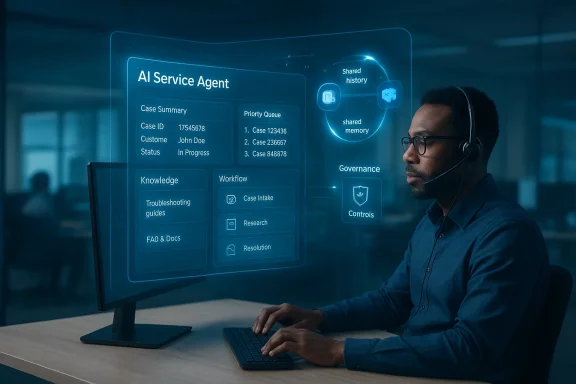
Microsoft’s outlined preview capabilities include case understanding and summarization, case prioritization and workload awareness, service knowledge retrieval, data updates and workflow initiation, and cross-app continuity with shared history and shared memory. Together, those features sketch a model of AI that can read, rank, retrieve, update, and remember across the surfaces a service worker already uses. The promise is not mystical intelligence; it is context preservation and action orchestration.That design is important because customer service work often fails at the handoff points. Agents spend time re-reading case histories, switching between systems, and reconstructing what happened before they got involved. If Service Agent can reduce those context switches, even modestly, it can materially improve response speed and agent satisfaction. The value is cumulative rather than flashy.
The shared history and shared memory language is especially notable. Microsoft is no longer talking only about one-off prompts and responses; it is talking about continuity across sessions and apps. That implies a memory model where the agent can maintain a working understanding of a case and carry that understanding into later actions, which is exactly what service environments need if they are going to avoid repetitive explanation loops.
Why these scenarios matter
Each preview feature maps to a common pain point in service operations. Summarization reduces reading time. Prioritization helps teams triage backlogs. Knowledge retrieval shortens the search for policy, troubleshooting, or product information. Workflow initiation and data updates reduce manual toggling between CRM and business systems. In other words, Microsoft is aiming at the coordination tax of service work, not just the writing burden.The real test, however, is whether the agent can deliver answers that are both fast and dependable. Service teams do not just need a plausible response; they need the right response, with the right confidence level and the right record of action. That is why a public preview is the right stage for this kind of release: the risk surface is wide, and the edge cases are where trust is either earned or lost.
From Copilot for Service to Service Agent
Microsoft’s earlier Copilot for Service launch established the company’s first serious claim on customer-service AI. At the time, the goal was to help contact-center workers tap their existing systems more efficiently, automate repetitive actions, and interact through a conversational interface. The original feature set was broad enough to sound ambitious but still conservative enough to feel understandable: better summaries, email drafting, meeting recaps, and record updates.The progression to Service Agent suggests Microsoft is learning where the earlier product sat on the adoption curve. Drafting and summarization are useful, but they are also the easiest parts of service work to automate and the easiest to commoditize. By pushing further into workload awareness and workflow initiation, Microsoft is attempting to move from assistive AI to operational AI—the kind that touches actual service delivery rather than merely preparing text around it.
The packaging shift
One of the clearest strategic inflection points came in September 2025, when Microsoft changed course and made these agents available to paying Microsoft 365 Copilot customers at no extra cost. That is a meaningful packaging decision because it reduces friction for adoption and broadens the pool of customers who can try service automation without buying a separate service-specific add-on. It is also a subtle form of platform lock-in, because the more useful Copilot becomes inside Microsoft’s own stack, the harder it is for buyers to justify fragmenting their AI investments.The shift also reflects the economics of enterprise AI. Microsoft has already spent years arguing that Copilot is most valuable when it is embedded into the software people already use. Service Agent extends that logic into operations, where the upside is not just time saved but faster resolution, better knowledge reuse, and more consistent handling. The result is a product strategy that ties AI value to Microsoft’s broader app ecosystem.
What changed from the original vision
The original Copilot for Service framing was centered on productivity assistance inside familiar tools like Outlook and Teams. Service Agent, by contrast, sounds closer to a case-operations companion that is aware of workload, history, and the state of the service queue. That difference may seem subtle, but it is decisive in practice. One version helps you produce outputs; the other helps you move work through a system.Case management becomes the AI battleground
Customer service is an attractive battleground for AI vendors because the workflows are structured enough to automate but complex enough to create differentiation. Unlike generic chat, service work has a clear objective: resolve the issue, document the outcome, and move to the next case. That gives Microsoft a chance to demonstrate measurable ROI, which enterprise buyers increasingly demand before expanding AI deployments.Case understanding and summarization
The most obvious win is case understanding and summarization. Service teams spend too much time reconstructing thread history, and customers hate being forced to repeat themselves. If the agent can accurately condense long histories into useful case briefs, it can shorten response times while making handoffs less painful. The catch, of course, is that summarization quality has to be excellent because a bad summary can be worse than no summary at all.Prioritization and workload awareness
Case prioritization and workload awareness is more interesting because it hints at an AI that can help coordinate human labor, not merely accelerate individual tasks. That matters in busy contact centers where backlog management is as important as resolution quality. A system that can surface what should be handled first, and why, can improve throughput—though only if the underlying logic is transparent enough for supervisors to trust it.Knowledge retrieval
Service knowledge retrieval is another practical feature with broad implications. Most support organizations have massive knowledge bases, but those repositories are only valuable if agents can find the right article quickly. A Copilot-style retrieval layer can lower that search cost, especially for newer agents, and can help standardize answers across teams. The risk, naturally, is that the assistant surfaces an article that is close but not current, which is precisely where operational errors start.Why it matters operationally
This is where the business case becomes tangible. If the AI can reduce average handle time, improve first-contact resolution, and shrink training ramp-up for new service staff, it may justify itself even before it achieves full autonomy. Those are the metrics enterprise buyers will care about, not the novelty of the interface. The interface is just the vehicle.- Better case summaries can reduce re-reading time.
- Prioritization can help teams triage high-value or high-urgency cases.
- Knowledge retrieval can cut down on article hunting.
- Consistency can improve when more agents use the same guidance layer.
- New employees may ramp faster with assistive context.
- Supervisors may get better visibility into workload distribution.
Cross-app continuity is the quiet breakthrough
Among the announced preview features, cross-app continuity may be the most strategically important even if it looks less dramatic on paper. Service workflows rarely live in one system. They move between case management, email, calendars, Teams, CRM records, and knowledge bases, and every transition creates room for errors or delay. By promising shared history and shared memory across applications, Microsoft is targeting the invisible glue that makes service operations feel coherent—or chaotic.Shared history, shared memory
The term shared history suggests that the agent can retain the relevant case context across interactions. Shared memory goes a step further, implying that the system can preserve state in a way that makes later actions more informed than the first prompt. In customer service, that could mean fewer restatements of the issue, fewer dropped details, and a more continuous experience for both the worker and the customer.Continuity across Microsoft apps
Microsoft’s broader platform advantage is its control of the apps where work already happens. If Service Agent can move smoothly between Microsoft 365 and Dynamics 365 surfaces, it reduces the overhead of switching tools and copying context from one system to another. That is a subtle but powerful advantage over point solutions that live only in a single service console.This also reinforces Microsoft’s long-term platform narrative. The company does not want Copilot to be understood as a standalone chatbot. It wants it to become the continuity layer across enterprise work. Service Agent is a useful example because service teams feel the pain of broken continuity more acutely than most other groups.
The governance implication
Continuity, however, brings a governance cost. The more state an AI system retains, the more important it becomes to know what it remembered, where it stored it, and how that memory influences future actions. In service environments, that is not just a technical question; it is a compliance question. The promise of continuity is only valuable if it remains auditable.- Continuity reduces repetitive context rebuilding.
- Cross-app action can lower user frustration.
- Shared memory may improve next-step recommendations.
- Auditing becomes more important as memory grows.
- Enterprise admins will want clear retention controls.
- Context handoff is likely where early real-world value appears.
Why Microsoft is making this move now
The timing is not accidental. Microsoft has spent the past two years expanding Copilot across productivity, knowledge work, and specialized business functions, and customer service is the next logical layer. It is a domain with high volume, clear process, and measurable outcomes, which makes it ideal for proving that AI is more than a novelty. It is also a space where Microsoft already has an installed base through Dynamics 365.Competitive pressure
There is also clear competitive pressure. Enterprise AI vendors are racing to prove they can do more than summarize documents, and customer service is one of the first arenas where that promise can be monetized. Microsoft’s challenge is to show that its integrated stack gives it an edge over vendors that specialize only in support automation. The answer may depend on how deeply Service Agent can tap data and workflows without becoming brittle.The economics of attachment
Microsoft also benefits from attachment economics. A service agent that works best inside Microsoft 365 and Dynamics 365 is not just a feature; it is a reason to stay in the ecosystem. That creates a reinforcing loop where AI capability helps justify the platform, and the platform helps justify the AI capability. It is very Microsoft in the best and most strategic sense.Enterprise versus consumer logic
This story also highlights the divide between enterprise and consumer AI. Consumer tools are often judged by delight and convenience, while enterprise tools are judged by reliability, governance, integration, and measurable productivity. Service Agent is clearly an enterprise-first product, and that means Microsoft will be evaluated less on how impressive it looks than on whether it can be deployed safely at scale.- The service desk is a measurable AI testbed.
- Dynamics 365 gives Microsoft a natural distribution path.
- Enterprise buyers want workflow automation, not just chat.
- Platform integration can be a moat if it lowers friction.
- Real-time service work is a strong differentiator if execution is reliable.
- The preview stage lets Microsoft tune trust before broad rollout.
Strengths and Opportunities
Microsoft’s strongest advantage here is that it is not trying to sell Service Agent as an isolated AI trick. It is embedding it into the systems that already manage customer relationships, service workflows, and employee productivity, which makes adoption more plausible and value realization more immediate. The opportunity is less about replacing service workers and more about giving them a faster, more consistent operating model.- Platform integration with Dynamics 365 and Microsoft 365 lowers adoption friction.
- Case summaries can reduce routine reading and handoff overhead.
- Workload awareness may improve queue management and prioritization.
- Knowledge retrieval can raise answer consistency across teams.
- Workflow initiation can shorten the time between diagnosis and action.
- Cross-app continuity addresses one of the biggest hidden costs in service work.
- No-extra-cost packaging for paying Copilot customers could accelerate trial and expansion.
Risks and Concerns
The biggest risk is that service teams will expect more than the system can safely deliver. Customer service has little tolerance for hallucinated answers, stale knowledge, or inappropriate workflow execution, so Microsoft will need strong guardrails and clear human-in-the-loop controls. If those controls are too weak, trust will evaporate quickly; if they are too strict, the product may feel like a glorified search box.- Hallucinations could lead to wrong or misleading responses.
- Stale knowledge may produce outdated guidance.
- Workflow mistakes could affect customer records or case outcomes.
- Memory handling raises governance and compliance questions.
- Over-automation may frustrate agents who want control.
- Uneven performance across different service contexts could limit rollout.
- Training burden may still be significant even with AI assistance.
What to Watch Next
The most important question now is whether Microsoft can turn the preview into a product that feels dependable under stress, not just impressive in demos. Public preview is the right place to surface failure modes, but it is also where early impressions are formed. If Service Agent stumbles on context, memory, or workflow accuracy, Microsoft will have to work hard to recover confidence.Another thing to watch is how Microsoft balances breadth and depth. The company has repeatedly shown a tendency to expand Copilot across many workloads, but success in service will probably depend on depth in a few high-value scenarios rather than broad surface area. In other words, customers are likely to value a small number of reliable automations more than a long list of marginal ones.
Key signals to monitor
- Whether Microsoft publishes clearer admin controls for memory and retention.
- Whether Service Agent can update records without requiring repeated confirmations.
- Whether the agent’s prioritization logic is explainable to supervisors.
- Whether service knowledge retrieval stays current enough for real support use.
- Whether broader M365 Copilot customers adopt the service features quickly.
- Whether Microsoft expands the scenario set beyond the initial preview use cases.
Microsoft’s Service Agent preview is not the loudest AI announcement the company has made, but it may be one of the most commercially important. Customer service is where enterprises feel the cost of inefficiency most directly, and where AI’s value can be measured in saved minutes, fewer escalations, and better customer outcomes. If Microsoft gets the balance right between assistance, memory, and control, Service Agent could become one of the clearest examples yet of Copilot evolving from an assistant into an operational partner.
Source: MSDynamicsWorld.com Microsoft details Service Agent capabilities in Microsoft 365 Copilot
Last edited:
