

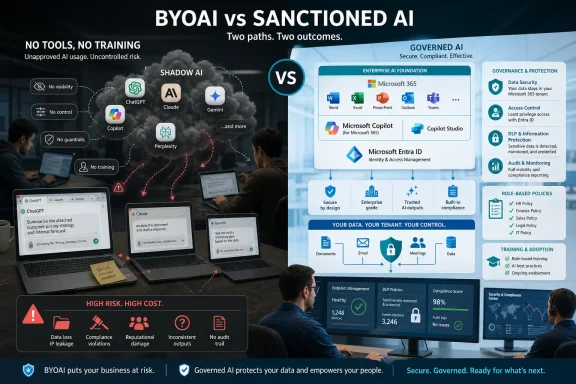
Forty-one percent of workers surveyed in May 2026 said their employer had given them no artificial-intelligence tools, training, or guidance for using AI at work, while 76 percent said they had already used personally sourced AI tools to complete job tasks. The workplace AI story is no longer about whether employees will adopt the technology. They already have. The real fight is now over whether employers can bring that adoption back inside the perimeter before convenience hardens into shadow infrastructure.
For years, enterprise technology followed a familiar ritual. A vendor pitched a platform, procurement negotiated the terms, security reviewed the risks, IT handled deployment, and employees eventually received a carefully branded tool with a training webinar and a policy PDF attached. Generative AI has smashed that sequence into pieces.
Resume Now’s new BYOAI data, reported by Human Resources Director, captures the inversion neatly. A large majority of workers are not waiting for an approved Copilot license, an internal chatbot, or a governance committee to define the acceptable use cases. They are signing up for tools themselves, often with personal accounts, and folding them into everyday work.
That makes “bring your own AI” different from earlier consumerization waves. Bring-your-own-device created management headaches because employees wanted to read email on iPhones before IT had finished blessing them. Shadow SaaS created procurement and data headaches because teams bought Trello, Slack, Dropbox, or Notion faster than central IT could standardize collaboration. BYOAI is more volatile because the tool is not merely storing work; it is transforming, summarizing, rewriting, classifying, and sometimes generating the work itself.
The worker’s motivation is not mysterious. Generative AI is useful in precisely the places where modern office work is most irritating: drafting messages, summarizing long documents, turning bullet notes into coherent prose, extracting action items, cleaning up spreadsheets, generating first-pass code, and translating corporate fog into something readable. If the sanctioned tool is missing, slow, blocked, too expensive, or less capable than the public alternative, employees will route around it.
The uncomfortable lesson for employers is that AI adoption has become a labor-market behavior, not just an IT project. Workers are trying to keep up with workload, appear competent, and avoid falling behind peers who are already automating parts of their day. In that environment, a policy vacuum does not preserve the old way of working. It simply makes the new way invisible.
A vague “use AI responsibly” statement is about as helpful as telling employees to “secure data appropriately” and then refusing to classify the data. People need to know whether they can paste customer emails into a chatbot, summarize meeting transcripts, generate code snippets, rewrite performance reviews, translate HR documents, draft sales proposals, or analyze financial exports. The risk profile changes dramatically depending on the task.
Role-specific guidance is where policy becomes operational. A developer needs rules about source code, proprietary algorithms, dependency suggestions, test generation, and license contamination. A salesperson needs rules about customer data, pricing, competitive claims, and CRM exports. An HR manager needs rules about employee records, performance documentation, bias, and confidentiality. A finance team needs rules about forecasts, nonpublic results, and auditability.
Without that middle layer, employees make their own risk decisions under pressure. Some will be cautious and use AI only for generic phrasing. Others will paste entire documents into whatever tool produces the best answer. Most will land somewhere in between, guided by hearsay, personal comfort, and the perceived urgency of the task.
This is where blanket bans fail. A ban can reduce visible usage, but it does not eliminate demand. It may even create a worse security posture by pushing AI use into personal devices, personal accounts, browser extensions, and unmonitored workflows. The company gets the illusion of control while losing telemetry, leverage, and teachable moments.
The danger is not that every public AI tool is malicious. Many are operated by serious companies with enterprise offerings, contractual privacy commitments, and security controls. The danger is that employees using personal accounts often do not know which promises apply to them, which data is retained, whether prompts are used for training, what plugins or connectors have access, or whether the output can be relied on.
That makes BYOAI a governance problem before it is a moral failing. Workers are not necessarily trying to leak secrets. They are trying to finish tasks. But the practical outcome can be the same if a support transcript, unreleased product plan, internal strategy memo, source-code fragment, contract clause, or spreadsheet of employee data leaves approved systems.
The Verizon 2026 Data Breach Investigations Report has reportedly elevated shadow AI as a major non-malicious insider concern, and that tracks with what security teams have been warning about since ChatGPT first entered the office bloodstream. The most realistic AI incident is not a sci-fi model takeover. It is an employee pasting something sensitive into a tool because the tool is helpful and the employer never gave them a safer alternative.
The Windows ecosystem is especially exposed because AI is no longer confined to a browser tab. It is arriving through Microsoft 365, Edge, Windows features, developer tools, search interfaces, meeting platforms, note-taking apps, and third-party productivity extensions. The boundary between “using AI” and “using normal office software” is dissolving.
That matters because Microsoft has spent the past several years positioning Copilot as the managed answer to uncontrolled AI use. The pitch is straightforward: if employees are going to use AI anyway, give them an enterprise-grade assistant that respects identity, permissions, compliance boundaries, and Microsoft 365 data controls. For many organizations already standardized on Entra ID, Purview, Defender, Intune, and Microsoft 365, that is a logical starting point.
But “buy Copilot” is not the same as “govern AI.” Licensing an approved assistant may reduce the incentive to use personal tools, but it does not automatically create role-specific guidance, data classification discipline, training, workflow redesign, or output validation. It also does not cover every use case. Developers may prefer specialized coding assistants. Designers may use image-generation tools. Analysts may use notebook-based AI workflows. Recruiters, marketers, lawyers, and support teams may each gravitate toward domain-specific systems.
Microsoft’s advantage is that it can embed AI directly into the tools many workers already use. That is also the source of a new challenge. When AI becomes part of Word, Excel, Teams, Outlook, Edge, Power Platform, and Windows itself, employers can no longer treat it as a novelty app that a few early adopters are playing with. It becomes part of the default productivity surface.
The question then shifts from adoption to accountability. Who approved the use case? Which data can the assistant access? What happens when generated text becomes an official record? How are hallucinations caught? How are prompts and outputs logged? Which employees are trained to review AI-assisted work, and which are simply expected to improvise?
There is a peculiar contradiction in today’s workplace. Executives tell investors, customers, and employees that AI will transform productivity. Job postings increasingly ask for AI fluency. Workers are encouraged, implicitly or explicitly, to become more efficient. Yet many of those same workers are given no sanctioned tools, no role-specific examples, no protected time to learn, and no clear line between experimentation and misconduct.
That contradiction encourages performative AI adoption. Employees may use AI quietly because admitting it feels risky. Managers may praise productivity gains without asking how the work was produced. Organizations may claim innovation while leaving the actual method to individual trial and error.
Real training is not a one-hour video explaining prompt engineering. It is an ongoing practice of showing employees what good AI-assisted work looks like in their actual job. It includes examples of acceptable prompts, unacceptable data inputs, verification steps, escalation paths, and documentation norms. It also includes frank discussion of when AI should not be used at all.
The best organizations will treat AI literacy like security awareness and data handling: imperfect, repetitive, measurable, and tied to real workflows. The weaker ones will treat it like a motivational poster. That gap will show up not only in productivity, but in incident reports.
Generative AI can produce plausible nonsense. It can invent sources, misread documents, flatten nuance, introduce subtle spreadsheet errors, hallucinate legal claims, rewrite technical details incorrectly, or turn a cautious draft into an overconfident statement. In some roles, that is embarrassing. In others, it is expensive.
The risk grows when AI output becomes upstream material for other work. A bad summary informs a manager’s decision. A flawed code suggestion enters a repository. A generated customer response misstates a contract. A synthetic analysis is copied into a deck and repeated as fact. By the time someone notices, the original prompt may be gone and the tool may not be covered by company logging.
This is where employers need to stop thinking of AI as a writing aid and start thinking of it as a production system. Even if the output is just text, it can affect decisions, records, obligations, and customer trust. A human still “owns” the work in theory, but ownership becomes mushy when the human is undertrained, the tool is unsanctioned, and the review process is informal.
For IT pros, this resembles the early days of spreadsheets in critical business processes. Everyone used them because they were flexible and powerful. Then companies discovered that undocumented formulas, local copies, and manual edits could move real money and create real risk. AI is spreadsheet risk with a conversational interface and a much larger blast radius.
Admins will be asked to block some tools, approve others, audit browser extensions, manage Edge and Chrome policies, control access to consumer AI sites, review OAuth grants, monitor clipboard and upload behavior, and explain why a personal chatbot account is different from an enterprise AI service. They will also be asked to do this without breaking legitimate productivity workflows.
That is harder than traditional application control. AI functionality is increasingly embedded inside products that organizations already permit. Blocking a domain may not stop an employee from using AI inside a note-taking app, design platform, CRM plugin, IDE extension, or browser sidebar. The old model of “approved app versus banned app” becomes less useful when AI is a feature hiding inside approved apps.
The Windows management stack can help, but it cannot substitute for decisions. Intune can enforce configuration. Defender can detect some risky behavior. Purview can classify and protect data. Entra ID can govern access. Browser policies can restrict extensions. DLP can catch some uploads. But none of those controls can define the organization’s appetite for AI-assisted work.
That definition has to come from leadership, legal, compliance, security, and business units together. IT can implement guardrails, but it cannot be the sole author of acceptable use. If every AI decision gets dumped onto the help desk, the organization has already failed.
Enterprise software often loses this contest because it prioritizes control over usability. The sanctioned tool may require a ticket, support only limited use cases, run on an older model, block attachments, lack integrations, or produce worse answers than the consumer tool. When that happens, employees hear “use the approved AI” as “accept a slower workflow.”
Security teams have seen this movie before. Users route around VPNs that break applications. Developers bypass artifact repositories that slow builds. Teams adopt unsanctioned file sharing when official storage makes collaboration painful. AI will follow the same pattern unless approved tools are both safer and genuinely useful.
That does not mean employers must approve every model or chase every shiny AI startup. It means they need a tiered approach. Some tasks can be handled by general enterprise assistants. Some require specialized tools. Some should be prohibited. Some can be allowed only with public or synthetic data. Some need human review before output leaves the company.
A usable AI program meets employees where the work happens. It provides templates, examples, approved workflows, and clear escalation paths. It explains why certain data cannot be used in certain systems. It gives workers a way to ask, “Can I use AI for this?” without waiting three weeks for a committee answer.
If workers hide AI use, managers cannot measure productivity honestly. If managers pretend not to notice, executives cannot plan staffing or training realistically. If legal and security teams are brought in only after an incident, policy becomes punitive rather than practical. The organization ends up with a shadow operating model: AI-assisted work everywhere, official acknowledgment nowhere.
This trust deficit also distorts performance evaluation. If one employee uses AI heavily and another does not, output comparisons become murky. If managers reward speed without requiring disclosure or verification, they may unintentionally reward risky workflows. If AI use is stigmatized, the most transparent employees may be punished while the quietest power users benefit.
The answer is not surveillance for its own sake. It is normalization with boundaries. Employees should be able to say they used AI for a draft, summary, analysis, or code suggestion without triggering suspicion. In return, they should be expected to follow rules about data input, review, disclosure, and accountability.
The companies that get this right will not frame AI governance as a crackdown. They will frame it as a professional standard. Just as employees are expected to know how to handle confidential files, phishing attempts, password managers, and customer records, they will be expected to know how to use AI tools without turning convenience into exposure.
Even when a generative AI tool is not making a final decision, it may shape the material that informs one. A hiring manager who uses AI to summarize candidates, an HR team that uses AI to draft performance documentation, or a support team that uses AI to classify customer complaints may create compliance questions. If the tool is unsanctioned, the answers get harder.
Auditors and regulators tend not to be impressed by “we didn’t know employees were doing that.” Once a behavior is widespread and foreseeable, ignorance becomes a weak defense. The Resume Now numbers make widespread use difficult to deny. Employers cannot plausibly claim that AI experimentation is limited to a few rogue enthusiasts.
This is especially relevant for organizations using Windows and Microsoft 365 in regulated environments. The platform provides many controls, but those controls must be configured, documented, and aligned with policy. An enterprise Copilot deployment without data governance can surface information employees should not have had access to in the first place. Conversely, a restrictive environment without approved AI options can drive users toward personal tools.
The compliance answer is not to freeze. It is to inventory use cases, classify data, approve tools, document controls, and revisit the policy as models and products change. AI governance will not be a one-time project. It will be an operating discipline.
The denial phase was understandable in late 2022 and early 2023. Generative AI looked like a fascinating consumer technology, and many organizations assumed that enterprise adoption would follow the normal path of evaluation, procurement, and phased rollout. By 2026, that assumption is no longer credible.
A more honest reading is that employees conducted the pilot without permission. They tested tools against real work, found value, built habits, and normalized AI assistance among peers. Employers now have to decide whether to formalize that reality or continue pretending deployment starts when procurement says it does.
The organizations that move fastest from denial to design will have an advantage. They will capture productivity gains while reducing avoidable risk. They will build internal expertise instead of outsourcing AI literacy to random influencers, vendor blogs, and trial-and-error prompting. They will also be better positioned to evaluate vendor claims because their workers and managers will understand actual use cases.
The laggards will discover AI through incidents: leaked data, bad outputs, compliance complaints, customer mistakes, or embarrassing screenshots. That is the most expensive way to learn a technology.
A mature BYOAI response starts with discovery rather than punishment. Ask employees what tools they use, what tasks they use them for, what works, and where the sanctioned environment is failing them. Anonymous surveys, manager interviews, DLP telemetry, browser extension inventories, and SaaS audits can all help build a picture without turning the effort into a witch hunt.
Then comes segmentation. Not all AI use is equal. Rewriting a public marketing blurb is not the same as uploading unreleased financials. Summarizing a public article is not the same as analyzing patient records. Generating test data is not the same as pasting production data. Policy must reflect those differences or users will ignore it.
Training should follow the same practical line. Workers need examples from their own roles, not abstract warnings. They need to know which data is forbidden, which tools are approved, when disclosure is required, how to verify output, and where to ask for help. Managers need additional training because they set the incentives that drive risky shortcuts.
Finally, employers need to review their approved AI stack with user experience in mind. If the official option is dramatically worse than the workaround, governance will leak. The safest tool is not the one listed in the policy; it is the one employees will actually use.
 The AI Rollout Already Happened Without IT
For years, enterprise technology followed a familiar ritual. A vendor pitched a platform, procurement negotiated the terms, security reviewed the risks, IT handled deployment, and employees eventually received a carefully branded tool with a training webinar and a policy PDF attached. Generative AI has smashed that sequence into pieces.Resume Now’s new BYOAI data, reported by Human Resources Director, captures the inversion neatly. A large majority of workers are not waiting for an approved Copilot license, an internal chatbot, or a governance committee to define the acceptable use cases. They are signing up for tools themselves, often with personal accounts, and folding them into everyday work.
That makes “bring your own AI” different from earlier consumerization waves. Bring-your-own-device created management headaches because employees wanted to read email on iPhones before IT had finished blessing them. Shadow SaaS created procurement and data headaches because teams bought Trello, Slack, Dropbox, or Notion faster than central IT could standardize collaboration. BYOAI is more volatile because the tool is not merely storing work; it is transforming, summarizing, rewriting, classifying, and sometimes generating the work itself.
The worker’s motivation is not mysterious. Generative AI is useful in precisely the places where modern office work is most irritating: drafting messages, summarizing long documents, turning bullet notes into coherent prose, extracting action items, cleaning up spreadsheets, generating first-pass code, and translating corporate fog into something readable. If the sanctioned tool is missing, slow, blocked, too expensive, or less capable than the public alternative, employees will route around it.
The uncomfortable lesson for employers is that AI adoption has become a labor-market behavior, not just an IT project. Workers are trying to keep up with workload, appear competent, and avoid falling behind peers who are already automating parts of their day. In that environment, a policy vacuum does not preserve the old way of working. It simply makes the new way invisible.
Guidance Is the Missing Middle Between Permission and Prohibition
The most revealing number in the survey is not that 76 percent of workers have used personally sourced AI tools. It is that only 21 percent say their employer has provided clear AI guidelines tailored to their role. That distinction matters because generic permission is not governance.A vague “use AI responsibly” statement is about as helpful as telling employees to “secure data appropriately” and then refusing to classify the data. People need to know whether they can paste customer emails into a chatbot, summarize meeting transcripts, generate code snippets, rewrite performance reviews, translate HR documents, draft sales proposals, or analyze financial exports. The risk profile changes dramatically depending on the task.
Role-specific guidance is where policy becomes operational. A developer needs rules about source code, proprietary algorithms, dependency suggestions, test generation, and license contamination. A salesperson needs rules about customer data, pricing, competitive claims, and CRM exports. An HR manager needs rules about employee records, performance documentation, bias, and confidentiality. A finance team needs rules about forecasts, nonpublic results, and auditability.
Without that middle layer, employees make their own risk decisions under pressure. Some will be cautious and use AI only for generic phrasing. Others will paste entire documents into whatever tool produces the best answer. Most will land somewhere in between, guided by hearsay, personal comfort, and the perceived urgency of the task.
This is where blanket bans fail. A ban can reduce visible usage, but it does not eliminate demand. It may even create a worse security posture by pushing AI use into personal devices, personal accounts, browser extensions, and unmonitored workflows. The company gets the illusion of control while losing telemetry, leverage, and teachable moments.
Shadow AI Turns Productivity Into a Data-Loss Problem
For WindowsForum readers, the phrase shadow AI should set off the same alarms as shadow IT, but with a shorter fuse. The classic shadow IT risk was that company data might sit in an unsanctioned cloud service. The shadow AI risk is that company data may be ingested, transformed, retained, used in prompts, exposed through plugins, or mixed into workflows that security teams cannot see.The danger is not that every public AI tool is malicious. Many are operated by serious companies with enterprise offerings, contractual privacy commitments, and security controls. The danger is that employees using personal accounts often do not know which promises apply to them, which data is retained, whether prompts are used for training, what plugins or connectors have access, or whether the output can be relied on.
That makes BYOAI a governance problem before it is a moral failing. Workers are not necessarily trying to leak secrets. They are trying to finish tasks. But the practical outcome can be the same if a support transcript, unreleased product plan, internal strategy memo, source-code fragment, contract clause, or spreadsheet of employee data leaves approved systems.
The Verizon 2026 Data Breach Investigations Report has reportedly elevated shadow AI as a major non-malicious insider concern, and that tracks with what security teams have been warning about since ChatGPT first entered the office bloodstream. The most realistic AI incident is not a sci-fi model takeover. It is an employee pasting something sensitive into a tool because the tool is helpful and the employer never gave them a safer alternative.
The Windows ecosystem is especially exposed because AI is no longer confined to a browser tab. It is arriving through Microsoft 365, Edge, Windows features, developer tools, search interfaces, meeting platforms, note-taking apps, and third-party productivity extensions. The boundary between “using AI” and “using normal office software” is dissolving.
Microsoft Saw the Pattern Before Many Employers Acted
Microsoft and LinkedIn’s 2024 Work Trend Index was one of the clearest early warnings that BYOAI was becoming normal. The report found widespread AI use among knowledge workers and said a large share of those users were bringing their own tools to work. Two years later, the Resume Now survey suggests the pattern has not resolved itself through normal enterprise adoption cycles.That matters because Microsoft has spent the past several years positioning Copilot as the managed answer to uncontrolled AI use. The pitch is straightforward: if employees are going to use AI anyway, give them an enterprise-grade assistant that respects identity, permissions, compliance boundaries, and Microsoft 365 data controls. For many organizations already standardized on Entra ID, Purview, Defender, Intune, and Microsoft 365, that is a logical starting point.
But “buy Copilot” is not the same as “govern AI.” Licensing an approved assistant may reduce the incentive to use personal tools, but it does not automatically create role-specific guidance, data classification discipline, training, workflow redesign, or output validation. It also does not cover every use case. Developers may prefer specialized coding assistants. Designers may use image-generation tools. Analysts may use notebook-based AI workflows. Recruiters, marketers, lawyers, and support teams may each gravitate toward domain-specific systems.
Microsoft’s advantage is that it can embed AI directly into the tools many workers already use. That is also the source of a new challenge. When AI becomes part of Word, Excel, Teams, Outlook, Edge, Power Platform, and Windows itself, employers can no longer treat it as a novelty app that a few early adopters are playing with. It becomes part of the default productivity surface.
The question then shifts from adoption to accountability. Who approved the use case? Which data can the assistant access? What happens when generated text becomes an official record? How are hallucinations caught? How are prompts and outputs logged? Which employees are trained to review AI-assisted work, and which are simply expected to improvise?
The Training Gap Is Now a Management Failure
Only 19 percent of workers in the Resume Now survey reported receiving comprehensive AI training with dedicated time and resources. That is a striking figure because many employers now talk about AI as a strategic priority. Strategy, however, is cheap when the training budget is missing.There is a peculiar contradiction in today’s workplace. Executives tell investors, customers, and employees that AI will transform productivity. Job postings increasingly ask for AI fluency. Workers are encouraged, implicitly or explicitly, to become more efficient. Yet many of those same workers are given no sanctioned tools, no role-specific examples, no protected time to learn, and no clear line between experimentation and misconduct.
That contradiction encourages performative AI adoption. Employees may use AI quietly because admitting it feels risky. Managers may praise productivity gains without asking how the work was produced. Organizations may claim innovation while leaving the actual method to individual trial and error.
Real training is not a one-hour video explaining prompt engineering. It is an ongoing practice of showing employees what good AI-assisted work looks like in their actual job. It includes examples of acceptable prompts, unacceptable data inputs, verification steps, escalation paths, and documentation norms. It also includes frank discussion of when AI should not be used at all.
The best organizations will treat AI literacy like security awareness and data handling: imperfect, repetitive, measurable, and tied to real workflows. The weaker ones will treat it like a motivational poster. That gap will show up not only in productivity, but in incident reports.
The Real Risk Is Bad Work at Machine Speed
Data leakage is the obvious concern, but it is not the only one. BYOAI also creates a quality-control problem. If employees are using different tools with different models, defaults, retention policies, context windows, and reliability profiles, then organizations may be standardizing on inconsistency without realizing it.Generative AI can produce plausible nonsense. It can invent sources, misread documents, flatten nuance, introduce subtle spreadsheet errors, hallucinate legal claims, rewrite technical details incorrectly, or turn a cautious draft into an overconfident statement. In some roles, that is embarrassing. In others, it is expensive.
The risk grows when AI output becomes upstream material for other work. A bad summary informs a manager’s decision. A flawed code suggestion enters a repository. A generated customer response misstates a contract. A synthetic analysis is copied into a deck and repeated as fact. By the time someone notices, the original prompt may be gone and the tool may not be covered by company logging.
This is where employers need to stop thinking of AI as a writing aid and start thinking of it as a production system. Even if the output is just text, it can affect decisions, records, obligations, and customer trust. A human still “owns” the work in theory, but ownership becomes mushy when the human is undertrained, the tool is unsanctioned, and the review process is informal.
For IT pros, this resembles the early days of spreadsheets in critical business processes. Everyone used them because they were flexible and powerful. Then companies discovered that undocumented formulas, local copies, and manual edits could move real money and create real risk. AI is spreadsheet risk with a conversational interface and a much larger blast radius.
Windows Admins Are About to Inherit the Mess
The BYOAI problem will not stay confined to HR policy documents. It will land on the desks of Windows administrators, security engineers, endpoint managers, and help-desk teams because that is where user behavior becomes enforceable reality.Admins will be asked to block some tools, approve others, audit browser extensions, manage Edge and Chrome policies, control access to consumer AI sites, review OAuth grants, monitor clipboard and upload behavior, and explain why a personal chatbot account is different from an enterprise AI service. They will also be asked to do this without breaking legitimate productivity workflows.
That is harder than traditional application control. AI functionality is increasingly embedded inside products that organizations already permit. Blocking a domain may not stop an employee from using AI inside a note-taking app, design platform, CRM plugin, IDE extension, or browser sidebar. The old model of “approved app versus banned app” becomes less useful when AI is a feature hiding inside approved apps.
The Windows management stack can help, but it cannot substitute for decisions. Intune can enforce configuration. Defender can detect some risky behavior. Purview can classify and protect data. Entra ID can govern access. Browser policies can restrict extensions. DLP can catch some uploads. But none of those controls can define the organization’s appetite for AI-assisted work.
That definition has to come from leadership, legal, compliance, security, and business units together. IT can implement guardrails, but it cannot be the sole author of acceptable use. If every AI decision gets dumped onto the help desk, the organization has already failed.
The Employer-Provided Tool Must Be Better Than the Workaround
More than half of workers in the survey said their employer supplies no AI tools at all or only free, publicly available ones. That detail should worry executives more than it probably will. Employees do not merely need a policy telling them what not to use. They need an approved path that is good enough to compete with the tools they have already discovered.Enterprise software often loses this contest because it prioritizes control over usability. The sanctioned tool may require a ticket, support only limited use cases, run on an older model, block attachments, lack integrations, or produce worse answers than the consumer tool. When that happens, employees hear “use the approved AI” as “accept a slower workflow.”
Security teams have seen this movie before. Users route around VPNs that break applications. Developers bypass artifact repositories that slow builds. Teams adopt unsanctioned file sharing when official storage makes collaboration painful. AI will follow the same pattern unless approved tools are both safer and genuinely useful.
That does not mean employers must approve every model or chase every shiny AI startup. It means they need a tiered approach. Some tasks can be handled by general enterprise assistants. Some require specialized tools. Some should be prohibited. Some can be allowed only with public or synthetic data. Some need human review before output leaves the company.
A usable AI program meets employees where the work happens. It provides templates, examples, approved workflows, and clear escalation paths. It explains why certain data cannot be used in certain systems. It gives workers a way to ask, “Can I use AI for this?” without waiting three weeks for a committee answer.
BYOAI Exposes a Trust Deficit Inside the Organization
There is a cultural reason employees adopt AI quietly. Many fear that admitting AI use will make them look lazy, replaceable, or noncompliant. Others suspect their employer wants the productivity boost but not the conversation about how work is changing. That silence benefits no one.If workers hide AI use, managers cannot measure productivity honestly. If managers pretend not to notice, executives cannot plan staffing or training realistically. If legal and security teams are brought in only after an incident, policy becomes punitive rather than practical. The organization ends up with a shadow operating model: AI-assisted work everywhere, official acknowledgment nowhere.
This trust deficit also distorts performance evaluation. If one employee uses AI heavily and another does not, output comparisons become murky. If managers reward speed without requiring disclosure or verification, they may unintentionally reward risky workflows. If AI use is stigmatized, the most transparent employees may be punished while the quietest power users benefit.
The answer is not surveillance for its own sake. It is normalization with boundaries. Employees should be able to say they used AI for a draft, summary, analysis, or code suggestion without triggering suspicion. In return, they should be expected to follow rules about data input, review, disclosure, and accountability.
The companies that get this right will not frame AI governance as a crackdown. They will frame it as a professional standard. Just as employees are expected to know how to handle confidential files, phishing attempts, password managers, and customer records, they will be expected to know how to use AI tools without turning convenience into exposure.
The Compliance Layer Is Coming Whether Companies Are Ready or Not
BYOAI is also running into a regulatory environment that is becoming less forgiving. Privacy laws, sector rules, contractual obligations, employment regulations, and emerging AI governance frameworks all point in the same direction: organizations need to know how automated systems are being used, especially when personal data, employment decisions, financial advice, healthcare information, or customer commitments are involved.Even when a generative AI tool is not making a final decision, it may shape the material that informs one. A hiring manager who uses AI to summarize candidates, an HR team that uses AI to draft performance documentation, or a support team that uses AI to classify customer complaints may create compliance questions. If the tool is unsanctioned, the answers get harder.
Auditors and regulators tend not to be impressed by “we didn’t know employees were doing that.” Once a behavior is widespread and foreseeable, ignorance becomes a weak defense. The Resume Now numbers make widespread use difficult to deny. Employers cannot plausibly claim that AI experimentation is limited to a few rogue enthusiasts.
This is especially relevant for organizations using Windows and Microsoft 365 in regulated environments. The platform provides many controls, but those controls must be configured, documented, and aligned with policy. An enterprise Copilot deployment without data governance can surface information employees should not have had access to in the first place. Conversely, a restrictive environment without approved AI options can drive users toward personal tools.
The compliance answer is not to freeze. It is to inventory use cases, classify data, approve tools, document controls, and revisit the policy as models and products change. AI governance will not be a one-time project. It will be an operating discipline.
The Resume Now Numbers Should End the Denial Phase
The survey is not the final word on workplace AI, and like all self-reported polling, it should be read with some caution. But its direction is consistent with the broader evidence from Microsoft’s earlier work, security industry reporting, and the lived experience of anyone managing modern knowledge workers. Employees are using AI faster than employers are governing it.The denial phase was understandable in late 2022 and early 2023. Generative AI looked like a fascinating consumer technology, and many organizations assumed that enterprise adoption would follow the normal path of evaluation, procurement, and phased rollout. By 2026, that assumption is no longer credible.
A more honest reading is that employees conducted the pilot without permission. They tested tools against real work, found value, built habits, and normalized AI assistance among peers. Employers now have to decide whether to formalize that reality or continue pretending deployment starts when procurement says it does.
The organizations that move fastest from denial to design will have an advantage. They will capture productivity gains while reducing avoidable risk. They will build internal expertise instead of outsourcing AI literacy to random influencers, vendor blogs, and trial-and-error prompting. They will also be better positioned to evaluate vendor claims because their workers and managers will understand actual use cases.
The laggards will discover AI through incidents: leaked data, bad outputs, compliance complaints, customer mistakes, or embarrassing screenshots. That is the most expensive way to learn a technology.
The Practical Playbook Starts With Admitting Employees Are Already There
The immediate response does not have to be grandiose. Employers do not need a 90-page AI manifesto before they can act. They need a short, enforceable, regularly updated framework that acknowledges reality and gives employees a safer path.A mature BYOAI response starts with discovery rather than punishment. Ask employees what tools they use, what tasks they use them for, what works, and where the sanctioned environment is failing them. Anonymous surveys, manager interviews, DLP telemetry, browser extension inventories, and SaaS audits can all help build a picture without turning the effort into a witch hunt.
Then comes segmentation. Not all AI use is equal. Rewriting a public marketing blurb is not the same as uploading unreleased financials. Summarizing a public article is not the same as analyzing patient records. Generating test data is not the same as pasting production data. Policy must reflect those differences or users will ignore it.
Training should follow the same practical line. Workers need examples from their own roles, not abstract warnings. They need to know which data is forbidden, which tools are approved, when disclosure is required, how to verify output, and where to ask for help. Managers need additional training because they set the incentives that drive risky shortcuts.
Finally, employers need to review their approved AI stack with user experience in mind. If the official option is dramatically worse than the workaround, governance will leak. The safest tool is not the one listed in the policy; it is the one employees will actually use.
The Numbers Point to a Policy Failure, Not a Worker Rebellion
The concrete lesson from the Resume Now survey is that BYOAI has become a normal workplace behavior before most employers have built the scaffolding around it. That does not make employees reckless by default. It makes leadership late.- Forty-one percent of surveyed workers said their employer had provided no AI tools, training, or guidance for workplace use.
- Seventy-six percent said they had used AI tools they personally found and signed up for to complete work tasks.
- Only 21 percent said their employer had given them clear AI guidelines with use cases tailored to their role.
- More than half said their employer provides either no AI tools or only free, publicly available ones.
- Just 19 percent reported comprehensive training backed by dedicated time and resources.
- The practical risk is not AI adoption itself, but AI adoption without approved tools, data rules, role-specific training, and accountable review.
References
- Primary source: hcamag.com
Published: 2026-06-26T07:10:44.376595
Unsanctioned AI use outpaces employer guidance, data shows | Human Resources Director
Workers are turning to outside AI tools as employer training and oversight fail to keep pace www.hcamag.com
- Related coverage: techtimes.com
Shadow AI Cybersecurity Risk Spikes as 45% of Workers Use Unsanctioned Tools
Shadow AI cybersecurity risk is accelerating: Verizon’s 2026 DBIR found shadow AI detections rose fourfold in a year, with 45% of employees now regular AI users on corporate devices. Two-thirds ofwww.techtimes.com - Related coverage: verizon.com
- Official source: microsoft.com
Microsoft Data Security Index annual report highlights evolving generative AI security needs | Microsoft Security Blog
84% of surveyed organizations want to feel more confident about managing and discovering data input into AI apps and tools.www.microsoft.com - Related coverage: forbes.com
2024 Microsoft Work Trend Index Shows Shifting Workplace Dynamics
The annual Work Trend Index from Microsoft and LinkedIn reveals a growing gap between employees' eagerness to use AI and their leaders' readiness for AI integration.www.forbes.com - Related coverage: resultsense.com
Verizon DBIR: AI shrinks attacker window from months to hours
Verizon's 2026 DBIR finds vulnerability exploitation now exceeds stolen credentials in breach initiation, with AI shrinking defender response time from months to hours.www.resultsense.com
