

Microsoft has marked Microsoft 365 Roadmap item 477371 as launched, bringing file-level archiving to Microsoft 365 Archive for SharePoint in July 2026. The feature lets organizations move individual inactive files into SharePoint’s archive tier rather than archiving an entire site.
According to Microsoft’s roadmap entry, the rollout applies to SharePoint on the web in worldwide standard multi-tenant tenants, with both Preview and General Availability release phases listed. The roadmap item was last updated July 15, 2026.
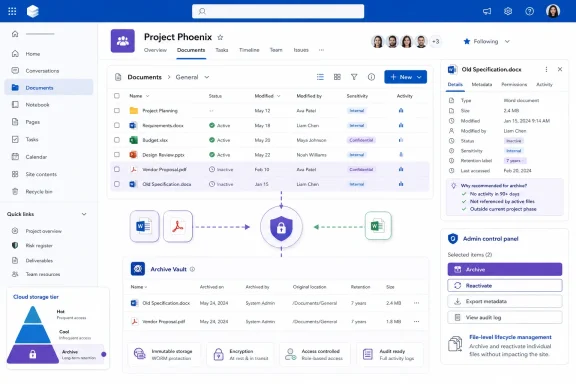
On SharePoint sites enabled for file-level archiving, users with edit permission can select files and use an Archive action. An archived file must be reactivated before it can be opened or read. Microsoft says recently archived files can be reactivated immediately.
The practical appeal is more granular lifecycle management. A project site can remain active while older deliverables, exported reports, or closed-case documents are shifted to lower-cost archive storage without moving them to another repository or losing the SharePoint location, metadata, permissions, compliance controls, and searchability.
Folder actions are also available: archiving or reactivating a folder applies recursively to the files it contains, including subfolders. The folders themselves do not receive an archive state.
The capability is not a way to evade SharePoint storage limits. Microsoft says archived files continue to count toward a site’s storage usage and quota. At the tenant level, their storage is reclassified from active SharePoint storage to archived storage when Microsoft 365 Archive is enabled; the data does not disappear from total tenant consumption.
There are operational limits worth checking before broad deployment. File-level archiving is limited to SharePoint sites, and certain content cannot be archived, including OneNote files, SharePoint pages, SharePoint agents, and files in the Site Assets library. Microsoft also notes that a reactivated file cannot be archived again for 30 days.
Microsoft’s published preview documentation further warned of incomplete support in some clients and services, including Word and PowerPoint for the web, Teams, mobile apps, macOS OneDrive sync, and older Windows or Office clients. IT teams should validate current client behavior in their tenant before making archive actions broadly available to end users.
Admins should enable the feature selectively, confirm billing and Microsoft 365 Archive configuration, and give users a clear reactivation process before archiving business-critical files.
According to Microsoft’s roadmap entry, the rollout applies to SharePoint on the web in worldwide standard multi-tenant tenants, with both Preview and General Availability release phases listed. The roadmap item was last updated July 15, 2026.
 What changes for SharePoint users
On SharePoint sites enabled for file-level archiving, users with edit permission can select files and use an Archive action. An archived file must be reactivated before it can be opened or read. Microsoft says recently archived files can be reactivated immediately.The practical appeal is more granular lifecycle management. A project site can remain active while older deliverables, exported reports, or closed-case documents are shifted to lower-cost archive storage without moving them to another repository or losing the SharePoint location, metadata, permissions, compliance controls, and searchability.
Folder actions are also available: archiving or reactivating a folder applies recursively to the files it contains, including subfolders. The folders themselves do not receive an archive state.
Admin controls and caveats
Microsoft’s administration documentation says file-level archiving is enabled by default when Microsoft 365 Archive is enabled, but SharePoint and Global Administrators can disable the capability for individual sites or set the default for newly created sites through SharePoint Online PowerShell. The relevant site property isAllowFileArchive; admins can also check a site’s archived-file storage consumption through the ArchivedFileDiskUsed property.The capability is not a way to evade SharePoint storage limits. Microsoft says archived files continue to count toward a site’s storage usage and quota. At the tenant level, their storage is reclassified from active SharePoint storage to archived storage when Microsoft 365 Archive is enabled; the data does not disappear from total tenant consumption.
There are operational limits worth checking before broad deployment. File-level archiving is limited to SharePoint sites, and certain content cannot be archived, including OneNote files, SharePoint pages, SharePoint agents, and files in the Site Assets library. Microsoft also notes that a reactivated file cannot be archived again for 30 days.
Microsoft’s published preview documentation further warned of incomplete support in some clients and services, including Word and PowerPoint for the web, Teams, mobile apps, macOS OneDrive sync, and older Windows or Office clients. IT teams should validate current client behavior in their tenant before making archive actions broadly available to end users.
Admins should enable the feature selectively, confirm billing and Microsoft 365 Archive configuration, and give users a clear reactivation process before archiving business-critical files.