

SharePoint administrators should run a focused Hero Link pilot before Microsoft’s planned August 2026 general-availability rollout, because a link that can be edited after distribution changes both recovery options and the consequences of a forwarded URL. The practical goal is not simply to confirm that sharing works: it is to identify where one mutable link reduces navigation tickets and where changing that link’s scope can become a governance incident.
Microsoft 365 Roadmap ID 492622 places the redesigned Hero Link experience across SharePoint, OneDrive, and Microsoft 365 file experiences on the web, desktop, Android, iOS, and Mac. Microsoft’s stated design is straightforward but consequential: the same Hero Link is used when someone copies a link, sends it by email, or copies the browser address-bar URL.
That convergence removes a familiar ambiguity. In older working habits, users and support staff can often distinguish a pasted sharing link from an address-bar link and infer different behaviors. Under the Hero Link model, they need to treat every distributed URL as part of the same access object. That is good news when a user needs access repaired without redistributing links; it is less forgiving when a previously innocuous forwarded URL is later broadened.
Start with a small pilot site containing non-sensitive but realistic material: a policy document, a team working file, a page with navigation links, and at least one item appropriate for a guest user. Use a group that includes site owners, ordinary members, internal users outside the site, help-desk staff, and a controlled guest account.
For each test, record four things before moving on: the original access state, the exact URL copied, the user who opened it, and the access state after a sharing change. The point is to expose whether the Hero Link preserves a predictable destination and permission outcome when it moves between people, devices, and Microsoft 365 surfaces.
Run these 12 tests before broad deployment:
A user who copied an item URL into a ticket, a Teams chat, a knowledge-base article, or a browser bookmark may retain a working route after a Hero Link’s scope is broadened. In a benign case, that saves a support cycle: the owner fixes access once, and the original recipient can reopen the same link. In a riskier case, a link that was initially harmless because it required pre-existing access can become usable by a wider population without the sender realizing every old copy remains in circulation.
That means pilot participants should identify every place their organization commonly stores SharePoint URLs. Intranet pages, Teams conversations, email templates, automated notifications, service-management tickets, onboarding guides, and browser bookmarks are not merely navigation artifacts under this model. They are potential redistributors of a mutable access route.
WindowsForum readers tracking Microsoft’s planned change that opens SharePoint page and news links inside the SharePoint app in Teams on mobile should pay particular attention to this cross-surface behavior. A link that appears to work safely in a desktop browser may be encountered first through mobile app handoff, where the user’s account context and expectation of what they are opening can differ.
Test direct grants with named users who do not belong to the site’s default membership. Then remove those grants and retest from a browser session that does not carry a misleading cached sign-in state. The desired result is not necessarily that every denial looks identical on every client; it is that the team can explain which permission was removed, which distributed URL was retried, and why access was or was not still available.
Guests are especially important because Microsoft intends for the redesigned sharing experience to explicitly tag external users and guests. Treat that label as a decision checkpoint rather than a cosmetic improvement. During the pilot, ask site owners to identify the guest before sharing, then repeat the test after forwarding, revoking, and reopening from a separate device.
If owners cannot reliably explain whether they granted access to a named guest, broadened a link, or relied on a site default, the pilot has found a training and governance gap. Do not resolve that gap by telling users never to share; resolve it with clear ownership rules for who may change an existing Hero Link after it has been distributed.
The safe assumption is not that the two changes will conflict, nor that they will automatically compose in a way that matches local policy. Microsoft has provided the broad feature direction, but each tenant needs to validate how expiration and the Hero Link model coexist with its own sharing defaults, site settings, and operational practices.
Make this a required pilot scenario. Create an internal link that is subject to the organization’s intended expiration policy, distribute it through at least two routes, and verify what happens when the Hero Link’s scope is later adjusted. Document the expected owner action when the link expires: whether the right remedy is to create a new link, directly add a person, or adjust an existing Hero Link where policy permits.
This is also where site-specific defaults matter. A central policy decision can be undermined if a communications site, project site, or OneDrive scenario has a different default sharing posture and its owners do not understand the difference. The second pilot site should be deliberately configured to expose that difference rather than merely duplicating the first site’s results.
Organizations planning navigation work should combine this pilot with a narrow compatibility test for navigation customizations rather than treating the two efforts as separate. WindowsForum has also highlighted the need to pilot SharePoint Framework Navigation Customizers ahead of September 2026 changes; the overlap is practical, because custom navigation can amplify a link’s reach faster than an individual email forward.
The pilot report should therefore separate two conclusions. First, identify whether Hero Links reduce access-recovery tickets by letting owners correct a link without replacing it everywhere. Second, identify where stable, redistributed URLs make a scope change too consequential for ordinary site owners to perform without review.
Yes. Microsoft says an already-distributed Hero Link can be changed from existing-access-only to a broader scope, so the pilot should retest the original URL after every scope change.
Does restricting a Hero Link to directly added people remove the need to test direct permissions?
No. That restriction makes direct-grant testing more important, because administrators need to verify that named-user access, forwarded links, and revoked grants produce the intended results.
Should guest sharing be included even if the primary use case is internal collaboration?
Yes. Microsoft intends to explicitly tag external users and guests in the redesigned experience, and a guest test is the clearest way to validate that owners recognize an external-sharing decision before completing it.
Will internal-link expiration automatically behave correctly with Hero Links?
Do not assume so. Microsoft’s internal-link expiration policy is rolling out separately, and each organization should validate the combined behavior under its own sharing configuration.
The August 2026 rollout is close enough that the useful question is no longer whether Hero Links are conceptually simpler. It is whether your owners, default settings, and support playbooks are ready for a single URL whose access behavior can change after it has already spread through the organization.
Microsoft 365 Roadmap ID 492622 places the redesigned Hero Link experience across SharePoint, OneDrive, and Microsoft 365 file experiences on the web, desktop, Android, iOS, and Mac. Microsoft’s stated design is straightforward but consequential: the same Hero Link is used when someone copies a link, sends it by email, or copies the browser address-bar URL.
That convergence removes a familiar ambiguity. In older working habits, users and support staff can often distinguish a pasted sharing link from an address-bar link and infer different behaviors. Under the Hero Link model, they need to treat every distributed URL as part of the same access object. That is good news when a user needs access repaired without redistributing links; it is less forgiving when a previously innocuous forwarded URL is later broadened.
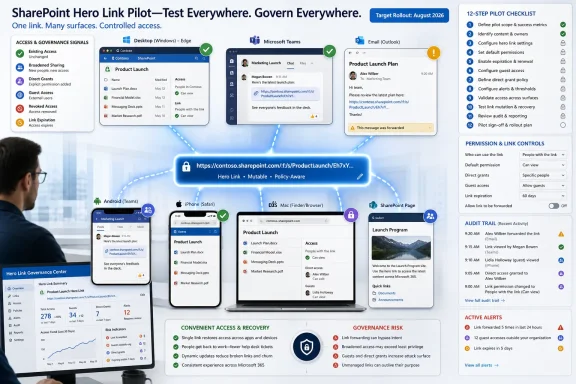 Build the pilot around one link, not one screen
Start with a small pilot site containing non-sensitive but realistic material: a policy document, a team working file, a page with navigation links, and at least one item appropriate for a guest user. Use a group that includes site owners, ordinary members, internal users outside the site, help-desk staff, and a controlled guest account.For each test, record four things before moving on: the original access state, the exact URL copied, the user who opened it, and the access state after a sharing change. The point is to expose whether the Hero Link preserves a predictable destination and permission outcome when it moves between people, devices, and Microsoft 365 surfaces.
Run these 12 tests before broad deployment:
- Create a Hero Link for an item available only to existing users with access, then copy it from the sharing experience and confirm that a current site member opens it successfully.
- Copy the browser address-bar URL for that same item and test it with the same user, confirming that it behaves as the same Hero Link rather than as an unrelated navigation address.
- Send the link through email, then open it from the received message with the intended recipient to verify that the email-sharing route produces the same practical result as copy-and-paste sharing.
- Forward that email to an internal user who does not already have access, and document the prompt, denial, request flow, or access outcome.
- Change the already-distributed Hero Link from existing-access-only to a broader permitted scope, then retry the original copied, emailed, and address-bar versions without redistributing any of them.
- Restrict that same Hero Link so that it applies to people directly added, then validate that recipients who were not directly added lose the expected access path.
- Add a direct grant to a named internal user after the link has already circulated, and confirm whether the original URL now provides the intended recovery route for that user.
- Test a guest or external account and verify that the new sharing experience explicitly identifies that person as external or a guest before access is granted.
- Remove or revoke the direct grant or shared access used in the prior test, then have the external user retry the exact saved URL from a clean browser session.
- Open the same distributed link from web, desktop, Android, iOS, and Mac where those clients are available in the pilot, recording whether sign-in, app handoff, and final access results remain consistent.
- Test a link from a SharePoint page or navigation element that users are likely to bookmark, forward, or reach from an intranet landing page, then repeat the broadening and restriction changes.
- Apply the tenant’s intended site-specific and organization-level sharing defaults to a second pilot site, then repeat the copied-link, browser-URL, guest, and revocation tests to establish where defaults change outcomes.
The copied URL is now a governance object
The most important pilot finding will not be whether users can share a document. It will be whether site owners understand that an address-bar URL, a copied link, and an emailed link may no longer represent separate paths with separate risk assumptions.A user who copied an item URL into a ticket, a Teams chat, a knowledge-base article, or a browser bookmark may retain a working route after a Hero Link’s scope is broadened. In a benign case, that saves a support cycle: the owner fixes access once, and the original recipient can reopen the same link. In a riskier case, a link that was initially harmless because it required pre-existing access can become usable by a wider population without the sender realizing every old copy remains in circulation.
That means pilot participants should identify every place their organization commonly stores SharePoint URLs. Intranet pages, Teams conversations, email templates, automated notifications, service-management tickets, onboarding guides, and browser bookmarks are not merely navigation artifacts under this model. They are potential redistributors of a mutable access route.
WindowsForum readers tracking Microsoft’s planned change that opens SharePoint page and news links inside the SharePoint app in Teams on mobile should pay particular attention to this cross-surface behavior. A link that appears to work safely in a desktop browser may be encountered first through mobile app handoff, where the user’s account context and expectation of what they are opening can differ.
Direct grants and guests need separate evidence
The distinction between broader links and direct access deserves its own evidence set. Microsoft says Hero Links can be restricted to people directly added, so administrators should not accept a general “sharing succeeded” result as proof that a site’s least-privilege expectations survived the redesign.Test direct grants with named users who do not belong to the site’s default membership. Then remove those grants and retest from a browser session that does not carry a misleading cached sign-in state. The desired result is not necessarily that every denial looks identical on every client; it is that the team can explain which permission was removed, which distributed URL was retried, and why access was or was not still available.
Guests are especially important because Microsoft intends for the redesigned sharing experience to explicitly tag external users and guests. Treat that label as a decision checkpoint rather than a cosmetic improvement. During the pilot, ask site owners to identify the guest before sharing, then repeat the test after forwarding, revoking, and reopening from a separate device.
If owners cannot reliably explain whether they granted access to a named guest, broadened a link, or relied on a site default, the pilot has found a training and governance gap. Do not resolve that gap by telling users never to share; resolve it with clear ownership rules for who may change an existing Hero Link after it has been distributed.
Link expiration adds a second moving part
Microsoft has separately scheduled an administrative policy for expiration of “People in your organization” sharing links, with rollout starting in June 2026. That timing matters because organizations may be testing Hero Links while the tenant’s internal-link expiration behavior is also arriving or being configured.The safe assumption is not that the two changes will conflict, nor that they will automatically compose in a way that matches local policy. Microsoft has provided the broad feature direction, but each tenant needs to validate how expiration and the Hero Link model coexist with its own sharing defaults, site settings, and operational practices.
Make this a required pilot scenario. Create an internal link that is subject to the organization’s intended expiration policy, distribute it through at least two routes, and verify what happens when the Hero Link’s scope is later adjusted. Document the expected owner action when the link expires: whether the right remedy is to create a new link, directly add a person, or adjust an existing Hero Link where policy permits.
This is also where site-specific defaults matter. A central policy decision can be undermined if a communications site, project site, or OneDrive scenario has a different default sharing posture and its owners do not understand the difference. The second pilot site should be deliberately configured to expose that difference rather than merely duplicating the first site’s results.
Navigation teams should test real publishing paths
Hero Links will affect more than document sharing. SharePoint navigation, quick links, home-site resources, and page-level calls to action are places where users expect a URL to remain stable. A stable URL is useful, but its access semantics must remain intelligible when site editors change a link after publishing.Organizations planning navigation work should combine this pilot with a narrow compatibility test for navigation customizations rather than treating the two efforts as separate. WindowsForum has also highlighted the need to pilot SharePoint Framework Navigation Customizers ahead of September 2026 changes; the overlap is practical, because custom navigation can amplify a link’s reach faster than an individual email forward.
The pilot report should therefore separate two conclusions. First, identify whether Hero Links reduce access-recovery tickets by letting owners correct a link without replacing it everywhere. Second, identify where stable, redistributed URLs make a scope change too consequential for ordinary site owners to perform without review.
Frequently Asked Questions
Can an old copied link become more broadly usable after its creator changes the Hero Link’s scope?Yes. Microsoft says an already-distributed Hero Link can be changed from existing-access-only to a broader scope, so the pilot should retest the original URL after every scope change.
Does restricting a Hero Link to directly added people remove the need to test direct permissions?
No. That restriction makes direct-grant testing more important, because administrators need to verify that named-user access, forwarded links, and revoked grants produce the intended results.
Should guest sharing be included even if the primary use case is internal collaboration?
Yes. Microsoft intends to explicitly tag external users and guests in the redesigned experience, and a guest test is the clearest way to validate that owners recognize an external-sharing decision before completing it.
Will internal-link expiration automatically behave correctly with Hero Links?
Do not assume so. Microsoft’s internal-link expiration policy is rolling out separately, and each organization should validate the combined behavior under its own sharing configuration.
The August 2026 rollout is close enough that the useful question is no longer whether Hero Links are conceptually simpler. It is whether your owners, default settings, and support playbooks are ready for a single URL whose access behavior can change after it has already spread through the organization.
References
- Primary source: learn.microsoft.com
Home site updates - SharePoint in Microsoft 365 | Microsoft Learn
Home site updates. Viva Connections is now the SharePoint app in teamlearn.microsoft.com - Independent coverage: microsoft.com
Microsoft 365 Roadmap | Microsoft 365
The Microsoft 365 Roadmap lists updates that are currently planned for applicable subscribers. Check here for more information on the status of new features and updates.www.microsoft.com
- Independent coverage: support.microsoft.com
Use the Hero web part | Microsoft Support
Use the Hero web part to bring focus and visual interest to your SharePoint modern page.support.microsoft.com - Independent coverage: mc.merill.net
MC1240699 - Introducing the new SharePoint experience | Microsoft 365 Message Center Archive
The new SharePoint experience, rolling out from March to July 2026, features a redesigned app bar with Discover, Publish, and Build hubs, AI capabilities for licensed users, and…mc.merill.net - Primary source: WindowsForum
SPFx September 2026: Pilot Navigation Customizers and CLI | Windows Forum
Teams should run a narrow SPFx compatibility pilot now, rather than rush every SharePoint Framework solution through an upgrade before September 2026. Use...windowsforum.com
