

Dice’s “Is it time to move from Windows to Linux?” argues that long-time Windows developers should now treat Linux as a practical daily development platform, especially as Windows 11 hardware rules, resource demands, telemetry concerns, and security friction make Microsoft’s desktop feel heavier than it used to. The interesting part is not that a Linux advocate made the case; it is that the case comes from someone whose professional memory begins with Windows 3.1, DOS, hand-written message loops, and the old Win32 bargain. Windows is not collapsing. But for developers, power users, and owners of otherwise healthy PCs stranded outside Microsoft’s upgrade path, the center of gravity has clearly moved.
There was a time when “switch to Linux” was mostly a cultural slogan. It meant accepting worse hardware support, giving up familiar commercial software, and learning a desktop environment that often seemed designed by people who did not have to support relatives over the phone. Linux was powerful, but it was also a statement.
That is no longer the whole story. The Dice essay lands because it describes a much more mundane migration: not a revolt, not a manifesto, but a gradual professional drift. First Ubuntu becomes the easiest way to test C code. Then it becomes the easiest way to run a local web server. Then Rust, C#, Flutter, gcc, clang, Python, containers, Raspberry Pi work, and remote debugging all begin to blur the old boundary between “Windows machine” and “Linux machine.”
That is the real threat to Windows among technical users. Most developers do not wake up one day and replace their operating system because of ideology. They move because their work already moved, one compiler, package manager, shell session, and test environment at a time.
Microsoft knows this, which is why the company has spent the past decade making Windows friendlier to Linux rather than pretending Linux does not exist. Windows Subsystem for Linux, Visual Studio Code, cross-platform .NET, Windows Terminal, SSH, Dev Home, GitHub integration, and remote development all acknowledge the same fact: the developer workstation is no longer defined by the kernel under the desktop. But that also means Microsoft has trained its own users to become less dependent on Windows.
VS Code is fast enough, extensible enough, and cross-platform enough that it has become the default editor for huge swaths of modern software work. It runs on Windows, Linux, and macOS. It talks to remote machines, containers, WSL instances, and cloud environments. It makes the local desktop less important by making the workspace portable.
That is good business for Microsoft when the destination is Azure, GitHub, .NET, or Copilot. It is less obviously good for Windows as a platform. If the same editor, the same repository, the same language server, the same terminal workflow, and the same CI pipeline work on Linux, the old argument for Windows becomes narrower. It is no longer “this is where professional development happens.” It is “this is where some of your legacy tools, corporate policies, games, and Windows-specific GUI stacks still live.”
For a developer who has decades invested in Windows, that shift matters. The Dice author is not claiming Windows is useless. Quite the opposite: he still likes it, still supports a Delphi project, and still has games that keep him anchored. But those are increasingly specific reasons, not general ones.
The gravitational pull now comes from workflow. Linux is no longer just the server you deploy to. It is the environment where the toolchains often arrive first, where package managers feel native, where scripting is assumed rather than bolted on, and where the distance between laptop and production server can be very short.
But from the user’s side, the result is simpler: many PCs that run Windows 10 perfectly well are not officially welcome in Windows 11. For home users, small offices, schools, hobbyists, and developers with spare machines, that is not an abstract lifecycle policy. It is a forced decision about whether functional hardware becomes e-waste, remains on an aging OS, or gets a second life elsewhere.
Linux benefits from that moment. A lightweight distribution can make a five-, eight-, or even ten-year-old PC feel useful again, especially for browsing, coding, file serving, media duties, or lab work. The Dice essay’s point about “getting extra years” out of hardware is not romantic thrift; it is practical IT economics.
This is where the Windows-to-Linux argument becomes strongest for non-gamers and non-specialists. If a machine cannot officially move to Windows 11, and if the user’s daily work is browser-based or developer-centric, Linux is not a compromise in the old sense. It may be the cleaner long-term path.
That does not mean Microsoft was wrong to draw a security line. Windows is the world’s most attacked desktop operating system, and dragging ancient hardware forward forever has real costs. But every line creates a constituency on the wrong side of it. Linux is now mature enough to receive many of those users without asking them to become kernel hobbyists.
Microbenchmarks are treacherous. Compiler versions, optimization flags, CPU governor behavior, timer resolution, virtualization overhead, Defender scanning, background services, and library differences can all distort the picture. A single workload does not prove that Linux is 30 percent faster than Windows, and anyone who has benchmarked across operating systems knows how quickly neat conclusions fall apart.
Still, the anecdote points at something real. Linux often feels leaner because it commonly runs fewer consumer-facing background services, fewer OEM add-ons, fewer bundled agents, and less endpoint security software on personal machines. On servers and developer systems, that leanness is part of the appeal. The system is doing what you asked it to do, and less that you did not.
Windows, by contrast, is engineered for an enormous compatibility surface. It supports a vast driver ecosystem, enterprise management frameworks, antimalware integrations, accessibility systems, legacy APIs, gaming stacks, consumer cloud services, update orchestration, telemetry, app compatibility shims, and security layers designed for hostile environments. That breadth is impressive, but it is not free.
The more important comparison is not whether Linux wins every benchmark. It is whether Linux gives technical users more predictable control over what is running, why it is running, and when it changes. For many developers, that predictability is worth more than a synthetic performance victory.
Windows machines can absolutely become sluggish over years of use. They accumulate startup items, shell extensions, scheduled tasks, services, drivers, update leftovers, vendor utilities, endpoint agents, browser helpers, and application detritus. Corporate laptops, in particular, can become crowded with monitoring, VPN, DLP, identity, compliance, backup, and security tooling.
But the Registry itself is often less villainous than its reputation. Modern Windows can handle very large registry hives, and “registry cleaners” have a long history of promising more than they can safely deliver. Removing hundreds of “dead” entries may be cosmetically satisfying without meaningfully improving performance, and aggressive cleaning can create its own problems.
The deeper issue is architectural and cultural. Windows software has historically installed itself deeply into the system, often with services, drivers, context menus, COM registrations, auto-updaters, licensing components, and machine-wide settings. Linux software can also make a mess, especially across competing package formats, but the Unix tradition tends to make services, configuration files, logs, and package ownership easier to inspect.
That inspectability matters. On Linux, a technically competent user usually has a clearer path from “what is running?” to “why is it running?” to “how do I disable it?” On Windows, the answer may be split across Task Manager, Services, Task Scheduler, Event Viewer, Settings, Group Policy, the Registry, the Microsoft Store, Defender, OEM utilities, and enterprise management agents. The irritation is not merely that Windows has more moving parts. It is that the moving parts often feel less legible.
That is not simply Windows being annoying. That is the modern security model arriving at the developer’s desk.
Enterprises have spent years moving away from permanent local administrator rights. They want least privilege, application control, code signing, device compliance, endpoint detection, tamper protection, audit trails, and managed elevation. From a security standpoint, this is rational. From a developer’s standpoint, it can feel like the machine has become a leased appliance.
Linux is not immune to this. A properly managed Linux workstation in a serious enterprise can be locked down with sudo policies, SELinux or AppArmor, endpoint agents, disk encryption, certificate rules, package repository controls, and configuration management. Developers who imagine Linux as a corporate escape hatch may be disappointed when the security team follows them there.
Still, Windows carries the heavier psychological burden because it used to be the developer’s playground. The Win32 era trained generations of programmers to expect intimate access to the machine. Today’s Windows increasingly belongs to the organization, the identity provider, the security baseline, and the compliance dashboard.
That shift is not going away. If anything, AI-era data protection, software supply chain controls, and regulatory pressure will make unmanaged developer freedom rarer. The question is not whether Windows or Linux is “restrictive.” The question is which platform lets a given organization impose necessary controls with the least collateral damage to productive work.
Ubuntu has experimented with opt-in desktop metrics and has emphasized local visibility into what is sent. Other distributions collect little or nothing by default. The open-source culture creates strong pressure for transparency, and users who dislike a distribution’s choices can usually move to another.
Windows operates under a different model. Microsoft documents diagnostic data categories and provides controls, especially for enterprise editions, but Windows is still a proprietary system tied deeply into cloud accounts, advertising IDs, Store services, Defender intelligence, search, widgets, Copilot features, and device health reporting. Even when the data collection is defensible, users are asked to trust a large commercial platform whose incentives extend beyond the local machine.
That trust gap matters more than the packet capture. Technical users do not merely object to telemetry because bytes leave the device. They object when they cannot easily understand the full chain of collection, retention, processing, and product feedback. Linux’s advantage is not that every distribution is saintly. It is that the social contract is different.
For Microsoft, this remains a strategic weakness. The company can publish privacy dashboards and admin controls, but it cannot fully replicate the trust model of a system users can inspect, rebuild, fork, or replace. Windows is a product. Linux is an ecosystem. That distinction becomes sharper every time Microsoft adds another cloud-connected surface to the desktop.
Linux gaming has improved enormously, largely because of Proton, Steam Deck, Vulkan, better GPU drivers, and years of work by Valve and the open-source community. Many Windows games now run shockingly well on Linux. But “many” is not “all,” and the missing category is often the most frustrating one: multiplayer games with anti-cheat systems, launchers that assume Windows, modding tools, niche peripherals, or titles with brittle DRM.
Professional software has a similar problem. If your world includes Adobe workflows, certain CAD packages, specialized accounting tools, proprietary VPN clients, old Delphi applications, Windows-only device programmers, or line-of-business software written for assumptions nobody has documented since 2007, Linux may be an excellent second machine and a terrible primary one.
This is why dual-platform fluency is more realistic than mass conversion. A developer can write Rust, C#, Python, Go, JavaScript, and C++ across Windows and Linux, while still keeping Windows for Visual Studio, games, vendor tools, and customer compatibility. The operating system becomes less of an identity and more of a tool in a rotation.
That may sound like a victory for Windows because it remains installed. But it is also a demotion. Windows is no longer always the default home base. Sometimes it is the compatibility layer for the parts of life that have not moved yet.
But WSL also functions as an extended Linux trial. It teaches Windows users apt, bash, systemd, ssh, grep, sed, Python environments, native Linux build chains, and the rhythm of a Unix-like system. It lowers the switching cost by turning Linux from a foreign country into a familiar neighborhood inside Windows.
That duality is fascinating. WSL keeps developers on Windows laptops, which helps Microsoft maintain relevance in organizations that standardize on Windows management. At the same time, it normalizes the idea that the most important development environment on a Windows PC may not be Windows.
For many developers, the next step is obvious. If most of the work already happens in a WSL shell, a container, a remote Linux host, or a VS Code session attached to something Linux-shaped, why not run Linux directly? The answer may be “because Outlook,” “because Teams policy,” “because BitLocker recovery,” “because anti-cheat,” or “because IT said no.” Those are real answers. They are not technical endorsements of the Windows developer experience.
The fragmentation that gives Linux users choice also gives newcomers homework. Ubuntu, Fedora, Debian, Linux Mint, Pop!_OS, openSUSE, Arch, elementary OS, and others offer different release cadences, package formats, desktop environments, defaults, and philosophies. That freedom is powerful, but it can also make basic advice annoyingly conditional.
Commercial software support remains uneven. Hardware vendors still tend to test Windows first. Laptop power management can vary widely. Microsoft 365 works best in the browser on Linux, which is acceptable for some users and a nonstarter for others. Creative professionals may find alternatives, but “alternative” is doing a lot of work in that sentence.
The point is not that Linux is secretly bad. It is that switching operating systems replaces one set of tradeoffs with another. Windows users frustrated by Microsoft’s defaults should not imagine Linux as Windows without the irritations. It is a different operating culture, and it rewards users who are willing to learn it on its own terms.
That distinction matters. A Windows developer in 1995 needed Windows because the API, the tools, the users, and the distribution model were all there. A developer in 2026 may need Windows for some workloads, Linux for others, and cloud-hosted environments for still more. The skill is no longer loyalty. The skill is portability.
This is especially true for younger developers building résumés. Linux competence is not exotic; it is assumed in web development, cloud engineering, DevOps, cybersecurity, embedded work, data engineering, and modern backend development. Even Windows-first shops increasingly expect comfort with SSH, containers, YAML, CI pipelines, and Linux servers.
For older Windows hands, the case is different but just as strong. Learning Linux is a hedge against platform decisions you do not control: Windows hardware cutoffs, subscription shifts, cloud account requirements, UI changes, telemetry policies, app store rules, and enterprise lockdown. It is not betrayal to learn another environment. It is professional risk management.
The Dice author’s journey is persuasive precisely because it is not dramatic. He did not renounce Windows. He outgrew needing it for everything.
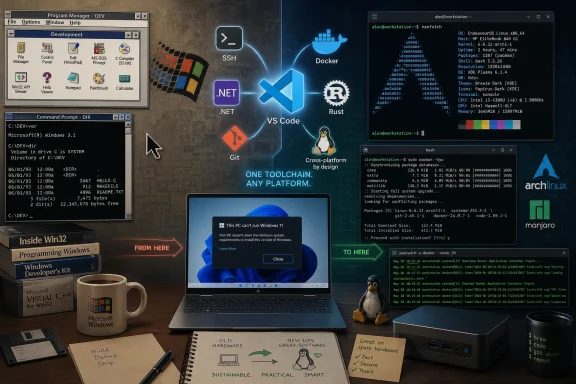 The Windows-to-Linux Debate Has Stopped Being Theoretical
There was a time when “switch to Linux” was mostly a cultural slogan. It meant accepting worse hardware support, giving up familiar commercial software, and learning a desktop environment that often seemed designed by people who did not have to support relatives over the phone. Linux was powerful, but it was also a statement.That is no longer the whole story. The Dice essay lands because it describes a much more mundane migration: not a revolt, not a manifesto, but a gradual professional drift. First Ubuntu becomes the easiest way to test C code. Then it becomes the easiest way to run a local web server. Then Rust, C#, Flutter, gcc, clang, Python, containers, Raspberry Pi work, and remote debugging all begin to blur the old boundary between “Windows machine” and “Linux machine.”
That is the real threat to Windows among technical users. Most developers do not wake up one day and replace their operating system because of ideology. They move because their work already moved, one compiler, package manager, shell session, and test environment at a time.
Microsoft knows this, which is why the company has spent the past decade making Windows friendlier to Linux rather than pretending Linux does not exist. Windows Subsystem for Linux, Visual Studio Code, cross-platform .NET, Windows Terminal, SSH, Dev Home, GitHub integration, and remote development all acknowledge the same fact: the developer workstation is no longer defined by the kernel under the desktop. But that also means Microsoft has trained its own users to become less dependent on Windows.
Microsoft Won the Developer Tooling Battle and Weakened the Desktop Moat
The most ironic line in the Dice piece is that Microsoft wrote the best text editor on Linux. That is not just a compliment to Visual Studio Code. It is a neat summary of Microsoft’s modern developer strategy and its unintended consequence.VS Code is fast enough, extensible enough, and cross-platform enough that it has become the default editor for huge swaths of modern software work. It runs on Windows, Linux, and macOS. It talks to remote machines, containers, WSL instances, and cloud environments. It makes the local desktop less important by making the workspace portable.
That is good business for Microsoft when the destination is Azure, GitHub, .NET, or Copilot. It is less obviously good for Windows as a platform. If the same editor, the same repository, the same language server, the same terminal workflow, and the same CI pipeline work on Linux, the old argument for Windows becomes narrower. It is no longer “this is where professional development happens.” It is “this is where some of your legacy tools, corporate policies, games, and Windows-specific GUI stacks still live.”
For a developer who has decades invested in Windows, that shift matters. The Dice author is not claiming Windows is useless. Quite the opposite: he still likes it, still supports a Delphi project, and still has games that keep him anchored. But those are increasingly specific reasons, not general ones.
The gravitational pull now comes from workflow. Linux is no longer just the server you deploy to. It is the environment where the toolchains often arrive first, where package managers feel native, where scripting is assumed rather than bolted on, and where the distance between laptop and production server can be very short.
Windows 11 Turned Old Hardware Into a Linux Sales Pitch
The Windows 11 hardware cutoff remains one of Microsoft’s most consequential platform decisions. TPM 2.0, Secure Boot, supported processors, and Microsoft’s security baseline make sense from Redmond’s perspective. The company wants a more defensible fleet, less legacy drag, and a foundation for virtualization-based security, device encryption, identity protections, and modern management.But from the user’s side, the result is simpler: many PCs that run Windows 10 perfectly well are not officially welcome in Windows 11. For home users, small offices, schools, hobbyists, and developers with spare machines, that is not an abstract lifecycle policy. It is a forced decision about whether functional hardware becomes e-waste, remains on an aging OS, or gets a second life elsewhere.
Linux benefits from that moment. A lightweight distribution can make a five-, eight-, or even ten-year-old PC feel useful again, especially for browsing, coding, file serving, media duties, or lab work. The Dice essay’s point about “getting extra years” out of hardware is not romantic thrift; it is practical IT economics.
This is where the Windows-to-Linux argument becomes strongest for non-gamers and non-specialists. If a machine cannot officially move to Windows 11, and if the user’s daily work is browser-based or developer-centric, Linux is not a compromise in the old sense. It may be the cleaner long-term path.
That does not mean Microsoft was wrong to draw a security line. Windows is the world’s most attacked desktop operating system, and dragging ancient hardware forward forever has real costs. But every line creates a constituency on the wrong side of it. Linux is now mature enough to receive many of those users without asking them to become kernel hobbyists.
Performance Is the Hook, but Predictability Is the Prize
The Dice author’s benchmark — a Rust poker hand evaluator running faster under Ubuntu in Hyper-V than on the Windows 11 host — is the kind of anecdote that makes operating system debates combustible. A 175 ns versus 125 ns comparison sounds dramatic. It also deserves caution.Microbenchmarks are treacherous. Compiler versions, optimization flags, CPU governor behavior, timer resolution, virtualization overhead, Defender scanning, background services, and library differences can all distort the picture. A single workload does not prove that Linux is 30 percent faster than Windows, and anyone who has benchmarked across operating systems knows how quickly neat conclusions fall apart.
Still, the anecdote points at something real. Linux often feels leaner because it commonly runs fewer consumer-facing background services, fewer OEM add-ons, fewer bundled agents, and less endpoint security software on personal machines. On servers and developer systems, that leanness is part of the appeal. The system is doing what you asked it to do, and less that you did not.
Windows, by contrast, is engineered for an enormous compatibility surface. It supports a vast driver ecosystem, enterprise management frameworks, antimalware integrations, accessibility systems, legacy APIs, gaming stacks, consumer cloud services, update orchestration, telemetry, app compatibility shims, and security layers designed for hostile environments. That breadth is impressive, but it is not free.
The more important comparison is not whether Linux wins every benchmark. It is whether Linux gives technical users more predictable control over what is running, why it is running, and when it changes. For many developers, that predictability is worth more than a synthetic performance victory.
The Registry Is a Symptom, Not the Whole Disease
The Dice essay takes a familiar swipe at the Windows Registry, arguing that dead entries accumulate and slow the system over time. This is one of those claims that contains a recognizable user experience but can oversimplify the mechanism.Windows machines can absolutely become sluggish over years of use. They accumulate startup items, shell extensions, scheduled tasks, services, drivers, update leftovers, vendor utilities, endpoint agents, browser helpers, and application detritus. Corporate laptops, in particular, can become crowded with monitoring, VPN, DLP, identity, compliance, backup, and security tooling.
But the Registry itself is often less villainous than its reputation. Modern Windows can handle very large registry hives, and “registry cleaners” have a long history of promising more than they can safely deliver. Removing hundreds of “dead” entries may be cosmetically satisfying without meaningfully improving performance, and aggressive cleaning can create its own problems.
The deeper issue is architectural and cultural. Windows software has historically installed itself deeply into the system, often with services, drivers, context menus, COM registrations, auto-updaters, licensing components, and machine-wide settings. Linux software can also make a mess, especially across competing package formats, but the Unix tradition tends to make services, configuration files, logs, and package ownership easier to inspect.
That inspectability matters. On Linux, a technically competent user usually has a clearer path from “what is running?” to “why is it running?” to “how do I disable it?” On Windows, the answer may be split across Task Manager, Services, Task Scheduler, Event Viewer, Settings, Group Policy, the Registry, the Microsoft Store, Defender, OEM utilities, and enterprise management agents. The irritation is not merely that Windows has more moving parts. It is that the moving parts often feel less legible.
Security Has Made Windows Feel Less Like a Personal Computer
One of the most revealing complaints in the Dice piece is not about Microsoft’s consumer design at all. It is about work. The author describes not being local admin, needing third-party approval for elevation, using elevated tools to kill processes, and having to sign compiled software before distribution because customers increasingly demand it.That is not simply Windows being annoying. That is the modern security model arriving at the developer’s desk.
Enterprises have spent years moving away from permanent local administrator rights. They want least privilege, application control, code signing, device compliance, endpoint detection, tamper protection, audit trails, and managed elevation. From a security standpoint, this is rational. From a developer’s standpoint, it can feel like the machine has become a leased appliance.
Linux is not immune to this. A properly managed Linux workstation in a serious enterprise can be locked down with sudo policies, SELinux or AppArmor, endpoint agents, disk encryption, certificate rules, package repository controls, and configuration management. Developers who imagine Linux as a corporate escape hatch may be disappointed when the security team follows them there.
Still, Windows carries the heavier psychological burden because it used to be the developer’s playground. The Win32 era trained generations of programmers to expect intimate access to the machine. Today’s Windows increasingly belongs to the organization, the identity provider, the security baseline, and the compliance dashboard.
That shift is not going away. If anything, AI-era data protection, software supply chain controls, and regulatory pressure will make unmanaged developer freedom rarer. The question is not whether Windows or Linux is “restrictive.” The question is which platform lets a given organization impose necessary controls with the least collateral damage to productive work.
Telemetry Is Where Trust Becomes a Product Feature
The Dice essay draws a bright line between Windows telemetry and Linux telemetry, arguing that Linux telemetry is opt-in and visible. In broad terms, that captures a real difference in user perception, though the details vary by distribution.Ubuntu has experimented with opt-in desktop metrics and has emphasized local visibility into what is sent. Other distributions collect little or nothing by default. The open-source culture creates strong pressure for transparency, and users who dislike a distribution’s choices can usually move to another.
Windows operates under a different model. Microsoft documents diagnostic data categories and provides controls, especially for enterprise editions, but Windows is still a proprietary system tied deeply into cloud accounts, advertising IDs, Store services, Defender intelligence, search, widgets, Copilot features, and device health reporting. Even when the data collection is defensible, users are asked to trust a large commercial platform whose incentives extend beyond the local machine.
That trust gap matters more than the packet capture. Technical users do not merely object to telemetry because bytes leave the device. They object when they cannot easily understand the full chain of collection, retention, processing, and product feedback. Linux’s advantage is not that every distribution is saintly. It is that the social contract is different.
For Microsoft, this remains a strategic weakness. The company can publish privacy dashboards and admin controls, but it cannot fully replicate the trust model of a system users can inspect, rebuild, fork, or replace. Windows is a product. Linux is an ecosystem. That distinction becomes sharper every time Microsoft adds another cloud-connected surface to the desktop.
Gaming and Legacy Apps Still Keep Windows in the Chair
The strongest argument against switching remains the one the Dice author gives almost casually: games and legacy projects. For many users, that is enough.Linux gaming has improved enormously, largely because of Proton, Steam Deck, Vulkan, better GPU drivers, and years of work by Valve and the open-source community. Many Windows games now run shockingly well on Linux. But “many” is not “all,” and the missing category is often the most frustrating one: multiplayer games with anti-cheat systems, launchers that assume Windows, modding tools, niche peripherals, or titles with brittle DRM.
Professional software has a similar problem. If your world includes Adobe workflows, certain CAD packages, specialized accounting tools, proprietary VPN clients, old Delphi applications, Windows-only device programmers, or line-of-business software written for assumptions nobody has documented since 2007, Linux may be an excellent second machine and a terrible primary one.
This is why dual-platform fluency is more realistic than mass conversion. A developer can write Rust, C#, Python, Go, JavaScript, and C++ across Windows and Linux, while still keeping Windows for Visual Studio, games, vendor tools, and customer compatibility. The operating system becomes less of an identity and more of a tool in a rotation.
That may sound like a victory for Windows because it remains installed. But it is also a demotion. Windows is no longer always the default home base. Sometimes it is the compatibility layer for the parts of life that have not moved yet.
WSL Is Both Microsoft’s Defense and Linux’s Demo Mode
Windows Subsystem for Linux is one of Microsoft’s smartest platform moves. It lets developers run Linux command-line tools, distributions, package managers, and development workflows without leaving Windows. For many users, it removes the need to choose.But WSL also functions as an extended Linux trial. It teaches Windows users apt, bash, systemd, ssh, grep, sed, Python environments, native Linux build chains, and the rhythm of a Unix-like system. It lowers the switching cost by turning Linux from a foreign country into a familiar neighborhood inside Windows.
That duality is fascinating. WSL keeps developers on Windows laptops, which helps Microsoft maintain relevance in organizations that standardize on Windows management. At the same time, it normalizes the idea that the most important development environment on a Windows PC may not be Windows.
For many developers, the next step is obvious. If most of the work already happens in a WSL shell, a container, a remote Linux host, or a VS Code session attached to something Linux-shaped, why not run Linux directly? The answer may be “because Outlook,” “because Teams policy,” “because BitLocker recovery,” “because anti-cheat,” or “because IT said no.” Those are real answers. They are not technical endorsements of the Windows developer experience.
The Desktop Linux Problem Is Smaller Than It Used to Be, but It Has Not Vanished
A fair WindowsForum treatment has to say the quiet part: Linux can still be annoying in ways Windows users do not expect. The first week can be delightful; the first weird suspend bug, fractional scaling glitch, audio routing problem, Nvidia driver regression, printer issue, or package conflict can cool the romance quickly.The fragmentation that gives Linux users choice also gives newcomers homework. Ubuntu, Fedora, Debian, Linux Mint, Pop!_OS, openSUSE, Arch, elementary OS, and others offer different release cadences, package formats, desktop environments, defaults, and philosophies. That freedom is powerful, but it can also make basic advice annoyingly conditional.
Commercial software support remains uneven. Hardware vendors still tend to test Windows first. Laptop power management can vary widely. Microsoft 365 works best in the browser on Linux, which is acceptable for some users and a nonstarter for others. Creative professionals may find alternatives, but “alternative” is doing a lot of work in that sentence.
The point is not that Linux is secretly bad. It is that switching operating systems replaces one set of tradeoffs with another. Windows users frustrated by Microsoft’s defaults should not imagine Linux as Windows without the irritations. It is a different operating culture, and it rewards users who are willing to learn it on its own terms.
The Real Migration Is From Single-OS Loyalty to Workload Pragmatism
The most sensible answer to the Dice headline is not “yes, everyone should move.” It is “yes, more people should be ready to.”That distinction matters. A Windows developer in 1995 needed Windows because the API, the tools, the users, and the distribution model were all there. A developer in 2026 may need Windows for some workloads, Linux for others, and cloud-hosted environments for still more. The skill is no longer loyalty. The skill is portability.
This is especially true for younger developers building résumés. Linux competence is not exotic; it is assumed in web development, cloud engineering, DevOps, cybersecurity, embedded work, data engineering, and modern backend development. Even Windows-first shops increasingly expect comfort with SSH, containers, YAML, CI pipelines, and Linux servers.
For older Windows hands, the case is different but just as strong. Learning Linux is a hedge against platform decisions you do not control: Windows hardware cutoffs, subscription shifts, cloud account requirements, UI changes, telemetry policies, app store rules, and enterprise lockdown. It is not betrayal to learn another environment. It is professional risk management.
The Dice author’s journey is persuasive precisely because it is not dramatic. He did not renounce Windows. He outgrew needing it for everything.
The Sensible Exit Plan Is Really a Two-Platform Habit
For Windows enthusiasts, the lesson is not to wipe the SSD in a fit of irritation. It is to build enough Linux fluency that Windows becomes a choice rather than a dependency. That starts with low-risk experiments and becomes more serious only when the workloads justify it.- Install a mainstream Linux distribution in a VM, WSL, or on spare hardware before touching a primary Windows installation.
- Test your actual workloads instead of arguing from benchmarks, because games, device tools, VPNs, IDEs, and customer requirements matter more than ideology.
- Treat unsupported Windows 10-era PCs as prime Linux candidates, especially when their daily role is browsing, coding, file serving, or lab experimentation.
- Learn the Linux terminal, package manager, service model, permissions, and filesystem layout before judging the desktop by its wallpaper and app launcher.
- Keep Windows where it is strongest, particularly for gaming, Visual Studio-heavy work, Microsoft 365-dependent organizations, and legacy commercial software.
- Make cross-platform tools your default where possible, because VS Code, .NET, Rust, Python, Git, containers, and SSH reduce the cost of changing your mind later.
References
- Primary source: dice.com
Published: Wed, 27 May 2026 13:33:00 GMT
Is it time to move from Windows to Linux? | Dice.com Career Advice
A veteran Windows developer weighs the real-world pros and cons of switching to Linux — from snappier performance and leaner RAM usage to registry bloat, telemetry, and the surprising role Microsoft itself has played in making Linux an attractive development environment. www.dice.com
- Official source: support.microsoft.com
Windows 11 System Requirements | Microsoft Support
Learn about Windows 11 minimum system requirements and how to assess your upgrade eligibility.support.microsoft.com - Official source: microsoft.com
Windows 11 Specs and System Requirements | Microsoft Windows
View Windows 11 specs, system requirements, and features from Microsoft. Learn about the device specifications, versions, and languages available for Windows 11.www.microsoft.com - Related coverage: dir.md

Windows 11 System Requirements 2026: Check If Your PC Is Compatible (Avoid Upgrade Failures!)
Can your PC run Windows 11? Discover official system requirements, compatibility checks, and expert tips before upgrading. Check your device now!
dir.md
- Related coverage: code.visualstudio.com
Installing Visual Studio Code on Linux
Install Visual Studio Code on Linux with Debian, RPM, Snap, Arch, or Nix package options.code.visualstudio.com - Related coverage: tomshardware.com
How to Bypass Windows 11's TPM, CPU and RAM Requirements | Tom's Hardware
Use simple utilities to install Windows 11 on any PC.www.tomshardware.com
- Related coverage: techradar.com
Linux users report Microsoft's Visual Studio Code Snap package isn't actually deleting files | TechRadar
Many have run out of disk space entirelywww.techradar.com - Related coverage: pcworld.com
What your PC will need to run Windows 11 | PCWorld
Windows 11 comes with new, stricter hardware requirements: more memory, more storage, and a Trusted Platform Module, or TPM. What does all this mean? We explain.www.pcworld.com - Related coverage: windowscentral.com
Unsupported Windows 10 PC gets a surprise Windows 11 upgrade | Windows Central
A Windows 10 user reportedly received an offer to upgrade to Windows 11 despite having a TPM 2.0 chip disabled on their PC.www.windowscentral.com - Official source: news.microsoft.com
Windows 11: Das sind die Systemanforderungen | News Center Microsoft
In diesem Blogpost beantworten wir Fragen rund um die Systemanforderungen für Windows 11 und das Tool "PC Health Check".news.microsoft.com - Related coverage: versalogic.com
Windows 11 Compatibility and Performance Testing Across VersaLogic Unsupported SBCs
PDF documentwww.versalogic.com
- Related coverage: askwoody.com
- Related coverage: bpb-us-e1.wpmucdn.com
