

Siemens and CISA disclosed on May 12–14, 2026, that SIMATIC HMI Unified Comfort Panels before V21.0 contain CVE-2026-27662, a high-severity flaw that can let an unauthenticated local attacker reach the built-in web browser through the Control Panel help link. The bug is not a spectacular remote-code-execution headline, but it is exactly the sort of industrial-control weakness that matters in the real world: a small escape hatch in a device trusted to sit close to machinery. Siemens has shipped V21 or later versions for affected products and is telling customers to update, while also hardening Control Panel access and disabling the taskbar where appropriate. The larger lesson is that modern HMIs are no longer simple terminals; they are web-capable computers on plant floors, and their convenience features now deserve the same suspicion as any exposed admin interface.
The vulnerability sits in a familiar place: between what an operator is supposed to do and what the underlying device can actually do. A SIMATIC HMI Unified Comfort Panel is meant to present a controlled runtime environment for industrial operators, not a general-purpose browsing station. Yet Siemens’ advisory describes a path from the Control Panel help link into the web browser when corresponding protections are missing.
That may sound modest until you consider where these panels live. They are mounted on machines, production lines, support arms, hygienic stations, and control cabinets. They are touched by operators, maintenance staff, contractors, integrators, and sometimes anyone standing in the right part of the plant at the wrong time.
The key phrase in the advisory is not “web browser” by itself. It is “if it is not protected by the corresponding security mechanisms.” This is not simply a broken feature; it is a reminder that many industrial systems rely on configuration discipline to preserve the boundary between runtime operation and administrative control.
CVSS 3.1 gives the issue a 7.7 high rating, with local attack vector, low complexity, no privileges required, and no user interaction. That combination deserves attention. It means exploitation is not described as requiring network reachability from the internet, but it also means a person with access to the panel may not need credentials or elaborate timing to cross into territory they should not reach.
This is a classic example of control-plane escape. The runtime application is supposed to constrain the user. The Control Panel is supposed to administer the device. The help system is supposed to explain the settings. But if the transitions between those layers are not tightly governed, a supposedly limited user can move from “operate the machine” to “explore the device.”
That distinction matters because HMIs are not ordinary kiosks. A kiosk escape in a hotel lobby might expose a desktop or browser session. A kiosk escape on an HMI can expose settings that influence production behavior, communications, local services, authentication surfaces, and the broader trust relationship between panel, controller, engineering workstation, and remote-access tooling.
The advisory does not claim that CVE-2026-27662 directly grants control over a PLC or automatically opens a shell. That restraint is important. But industrial incidents often do not begin with cinematic exploits; they begin with access to a screen, a misconfiguration, a maintenance shortcut, or a forgotten feature that lets an attacker learn how the environment is stitched together.
Factory floors, labs, utilities, packaging lines, pharmaceutical environments, and industrial test rigs are full of shared physical spaces. A panel may be reachable by operators across shifts. It may be temporarily exposed during maintenance. It may be located in a cabinet whose lock is more ceremonial than meaningful. It may be accessible to a vendor technician whose privileges are broader in practice than anyone wants to admit.
That is why “unauthenticated” is doing real work here. If the Control Panel and runtime protections are weak, the barrier is not a password prompt; it is merely proximity and workflow. In plants where HMIs are treated as rugged appliances rather than managed endpoints, that is a thin line.
The CVSS impact values also point to why Siemens and CISA are treating this seriously. The listed impact is high for integrity and availability, while confidentiality is not the primary concern. In other words, the feared outcome is not primarily data theft; it is unauthorized change and disruption.
But the advisory is not just a patch notice. Siemens also points customers to security guidelines covering the end of HMI runtime, access protection for the Control Panel, and runtime autostart behavior. It separately recommends disabling the taskbar through Control Panel system properties.
That combination tells the real story. V21 closes the product flaw, but the mitigations address the operational pattern that made the flaw meaningful. If users can leave runtime, open the Control Panel, reach help, and pivot into a browser, the installation has too many assumptions bundled into a single touch screen.
This is where industrial patching differs from Windows desktop patching. Updating an HMI panel may require planned downtime, engineering validation, image management, project compatibility checks, and coordination with operations. The vendor fix may be the right answer, but the first practical defense may be locking down the panel so the vulnerable path is no longer reachable during the maintenance window before the update.
It also drags browser-era risk onto hardware that many organizations still inventory like a display. A browser is not just a window to documentation. It can render content, reach internal addresses, interact with web services, expose cached sessions, handle certificates, and become a discovery tool for whatever the panel can see.
In a tightly segmented architecture, that may be limited. In a messier plant network, it may be enough to enumerate nearby services, stumble into engineering interfaces, or validate assumptions about default credentials and weakly protected endpoints. The advisory’s language about “backdoors” should be read broadly: hidden service paths, maintenance endpoints, diagnostic pages, old convenience accounts, or configuration shortcuts that were never meant to be browsed from the operator panel.
This is the uncomfortable reality of industrial modernization. The same web foundation that makes HMIs more capable makes them harder to treat as fixed-function devices. If an HMI contains a browser, local apps, remote services, and control-panel settings, then it belongs in endpoint security discussions even if it does not look like a PC.
That breadth matters because many industrial organizations do not track HMIs with the same precision they apply to servers. They may know a production cell has “a Siemens Unified panel” without knowing the exact order number, image version, firmware level, project version, or Control Panel lockdown state. That is no longer enough.
The advisory also demonstrates how vulnerability management in OT often starts with hardware identity rather than software identity. A Windows admin asks, “Which build is installed?” A plant engineer may first need to ask, “Which MTP model is this, what image is it running, which TIA Portal version produced the project, and who owns the downtime window?”
For WindowsForum readers used to KB numbers and cumulative updates, this is the industrial equivalent of patching a fleet where every screen is attached to a physical process. The fix may be a version number, but the work is asset discovery, process risk, validation, and change control.
The affected critical infrastructure sector is listed as critical manufacturing, with worldwide deployment and Siemens headquartered in Germany. That global footprint matters because SIMATIC gear is not a niche product sitting in a few labs. It is embedded in industrial environments where uptime, safety, and production continuity often compete with security maintenance.
CISA’s general recommendations are familiar but still relevant: minimize network exposure, avoid internet accessibility for control systems, isolate control networks from business networks, use VPNs carefully when remote access is necessary, and perform impact analysis before deploying mitigations. These recommendations can sound generic because they appear in many ICS advisories. They remain repeated because too many environments still violate them.
The wrinkle here is that network exposure is not the only issue. A local Control Panel escape is also about physical access, role separation, operator workflow, and maintenance habits. Segmentation helps, but it does not replace locking down the panel itself.
Industrial environments accumulate exceptions. A vendor remote-support tool is left enabled because it helped during commissioning. A diagnostic web server remains reachable because maintenance likes it. A default route exists because the line once needed temporary connectivity. A service account survives because nobody wants to break the historian feed.
A browser on the panel can become the attacker’s flashlight. It can reveal what internal naming conventions look like, which hosts respond, which certificates are self-signed, which portals are reachable, and which systems trust the HMI’s network location. Even failed access attempts can teach an attacker how the environment is organized.
That is why this bug should not be dismissed as merely “someone can browse from the HMI.” In OT, visibility is often the first privilege. If the attacker can turn a locked-down operator surface into a general exploration tool, the defender has lost an important layer of obscurity and control.
Windows environments have spent years learning that “disable the obvious button” is not the same as creating a hardened shell. If users can invoke help, open file dialogs, launch a browser, reach settings, or trigger an external handler, the lockdown is porous. HMIs face the same problem, with higher physical stakes.
For mixed IT/OT organizations, this is an opportunity to bring endpoint-hardening instincts into plant-floor discussions without pretending that HMIs are just PCs. The right posture is not to impose desktop patch policy blindly. It is to ask the same class of questions: what can a low-privilege user launch, what network paths can the device reach, which local settings require authentication, and how quickly can the device be restored if hardening breaks a workflow?
The Windows analogy also helps explain why Siemens’ mitigation advice emphasizes Control Panel access protection and taskbar disabling. Those are not cosmetic controls. They are part of preventing the operator interface from becoming a launcher.
That does not mean organizations should delay indefinitely. It means they should triage intelligently. Panels in public or semi-public areas, panels with weak Control Panel protection, panels connected to broader plant networks, and panels used by many shifts deserve priority. A lab panel isolated from production may be lower risk than a packaging-line panel reachable by contractors during night maintenance.
Administrators should also distinguish between temporary mitigation and permanent remediation. Disabling the taskbar and protecting the Control Panel may reduce exposure, but they do not turn a vulnerable pre-V21 product into a patched one. Conversely, patching without reviewing access controls may leave other escape paths or bad habits in place.
The best outcome is not merely that every affected panel reports V21. It is that the organization emerges with a more accurate HMI inventory, clearer ownership of panel hardening, and a repeatable process for evaluating future Siemens ProductCERT and CISA advisories.
Vendors often argue, with some justification, that industrial products need flexibility. Commissioning teams need access. Integrators need to troubleshoot. Plants vary wildly in network design, user administration, remote support, and safety constraints. A default that is too strict can slow deployment or generate expensive support calls.
But the security market is moving in the opposite direction. Regulators, insurers, asset owners, and national cyber agencies increasingly expect products to arrive with safer defaults and make insecure modes explicit. In that climate, “enable the security mechanism yourself” is becoming a weaker defense, especially when the affected device is a machine-facing control surface.
Siemens is hardly alone here. The entire OT ecosystem is still unwinding decades of trusted-network assumptions. But Siemens’ position in industrial automation means its defaults carry unusual weight. When a Unified Comfort Panel offers a browser, taskbar, Control Panel, help system, runtime autostart, web access, and remote services, the default boundaries between them must be engineered as carefully as the features themselves.
Good OT security is often boring. It is asset lists, maintenance windows, locked Control Panels, disabled taskbars, segmented networks, documented remote access, and tested restoration images. CVE-2026-27662 is exactly the sort of vulnerability that punishes organizations that skipped those basics because the panel “was only an HMI.”
The advisory also shows why the line between IT and OT security keeps getting thinner. A browser escape on a plant-floor panel now belongs in the same conversation as kiosk hardening, endpoint lockdown, vulnerability management, and identity-controlled administration. The screen on the machine is no longer just the screen on the machine.
Siemens has provided the immediate answer: move to V21 or later and apply the recommended hardening steps. The longer-term answer is less comfortable and more important: treat every modern HMI as a managed computing endpoint with industrial consequences, because the next advisory may not be kind enough to stop at the browser.
Source: CISA Siemens SIMATIC | CISA
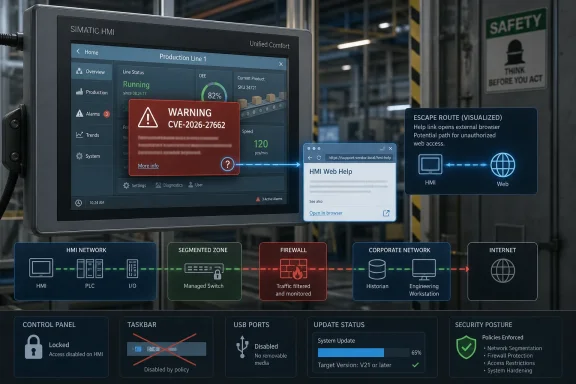 Siemens’ HMI Problem Is Really a Boundary Problem
The vulnerability sits in a familiar place: between what an operator is supposed to do and what the underlying device can actually do. A SIMATIC HMI Unified Comfort Panel is meant to present a controlled runtime environment for industrial operators, not a general-purpose browsing station. Yet Siemens’ advisory describes a path from the Control Panel help link into the web browser when corresponding protections are missing.That may sound modest until you consider where these panels live. They are mounted on machines, production lines, support arms, hygienic stations, and control cabinets. They are touched by operators, maintenance staff, contractors, integrators, and sometimes anyone standing in the right part of the plant at the wrong time.
The key phrase in the advisory is not “web browser” by itself. It is “if it is not protected by the corresponding security mechanisms.” This is not simply a broken feature; it is a reminder that many industrial systems rely on configuration discipline to preserve the boundary between runtime operation and administrative control.
CVSS 3.1 gives the issue a 7.7 high rating, with local attack vector, low complexity, no privileges required, and no user interaction. That combination deserves attention. It means exploitation is not described as requiring network reachability from the internet, but it also means a person with access to the panel may not need credentials or elaborate timing to cross into territory they should not reach.
The Help Link Became the Escape Route
Industrial security advisories often bury the most interesting detail in plain English. Here, the help link is the hinge. A feature intended to aid users becomes a route to the browser, and the browser becomes a route to actions that Siemens characterizes as potentially leading to unwanted misconfigurations, backdoor discovery, unauthorized actions, or further compromise.This is a classic example of control-plane escape. The runtime application is supposed to constrain the user. The Control Panel is supposed to administer the device. The help system is supposed to explain the settings. But if the transitions between those layers are not tightly governed, a supposedly limited user can move from “operate the machine” to “explore the device.”
That distinction matters because HMIs are not ordinary kiosks. A kiosk escape in a hotel lobby might expose a desktop or browser session. A kiosk escape on an HMI can expose settings that influence production behavior, communications, local services, authentication surfaces, and the broader trust relationship between panel, controller, engineering workstation, and remote-access tooling.
The advisory does not claim that CVE-2026-27662 directly grants control over a PLC or automatically opens a shell. That restraint is important. But industrial incidents often do not begin with cinematic exploits; they begin with access to a screen, a misconfiguration, a maintenance shortcut, or a forgotten feature that lets an attacker learn how the environment is stitched together.
A High Score Without a Remote Attack Still Deserves Respect
Some administrators will see “local” in the CVSS vector and instinctively downgrade the risk. In enterprise IT, a local-only bug often means the attacker already has a foothold on a workstation. In operational technology, local access can be much less reassuring.Factory floors, labs, utilities, packaging lines, pharmaceutical environments, and industrial test rigs are full of shared physical spaces. A panel may be reachable by operators across shifts. It may be temporarily exposed during maintenance. It may be located in a cabinet whose lock is more ceremonial than meaningful. It may be accessible to a vendor technician whose privileges are broader in practice than anyone wants to admit.
That is why “unauthenticated” is doing real work here. If the Control Panel and runtime protections are weak, the barrier is not a password prompt; it is merely proximity and workflow. In plants where HMIs are treated as rugged appliances rather than managed endpoints, that is a thin line.
The CVSS impact values also point to why Siemens and CISA are treating this seriously. The listed impact is high for integrity and availability, while confidentiality is not the primary concern. In other words, the feared outcome is not primarily data theft; it is unauthorized change and disruption.
V21 Is the Fix, but Configuration Is the Control
Siemens’ clean remediation is straightforward: update affected Unified Comfort Panels to V21 or later. The affected range is broad across MTP700, MTP1000, MTP1200, MTP1500, MTP1900, and MTP2200 Unified Comfort families, including hygienic variants, neutral-design units, Comfort Pro versions, and several SIPLUS-branded models. If the device is a Unified Comfort Panel before V21, the safest assumption is that it needs review.But the advisory is not just a patch notice. Siemens also points customers to security guidelines covering the end of HMI runtime, access protection for the Control Panel, and runtime autostart behavior. It separately recommends disabling the taskbar through Control Panel system properties.
That combination tells the real story. V21 closes the product flaw, but the mitigations address the operational pattern that made the flaw meaningful. If users can leave runtime, open the Control Panel, reach help, and pivot into a browser, the installation has too many assumptions bundled into a single touch screen.
This is where industrial patching differs from Windows desktop patching. Updating an HMI panel may require planned downtime, engineering validation, image management, project compatibility checks, and coordination with operations. The vendor fix may be the right answer, but the first practical defense may be locking down the panel so the vulnerable path is no longer reachable during the maintenance window before the update.
The Browser Is Now Part of the Attack Surface
The presence of a browser on an HMI should no longer surprise anyone. Siemens’ Unified generation is part of a broader industrial shift toward web technologies, modern visualization stacks, remote access, HTML-based components, and more flexible integration. That shift brings advantages: richer interfaces, easier visualization, better interoperability, and more familiar development patterns.It also drags browser-era risk onto hardware that many organizations still inventory like a display. A browser is not just a window to documentation. It can render content, reach internal addresses, interact with web services, expose cached sessions, handle certificates, and become a discovery tool for whatever the panel can see.
In a tightly segmented architecture, that may be limited. In a messier plant network, it may be enough to enumerate nearby services, stumble into engineering interfaces, or validate assumptions about default credentials and weakly protected endpoints. The advisory’s language about “backdoors” should be read broadly: hidden service paths, maintenance endpoints, diagnostic pages, old convenience accounts, or configuration shortcuts that were never meant to be browsed from the operator panel.
This is the uncomfortable reality of industrial modernization. The same web foundation that makes HMIs more capable makes them harder to treat as fixed-function devices. If an HMI contains a browser, local apps, remote services, and control-panel settings, then it belongs in endpoint security discussions even if it does not look like a PC.
The Affected List Is a Fleet Management Warning
The long product list in this advisory is not filler. It is a fleet management problem in vendor-catalog form. Affected devices span multiple screen sizes and mounting styles, including standard Unified Comfort Panels, hygienic models, neutral-design variants, Comfort Pro configurations for stands and support arms, and SIPLUS versions designed for harsher environments.That breadth matters because many industrial organizations do not track HMIs with the same precision they apply to servers. They may know a production cell has “a Siemens Unified panel” without knowing the exact order number, image version, firmware level, project version, or Control Panel lockdown state. That is no longer enough.
The advisory also demonstrates how vulnerability management in OT often starts with hardware identity rather than software identity. A Windows admin asks, “Which build is installed?” A plant engineer may first need to ask, “Which MTP model is this, what image is it running, which TIA Portal version produced the project, and who owns the downtime window?”
For WindowsForum readers used to KB numbers and cumulative updates, this is the industrial equivalent of patching a fleet where every screen is attached to a physical process. The fix may be a version number, but the work is asset discovery, process risk, validation, and change control.
CISA’s Republication Makes This Bigger Than a Siemens Notice
CISA’s May 14 republication of Siemens ProductCERT advisory SSA-387223 is not just bureaucratic duplication. It turns a vendor advisory into a signal for critical infrastructure operators, security teams, and vulnerability management programs that ingest CISA ICS advisories as part of formal risk processes.The affected critical infrastructure sector is listed as critical manufacturing, with worldwide deployment and Siemens headquartered in Germany. That global footprint matters because SIMATIC gear is not a niche product sitting in a few labs. It is embedded in industrial environments where uptime, safety, and production continuity often compete with security maintenance.
CISA’s general recommendations are familiar but still relevant: minimize network exposure, avoid internet accessibility for control systems, isolate control networks from business networks, use VPNs carefully when remote access is necessary, and perform impact analysis before deploying mitigations. These recommendations can sound generic because they appear in many ICS advisories. They remain repeated because too many environments still violate them.
The wrinkle here is that network exposure is not the only issue. A local Control Panel escape is also about physical access, role separation, operator workflow, and maintenance habits. Segmentation helps, but it does not replace locking down the panel itself.
The Misconfiguration Risk Is the Real Payload
The advisory’s most interesting claim is not that an attacker can open a browser. It is that browser access may allow the attacker to find backdoors, perform unauthorized actions, or exploit misconfigurations. That is the language of chained compromise, not one-shot exploitation.Industrial environments accumulate exceptions. A vendor remote-support tool is left enabled because it helped during commissioning. A diagnostic web server remains reachable because maintenance likes it. A default route exists because the line once needed temporary connectivity. A service account survives because nobody wants to break the historian feed.
A browser on the panel can become the attacker’s flashlight. It can reveal what internal naming conventions look like, which hosts respond, which certificates are self-signed, which portals are reachable, and which systems trust the HMI’s network location. Even failed access attempts can teach an attacker how the environment is organized.
That is why this bug should not be dismissed as merely “someone can browse from the HMI.” In OT, visibility is often the first privilege. If the attacker can turn a locked-down operator surface into a general exploration tool, the defender has lost an important layer of obscurity and control.
Windows Shops Should Recognize the Pattern
This is not a Windows vulnerability, but Windows administrators should recognize the shape of the failure. It resembles kiosk escapes, browser protocol handler abuse, control-panel restrictions that miss a path, and help-system links that pierce a lockdown model. The technology stack is industrial, but the security lesson is familiar.Windows environments have spent years learning that “disable the obvious button” is not the same as creating a hardened shell. If users can invoke help, open file dialogs, launch a browser, reach settings, or trigger an external handler, the lockdown is porous. HMIs face the same problem, with higher physical stakes.
For mixed IT/OT organizations, this is an opportunity to bring endpoint-hardening instincts into plant-floor discussions without pretending that HMIs are just PCs. The right posture is not to impose desktop patch policy blindly. It is to ask the same class of questions: what can a low-privilege user launch, what network paths can the device reach, which local settings require authentication, and how quickly can the device be restored if hardening breaks a workflow?
The Windows analogy also helps explain why Siemens’ mitigation advice emphasizes Control Panel access protection and taskbar disabling. Those are not cosmetic controls. They are part of preventing the operator interface from becoming a launcher.
Updating Industrial HMIs Is a Change-Control Exercise, Not a Click
The straightforward recommendation to update to V21 or later should be treated as a project, not a casual button press. In industrial systems, firmware and platform updates can affect runtime behavior, communication settings, scripts, web components, certificate handling, user administration, and third-party integrations. Even when the vendor fix is correct, deployment needs testing.That does not mean organizations should delay indefinitely. It means they should triage intelligently. Panels in public or semi-public areas, panels with weak Control Panel protection, panels connected to broader plant networks, and panels used by many shifts deserve priority. A lab panel isolated from production may be lower risk than a packaging-line panel reachable by contractors during night maintenance.
Administrators should also distinguish between temporary mitigation and permanent remediation. Disabling the taskbar and protecting the Control Panel may reduce exposure, but they do not turn a vulnerable pre-V21 product into a patched one. Conversely, patching without reviewing access controls may leave other escape paths or bad habits in place.
The best outcome is not merely that every affected panel reports V21. It is that the organization emerges with a more accurate HMI inventory, clearer ownership of panel hardening, and a repeatable process for evaluating future Siemens ProductCERT and CISA advisories.
Siemens’ Secure-by-Configuration Burden Gets Heavier
CVE-2026-27662 lands in a broader industry debate over secure defaults. The assigned weakness, CWE-1188, is “Initialization of a Resource with an Insecure Default.” That classification is blunt: a resource starts in a state that is too permissive unless someone changes it.Vendors often argue, with some justification, that industrial products need flexibility. Commissioning teams need access. Integrators need to troubleshoot. Plants vary wildly in network design, user administration, remote support, and safety constraints. A default that is too strict can slow deployment or generate expensive support calls.
But the security market is moving in the opposite direction. Regulators, insurers, asset owners, and national cyber agencies increasingly expect products to arrive with safer defaults and make insecure modes explicit. In that climate, “enable the security mechanism yourself” is becoming a weaker defense, especially when the affected device is a machine-facing control surface.
Siemens is hardly alone here. The entire OT ecosystem is still unwinding decades of trusted-network assumptions. But Siemens’ position in industrial automation means its defaults carry unusual weight. When a Unified Comfort Panel offers a browser, taskbar, Control Panel, help system, runtime autostart, web access, and remote services, the default boundaries between them must be engineered as carefully as the features themselves.
The Plant-Floor Checklist Hidden Inside This Advisory
The practical path through CVE-2026-27662 is narrower than the product list makes it look, but it requires discipline. The important work is not memorizing every 6AV and 6AG order number; it is turning this advisory into a short, testable field exercise for each affected site.- Inventory all SIMATIC HMI Unified Comfort and SIPLUS Unified Comfort panels and record their exact model, firmware or image version, location, owner, and production criticality.
- Prioritize any affected panel running a version before V21.0, especially where operators or contractors can reach the physical interface without strong supervision.
- Update affected panels to V21 or later after validating the runtime project, communications, scripts, web components, and recovery plan in the appropriate maintenance window.
- Enable access protection for the Control Panel, review runtime autostart behavior, and make sure ordinary operators cannot exit into administrative surfaces as a matter of convenience.
- Disable the taskbar where the operational workflow does not require it, because launch surfaces on an HMI should be treated as attack surfaces.
- Recheck network segmentation and remote-access paths from the panel’s point of view, not merely from the firewall diagram.
This Is the Kind of OT Bug That Rewards Boring Security
The most dangerous response to this advisory would be either panic or indifference. Panic overstates what Siemens has disclosed; this is not described as a wormable remote exploit. Indifference understates what a local unauthenticated escape can mean on a production floor.Good OT security is often boring. It is asset lists, maintenance windows, locked Control Panels, disabled taskbars, segmented networks, documented remote access, and tested restoration images. CVE-2026-27662 is exactly the sort of vulnerability that punishes organizations that skipped those basics because the panel “was only an HMI.”
The advisory also shows why the line between IT and OT security keeps getting thinner. A browser escape on a plant-floor panel now belongs in the same conversation as kiosk hardening, endpoint lockdown, vulnerability management, and identity-controlled administration. The screen on the machine is no longer just the screen on the machine.
Siemens has provided the immediate answer: move to V21 or later and apply the recommended hardening steps. The longer-term answer is less comfortable and more important: treat every modern HMI as a managed computing endpoint with industrial consequences, because the next advisory may not be kind enough to stop at the browser.
Source: CISA Siemens SIMATIC | CISA
