

Smart assistants have moved far beyond novelty — today they quietly manage calendars, control our homes, summarize work, and at times, raise serious questions about who owns the data they collect.
Smart assistants — also called voice assistants or AI assistants — are software agents that respond to voice or typed commands to perform tasks like setting reminders, controlling smart home devices, answering questions, and helping with productivity. They appear in smart speakers, smartphones, smart displays, TVs, and desktop environments, and are now a standard layer of modern digital life. Adoption and capability have both accelerated: the voice-assistant market is expanding rapidly and analysts project meaningful revenue and device growth over the coming years.
That growth is not evenly distributed. In the U.S., Amazon’s Echo/Alexa hardware historically commanded a large installed base, while Google’s Assistant and Apple’s Siri each contest for the other axes of influence — accuracy, ecosystem integration, and privacy posture. Survey and market data show a competitive landscape where device availability, ecosystem lock-in, and platform features all shape which assistant people use.
At the same time, incident-prone moments underscore that the convenience of assistants comes with trade-offs. Recent reporting about an enterprise Copilot bug that accessed and summarized confidential email content highlights the evolving privacy risks of deeply integrated AI assistants. These are not theoretical problems: they can affect organizations and individuals and have implications for trust and governance.
Caveat: The convenience of contextual calendar assistance depends on what you allow the assistant to access. Always review the account connectors and permissions, and be cautious about granting broad read/write access to sensitive mailboxes.
Security note: Automations that unlock doors or open garage doors should be configured conservatively — prefer multi-user permissions, geofencing with fail-safes, and time-based locks. Always enable two-factor authentication on the account that controls your smart devices.
Risk and governance: For business users, the power to summarize sensitive communications creates liability if the assistant accesses data it shouldn’t. The recent Copilot bug that summarized protected emails shows how software errors can subvert intended controls. Organizations should pair assistant deployments with data governance, DLP (Data Loss Prevention) rules, and thorough testing before broad rollout.
Key privacy controls and practices:
Smart assistants are not a silver bullet, but when used deliberately they are powerful helpers: they reduce friction for mundane tasks, amplify accessibility, and — when governed properly — can be trusted members of your digital toolkit. The challenge ahead is as much social and organizational as it is technical: balancing convenience with control, and adopting practical governance while still reaping the everyday benefits of voice and AI-powered assistance.
Source: crispng.com 8 Ways Smart Assistants Can Simplify Daily Life
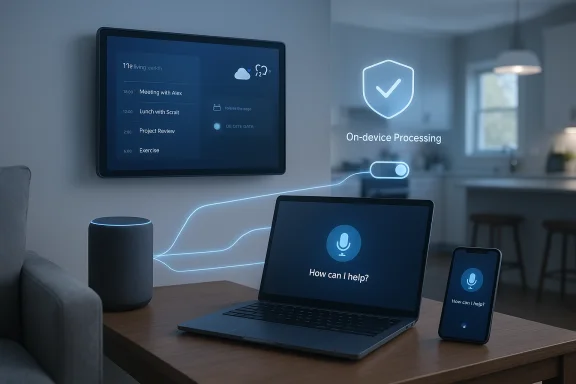 Background / Overview
Smart assistants — also called voice assistants or AI assistants — are software agents that respond to voice or typed commands to perform tasks like setting reminders, controlling smart home devices, answering questions, and helping with productivity. They appear in smart speakers, smartphones, smart displays, TVs, and desktop environments, and are now a standard layer of modern digital life. Adoption and capability have both accelerated: the voice-assistant market is expanding rapidly and analysts project meaningful revenue and device growth over the coming years.That growth is not evenly distributed. In the U.S., Amazon’s Echo/Alexa hardware historically commanded a large installed base, while Google’s Assistant and Apple’s Siri each contest for the other axes of influence — accuracy, ecosystem integration, and privacy posture. Survey and market data show a competitive landscape where device availability, ecosystem lock-in, and platform features all shape which assistant people use.
At the same time, incident-prone moments underscore that the convenience of assistants comes with trade-offs. Recent reporting about an enterprise Copilot bug that accessed and summarized confidential email content highlights the evolving privacy risks of deeply integrated AI assistants. These are not theoretical problems: they can affect organizations and individuals and have implications for trust and governance.
1. Managing schedules and reminders effortlessly
Smart assistants excel at time-based and context-aware reminders. With a simple voice prompt you can set one-off reminders, recurring events, or location-based prompts ("remind me when I get to the office"), and many assistants will surface those reminders across devices in the same ecosystem.- Benefits:
- Hands-free entry of appointments while commuting or cooking.
- Cross-device syncing across phone, laptop, smart display, and watch when you use a unified account.
- Automated follow-ups and meeting prep when assistants are integrated with calendars and email services.
Caveat: The convenience of contextual calendar assistance depends on what you allow the assistant to access. Always review the account connectors and permissions, and be cautious about granting broad read/write access to sensitive mailboxes.
2. Controlling smart home devices seamlessly
One of the earliest and most tangible uses for voice assistants has been smart-home control: lights, thermostats, locks, cameras, and shades can be adjusted with a spoken phrase or built into automation routines.- Typical actions:
- "Turn off all downstairs lights."
- "Set the thermostat to 70°F."
- "Lock the front door" or "Show backyard camera on the living room screen."
Security note: Automations that unlock doors or open garage doors should be configured conservatively — prefer multi-user permissions, geofencing with fail-safes, and time-based locks. Always enable two-factor authentication on the account that controls your smart devices.
3. Providing instant information and news updates
As single-query information layers, assistants are fast at delivering short-form, real-time updates: weather, traffic, sports scores, flight statuses, stock tickers, and breaking news highlights.- Why it matters:
- Quick situational awareness without pulling out a phone.
- Faster decision-making for commuting, errands, and travel.
- On-demand briefings that can be scheduled (morning news, traffic report before leaving).
4. Simplifying shopping and grocery lists
Voice-driven shopping and list management are low-friction conveniences that reduce forgotten items and speed routine replenishment.- Typical functions:
- "Add milk to my grocery list."
- "Reorder my usual paper towels."
- Voice search for product suggestions and price comparisons.
5. Supporting productivity and focus
Smart assistants are increasingly positioned as personal productivity layers: they set timers, manage to‑do lists, summarize long texts, draft emails, and orchestrate meeting follow-ups.- Workplace use cases:
- Generating meeting summaries and action items from chat transcripts.
- Turning a short prompt into a draft document, slide deck, or spreadsheet.
- Creating prioritized to‑do lists that pull items from flagged emails or project boards.
Risk and governance: For business users, the power to summarize sensitive communications creates liability if the assistant accesses data it shouldn’t. The recent Copilot bug that summarized protected emails shows how software errors can subvert intended controls. Organizations should pair assistant deployments with data governance, DLP (Data Loss Prevention) rules, and thorough testing before broad rollout.
6. Enhancing entertainment experiences
Assistants centralize entertainment controls: play specific tracks, resume playlists, control streaming playback on TVs and sound systems, and surface recommendations based on listening habits.- Advantages:
- Faster content discovery through voice queries or personalized suggestions.
- Hands-free control in group settings (living room, kitchen).
- Cross-device continuity — ask on one device, continue on another.
7. Assisting with navigation and travel planning
Integrated with mapping and travel services, assistants provide turn‑by‑turn navigation, ETA estimates, flight and gate alerts, and local recommendations.- What assistants handle well:
- Traffic and estimated travel time for commuting.
- Flight status queries and gate changes.
- Nearby restaurant suggestions and directions.
8. Promoting accessibility and hands‑free convenience
One of the clearest societal benefits of voice assistants is accessibility. For people with mobility limitations, visual impairments, or temporary constraints (e.g., cooking with messy hands), voice control can mean independence.- Accessibility benefits:
- Operating devices without fine motor input.
- Getting spoken access to information and notifications.
- Setting voice-enabled reminders and controlling accessibility settings.
Platform differences: Alexa, Google Assistant, Siri, Copilot and the rest
Not all assistants are built the same. Here’s a concise comparison of the high-level strengths and trade-offs.- Amazon Alexa
- Strengths: broad device compatibility, a large skills ecosystem, strong smart-home foothold through Echo hardware.
- Trade-offs: centralized cloud processing that historically relied on human reviewers for quality checks (companies have revised reviewer policies). Large skill ecosystems can mean variable quality.
- Google Assistant
- Strengths: deep search and contextual understanding, robust mapping/navigation integrations, strong multimodal capabilities.
- Trade-offs: Google’s business model is data-driven, which some users weigh against convenience. Recent pushes to expand Gemini/Assistant capabilities make it a top contender for accuracy and multimodal responses.
- Apple Siri
- Strengths: emphasis on privacy and on-device processing when possible; tight hardware-software integration on iPhone, iPad, and HomePod.
- Trade-offs: smaller smart-speaker market share and historically slower feature cadence compared with competitors; Apple has focused on privacy-first design choices.
- Microsoft Copilot (Windows / Microsoft 365)
- Strengths: deep enterprise and productivity integrations (Office, Outlook, Teams), evolving document-export features and connectors for third-party accounts.
- Trade-offs: as Copilot takes on more enterprise tasks, governance, privacy controls, and correctness become critical — illustrated by recent incidents where Copilot processed protected emails incorrectly. That event is a sober reminder that integration increases both power and risk.
Privacy and security: what to watch for
Privacy is the central tension in the value proposition of assistants: every convenience is paired with a potential data collection vector.Key privacy controls and practices:
- Review voice history and deletion options in the assistant’s app. Major platforms provide ways to review and delete recorded interactions, and some allow automatic deletion windows (e.g., 3 months to 18 months).
- Turn on guest or privacy modes where available to prevent temporary interactions from being logged.
- Use on-device processing options when offered for sensitive queries or when you want fewer cloud round trips.
- Be conservative when enabling third‑party connectors that grant deep read/write access to email, calendar, drives, or CRM data.
Step-by-step: sensible setup and governance (practical checklist)
- Inventory your assistants and accounts. Know which assistants are active on which devices.
- Lock down your accounts with strong passwords and multi-factor authentication.
- Audit and disable unused connectors. Only enable the minimum permissions needed.
- Set reasonable data retention windows for voice history (e.g., 3 months) if offered.
- Use device-level privacy controls: microphone mute, guest modes, and physical camera covers.
- For enterprise deployments, pair assistant use with DLP policies, role-based access, and staged rollouts with security testing.
- Regularly review software updates and vendor privacy-policy changes.
Practical tips to get more value from assistants
- Use short, clear commands and create routines that bundle multiple actions into one phrase.
- Train voice recognition profiles where available to improve accuracy for your voice.
- Use voice verification for purchases or sensitive actions when the assistant supports it.
- Combine assistants’ strengths: map directions with Google Assistant but keep private notes behind an on‑device assistant when possible.
- Explore productivity connectors (export, create document features), but test them in a sandbox before connecting business accounts.
What’s next: trends to watch
- On-device and hybrid processing will expand. Vendors are investing in local LLMs and hybrid edge-cloud models to reduce latency and surface privacy advantages.
- Deeper multimodal assistants that can handle text, voice, images, and video will move beyond Q&A into task orchestration.
- Smarter automation and “agents” that perform multi-step tasks (book travel, coordinate meetings, manage subscriptions) will grow, but they’ll require stronger governance guardrails.
- Policy and regulatory attention will rise. Governments and standard-setting bodies are increasingly interested in how assistant-collected data is used and retained.
Strengths, risks, and final assessment
Strengths- Time savings: assistants remove friction for small, frequent tasks that add up across a week.
- Accessibility: they lower barriers for people with disabilities and those juggling hands-full activities.
- Productivity: integrated assistants can reduce administrative load when configured responsibly.
- Privacy and data governance: deep integrations with email, calendars, and drives create sensitive attack surfaces and potential for accidental exposure. Recent production bugs illustrate the stakes.
- Ecosystem lock-in: convenience often ties you to a single provider’s devices and services.
- Variable accuracy and bias: assistants are only as good as their training data and platform integrations; errors in summarization or action execution can have outsized consequences.
How to start (quick-start checklist for everyday users)
- Identify one routine to automate (morning briefing, grocery list, thermostat schedule).
- Enable only the necessary connector for that routine.
- Create a simple voice routine or automation with a fallback (manual confirmation).
- Test the automation for a week, review logs/voice history, and adjust retention settings.
- Expand gradually: add cross-device syncing, but keep critical data behind stricter controls.
Smart assistants are not a silver bullet, but when used deliberately they are powerful helpers: they reduce friction for mundane tasks, amplify accessibility, and — when governed properly — can be trusted members of your digital toolkit. The challenge ahead is as much social and organizational as it is technical: balancing convenience with control, and adopting practical governance while still reaping the everyday benefits of voice and AI-powered assistance.
Source: crispng.com 8 Ways Smart Assistants Can Simplify Daily Life
