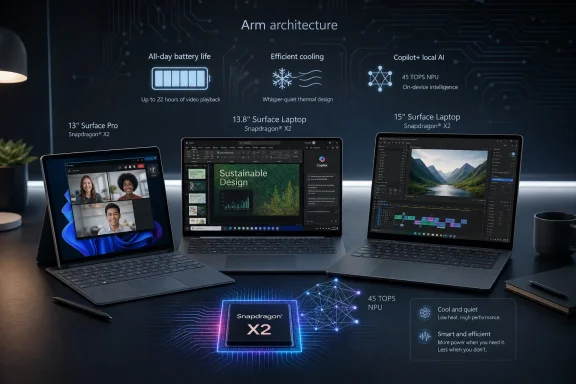
Microsoft announced new Snapdragon X2-powered Surface Pro 13-inch, Surface Laptop 13.8-inch, and Surface Laptop 15-inch devices on June 16, 2026, with U.S. consumer availability starting immediately and business availability beginning July 14. The launch is not a dramatic reinvention of Surface so much as a hardening of Microsoft’s Windows-on-Arm strategy. After years of treating Arm-based Windows PCs as either curiosities or compromises, Microsoft is now positioning them as the normal high-end Surface experience. The bet is simple: if local AI, long battery life, and thin premium hardware are the future of Windows, Surface has to stop hedging.
For most of its history, Surface has been a showcase for Windows hardware ideas that Microsoft wanted the rest of the PC industry to copy. The original Surface Pro made the detachable tablet PC feel credible. The Surface Laptop gave Microsoft a more conventional premium notebook to place beside MacBooks and ultrabooks. Surface Studio, Surface Book, and Surface Duo were bolder experiments, with varying degrees of commercial consequence.
The new Snapdragon X2 Surface refresh is less visually adventurous than those older swings, but strategically it may matter more. Microsoft is no longer using Arm as a side lane for specialty devices. It is putting Qualcomm silicon into the mainstream Surface Pro and Surface Laptop lines, with pricing that says these machines are not budget alternatives to Intel systems.
That shift matters because Windows on Arm has historically carried a trust deficit. Users worried about app compatibility, administrators worried about manageability, and developers worried about whether the install base justified the work. Microsoft’s answer in 2026 is not to explain Arm as an exception. It is to make Arm the default story for some of its most visible PCs.
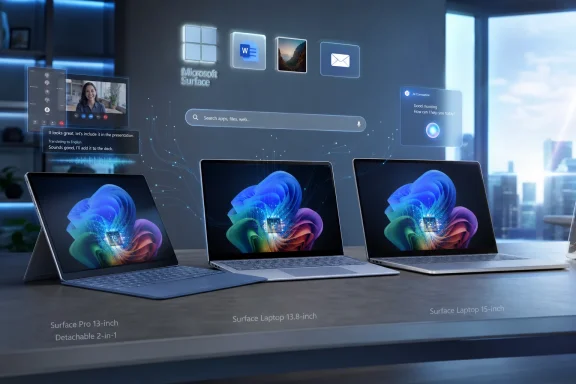
The Surface Pro 13-inch keeps the detachable 2-in-1 format, while the Surface Laptop 13.8-inch and 15-inch keep the familiar clamshell shape. The chassis language is deliberately conservative. Microsoft wants the processor transition to feel like an upgrade inside a known machine, not a request for users to rethink what a Windows PC is.
The first Copilot+ Surface generation proved that Windows on Arm could be fast enough for many productivity users. The harder question was whether it could feel consistently premium once users moved beyond browser tabs, Office, Teams, and media playback. Graphics improvements are Microsoft’s way of addressing that middle ground: not necessarily high-end gaming, but the growing pile of everyday workloads that touch GPU acceleration.
That includes creative apps, browser rendering, video conferencing effects, external displays, light editing, and AI-assisted workflows that increasingly bounce between CPU, GPU, and NPU. The modern laptop is no longer judged only by how quickly it opens Word. It is judged by whether it remains fluid while a dozen apps, a camera pipeline, a browser full of web apps, and background AI features all compete for silicon.
The bigger picture is that Microsoft needs Snapdragon X2 to make Windows on Arm feel boring. Not exciting, not exotic, not something buyers have to research for two evenings before clicking purchase. Boring is the victory condition here: the user buys a Surface, installs apps, joins meetings, edits photos, writes documents, travels, and does not have to think about instruction sets.
That distinction is easy to lose in the marketing fog. Local AI is not a magic privacy blanket, and cloud AI is not going away. Many useful models remain too large, too frequently updated, or too dependent on server-side context to run entirely on a laptop. But local processing does matter when latency, offline access, battery efficiency, or data sensitivity come into play.
For Windows users, the practical promise is that AI features should feel less like web services wearing an operating-system costume. Search, recall-style activity indexing, image manipulation, transcription, camera effects, summarization, and accessibility features all become more convincing if the PC has enough local silicon to participate. Microsoft’s hardware strategy is trying to make the NPU as expected as the webcam.
That does not mean every Copilot+ feature will win over skeptics. Some users remain wary of operating-system-level activity tracking, and enterprises will continue to scrutinize how data is stored, processed, and governed. But Microsoft’s Surface roadmap makes clear that the company sees local AI acceleration as table stakes for premium Windows hardware, not a novelty feature bolted onto a few enthusiast machines.
The new model offers a 13-inch PixelSense touchscreen with a 2880 x 1920 resolution, up to a 120Hz refresh rate, and LCD or optional OLED configurations. The OLED option matters because display quality has become one of the clearest ways premium laptops justify their price. Deep blacks and strong contrast are not abstract luxuries if you spend all day in documents, photos, presentations, and streaming video.
Battery life is rated at up to 15.5 hours of local video playback. As always, that number should be read as a controlled benchmark rather than a promise about a normal workday full of browser tabs, Teams calls, mixed connectivity, and display brightness changes. Still, Arm-based Surface devices have generally made battery life a core part of their appeal, and Microsoft clearly wants the Pro to feel less like a beautiful machine that needs constant outlet awareness.
The camera story is also worth noting. A 1440p Quad HD camera with an ultrawide field of view is exactly the sort of component that would have sounded secondary a decade ago and now affects daily work. Hybrid work made webcam quality a first-order productivity feature, and Microsoft knows Surface buyers often live inside video meetings.
The old Surface Pro caveat also survives: the keyboard and pen remain part of the real-world cost equation. A Surface Pro without a keyboard may be technically complete, but for most buyers it is not functionally complete. Microsoft’s limited-time U.S. keyboard promotion softens that reality for early purchasers, but it does not change the long-standing critique that Surface Pro pricing often looks better before the essential accessories enter the cart.
The battery claims are stronger here than on the Pro. Microsoft rates the 13.8-inch Surface Laptop at up to 20 hours of local video playback and the 15-inch model at up to 19 hours. Again, local video playback is not the same as a messy workday, but it is the metric Microsoft is using to argue that Snapdragon X2 delivers the endurance users expect from modern Arm laptops.
The 15-inch model’s display density jump from 201 pixels per inch to 262 pixels per inch is a quieter upgrade than an OLED panel, but it may be one of the most meaningful day-to-day changes. Text clarity matters on larger displays. If you spend hours in code editors, spreadsheets, PDFs, and browser-based admin consoles, sharper rendering is not decorative; it reduces fatigue.
The 13.8-inch Surface Laptop adds a Jade color alongside Platinum, Black, and Dune. Color is easy to dismiss until you remember that premium laptops are also identity objects. Microsoft learned years ago that Surface could not win only on detachable keyboards and aspect ratios. It also had to look like something people wanted to carry.
That is defensible if the machines deliver. Premium buyers will pay for performance, battery life, display quality, industrial design, and a device that feels stable for several years. Enterprise buyers will pay for manageability, predictable configurations, security posture, and support. But high prices also make every remaining Arm compatibility edge case feel more annoying.
This is the tension at the center of the launch. Microsoft wants Surface to normalize Windows on Arm, but normalization usually requires volume. Volume usually requires accessible pricing. By launching these Snapdragon X2 systems at premium prices, Microsoft is saying the first job is not to flood the market; it is to prove that Arm Windows PCs belong at the top of it.
That may be the right sequencing. Cheap Arm Windows laptops that disappoint would damage the platform more than help it. A successful premium Surface can give OEMs permission to build around Snapdragon X2 with confidence. But it also means many users will experience this transition from afar, reading reviews and waiting for the same silicon story to move into less expensive machines.
The compatibility picture is much better than it was in the Surface Pro X era, but enterprises have long memories. Line-of-business apps, VPN clients, endpoint security tools, print drivers, browser extensions, accessibility software, and legacy utilities all have to behave. One incompatible component can turn a promising hardware refresh into a pilot-program headache.
The reward is real if the software estate is ready. Longer battery life can reduce travel friction. Local AI acceleration may improve transcription, translation, search, and document workflows without sending every task to a remote service. Better cameras and haptics improve the texture of hybrid work. Thin, quiet machines with premium displays remain easy to issue to users who live in meetings and documents.
But administrators will need to separate Microsoft’s platform ambition from their own deployment reality. The right question is not whether Snapdragon X2 is “good enough” in the abstract. It is whether it is good enough for a particular organization’s app stack, support model, security requirements, and refresh cycle. Surface is a flagship, not a waiver from testing.
Microsoft’s challenge is partly technical and partly psychological. A user who had a bad experience with an earlier Arm Windows device may not care that the new one is different. A sysadmin who remembers driver weirdness may not be eager to relitigate the issue. A developer who already supports x64 Windows, macOS, and perhaps Linux may still view Arm64 Windows as another testing burden.
That is why Surface matters. Microsoft cannot force every software vendor to optimize instantly, but it can create visible demand. If premium Surface buyers are using Arm machines in meaningful numbers, app vendors have a stronger incentive to polish native builds. If enterprise pilots succeed, internal development teams have a reason to care. Hardware can pull the software ecosystem forward, but only if users trust the hardware enough to buy it.
The Snapdragon X2 launch therefore has stakes beyond these three devices. It is a referendum on whether Microsoft’s 2024 Copilot+ push was a one-cycle marketing event or the start of a durable Windows hardware transition. The answer will not come from launch slides. It will come from reviews, app behavior, battery tests, return rates, enterprise pilots, and whether OEMs follow with compelling alternatives.
That is why Microsoft’s most convincing argument for these Surface devices may not be Copilot at all. It may be the combination of battery life, graphics gains, better cameras, sharper displays, premium build quality, and enough local AI hardware to keep Windows evolving over the next several years. The NPU is insurance as much as it is a feature.
There is also a privacy and governance angle that Microsoft will have to keep earning. Local AI sounds more private than cloud AI, but users and administrators will want clear controls over what is processed, stored, indexed, synced, and retained. The more Windows becomes context-aware, the more Microsoft must prove that awareness does not become surveillance by default.
The Surface launch gestures toward a future where AI acceleration is ordinary and invisible. That is probably the right destination. The best AI PC will not be the one that constantly reminds users it is an AI PC. It will be the one where useful features run quickly, respect policy, conserve battery, and fade into the operating system.
 Surface Stops Apologizing for Arm
For most of its history, Surface has been a showcase for Windows hardware ideas that Microsoft wanted the rest of the PC industry to copy. The original Surface Pro made the detachable tablet PC feel credible. The Surface Laptop gave Microsoft a more conventional premium notebook to place beside MacBooks and ultrabooks. Surface Studio, Surface Book, and Surface Duo were bolder experiments, with varying degrees of commercial consequence.The new Snapdragon X2 Surface refresh is less visually adventurous than those older swings, but strategically it may matter more. Microsoft is no longer using Arm as a side lane for specialty devices. It is putting Qualcomm silicon into the mainstream Surface Pro and Surface Laptop lines, with pricing that says these machines are not budget alternatives to Intel systems.
That shift matters because Windows on Arm has historically carried a trust deficit. Users worried about app compatibility, administrators worried about manageability, and developers worried about whether the install base justified the work. Microsoft’s answer in 2026 is not to explain Arm as an exception. It is to make Arm the default story for some of its most visible PCs.
The Surface Pro 13-inch keeps the detachable 2-in-1 format, while the Surface Laptop 13.8-inch and 15-inch keep the familiar clamshell shape. The chassis language is deliberately conservative. Microsoft wants the processor transition to feel like an upgrade inside a known machine, not a request for users to rethink what a Windows PC is.
The Snapdragon X2 Is the Product Story, Not the Spec Sheet
The headline silicon change is Qualcomm’s Snapdragon X2 platform, available in Snapdragon X2 Plus and Snapdragon X2 Elite configurations. Microsoft is claiming up to 53 percent faster graphics performance for the new Surface Pro compared with the previous generation, and up to 58 percent faster graphics performance for the new Surface Laptop. Those are vendor numbers, and real-world performance will depend on cooling, workload, drivers, and app support, but they reveal where Microsoft thinks last generation’s pain points were.The first Copilot+ Surface generation proved that Windows on Arm could be fast enough for many productivity users. The harder question was whether it could feel consistently premium once users moved beyond browser tabs, Office, Teams, and media playback. Graphics improvements are Microsoft’s way of addressing that middle ground: not necessarily high-end gaming, but the growing pile of everyday workloads that touch GPU acceleration.
That includes creative apps, browser rendering, video conferencing effects, external displays, light editing, and AI-assisted workflows that increasingly bounce between CPU, GPU, and NPU. The modern laptop is no longer judged only by how quickly it opens Word. It is judged by whether it remains fluid while a dozen apps, a camera pipeline, a browser full of web apps, and background AI features all compete for silicon.
The bigger picture is that Microsoft needs Snapdragon X2 to make Windows on Arm feel boring. Not exciting, not exotic, not something buyers have to research for two evenings before clicking purchase. Boring is the victory condition here: the user buys a Surface, installs apps, joins meetings, edits photos, writes documents, travels, and does not have to think about instruction sets.
Copilot+ Becomes a Hardware Mandate in Disguise
Microsoft’s AI branding is everywhere in this launch, but the more important message is architectural. These are Copilot+ PCs, which means they are built around a dedicated neural processing unit capable of running certain AI workloads locally. Microsoft’s pitch is not just that Copilot can answer questions. It is that Windows is being redesigned around a hybrid model where some inference happens on the device and some still goes to the cloud.That distinction is easy to lose in the marketing fog. Local AI is not a magic privacy blanket, and cloud AI is not going away. Many useful models remain too large, too frequently updated, or too dependent on server-side context to run entirely on a laptop. But local processing does matter when latency, offline access, battery efficiency, or data sensitivity come into play.
For Windows users, the practical promise is that AI features should feel less like web services wearing an operating-system costume. Search, recall-style activity indexing, image manipulation, transcription, camera effects, summarization, and accessibility features all become more convincing if the PC has enough local silicon to participate. Microsoft’s hardware strategy is trying to make the NPU as expected as the webcam.
That does not mean every Copilot+ feature will win over skeptics. Some users remain wary of operating-system-level activity tracking, and enterprises will continue to scrutinize how data is stored, processed, and governed. But Microsoft’s Surface roadmap makes clear that the company sees local AI acceleration as table stakes for premium Windows hardware, not a novelty feature bolted onto a few enthusiast machines.
The Surface Pro Remains Microsoft’s Favorite Compromise
The Surface Pro 13-inch is still the most Surface-like Surface because it continues to embody Microsoft’s longest-running hardware argument: one device can be a tablet, a laptop, a notebook, a sketchpad, and a meeting machine if users accept a few compromises. The kickstand is still there. The detachable keyboard is still central. Pen input is still part of the identity.The new model offers a 13-inch PixelSense touchscreen with a 2880 x 1920 resolution, up to a 120Hz refresh rate, and LCD or optional OLED configurations. The OLED option matters because display quality has become one of the clearest ways premium laptops justify their price. Deep blacks and strong contrast are not abstract luxuries if you spend all day in documents, photos, presentations, and streaming video.
Battery life is rated at up to 15.5 hours of local video playback. As always, that number should be read as a controlled benchmark rather than a promise about a normal workday full of browser tabs, Teams calls, mixed connectivity, and display brightness changes. Still, Arm-based Surface devices have generally made battery life a core part of their appeal, and Microsoft clearly wants the Pro to feel less like a beautiful machine that needs constant outlet awareness.
The camera story is also worth noting. A 1440p Quad HD camera with an ultrawide field of view is exactly the sort of component that would have sounded secondary a decade ago and now affects daily work. Hybrid work made webcam quality a first-order productivity feature, and Microsoft knows Surface buyers often live inside video meetings.
The old Surface Pro caveat also survives: the keyboard and pen remain part of the real-world cost equation. A Surface Pro without a keyboard may be technically complete, but for most buyers it is not functionally complete. Microsoft’s limited-time U.S. keyboard promotion softens that reality for early purchasers, but it does not change the long-standing critique that Surface Pro pricing often looks better before the essential accessories enter the cart.
The Surface Laptop Is Where Microsoft Plays It Straight
If the Surface Pro is Microsoft’s argument for flexibility, the Surface Laptop is its argument for restraint. The 13.8-inch and 15-inch models are conventional premium notebooks with touchscreens, clean lines, and fewer conceptual trade-offs. No kickstand, no detachable keyboard, no lapability debate. Just a Windows laptop that wants to be judged against MacBook Airs, MacBook Pros, Dell XPS machines, HP Spectres, Lenovo Yogas, and every other premium portable fighting for the same desk space.The battery claims are stronger here than on the Pro. Microsoft rates the 13.8-inch Surface Laptop at up to 20 hours of local video playback and the 15-inch model at up to 19 hours. Again, local video playback is not the same as a messy workday, but it is the metric Microsoft is using to argue that Snapdragon X2 delivers the endurance users expect from modern Arm laptops.
The 15-inch model’s display density jump from 201 pixels per inch to 262 pixels per inch is a quieter upgrade than an OLED panel, but it may be one of the most meaningful day-to-day changes. Text clarity matters on larger displays. If you spend hours in code editors, spreadsheets, PDFs, and browser-based admin consoles, sharper rendering is not decorative; it reduces fatigue.
The 13.8-inch Surface Laptop adds a Jade color alongside Platinum, Black, and Dune. Color is easy to dismiss until you remember that premium laptops are also identity objects. Microsoft learned years ago that Surface could not win only on detachable keyboards and aspect ratios. It also had to look like something people wanted to carry.
The Price Says Microsoft Wants Margin, Not Mass Adoption
The U.S. starting prices are $1,499 for the Surface Pro 13-inch, $1,599 for the Surface Laptop 13.8-inch, and $1,699 for the Surface Laptop 15-inch. Those numbers are not shy. They place the new devices firmly in premium territory and make clear that Microsoft is not trying to win the Windows-on-Arm fight by racing to the bottom.That is defensible if the machines deliver. Premium buyers will pay for performance, battery life, display quality, industrial design, and a device that feels stable for several years. Enterprise buyers will pay for manageability, predictable configurations, security posture, and support. But high prices also make every remaining Arm compatibility edge case feel more annoying.
This is the tension at the center of the launch. Microsoft wants Surface to normalize Windows on Arm, but normalization usually requires volume. Volume usually requires accessible pricing. By launching these Snapdragon X2 systems at premium prices, Microsoft is saying the first job is not to flood the market; it is to prove that Arm Windows PCs belong at the top of it.
That may be the right sequencing. Cheap Arm Windows laptops that disappoint would damage the platform more than help it. A successful premium Surface can give OEMs permission to build around Snapdragon X2 with confidence. But it also means many users will experience this transition from afar, reading reviews and waiting for the same silicon story to move into less expensive machines.
Enterprise IT Gets a Faster Surface and a Longer Checklist
For business customers, the July 14 availability date matters because Surface is not just a consumer brand. It is also a fleet device, a conference-room device, an executive laptop, and a standardization target for organizations that want Windows hardware with first-party polish. Snapdragon X2 gives IT departments a more compelling Arm Surface to evaluate, but not necessarily an easier buying decision.The compatibility picture is much better than it was in the Surface Pro X era, but enterprises have long memories. Line-of-business apps, VPN clients, endpoint security tools, print drivers, browser extensions, accessibility software, and legacy utilities all have to behave. One incompatible component can turn a promising hardware refresh into a pilot-program headache.
The reward is real if the software estate is ready. Longer battery life can reduce travel friction. Local AI acceleration may improve transcription, translation, search, and document workflows without sending every task to a remote service. Better cameras and haptics improve the texture of hybrid work. Thin, quiet machines with premium displays remain easy to issue to users who live in meetings and documents.
But administrators will need to separate Microsoft’s platform ambition from their own deployment reality. The right question is not whether Snapdragon X2 is “good enough” in the abstract. It is whether it is good enough for a particular organization’s app stack, support model, security requirements, and refresh cycle. Surface is a flagship, not a waiver from testing.
The App Gap Is Smaller, but Trust Has to Be Earned Again
The old critique of Windows on Arm was brutally simple: why buy a Windows PC that might not run all Windows apps well? Emulation has improved, native Arm64 apps have increased, and major software vendors have had years to prepare. But platform reputation changes more slowly than platform capability.Microsoft’s challenge is partly technical and partly psychological. A user who had a bad experience with an earlier Arm Windows device may not care that the new one is different. A sysadmin who remembers driver weirdness may not be eager to relitigate the issue. A developer who already supports x64 Windows, macOS, and perhaps Linux may still view Arm64 Windows as another testing burden.
That is why Surface matters. Microsoft cannot force every software vendor to optimize instantly, but it can create visible demand. If premium Surface buyers are using Arm machines in meaningful numbers, app vendors have a stronger incentive to polish native builds. If enterprise pilots succeed, internal development teams have a reason to care. Hardware can pull the software ecosystem forward, but only if users trust the hardware enough to buy it.
The Snapdragon X2 launch therefore has stakes beyond these three devices. It is a referendum on whether Microsoft’s 2024 Copilot+ push was a one-cycle marketing event or the start of a durable Windows hardware transition. The answer will not come from launch slides. It will come from reviews, app behavior, battery tests, return rates, enterprise pilots, and whether OEMs follow with compelling alternatives.
AI PCs Need Better Reasons Than AI
The phrase AI PC still has a problem: it describes a vendor priority more clearly than a user benefit. Most people do not wake up wanting a neural processing unit. They want a machine that is fast, quiet, secure, responsive, long-lasting, and capable of handling whatever modern software throws at it. AI features matter when they become part of those outcomes.That is why Microsoft’s most convincing argument for these Surface devices may not be Copilot at all. It may be the combination of battery life, graphics gains, better cameras, sharper displays, premium build quality, and enough local AI hardware to keep Windows evolving over the next several years. The NPU is insurance as much as it is a feature.
There is also a privacy and governance angle that Microsoft will have to keep earning. Local AI sounds more private than cloud AI, but users and administrators will want clear controls over what is processed, stored, indexed, synced, and retained. The more Windows becomes context-aware, the more Microsoft must prove that awareness does not become surveillance by default.
The Surface launch gestures toward a future where AI acceleration is ordinary and invisible. That is probably the right destination. The best AI PC will not be the one that constantly reminds users it is an AI PC. It will be the one where useful features run quickly, respect policy, conserve battery, and fade into the operating system.
The Surface Bet Now Has Receipts to Produce
Microsoft’s new Surface lineup gives Windows users a clear signal about where the company is steering premium PCs, but the practical verdict will come after the launch glow fades. The concrete points are less about slogans and more about what buyers should test, price, and demand.- The new Surface Pro 13-inch, Surface Laptop 13.8-inch, and Surface Laptop 15-inch make Snapdragon X2 a mainstream Surface platform rather than a side experiment.
- Microsoft is claiming major graphics gains over the previous generation, but independent testing will matter more than launch percentages.
- The Surface Pro remains a premium detachable whose real cost often includes a keyboard and pen, even if early U.S. promotions temporarily change that math.
- The Surface Laptop models are the more conservative bet for users who want Arm battery life and performance without adopting the Surface Pro form factor.
- Enterprise buyers should treat Snapdragon X2 Surface devices as serious candidates, but only after validating app compatibility, drivers, security tools, and management workflows.
- The Copilot+ branding is less important than the broader shift toward local AI hardware becoming standard in premium Windows PCs.
References
- Primary source: HardwareZone
Published: Thu, 18 Jun 2026 03:56:43 GMT
Microsoft Surface devices get Snapdragon X2 | HardwareZone Singapore
Microsoft refreshes its Surface line-up with Snapdragon X2 processors for enhanced performance and local AI capabilities. www.hardwarezone.com.sg
- Related coverage: techradar.com
Microsoft reveals new Surface Pro and Surface Laptop with big graphics upgrades from Snapdragon X2 CPUs — but they're seriously pricey | TechRadar
Around an up to 50% boost in graphics performancewww.techradar.com - Related coverage: windowscentral.com
Microsoft will finally include a keyboard with its new Surface Pro 12, but only for a limited time | Windows Central
After years of asking, Microsoft will throw in a Surface Pro keyboard for free if you order the new Surface Pro 12th-Gen before June 30.www.windowscentral.com - Related coverage: tomsguide.com
Latest Microsoft Surface devices are more expensive — but there’s some good news | Tom's Guide
The consumer versions of the Microsoft Surface Laptop 8 and Surface Pro 12 are now available for $600 and $500 more than 2024's models.www.tomsguide.com - Related coverage: tomshardware.com
Microsoft debuts Surface Pro and Surface Laptop with new jade green color and Qualcomm Snapdragon X2 chips — refreshed devices start at $1,499 with 16GB of RAM | Tom's Hardware
The Laptop features Microsoft's new haptic touchpad.www.tomshardware.com - Official source: news.microsoft.com

- Official source: blogs.windows.com
Introducing the next Surface Pro and Surface Laptop, built for performance and flexibility
For more than 13 years, Surface has been shaped by the people who use it. Architects sketch buildings, developers train models, students build startups and field engineers solve problems that rarely make headlines. We didn't intend to design for onblogs.windows.com - Official source: 9to5google.com
Microsoft launches new Surface Laptop, Pro with Snapdragon X2
Roughly two years after the last generation debuted, Microsoft is today unveiling its new Surface Laptop and Surface Pro models,...9to5google.com - Related coverage: igeekphone.com
Microsoft's new generation Surface Pro/Laptop is Released Simultaneously: Equipped with Snapdragon X2, supporting Local AI, Starting from 12,988 yuan
iGEEKPHONE June 16th: Microsoft has officially launched the new 13-inch Surface Pro and Surface Laptop series products, both equipped with the Snapdragon X2 processor.www.igeekphone.com - Related coverage: engadget.com
Microsoft's New Surface Pro And Surface Laptop Cost $500 And $600 More Than Their Predecessors
Microsoft's new Surface Pro and Surface Laptop are about 50 to 60 percent more expensive than the previous generation. Thanks, AI!www.engadget.com - Official source: microsoft.com
- Official source: cdn-dynmedia-1.microsoft.com
msft-echo-Surface-Laptop-for-Business-13.8-15-inch-fact-sheet
PDF documentcdn-dynmedia-1.microsoft.com