

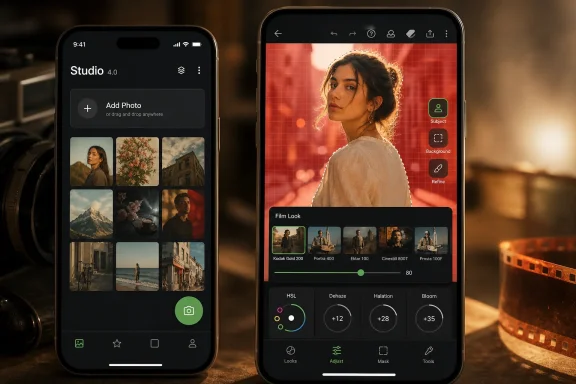
Google released Snapseed 4.0 for Android on May 8, 2026, bringing its long-neglected mobile photo editor a redesigned home screen, smart subject and background masking, batch editing, a built-in camera with real-time film looks, and new tools including HSL, Dehaze, Halation, and Bloom. The surprise is not that Google can still build a capable photo app; the surprise is that it chose to revive one that many Android users assumed had been placed on corporate life support. Snapseed 4.0 is less a routine version bump than a small referendum on what mobile creativity software should cost, how much friction it should impose, and whether Google still has room for a serious editor outside Google Photos.
Snapseed has always occupied a strange corner of Google’s app portfolio. It was powerful enough for enthusiasts, approachable enough for casual users, and old enough to feel like a relic from the pre-subscription era of mobile software. Google acquired Nik Software in 2012, folded Snapseed into its broader photo ambitions, and then let the app drift through years of minor maintenance while Google Photos became the company’s preferred showcase for computational editing.
That drift is why version 4.0 matters. Android users had been stuck on the 2.x branch, with version 2.22 arriving in 2024 and little to suggest that a major overhaul was imminent. Meanwhile, iOS received a more modern Snapseed experience earlier, creating the awkward spectacle of Google’s own photo editor looking more alive on Apple’s platform than on Android.
The Android release closes that gap, but it also exposes the gap in the first place. Google did not merely add a filter pack or shuffle buttons around. It brought Android users into the same product philosophy that had already begun to appear on iPhone: Snapseed as a place where shooting, styling, masking, and finishing happen inside one free app.
That is a meaningful shift. Snapseed used to be the app you opened after the photo was taken. Snapseed 4.0 wants to be present before the shutter fires.
The new camera offers real-time film emulation, including looks inspired by familiar analog names such as Kodak Portra, Fujifilm Superia, Polaroid SX-70, and Ilford HP5. That framing is not subtle. Snapseed is borrowing the emotional language of film at the same moment mobile photography is saturated with AI cleanup, synthetic lighting, object erasure, and platform-native “enhancement.”
This is a different bet from Magic Editor inside Google Photos. Magic Editor is about changing reality after capture. Snapseed Camera is about giving users a stronger aesthetic intention at capture. The distinction matters because many photographers, even casual ones, increasingly want phone images that look less like a device’s default computational pipeline and more like something they chose.
The pro mode is part of that same argument. Manual ISO, shutter speed, and focus controls will not turn every Android phone into a dedicated camera, and third-party camera access on Android can still run into device-specific limitations. But it gives Snapseed a vocabulary that serious hobbyists understand. Google is saying, in effect, that this app is not just for tapping “auto” and exporting a social-ready JPEG.
The reversibility is equally important. Real-time looks that remain editable or reversible after capture are more than a convenience; they are a philosophical compromise between old-school commitment and modern non-destructive workflows. Snapseed can let users feel as if they are shooting with a look baked into the moment without actually trapping them there.
That matters because masking has become the dividing line between toy editors and serious mobile tools. Global filters are easy. Local edits are where images start to feel intentionally finished. If Snapseed can reliably identify the person, object, sky, wall, or background a user wants to adjust, it removes one of the biggest reasons to leave for Lightroom, Photoshop Express, or a paid niche app.
There is also a deeper workflow implication. A free app with good automatic masking changes the economics of casual professionalism. The small-business owner editing product shots, the student building a portfolio, the social media manager cleaning up event photos, and the enthusiast tuning travel images all gain a capability that has often been packaged as a premium feature elsewhere.
Google is not calling this a full generative editing suite, and that restraint is useful. Smart Masking is not the same thing as inventing pixels, replacing skies, or staging synthetic scenes. It is an assistive selection tool, which makes it easier to defend as photography rather than image fabrication.
That distinction will increasingly matter. As AI editing becomes more aggressive, users will need tools that speed up craft without erasing the boundary between adjustment and invention. Snapseed’s new masking looks positioned on the more conservative side of that line, at least for now.
With batch editing, Google is acknowledging that phone photography is no longer just about single moments. Users shoot bursts, event sets, product catalogs, recipe steps, travel sequences, and social campaigns. The phone is now a capture device and a publishing workstation.
The ability to apply favorite looks or specific adjustments across multiple images turns Snapseed from a charming editor into something closer to a lightweight production tool. That does not mean it replaces desktop workflows for professionals, but it does mean the app can handle more of the repetitive work that previously pushed users toward subscription software.
It also makes the new camera more useful. If a user develops a look that works for a shoot, the value is not merely that one image looks good. The value is consistency across a set. Batch Editing and real-time looks are separate features on paper, but together they point toward a coherent workflow: shoot with intention, refine once, apply broadly.
This is where Snapseed 4.0 starts to feel strategically interesting. Google is not chasing the most complex professional editor. It is making a free app credible enough for the middle tier of users who need more than Google Photos but do not want another monthly bill.
The floating action button for Snapseed Camera reinforces that shift. It makes capture a first-class action rather than an afterthought. For a legacy app, this is the kind of interface change that signals a product team is trying to alter habit, not merely modernize icons.
The revamped toolbox also matters because Snapseed’s strength has long been its depth, and its weakness has often been discoverability. Over 30 professional tools are only useful if users can find them, understand them, and move between them without breaking concentration. The new combined carousels and sliders appear designed to reduce the old rhythm of open, adjust, back out, reopen, and hunt.
The removal of the four-tool favorite limit is another small but telling decision. Power users remember these limits because they trip over them constantly. Unlimited pinned favorites make Snapseed more personal and less prescriptive, which is exactly what an editor should feel like.
Still, redesigns always come with risk. Longtime users build muscle memory over years, and Snapseed has a particularly loyal base precisely because its older interface was direct and familiar. A cleaner UI can be better in the abstract and slower for veterans in practice.
Halation adds reddish glow around bright areas, mimicking a film characteristic associated with light scattering through analog materials. Bloom lets highlights bleed into neighboring areas. These effects are stylized, but they are also a reaction against the hard-edged clarity of modern computational photography.
The inclusion of HSL controls is more utilitarian. Hue, saturation, and luminance adjustments give users targeted control over color families rather than forcing broad edits across the entire image. This is one of the features that separates a playful filter app from an editor that can support deliberate color grading.
Dehaze similarly belongs to the practical side of the update. Atmospheric clarity adjustments are useful for landscapes, city shots, backlit scenes, and images where contrast has been flattened by mist, glare, or lens behavior. It is not new to the editing world, but its presence helps Snapseed feel current.
Together, these tools expand Snapseed in both directions. It gains more expressive filmic effects for users chasing mood and more precise controls for users chasing correction. The strongest mobile editors need both.
Mobile creative software has moved aggressively toward recurring revenue. Many apps that once sold for a few dollars now charge monthly fees. Others offer a thin free tier and reserve the best tools, batch workflows, or high-resolution exports for paying users. Snapseed’s continued free status makes it feel almost anachronistic.
Google can do this because Snapseed is not a standalone business in the way many independent editing apps are. That advantage cuts both ways. It allows Google to subsidize a polished editor, but it also means users have learned to fear Google’s attention span. Free Google products can be generous, but they can also disappear, stagnate, or be folded into something else.
That history is why the 4.0 update is encouraging but not definitive. A major release says someone inside Google cares about Snapseed again. Sustained updates will be the proof. Users burned by abandoned Google experiments will reasonably wait before declaring the app reborn.
For competitors, though, the pressure is immediate. A credible free editor with masking, batch editing, non-destructive adjustments, film looks, and a camera workflow makes it harder to justify lightweight subscription tiers. Paid apps will need to win on depth, ecosystem, cloud sync, asset management, RAW handling, collaboration, or professional reliability rather than merely having a longer feature list.
There are plausible technical and organizational explanations. Android hardware fragmentation complicates camera features, especially when manual controls, lenses, sensors, and vendor processing pipelines vary widely. iOS gives developers a narrower target. But users do not experience internal complexity; they experience waiting.
The May rollout appears staged, which is typical for major app updates. Some users saw version 4.0 immediately, while others had to wait as availability expanded through the Play Store. That kind of rollout is prudent, especially for an app adding a camera path and major UI changes, but it also heightens the sense that Android users have been queued behind everyone else.
The simultaneous iOS update to version 4.0 helps normalize the product line. Both platforms now share the larger branding moment, even if their paths to get there differed. The bigger question is whether feature parity holds over time.
For WindowsForum readers, the platform story has a familiar ring. Microsoft users have watched services arrive first or best on rival platforms; Android users have watched Google do the same. In modern software, platform ownership does not guarantee preferential treatment. Product teams follow users, revenue, engineering convenience, and strategic visibility — often in that order.
Version 4.0 makes that division clearer rather than erasing it. Google Photos is the library, backup service, memory machine, and AI showcase. Snapseed is the hands-on editor for users who want tool-by-tool control, repeatable looks, and a workflow that does not begin with cloud organization.
That split could be healthy. Not every image editing task belongs inside a photo library, and not every user wants AI-forward editing embedded in a storage product. Snapseed can serve the users who want to open an image, make deliberate changes, and export without navigating the broader Google Photos experience.
But the overlap is real. If Google Photos continues to absorb more advanced tools, Snapseed must justify its existence through speed, precision, and creative feel. The new camera helps because it gives Snapseed an identity Google Photos does not have. Batch editing helps because it serves a workflow Google Photos has not traditionally emphasized.
The risk is that Snapseed becomes a feature incubator or a nostalgia brand rather than a durable product. The opportunity is that it becomes Google’s free, craft-oriented editor: less magical than Photos, but more controllable.
That heritage still gives Snapseed an advantage. Users who remember the app from its earlier prime do not see it as a random Google experiment. They see it as a familiar tool that lost momentum and may now be getting a second act.
The challenge is that nostalgia can only carry the first week of downloads. The new Snapseed must compete against apps that spent the last several years iterating while it slept. Lightroom Mobile has a deep ecosystem. VSCO still owns a particular style culture. Pixelmator, Photomator, Photoshop Express, Picsart, Canva, and a swarm of AI-first tools all compete for different slices of mobile creativity.
Snapseed’s counterargument is focus. It does not need to be a social network, asset manager, design suite, or AI playground. It needs to be fast, capable, free, and trustworthy. Version 4.0 moves it closer to that role.
If Google resists the urge to overload it, Snapseed could occupy a rare lane: a serious editor that feels light. In a market where every app wants to become a platform, restraint can be a feature.
These are not reasons to dismiss Snapseed 4.0. They are reasons to judge it by repeated use rather than the feature checklist. A built-in camera that produces weaker files than a phone’s native camera will be used mainly for experiments. Smart masking that fails on hair, glass, shadows, or cluttered backgrounds will frustrate the exact users most likely to need it.
The redesigned interface will face the same test. New users may find it cleaner. Veterans may find it slower. Google’s task is not to satisfy every memory of the old app but to preserve the speed that made Snapseed beloved in the first place.
Export behavior, file naming, metadata retention, and performance on midrange Android phones will matter as much as the headline tools. Enthusiast communities notice these details immediately. A free app gets more forgiveness than a paid one, but serious users still build workflows around reliability.
The good news for Google is that Snapseed’s audience wants it to succeed. This is not a hostile user base waiting for failure. It is a community that spent years asking why one of the best free mobile editors had been left behind.
That environment gives Snapseed an opening beyond its feature set. Free software from Google is not charity, but the user experience is still meaningfully different when the app is not constantly steering people toward a paid tier. The absence of watermarks and in-app purchases changes the relationship between user and tool.
This will matter especially for younger creators, students, hobbyists, and users in markets where recurring dollar-priced subscriptions are burdensome. A capable free editor can become infrastructure. It can be recommended without a caveat, taught in workshops without licensing anxiety, and installed on a backup phone without a second thought.
There is a competitive danger here for paid apps, but not an existential one. Professionals will still pay for ecosystem depth, color management, presets, cloud workflows, desktop integration, and support. What Snapseed threatens is the middle tier of subscription software that charges for convenience without offering a truly professional ceiling.
In that sense, Google has reintroduced price pressure into a complacent market. Snapseed does not have to beat every paid editor to matter. It only has to be good enough that users ask why a rival app wants $7.99 a month for the same daily tasks.
Snapseed 4.0 argues against that pattern, but it does not erase it. A major release after years of relative quiet can mean a renewed roadmap. It can also mean a one-time modernization effort that slows again once the applause fades.
The presence of named product leadership and public communication around the Android release is a good sign. So is the scale of the update. Companies do not usually redesign interfaces, add camera modes, and ship major workflow features merely to tidy up an app before abandoning it.
But trust is built through cadence. Users should watch whether Google ships quick bug fixes, responds to camera compatibility complaints, improves masking, expands RAW support, and keeps Android and iOS aligned. The real story will be version 4.1, 4.2, and the next year of maintenance.
For administrators and IT-minded readers, this may sound familiar from enterprise software. A product’s roadmap matters because workflows create dependency. Even for a consumer photo editor, reliability is not just whether the app opens today. It is whether users can reasonably expect the tool to remain viable tomorrow.
There are still practical unknowns, especially around device-specific camera behavior and how well the new interface lands with longtime users. But the direction is clear enough to matter.
 Google Revives the App It Forgot to Kill
Snapseed has always occupied a strange corner of Google’s app portfolio. It was powerful enough for enthusiasts, approachable enough for casual users, and old enough to feel like a relic from the pre-subscription era of mobile software. Google acquired Nik Software in 2012, folded Snapseed into its broader photo ambitions, and then let the app drift through years of minor maintenance while Google Photos became the company’s preferred showcase for computational editing.That drift is why version 4.0 matters. Android users had been stuck on the 2.x branch, with version 2.22 arriving in 2024 and little to suggest that a major overhaul was imminent. Meanwhile, iOS received a more modern Snapseed experience earlier, creating the awkward spectacle of Google’s own photo editor looking more alive on Apple’s platform than on Android.
The Android release closes that gap, but it also exposes the gap in the first place. Google did not merely add a filter pack or shuffle buttons around. It brought Android users into the same product philosophy that had already begun to appear on iPhone: Snapseed as a place where shooting, styling, masking, and finishing happen inside one free app.
That is a meaningful shift. Snapseed used to be the app you opened after the photo was taken. Snapseed 4.0 wants to be present before the shutter fires.
The Camera Is the Tell
The built-in Snapseed Camera is the clearest sign that Google’s ambitions here are larger than housekeeping. A traditional editor waits for a file. A camera-led editor tries to shape the image before the user has even committed to it.The new camera offers real-time film emulation, including looks inspired by familiar analog names such as Kodak Portra, Fujifilm Superia, Polaroid SX-70, and Ilford HP5. That framing is not subtle. Snapseed is borrowing the emotional language of film at the same moment mobile photography is saturated with AI cleanup, synthetic lighting, object erasure, and platform-native “enhancement.”
This is a different bet from Magic Editor inside Google Photos. Magic Editor is about changing reality after capture. Snapseed Camera is about giving users a stronger aesthetic intention at capture. The distinction matters because many photographers, even casual ones, increasingly want phone images that look less like a device’s default computational pipeline and more like something they chose.
The pro mode is part of that same argument. Manual ISO, shutter speed, and focus controls will not turn every Android phone into a dedicated camera, and third-party camera access on Android can still run into device-specific limitations. But it gives Snapseed a vocabulary that serious hobbyists understand. Google is saying, in effect, that this app is not just for tapping “auto” and exporting a social-ready JPEG.
The reversibility is equally important. Real-time looks that remain editable or reversible after capture are more than a convenience; they are a philosophical compromise between old-school commitment and modern non-destructive workflows. Snapseed can let users feel as if they are shooting with a look baked into the moment without actually trapping them there.
Smart Masking Moves Snapseed Into the Modern Editing Race
Smart Masking may be the feature that most changes the day-to-day editing experience. Snapseed’s older selective tools were powerful, but they demanded patience. The promise of isolating a subject or background with a tap brings the app closer to the expectations set by newer AI-assisted editors.That matters because masking has become the dividing line between toy editors and serious mobile tools. Global filters are easy. Local edits are where images start to feel intentionally finished. If Snapseed can reliably identify the person, object, sky, wall, or background a user wants to adjust, it removes one of the biggest reasons to leave for Lightroom, Photoshop Express, or a paid niche app.
There is also a deeper workflow implication. A free app with good automatic masking changes the economics of casual professionalism. The small-business owner editing product shots, the student building a portfolio, the social media manager cleaning up event photos, and the enthusiast tuning travel images all gain a capability that has often been packaged as a premium feature elsewhere.
Google is not calling this a full generative editing suite, and that restraint is useful. Smart Masking is not the same thing as inventing pixels, replacing skies, or staging synthetic scenes. It is an assistive selection tool, which makes it easier to defend as photography rather than image fabrication.
That distinction will increasingly matter. As AI editing becomes more aggressive, users will need tools that speed up craft without erasing the boundary between adjustment and invention. Snapseed’s new masking looks positioned on the more conservative side of that line, at least for now.
Batch Editing Is the Feature Working Photographers Will Notice First
Batch Editing is less glamorous than film emulation, but it may be more consequential. Anyone who edits a set of images knows the pain of repeating the same adjustments over and over: exposure tweaks, contrast curves, color treatment, sharpening, vignette, export, repeat. Snapseed’s earlier workflow was pleasant for one image at a time and irritating for a series.With batch editing, Google is acknowledging that phone photography is no longer just about single moments. Users shoot bursts, event sets, product catalogs, recipe steps, travel sequences, and social campaigns. The phone is now a capture device and a publishing workstation.
The ability to apply favorite looks or specific adjustments across multiple images turns Snapseed from a charming editor into something closer to a lightweight production tool. That does not mean it replaces desktop workflows for professionals, but it does mean the app can handle more of the repetitive work that previously pushed users toward subscription software.
It also makes the new camera more useful. If a user develops a look that works for a shoot, the value is not merely that one image looks good. The value is consistency across a set. Batch Editing and real-time looks are separate features on paper, but together they point toward a coherent workflow: shoot with intention, refine once, apply broadly.
This is where Snapseed 4.0 starts to feel strategically interesting. Google is not chasing the most complex professional editor. It is making a free app credible enough for the middle tier of users who need more than Google Photos but do not want another monthly bill.
The Redesign Is About Reclaiming Attention
Snapseed’s new homepage grid is not just cosmetic. By showing previously edited photos and placing Add Photo at the bottom, the app now behaves less like a utility drawer and more like a workspace. That may sound like a small difference, but mobile editing apps live or die by whether users remember to return to them.The floating action button for Snapseed Camera reinforces that shift. It makes capture a first-class action rather than an afterthought. For a legacy app, this is the kind of interface change that signals a product team is trying to alter habit, not merely modernize icons.
The revamped toolbox also matters because Snapseed’s strength has long been its depth, and its weakness has often been discoverability. Over 30 professional tools are only useful if users can find them, understand them, and move between them without breaking concentration. The new combined carousels and sliders appear designed to reduce the old rhythm of open, adjust, back out, reopen, and hunt.
The removal of the four-tool favorite limit is another small but telling decision. Power users remember these limits because they trip over them constantly. Unlimited pinned favorites make Snapseed more personal and less prescriptive, which is exactly what an editor should feel like.
Still, redesigns always come with risk. Longtime users build muscle memory over years, and Snapseed has a particularly loyal base precisely because its older interface was direct and familiar. A cleaner UI can be better in the abstract and slower for veterans in practice.
Film Effects Are Nostalgia, But Not Only Nostalgia
Halation and Bloom are easy to dismiss as aesthetic toys, but that would miss the broader trend. Mobile cameras have become technically excellent and visually predictable. Their default output is sharp, balanced, bright, and increasingly similar across devices. Many users now reach for imperfection because perfection has become boring.Halation adds reddish glow around bright areas, mimicking a film characteristic associated with light scattering through analog materials. Bloom lets highlights bleed into neighboring areas. These effects are stylized, but they are also a reaction against the hard-edged clarity of modern computational photography.
The inclusion of HSL controls is more utilitarian. Hue, saturation, and luminance adjustments give users targeted control over color families rather than forcing broad edits across the entire image. This is one of the features that separates a playful filter app from an editor that can support deliberate color grading.
Dehaze similarly belongs to the practical side of the update. Atmospheric clarity adjustments are useful for landscapes, city shots, backlit scenes, and images where contrast has been flattened by mist, glare, or lens behavior. It is not new to the editing world, but its presence helps Snapseed feel current.
Together, these tools expand Snapseed in both directions. It gains more expressive filmic effects for users chasing mood and more precise controls for users chasing correction. The strongest mobile editors need both.
Free Is Now a Product Position
The most radical thing about Snapseed 4.0 may be that it remains free. No subscription, no watermark, no in-app purchase ladder, no artificial export ceiling. In 2026, that is not a neutral fact; it is a market position.Mobile creative software has moved aggressively toward recurring revenue. Many apps that once sold for a few dollars now charge monthly fees. Others offer a thin free tier and reserve the best tools, batch workflows, or high-resolution exports for paying users. Snapseed’s continued free status makes it feel almost anachronistic.
Google can do this because Snapseed is not a standalone business in the way many independent editing apps are. That advantage cuts both ways. It allows Google to subsidize a polished editor, but it also means users have learned to fear Google’s attention span. Free Google products can be generous, but they can also disappear, stagnate, or be folded into something else.
That history is why the 4.0 update is encouraging but not definitive. A major release says someone inside Google cares about Snapseed again. Sustained updates will be the proof. Users burned by abandoned Google experiments will reasonably wait before declaring the app reborn.
For competitors, though, the pressure is immediate. A credible free editor with masking, batch editing, non-destructive adjustments, film looks, and a camera workflow makes it harder to justify lightweight subscription tiers. Paid apps will need to win on depth, ecosystem, cloud sync, asset management, RAW handling, collaboration, or professional reliability rather than merely having a longer feature list.
Android Users Finally Stop Playing Second Platform
The Android timing is awkward because it follows iOS. Google’s own operating system did not get the modern Snapseed first, and Android users noticed. That is more than platform pride; it cuts into expectations about where Google’s best mobile experiences should debut.There are plausible technical and organizational explanations. Android hardware fragmentation complicates camera features, especially when manual controls, lenses, sensors, and vendor processing pipelines vary widely. iOS gives developers a narrower target. But users do not experience internal complexity; they experience waiting.
The May rollout appears staged, which is typical for major app updates. Some users saw version 4.0 immediately, while others had to wait as availability expanded through the Play Store. That kind of rollout is prudent, especially for an app adding a camera path and major UI changes, but it also heightens the sense that Android users have been queued behind everyone else.
The simultaneous iOS update to version 4.0 helps normalize the product line. Both platforms now share the larger branding moment, even if their paths to get there differed. The bigger question is whether feature parity holds over time.
For WindowsForum readers, the platform story has a familiar ring. Microsoft users have watched services arrive first or best on rival platforms; Android users have watched Google do the same. In modern software, platform ownership does not guarantee preferential treatment. Product teams follow users, revenue, engineering convenience, and strategic visibility — often in that order.
Snapseed Now Sits Beside Google Photos Instead of Beneath It
Google Photos has become the mainstream home for Google’s most visible consumer image editing. Magic Editor, Magic Eraser, portrait tools, and automated enhancements are where most users encounter Google’s computational photography work. Snapseed, by contrast, has historically felt like the manual transmission.Version 4.0 makes that division clearer rather than erasing it. Google Photos is the library, backup service, memory machine, and AI showcase. Snapseed is the hands-on editor for users who want tool-by-tool control, repeatable looks, and a workflow that does not begin with cloud organization.
That split could be healthy. Not every image editing task belongs inside a photo library, and not every user wants AI-forward editing embedded in a storage product. Snapseed can serve the users who want to open an image, make deliberate changes, and export without navigating the broader Google Photos experience.
But the overlap is real. If Google Photos continues to absorb more advanced tools, Snapseed must justify its existence through speed, precision, and creative feel. The new camera helps because it gives Snapseed an identity Google Photos does not have. Batch editing helps because it serves a workflow Google Photos has not traditionally emphasized.
The risk is that Snapseed becomes a feature incubator or a nostalgia brand rather than a durable product. The opportunity is that it becomes Google’s free, craft-oriented editor: less magical than Photos, but more controllable.
The Old Nik DNA Still Matters
Snapseed’s credibility did not come from nowhere. Nik Software built its reputation on serious imaging tools, and early Snapseed earned loyalty because it translated some of that sensibility to touch screens. The app made local adjustments feel natural before many phone editors understood what serious mobile editing could become.That heritage still gives Snapseed an advantage. Users who remember the app from its earlier prime do not see it as a random Google experiment. They see it as a familiar tool that lost momentum and may now be getting a second act.
The challenge is that nostalgia can only carry the first week of downloads. The new Snapseed must compete against apps that spent the last several years iterating while it slept. Lightroom Mobile has a deep ecosystem. VSCO still owns a particular style culture. Pixelmator, Photomator, Photoshop Express, Picsart, Canva, and a swarm of AI-first tools all compete for different slices of mobile creativity.
Snapseed’s counterargument is focus. It does not need to be a social network, asset manager, design suite, or AI playground. It needs to be fast, capable, free, and trustworthy. Version 4.0 moves it closer to that role.
If Google resists the urge to overload it, Snapseed could occupy a rare lane: a serious editor that feels light. In a market where every app wants to become a platform, restraint can be a feature.
The Practical Friction Will Decide the Reception
The first wave of enthusiasm around a major app update often hides the issues that shape long-term use. Camera quality through third-party apps can vary by device. Lens availability may not match the native camera. RAW workflows may be inconsistent. Masking performance may depend on image complexity and device capability.These are not reasons to dismiss Snapseed 4.0. They are reasons to judge it by repeated use rather than the feature checklist. A built-in camera that produces weaker files than a phone’s native camera will be used mainly for experiments. Smart masking that fails on hair, glass, shadows, or cluttered backgrounds will frustrate the exact users most likely to need it.
The redesigned interface will face the same test. New users may find it cleaner. Veterans may find it slower. Google’s task is not to satisfy every memory of the old app but to preserve the speed that made Snapseed beloved in the first place.
Export behavior, file naming, metadata retention, and performance on midrange Android phones will matter as much as the headline tools. Enthusiast communities notice these details immediately. A free app gets more forgiveness than a paid one, but serious users still build workflows around reliability.
The good news for Google is that Snapseed’s audience wants it to succeed. This is not a hostile user base waiting for failure. It is a community that spent years asking why one of the best free mobile editors had been left behind.
The Subscription Backlash Has a New Exhibit
Snapseed 4.0 lands at a moment when users are increasingly tired of software rent. The frustration is not only about price. It is about cognitive load: another account, another trial, another renewal reminder, another export gate, another “pro” badge over a tool that used to be basic.That environment gives Snapseed an opening beyond its feature set. Free software from Google is not charity, but the user experience is still meaningfully different when the app is not constantly steering people toward a paid tier. The absence of watermarks and in-app purchases changes the relationship between user and tool.
This will matter especially for younger creators, students, hobbyists, and users in markets where recurring dollar-priced subscriptions are burdensome. A capable free editor can become infrastructure. It can be recommended without a caveat, taught in workshops without licensing anxiety, and installed on a backup phone without a second thought.
There is a competitive danger here for paid apps, but not an existential one. Professionals will still pay for ecosystem depth, color management, presets, cloud workflows, desktop integration, and support. What Snapseed threatens is the middle tier of subscription software that charges for convenience without offering a truly professional ceiling.
In that sense, Google has reintroduced price pressure into a complacent market. Snapseed does not have to beat every paid editor to matter. It only has to be good enough that users ask why a rival app wants $7.99 a month for the same daily tasks.
Google’s Commitment Is the Unanswered Feature
Every Snapseed story eventually becomes a Google commitment story. The company has a long memory problem in consumer software, not because users forget, but because they remember too much. They remember beloved products withering. They remember abrupt shutdowns. They remember tools that seemed strategic until they suddenly were not.Snapseed 4.0 argues against that pattern, but it does not erase it. A major release after years of relative quiet can mean a renewed roadmap. It can also mean a one-time modernization effort that slows again once the applause fades.
The presence of named product leadership and public communication around the Android release is a good sign. So is the scale of the update. Companies do not usually redesign interfaces, add camera modes, and ship major workflow features merely to tidy up an app before abandoning it.
But trust is built through cadence. Users should watch whether Google ships quick bug fixes, responds to camera compatibility complaints, improves masking, expands RAW support, and keeps Android and iOS aligned. The real story will be version 4.1, 4.2, and the next year of maintenance.
For administrators and IT-minded readers, this may sound familiar from enterprise software. A product’s roadmap matters because workflows create dependency. Even for a consumer photo editor, reliability is not just whether the app opens today. It is whether users can reasonably expect the tool to remain viable tomorrow.
A Free Editor Becomes a Workflow Bet
Snapseed 4.0 is not simply a bundle of new features; it is Google’s attempt to make an old editor feel like a modern workflow again. The strongest parts of the update are the ones that connect to one another: camera capture feeds editable film looks, Smart Masking enables faster local adjustments, Batch Editing spreads a style across a set, and the redesigned grid gives users a reason to return.There are still practical unknowns, especially around device-specific camera behavior and how well the new interface lands with longtime users. But the direction is clear enough to matter.
- Snapseed 4.0 brings Android users into the modern branch after years in which the platform lagged behind iOS.
- The built-in camera changes Snapseed from a post-capture editor into a shoot-and-edit app.
- Smart Masking and Batch Editing are the workflow upgrades most likely to save real time.
- HSL, Dehaze, Halation, and Bloom give the app both corrective precision and more stylized film-era character.
- The app’s continued free model is now one of its most important competitive features.
- Google still has to prove that this is a renewed commitment rather than a one-off resurrection.
References
- Primary source: TechJuice
Published: 2026-07-01T10:50:16.066291
Here's Everything New in Snapseed 4.0 for Android Users
Google rolls out Snapseed 4.0 for Android with Smart Masking, Batch Editing, film camera after nearly two-year wait.www.techjuice.pk
- Related coverage: thurrott.com
Google Releases Snapseed 4.0 for Android, iOS - Thurrott.com
Google released a new Snapseed 4.0 photo editor on Android, one year after shipping version 3.0 on the iPhone.www.thurrott.com - Related coverage: thelivingdraft.com
Snapseed 4.0 Android Update: AI Editing, Batch Editing, New Camera & HSL Tools
Snapseed 4.0 is now rolling out on Android with AI Smart Masking, batch editing, HSL controls, Dehaze, film effects, and a new built-in camera mode.thelivingdraft.com - Related coverage: techgenyz.com
Snapseed 4.0 Is Now on Android: Non-Destructive Editing, AI Tools and Impressive Camera Features
Snapseed 4.0 rolls out on Android with non-destructive editing, batch edits, smart masking, film tools, and the new Snapseed Camera feature.techgenyz.com - Related coverage: newsbytesapp.com
Snapseed 4.0 rolling out on Android with new camera
Google begins rolling out Snapseed 4.0 for Android, introducing a refreshed interface, advanced editing tools, and new features like Snapseed Camera and non-destructive editing.www.newsbytesapp.com
- Related coverage: digitaltrends.com
Google releases big v4.0 update for its popular Snapseed editing app on Android - Digital Trends
Google has finally brought Snapseed 4.0 to Android, and it's a big one — a fully redesigned interface, a built-in camera with real-time film emulation, and 30+ pro editing tools, all still completely free.www.digitaltrends.com
- Related coverage: androidcentral.com
Google is gearing up to revive Snapseed on Android, and I couldn't be more excited | Android Central
Snapseed, a fun and beloved photo editor, is back receiving regular updates and even works as a virtual film camera — but only on iOS. That's changing soon.www.androidcentral.com - Related coverage: gadgets.beebom.com
Snapseed 4.0 Update Just Arrived on Android and It Was Worth the Wait | Beebom Gadgets
Google has started rolling out the Snapseed 4.0 update for Android, bringing a redesigned UI, Snapseed Camera, HSL controls and non-destructive editing tools.gadgets.beebom.com - Related coverage: business-standard.com
- Related coverage: tecnobits.com
Snapseed 4.0 for Android: Complete guide to the new editor
Discover Snapseed 4.0 on Android: new interface, integrated camera, film simulations, and over 30 pro tools.tecnobits.com - Related coverage: visalytica.com
- Related coverage: inews.zoombangla.com
Snapseed 4.0 Android Release Follows Renewed Interest In Google’s Photo Editor
Snapseed 4.0 is set to roll out on iOS and Android this week, bringing the refreshed photo editing experience to Android usersinews.zoombangla.com - Related coverage: techradar.com
Android fans left baffled as Google launches new Snapseed camera for iPhone | TechRadar
Snapseed now lets you take photos as well as edit themwww.techradar.com - Related coverage: t3.com
Your Android phone just got a big camera update – and it doesn't matter which brand | T3
Surprise app update brings new features to your Android phonewww.t3.com - Related coverage: charteroakphoto.org
- Related coverage: thestug.org
- Related coverage: parkwoodcameraclub.com
