

Sparkle 2.19.0 is a new release of the open-source Windows optimization utility for Windows 10 and Windows 11, updating its app installer experience, debloat scripts, settings interface, developer options, and package-manager checks while adding new apps and fixes for performance-related UI issues. The release is not a revolution so much as a revealing maintenance build. It shows where the Windows “debloat” movement has matured: away from one-shot scripts and toward reversible, GUI-driven control panels for users who want Microsoft’s operating system to feel less preconfigured by Microsoft.
There is a whole category of Windows utilities whose existence is an editorial on Windows itself. Sparkle sits squarely in that category. Its pitch is simple: remove unwanted bundled software, turn down telemetry, clean temporary files, apply performance tweaks, manage app installs, and do it all from a modern interface rather than a folder of PowerShell scripts.
That pitch lands because Windows 10 and Windows 11 have made “clean install” feel less clean over time. Start menu recommendations, Copilot-era integrations, Phone Link, OneDrive nudges, telemetry controls, advertising surfaces, background services, and preinstalled consumer apps have trained a certain class of user to distrust the default state of the OS. Sparkle is not just selling speed; it is selling agency.
Version 2.19.0 reinforces that identity. The changelog is heavy on app installation wording, Chocolatey and Winget checks, debloat script adjustments, dark-mode polish, and UI performance fixes. Those are not glamorous features, but they are the kinds of changes that decide whether a utility like this feels like a weekend script or a tool people might actually keep installed.
The uncomfortable truth is that Windows optimization tools live in a grey zone. They can make machines feel cleaner, especially on fresh consumer installs. They can also break assumptions made by Windows Update, Microsoft Store apps, remote access, gaming overlays, device vendors, and helpdesk runbooks. Sparkle’s bet is that a safer, more reversible wrapper can make that bargain acceptable.
That sounds modest until you look at what Sparkle is trying to become. A Windows optimizer that only removes things eventually runs out of road. A Windows optimizer that also installs preferred tools, manages package managers, exposes utilities, and tracks reversible tweaks becomes a lightweight provisioning layer for enthusiasts.
This is why the package-manager changes matter. Winget, Chocolatey, and Scoop occupy overlapping but distinct places in the Windows power-user ecosystem. Winget is Microsoft’s official-ish answer to command-line app installation. Chocolatey is the long-running community workhorse. Scoop appeals to users who like portable, user-space command-line tooling. By making its checks faster and clearer, Sparkle is smoothing the path from “remove Microsoft’s defaults” to “replace them with mine.”
The addition of uv is especially telling. It is a fast Python package and project-management tool that has become popular with developers who want less friction in Python environments. YASB, a status bar project, points more toward desktop customization. TortoiseGit is classic Windows developer muscle memory. Sparkle is quietly expanding from debloat utility into a broader “make this PC mine” launcher.
That is a smarter direction than chasing one more dubious registry tweak. Windows users are often less interested in abstract optimization than in reducing friction: install the tools I use, remove the ones I do not, expose the controls Microsoft buries, and do not make me babysit a dozen scripts.
Sparkle reflects that evolution by emphasizing reversibility, restore points, and GUI-managed tweaks. The project’s own documentation warns users to create a system restore point and notes that some changes cannot be automatically undone. That caveat matters. “Safe and reversible” is a direction, not a magic shield.
Version 2.19.0’s reapply-button fix is a good example of practical maturity. The button now only appears for reversible tweaks. That is a small UI change with real trust implications. If a tool suggests that every change can be reapplied or rolled back with equal confidence, it is overpromising. If it distinguishes between reversible and less-reversible actions, it starts treating users like adults.
The addition of Phone Link to the debloat script is also a revealing choice. Phone Link is useful for some users and unwanted clutter for others. Microsoft sees it as ecosystem integration; debloat users see another resident feature they did not ask for. Sparkle’s role is not to settle that argument but to make the user’s preference easier to enforce.
This is where Microsoft’s product strategy and the enthusiast community keep colliding. Microsoft increasingly builds Windows as a services surface for Microsoft accounts, cloud sync, AI features, app promotion, phone integration, and Store-distributed components. Enthusiasts often want Windows as a fast, local, predictable desktop operating system. Sparkle exists because those two visions are not the same.
Remote Desktop warnings are not decorative. They exist because remote access is a sensitive boundary, and Windows tries to make some of that risk visible. Disabling warnings may be perfectly reasonable in a lab, on a managed workstation, or for a user who understands the environment. It may be a bad idea on a family PC, a shared machine, or any system where remote access is not tightly controlled.
This is the recurring tension with all-in-one tweak suites. The same interface can offer genuinely harmless quality-of-life changes next to settings that alter security, update, privacy, or networking behavior. The convenience is real. So is the risk of flattening every choice into the same cheerful toggle.
Sparkle’s best defense is transparency. A tweak should explain what it changes, how to undo it, and what might break. That is especially important because the audience for modern Windows optimization tools is broader than the old registry-hacking crowd. A user drawn in by “clean junk files” may not understand the implications of disabling warnings, changing DNS, modifying services, or removing Store components.
The responsible way to read Sparkle 2.19.0 is not as a blanket recommendation to apply every tweak. It is as a control surface. The more powerful the control surface becomes, the more important it is that users treat it like system administration rather than cosmetic customization.
Debloat scripts have always had an image problem. Even when they are open source and well-intentioned, they tend to look like something the user is not supposed to understand. A terminal window scrolls by, packages disappear, services stop, and the user is left to infer success from the absence of errors. That may be fine for sysadmins. It is not reassuring for everyone else.
A themed, integrated debloat experience changes the psychology. It makes the operation feel deliberate rather than improvised. It also raises expectations. Once a script is presented as part of a polished app, users will judge it like an app feature, not like a community snippet.
That is both opportunity and burden for Sparkle. If the project can keep its debloat logic clear, documented, and conservative by default, the GUI gives users a safer path into customization. If it hides too much complexity behind toggles, it risks making consequential system changes feel trivial.
The dark-mode update, therefore, is not just about aesthetics. It is about legitimacy. Sparkle is competing not only with other debloat tools but with the default Windows Settings app, PowerToys, Winget, vendor utilities, and the accumulated habits of users who have learned to tolerate the defaults.
The criticism is not baseless. Shipping a roughly 100 MB portable optimizer to remove bloat from Windows is an irony too obvious to ignore. Electron apps consume more disk space and memory than native utilities, and Windows enthusiasts are often allergic to anything that looks like web tech dressed up as desktop software.
But the counterargument is just as obvious: approachability wins users. A native-feeling interface, automatic updates, searchable app catalogs, tweak status, restore-point controls, and integrated utilities are easier to deliver quickly with Electron and React than with many traditional Windows stacks. For an open-source project maintained at enthusiast scale, that matters.
Version 2.19.0’s fix for broken app icons and new option to hide app icons on the apps page for improved performance is an example of this tradeoff in motion. Rich UI makes the tool friendlier. Rich UI also creates performance problems of its own. Sparkle is now optimizing the optimizer.
The practical question is not whether Electron is philosophically pure. It is whether the app’s overhead is justified by the workflows it simplifies. For a one-time debloat run, maybe not. For users who want a repeatable control panel for installs, utilities, cleaning, tweaks, and restore points, the weight becomes easier to defend.
Sparkle’s app catalog is a bridge between those worlds. It gives less command-line-oriented users a graphical path into Winget and Chocolatey, while giving enthusiasts a faster way to assemble a machine after stripping away defaults. The 2.19.0 changes to installation text and package-manager checks are usability changes, but usability is the whole ballgame here.
The Chocolatey restart prompt is a small but sensible example. Package-manager installs sometimes change environment variables, shell state, or background services in ways that are not visible until a restart or new session. A success message that tells users what to do next prevents confusion masquerading as failure.
The currently non-working Scoop bucket is less flattering, but it is still informative. Sparkle’s ambitions are larger than its current polish. Adding Scoop support would make sense for developers and command-line-heavy users, but shipping the bucket before it works also shows the rough edges of a fast-moving beta project.
That beta status should shape expectations. Sparkle may be useful, but it should not be treated like a corporate endpoint-management platform. It is an enthusiast tool moving toward repeatable provisioning, not a replacement for Intune, Group Policy, winget configuration files, or properly tested deployment scripts.
Sparkle’s documentation and interface matter because they can either fight that folklore or package it. A modern optimizer should explain the tradeoff behind each change, not merely promise performance. Disabling hibernation can recover disk space but removes Fast Startup and hibernate behavior. Removing OneDrive may be desirable on a local-first desktop but disruptive for someone relying on Known Folder Move. Disabling telemetry may satisfy privacy preferences but can affect diagnostics and supportability.
The same applies to “gaming” optimizations. Windows 11 performance is shaped by drivers, firmware, GPU scheduling, background tasks, security features, power plans, display settings, and game-specific behavior. A single tool can help reduce clutter, but it cannot turn a poorly cooled laptop or misconfigured driver stack into a high-end gaming rig.
Sparkle’s best long-term path is to be conservative and explicit. It should separate cleanup from privacy changes, privacy changes from performance changes, and performance changes from security-affecting changes. Users should not have to read source code to know whether a toggle is low-risk housekeeping or a decision they may need to defend later.
The 2.19.0 change that hides the reapply button for non-reversible tweaks suggests the project understands this. More of that thinking would make Sparkle more credible than a typical “make Windows faster” bundle. The future of this category should be less magic and more informed consent.
Users reach for debloat utilities when they feel Windows is noisy, slow, overstuffed, or disrespectful of preference. In an enterprise, those problems should be addressed through deployment images, provisioning packages, Group Policy, MDM, app control, update rings, and documented baselines. If employees are downloading consumer optimization tools to fix corporate endpoints, the technical problem has already become a governance problem.
That does not make Sparkle useless to professionals. In a lab, it can be a quick way to inspect common tweak patterns, evaluate debloat assumptions, or prototype a cleaner personal workstation. Its app installation layer may also be useful on non-managed personal systems where a full deployment stack would be absurd.
But the risk profile changes the moment a machine is business-critical. Removing built-in apps may affect support scripts. Changing services may affect compliance posture. Disabling warnings may violate internal expectations. Cleaning aggressively may remove logs needed for troubleshooting. Privacy tweaks may conflict with enterprise diagnostics.
The right professional response is not snobbery. It is containment. Test on sacrificial systems, document every change, prefer reversible actions, and translate any desirable setting into managed policy before deploying it broadly. Sparkle can inform a baseline, but it should not become the baseline by accident.
The release also underlines the central bargain of Windows optimization in 2026. Users want less clutter, more privacy, faster setup, and clearer control. Microsoft wants Windows to be a platform for services, accounts, recommendations, integrations, and recurring engagement. Utilities like Sparkle occupy the gap between those goals.
For users, the smartest approach is selective adoption. Use Sparkle to inspect options, clean obvious junk, install familiar tools, and apply tweaks you understand. Avoid the temptation to click every performance or privacy switch simply because it exists. The best optimization is the one you can explain and undo.
For the project, the challenge is trust. Open source helps. Documentation helps. Reversibility helps. Clear warnings help. But the more Sparkle expands into app provisioning, debloating, privacy, networking, gaming, DNS, RDP behavior, and developer workflows, the more it must resist the optimizer genre’s worst habit: treating every Windows default as a defect.
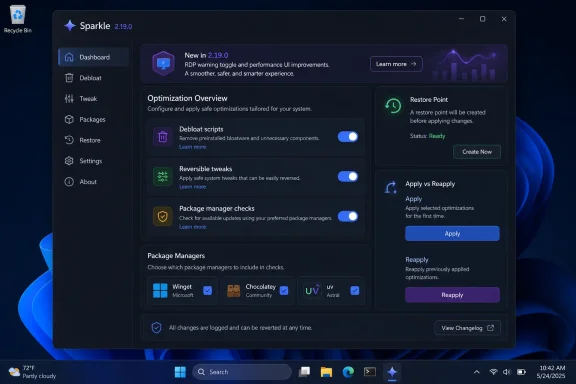 Sparkle Is Becoming a Front End for Windows Distrust
There is a whole category of Windows utilities whose existence is an editorial on Windows itself. Sparkle sits squarely in that category. Its pitch is simple: remove unwanted bundled software, turn down telemetry, clean temporary files, apply performance tweaks, manage app installs, and do it all from a modern interface rather than a folder of PowerShell scripts.That pitch lands because Windows 10 and Windows 11 have made “clean install” feel less clean over time. Start menu recommendations, Copilot-era integrations, Phone Link, OneDrive nudges, telemetry controls, advertising surfaces, background services, and preinstalled consumer apps have trained a certain class of user to distrust the default state of the OS. Sparkle is not just selling speed; it is selling agency.
Version 2.19.0 reinforces that identity. The changelog is heavy on app installation wording, Chocolatey and Winget checks, debloat script adjustments, dark-mode polish, and UI performance fixes. Those are not glamorous features, but they are the kinds of changes that decide whether a utility like this feels like a weekend script or a tool people might actually keep installed.
The uncomfortable truth is that Windows optimization tools live in a grey zone. They can make machines feel cleaner, especially on fresh consumer installs. They can also break assumptions made by Windows Update, Microsoft Store apps, remote access, gaming overlays, device vendors, and helpdesk runbooks. Sparkle’s bet is that a safer, more reversible wrapper can make that bargain acceptable.
The Changelog Says “Maintenance,” but the Product Strategy Says “Control”
The headline additions in Sparkle 2.19.0 are not the sort of features that produce viral screenshots. The update enhances app installation text, changes the Chocolatey success message to include a restart prompt, simplifies and speeds up Chocolatey and Winget installation checks, and adds a force-local-apps toggle in settings. It also introduces a developer options section, adds uv, YASB, and TortoiseGit to the app catalog, and includes a currently non-working Scoop bucket.That sounds modest until you look at what Sparkle is trying to become. A Windows optimizer that only removes things eventually runs out of road. A Windows optimizer that also installs preferred tools, manages package managers, exposes utilities, and tracks reversible tweaks becomes a lightweight provisioning layer for enthusiasts.
This is why the package-manager changes matter. Winget, Chocolatey, and Scoop occupy overlapping but distinct places in the Windows power-user ecosystem. Winget is Microsoft’s official-ish answer to command-line app installation. Chocolatey is the long-running community workhorse. Scoop appeals to users who like portable, user-space command-line tooling. By making its checks faster and clearer, Sparkle is smoothing the path from “remove Microsoft’s defaults” to “replace them with mine.”
The addition of uv is especially telling. It is a fast Python package and project-management tool that has become popular with developers who want less friction in Python environments. YASB, a status bar project, points more toward desktop customization. TortoiseGit is classic Windows developer muscle memory. Sparkle is quietly expanding from debloat utility into a broader “make this PC mine” launcher.
That is a smarter direction than chasing one more dubious registry tweak. Windows users are often less interested in abstract optimization than in reducing friction: install the tools I use, remove the ones I do not, expose the controls Microsoft buries, and do not make me babysit a dozen scripts.
Debloating Has Moved From Rebellion to Routine
A decade ago, Windows debloating often meant running a scary script from a forum post and hoping the author had the same hardware, edition, and tolerance for broken features that you did. Today, the practice is more mainstream but also more complicated. Windows itself has become more service-driven, more cloud-connected, and more dependent on components that once looked optional.Sparkle reflects that evolution by emphasizing reversibility, restore points, and GUI-managed tweaks. The project’s own documentation warns users to create a system restore point and notes that some changes cannot be automatically undone. That caveat matters. “Safe and reversible” is a direction, not a magic shield.
Version 2.19.0’s reapply-button fix is a good example of practical maturity. The button now only appears for reversible tweaks. That is a small UI change with real trust implications. If a tool suggests that every change can be reapplied or rolled back with equal confidence, it is overpromising. If it distinguishes between reversible and less-reversible actions, it starts treating users like adults.
The addition of Phone Link to the debloat script is also a revealing choice. Phone Link is useful for some users and unwanted clutter for others. Microsoft sees it as ecosystem integration; debloat users see another resident feature they did not ask for. Sparkle’s role is not to settle that argument but to make the user’s preference easier to enforce.
This is where Microsoft’s product strategy and the enthusiast community keep colliding. Microsoft increasingly builds Windows as a services surface for Microsoft accounts, cloud sync, AI features, app promotion, phone integration, and Store-distributed components. Enthusiasts often want Windows as a fast, local, predictable desktop operating system. Sparkle exists because those two visions are not the same.
The New RDP Warning Toggle Shows the Security Tradeoff
One of the more interesting additions in 2.19.0 is a tweak to disable RDP warnings. On the surface, that sounds like a convenience option: remove a warning dialog that gets in the way of a known workflow. For IT pros, it is also a reminder that optimization tools frequently cross from performance into security posture.Remote Desktop warnings are not decorative. They exist because remote access is a sensitive boundary, and Windows tries to make some of that risk visible. Disabling warnings may be perfectly reasonable in a lab, on a managed workstation, or for a user who understands the environment. It may be a bad idea on a family PC, a shared machine, or any system where remote access is not tightly controlled.
This is the recurring tension with all-in-one tweak suites. The same interface can offer genuinely harmless quality-of-life changes next to settings that alter security, update, privacy, or networking behavior. The convenience is real. So is the risk of flattening every choice into the same cheerful toggle.
Sparkle’s best defense is transparency. A tweak should explain what it changes, how to undo it, and what might break. That is especially important because the audience for modern Windows optimization tools is broader than the old registry-hacking crowd. A user drawn in by “clean junk files” may not understand the implications of disabling warnings, changing DNS, modifying services, or removing Store components.
The responsible way to read Sparkle 2.19.0 is not as a blanket recommendation to apply every tweak. It is as a control surface. The more powerful the control surface becomes, the more important it is that users treat it like system administration rather than cosmetic customization.
Dark Mode for the Debloat Script Is More Than Cosmetic
Sparkle 2.19.0 updates the Debloat Script Theme to dark mode, bumps the debloat script version, and fixes some debloat script logic. Taken literally, that is housekeeping. Taken as product design, it shows Sparkle trying to make the messiest part of Windows optimization feel like a first-class workflow.Debloat scripts have always had an image problem. Even when they are open source and well-intentioned, they tend to look like something the user is not supposed to understand. A terminal window scrolls by, packages disappear, services stop, and the user is left to infer success from the absence of errors. That may be fine for sysadmins. It is not reassuring for everyone else.
A themed, integrated debloat experience changes the psychology. It makes the operation feel deliberate rather than improvised. It also raises expectations. Once a script is presented as part of a polished app, users will judge it like an app feature, not like a community snippet.
That is both opportunity and burden for Sparkle. If the project can keep its debloat logic clear, documented, and conservative by default, the GUI gives users a safer path into customization. If it hides too much complexity behind toggles, it risks making consequential system changes feel trivial.
The dark-mode update, therefore, is not just about aesthetics. It is about legitimacy. Sparkle is competing not only with other debloat tools but with the default Windows Settings app, PowerToys, Winget, vendor utilities, and the accumulated habits of users who have learned to tolerate the defaults.
Electron Is the Price Sparkle Pays for Approachability
Sparkle is built with Electron and React, with TypeScript and PowerShell playing major roles in the project. That technology stack will annoy a certain kind of Windows purist. The README even nods to the complaint by suggesting that users allergic to Electron may prefer a PowerShell-based alternative.The criticism is not baseless. Shipping a roughly 100 MB portable optimizer to remove bloat from Windows is an irony too obvious to ignore. Electron apps consume more disk space and memory than native utilities, and Windows enthusiasts are often allergic to anything that looks like web tech dressed up as desktop software.
But the counterargument is just as obvious: approachability wins users. A native-feeling interface, automatic updates, searchable app catalogs, tweak status, restore-point controls, and integrated utilities are easier to deliver quickly with Electron and React than with many traditional Windows stacks. For an open-source project maintained at enthusiast scale, that matters.
Version 2.19.0’s fix for broken app icons and new option to hide app icons on the apps page for improved performance is an example of this tradeoff in motion. Rich UI makes the tool friendlier. Rich UI also creates performance problems of its own. Sparkle is now optimizing the optimizer.
The practical question is not whether Electron is philosophically pure. It is whether the app’s overhead is justified by the workflows it simplifies. For a one-time debloat run, maybe not. For users who want a repeatable control panel for installs, utilities, cleaning, tweaks, and restore points, the weight becomes easier to defend.
Package Managers Are the New OEM Recovery Disc
The most underrated part of Sparkle’s direction is its app installation layer. A clean Windows setup used to end with a browser marathon: download Chrome or Firefox, install 7-Zip, grab a code editor, add Git, install a media player, fetch runtimes, configure terminals, and then repeat the whole ritual on the next machine. Package managers turned that into a scriptable process, but they still intimidate many users.Sparkle’s app catalog is a bridge between those worlds. It gives less command-line-oriented users a graphical path into Winget and Chocolatey, while giving enthusiasts a faster way to assemble a machine after stripping away defaults. The 2.19.0 changes to installation text and package-manager checks are usability changes, but usability is the whole ballgame here.
The Chocolatey restart prompt is a small but sensible example. Package-manager installs sometimes change environment variables, shell state, or background services in ways that are not visible until a restart or new session. A success message that tells users what to do next prevents confusion masquerading as failure.
The currently non-working Scoop bucket is less flattering, but it is still informative. Sparkle’s ambitions are larger than its current polish. Adding Scoop support would make sense for developers and command-line-heavy users, but shipping the bucket before it works also shows the rough edges of a fast-moving beta project.
That beta status should shape expectations. Sparkle may be useful, but it should not be treated like a corporate endpoint-management platform. It is an enthusiast tool moving toward repeatable provisioning, not a replacement for Intune, Group Policy, winget configuration files, or properly tested deployment scripts.
Windows Tweaks Need Evidence, Not Folklore
The Windows optimization world has always been polluted by folklore. Disable this service. Change that registry value. Turn off this animation. Kill telemetry. Remove hibernation. Optimize networking. Improve gaming. Some tweaks are sensible in specific contexts. Others are placebo. A few can make things worse.Sparkle’s documentation and interface matter because they can either fight that folklore or package it. A modern optimizer should explain the tradeoff behind each change, not merely promise performance. Disabling hibernation can recover disk space but removes Fast Startup and hibernate behavior. Removing OneDrive may be desirable on a local-first desktop but disruptive for someone relying on Known Folder Move. Disabling telemetry may satisfy privacy preferences but can affect diagnostics and supportability.
The same applies to “gaming” optimizations. Windows 11 performance is shaped by drivers, firmware, GPU scheduling, background tasks, security features, power plans, display settings, and game-specific behavior. A single tool can help reduce clutter, but it cannot turn a poorly cooled laptop or misconfigured driver stack into a high-end gaming rig.
Sparkle’s best long-term path is to be conservative and explicit. It should separate cleanup from privacy changes, privacy changes from performance changes, and performance changes from security-affecting changes. Users should not have to read source code to know whether a toggle is low-risk housekeeping or a decision they may need to defend later.
The 2.19.0 change that hides the reapply button for non-reversible tweaks suggests the project understands this. More of that thinking would make Sparkle more credible than a typical “make Windows faster” bundle. The future of this category should be less magic and more informed consent.
IT Pros Should Treat Sparkle as a Lab Tool, Not a Policy
For WindowsForum’s sysadmin and IT pro audience, the obvious question is whether Sparkle belongs anywhere near managed machines. The short answer is: not without testing, policy review, and a clear support boundary. The longer answer is more interesting, because tools like Sparkle often reveal what users wish IT had already solved.Users reach for debloat utilities when they feel Windows is noisy, slow, overstuffed, or disrespectful of preference. In an enterprise, those problems should be addressed through deployment images, provisioning packages, Group Policy, MDM, app control, update rings, and documented baselines. If employees are downloading consumer optimization tools to fix corporate endpoints, the technical problem has already become a governance problem.
That does not make Sparkle useless to professionals. In a lab, it can be a quick way to inspect common tweak patterns, evaluate debloat assumptions, or prototype a cleaner personal workstation. Its app installation layer may also be useful on non-managed personal systems where a full deployment stack would be absurd.
But the risk profile changes the moment a machine is business-critical. Removing built-in apps may affect support scripts. Changing services may affect compliance posture. Disabling warnings may violate internal expectations. Cleaning aggressively may remove logs needed for troubleshooting. Privacy tweaks may conflict with enterprise diagnostics.
The right professional response is not snobbery. It is containment. Test on sacrificial systems, document every change, prefer reversible actions, and translate any desirable setting into managed policy before deploying it broadly. Sparkle can inform a baseline, but it should not become the baseline by accident.
The Best Sparkle Users Will Move Slowly
Sparkle 2.19.0 is best understood as a practical quality release for a tool that is trying to grow up. It improves installer messaging, package-manager checks, settings, developer options, app catalog entries, icon handling, debloat logic, and UI performance. None of those changes alone transforms the product. Together, they make it more plausible as a daily utility rather than a one-off experiment.The release also underlines the central bargain of Windows optimization in 2026. Users want less clutter, more privacy, faster setup, and clearer control. Microsoft wants Windows to be a platform for services, accounts, recommendations, integrations, and recurring engagement. Utilities like Sparkle occupy the gap between those goals.
For users, the smartest approach is selective adoption. Use Sparkle to inspect options, clean obvious junk, install familiar tools, and apply tweaks you understand. Avoid the temptation to click every performance or privacy switch simply because it exists. The best optimization is the one you can explain and undo.
For the project, the challenge is trust. Open source helps. Documentation helps. Reversibility helps. Clear warnings help. But the more Sparkle expands into app provisioning, debloating, privacy, networking, gaming, DNS, RDP behavior, and developer workflows, the more it must resist the optimizer genre’s worst habit: treating every Windows default as a defect.
The 2.19.0 Lesson Is to Customize With a Seatbelt
Sparkle’s latest release is useful because it makes several rough edges smoother, but its real value is as a reminder that Windows customization should be deliberate rather than performative. The update is worth a look for enthusiasts who already understand what they want to change and why.- Sparkle 2.19.0 focuses more on polish, installer behavior, package-manager checks, debloat-script fixes, and UI performance than on headline-grabbing new optimization claims.
- The app continues to position itself as a reversible control surface for Windows 10 and Windows 11 debloating, privacy tweaks, cleanup, utilities, and app installation.
- The addition of developer-facing apps and settings suggests Sparkle is expanding from debloat tool into a broader workstation setup utility.
- Security-adjacent tweaks, including RDP warning behavior, should be treated carefully because convenience changes can alter a system’s risk profile.
- IT pros should test Sparkle in labs and personal environments before considering any of its changes for managed systems.
- The safest Sparkle workflow is to create a restore point, apply a small number of understood tweaks, reboot, test, and document what changed.
References
- Primary source: Neowin
Published: 2026-05-18T02:56:08.150177
Sparkle 2.19.0 - Neowin
Sparkle is a free Windows optimization tool to debloat apps, boost performance, enhance privacy, clean junk, and apply safe, reversible tweaks easily. www.neowin.net
- Official source: github.com
GitHub - thedogecraft/sparkle: A Windows app to debloat and optimize your PC · GitHub
A Windows app to debloat and optimize your PC. Contribute to thedogecraft/sparkle development by creating an account on GitHub. github.com
- Related coverage: sourceforge.net
Sparkle
Download Sparkle for free. A Windows app to debloat and optimize your PC. Sparkle is a Windows application that helps you remove Microsoft bloat and apply tweaks, such as disabling telemetry, turning off Copilot, applying NVIDIA optimizations for gaming, and removing OneDrive. It also includes a...sourceforge.net - Related coverage: unikoshardware.com
- Related coverage: thedogecraft-sparkle.mintlify.app
Welcome to Sparkle - Sparkle
A free, open-source Windows app to debloat, optimize, and clean your PC.thedogecraft-sparkle.mintlify.app - Related coverage: sparkle-project.org

Sparkle: open source software update framework for macOS
sparkle-project.org
- Official source: gearupwindows.com
- Official source: csrc.nist.gov
Sparkle Revisited: Proving Tight Adaptive Security of a Simple Schnorr Threshold Scheme
NIST MPTS 2026csrc.nist.gov
