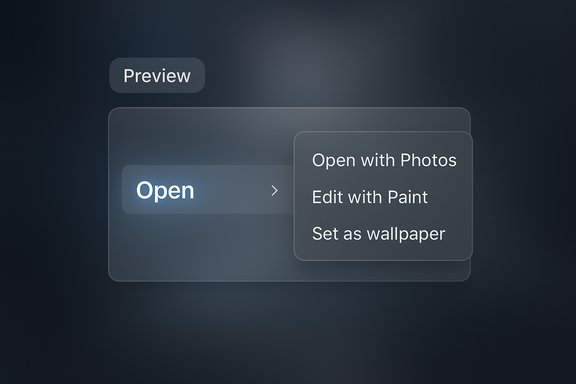
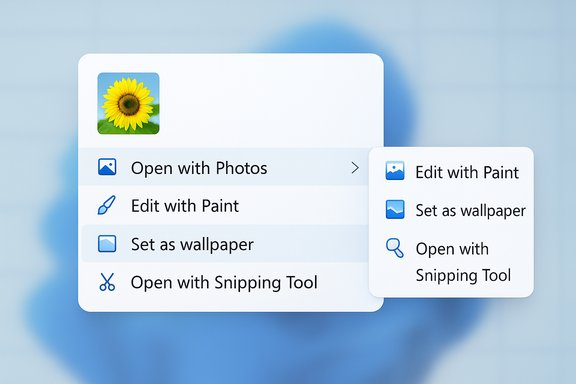
Microsoft is preparing a targeted overhaul of Windows 11’s long‑complained‑about right‑click menu in File Explorer — a redesign, previewed in WinUI developer materials, that replaces jammed vertical lists with split menu entries driven by a new WinUI control called SplitMenuFlyoutItem.
Since Windows 11 launched, the Context Menu (the right‑click menu) has elicited steady user criticism for being cluttered, repetitive, and inconsistent across shell surfaces. What started as a relatively compact list has accumulated entries from built‑in commands, app registrations, legacy shell extensions, and third‑party installers — often producing multiple near‑duplicate items for the same app (open/edit/set as background), and burying frequently used commands deeper under submenus. Microsoft has acknowledged the problem and is exploring UI and API changes to make context menus genuinely contextual again. The current proposal, shown in WinUI community previews and reported in multiple outlets, is branded internally as a Split Context Menu that groups related actions and surfaces a single primary action with an adjacent gate to secondary tasks.
However, the transition has feasible risks: legacy shell extensions, discoverability for muscle‑memory users, keyboard and accessibility regressions, enterprise manageability, and runtime performance trade‑offs. The success of the change depends not just on the control’s visuals, but on robust migration tooling, clear developer guidance, and enterprise policy controls.
Until Microsoft publishes formal WinUI docs, SDK releases, and Insider builds that implement the feature, readers should treat implementation details and timelines as provisional. The preview promises real gains for File Explorer users, but execution will determine whether the Split Context Menu is a well‑designed improvement or an interface fragmentation event that introduces new edge cases for power users and IT admins.
A thoughtful rollout that provides backwards compatibility, clear developer migration paths, and administrative control will determine whether this UI change becomes a genuine productivity win for Windows 11 or another well‑intentioned update that creates new headaches for power users and enterprises.
Source: PCWorld Microsoft is working on a fix for Windows 11's cluttered right-click menu
 Background
Since Windows 11 launched, the Context Menu (the right‑click menu) has elicited steady user criticism for being cluttered, repetitive, and inconsistent across shell surfaces. What started as a relatively compact list has accumulated entries from built‑in commands, app registrations, legacy shell extensions, and third‑party installers — often producing multiple near‑duplicate items for the same app (open/edit/set as background), and burying frequently used commands deeper under submenus. Microsoft has acknowledged the problem and is exploring UI and API changes to make context menus genuinely contextual again. The current proposal, shown in WinUI community previews and reported in multiple outlets, is branded internally as a Split Context Menu that groups related actions and surfaces a single primary action with an adjacent gate to secondary tasks. What Microsoft is changing: the Split Context Menu explained
The split entry model
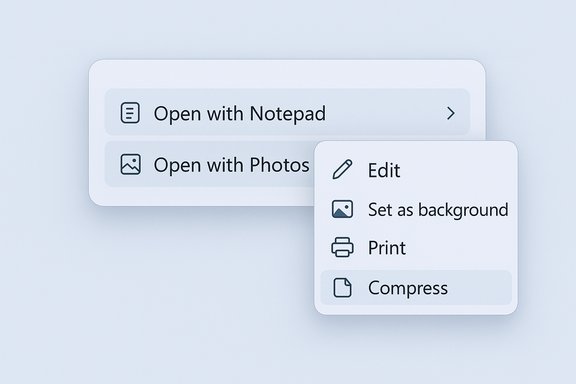
The Split Context Menu introduces a horizontal split in a single menu row:- The left side is a primary action (one click performs the default operation, e.g., “Open with Photos”).
- The right side contains a chevron or small affordance that opens a compact secondary flyout with related actions or additional apps.
The new WinUI control: SplitMenuFlyoutItem
Preview materials name the control SplitMenuFlyoutItem — a WinUI3 control that behaves like a button + submenu hybrid. Developers can reportedly declare a primary action and populate the nested flyout with secondary commands. This design allows File Explorer and apps to show fewer top‑level items while preserving discoverability for advanced or context‑specific commands.Context awareness and grouping
A key promise is context‑aware grouping: the items shown in the nested flyout will adapt to the selected file type and user behavior. For example:- Right‑click a .txt file → primary “Open with Notepad”, secondary editors in the flyout.
- Right‑click an image → primary “Open with Photos”, secondary items (Edit, Set as wallpaper, other image apps) tucked into the flyout.
Why this matters: UX and real‑world benefits
- Shorter menus — reducing vertical length makes important items easier to find and reduces pointer travel.
- Less repetition — duplicate entries for the same app (open/edit/etc. can be consolidated.
- Preserved discoverability — secondary tools remain accessible, but off the primary path.
- Developer control — WinUI‑based apps can tailor menus by file type, improving the user experience for domain‑specific workflows.
Implementation path: APIs, Windows App SDK, and preview availability
Reports indicate the SplitMenuFlyoutItem control is a WinUI3 component and that the Windows App SDK preview channel is the distribution vehicle for new WinUI controls. Microsoft often surfaces new controls and API previews through the Windows App SDK preview packages and WinUI releases before broad OS integration, which allows app developers to experiment and adopt changes ahead of system‑wide rollouts. At the time of reporting, Microsoft has shown the concept in a WinUI Community Call and in developer previews, but the feature was not yet present in public Insider builds for general testing. That suggests the change will follow the standard preview → Insider → channel‑release path, and may depend on developer adoption to ensure ecosystem compatibility. Caveat: several outlets claim the API is available on official Microsoft repositories, but direct references or stable GitHub entries for a finalized SplitMenuFlyoutItem control were not reliably discoverable at the time these articles were published. This remains a point to verify as preview SDK releases and WinUI documentation update.Developer implications: what app makers must consider
- Adoption window — app developers who rely on Win32 shell verbs and legacy shell extensions will need migration guidance. The SplitMenuFlyoutItem is a WinUI control, so migrating may require updating app packaging or adding WinUI‑based menu registration layers.
- API surface — developers must choose which action is primary and which are secondary, meaning design decisions about task prioritization become part of app UX.
- Telemetry and promotion logic — if Windows promotes frequently used apps into the primary slot, developers should understand how telemetry, file associations, and user preferences influence that behavior.
- Compatibility with legacy shell extensions — many installers and utilities still register COM‑based shell extensions; Windows will need to bridge those extensions into the new model or provide transformation helpers.
Risk analysis: technical, compatibility, and ecosystem concerns
Legacy shell extensions and stability
The old shell extension model exposes a technical risk: many third‑party handlers are poorly written or rely on synchronous COM callbacks that can hang File Explorer. If Microsoft reintroduces runtime hooks that still enumerate legacy COM extensions at top level, it must preserve the longstanding need for stability and timeout handling. The new split model could either reduce the top‑level enumeration cost (by hiding many extensions) or complicate it (if nested flyouts trigger on hover and cause late enumeration). The net effect depends on implementation details that are not public yet.Discoverability and discoverability regressions
Condensing multiple entries into a split row improves density, but also introduces a two‑target interaction model — a click target for the primary action and a smaller target for the secondary menu. That raises discoverability concerns for users who expect to see all available verbs at a glance, or who rely on muscle memory to execute a less common command. Accessibility considerations (keyboard navigation, screen reader labeling, and large pointer targets) must be carefully implemented to avoid regressing usability.Enterprise management and security policies
Enterprises that lean on Group Policy, AppLocker, or custom shell integrations will need control over the new behavior. Administrators will expect policy controls to:- Enforce legacy menu visibility,
- Lock primary actions for managed apps,
- Disable telemetry‑driven promotions.
Performance and runtime cost
Although the split approach aims to reduce UI height, it may increase per‑item complexity (hover logic, fetch of secondary commands, grouping heuristics). If the nested flyout requires on‑demand enumeration of registered apps or COM extensions, there will be performance trade‑offs that Microsoft must mitigate with asynchronous patterns, caching, and robust timeouts.Accessibility and keyboard behavior
A two‑part control requires careful keyboard affordances:- Keyboard users must be able to reach the primary action and the secondary menu with predictable keystrokes.
- Screen readers must announce both the primary behavior and the existence of a nested flyout.
- High‑contrast themes and focus visuals must remain intact for users with visual impairments.
Administration and power‑user considerations
- Power users who use shell tweaks or registry hacks to add custom verbs should expect migration guidance from Microsoft. The company will likely offer a transition path so that existing verbs appear in the secondary flyout rather than vanishing.
- System administrators should look for upcoming Group Policy templates and Windows ADMX updates in Insider releases to control the split behavior.
- Scripted workflows that rely on exact menu ordering or the presence of context menu items may need to be updated to use command‑line tools or explicit executable calls rather than a fragile UI path.
How and when you might see it
Reports indicate the feature is still in early development and not yet available in Insider builds at the time of reporting. As with other UI changes, expect the following sequence:- WinUI / Windows App SDK preview release with the control and sample code for developers.
- WinUI Community Call demos and developer preview guidance.
- Inclusion in Windows Insider Preview builds (Dev/Beta channels) for hands‑on testing.
- Incremental system‑wide rollout tied to a Windows feature update or cumulative set of updates.
What we verified and what remains unverified
Verified:- Multiple independent outlets report Microsoft is working on a “Split Context Menu” and demonstrated the concept in WinUI community materials.
- The proposed control name shown in reporting is SplitMenuFlyoutItem, described as a WinUI3 component that supports split primary/secondary actions.
- Several articles state the API has been published in Microsoft’s WinUI GitHub repo or Windows App SDK; a stable, discoverable GitHub control entry or finalized API documentation for SplitMenuFlyoutItem could not be conclusively located at the time of reporting. Readers should treat claims of immediate API availability with caution until official WinUI/Windows App SDK release notes or GitHub commits confirm it.
Recommendations for users, admins, and developers
For end users:- Expect the context menu to evolve; if you rely on a particular verb that disappears from top level, check the nested flyout or “Show more options”.
- Keep Windows Insider and app update channels under observation if you want early access to and feedback on the change.
- Monitor Insider channels and Windows App SDK previews for policy templates and ADMX updates.
- Validate critical scripts and automation against Insider builds before broad deployment.
- Prepare fallback automation that calls executables or PowerShell scripts directly instead of relying on UI elements.
- Track Windows App SDK preview releases and WinUI samples for guidance on implementing SplitMenuFlyoutItem.
- Update installer and context‑menu registration strategies to opt into split behaviors where appropriate.
- Test accessibility, keyboard navigation, and performance on representative hardware and complex shell‑extension environments.
Final analysis: promise, but proceed carefully
Microsoft’s Split Context Menu is a sensible, long‑overdue reaction to a real UX problem. Consolidating related verbs into a single row with a nested menu balances the need for speed (one‑click actions) and depth (secondary commands), and it gives app developers a modern API to express contextual actions cleanly. The design aligns with recent UI trends that prefer compact density and contextual reveal patterns.However, the transition has feasible risks: legacy shell extensions, discoverability for muscle‑memory users, keyboard and accessibility regressions, enterprise manageability, and runtime performance trade‑offs. The success of the change depends not just on the control’s visuals, but on robust migration tooling, clear developer guidance, and enterprise policy controls.
Until Microsoft publishes formal WinUI docs, SDK releases, and Insider builds that implement the feature, readers should treat implementation details and timelines as provisional. The preview promises real gains for File Explorer users, but execution will determine whether the Split Context Menu is a well‑designed improvement or an interface fragmentation event that introduces new edge cases for power users and IT admins.
A thoughtful rollout that provides backwards compatibility, clear developer migration paths, and administrative control will determine whether this UI change becomes a genuine productivity win for Windows 11 or another well‑intentioned update that creates new headaches for power users and enterprises.
Source: PCWorld Microsoft is working on a fix for Windows 11's cluttered right-click menu