

Splunk has released urgent fixes for two high‑severity Windows permission flaws — CVE‑2025‑20386 (Splunk Enterprise) and CVE‑2025‑20387 (Splunk Universal Forwarder) — that can leave installation directories readable or writable by non‑administrative users after an install or upgrade, enabling local privilege escalation and tampering of configuration and credential material; Splunk rates both issues High (CVSS v3.1 = 8.0) and advises immediate upgrades to
Splunk is a cornerstone of many enterprise security operations centers, ingesting logs, credentials, and security telemetry across networks. The December 3, 2025 disclosures identify a class of deployment/installation errors on Windows where the installer or upgrade process assigns overly permissive ACLs (access control lists) to the Splunk installation folders (
Windows elevation‑and‑permission related advisories across 2024–2025 have demonstrated how seemingly small deployment errors can enable high‑impact escalation chains. Enterprise defenders should treat installer ACL checks as part of standard post‑deployment validation and include them in change control lists for server builds and automation pipelines. Industry commentary and forum threads about Administrator Protection and untrusted search paths illustrate how small setup errors can morph into large compromises if left unchecked.
Community and vendor transparency in this case has been prompt and clear: Splunk published precise fix versions and mitigation steps, and major vulnerability databases quickly mirrored the information — that coordination is the right pattern for minimizing enterprise exposure.
Key technical references used for validation and analysis: Splunk’s vulnerability advisories and remediation instructions, public CVE/NVD entries, and independent vulnerability trackers and community write‑ups were reviewed to confirm version ranges, CVSS scores, mitigation commands, and exploitation posture. For historical context about Windows permission and elevation classes, internal forum analyses and prior vulnerability summaries were included to illustrate the persistent nature of installer/permission weaknesses.
Source: WebProNews Splunk Patches Critical Windows Privilege Escalation Vulnerabilities (CVSS 8.0)
10.0.2, 9.4.6, 9.3.8, or 9.2.10 (or later) and provides mitigation commands for environments that cannot patch immediately.
 Background / Overview
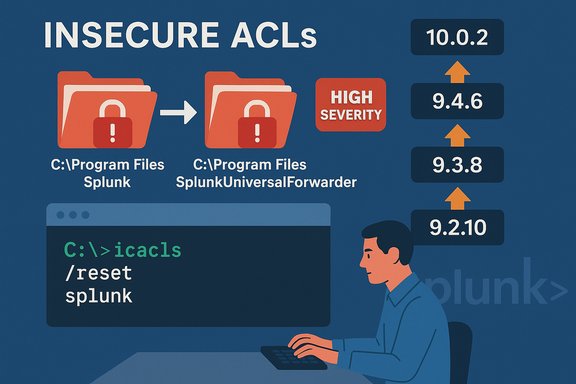
Splunk is a cornerstone of many enterprise security operations centers, ingesting logs, credentials, and security telemetry across networks. The December 3, 2025 disclosures identify a class of deployment/installation errors on Windows where the installer or upgrade process assigns overly permissive ACLs (access control lists) to the Splunk installation folders (C:\Program Files\Splunk and C:\Program Files\SplunkUniversalForwarder). Those ACL mistakes let non‑administrative local users read, and in some cases modify, files that should be restricted to administrators. The vendor advisories and external trackers classify the vulnerability as an incorrect permission assignment (CWE‑732) and score it 8.0 (High). This is not a remote code execution vulnerability in the classic sense — attackers must either have local access or trick a user with privileges to perform an installation or upgrade — but when the installation leaves the product directory writable or readable by ordinary users, it becomes an attractive post‑compromise escalation primitive and a potential vector for sabotage or credential theft. Independent vulnerability repositories and the U.S. vulnerability ecosystem indexed the CVEs within hours of Splunk’s advisories, and security teams quickly elevated patching priority. What exactly is wrong: the technical underpinnings
How the flaw arises
- The root cause is an installer/upgrade process that sets ACLs incorrectly on Windows during new installs or upgrades of affected Splunk builds.
- As a result, directories that should be admin‑only end up allowing access by non‑administrator groups (for example, builtin users or authenticated users), exposing configuration files, credential stores, and binaries.
Affected builds and scope
Splunk EnterpriseandSplunk Universal Forwarderon Windows in versions:10.0versions below10.0.2,9.4versions below9.4.6,9.3versions below9.3.8,9.2versions below9.2.10.- Splunk’s official advisories list these exact version cutoffs and mark the fix versions as
10.0.2,9.4.6,9.3.8, and9.2.10.
What an attacker can do
- With local account access or by inducing an install/upgrade, an attacker or malicious insider can:
- Read configuration files that may contain connection strings, endpoints, or encrypted/hashed secrets that can be leveraged offline.
- Modify scripts, inputs, or configuration to introduce persistence or telemetry blind spots.
- Replace or tamper with forwarder components to exfiltrate logs or inject malicious data into monitoring pipelines.
- In realistic attacker chains, this flaw is commonly used as a stepping stone: obtain a low‑privilege foothold → abuse misconfigured ACLs to escalate privileges (or harvest credentials) → pivot or persist. Multiple industry trackers and the NVD describe the impact and the CVSS scoring consistent with this model.
What the CVSS and vendor classification mean in practice
- CVSS v3.1 vector listed by Splunk:
CVSS:3.1/AV:N/AC:L/PR:L/UI:R/S:U/C:H/I:H/A:H— this captures that user interaction (installation/upgrade) and low privileges are required, but confidentiality, integrity, and availability impacts are high if abused. Splunk and third‑party trackers converged on an 8.0 score.
Enterprise impact: why this matters to SOCs and IT teams
Splunk often has privileged integration points across an enterprise: log sources, authentication stores, service credentials, and sometimes orchestration actions. When its files and configs are accessible to non‑admins, several high‑risk outcomes become feasible:- Credential exposure: Even when credentials are stored encrypted, attackers may be able to extract keys, dumped secrets, or configuration offsets that facilitate offline cracking or use in lateral movement.
- Telemetry tampering: Modifying forwarder configuration or scripted inputs can blind detection systems by suppressing alerts, altering ingest filters, or sending falsified logs.
- Privilege escalation: A writable installation directory allows an attacker to drop a malicious DLL, scheduled task, or service override that the Splunk service may run or load, enabling SYSTEM‑level or persistent execution on the host.
- Regulatory and compliance fallout: Breach of telemetry or logs holding personal data can trigger data‑protection law implications (for example, GDPR, CCPA) and incident reporting burdens in regulated industries.
Splunk’s response and available fixes
Official fixes
Splunk published two vendor advisories:SVD‑2025‑1205forSplunk Enterprise(CVE‑2025‑20386).SVD‑2025‑1206forSplunk Universal Forwarder(CVE‑2025‑20387).
10.0.2, 9.4.6, 9.3.8, or 9.2.10 (or later). Splunk’s advisories explicitly rate the issues High and include mitigation/rollback steps for administrators who cannot immediately upgrade. Published mitigation (when you cannot patch immediately)
Splunk provides anicacls‑based remediation sequence to reset the installation directory ACLs; execution must be done as a Windows administrator after the install/upgrade:icacls.exe "<path\to\installation\directory>" /inheritance:dicacls.exe "<path\to\installation\directory>" /remove:g *BU /T /Cicacls.exe "<path\to\installation\directory>" /remove:g *S-1-5-11 /T /Cicacls.exe "<path\to\installation\directory>" /inheritance:e /T /C
icacls reports. Splunk’s advisory includes these steps as an official workaround for environments that cannot perform immediate upgrades. Detection, hunting and triage guidance
Short‑term detection should assume the worst for hosts with any of the affected builds. Prioritize hunting on high‑value hosts and jump boxes.Immediate detection checks (high priority)
- Inventory: Query installed Splunk versions across the fleet (ConfigMgr/Intune/WSUS reports, or run
splunk --versionremotely) and flag any installs older than the fixed versions. - ACL audit: Scripted checks for risky ACLs on the install paths:
C:\Program Files\SplunkandC:\Program Files\SplunkUniversalForwarder- Look for
BUILTIN\Users,Authenticated Users, or other non‑admin groups withRead/Writepermissions. - File integrity: Monitor for untrusted modifications to key config files (for example,
inputs.conf,outputs.conf, orweb.conf) and compare to baseline checksums.
EDR/SIEM telemetry to collect and monitor
- Module load events showing elevated processes loading modules from non‑system paths.
- Unexpected writes to Splunk installation directories by non‑admin users.
- Process creation chains where unprivileged users spawn or modify service installers or scheduling tasks immediately before a Splunk service restart.
- New service registrations, scheduled tasks, or driver loads authored by standard users.
Forensic triage priorities
- Capture and preserve
icaclsoutput from the host and an event log timeline covering install/upgrade times. - Collect Splunk config files and any modified binaries or scripts for offline analysis.
- Dump process memory or image if you suspect active in‑memory persistence or injected modules.
- Correlate with identity/logon events to discover who performed the install/upgrade action and whether a legitimate admin credential was used coercively.
Why this repeats a common pattern — historical context and lessons
Permission misconfiguration during installation is a recurring class of vulnerability across Windows ecosystems. Past advisories and community analysis show similar root causes: installer scripts, packaging changes, or third‑party packaging tool updates that inadvertently grant broader ACLs. Attackers have repeatedly leveraged these scenarios because they are easy to weaponize once a local foothold exists.Windows elevation‑and‑permission related advisories across 2024–2025 have demonstrated how seemingly small deployment errors can enable high‑impact escalation chains. Enterprise defenders should treat installer ACL checks as part of standard post‑deployment validation and include them in change control lists for server builds and automation pipelines. Industry commentary and forum threads about Administrator Protection and untrusted search paths illustrate how small setup errors can morph into large compromises if left unchecked.
Practical remediation and operational playbook (step‑by‑step)
- Triage and inventory (first 0–6 hours)
- Enumerate Splunk installations and identify hosts with affected versions.
- Prioritize high‑value targets: domain controllers, jump hosts, SIEM backends, logging aggregation servers.
- Patch (0–72 hours)
- Where possible, schedule upgrades to the fixed Splunk versions:
10.0.2,9.4.6,9.3.8, or9.2.10. - Follow existing maintenance windows and compatibility testing (Splunk upgrades can interact with custom apps or connectors).
- Mitigate if you cannot patch immediately
- Run the vendor‑provided
icaclssteps on affected hosts as a Windows administrator to correct ACLs (see the four commands above). Validate ACL state withicaclsoutput. - Remove unnecessary local accounts and tighten group memberships on hosts that perform Splunk installs/upgrades.
- Monitor and hunt (ongoing)
- Create SIEM rules for anomalous writes to Splunk directories and unexpected process ancestry involving installers.
- Push EDR rules to alert on
icaclsor other ACL‑modifying commands executed by non‑admin accounts. - Hardening and prevention (post‑patch)
- Add installation directory ACL verification to automated configuration management (Chef/Ansible/Puppet/PowerShell Desired State Configuration).
- Include Splunk installer runs in change‑control workflows and require maintenance authentication processes that include multi‑party approvals for server changes.
- Use least privilege and Just‑In‑Time admin models; avoid long‑lived admin sessions on endpoints that can be used to initiate installs.
- Incident response (if signs of abuse are found)
- Isolate affected hosts, preserve forensic artifacts, rotate credentials for any service accounts referenced in Splunk configuration, and conduct an enterprise credential sweep.
- Rebuild high‑value compromised endpoints from known good images where needed.
Risk tradeoffs and operational considerations
- Patching is the straightforward fix, but large organizations must balance uptime and compatibility risks. Splunk upgrades should be staged through test → pilot → production rings. Splunk’s advisories and third‑party scanners recommend the same staged approach.
- The vendor‑issued
icaclsmitigation is effective in many cases but must be executed carefully and validated; misuse of ACL commands can break legitimate service access if applied incorrectly. - Because the vector requires local action or user interaction, remote exploitation at scale is unlikely, but the value for targeted attackers and insider threats is substantial — treat exposed hosts as high‑risk assets for lateral movement and data exposure. Independent trackers and advisory mirrors underscore this operational profile.
Broader defensive best practices (beyond the immediate fix)
- Enforce installation hygiene: automated post‑install checks (ACL confirmation) should be part of any Windows package deployment pipeline.
- Use application control (WDAC, AppLocker) to prevent unauthorized executables or DLLs being loaded by Splunk processes.
- Limit the number of accounts capable of performing installs or upgrades on production servers; use Privileged Access Workstations (PAWs) and JIT admin solutions.
- Integrate Splunk change events into your CMDB and SIEM so upgrades are tracked and anomalies correlated with configuration modifications.
- Maintain long‑term monitoring of Splunk components for unusual outbound connections or unexplained log suppression — attackers often target telemetry pipelines to cover tracks.
Unverified claims and cautionary notes
- Social posts and early community messages describing instant “SYSTEM‑level” escalation should be treated cautiously until reproduction details or PoCs are verified; Splunk’s advisory describes incorrect permissions and the resulting ability for non‑admins to access installation directories — the escalation to SYSTEM depends on what an attacker can subsequently do with that access and what additional misconfigurations exist in a given environment. In short, the pathway to SYSTEM is plausible but environment‑dependent.
- At the time of the advisory, no broad in‑the‑wild exploitation campaign was confirmed in public trackers, but PoCs and opportunistic exploitation frequently follow rapid public disclosure for this class of bug — treat the absence of confirmed active exploitation as temporary and don't delay remediation.
Why this should change how vendors and enterprises think about installers
This incident is yet another reminder that secure defaults must extend to installation and upgrade tooling. Vendors must treat ACLs and post‑install file ownership as part of their security testing matrix. Enterprises must include installation verification in their baseline hardening and patch validation playbooks. The cost of a missed ACL check is not theoretical; it is a concrete enabler for data exposure and escalation that can be difficult to detect after the fact.Community and vendor transparency in this case has been prompt and clear: Splunk published precise fix versions and mitigation steps, and major vulnerability databases quickly mirrored the information — that coordination is the right pattern for minimizing enterprise exposure.
Conclusion
The Splunk Windows permission vulnerabilities (CVE‑2025‑20386 and CVE‑2025‑20387) are a high‑severity operational weakness born from misconfigured install/upgrade ACLs rather than a remote code execution hole — but the operational consequences are material. Enterprises that run Splunk on Windows should prioritize the following actions immediately:- Inventory and identify affected hosts.
- Apply vendor patches to
10.0.2,9.4.6,9.3.8, or9.2.10as the primary remediation. - If immediate upgrades are not possible, apply the vendor
icaclsmitigation commands and validate ACLs. - Hunt for signs of tampering, especially on jump hosts, aggregation servers, and endpoints where Splunk is installed.
- Harden installation and change control processes to prevent similar deployment errors in the future.
Key technical references used for validation and analysis: Splunk’s vulnerability advisories and remediation instructions, public CVE/NVD entries, and independent vulnerability trackers and community write‑ups were reviewed to confirm version ranges, CVSS scores, mitigation commands, and exploitation posture. For historical context about Windows permission and elevation classes, internal forum analyses and prior vulnerability summaries were included to illustrate the persistent nature of installer/permission weaknesses.
Source: WebProNews Splunk Patches Critical Windows Privilege Escalation Vulnerabilities (CVSS 8.0)
