

The page titled “Install OpenSSH On Microsoft Windows Server 2016 And Open Ssh Port 22 In Windows Firewall” appears to be an unrelated, likely auto-generated or compromised Fathom Journal page mixing Windows Server administration keywords with a political magazine archive, not a trustworthy technical guide. That mismatch is the story: a routine sysadmin task has been wrapped in a content-farm shell, creating just enough plausibility to catch search traffic and just enough confusion to mislead administrators. For WindowsForum readers, the lesson is not merely how to open TCP 22 on Server 2016, but how easily operational guidance can be polluted by search-engine debris. In 2026, the old advice still applies: verify the source before you paste the command.
There is no natural editorial bridge between OpenSSH on Windows Server 2016 and a Fathom Journal index of essays about Israel, antisemitism, regional politics, and book reviews. The supplied page text reads like a scraped front page with one Windows administration phrase grafted onto the title. That is a familiar shape: a real-looking domain, a mechanically generated slug, and a headline designed for search rather than readers.
This matters because Windows Server administration is not a lifestyle blog topic. A bad recipe for enabling SSH can expose an administrative endpoint to the internet, weaken authentication, or leave a legacy server with an unmaintained binary listening on the default port. A page does not need to ship malware to be dangerous; it only needs to give a hurried admin the wrong confidence.
The headline itself targets a common search pattern. “Install OpenSSH on Microsoft Windows Server 2016” and “open SSH port 22 in Windows Firewall” are exactly the kind of phrases an administrator might type while maintaining an older box. The rest of the page, however, does not behave like a technical article: there are no coherent steps, no version caveats, no PowerShell examples, no discussion of firewall scope, and no sign that the author understands Server 2016’s awkward place in Microsoft’s OpenSSH timeline.
That gap should make readers stop. Search results can surface technically relevant titles on pages whose bodies are unrelated, outdated, or compromised. The cure is not paranoia; it is source discipline.
That historical wrinkle is where bad guides thrive. On Windows Server 2019, 2022, and newer builds, the OpenSSH Client and Server are commonly handled as optional capabilities, with relatively clean PowerShell installation paths. On Server 2016, depending on patch level and environment, the experience may involve installing a Microsoft-supported OpenSSH build manually, registering
That is not impossible, but it is not the same as clicking through a modern Settings page. Treating every Windows Server release as interchangeable is one of the easiest ways to produce broken infrastructure documentation. The command that works on Server 2022 may fail or mean something different on Server 2016.
This is why the page’s framing is suspicious. A real Server 2016 OpenSSH guide would lean into the version-specific caveats. It would explain where the binaries come from, how the service is registered, where
The firewall command most administrators recognize is straightforward: create or enable an inbound TCP rule for local port 22. On a lab server, that may be enough to prove connectivity. On a production server, it is only the beginning of the conversation.
The more important question is who can reach that port. A Windows Defender Firewall rule that allows port 22 from any remote address on any profile is very different from a rule scoped to a management subnet, VPN pool, jump host, or privileged access workstation. SSH’s reputation for security comes from cryptography and operational discipline, not from magical protection around a socket.
That distinction is especially important for Server 2016. Many Server 2016 deployments are not shiny greenfield machines; they are line-of-business anchors, legacy application hosts, or infrastructure systems that survived multiple refresh cycles because nobody wanted to touch them. Adding SSH to such a machine without hardening is not modernization. It is widening the blast radius.
A trustworthy guide should tell you whether it is using built-in Windows capabilities, a Microsoft-maintained Win32-OpenSSH release, or a third-party package. It should explain how to verify installation, how to start and configure the
In practice, a cautious Server 2016 deployment usually follows a sequence like this: acquire the OpenSSH package from a trusted Microsoft source, place it in a controlled path, install or register the service using the provided scripts, start
The validation steps are just as important as the installation steps.
The useful Microsoft guidance is not glamorous. It tells administrators to check the
The firewall piece is equally mundane and equally critical. A proper inbound rule specifies TCP, local port 22, inbound direction, enabled state, and allow action. In production, it should also specify profiles and remote address scope. Administrators should audit that rule over time because firewall rules have a way of becoming permanent exceptions long after the project that created them has ended.
This is where vendor documentation earns its keep. It is not always the best prose and it may not cover every edge case, but it carries current assumptions about supported versions, service names, file locations, and security posture. If a third-party guide disagrees with official documentation, the third-party guide needs to explain why. Most SEO sludge does not even know there is a disagreement to explain.
That makes the title the anomaly. The page appears to have been indexed or presented with a Windows Server administration headline while serving unrelated editorial content. The random-looking slug strengthens the impression that this is not a normal article page. It may be a compromised page, a spam injection, a malformed scrape, or a search-index artifact, but the practical conclusion is the same: do not use it as a technical source.
This kind of page can be especially effective because it borrows trust from a real publication. A user may not know Fathom Journal, but the site looks like an established outlet rather than a disposable spam domain. Search engines have historically struggled with this category of abuse because the host domain may be legitimate even when a specific URL is garbage.
For Windows administrators, the safe habit is to judge the page, not only the domain. Does the body match the headline? Are the commands explained? Are dates and supported versions clear? Does the page link to primary documentation or release artifacts? Can you tell who wrote it and why? If those answers are missing, the page should not influence a server change.
SSH on Windows can be a good thing. It gives administrators a familiar automation path, supports secure file transfer workflows, and integrates Windows servers into cross-platform management systems. For mixed estates, OpenSSH can reduce dependence on brittle remote desktop habits and make scripting more consistent.
But SSH is not automatically safer than RDP just because Unix people like it. A publicly reachable SSH service with weak passwords is a brute-force magnet. A poorly maintained OpenSSH build is a liability. A permissive firewall rule on a legacy server is an invitation to future regret. Security comes from a whole posture: patching, keys, least privilege, logging, scoping, and review.
That posture should be explicit in any serious guide. If a tutorial tells you how to open port 22 but says nothing about limiting source addresses, key-based authentication, administrative group membership, or logging, it is not finished. It has stopped at the most dangerous midpoint: the server is reachable, but not yet governed.
Older servers accumulate exceptions. They may run applications that constrain patching windows, depend on older cryptographic settings, or sit behind firewall rules nobody wants to touch. Adding OpenSSH can be justified, but it should be justified as a managed change, not an improvised convenience.
The best argument for installing OpenSSH on Server 2016 is operational consistency. If the organization has standardized on SSH-based automation, configuration management, or secure file transfer, bringing a Windows server into that model may reduce complexity. The worst argument is “a web page said to open port 22.” That is how temporary fixes become undocumented architecture.
There is also a lifecycle point here. If a Server 2016 system is important enough to need new remote administration paths in 2026, it is important enough to have a migration plan. SSH may help manage the server more safely in the short term, but it should not become an excuse to defer modernization indefinitely.
Before enabling access, administrators should decide whether password logins are acceptable. In many environments, key-based authentication is the better default, especially when combined with restricted administrative membership and careful key handling. If passwords remain enabled, account lockout policy, MFA-adjacent controls, privileged access workflows, and monitoring become even more important.
They should also decide whether port 22 should be reachable at all from the broader network. Security teams sometimes overstate the value of moving SSH to a nonstandard port, but they are right to care about exposure. A nonstandard port is not a security control by itself; source restriction is the control that matters.
Logging deserves more attention than it usually gets. Enabling SSH without reviewing Windows event logs, authentication events, and alerting paths creates a blind spot. The first sign of abuse should not be a ransomware note or a mysterious scheduled task.
Server administration content ages badly because products change underneath it. Optional features move. Package names change. Defaults improve. Security guidance tightens. A command copied from an old blog can still run while embodying assumptions that no longer make sense.
That is why date awareness matters. A current page should distinguish between Windows Server 2016, 2019, 2022, and 2025. It should say whether a feature is installed by default, available as an optional capability, or manually deployed. It should also acknowledge when a version-specific workaround exists only because the server is old.
The Fathom page fails before reaching any of that nuance. Its body is not merely outdated; it is unrelated. But it is useful as an example because it shows the extreme end of the same problem: search can return pages that look topically relevant at the title layer while offering no reliable technical content underneath.
For OpenSSH on Windows Server 2016, that means documenting the package source and version. It means recording the firewall rule name, profile, local port, and allowed remote addresses. It means storing any
This may sound heavy for a small task, but remote access is not small. The difference between a convenience and an incident often lies in whether somebody scoped the rule to a management network. The difference between a clean audit and an embarrassing scramble often lies in whether somebody wrote down why SSH was installed in the first place.
The irony is that OpenSSH itself is not the suspicious part. It is a mature and widely used tool. The suspicious part is the web page pretending to explain it.
For a Windows Server 2016 machine, the safe path is deliberate. Confirm the server’s patch state and support constraints. Use a trusted OpenSSH package path appropriate for that OS. Validate the service locally before touching the firewall. Open TCP 22 only to the networks that require it. Prefer key-based access where feasible. Monitor the result.
That workflow will take longer than copying a one-liner from a search result. It is also how administrators avoid creating a ghost service that nobody owns. In 2026, remote management is too important to be driven by whatever page happens to rank.
Source: Fathom Journal Fathom - For a deeper understanding of Israel, the region, and global antisemitism
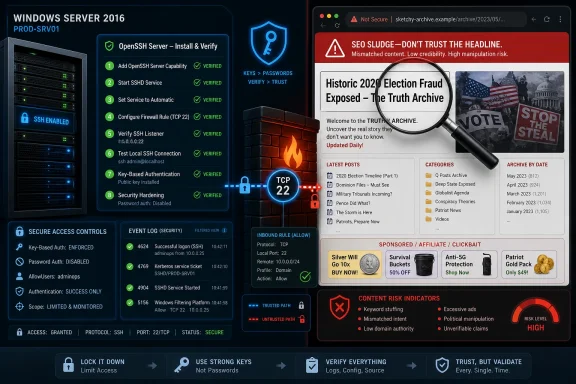 A Windows Server How-To Wearing the Wrong Magazine’s Clothes
There is no natural editorial bridge between OpenSSH on Windows Server 2016 and a Fathom Journal index of essays about Israel, antisemitism, regional politics, and book reviews. The supplied page text reads like a scraped front page with one Windows administration phrase grafted onto the title. That is a familiar shape: a real-looking domain, a mechanically generated slug, and a headline designed for search rather than readers.This matters because Windows Server administration is not a lifestyle blog topic. A bad recipe for enabling SSH can expose an administrative endpoint to the internet, weaken authentication, or leave a legacy server with an unmaintained binary listening on the default port. A page does not need to ship malware to be dangerous; it only needs to give a hurried admin the wrong confidence.
The headline itself targets a common search pattern. “Install OpenSSH on Microsoft Windows Server 2016” and “open SSH port 22 in Windows Firewall” are exactly the kind of phrases an administrator might type while maintaining an older box. The rest of the page, however, does not behave like a technical article: there are no coherent steps, no version caveats, no PowerShell examples, no discussion of firewall scope, and no sign that the author understands Server 2016’s awkward place in Microsoft’s OpenSSH timeline.
That gap should make readers stop. Search results can surface technically relevant titles on pages whose bodies are unrelated, outdated, or compromised. The cure is not paranoia; it is source discipline.
Server 2016 Sits on the Awkward Side of Microsoft’s SSH Transition
OpenSSH on Windows is now normal enough that many administrators forget how recent that normalization is. Windows 10 and later Windows Server releases made OpenSSH feel like a first-party component. Windows Server 2016, by contrast, belongs to the transition era: old enough that many guides used GitHub ZIP packages and manual service registration, but new enough that administrators expect a native Microsoft-ish experience.That historical wrinkle is where bad guides thrive. On Windows Server 2019, 2022, and newer builds, the OpenSSH Client and Server are commonly handled as optional capabilities, with relatively clean PowerShell installation paths. On Server 2016, depending on patch level and environment, the experience may involve installing a Microsoft-supported OpenSSH build manually, registering
sshd, setting services, generating host keys, and creating a firewall rule yourself.That is not impossible, but it is not the same as clicking through a modern Settings page. Treating every Windows Server release as interchangeable is one of the easiest ways to produce broken infrastructure documentation. The command that works on Server 2022 may fail or mean something different on Server 2016.
This is why the page’s framing is suspicious. A real Server 2016 OpenSSH guide would lean into the version-specific caveats. It would explain where the binaries come from, how the service is registered, where
sshd_config lives, how the firewall rule is scoped, and how to validate that port 22 is actually listening. A search-optimized fake only needs the nouns.Opening Port 22 Is Not the Same as Securing SSH
The phrase “open SSH port 22” sounds harmless because port 22 is the default. In practice, opening TCP 22 is a security decision, not a checkbox. It creates a remote administration path into a Windows server that may be domain-joined, internet-facing, or hosting sensitive workloads.The firewall command most administrators recognize is straightforward: create or enable an inbound TCP rule for local port 22. On a lab server, that may be enough to prove connectivity. On a production server, it is only the beginning of the conversation.
The more important question is who can reach that port. A Windows Defender Firewall rule that allows port 22 from any remote address on any profile is very different from a rule scoped to a management subnet, VPN pool, jump host, or privileged access workstation. SSH’s reputation for security comes from cryptography and operational discipline, not from magical protection around a socket.
That distinction is especially important for Server 2016. Many Server 2016 deployments are not shiny greenfield machines; they are line-of-business anchors, legacy application hosts, or infrastructure systems that survived multiple refresh cycles because nobody wanted to touch them. Adding SSH to such a machine without hardening is not modernization. It is widening the blast radius.
The Real Installation Path Begins With Trust
The first operational question is not “which command do I run?” It is “which OpenSSH package am I installing, and who maintains it?” For newer Windows versions, Microsoft’s own documentation should be the starting point. For Server 2016, administrators need to be particularly careful because the installation path may not be the same as the one documented for newer builds.A trustworthy guide should tell you whether it is using built-in Windows capabilities, a Microsoft-maintained Win32-OpenSSH release, or a third-party package. It should explain how to verify installation, how to start and configure the
sshd service, and how to roll back. It should not bury the method under ads, unrelated content, or generic filler.In practice, a cautious Server 2016 deployment usually follows a sequence like this: acquire the OpenSSH package from a trusted Microsoft source, place it in a controlled path, install or register the service using the provided scripts, start
sshd, set it to automatic startup if required, and then create a narrowly scoped inbound firewall rule. The exact commands depend on the package and build state, which is precisely why administrators should not rely on an orphaned page with a mismatched body.The validation steps are just as important as the installation steps.
Get-Service sshd should show whether the service exists and whether it is running. netstat or PowerShell networking cmdlets should confirm whether the server is listening on TCP 22. A remote test from the intended management network should confirm the firewall path. A failed connection is not solved by turning off the firewall; it is solved by isolating whether the problem is service state, local policy, network ACLs, cloud security groups, NAT, or authentication.Microsoft’s Documentation Has Become the Baseline, Not an Optional Courtesy
One notable change in the Windows admin world is that Microsoft’s OpenSSH guidance has matured. The company now documents OpenSSH installation, first use, and firewall troubleshooting as part of the Windows Server administration story. That does not make every environment simple, but it gives administrators a baseline that random SEO pages cannot match.The useful Microsoft guidance is not glamorous. It tells administrators to check the
sshd service, verify that port 22 is listening, review Windows Firewall inbound rules, examine sshd_config, test configuration syntax, and restart the service after changes. That is exactly the kind of boring, reliable troubleshooting sequence that separates a real operations document from search bait.The firewall piece is equally mundane and equally critical. A proper inbound rule specifies TCP, local port 22, inbound direction, enabled state, and allow action. In production, it should also specify profiles and remote address scope. Administrators should audit that rule over time because firewall rules have a way of becoming permanent exceptions long after the project that created them has ended.
This is where vendor documentation earns its keep. It is not always the best prose and it may not cover every edge case, but it carries current assumptions about supported versions, service names, file locations, and security posture. If a third-party guide disagrees with official documentation, the third-party guide needs to explain why. Most SEO sludge does not even know there is a disagreement to explain.
The Fathom Page Looks Like Search Pollution, Not Sysadmin Publishing
The supplied Fathom Journal text is almost entirely an archive listing. It includes article titles, authors, dates, newsletter prompts, donation calls, and site navigation for a publication focused on Israel, the Middle East, antisemitism, and related political debate. There is no meaningful OpenSSH tutorial in the body.That makes the title the anomaly. The page appears to have been indexed or presented with a Windows Server administration headline while serving unrelated editorial content. The random-looking slug strengthens the impression that this is not a normal article page. It may be a compromised page, a spam injection, a malformed scrape, or a search-index artifact, but the practical conclusion is the same: do not use it as a technical source.
This kind of page can be especially effective because it borrows trust from a real publication. A user may not know Fathom Journal, but the site looks like an established outlet rather than a disposable spam domain. Search engines have historically struggled with this category of abuse because the host domain may be legitimate even when a specific URL is garbage.
For Windows administrators, the safe habit is to judge the page, not only the domain. Does the body match the headline? Are the commands explained? Are dates and supported versions clear? Does the page link to primary documentation or release artifacts? Can you tell who wrote it and why? If those answers are missing, the page should not influence a server change.
The Security Risk Is Operational Laziness at Internet Speed
The danger in a bad OpenSSH guide is rarely a single catastrophic command. It is the chain of small shortcuts. An admin installs an old build, opens port 22 globally, leaves password authentication enabled, allows broad administrative logins, and forgets to monitor the service. Each step is individually understandable; together they create a new remote attack surface.SSH on Windows can be a good thing. It gives administrators a familiar automation path, supports secure file transfer workflows, and integrates Windows servers into cross-platform management systems. For mixed estates, OpenSSH can reduce dependence on brittle remote desktop habits and make scripting more consistent.
But SSH is not automatically safer than RDP just because Unix people like it. A publicly reachable SSH service with weak passwords is a brute-force magnet. A poorly maintained OpenSSH build is a liability. A permissive firewall rule on a legacy server is an invitation to future regret. Security comes from a whole posture: patching, keys, least privilege, logging, scoping, and review.
That posture should be explicit in any serious guide. If a tutorial tells you how to open port 22 but says nothing about limiting source addresses, key-based authentication, administrative group membership, or logging, it is not finished. It has stopped at the most dangerous midpoint: the server is reachable, but not yet governed.
Server 2016’s Age Changes the Risk Calculation
Windows Server 2016 is not dead, but it is not young. In many environments it remains supported enough to keep running and old enough to demand extra caution. That combination is uncomfortable: administrators still have to maintain it, but they should resist treating it like a modern default platform.Older servers accumulate exceptions. They may run applications that constrain patching windows, depend on older cryptographic settings, or sit behind firewall rules nobody wants to touch. Adding OpenSSH can be justified, but it should be justified as a managed change, not an improvised convenience.
The best argument for installing OpenSSH on Server 2016 is operational consistency. If the organization has standardized on SSH-based automation, configuration management, or secure file transfer, bringing a Windows server into that model may reduce complexity. The worst argument is “a web page said to open port 22.” That is how temporary fixes become undocumented architecture.
There is also a lifecycle point here. If a Server 2016 system is important enough to need new remote administration paths in 2026, it is important enough to have a migration plan. SSH may help manage the server more safely in the short term, but it should not become an excuse to defer modernization indefinitely.
The Commands Are Easy; The Guardrails Are the Work
The mechanical version of the job is simple. Install OpenSSH Server from a trusted source, start thesshd service, set startup behavior, confirm the daemon is listening, and allow inbound TCP 22 through Windows Defender Firewall for the right network scope. The uncomfortable truth is that most of the real work happens around those commands.Before enabling access, administrators should decide whether password logins are acceptable. In many environments, key-based authentication is the better default, especially when combined with restricted administrative membership and careful key handling. If passwords remain enabled, account lockout policy, MFA-adjacent controls, privileged access workflows, and monitoring become even more important.
They should also decide whether port 22 should be reachable at all from the broader network. Security teams sometimes overstate the value of moving SSH to a nonstandard port, but they are right to care about exposure. A nonstandard port is not a security control by itself; source restriction is the control that matters.
Logging deserves more attention than it usually gets. Enabling SSH without reviewing Windows event logs, authentication events, and alerting paths creates a blind spot. The first sign of abuse should not be a ransomware note or a mysterious scheduled task.
The Web’s Tutorial Economy Has a Freshness Problem
The OpenSSH-on-Windows ecosystem illustrates a broader problem with technical publishing. A guide written in 2017 may have been useful when it was posted, misleading in 2020, partially correct in 2023, and dangerous by 2026. Search engines do not always communicate that decay clearly, especially when pages are copied, rehosted, or wrapped in new dates.Server administration content ages badly because products change underneath it. Optional features move. Package names change. Defaults improve. Security guidance tightens. A command copied from an old blog can still run while embodying assumptions that no longer make sense.
That is why date awareness matters. A current page should distinguish between Windows Server 2016, 2019, 2022, and 2025. It should say whether a feature is installed by default, available as an optional capability, or manually deployed. It should also acknowledge when a version-specific workaround exists only because the server is old.
The Fathom page fails before reaching any of that nuance. Its body is not merely outdated; it is unrelated. But it is useful as an example because it shows the extreme end of the same problem: search can return pages that look topically relevant at the title layer while offering no reliable technical content underneath.
Treat Every Remote Admin Guide as a Change Request
A better mental model is to treat any guide involving remote administration as an informal change request. Before following it, ask what service will be installed, what port will be opened, who will be able to connect, how access will be authenticated, how activity will be logged, and how the change will be reversed. If the guide cannot help answer those questions, it is not a guide; it is a prompt.For OpenSSH on Windows Server 2016, that means documenting the package source and version. It means recording the firewall rule name, profile, local port, and allowed remote addresses. It means storing any
sshd_config changes in a place where another administrator can find them. It means verifying service recovery behavior and patch ownership.This may sound heavy for a small task, but remote access is not small. The difference between a convenience and an incident often lies in whether somebody scoped the rule to a management network. The difference between a clean audit and an embarrassing scramble often lies in whether somebody wrote down why SSH was installed in the first place.
The irony is that OpenSSH itself is not the suspicious part. It is a mature and widely used tool. The suspicious part is the web page pretending to explain it.
The Practical Verdict for Admins Who Found This Page in Search
The right response to this specific page is not to debate whether Fathom Journal has suddenly diversified into Windows infrastructure. It is to discard the page as a source for technical work and use primary Microsoft documentation or a clearly maintained administrator guide instead. The headline may match the task, but the content does not.For a Windows Server 2016 machine, the safe path is deliberate. Confirm the server’s patch state and support constraints. Use a trusted OpenSSH package path appropriate for that OS. Validate the service locally before touching the firewall. Open TCP 22 only to the networks that require it. Prefer key-based access where feasible. Monitor the result.
That workflow will take longer than copying a one-liner from a search result. It is also how administrators avoid creating a ghost service that nobody owns. In 2026, remote management is too important to be driven by whatever page happens to rank.
The Port 22 Lesson Hidden Inside a Bad Search Result
The concrete takeaways are narrower than the headline and broader than one server. This is about OpenSSH, but it is also about the habits administrators bring to any web-sourced fix.- The supplied Fathom Journal page should not be treated as a Windows Server technical guide because its body is unrelated to the OpenSSH headline.
- Windows Server 2016 requires more version-aware OpenSSH handling than newer Windows Server releases, so administrators should verify the supported installation method before running commands.
- Opening TCP port 22 in Windows Firewall should be scoped to trusted management sources whenever possible, not exposed broadly by default.
- A successful SSH setup requires service validation, listener checks, firewall review, authentication policy, and logging, not merely an inbound rule.
- Microsoft’s current documentation should be the baseline for OpenSSH behavior on Windows, with third-party guides used only when they are current, specific, and explain their assumptions.
- Any legacy server important enough to receive new remote access should also have an ownership, monitoring, and migration plan.
Source: Fathom Journal Fathom - For a deeper understanding of Israel, the region, and global antisemitism
