

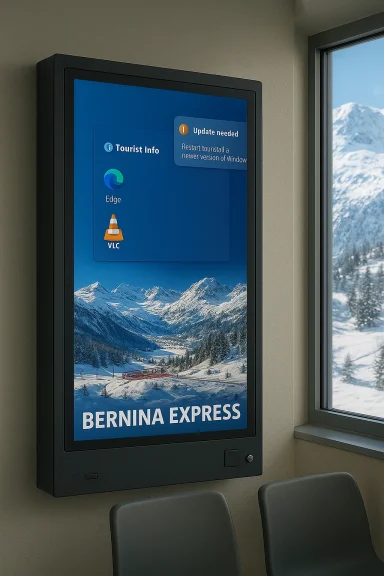
A bright public-information screen in the waiting room at St. Moritz's railway station briefly became the town's latest tech talking point when it displayed a full Windows 11 Start menu and a list of pending updates instead of passenger information — an amusing snapshot of a real-world configuration mistake that reveals a lot about digital-signage practices, operational risk, and how modern UI rollouts can surface in the most unexpected places.
The incident was spotted and reported on February 18, 2026: a display normally used by the Rhätische Bahn (Rhaetian Railway) to show timetables and promotional imagery instead showed a German-language Windows 11 Start menu, a user named “Tourist Info,” shortcuts to Edge and VLC, and an update notification. The image went viral on social and technology news channels because it’s a vivid, low-fi example of what can go wrong when a general-purpose desktop environment is exposed on a public-facing screen.
The visual gag is funny — but it also opens a useful conversation about digital-signage security, operational hygiene, and the lifecycle management of public displays. This article explains what likely happened, places the display glitch in context (from the Bernina Express panorama to St. Moritz’s pioneering electrification history), and — most importantly for IT and facilities teams — lays out concrete, practical steps to prevent repeat incidents and secure passenger-facing displays.
What made this instance notable was that, instead of the usual content, the screen exposed a Windows 11 desktop environment: the Start menu, a visible user name labelled “Tourist Info,” icons for VLC and Microsoft Edge, and an apparent prompt to install updates. There were no obvious system errors — just an ordinary Start menu sitting in place of a kiosk-mode passenger information system.
Why this matters for signage administrators:
St. Moritz itself has long promoted innovation. The Kulm Hotel — cited by the signage text — has historical claims of pioneering electric lighting in the area in the late 1870s. Historical sources indicate that Johannes Badrutt installed early arc lamps and a private hydroelectric plant in the property around 1878–1879. That pioneering spirit sits amusingly well beside today’s minor signage mishap — both are reminders that technology has long been a point of civic pride in the Engadine.
Operators who treat displays as second-class devices will occasionally wake up to a Start menu where a timetable should be. Those who invest in dedicated signage platforms, hardened configurations, disciplined update practices, and clear procedures will rarely be the subject of an accidental viral photo — and when they are, they’ll have the logs, the recovery path, and the communications plan to turn an awkward moment into a demonstration of competence.
Source: theregister.com Windows 11 Start menu makes unscheduled stop in Saint Moritz
 Overview
The incident was spotted and reported on February 18, 2026: a display normally used by the Rhätische Bahn (Rhaetian Railway) to show timetables and promotional imagery instead showed a German-language Windows 11 Start menu, a user named “Tourist Info,” shortcuts to Edge and VLC, and an update notification. The image went viral on social and technology news channels because it’s a vivid, low-fi example of what can go wrong when a general-purpose desktop environment is exposed on a public-facing screen.The visual gag is funny — but it also opens a useful conversation about digital-signage security, operational hygiene, and the lifecycle management of public displays. This article explains what likely happened, places the display glitch in context (from the Bernina Express panorama to St. Moritz’s pioneering electrification history), and — most importantly for IT and facilities teams — lays out concrete, practical steps to prevent repeat incidents and secure passenger-facing displays.
Background: where the screen sits and what it showed
The display and its content
The device was located in the waiting room at St. Moritz station and was showing promotional imagery for the Rhaetian Railway; the pictured coaches match the style of the Bernina Express panoramic cars used on the St. Moritz–Tirano route. The Bernina/Albula railway corridor is internationally known — technically impressive and listed for its cultural landscape importance — and the Rhaetian Railway routinely uses panoramic imagery for station display screens and advertising campaigns.What made this instance notable was that, instead of the usual content, the screen exposed a Windows 11 desktop environment: the Start menu, a visible user name labelled “Tourist Info,” icons for VLC and Microsoft Edge, and an apparent prompt to install updates. There were no obvious system errors — just an ordinary Start menu sitting in place of a kiosk-mode passenger information system.
Why the image resonated
A couple of things make this image attract attention:- The contrast: St. Moritz is a high-profile, historic Alpine resort town; a highly modern UI laid over a pastoral travel poster creates cognitive dissonance.
- The UI itself: Windows 11 has undergone visible Start menu redesigns and rollout updates in late 2025 and early 2026, and people are used to seeing that UI on personal machines — not public signage.
- The human element: Seeing the admin account name and a list of available apps or updates makes the error feel avoidable and human, not a mysterious outage.
Why this likely happened: common causes and failure modes
Public displays typically run one of three software models:- A purpose-built digital-signage OS or appliance that boots directly into a signage player.
- A locked-down general OS configured in kiosk/assigned access mode so the system presents only a single app experience.
- A full desktop OS used as a convenience (cheaper or familiar), with a signage application launched on top of it.
- The signage application crashed or was closed, returning the system to the desktop.
- The signage software runs as a user-level app and relies on an autologon or scheduled task that didn’t start (or was stopped for maintenance).
- An unapplied update or an unexpected reboot left the system on the login/desktop screen.
- Remote-management or content-management errors (misapplied configuration, content delivery failure).
- Local intervention: a staff member logged into the machine for maintenance and left the Start menu visible.
The broader context: Windows 11 Start menu changes and why they matter here
Microsoft has been rolling out a redesigned Start menu for Windows 11 over the past year as part of optional cumulative updates and staged enablements. The new Start exposes the “All apps” surface more prominently, integrates phone link panels, and contains deeper personalization — features that are highly visible when a desktop is exposed on a public display.Why this matters for signage administrators:
- New UI surfaces increase the chance of revealing personal or administrative data when a system is not locked down.
- Optional updates and staged feature rollouts can create inconsistencies between systems — some signage units may show different UI behavior, complicating remote troubleshooting.
- Update prompts or notifications that are normally concealed in locked kiosk setups can appear on exposed desktops and be visible to the public.
Cultural and local color: Bernina Express and St. Moritz history
The advertising imagery visible on the affected screen appears to be for the Bernina Express panoramic service, which runs between St. Moritz and Tirano and is operated by the Rhätische Bahn. The Bernina line is internationally renowned for the engineering of its route and spectacular Alpine panoramas; it’s part of the Albula/Bernina cultural landscape celebrated for both technical and aesthetic reasons.St. Moritz itself has long promoted innovation. The Kulm Hotel — cited by the signage text — has historical claims of pioneering electric lighting in the area in the late 1870s. Historical sources indicate that Johannes Badrutt installed early arc lamps and a private hydroelectric plant in the property around 1878–1879. That pioneering spirit sits amusingly well beside today’s minor signage mishap — both are reminders that technology has long been a point of civic pride in the Engadine.
Security and operational risks revealed by an exposed Start menu
What looks like a laugh is also a concrete operational and security risk. Exposing a desktop on public hardware can lead to several problems:- Unauthorized access or manipulation. A visible Start menu could allow a passerby to launch apps, change settings, or run utilities that disrupt content delivery.
- Information leakage. Account names, open documents, or queued update details can reveal internal operational processes, staff names, or software versions.
- Malware and exploitation. Public displays are often physically reachable; removable media or unattended keyboards can be vectors to install persistence mechanisms or malware.
- Brand and trust damage. When passenger information screens fail, travelers may lose confidence in the operator’s reliability, and social clips of the error can damage brand perception.
- Regulatory or contractual exposure. Passenger-information obligations are part of transit operations; a persistent failure to show timetable data could expose the operator to complaints or fines in some jurisdictions.
Practical, step-by-step hardening for public displays
If you manage passenger information systems, corporate signage, or public displays, the St. Moritz screenshot is a useful postmortem. The following steps present a prioritized, practical checklist for preventing, detecting, and responding to similar incidents.- Enforce kiosk-mode operation
- Use Windows Assigned Access, a signage-player appliance, or a purpose-built digital signage OS that boots directly into the player.
- Avoid running signage as a user-launched app on a general-purpose desktop.
- Use a dedicated account with minimal privileges
- Create a local, locked-down user (not an administrator) that auto-logs in to run the signage app.
- Ensure admin-level access is only used off-line and for scheduled maintenance.
- Replace the shell or lock the shell
- Configure an alternate shell or set the signage app as the default shell so the Start menu cannot be invoked.
- On Windows, shell replacement reduces exposure; on Linux, run signage as a systemd service with no desktop environment.
- Disable interactive update prompts and notifications
- Use enterprise update management (WSUS, Intune, or a policy based on Windows Update for Business) to control reboots and visible prompts.
- Configure maintenance windows and staged updates, and test updates on a lab cluster before production.
- Secure remote management
- Use a device-management platform to deploy content, monitor uptime, and push configuration changes.
- Require multi-factor authentication for administrative access and log all remote sessions.
- Lockdown peripherals and physical access
- Disable USB ports or enable selective USB allowlists.
- Physically secure devices inside locked cabinets or mount enclosures that limit direct access to the keyboard and ports.
- Implement watch-dog monitoring and automated recovery
- Monitor process health; if the signage player exits, auto-restart it or trigger a safe fallback that displays cached content.
- If the device fails to boot into the signage app, redirect its content to a redundant device.
- Harden the OS
- Apply least-privilege policies, enable BitLocker for disk encryption, enforce secure boot, and keep firmware updated.
- Use Windows Defender Application Control or similar allowlists to prevent unauthorized executables.
- Create a documented maintenance and incident plan
- Define who can log in, how and when updates are applied, and how to quickly restore service.
- Keep a public fallback: a static poster or redundant simple display that guarantees minimal passenger information even if the digital system fails.
- Test recovery and public-facing behavior regularly
- Conduct “what-if” drills to simulate software crashes and forced reboots.
- Review logs, screenshots, and uptime metrics monthly, and include these checks in vendor SLAs.
Software choices: Windows, Linux, or purpose-built signage appliances?
There’s no single correct OS for digital signage, but there are tradeoffs:- Windows (full desktop) is familiar and has broad application support (VLC, Edge, etc.), but it must be heavily locked down — Assigned Access, shell replacement, or Windows 10/11 IoT variants are strongly recommended.
- Windows IoT / embedded editions reduce attack surface and boot into specific apps but require licensing and proper lifecycle management.
- Linux-based signage players (including Chromium OS derivatives) can be lightweight and secure out-of-the-box, but tooling and content workflows may differ from Windows enterprise stacks.
- Dedicated signage appliances and SaaS CMS provide the highest operational simplicity: vendor-managed players, scheduled updates, and central content delivery reduce local management complexity.
The human factor: maintenance culture, training, and vendor relationships
Operational mistakes usually point to process weaknesses. Signs you need to improve operational posture include:- Late or unmanaged updates applied interactively on production displays.
- Generic/shared admin accounts used across multiple devices.
- Lack of remote device health telemetry, leading to on-site troubleshooting rather than automated failover.
- Poor handover practices between facilities staff and IT teams.
Public relations and passenger experience
From a communications perspective, incidents like the St. Moritz screenshot are low risk but high-visibility. Transit operators should:- Maintain a simple, redundant information source (analogue timetables or static digital posters) at critical passenger touchpoints.
- Prepare a brief incident statement for social channels in case images circulate: transparency and a quick explanation mitigate brand damage.
- Log incident details to inform future procurement and operational changes.
What we can verify (and what’s uncertain)
- The display incident was reported on February 18, 2026, in technology media; the image shows a Windows 11 Start menu exposed on a St. Moritz station screen.
- The promotional imagery on the screen aligns with official Rhaetian Railway materials for the Bernina panoramic services (the Bernina Express runs between St. Moritz and Tirano).
- Historical claims that the Kulm Hotel was among the first in Switzerland to deploy electric lighting are supported by multiple Swiss historical sources; the precise date sometimes appears as 1878 in summary accounts and 1879 in more detailed contemporary reporting, reflecting the ambiguity in period reporting.
- The exact root cause on the device (crash, scheduled maintenance, manual login, or remote intervention).
- Whether the unit was running an official signage-player configuration that failed or a general-purpose desktop intentionally.
- Any system logs or management telemetry that would show the sequence of events before the screen exposure was photographed.
Recommendations for transit operators, facility managers, and integrators
- Treat digital signage like any other critical operational system: formal inventory, documented configuration baselines, and scheduled, tested updates.
- Move away from ad-hoc, manually administered desktop deployments; prefer hardened kiosk shells, IoT variants, or certified signage appliances.
- Standardize monitoring: uptime alerts, content-state verification, and automated fallbacks reduce the chance a failed playback leaves a desktop exposed.
- Insist on secure vendor practices: USB port lockdown, allowlists for executables, and audited remote access.
- Use signage-specific content-delivery networks and scheduled content testing before public use.
Closing: a small misconfiguration, a large lesson
The St. Moritz Start-menu photo is an amusing reminder that even in some of the world’s most venerable places, modern software habits and operational shortcuts travel faster than we sometimes expect. It’s a benign, human-scale error — but it illuminates an important truth: digital signage is both an IT asset and a public-facing service, and it requires the same attention to security, lifecycle, and human processes that any critical infrastructure deserves.Operators who treat displays as second-class devices will occasionally wake up to a Start menu where a timetable should be. Those who invest in dedicated signage platforms, hardened configurations, disciplined update practices, and clear procedures will rarely be the subject of an accidental viral photo — and when they are, they’ll have the logs, the recovery path, and the communications plan to turn an awkward moment into a demonstration of competence.
Source: theregister.com Windows 11 Start menu makes unscheduled stop in Saint Moritz
