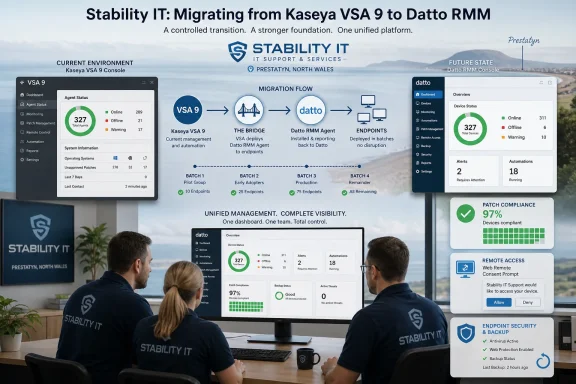
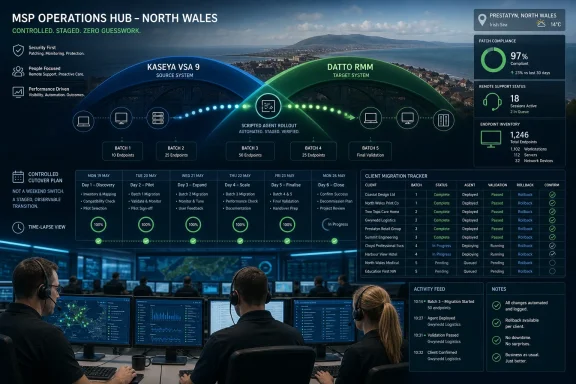
Stability IT moved from Kaseya’s VSA 9 to Datto RMM in a staged migration across its managed client environments in North Wales, using VSA scripts to deploy the new agent client-by-client while technicians temporarily worked in both platforms without disrupting support operations. The case is less about one MSP swapping consoles than about the quiet economics of tool sprawl finally becoming intolerable. Stability IT’s story shows why RMM modernization is now as much an operational-control project as a software upgrade. For Windows admins and MSPs, the headline is simple: patching, remote access, backup, endpoint security, and documentation are no longer separate conversations.
The easiest way to botch an RMM migration is to treat it like a login change. Stability IT appears to have avoided that trap by using the old platform to deliver the new one, letting VSA 9 become the deployment rail for Datto RMM rather than a system to be abruptly abandoned.
That detail matters. MSPs live and die by continuity, and a remote monitoring platform is not a peripheral tool. It is the mechanism through which technicians see machines, apply patches, collect alerts, launch sessions, and prove work happened.
The company’s migration pattern was deliberately unglamorous: script the Datto RMM agent rollout, move clients in batches, verify each client in the new platform, then remove that client from VSA. For a few weeks, technicians simply worked from whichever system contained the customer they were supporting.
That dual-running period is the part many migration plans underestimate. It gave Stability IT a buffer against surprise, but it also gave technicians permission to keep serving customers instead of becoming unpaid QA testers for a rushed cutover. The result was a migration that Davies described as smooth because the process was boring in exactly the right way.
That earlier shift was probably the harder cultural change. ScreenConnect could get a technician onto a user’s machine, but it did not solve centralized patching, automation, or broad fleet management by itself. Stability IT was still relying on WSUS for Windows patching and PRTG for monitoring, which meant the toolchain reflected the common MSP bargain: several good tools, none of them quite the system of record.
VSA 9 gave the company a more complete operating model. It brought automation, patching, monitoring, and remote support into a single environment, and it prepared the team to think in RMM terms. By the time Datto RMM entered the picture, Stability IT’s technicians already understood the rhythms of policy-based management and endpoint automation.
That is why Davies’ comment that the Datto RMM migration was easier than the original move from ScreenConnect rings true. Switching between two mature RMM platforms is still work, but it is not the same as teaching an organization to stop operating like remote access is the center of the universe.
Before Datto RMM, Stability IT’s Windows patching depended on WSUS servers at client sites. That architecture can work, and many Windows administrators have run it successfully for years, but it is also a model that pushes complexity outward. Every customer site becomes its own small patching kingdom, with its own server, configuration, storage, sync behavior, and failure modes.
The worst failure mode was not that patching broke. It was that Stability IT sometimes did not know patching had broken until someone logged into the WSUS server and checked. In an MSP environment, that is the operational equivalent of flying by visiting each cockpit after the plane has landed.
Datto RMM replaced that with centralized patch policy and fleetwide visibility. The claimed result is over 97 percent patch compliance across more than 1,800 endpoints, with the remaining machines still visible in monitoring mode because some clients block automatic Windows updates by policy.
That last caveat is important. Perfect automation is often a fantasy in real customer estates. Some clients have application constraints, maintenance windows, regulatory caution, or simple executive nervousness about updates. The difference between a mature MSP and a reactive one is not that every endpoint behaves; it is that exceptions are known, tracked, and defensible.
The Cyber Essentials regime has long treated patching as a baseline security control, and the 14-day expectation for high-risk or critical updates has become a practical forcing function for smaller organizations. Whether the estate consists of servers, laptops, desktops, or internet-facing devices, the pressure is the same: it is no longer enough to say patches are being handled.
This is where centralized RMM reporting becomes more than an MSP convenience. A customer that needs to prove compliance needs dates, status, exceptions, and repeatability. A technician logging into individual WSUS servers to discover whether updates are healthy is not a compliance workflow; it is an archaeological dig.
Stability IT’s move to Datto RMM therefore changes the conversation with clients. Instead of explaining that patching is managed somewhere inside each customer’s infrastructure, the MSP can show a cross-client operating picture and drill into exceptions. That is a stronger posture for audits, renewals, insurance conversations, and board-level security reviews.
There is also a security point here that should not be softened. Patching delays are one of the easiest ways for ordinary businesses to become incident-response case studies. A 97 percent compliance number does not make risk vanish, but it suggests the MSP has moved from hopeful maintenance to measurable control.
Remote access is the technician’s front door. If sessions are slow, unreliable, or awkward, every interaction starts with friction. The customer hears hesitation, the technician loses confidence, and the service desk burns minutes before troubleshooting has even begun.
Davies singled out Datto RMM’s Web Remote as the team’s default tool, along with the Agent Browser for performing tasks without taking over the user’s session. That second capability is easily underrated. Being able to inspect, manage, and remediate without interrupting a user turns remote support from a screen-sharing event into background administration.
The consent prompt also deserves attention. In Stability IT’s workflow, the client sees the technician’s name and must approve the session. That is not merely a usability flourish; it is a trust boundary. In an era of help-desk impersonation and social-engineering attacks, users need a support experience that makes legitimate access recognizable.
Speed and trust reinforce each other. A remote session that starts quickly, identifies the technician clearly, and avoids unnecessary disruption helps the MSP feel less like an outside contractor and more like an extension of the client’s own IT function.
The company moved antivirus and EDR functions toward Datto AV and Datto EDR, replacing a Bitdefender-centered workflow over time as renewals came up. It also moved endpoint backup away from a Veeam model that required on-site infrastructure and capacity checks. Documentation stayed tied into IT Glue and MyGlue, with technicians able to inject passwords into RMM sessions rather than manually copy credentials across systems.
Each of those changes removes a small tax. A separate AV portal is a tax. A separate backup server at a client site is a tax. A separate documentation workflow is a tax. None of those taxes necessarily justifies a platform migration by itself, but together they define the daily cost of fragmentation.
For Windows-heavy MSPs, this is the central tension of the next few years. Best-of-breed tools remain attractive, especially for security specialists who want depth in every layer. But MSP profitability depends on repeatable service delivery, and repeatability is hard when every endpoint task crosses a different console, license, alerting model, and renewal date.
Stability IT’s reported 8 percent margin increase on managed services is the commercial expression of that technical simplification. The company says the bundled license economics allowed it to replace multiple tools while maintaining client pricing and creating room to upsell services that previously would have required more tooling overhead.
When RMM, AV, EDR, backup, documentation, and integrations sit inside one vendor orbit, the MSP gains a cleaner operating model. It also concentrates pricing risk, roadmap risk, outage risk, and contract risk. If the vendor changes terms, shifts product priorities, or stumbles on support, the blast radius is larger than it would be with a looser stack.
That does not mean Stability IT made the wrong call. It means the value of consolidation should be measured with clear eyes. A platform that saves technician time, improves patch compliance, speeds remote support, and raises margin can be worth the dependency. But the dependency is part of the bill, even if it does not appear as a line item.
The better question for MSPs is not whether lock-in exists. It is whether the operational gains are large enough to justify it, and whether the MSP has enough process maturity to avoid becoming passive inside the vendor’s ecosystem.
Stability IT’s staged migration suggests it retained some of that discipline. The team tested Datto RMM with one client, asked technicians for direct feedback, then expanded after the internal verdict was clear. That is the right order: prove the workflow, then scale the vendor commitment.
Modern endpoint management wants policy, telemetry, and exception handling across the whole fleet. That does not necessarily require Datto RMM; Microsoft Intune, Windows Autopatch, Configuration Manager, NinjaOne, ConnectWise, NinjaOne, Syncro, Atera, and other tools all compete in adjacent territory. But the direction of travel is obvious.
The admin console has moved from “this customer’s server” to “this provider’s estate.” That shift changes staffing, escalation, reporting, and accountability. It also changes what customers expect from their MSP.
A customer no longer wants to hear that patching depends on whether a particular on-premises server is healthy. They want to know whether their devices are compliant, which ones are not, and what the MSP is doing about it. Stability IT’s Datto RMM move is one example of how MSPs are retooling around that expectation.
In the old model, backing up workstations required thinking about local backup infrastructure, available server capacity, whether a device was on-site, and whether the client was willing to pay for another visible project. That naturally pushed MSPs toward protecting servers first and leaving many workstations uncovered.
Kaseya 365 Endpoint Backup changed the packaging. Stability IT says backup became something bundled into the subscription and managed through Datto RMM, with storage charged separately. That turned workstation backup from a bespoke deployment into an attachable service.
This is where platform economics can change customer behavior. Clients who would never initiate a workstation-backup project may accept it when the MSP can present it as a low-friction extension of managed service. The MSP, in turn, gets a broader protection story without standing up separate backup servers at every site.
There is an important caution here too. Backup only matters if restore works, retention aligns with business needs, and coverage is tested. But reducing deployment friction is still meaningful. The best backup strategy is the one that actually gets implemented before the laptop dies, the user deletes the folder, or ransomware turns “we should have” into “we can’t.”
A technically superior product can fail if the service desk avoids it. A slightly less elegant product can win if it becomes the fastest route to resolution. Stability IT’s technicians reportedly reacted to the Datto RMM pilot by asking why every client was not already on it, which is the kind of internal signal leadership should take seriously.
Technician preference is not just about comfort. It is operational telemetry. If the people closing tickets believe a tool is quicker, easier to navigate, and more reliable, that affects call length, escalation rate, burnout, and customer satisfaction.
This is especially true in remote-first support. A field engineer can sometimes improvise around a bad console with physical access, local admin tools, and direct observation. A remote technician has the RMM platform, the documentation system, the security console, and whatever the user can describe over the phone. The toolchain is the workplace.
That is why the migration’s success cannot be reduced to agent deployment. The real test was whether technicians could move through the day faster after the change. Stability IT says they could, and the reported SLA improvements suggest the change reached the customer-facing side of the business.
That squeezes providers. An MSP can respond by hiring more technicians, accepting thinner margins, or simplifying the machinery behind service delivery. Consolidated RMM platforms promise the third option, though they do not always deliver it cleanly.
The Kaseya 365 model is explicitly designed around that pressure. It bundles endpoint management, security, and backup into a per-endpoint commercial structure, aiming to make the MSP’s cost base more predictable while creating cross-sell opportunities. Stability IT’s reported margin gain is exactly the kind of outcome vendors want to showcase.
The more interesting point is that the customer may not care which console made it happen. Customers care whether tickets are resolved quickly, patches are applied, backups exist, and security controls can be evidenced. If consolidation helps the MSP deliver those outcomes more consistently, the platform decision becomes visible only through better service.
That is the strategic opportunity for MSPs. The goal is not to impress customers with an integrated stack diagram. The goal is to make the stack disappear behind reliable outcomes.
A successful RMM move should reduce the number of places technicians must look for truth. It should make patch status easier to prove, not merely easier to configure. It should improve remote access enough that the service desk feels the difference in daily work.
It should also be staged carefully enough that the old platform helps deploy the new one. That sounds obvious until a migration plan assumes manual installation, customer-by-customer improvisation, or a hard cutover weekend that turns Monday morning into a ticket storm.
The one-client pilot was another good move. It made technician feedback concrete and gave leadership a direct comparison between VSA 9 and Datto RMM in live service conditions. In RMM selection, demos matter less than whether the tool behaves well at 9:17 a.m. when three users are waiting and a server needs attention.
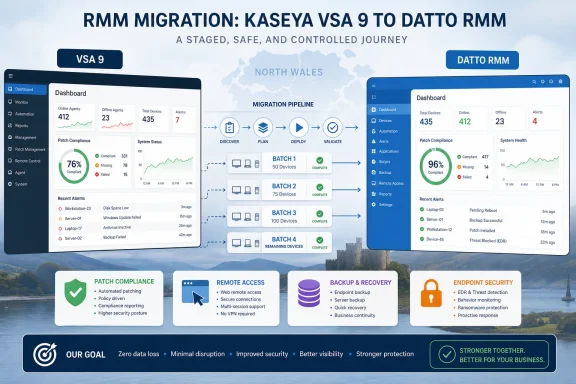 The Migration Worked Because It Was Treated as an Operations Project, Not a Vendor Swap
The easiest way to botch an RMM migration is to treat it like a login change. Stability IT appears to have avoided that trap by using the old platform to deliver the new one, letting VSA 9 become the deployment rail for Datto RMM rather than a system to be abruptly abandoned.That detail matters. MSPs live and die by continuity, and a remote monitoring platform is not a peripheral tool. It is the mechanism through which technicians see machines, apply patches, collect alerts, launch sessions, and prove work happened.
The company’s migration pattern was deliberately unglamorous: script the Datto RMM agent rollout, move clients in batches, verify each client in the new platform, then remove that client from VSA. For a few weeks, technicians simply worked from whichever system contained the customer they were supporting.
That dual-running period is the part many migration plans underestimate. It gave Stability IT a buffer against surprise, but it also gave technicians permission to keep serving customers instead of becoming unpaid QA testers for a rushed cutover. The result was a migration that Davies described as smooth because the process was boring in exactly the right way.
VSA 9 Was the Bridge Away From a More Fragmented Past
The move to Datto RMM did not begin from nothing. Stability IT had already made the philosophical jump from basic remote support to a full RMM model when it moved away from ScreenConnect and into VSA 9.That earlier shift was probably the harder cultural change. ScreenConnect could get a technician onto a user’s machine, but it did not solve centralized patching, automation, or broad fleet management by itself. Stability IT was still relying on WSUS for Windows patching and PRTG for monitoring, which meant the toolchain reflected the common MSP bargain: several good tools, none of them quite the system of record.
VSA 9 gave the company a more complete operating model. It brought automation, patching, monitoring, and remote support into a single environment, and it prepared the team to think in RMM terms. By the time Datto RMM entered the picture, Stability IT’s technicians already understood the rhythms of policy-based management and endpoint automation.
That is why Davies’ comment that the Datto RMM migration was easier than the original move from ScreenConnect rings true. Switching between two mature RMM platforms is still work, but it is not the same as teaching an organization to stop operating like remote access is the center of the universe.
Patching Was the Real Business Case Hiding in Plain Sight
Remote access gets the emotional attention because technicians feel it every day. But patching was the more consequential problem.Before Datto RMM, Stability IT’s Windows patching depended on WSUS servers at client sites. That architecture can work, and many Windows administrators have run it successfully for years, but it is also a model that pushes complexity outward. Every customer site becomes its own small patching kingdom, with its own server, configuration, storage, sync behavior, and failure modes.
The worst failure mode was not that patching broke. It was that Stability IT sometimes did not know patching had broken until someone logged into the WSUS server and checked. In an MSP environment, that is the operational equivalent of flying by visiting each cockpit after the plane has landed.
Datto RMM replaced that with centralized patch policy and fleetwide visibility. The claimed result is over 97 percent patch compliance across more than 1,800 endpoints, with the remaining machines still visible in monitoring mode because some clients block automatic Windows updates by policy.
That last caveat is important. Perfect automation is often a fantasy in real customer estates. Some clients have application constraints, maintenance windows, regulatory caution, or simple executive nervousness about updates. The difference between a mature MSP and a reactive one is not that every endpoint behaves; it is that exceptions are known, tracked, and defensible.
Cyber Essentials Turns Patch Visibility Into Evidence
For Stability IT’s customers seeking Cyber Essentials certification, patch visibility is not just tidy engineering. It is evidence.The Cyber Essentials regime has long treated patching as a baseline security control, and the 14-day expectation for high-risk or critical updates has become a practical forcing function for smaller organizations. Whether the estate consists of servers, laptops, desktops, or internet-facing devices, the pressure is the same: it is no longer enough to say patches are being handled.
This is where centralized RMM reporting becomes more than an MSP convenience. A customer that needs to prove compliance needs dates, status, exceptions, and repeatability. A technician logging into individual WSUS servers to discover whether updates are healthy is not a compliance workflow; it is an archaeological dig.
Stability IT’s move to Datto RMM therefore changes the conversation with clients. Instead of explaining that patching is managed somewhere inside each customer’s infrastructure, the MSP can show a cross-client operating picture and drill into exceptions. That is a stronger posture for audits, renewals, insurance conversations, and board-level security reviews.
There is also a security point here that should not be softened. Patching delays are one of the easiest ways for ordinary businesses to become incident-response case studies. A 97 percent compliance number does not make risk vanish, but it suggests the MSP has moved from hopeful maintenance to measurable control.
Faster Remote Access Is a Morale Feature Disguised as a Technical Metric
Stability IT says remote support became more than 50 percent faster, with most support calls resolved in under 10 minutes and first-contact resolution targeted within 15 minutes. In an MSP, those numbers affect far more than ticket statistics.Remote access is the technician’s front door. If sessions are slow, unreliable, or awkward, every interaction starts with friction. The customer hears hesitation, the technician loses confidence, and the service desk burns minutes before troubleshooting has even begun.
Davies singled out Datto RMM’s Web Remote as the team’s default tool, along with the Agent Browser for performing tasks without taking over the user’s session. That second capability is easily underrated. Being able to inspect, manage, and remediate without interrupting a user turns remote support from a screen-sharing event into background administration.
The consent prompt also deserves attention. In Stability IT’s workflow, the client sees the technician’s name and must approve the session. That is not merely a usability flourish; it is a trust boundary. In an era of help-desk impersonation and social-engineering attacks, users need a support experience that makes legitimate access recognizable.
Speed and trust reinforce each other. A remote session that starts quickly, identifies the technician clearly, and avoids unnecessary disruption helps the MSP feel less like an outside contractor and more like an extension of the client’s own IT function.
The Platform Story Is Really a Consolidation Story
Kaseya’s preferred framing is platform consolidation, and in this case the marketing claim maps reasonably well to the operational evidence. Stability IT did not stop at RMM.The company moved antivirus and EDR functions toward Datto AV and Datto EDR, replacing a Bitdefender-centered workflow over time as renewals came up. It also moved endpoint backup away from a Veeam model that required on-site infrastructure and capacity checks. Documentation stayed tied into IT Glue and MyGlue, with technicians able to inject passwords into RMM sessions rather than manually copy credentials across systems.
Each of those changes removes a small tax. A separate AV portal is a tax. A separate backup server at a client site is a tax. A separate documentation workflow is a tax. None of those taxes necessarily justifies a platform migration by itself, but together they define the daily cost of fragmentation.
For Windows-heavy MSPs, this is the central tension of the next few years. Best-of-breed tools remain attractive, especially for security specialists who want depth in every layer. But MSP profitability depends on repeatable service delivery, and repeatability is hard when every endpoint task crosses a different console, license, alerting model, and renewal date.
Stability IT’s reported 8 percent margin increase on managed services is the commercial expression of that technical simplification. The company says the bundled license economics allowed it to replace multiple tools while maintaining client pricing and creating room to upsell services that previously would have required more tooling overhead.
The Vendor Lock-In Concern Does Not Disappear
A consolidation success story should still make administrators a little uneasy. The same forces that make platform bundles efficient also increase dependency.When RMM, AV, EDR, backup, documentation, and integrations sit inside one vendor orbit, the MSP gains a cleaner operating model. It also concentrates pricing risk, roadmap risk, outage risk, and contract risk. If the vendor changes terms, shifts product priorities, or stumbles on support, the blast radius is larger than it would be with a looser stack.
That does not mean Stability IT made the wrong call. It means the value of consolidation should be measured with clear eyes. A platform that saves technician time, improves patch compliance, speeds remote support, and raises margin can be worth the dependency. But the dependency is part of the bill, even if it does not appear as a line item.
The better question for MSPs is not whether lock-in exists. It is whether the operational gains are large enough to justify it, and whether the MSP has enough process maturity to avoid becoming passive inside the vendor’s ecosystem.
Stability IT’s staged migration suggests it retained some of that discipline. The team tested Datto RMM with one client, asked technicians for direct feedback, then expanded after the internal verdict was clear. That is the right order: prove the workflow, then scale the vendor commitment.
Windows Admins Should Notice the Death of the Site-by-Site Patch Model
The most Windows-specific lesson here is the quiet retreat of site-local patch management as the default MSP answer. WSUS is not dead, and it still has use cases, especially where organizations need tight control over update rings, bandwidth, or disconnected environments. But for a distributed MSP serving many small and mid-market clients, WSUS at every site increasingly looks like inherited complexity.Modern endpoint management wants policy, telemetry, and exception handling across the whole fleet. That does not necessarily require Datto RMM; Microsoft Intune, Windows Autopatch, Configuration Manager, NinjaOne, ConnectWise, NinjaOne, Syncro, Atera, and other tools all compete in adjacent territory. But the direction of travel is obvious.
The admin console has moved from “this customer’s server” to “this provider’s estate.” That shift changes staffing, escalation, reporting, and accountability. It also changes what customers expect from their MSP.
A customer no longer wants to hear that patching depends on whether a particular on-premises server is healthy. They want to know whether their devices are compliant, which ones are not, and what the MSP is doing about it. Stability IT’s Datto RMM move is one example of how MSPs are retooling around that expectation.
Backup Became Easier to Sell Once It Stopped Being a Project
The endpoint backup part of the case study is easy to miss, but it may be one of the more commercially important pieces.In the old model, backing up workstations required thinking about local backup infrastructure, available server capacity, whether a device was on-site, and whether the client was willing to pay for another visible project. That naturally pushed MSPs toward protecting servers first and leaving many workstations uncovered.
Kaseya 365 Endpoint Backup changed the packaging. Stability IT says backup became something bundled into the subscription and managed through Datto RMM, with storage charged separately. That turned workstation backup from a bespoke deployment into an attachable service.
This is where platform economics can change customer behavior. Clients who would never initiate a workstation-backup project may accept it when the MSP can present it as a low-friction extension of managed service. The MSP, in turn, gets a broader protection story without standing up separate backup servers at every site.
There is an important caution here too. Backup only matters if restore works, retention aligns with business needs, and coverage is tested. But reducing deployment friction is still meaningful. The best backup strategy is the one that actually gets implemented before the laptop dies, the user deletes the folder, or ransomware turns “we should have” into “we can’t.”
The Technician Experience Is the Hidden Control Plane
The case study repeatedly returns to technician feedback, and that is not accidental. Tools succeed in MSPs when technicians trust them under pressure.A technically superior product can fail if the service desk avoids it. A slightly less elegant product can win if it becomes the fastest route to resolution. Stability IT’s technicians reportedly reacted to the Datto RMM pilot by asking why every client was not already on it, which is the kind of internal signal leadership should take seriously.
Technician preference is not just about comfort. It is operational telemetry. If the people closing tickets believe a tool is quicker, easier to navigate, and more reliable, that affects call length, escalation rate, burnout, and customer satisfaction.
This is especially true in remote-first support. A field engineer can sometimes improvise around a bad console with physical access, local admin tools, and direct observation. A remote technician has the RMM platform, the documentation system, the security console, and whatever the user can describe over the phone. The toolchain is the workplace.
That is why the migration’s success cannot be reduced to agent deployment. The real test was whether technicians could move through the day faster after the change. Stability IT says they could, and the reported SLA improvements suggest the change reached the customer-facing side of the business.
The MSP Market Is Rewarding Fewer Consoles and Better Proof
Stability IT’s experience reflects a broader MSP market reality: customers are asking for more security, more evidence, and faster service, but they are not always willing to pay proportionally more for the operational burden behind it.That squeezes providers. An MSP can respond by hiring more technicians, accepting thinner margins, or simplifying the machinery behind service delivery. Consolidated RMM platforms promise the third option, though they do not always deliver it cleanly.
The Kaseya 365 model is explicitly designed around that pressure. It bundles endpoint management, security, and backup into a per-endpoint commercial structure, aiming to make the MSP’s cost base more predictable while creating cross-sell opportunities. Stability IT’s reported margin gain is exactly the kind of outcome vendors want to showcase.
The more interesting point is that the customer may not care which console made it happen. Customers care whether tickets are resolved quickly, patches are applied, backups exist, and security controls can be evidenced. If consolidation helps the MSP deliver those outcomes more consistently, the platform decision becomes visible only through better service.
That is the strategic opportunity for MSPs. The goal is not to impress customers with an integrated stack diagram. The goal is to make the stack disappear behind reliable outcomes.
Stability IT’s Migration Playbook Has a Few Hard Edges
Stability IT’s case is vendor-friendly, but it still offers a practical pattern for other MSPs looking at RMM change. The lesson is not “buy the same thing.” The lesson is to migrate in a way that protects service delivery while using the migration to eliminate operational debt.A successful RMM move should reduce the number of places technicians must look for truth. It should make patch status easier to prove, not merely easier to configure. It should improve remote access enough that the service desk feels the difference in daily work.
It should also be staged carefully enough that the old platform helps deploy the new one. That sounds obvious until a migration plan assumes manual installation, customer-by-customer improvisation, or a hard cutover weekend that turns Monday morning into a ticket storm.
The one-client pilot was another good move. It made technician feedback concrete and gave leadership a direct comparison between VSA 9 and Datto RMM in live service conditions. In RMM selection, demos matter less than whether the tool behaves well at 9:17 a.m. when three users are waiting and a server needs attention.
The Practical Wins Are Smaller Than the Marketing, Which Is Why They Matter
Stability IT’s Datto RMM migration produced a cleaner operating model: scripted deployment from VSA 9, centralized patch visibility, faster remote support, broader endpoint backup, tighter integrations, and an 8 percent managed-services margin lift. The important point is that none of those improvements is magical. They are the accumulated result of removing friction from work technicians already had to do.- Stability IT used VSA 9 itself as the delivery mechanism for Datto RMM, reducing the risk of a disruptive rip-and-replace migration.
- The company moved clients in batches and let technicians operate in both platforms during the transition, preserving support continuity.
- Centralized patch management replaced a site-by-site WSUS model that could fail silently until someone inspected it.
- Reported patch compliance now exceeds 97 percent across more than 1,800 endpoints, with exceptions still tracked rather than ignored.
- Faster Web Remote sessions and Agent Browser workflows improved the technician experience because support work could happen with less user disruption.
- The commercial upside came from consolidation, with endpoint security, backup, RMM, and documentation integrations reducing the operational cost of delivering managed services.
References
- Primary source: Kaseya
Published: 2026-06-20T00:40:25.189083
How Stability IT Improved Operations with Datto RMM
Learn how Stability IT consolidated tools, reached 97% patch compliance, resolved support calls faster and increased MSP profitability.www.kaseya.com
- Related coverage: help.one.kaseya.com
- Related coverage: rmm.datto.com
Getting Started with Datto RMM and Kaseya 365
Step-by-step instructions on how to integrate Datto RMM with KaseyaOne.rmm.datto.com - Related coverage: help.itglue.kaseya.com