

Windows 11 users who want deeper Start menu and taskbar customization in July 2026 are increasingly turning to third-party tools such as Stardock’s Start11, because Microsoft’s built-in personalization controls still stop short of restoring the flexible desktop model many Windows 10 users remember. The practical answer is simple: Windows 11 can be tuned, but it cannot be fully remade from Settings alone. That gap has become a small but revealing referendum on Microsoft’s modern Windows design philosophy. The Start menu is no longer just a launcher; it is a contested piece of productivity infrastructure.
Windows 11 arrived with a cleaner visual language, a centered taskbar, rounded corners, and a Start menu stripped of the live-tile sprawl that defined the Windows 8 and Windows 10 era. For many casual users, that was a reasonable trade. The old Start menu had become a little city of icons, tiles, folders, and muscle-memory shortcuts, and Microsoft clearly wanted something calmer.
But simplification is rarely neutral in Windows. It decides which workflows are considered mainstream and which ones become edge cases. The Windows 11 Start menu reduced the number of things users could shape directly, while the taskbar initially lost several familiar behaviors that had been part of the operating system’s grammar for years.
Microsoft has since restored some controls, including options around taskbar button combining and labels, and it continues to test more flexible Start and taskbar ideas in preview builds. Yet the philosophical line remains visible. Windows 11 offers personalization; it does not offer the kind of ownership that longtime desktop users associate with Windows.
That is why utilities such as Start11 have a market. They are not merely cosmetic toys for people who miss an old look. They are pressure valves for users who think the desktop should adapt to the job rather than the other way around.
Start11’s most obvious pitch is visual. It can make Windows 11 behave more like Windows 10, Windows 7, or something closer to Stardock’s own modern launcher designs. But the more durable appeal is organizational. A Start menu with tiles, custom colors, pinned folders, file shortcuts, and taskbar menus becomes less of a generic app list and more of a command center.
That is also why the Windows 10-style layout remains compelling even after Microsoft abandoned live tiles. Tiles were often mocked, sometimes fairly, but they solved one simple problem: they let users create a visual hierarchy. Small icons could sit in the background. Frequently used tools could be larger. Color could mark a category or signal importance.
Windows 11’s native Start menu is tidier, but it is flatter. Its pinned grid can be useful, and Start folders help, but it does not give users the same sense of spatial authorship. Start11 restores that older idea: the launcher is a place you arrange, not just a page you tolerate.
The centered taskbar is a good example of Microsoft’s current design bargain. It looks balanced, especially on wide displays, and it makes Windows feel a little more like a modern cross-device interface. But it also disrupts decades of muscle memory for users trained to fling the pointer to the bottom-left corner.
For a single laptop screen, the centered taskbar is often fine. For multi-monitor workstations, remote desktops, ultrawide displays, and users juggling many open windows, taskbar behavior becomes more than aesthetic. Grouping, labels, per-monitor visibility, and pinned folder menus affect how quickly someone can get back to the exact window or file they need.
Start11’s taskbar controls are useful because they acknowledge that the taskbar is still a working surface. It is not just a row of app badges. It is a live map of what the user is doing.
That changes the role of the Start menu. Launching Word, Excel, Outlook, or Teams is no longer enough. A serious desktop launcher needs to find the web app, dashboard, portal, ticket, spreadsheet, or tab that is already open somewhere in the pile.
Microsoft has tried to make Windows Search more web-aware, but its integration often feels split between local search, Bing, recent files, cloud content, and promotional surfaces. Power users tend to value predictability over breadth. If pressing the Windows key and typing a few characters reliably jumps to the right Edge tab, that is not a gimmick; it is workflow compression.
This is where third-party tools can feel sharper than the operating system itself. They do not need to serve every Microsoft business goal. They can focus on one promise: get the user to the thing they meant faster.
That matters more than it used to. Many professionals now move among physical desktops, laptops, cloud PCs, remote sessions, test VMs, privileged-access workstations, and client environments. A lightly branded Start menu or desktop background can prevent small but consequential mistakes.
The trick is restraint. A 20 percent transparency logo in the Start menu is not the same thing as plastering the desktop with corporate wallpaper and locking every setting by policy. The former helps orientation. The latter often signals that IT does not trust the user.
Windows customization has always lived in that tension. Personalization can make a machine feel like a tool fitted to the hand. Overmanaged branding can make it feel like a kiosk.
An accountant may open the same budget workbook every morning. A consultant may jump into a client directory dozens of times per day. A conference planner may care less about opening File Explorer than about getting straight to the 2026 folder inside a broader event archive.
Windows has pieces of this already. Quick Access, pinned File Explorer locations, recent files, Start pins, taskbar pins, jump lists, and OneDrive shortcuts all solve part of the problem. But they are scattered across surfaces, and their behavior changes depending on the app, file type, and account configuration.
A folder menu pinned directly to the taskbar is an older, almost unfashionable idea — and that is why it works. It treats the file system as a navigable hierarchy rather than pretending everything should be search, recents, or cloud activity feeds. For many WindowsForum readers, that is not nostalgia. That is precision.
Start11’s ability to back up and restore settings helps. So does a license model that allows activation across multiple personal devices. For an individual enthusiast or consultant, that can make the experience consistent across a desktop, laptop, and virtual desktop.
In managed environments, the calculus is more complicated. A utility that improves one executive’s workflow may become a support burden if deployed casually across a fleet. IT teams need to know how it updates, how it behaves with feature updates, whether it conflicts with endpoint security tooling, and how easily it can be removed.
That does not mean such tools should be avoided. It means they should be treated as productivity software, not decoration. If a customized Start menu saves real time, it deserves the same evaluation as a password manager, clipboard utility, terminal emulator, or window manager.
The built-in options are also the only safe baseline for everyone. They are supported, policy-manageable, and less likely to break after major updates. For many users, native Settings are enough: align the taskbar left, adjust taskbar behaviors, pin key apps, choose which folders appear near the power button, and clean up the Start menu’s pinned area.
But the ceiling remains low. Microsoft optimizes for coherence, telemetry-backed defaults, and a supportable interface across hundreds of millions of machines. Enthusiasts and professionals often optimize for speed, memory, and idiosyncratic repetition.
The result is a familiar Windows pattern. Microsoft provides the official road. Third-party developers build the shortcuts users actually take.
The Start button is the operating system’s front door. It is where users expect the machine to reveal its structure. When Microsoft changes that door, removes controls, or inserts recommendations, it changes the emotional contract between user and PC.
That is why Windows 8 provoked such a strong reaction, why Windows 10 was received as a correction, and why Windows 11’s more restrained Start menu still irritates a certain class of user. The complaint is not merely “I dislike the look.” It is “my computer no longer reflects how I work.”
Start11 succeeds because it speaks directly to that feeling. It does not ask users to wait for Microsoft’s roadmap. It gives them back a sense of authorship now.
That is why the Journal of Accountancy example is useful. The author keeps the centered taskbar, chooses a Windows 10-style Start menu, colors only the most important tiles, pins a small number of high-value files and folders, and backs up the configuration for reuse. That is customization in service of work, not customization as a hobby.
Windows enthusiasts sometimes underestimate how much their machines depend on muscle memory. The goal is not to make every pixel configurable. The goal is to reduce the number of small interruptions between intent and action.
A Start menu replacement is worth considering when it solves repeated friction. If the default Windows 11 Start menu is merely boring, leave it alone. If it makes you hunt for the same things every hour, it is costing you time.
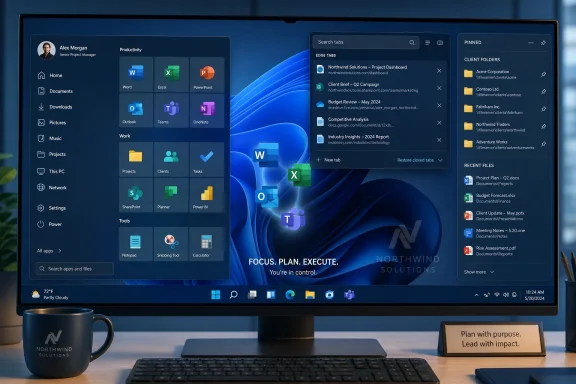 Microsoft Simplified the Desktop, and Power Users Never Stopped Noticing
Windows 11 arrived with a cleaner visual language, a centered taskbar, rounded corners, and a Start menu stripped of the live-tile sprawl that defined the Windows 8 and Windows 10 era. For many casual users, that was a reasonable trade. The old Start menu had become a little city of icons, tiles, folders, and muscle-memory shortcuts, and Microsoft clearly wanted something calmer.But simplification is rarely neutral in Windows. It decides which workflows are considered mainstream and which ones become edge cases. The Windows 11 Start menu reduced the number of things users could shape directly, while the taskbar initially lost several familiar behaviors that had been part of the operating system’s grammar for years.
Microsoft has since restored some controls, including options around taskbar button combining and labels, and it continues to test more flexible Start and taskbar ideas in preview builds. Yet the philosophical line remains visible. Windows 11 offers personalization; it does not offer the kind of ownership that longtime desktop users associate with Windows.
That is why utilities such as Start11 have a market. They are not merely cosmetic toys for people who miss an old look. They are pressure valves for users who think the desktop should adapt to the job rather than the other way around.
Start11 Turns Nostalgia Into Workflow
The Journal of Accountancy’s July walkthrough lands in an interesting place because it is not written like a gamer’s theming guide or a retro-computing exercise. It is a practical office-user account: someone wants a Start menu that reflects real work, frequent files, client folders, conference directories, browser tabs, and a company identity. That framing matters.Start11’s most obvious pitch is visual. It can make Windows 11 behave more like Windows 10, Windows 7, or something closer to Stardock’s own modern launcher designs. But the more durable appeal is organizational. A Start menu with tiles, custom colors, pinned folders, file shortcuts, and taskbar menus becomes less of a generic app list and more of a command center.
That is also why the Windows 10-style layout remains compelling even after Microsoft abandoned live tiles. Tiles were often mocked, sometimes fairly, but they solved one simple problem: they let users create a visual hierarchy. Small icons could sit in the background. Frequently used tools could be larger. Color could mark a category or signal importance.
Windows 11’s native Start menu is tidier, but it is flatter. Its pinned grid can be useful, and Start folders help, but it does not give users the same sense of spatial authorship. Start11 restores that older idea: the launcher is a place you arrange, not just a page you tolerate.
The Centered Taskbar Is a Design Choice, Not a Workflow Strategy
One of the revealing details in the walkthrough is that the author leaves the Windows 11 taskbar centered. That is a reminder that customization does not always mean rolling everything back to 2015. Many users have adapted to some Windows 11 conventions while still wanting deeper control elsewhere.The centered taskbar is a good example of Microsoft’s current design bargain. It looks balanced, especially on wide displays, and it makes Windows feel a little more like a modern cross-device interface. But it also disrupts decades of muscle memory for users trained to fling the pointer to the bottom-left corner.
For a single laptop screen, the centered taskbar is often fine. For multi-monitor workstations, remote desktops, ultrawide displays, and users juggling many open windows, taskbar behavior becomes more than aesthetic. Grouping, labels, per-monitor visibility, and pinned folder menus affect how quickly someone can get back to the exact window or file they need.
Start11’s taskbar controls are useful because they acknowledge that the taskbar is still a working surface. It is not just a row of app badges. It is a live map of what the user is doing.
The Real Upgrade Is Not the Old Start Menu — It Is Reduced Friction
The most interesting feature in the article may not be tiles or branding. It is search across Microsoft Edge tabs. For users who keep dozens of browser tabs open — especially in modern finance, accounting, operations, and IT work — the browser has become the real operating system.That changes the role of the Start menu. Launching Word, Excel, Outlook, or Teams is no longer enough. A serious desktop launcher needs to find the web app, dashboard, portal, ticket, spreadsheet, or tab that is already open somewhere in the pile.
Microsoft has tried to make Windows Search more web-aware, but its integration often feels split between local search, Bing, recent files, cloud content, and promotional surfaces. Power users tend to value predictability over breadth. If pressing the Windows key and typing a few characters reliably jumps to the right Edge tab, that is not a gimmick; it is workflow compression.
This is where third-party tools can feel sharper than the operating system itself. They do not need to serve every Microsoft business goal. They can focus on one promise: get the user to the thing they meant faster.
Branding a Start Menu Sounds Silly Until It Becomes Orientation
Adding a company logo to the Start menu background could be dismissed as desktop vanity. In an enterprise environment, though, visual identity can serve a practical purpose. It tells a user which machine, tenant, virtual desktop, or work context they are in.That matters more than it used to. Many professionals now move among physical desktops, laptops, cloud PCs, remote sessions, test VMs, privileged-access workstations, and client environments. A lightly branded Start menu or desktop background can prevent small but consequential mistakes.
The trick is restraint. A 20 percent transparency logo in the Start menu is not the same thing as plastering the desktop with corporate wallpaper and locking every setting by policy. The former helps orientation. The latter often signals that IT does not trust the user.
Windows customization has always lived in that tension. Personalization can make a machine feel like a tool fitted to the hand. Overmanaged branding can make it feel like a kiosk.
The File and Folder Pins Are the Feature Microsoft Should Study Closely
Pinning applications is table stakes. Pinning files and folder menus is where Start11 becomes more interesting for daily work. The difference is subtle but important: users do not merely launch apps; they revisit working sets.An accountant may open the same budget workbook every morning. A consultant may jump into a client directory dozens of times per day. A conference planner may care less about opening File Explorer than about getting straight to the 2026 folder inside a broader event archive.
Windows has pieces of this already. Quick Access, pinned File Explorer locations, recent files, Start pins, taskbar pins, jump lists, and OneDrive shortcuts all solve part of the problem. But they are scattered across surfaces, and their behavior changes depending on the app, file type, and account configuration.
A folder menu pinned directly to the taskbar is an older, almost unfashionable idea — and that is why it works. It treats the file system as a navigable hierarchy rather than pretending everything should be search, recents, or cloud activity feeds. For many WindowsForum readers, that is not nostalgia. That is precision.
The Cost of Customization Is Another Layer to Maintain
There is a catch, and administrators know it well: every shell customization tool becomes one more dependency between the user and the desktop. When Windows updates, shell-adjacent utilities are often the first to show friction. When users roam between machines, settings need to be exported, imported, licensed, and supported.Start11’s ability to back up and restore settings helps. So does a license model that allows activation across multiple personal devices. For an individual enthusiast or consultant, that can make the experience consistent across a desktop, laptop, and virtual desktop.
In managed environments, the calculus is more complicated. A utility that improves one executive’s workflow may become a support burden if deployed casually across a fleet. IT teams need to know how it updates, how it behaves with feature updates, whether it conflicts with endpoint security tooling, and how easily it can be removed.
That does not mean such tools should be avoided. It means they should be treated as productivity software, not decoration. If a customized Start menu saves real time, it deserves the same evaluation as a password manager, clipboard utility, terminal emulator, or window manager.
Microsoft’s Native Controls Still Matter Because They Define the Floor
It is tempting to frame Start11 as an indictment of Windows 11. That is only partly fair. Microsoft has improved Windows 11’s native customization since launch, and the company appears to understand that the original taskbar rollback went too far for many users.The built-in options are also the only safe baseline for everyone. They are supported, policy-manageable, and less likely to break after major updates. For many users, native Settings are enough: align the taskbar left, adjust taskbar behaviors, pin key apps, choose which folders appear near the power button, and clean up the Start menu’s pinned area.
But the ceiling remains low. Microsoft optimizes for coherence, telemetry-backed defaults, and a supportable interface across hundreds of millions of machines. Enthusiasts and professionals often optimize for speed, memory, and idiosyncratic repetition.
The result is a familiar Windows pattern. Microsoft provides the official road. Third-party developers build the shortcuts users actually take.
The Start Menu Has Become a Proxy Fight Over Control
The intensity around Start menu customization can look disproportionate from the outside. After all, a Start menu is just a launcher. But in Windows culture, launchers carry symbolic weight.The Start button is the operating system’s front door. It is where users expect the machine to reveal its structure. When Microsoft changes that door, removes controls, or inserts recommendations, it changes the emotional contract between user and PC.
That is why Windows 8 provoked such a strong reaction, why Windows 10 was received as a correction, and why Windows 11’s more restrained Start menu still irritates a certain class of user. The complaint is not merely “I dislike the look.” It is “my computer no longer reflects how I work.”
Start11 succeeds because it speaks directly to that feeling. It does not ask users to wait for Microsoft’s roadmap. It gives them back a sense of authorship now.
The Sensible Path Is Layered Customization, Not Maximum Tweaking
The smartest approach is not to install every shell tweak available and recreate a desktop from 2009. The more sustainable path is layered customization. Keep what works in Windows 11, replace what slows you down, and avoid turning the shell into a museum of old habits.That is why the Journal of Accountancy example is useful. The author keeps the centered taskbar, chooses a Windows 10-style Start menu, colors only the most important tiles, pins a small number of high-value files and folders, and backs up the configuration for reuse. That is customization in service of work, not customization as a hobby.
Windows enthusiasts sometimes underestimate how much their machines depend on muscle memory. The goal is not to make every pixel configurable. The goal is to reduce the number of small interruptions between intent and action.
A Start menu replacement is worth considering when it solves repeated friction. If the default Windows 11 Start menu is merely boring, leave it alone. If it makes you hunt for the same things every hour, it is costing you time.
The July Desktop Tweak That Says More Than It Seems
The concrete lesson from this Start11 walkthrough is that deep Windows customization still has a place, but it should be applied deliberately. A replacement Start menu can restore flexibility Microsoft removed, but it also adds software that must be trusted and maintained.- Windows 11’s built-in personalization tools are enough for light cleanup, but they do not fully recreate the richer Start and taskbar workflows many Windows 10 users built over years.
- Start11 is useful when the goal is a working launcher with tile layouts, custom visual hierarchy, pinned files, folder menus, and taskbar behavior controls.
- Browser-tab search is increasingly important because many modern “apps” now live inside Edge or another browser rather than as separate desktop programs.
- File and folder pinning can save more time than cosmetic changes because it maps the desktop around real projects, clients, and recurring documents.
- Backing up customization settings matters if the same workflow needs to follow a user across a desktop, laptop, virtual desktop, or replacement PC.
- IT teams should evaluate shell customization tools as productivity dependencies, not harmless visual tweaks.
References
- Primary source: Journal of Accountancy
Published: 2026-07-01T11:10:16.588064
Customization tips for Windows 11’s Start menu and taskbar
This article looks at Start11, which can be used to customize styles, search, pin folder menus, and taskbars.www.journalofaccountancy.com - Official source: learn.microsoft.com
Customize the Windows 11 Start menu | Microsoft Learn
How to pin OEM apps in the Windows 11 start menulearn.microsoft.com - Official source: microsoft.com
Start Menu | Microsoft Windows
Get the most out of your Windows 11 experience with the Start menu. With the Start menu, you can save time, and find it faster with enhanced search. Find apps, settings, recommended files, and more.www.microsoft.com
- Official source: support.microsoft.com
Personalizzare la barra delle applicazioni in Windows | Microsoft Support
Scopri come usare le funzionalità della barra delle applicazioni in Windows. Nascondi la barra delle applicazioni, aggiungi un'app, modifica la posizione e altro ancora con le impostazioni della barra delle applicazioni.support.microsoft.com - Related coverage: stardock.com
NOW AVAILABLE: Start11 Brings Customization to the Windows 11 Start Menu Today
All of the latest news, announcements, and product releases from Stardock.www.stardock.com - Related coverage: pcworld.com
Tested: Start11 solves Windows 11's worst Start menu and taskbar sins | PCWorld
Stardock Software today debuts the 1.1 release of Start11, which allows you to tweak your Windows 11 taskbar and Start menu in ways the operating system does not.www.pcworld.com
- Related coverage: tomshardware.com
How to Replace the Start Menu in Windows 11 | Tom's Hardware
Get a more compact Start menu with greater information density.www.tomshardware.com - Related coverage: howtogeek.com
10 Ways to Customize the Windows 11 Start Menu
Add some pizzazz to your Start Menu. www.howtogeek.com
- Related coverage: windowscentral.com
Windows 11 is finally rethinking the Start menu and Taskbar, and it might win back people who gave up on it | Windows Central
Microsoft rebalances Windows 11, adding more flexibility to the Taskbar and Start menu.www.windowscentral.com
