

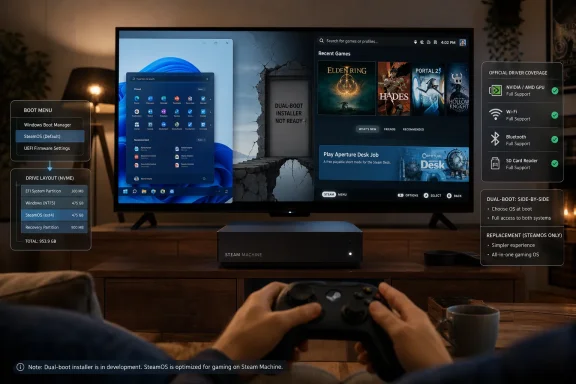
Valve released official Windows drivers for its 2026 Steam Machine on July 7, enabling owners to replace SteamOS with Windows 10 or Windows 11, but the company still has not delivered the promised SteamOS installer support for clean dual-booting on the living-room PC. As reported by Windows Central and detailed on Valve’s Steam Support pages, the Steam Machine is being treated as a PC first and a console-like appliance second. That distinction is the entire story. Valve has widened the door to Windows, but it has not yet built the hallway between Windows and SteamOS.
The release of official Windows drivers is not a small courtesy. It means Steam Machine owners no longer have to depend on improvised community packages, half-working chipset support, or forum archaeology to get Microsoft’s operating system running on Valve’s hardware. Valve’s package covers the practical essentials: graphics, wireless networking, Bluetooth, and the SD card reader.
That matters because the Steam Machine is not a generic beige-box desktop, even if Valve would very much like buyers to think of it as a PC. Like the Steam Deck before it, the machine uses custom or semi-custom hardware tuned for Valve’s own software stack. Windows can run on it, but Windows needs drivers that understand the hardware, and that is where first-party support changes the risk calculation.
Windows Report framed the move as Valve “officially” giving users another way to use the hardware. That is right, but only halfway. Valve is not blessing Windows as an equal citizen on the device; it is acknowledging that customers own the box and may want to install another operating system on it.
The missing piece is still the one power users care about most. SteamOS and Windows cannot yet coexist in an officially supported side-by-side configuration. If you install Windows today using Valve’s supported path, you are replacing SteamOS rather than pairing it with Microsoft’s OS.
Valve’s own language has long left room for this future. The company has said Steam hardware is capable of dual-booting, while the SteamOS installer that would provide a dual-boot wizard is not ready. That phrasing is careful. It says the hardware is not the obstacle, but it also declines to promise a date.
For Windows enthusiasts, that makes the driver release both welcome and frustrating. The hard technical plumbing is partly visible now, but the safe consumer-grade workflow is not. Anyone comfortable partitioning drives, managing boot entries, and recovering operating systems can already find their own path, just as Steam Deck owners have for years. But that is not the same as support.
Valve’s hesitation is understandable. A broken dual-boot setup can turn a friendly living-room PC into a support nightmare. Windows updates can touch bootloaders, firmware changes can alter assumptions, and SteamOS recovery tooling has to behave predictably around partitions it does not own. The moment Valve ships a wizard, it inherits some responsibility for the messiness of two operating systems sharing one consumer device.
Anti-cheat remains the recurring fault line. Some multiplayer games still rely on Windows-only anti-cheat implementations or publisher choices that leave Linux users outside the gate. Other titles work technically but remain unsupported in ways that make competitive players nervous. For those users, Windows is not a preference; it is admission.
Then there are the ecosystems outside Steam. Microsoft’s PC Game Pass, Epic Games Store, Battle.net, Ubisoft Connect, mod managers, peripheral utilities, capture tools, and niche launchers all vary in how gracefully they behave on Linux. Some can be coaxed into working. Some cannot. Some are simply easier on Windows.
That is why Valve’s driver package is strategically awkward. It improves the case for buying Valve hardware even if SteamOS is not enough, but it also highlights the limits of Valve’s Linux-first pitch. The Steam Machine is at its best when SteamOS makes the PC disappear. Windows brings the PC back.
SteamOS is not just the Steam client in a full-screen suit. It is an operating system designed around suspend behavior, controller-first navigation, shader caching, system updates, performance overlays, and a curated console-like flow. Big Picture Mode can imitate the front end, but Windows remains underneath, with all the power and friction that implies.
That friction is not inherently bad. Windows gives users access to decades of software, broader hardware compatibility, and the messy abundance that defines PC gaming. For many WindowsForum readers, that is the point. A machine that can become a Windows box is more valuable than a locked appliance.
But the experience trade-off is real. SteamOS lets Valve optimize one lane. Windows turns the Steam Machine into a more conventional small-form-factor gaming PC, where updates, background services, driver cadence, launchers, and telemetry all become part of the daily environment again. Some users will gladly accept that bargain. Others bought Valve hardware precisely to avoid it.
That openness does commercial work. It lowers the psychological risk of buying a Steam Machine. If SteamOS disappoints, if a must-play game fails, or if the owner simply wants a familiar Windows desktop, the hardware is not stranded. The escape hatch makes the default platform easier to accept.
The move also pressures Microsoft in an uncomfortable way. Windows remains the compatibility king for PC gaming, but Valve is increasingly defining what a console-like PC gaming experience should feel like. The Steam Deck proved that a Linux-based handheld could become mainstream gaming hardware. The Steam Machine tries to bring that argument back to the living room.
Microsoft, meanwhile, has spent years trying to make Windows better for handhelds and TV-adjacent gaming PCs without fully escaping the desktop assumptions baked into the platform. Valve’s driver release quietly says: if you need Windows, here it is. But the device’s identity still belongs to SteamOS.
The difference is placement. The Steam Deck is a handheld, and handheld tinkerers are often willing to accept rough edges. A Steam Machine lives under a television, where expectations are closer to a console. A failed boot menu on a handheld is annoying; a failed boot menu in the living room is a family tech-support incident.
That raises the bar for official dual-boot. Valve cannot simply expose the capability and assume the audience will forgive breakage. If the Steam Machine is meant to compete for space near consoles, streaming boxes, and compact gaming PCs, its recovery story has to be boring in the best possible way.
The irony is that dual-boot matters most to the exact audience likely to evangelize the hardware. Enthusiasts want SteamOS for the clean living-room experience and Windows for the edge cases. They do not want to choose permanently, and they certainly do not want to reinstall from scratch every time their needs change.
Closed platforms rely on lock-in because the platform owner fears comparison. Valve’s bet is different. It wants SteamOS to win by convenience, performance, and integration, while Windows remains available for everything SteamOS cannot yet handle. That is a healthier posture than pretending the compatibility gap does not exist.
Still, there is a risk. Every Steam Machine running Windows is one fewer user living inside Valve’s carefully tuned Linux environment. If too many buyers treat Windows as the real OS and SteamOS as the thing they delete on day one, Valve’s living-room strategy becomes just another compact gaming PC with Steam branding.
The balance will depend on execution. If SteamOS continues to improve and the dual-boot wizard arrives, Windows becomes a supplement. If dual-boot remains missing and compatibility pain persists, Windows becomes the fallback that defines the product.
That does not make the setup reckless. It makes it a niche configuration that should be treated with the same caution as any vendor-supported-but-not-default operating system install. Owners should keep recovery media handy, preserve copies of Valve’s driver package, and assume that returning to SteamOS means a clean reinstall rather than a casual toggle.
The graphics driver deserves particular attention. Because the Steam Machine uses Valve-specific hardware rather than an off-the-shelf retail GPU configuration, users should not assume AMD’s mainstream Radeon Software stack will behave like it does on a conventional desktop. Valve’s package exists because the normal route is not necessarily the right route.
That is the quiet trade-off behind first-party drivers. They reduce chaos, but they also remind users that this is still a specialized device. Official support does not magically turn the Steam Machine into a generic Windows PC.
But the optics are not entirely Microsoft’s. Valve is the company deciding how Windows arrives on this device, which drivers are provided, and what the supported path looks like. Microsoft supplies the operating system; Valve controls the hardware story.
That inversion is becoming more common in gaming PCs. Windows is still the enormous compatibility layer underneath the industry, but device makers increasingly want to own the experience above it. ASUS, Lenovo, MSI, and others have all tried to soften Windows for handheld gaming. Valve’s advantage is that it can offer an alternative OS rather than merely skinning Microsoft’s.
The Steam Machine driver release therefore reads less like surrender and more like containment. Valve is not saying Windows won. It is saying Windows is allowed, documented, and useful — just not the default vision.
The 2026 Steam Machine arrives in a different world. Proton has transformed Linux gaming. The Steam Deck has given Valve a successful hardware reference point. PC gamers are more comfortable with small-form-factor devices, handhelds, docks, and hybrid setups. The living room is no longer a console-only space.
Even so, the value proposition is delicate. If the Steam Machine is too console-like, enthusiasts will complain about limits. If it is too PC-like, mainstream buyers will wonder why they did not just buy or build a Windows gaming PC. SteamOS is Valve’s answer to that tension, and Windows support is the safety valve.
That is why dual-boot is more than a feature request. It is the cleanest expression of what the Steam Machine wants to be: a device that can act like a console when you want simplicity and like a PC when you need reach. Without it, users must pick an identity for the machine instead of switching between them.
 Valve Opens the Windows Door Without Handing Over the House Keys
The release of official Windows drivers is not a small courtesy. It means Steam Machine owners no longer have to depend on improvised community packages, half-working chipset support, or forum archaeology to get Microsoft’s operating system running on Valve’s hardware. Valve’s package covers the practical essentials: graphics, wireless networking, Bluetooth, and the SD card reader.That matters because the Steam Machine is not a generic beige-box desktop, even if Valve would very much like buyers to think of it as a PC. Like the Steam Deck before it, the machine uses custom or semi-custom hardware tuned for Valve’s own software stack. Windows can run on it, but Windows needs drivers that understand the hardware, and that is where first-party support changes the risk calculation.
Windows Report framed the move as Valve “officially” giving users another way to use the hardware. That is right, but only halfway. Valve is not blessing Windows as an equal citizen on the device; it is acknowledging that customers own the box and may want to install another operating system on it.
The missing piece is still the one power users care about most. SteamOS and Windows cannot yet coexist in an officially supported side-by-side configuration. If you install Windows today using Valve’s supported path, you are replacing SteamOS rather than pairing it with Microsoft’s OS.
The Dual-Boot Delay Is the Real Product Decision
Dual-boot support sounds like a utility feature, the sort of thing that might sit quietly in a recovery menu. In practice, it is the dividing line between experimentation and commitment. Installing Windows as a replacement is a weekend project with consequences; installing Windows alongside SteamOS would be a mode switch.Valve’s own language has long left room for this future. The company has said Steam hardware is capable of dual-booting, while the SteamOS installer that would provide a dual-boot wizard is not ready. That phrasing is careful. It says the hardware is not the obstacle, but it also declines to promise a date.
For Windows enthusiasts, that makes the driver release both welcome and frustrating. The hard technical plumbing is partly visible now, but the safe consumer-grade workflow is not. Anyone comfortable partitioning drives, managing boot entries, and recovering operating systems can already find their own path, just as Steam Deck owners have for years. But that is not the same as support.
Valve’s hesitation is understandable. A broken dual-boot setup can turn a friendly living-room PC into a support nightmare. Windows updates can touch bootloaders, firmware changes can alter assumptions, and SteamOS recovery tooling has to behave predictably around partitions it does not own. The moment Valve ships a wizard, it inherits some responsibility for the messiness of two operating systems sharing one consumer device.
Windows Is Still the Compatibility Escape Hatch
The reason anyone cares about Windows on a Steam Machine is not nostalgia for the Start menu. It is game compatibility. SteamOS has become much better at running Windows games through Proton, but better is not universal.Anti-cheat remains the recurring fault line. Some multiplayer games still rely on Windows-only anti-cheat implementations or publisher choices that leave Linux users outside the gate. Other titles work technically but remain unsupported in ways that make competitive players nervous. For those users, Windows is not a preference; it is admission.
Then there are the ecosystems outside Steam. Microsoft’s PC Game Pass, Epic Games Store, Battle.net, Ubisoft Connect, mod managers, peripheral utilities, capture tools, and niche launchers all vary in how gracefully they behave on Linux. Some can be coaxed into working. Some cannot. Some are simply easier on Windows.
That is why Valve’s driver package is strategically awkward. It improves the case for buying Valve hardware even if SteamOS is not enough, but it also highlights the limits of Valve’s Linux-first pitch. The Steam Machine is at its best when SteamOS makes the PC disappear. Windows brings the PC back.
Big Picture Mode Is Not SteamOS, Even When It Looks Like It
Windows Report correctly notes that users can install Steam on Windows and switch to Big Picture Mode for an interface that feels close to SteamOS. That is useful, especially on a TV-connected machine. It is not equivalent.SteamOS is not just the Steam client in a full-screen suit. It is an operating system designed around suspend behavior, controller-first navigation, shader caching, system updates, performance overlays, and a curated console-like flow. Big Picture Mode can imitate the front end, but Windows remains underneath, with all the power and friction that implies.
That friction is not inherently bad. Windows gives users access to decades of software, broader hardware compatibility, and the messy abundance that defines PC gaming. For many WindowsForum readers, that is the point. A machine that can become a Windows box is more valuable than a locked appliance.
But the experience trade-off is real. SteamOS lets Valve optimize one lane. Windows turns the Steam Machine into a more conventional small-form-factor gaming PC, where updates, background services, driver cadence, launchers, and telemetry all become part of the daily environment again. Some users will gladly accept that bargain. Others bought Valve hardware precisely to avoid it.
Valve’s Openness Is Also a Competitive Weapon
It is tempting to read this as Valve being unusually benevolent. Compared with traditional consoles, it is. Sony and Microsoft do not provide driver bundles so owners can wipe their console OS and install Windows. Valve does, because Valve’s hardware strategy depends on the device remaining a PC in spirit as well as architecture.That openness does commercial work. It lowers the psychological risk of buying a Steam Machine. If SteamOS disappoints, if a must-play game fails, or if the owner simply wants a familiar Windows desktop, the hardware is not stranded. The escape hatch makes the default platform easier to accept.
The move also pressures Microsoft in an uncomfortable way. Windows remains the compatibility king for PC gaming, but Valve is increasingly defining what a console-like PC gaming experience should feel like. The Steam Deck proved that a Linux-based handheld could become mainstream gaming hardware. The Steam Machine tries to bring that argument back to the living room.
Microsoft, meanwhile, has spent years trying to make Windows better for handhelds and TV-adjacent gaming PCs without fully escaping the desktop assumptions baked into the platform. Valve’s driver release quietly says: if you need Windows, here it is. But the device’s identity still belongs to SteamOS.
The Steam Deck Playbook Is Repeating, With Higher Stakes
This is not Valve’s first trip through the Windows-driver maze. The Steam Deck also received official Windows resources after launch, and its community quickly built elaborate dual-boot workflows around Clover, external drives, recovery images, and partition gymnastics. The pattern is familiar: Valve supports enough for Windows to run, while enthusiasts fill in the rest.The difference is placement. The Steam Deck is a handheld, and handheld tinkerers are often willing to accept rough edges. A Steam Machine lives under a television, where expectations are closer to a console. A failed boot menu on a handheld is annoying; a failed boot menu in the living room is a family tech-support incident.
That raises the bar for official dual-boot. Valve cannot simply expose the capability and assume the audience will forgive breakage. If the Steam Machine is meant to compete for space near consoles, streaming boxes, and compact gaming PCs, its recovery story has to be boring in the best possible way.
The irony is that dual-boot matters most to the exact audience likely to evangelize the hardware. Enthusiasts want SteamOS for the clean living-room experience and Windows for the edge cases. They do not want to choose permanently, and they certainly do not want to reinstall from scratch every time their needs change.
The Driver Package Makes the Steam Machine More PC, Not Less Steam
The practical result is simple: Valve has made the Steam Machine more useful. That does not mean it has diluted the SteamOS project. If anything, the move suggests Valve is confident enough in SteamOS to let users walk away from it.Closed platforms rely on lock-in because the platform owner fears comparison. Valve’s bet is different. It wants SteamOS to win by convenience, performance, and integration, while Windows remains available for everything SteamOS cannot yet handle. That is a healthier posture than pretending the compatibility gap does not exist.
Still, there is a risk. Every Steam Machine running Windows is one fewer user living inside Valve’s carefully tuned Linux environment. If too many buyers treat Windows as the real OS and SteamOS as the thing they delete on day one, Valve’s living-room strategy becomes just another compact gaming PC with Steam branding.
The balance will depend on execution. If SteamOS continues to improve and the dual-boot wizard arrives, Windows becomes a supplement. If dual-boot remains missing and compatibility pain persists, Windows becomes the fallback that defines the product.
The Catch Is Written in the Recovery Plan
For IT pros, the most important word in this story is not “driver.” It is “replace.” Replacing SteamOS with Windows changes the maintenance model of the device. Updates come through Windows Update, GPU support depends on Valve’s driver cadence, and recovery requires more planning than a standard Windows desktop from Dell, Lenovo, or HP.That does not make the setup reckless. It makes it a niche configuration that should be treated with the same caution as any vendor-supported-but-not-default operating system install. Owners should keep recovery media handy, preserve copies of Valve’s driver package, and assume that returning to SteamOS means a clean reinstall rather than a casual toggle.
The graphics driver deserves particular attention. Because the Steam Machine uses Valve-specific hardware rather than an off-the-shelf retail GPU configuration, users should not assume AMD’s mainstream Radeon Software stack will behave like it does on a conventional desktop. Valve’s package exists because the normal route is not necessarily the right route.
That is the quiet trade-off behind first-party drivers. They reduce chaos, but they also remind users that this is still a specialized device. Official support does not magically turn the Steam Machine into a generic Windows PC.
Microsoft Gains a User, Valve Keeps the Narrative
From Microsoft’s point of view, every Steam Machine that runs Windows is a small win. Windows remains the default answer for maximum PC game compatibility, and Valve has just lowered the barrier to putting Windows on another piece of gaming hardware. For Game Pass users especially, that matters.But the optics are not entirely Microsoft’s. Valve is the company deciding how Windows arrives on this device, which drivers are provided, and what the supported path looks like. Microsoft supplies the operating system; Valve controls the hardware story.
That inversion is becoming more common in gaming PCs. Windows is still the enormous compatibility layer underneath the industry, but device makers increasingly want to own the experience above it. ASUS, Lenovo, MSI, and others have all tried to soften Windows for handheld gaming. Valve’s advantage is that it can offer an alternative OS rather than merely skinning Microsoft’s.
The Steam Machine driver release therefore reads less like surrender and more like containment. Valve is not saying Windows won. It is saying Windows is allowed, documented, and useful — just not the default vision.
The Living-Room PC Still Has to Earn Its Place
The Steam Machine name carries baggage. The original Steam Machines of the 2010s were an ambitious but muddled attempt to pull PC gaming into the living room through partner hardware, SteamOS, and the Steam Controller. The idea was early, the software stack was immature, and the market was not ready.The 2026 Steam Machine arrives in a different world. Proton has transformed Linux gaming. The Steam Deck has given Valve a successful hardware reference point. PC gamers are more comfortable with small-form-factor devices, handhelds, docks, and hybrid setups. The living room is no longer a console-only space.
Even so, the value proposition is delicate. If the Steam Machine is too console-like, enthusiasts will complain about limits. If it is too PC-like, mainstream buyers will wonder why they did not just buy or build a Windows gaming PC. SteamOS is Valve’s answer to that tension, and Windows support is the safety valve.
That is why dual-boot is more than a feature request. It is the cleanest expression of what the Steam Machine wants to be: a device that can act like a console when you want simplicity and like a PC when you need reach. Without it, users must pick an identity for the machine instead of switching between them.
The Steam Machine’s Windows Moment Leaves Five Hard Truths
Valve’s driver release is good news, but it should not be mistaken for the end of the story. It is a foundation, not a finished Windows strategy, and the missing dual-boot wizard remains the gap between enthusiast possibility and mainstream confidence.- Valve now provides official Windows drivers for the Steam Machine, covering the core hardware needed to run Windows 10 or Windows 11 properly.
- Installing Windows through the supported path currently means replacing SteamOS rather than running both operating systems side by side.
- Windows remains the most practical route for games and services that still depend on Windows-only anti-cheat, launchers, or subscription ecosystems.
- Big Picture Mode can recreate some of the SteamOS feel on Windows, but it does not reproduce the full system-level integration Valve built into SteamOS.
- The Steam Machine is still best understood as a PC with a preferred operating system, not a closed console with a hidden desktop mode.
- Official dual-boot support would turn Windows from a replacement choice into a practical compatibility layer for owners who want both ecosystems.
References
- Primary source: Windows Central
Published: Tue, 07 Jul 2026 13:24:33 GMT
Valve releases Windows PC drivers for Steam Machine — but official dual-boot support for SteamOS gaming is still missing | Windows Central
Valve still allows Steam hardware owners to install Windows, providing compatible drivers to everyone.www.windowscentral.com - Independent coverage: Windows Report
Published: 2026-07-07T12:10:10.941659
Loading…
windowsreport.com - Related coverage: notebookcheck.net
Steam Machine can now run Windows with official Valve drivers - Notebookcheck News
Valve's new Steam Machine drivers for Windows are now made official. The set includes drivers for all major components, and their release is in line with Valve's PC-first approach to gaming hardware. www.notebookcheck.net
- Related coverage: pcworld.com
You can now install Windows on Valve's Steam Deck | PCWorld
Players who want to run Windows on the Steam Deck now have working GPU, Wi-Fi, and Bluetooth drivers.www.pcworld.com - Related coverage: tweakers.net
Loading…
tweakers.net - Related coverage: gamespot.com
Steam Deck Can Run Windows Now, But Audio Driver Is Not Available Yet - GameSpot
No dual-boot yet, either.www.gamespot.com
- Related coverage: pcgamesn.com
Loading…
www.pcgamesn.com - Related coverage: en.softonic.com
Loading…
en.softonic.com - Related coverage: windowsforum.com
Loading…
windowsforum.com - Related coverage: techspot.com
Loading…
www.techspot.com - Related coverage: itc.ua
Loading…
itc.ua - Related coverage: tomshardware.com
Steam app is now 64-bit only on systems that support it, 32-bit support enters final countdown — 32-bit users will stop receiving updates in 2026 | Tom's Hardware
Valve’s latest client update shifts Steam to 64-bit on Windows systems.www.tomshardware.com - Related coverage: techradar.com
Goodbye Windows 11 – Valve's SteamOS is now available on the Legion Go S, with some support for other AMD-powered handhelds | TechRadar
Time for Microsoft to offer better support for handhelds...www.techradar.com - Related coverage: pcgamer.com
Valve really isn't budging: Steam Machine and Steam Frame are still 'shipping this summer,' it insists | PC Gamer
Despite the dire hardware and component landscape, it's apparently still happening.www.pcgamer.com