

Security Boulevard syndicated an IRONSCALES-authored guide on June 1, 2026, arguing that Microsoft 365 tenants need layered controls across Defender for Office 365, email authentication, transport rules, and automated remediation to stop CEO impersonation attacks. The useful part of the piece is not that it introduces a new threat; it is that it exposes how many organizations still treat executive impersonation as a spam-filter problem. That is the wrong mental model. CEO fraud succeeds because it sits in the seam between identity, mail flow, human workflow, and finance controls.
CEO impersonation is often described as a phishing problem, but that undersells the mechanics. The attacker is not always trying to steal a password or push malware. In the cleanest version of the scam, the message contains no link, no attachment, and no obviously malicious infrastructure; it simply asks a real employee to do something expensive, urgent, and difficult to reverse.
That is why these attacks are so uncomfortable for Microsoft 365 administrators. Exchange Online Protection and Defender for Office 365 can evaluate senders, domains, authentication results, URLs, attachments, reputation, and user-reported messages. But an email that says, “Are you available for a quick payment request?” is less a malicious object than a social trigger.
The Security Boulevard piece, adapted from IRONSCALES marketing material, gets one big thing right: stopping executive impersonation is not a single toggle. It is a chain of controls that must force attackers out of easy spoofing, make lookalike behavior more visible, warn users at the moment of decision, and allow security teams to claw back messages that have already landed.
For WindowsForum readers, the practical question is not whether Microsoft 365 has tools for this. It does. The question is whether those tools are configured as a coherent system, or whether they are sitting in the tenant as partially enabled features that create a comforting dashboard but leave the finance department exposed.
That distinction matters because different defenses apply. SPF, DKIM, and DMARC are built to make exact-domain forgery harder. They help receiving systems decide whether a message claiming to come from a domain was actually authorized by that domain’s mail infrastructure. If your domain authentication is weak or your DMARC policy is still sitting at monitoring-only forever, you are leaving the cheapest version of the attack available.
But DMARC does not prevent an attacker from registering a plausible cousin of your domain or using a free webmail account with the CEO’s display name. A message from “Jane Roberts, CEO” at a random external address may pass SPF and DKIM perfectly because the attacker controls that sending domain. The authentication result is real; the identity claim is the lie.
That is where Microsoft’s anti-phishing impersonation controls, mailbox intelligence, user protection lists, domain impersonation protection, and transport rules enter the picture. They are not replacements for email authentication. They are the next layer after email authentication has forced the attacker into more detectable behavior.
The IRONSCALES guide recommends adding executives and other high-value personnel to Defender’s protected users list. That is sensible advice, especially for CEOs, CFOs, controllers, HR leaders, payroll staff, executive assistants, board-facing personnel, and anyone who can authorize payments or sensitive data release. The point is not that every employee is unimportant; it is that attackers do not choose victims randomly when they are running business email compromise campaigns.
The guide’s mention of a 350-user limit per anti-phishing policy is also a reminder that tenant design matters. In a small business, the protected-user list may comfortably cover every high-risk target. In a larger enterprise, administrators need to think in groups, policies, precedence, and exceptions rather than treating the feature as a one-time checklist item.
Mailbox intelligence is the more interesting control because it shifts the analysis from “Is this sender globally bad?” to “Does this sender make sense for this recipient?” That matters in executive impersonation, where the attack may be novel to Microsoft’s global reputation systems but strange in the context of a specific mailbox. A first-time sender using a familiar executive display name is exactly the kind of anomaly that generic filtering can miss and relationship-aware filtering can catch.
That is why domain impersonation protection is not optional for organizations with valuable brands, common abbreviations, subsidiaries, or vendor ecosystems. Attackers can swap letters, insert hyphens, abuse homoglyphs, use different top-level domains, or create names that are close enough to pass a hurried glance. The more recognizable the organization, the more attractive the lookalike surface becomes.
Defender’s domain impersonation settings can protect accepted domains and selected custom domains. The latter is easy to overlook. If your employees routinely receive payment instructions from a bank, law firm, logistics provider, payroll vendor, or managed service provider, a lookalike of that partner’s domain can be just as dangerous as a lookalike of your own.
This is where quarterly review matters. Acquisitions, vendor changes, new subsidiaries, and rebrands create gaps. Attackers do not need your mail architecture to be completely broken; they need one trusted relationship that is not represented in your policy set.
Transport rules that quarantine or flag external messages using executive display names can add a blunt but useful layer. A rule that looks for the CEO’s name in the From header and treats matching external mail as suspicious will generate false positives if applied carelessly, but it can catch the crude messages that still fool people. In many environments, crude is enough.
The trade-off is operational friction. Executives may use personal accounts, board portals may generate messages with executive names, and third-party services may send on behalf of leadership. A transport rule that blocks all of this without exceptions will quickly train users to complain, and eventually train administrators to disable the rule.
That does not make the control bad. It means it needs ownership. Security teams should document which executive names are covered, which exceptions are allowed, who approves those exceptions, and how often the rule is tested. The weakest version of this control is the one created during an incident and forgotten until it breaks a legitimate workflow.
But quarantine policies also decide who gets to override the system. If end users can release suspicious impersonation mail without security review, the organization may have built an elegant detection pipeline that ends in a self-service bypass. That is not a theoretical problem; it is a common side effect of policies configured for convenience rather than risk.
Microsoft 365 gives administrators multiple ways to tune quarantine behavior, user notifications, release workflows, and administrative review. Those choices should map to the type of threat. A bulk marketing false positive and a CEO impersonation message should not necessarily have the same release path.
Safety tips and warning banners are similarly useful only when they are specific enough to matter. Users learn to ignore generic warnings. They are more likely to pause when the message explains that the sender is external, first-time, using a lookalike domain, or presenting a display name associated with an internal executive.
A properly aligned SPF, DKIM, and DMARC posture removes exact-domain spoofing from the attacker’s cheap menu. Moving DMARC from monitoring to quarantine or reject, after testing legitimate senders, forces adversaries toward lookalike domains, compromised accounts, or display-name deception. Those techniques are still dangerous, but they create different signals for defenders.
The difficult part is not publishing a DMARC record. The difficult part is discovering every legitimate sender using your domain: Microsoft 365, marketing platforms, ticketing systems, payroll providers, CRM tools, scanners, line-of-business applications, and forgotten services created by departments that never told IT. A rushed reject policy can break real mail. A permanent monitoring-only policy can become security theater.
The right posture is staged but finite. Monitor, inventory, align, quarantine, observe, then reject where the business can tolerate it. If the project never reaches enforcement, attackers learn that the organization’s domain is still available for abuse.
There is a real gap between gateway detection and mailbox reality. Messages can be delivered before verdicts change. Similar lures can hit dozens of users with slight variations. Employees can report one message while copies remain elsewhere. Security teams can spend precious minutes searching and purging while the attacker continues the conversation.
Microsoft has its own answer to this in Defender for Office 365 Plan 2 features such as Automated Investigation and Response, threat hunting, Explorer, and remediation workflows. But not every tenant has the right licensing, staffing, tuning, or operational maturity to use those features well. Third-party tools compete by promising faster deployment, simpler workflows, and stronger behavioral analysis across the mailbox layer.
The sober view is that Microsoft-native and third-party controls should be judged by outcomes, not slogans. Can the system catch first-contact executive impersonation? Can it distinguish a real vendor from a lookalike? Can it purge a campaign after delivery? Can analysts explain why a message was blocked? Can false positives be resolved without teaching users to distrust the whole stack?
That is why awareness training alone is insufficient. Training tells employees to be skeptical. Workflow design gives them permission to stop. A finance employee who has been told never to challenge executives is unlikely to save the company because of a quarterly phishing module.
The technical controls in Microsoft 365 should therefore be paired with process controls outside Microsoft 365. Wire transfers should require out-of-band verification. Payment detail changes should require a known-good callback. Gift card purchases should be banned or centrally controlled. Payroll changes should not be approved from email alone.
This is not an argument against security awareness. It is an argument against making awareness carry the entire load. The best anti-impersonation program makes the suspicious action hard to complete even when the suspicious email gets through.
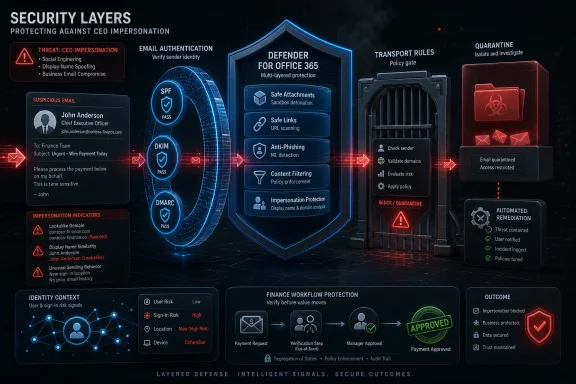
That is why the seven-step model in the syndicated guide is more useful as an architecture than as a recipe. Enable user impersonation protection. Protect domains. Turn on mailbox intelligence. Quarantine suspicious detections. Enforce SPF, DKIM, and DMARC. Add display-name rules where appropriate. Automate tenant-wide remediation. None of those steps is exotic; the value is in doing all of them together.
The order matters less than the coverage. A tenant with DMARC but no impersonation policy is still exposed. A tenant with protected users but no remediation workflow is still racing the attacker after delivery. A tenant with transport rules but no exception management will drown in operational noise.
The mature version of this program has feedback loops. User reports feed investigations. Investigations refine policies. False positives update exceptions. New executives and vendors trigger policy updates. Finance procedures adapt to the threat model. That is how a checklist becomes a control system.
 The Inbox Is Now an Approval System, Whether IT Likes It or Not
CEO impersonation is often described as a phishing problem, but that undersells the mechanics. The attacker is not always trying to steal a password or push malware. In the cleanest version of the scam, the message contains no link, no attachment, and no obviously malicious infrastructure; it simply asks a real employee to do something expensive, urgent, and difficult to reverse.That is why these attacks are so uncomfortable for Microsoft 365 administrators. Exchange Online Protection and Defender for Office 365 can evaluate senders, domains, authentication results, URLs, attachments, reputation, and user-reported messages. But an email that says, “Are you available for a quick payment request?” is less a malicious object than a social trigger.
The Security Boulevard piece, adapted from IRONSCALES marketing material, gets one big thing right: stopping executive impersonation is not a single toggle. It is a chain of controls that must force attackers out of easy spoofing, make lookalike behavior more visible, warn users at the moment of decision, and allow security teams to claw back messages that have already landed.
For WindowsForum readers, the practical question is not whether Microsoft 365 has tools for this. It does. The question is whether those tools are configured as a coherent system, or whether they are sitting in the tenant as partially enabled features that create a comforting dashboard but leave the finance department exposed.
Spoofing and Impersonation Are Different Crimes in the Same Costume
The most important distinction in the guide is the one many organizations blur: spoofing and impersonation are not the same thing. Spoofing attempts to forge an exact sender identity, such as making a message appear to come from the real corporate domain without authorization. Impersonation is more slippery: the attacker uses a display name, a lookalike domain, or a familiar personal style to convince the recipient that the message belongs to someone it does not.That distinction matters because different defenses apply. SPF, DKIM, and DMARC are built to make exact-domain forgery harder. They help receiving systems decide whether a message claiming to come from a domain was actually authorized by that domain’s mail infrastructure. If your domain authentication is weak or your DMARC policy is still sitting at monitoring-only forever, you are leaving the cheapest version of the attack available.
But DMARC does not prevent an attacker from registering a plausible cousin of your domain or using a free webmail account with the CEO’s display name. A message from “Jane Roberts, CEO” at a random external address may pass SPF and DKIM perfectly because the attacker controls that sending domain. The authentication result is real; the identity claim is the lie.
That is where Microsoft’s anti-phishing impersonation controls, mailbox intelligence, user protection lists, domain impersonation protection, and transport rules enter the picture. They are not replacements for email authentication. They are the next layer after email authentication has forced the attacker into more detectable behavior.
Microsoft’s Native Defenses Are Stronger Than Their Default Configurations
Microsoft Defender for Office 365 includes anti-phishing policies with impersonation protection, mailbox intelligence, spoof intelligence, safety tips, and policy actions such as quarantine. Microsoft’s documentation has long treated these as core Defender for Office 365 capabilities, not exotic add-ons. Yet many tenants remain underconfigured because administrators assume the presence of Defender means the relevant protections are fully tuned.The IRONSCALES guide recommends adding executives and other high-value personnel to Defender’s protected users list. That is sensible advice, especially for CEOs, CFOs, controllers, HR leaders, payroll staff, executive assistants, board-facing personnel, and anyone who can authorize payments or sensitive data release. The point is not that every employee is unimportant; it is that attackers do not choose victims randomly when they are running business email compromise campaigns.
The guide’s mention of a 350-user limit per anti-phishing policy is also a reminder that tenant design matters. In a small business, the protected-user list may comfortably cover every high-risk target. In a larger enterprise, administrators need to think in groups, policies, precedence, and exceptions rather than treating the feature as a one-time checklist item.
Mailbox intelligence is the more interesting control because it shifts the analysis from “Is this sender globally bad?” to “Does this sender make sense for this recipient?” That matters in executive impersonation, where the attack may be novel to Microsoft’s global reputation systems but strange in the context of a specific mailbox. A first-time sender using a familiar executive display name is exactly the kind of anomaly that generic filtering can miss and relationship-aware filtering can catch.
Domain Lookalikes Turn Authentication Into an Attacker’s Friend
One of the crueler tricks in modern email security is that a malicious message can be fully authenticated. If an attacker registers a domain that visually resembles the company’s real domain, sets up SPF and DKIM correctly, and sends from that infrastructure, the authentication layer may report that everything checks out. It checked the wrong question.That is why domain impersonation protection is not optional for organizations with valuable brands, common abbreviations, subsidiaries, or vendor ecosystems. Attackers can swap letters, insert hyphens, abuse homoglyphs, use different top-level domains, or create names that are close enough to pass a hurried glance. The more recognizable the organization, the more attractive the lookalike surface becomes.
Defender’s domain impersonation settings can protect accepted domains and selected custom domains. The latter is easy to overlook. If your employees routinely receive payment instructions from a bank, law firm, logistics provider, payroll vendor, or managed service provider, a lookalike of that partner’s domain can be just as dangerous as a lookalike of your own.
This is where quarterly review matters. Acquisitions, vendor changes, new subsidiaries, and rebrands create gaps. Attackers do not need your mail architecture to be completely broken; they need one trusted relationship that is not represented in your policy set.
Display Names Are the Soft Underbelly of Email Clients
Display name spoofing is embarrassingly effective because email clients were designed for usability, not forensic clarity. On desktop Outlook, a trained user may expand sender details and inspect the address. On a phone, in a busy moment, the display name often dominates the interface. That design choice is convenient for normal communication and dangerous for adversarial communication.Transport rules that quarantine or flag external messages using executive display names can add a blunt but useful layer. A rule that looks for the CEO’s name in the From header and treats matching external mail as suspicious will generate false positives if applied carelessly, but it can catch the crude messages that still fool people. In many environments, crude is enough.
The trade-off is operational friction. Executives may use personal accounts, board portals may generate messages with executive names, and third-party services may send on behalf of leadership. A transport rule that blocks all of this without exceptions will quickly train users to complain, and eventually train administrators to disable the rule.
That does not make the control bad. It means it needs ownership. Security teams should document which executive names are covered, which exceptions are allowed, who approves those exceptions, and how often the rule is tested. The weakest version of this control is the one created during an incident and forgotten until it breaks a legitimate workflow.
Quarantine Is a Business Decision, Not Just a Security Action
The IRONSCALES guide recommends quarantining messages detected as user impersonation, domain impersonation, or mailbox-intelligence impersonation. That is a defensible default. If the message is truly a CEO fraud attempt, delivery to the inbox is the dangerous outcome.But quarantine policies also decide who gets to override the system. If end users can release suspicious impersonation mail without security review, the organization may have built an elegant detection pipeline that ends in a self-service bypass. That is not a theoretical problem; it is a common side effect of policies configured for convenience rather than risk.
Microsoft 365 gives administrators multiple ways to tune quarantine behavior, user notifications, release workflows, and administrative review. Those choices should map to the type of threat. A bulk marketing false positive and a CEO impersonation message should not necessarily have the same release path.
Safety tips and warning banners are similarly useful only when they are specific enough to matter. Users learn to ignore generic warnings. They are more likely to pause when the message explains that the sender is external, first-time, using a lookalike domain, or presenting a display name associated with an internal executive.
DMARC Still Matters Because It Changes the Attacker’s Economics
It is fashionable in some circles to dismiss DMARC because it does not stop all phishing. That is a category error. Seat belts do not prevent all crashes either, but nobody serious treats that as an argument against wearing one.A properly aligned SPF, DKIM, and DMARC posture removes exact-domain spoofing from the attacker’s cheap menu. Moving DMARC from monitoring to quarantine or reject, after testing legitimate senders, forces adversaries toward lookalike domains, compromised accounts, or display-name deception. Those techniques are still dangerous, but they create different signals for defenders.
The difficult part is not publishing a DMARC record. The difficult part is discovering every legitimate sender using your domain: Microsoft 365, marketing platforms, ticketing systems, payroll providers, CRM tools, scanners, line-of-business applications, and forgotten services created by departments that never told IT. A rushed reject policy can break real mail. A permanent monitoring-only policy can become security theater.
The right posture is staged but finite. Monitor, inventory, align, quarantine, observe, then reject where the business can tolerate it. If the project never reaches enforcement, attackers learn that the organization’s domain is still available for abuse.
IRONSCALES Is Selling a Real Gap, Even If the Pitch Is Still a Pitch
The Security Boulevard article is plainly vendor-authored, and readers should treat its claims accordingly. IRONSCALES positions itself as the behavioral AI layer that catches what native Microsoft 365 filters miss, clusters similar threats across a tenant, and automates remediation. That is the standard language of the integrated cloud email security market, but it is not automatically empty language.There is a real gap between gateway detection and mailbox reality. Messages can be delivered before verdicts change. Similar lures can hit dozens of users with slight variations. Employees can report one message while copies remain elsewhere. Security teams can spend precious minutes searching and purging while the attacker continues the conversation.
Microsoft has its own answer to this in Defender for Office 365 Plan 2 features such as Automated Investigation and Response, threat hunting, Explorer, and remediation workflows. But not every tenant has the right licensing, staffing, tuning, or operational maturity to use those features well. Third-party tools compete by promising faster deployment, simpler workflows, and stronger behavioral analysis across the mailbox layer.
The sober view is that Microsoft-native and third-party controls should be judged by outcomes, not slogans. Can the system catch first-contact executive impersonation? Can it distinguish a real vendor from a lookalike? Can it purge a campaign after delivery? Can analysts explain why a message was blocked? Can false positives be resolved without teaching users to distrust the whole stack?
The Human Element Is Not a Training Problem Alone
Verizon’s 2026 breach reporting, as summarized in the broader security press and Verizon’s own materials, continues to emphasize the human element in breaches. That should not be reduced to “users are the weakest link.” In CEO impersonation, the human is often following an implied business process: respond quickly to leadership, avoid embarrassing the boss, and keep a sensitive transaction discreet.That is why awareness training alone is insufficient. Training tells employees to be skeptical. Workflow design gives them permission to stop. A finance employee who has been told never to challenge executives is unlikely to save the company because of a quarterly phishing module.
The technical controls in Microsoft 365 should therefore be paired with process controls outside Microsoft 365. Wire transfers should require out-of-band verification. Payment detail changes should require a known-good callback. Gift card purchases should be banned or centrally controlled. Payroll changes should not be approved from email alone.
This is not an argument against security awareness. It is an argument against making awareness carry the entire load. The best anti-impersonation program makes the suspicious action hard to complete even when the suspicious email gets through.
Windows Admins Need to Treat Mail Flow Like Identity Infrastructure
For many sysadmins, email security still sits mentally closer to spam control than identity governance. That distinction is obsolete. In Microsoft 365, the inbox is tied to Entra ID, Teams, SharePoint, OneDrive, compliance workflows, eDiscovery, audit logs, and financial operations. A convincing email can become an identity incident, a data loss event, or a fraud loss without ever installing malware.That is why the seven-step model in the syndicated guide is more useful as an architecture than as a recipe. Enable user impersonation protection. Protect domains. Turn on mailbox intelligence. Quarantine suspicious detections. Enforce SPF, DKIM, and DMARC. Add display-name rules where appropriate. Automate tenant-wide remediation. None of those steps is exotic; the value is in doing all of them together.
The order matters less than the coverage. A tenant with DMARC but no impersonation policy is still exposed. A tenant with protected users but no remediation workflow is still racing the attacker after delivery. A tenant with transport rules but no exception management will drown in operational noise.
The mature version of this program has feedback loops. User reports feed investigations. Investigations refine policies. False positives update exceptions. New executives and vendors trigger policy updates. Finance procedures adapt to the threat model. That is how a checklist becomes a control system.
The Seven-Step Fix Is Really a Tenant Hygiene Test
The concrete lesson from the IRONSCALES guide is that CEO impersonation defense is a useful proxy for Microsoft 365 security maturity. If an organization cannot identify its high-risk users, authenticate its domains, inspect external display-name abuse, and remediate delivered threats quickly, it probably has larger problems waiting elsewhere in the tenant.- Organizations should protect executives, finance staff, HR leaders, payroll personnel, and executive assistants with Defender for Office 365 impersonation policies rather than assuming default filtering is enough.
- SPF, DKIM, and DMARC should be treated as enforcement projects with a real endpoint, not as DNS records published once and forgotten.
- Domain impersonation protection should include important partner, vendor, subsidiary, and acquisition domains, because attackers often abuse trusted business relationships rather than only the victim’s own brand.
- Quarantine policies should restrict user self-release for high-risk impersonation detections, because convenience can otherwise become a bypass.
- Display-name rules are crude but useful when they are tested, documented, and paired with exceptions for legitimate executive workflows.
- Automated remediation matters because the attacker’s advantage is speed, and manually hunting fifty copies of the same lure is not a serious incident response strategy.
References
- Primary source: Security Boulevard
Published: Mon, 01 Jun 2026 17:59:54 GMT
How to Stop CEO Impersonation in Microsoft 365 in 7 Steps (2026) - Security Boulevard
CEO impersonation attacks slip through native Microsoft 365 filters more often than most IT admins expect. Attackers spoof display names, register lookalike domains, and mimic communication patterns to trick employees into wiring funds or sharing credentials. IRONSCALES catches these threats by...securityboulevard.com - Related coverage: techradar.com
Hackers are ditching stolen passwords as AI-powered software attacks rip through global corporate networks faster than ever | TechRadar
AI-driven hackers exploit vulnerabilities faster than companies secure their systemswww.techradar.com - Official source: learn.microsoft.com
Anti-phishing policies in Microsoft 365 - Microsoft Defender for Office 365 | Microsoft Learn
Admins can learn about the anti-phishing policies that are available in the built-in security features for all cloud mailboxes and in Microsoft Defender for Office 365.learn.microsoft.com - Official source: microsoft.com
Microsoft Defender for Office 365 | Microsoft Security
Microsoft Defender for Office 365 is powerful email security software with phishing protection, secure collaboration tools, and advanced threat security.www.microsoft.com
- Official source: techcommunity.microsoft.com
Email Protection Basics in Microsoft 365: Spoof and Impersonation | Microsoft Community Hub
This blog is part three in a series aimed at demystifying how email protection works in Microsoft 365. techcommunity.microsoft.com
- Official source: cdn-dynmedia-1.microsoft.com
