

Subnautica 2’s early PC crash pattern, reported in player troubleshooting guides and reflected in AMD’s June 2026 driver notes, is not one bug but a stack of launch-time failures involving DirectX 12, Windows builds, GPU selection, driver regressions, local graphics config, and in some cases Intel CPU instability. That distinction matters because the wrong fix can waste hours while leaving the real fault untouched. The story here is less “a game crashes” than “modern Windows gaming now depends on a fragile contract between OS, driver, firmware, engine, and launcher.” Subnautica 2 is simply the latest game to make that contract visible.
The most misleading failure in the current Subnautica 2 troubleshooting wave is the popup that says the game may not have exited correctly. On its face, it sounds like a save-state warning or a polite nudge after a hard close. In practice, it can appear before the game has even reached the menu, which means it is often describing a failed startup path rather than a bad shutdown.
That is a familiar pattern in PC gaming, but Subnautica 2 gives it a sharper edge because the game’s minimum environment is not especially forgiving. It wants Windows 10 or 11, DirectX 12, a reasonably modern CPU, 12GB of RAM, and a GPU floor around the GTX 1660 or Radeon RX 5500 XT class. For Windows 10 users, Unknown Worlds’ own guidance has also pointed players toward Version 22H2, Build 19045 or later, which turns what looks like a game bug into a basic platform check.
The important split is timing. A crash before the main menu is usually not the same class of problem as a freeze after loading a save. The former points toward Windows, DirectX, GPU routing, or a driver. The latter points more naturally toward corrupted game files, overlays, aggressive settings, upscaling state, or local configuration.
That distinction is where many generic “reinstall the game” fixes go wrong. Reinstalling Subnautica 2 will not make an old integrated GPU support the required DirectX feature set. It will not fix a Windows laptop choosing the wrong graphics processor. It will not undo a problematic Radeon driver branch unless the driver itself changes.
That gap explains why some players report the classic contradiction: Windows says DirectX 12 exists, but the game says DirectX 12 is not supported. Both statements can be true in their own narrow way. The operating system may ship the DirectX 12 runtime, while the actual graphics hardware or driver path may not expose the capabilities Subnautica 2 expects at launch.
Laptops make this worse. A notebook with a capable NVIDIA or Radeon GPU may still present the game with Intel integrated graphics if Windows graphics preferences, driver routing, or power settings choose poorly. In that situation, the game is not judging the expensive chip the user thinks it is using; it is judging the low-power adapter it actually sees at startup.
That is why forcing the game executable itself onto the high-performance GPU is not a cosmetic step. It is a first-order diagnostic. If Subnautica 2 suddenly starts after
But verification is not a universal remedy, and treating it as one obscures the real order of operations. If the PC is below spec, if Windows is too old, if the game is launching on the wrong GPU, or if the driver branch is known-bad, Steam can faithfully verify every file and the game will still fail. The installation can be perfect while the environment around it is broken.
Overlays sit in a more ambiguous category. Discord Overlay, MSI Afterburner, RivaTuner, capture tools, RGB suites, and hardware monitors are staples of enthusiast PCs precisely because they are useful. They also hook into rendering, input, frame timing, or process behavior in ways that can expose edge cases during a fragile DX12 startup sequence.
The cleanest test is temporary subtraction. Close the overlays, verify the install, clear the cache, test once, and then reintroduce tools one by one. If the crash disappears only when the overlay stack is gone, the fix is not “Subnautica 2 hates my PC.” It is “one more layer in the launch path was enough to tip the renderer over.”
But AMD’s Adrenalin Edition 26.6.1 release notes now list an intermittent Subnautica 2 crash on Radeon RX 9000 series graphics products as fixed. That changes the recommendation. For RX 9060, RX 9070, RX 9070 XT, and related systems, the current best move is no longer to hunt for old advice in forum threads; it is to install 26.6.1 or newer, then retest before changing anything else.
This is the uncomfortable reality of PC gaming support in 2026. A guide written on Monday may tell users to roll back. A driver published on Wednesday may make that instruction wrong. A game hotfix on Friday may move the failure from startup to settings state, and the community will still be repeating the first workaround two weeks later.
For WindowsForum readers, the lesson is broader than Subnautica 2. Driver branches are living documents. When a vendor specifically names a game and a GPU series in fixed issues, that driver note becomes more authoritative than a workaround discovered during launch week.
That is why resetting the local configuration is a more precise move than deleting everything. The relevant path lives under the user’s local AppData folder, in the Subnautica 2 saved configuration area. Renaming the Windows config folder allows the game to rebuild defaults without intentionally destroying local saves.
Frame generation and upscaling settings deserve special suspicion because they sit at the intersection of game code, driver support, GPU generation, and latency tooling. A bad saved state can keep applying the same unstable option at every launch. In that case, the game appears permanently broken even though the actual trigger is a single stored preference.
The safest approach is conservative. Lower the graphics preset one step, disable frame generation, let the game rebuild config if needed, and avoid deleting the SaveGames folder unless the user truly means to remove progress. A fix that preserves saves is always preferable to a scorched-earth reinstall that may not touch the problematic settings anyway.
This is not unique to Subnautica 2. Over the past couple of years, Unreal Engine shader compilation and Oodle decompression failures became part of the public symptom set around unstable high-end Intel desktop systems. Intel, motherboard vendors, game developers, and middleware vendors all ended up in the same messy story: performance-oriented firmware defaults, voltage behavior, microcode updates, and heavy shader workloads collided in ways users experienced as “the game crashes.”
That makes the usual consumer instinct dangerous. If the crash text explicitly mentions Oodle, ShaderCodeArchive, DecompressShaderWithOodle, or CPU instability, repeatedly reinstalling the game may be a distraction. The more relevant steps are updating the motherboard BIOS, applying Intel-recommended default settings, removing aggressive overclocks or undervolts, and testing stability under sane power limits.
For enthusiasts, this can feel like an accusation against the machine. It should not. Games are often the first workloads to reveal marginal instability because they combine bursty CPU demand, shader compilation, decompression, GPU driver activity, and thermal transitions. A PC can seem “stable” in daily use and still fail under exactly the kind of workload a modern Unreal Engine game creates.
As a first response, however, reinstalling is often theater. It consumes bandwidth and time while leaving the same Windows build, same driver, same wrong-GPU selection, same overlay hook, and same firmware instability in place. The user gets the psychological satisfaction of a big action without changing the condition that caused the crash.
A better final step is structured evidence collection. If the game still fails after a reinstall, support needs the Windows build, GPU model, driver version, CPU model, BIOS version, whether the machine has integrated and dedicated graphics, and the exact crash text. “It crashes” is emotionally true but diagnostically weak.
Crash timing belongs in that report as well. Before menu, after menu, after loading a save, after changing graphics settings, and only with an Oodle fatal error are different facts. Each points the developer or support technician toward a different layer of the stack.
There is also a communication problem. A popup about an incorrect exit sounds like user behavior. A DirectX 12 warning sounds like a missing runtime. A black screen sounds like the GPU froze. An Oodle crash sounds like a corrupted game archive. Each message captures a symptom, but none of them fully explains the failure path.
That is why public troubleshooting guides tend to sprawl. They are trying to encode a decision tree into a form palatable to people who just want to swim with alien fish. But the real answer is procedural: identify where the crash occurs, verify the platform, isolate the graphics path, update the specific driver branch if applicable, reset local graphics state, and only then reinstall.
For sysadmins and power users, this is familiar work. It is endpoint triage with nicer water effects. The difference is that the average player rarely thinks in terms of launch environment, renderer initialization, driver regressions, and firmware profiles until a game forces the issue.
That framing also keeps older advice from doing damage. If a user with an RX 9070 XT finds a launch-week post recommending a rollback, they should compare that against AMD’s current fixed-driver note. If a user with an Intel 14th-generation desktop CPU sees ShaderCodeArchive in the crash, they should not treat it like a normal missing-file error. If a laptop user sees DX12 complaints, they should verify which GPU the game actually sees, not merely which GPU the laptop contains.
The community value of guides like the Appuals pieces is that they separate the symptoms instead of collapsing them into one “crashing” bucket. The next step is to keep those buckets current. In PC troubleshooting, chronology is not trivia; it is part of the fix.
That makes the fix list more disciplined than dramatic:
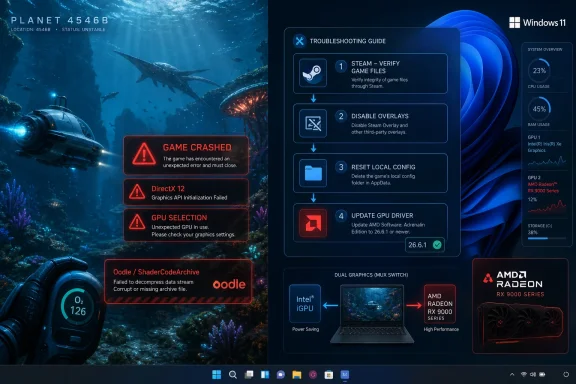 The Crash Dialog Is Telling Only Half the Truth
The most misleading failure in the current Subnautica 2 troubleshooting wave is the popup that says the game may not have exited correctly. On its face, it sounds like a save-state warning or a polite nudge after a hard close. In practice, it can appear before the game has even reached the menu, which means it is often describing a failed startup path rather than a bad shutdown.That is a familiar pattern in PC gaming, but Subnautica 2 gives it a sharper edge because the game’s minimum environment is not especially forgiving. It wants Windows 10 or 11, DirectX 12, a reasonably modern CPU, 12GB of RAM, and a GPU floor around the GTX 1660 or Radeon RX 5500 XT class. For Windows 10 users, Unknown Worlds’ own guidance has also pointed players toward Version 22H2, Build 19045 or later, which turns what looks like a game bug into a basic platform check.
The important split is timing. A crash before the main menu is usually not the same class of problem as a freeze after loading a save. The former points toward Windows, DirectX, GPU routing, or a driver. The latter points more naturally toward corrupted game files, overlays, aggressive settings, upscaling state, or local configuration.
That distinction is where many generic “reinstall the game” fixes go wrong. Reinstalling Subnautica 2 will not make an old integrated GPU support the required DirectX feature set. It will not fix a Windows laptop choosing the wrong graphics processor. It will not undo a problematic Radeon driver branch unless the driver itself changes.
DirectX 12 Has Become a Gatekeeper, Not a Checkbox
For years, “DirectX 12 support” was treated by many Windows users as a box that could be ticked by runningdxdiag and seeing the right number. That is no longer enough. Modern Unreal Engine titles can require a particular combination of feature level, shader support, driver behavior, and GPU capabilities that exceeds the comforting presence of “DirectX 12” in the Windows diagnostic tool.That gap explains why some players report the classic contradiction: Windows says DirectX 12 exists, but the game says DirectX 12 is not supported. Both statements can be true in their own narrow way. The operating system may ship the DirectX 12 runtime, while the actual graphics hardware or driver path may not expose the capabilities Subnautica 2 expects at launch.
Laptops make this worse. A notebook with a capable NVIDIA or Radeon GPU may still present the game with Intel integrated graphics if Windows graphics preferences, driver routing, or power settings choose poorly. In that situation, the game is not judging the expensive chip the user thinks it is using; it is judging the low-power adapter it actually sees at startup.
That is why forcing the game executable itself onto the high-performance GPU is not a cosmetic step. It is a first-order diagnostic. If Subnautica 2 suddenly starts after
Subnautica2.exe is assigned to the dedicated GPU in Windows Settings, the issue was never a mysterious crash. It was a device-selection failure dressed up as a game-launch failure.Steam Verification Is Useful, But It Is Not Magic
Steam’s file verification tool remains one of the saner early steps because it answers a narrow question: does the local install match what Steam expects? A failed or interrupted update, a damaged file, or a security product quarantining something in the install folder can absolutely produce startup crashes. Clearing Steam’s download cache can also help when the local client is stuck with stale update metadata.But verification is not a universal remedy, and treating it as one obscures the real order of operations. If the PC is below spec, if Windows is too old, if the game is launching on the wrong GPU, or if the driver branch is known-bad, Steam can faithfully verify every file and the game will still fail. The installation can be perfect while the environment around it is broken.
Overlays sit in a more ambiguous category. Discord Overlay, MSI Afterburner, RivaTuner, capture tools, RGB suites, and hardware monitors are staples of enthusiast PCs precisely because they are useful. They also hook into rendering, input, frame timing, or process behavior in ways that can expose edge cases during a fragile DX12 startup sequence.
The cleanest test is temporary subtraction. Close the overlays, verify the install, clear the cache, test once, and then reintroduce tools one by one. If the crash disappears only when the overlay stack is gone, the fix is not “Subnautica 2 hates my PC.” It is “one more layer in the launch path was enough to tip the renderer over.”
AMD’s RX 9000 Fix Shows Why Yesterday’s Advice Can Age Badly
The Radeon RX 9000 branch is the clearest example of why troubleshooting articles have a short shelf life. Early advice for some affected AMD users reportedly included rolling back to an older Adrenalin driver. That made sense if a newer driver introduced a launch regression and no fixed build yet existed.But AMD’s Adrenalin Edition 26.6.1 release notes now list an intermittent Subnautica 2 crash on Radeon RX 9000 series graphics products as fixed. That changes the recommendation. For RX 9060, RX 9070, RX 9070 XT, and related systems, the current best move is no longer to hunt for old advice in forum threads; it is to install 26.6.1 or newer, then retest before changing anything else.
This is the uncomfortable reality of PC gaming support in 2026. A guide written on Monday may tell users to roll back. A driver published on Wednesday may make that instruction wrong. A game hotfix on Friday may move the failure from startup to settings state, and the community will still be repeating the first workaround two weeks later.
For WindowsForum readers, the lesson is broader than Subnautica 2. Driver branches are living documents. When a vendor specifically names a game and a GPU series in fixed issues, that driver note becomes more authoritative than a workaround discovered during launch week.
The Local Config Folder Is Where Good Settings Go Bad
Once Subnautica 2 reaches the menu, the diagnostic center of gravity moves. At that point, the system has generally passed the first DX12 handshake. Crashes after loading a save, freezes after changing graphics options, and black screens that follow upscaling changes are more likely to involve saved local settings than the raw ability to launch the engine.That is why resetting the local configuration is a more precise move than deleting everything. The relevant path lives under the user’s local AppData folder, in the Subnautica 2 saved configuration area. Renaming the Windows config folder allows the game to rebuild defaults without intentionally destroying local saves.
Frame generation and upscaling settings deserve special suspicion because they sit at the intersection of game code, driver support, GPU generation, and latency tooling. A bad saved state can keep applying the same unstable option at every launch. In that case, the game appears permanently broken even though the actual trigger is a single stored preference.
The safest approach is conservative. Lower the graphics preset one step, disable frame generation, let the game rebuild config if needed, and avoid deleting the SaveGames folder unless the user truly means to remove progress. A fix that preserves saves is always preferable to a scorched-earth reinstall that may not touch the problematic settings anyway.
Oodle Errors Are a Warning From Below the Game Layer
The most serious branch in the Subnautica 2 crash tree is the one involving Oodle, ShaderCodeArchive, or shader decompression errors. Those words can sound like an obscure game-file problem. In some systems, especially those using Intel 13th- and 14th-generation desktop CPUs, they may instead indicate a broader CPU stability issue that Unreal Engine games are unusually good at exposing.This is not unique to Subnautica 2. Over the past couple of years, Unreal Engine shader compilation and Oodle decompression failures became part of the public symptom set around unstable high-end Intel desktop systems. Intel, motherboard vendors, game developers, and middleware vendors all ended up in the same messy story: performance-oriented firmware defaults, voltage behavior, microcode updates, and heavy shader workloads collided in ways users experienced as “the game crashes.”
That makes the usual consumer instinct dangerous. If the crash text explicitly mentions Oodle, ShaderCodeArchive, DecompressShaderWithOodle, or CPU instability, repeatedly reinstalling the game may be a distraction. The more relevant steps are updating the motherboard BIOS, applying Intel-recommended default settings, removing aggressive overclocks or undervolts, and testing stability under sane power limits.
For enthusiasts, this can feel like an accusation against the machine. It should not. Games are often the first workloads to reveal marginal instability because they combine bursty CPU demand, shader compilation, decompression, GPU driver activity, and thermal transitions. A PC can seem “stable” in daily use and still fail under exactly the kind of workload a modern Unreal Engine game creates.
Reinstalling Is the Last Clean Test, Not the First Ritual
The reinstall remains in the toolbox, but its role should be demoted. It is useful after the platform checks, driver checks, Steam verification, overlay isolation, AMD-specific fix, and config reset have all failed. At that point, a clean reinstall can rule out a stubborn local installation problem.As a first response, however, reinstalling is often theater. It consumes bandwidth and time while leaving the same Windows build, same driver, same wrong-GPU selection, same overlay hook, and same firmware instability in place. The user gets the psychological satisfaction of a big action without changing the condition that caused the crash.
A better final step is structured evidence collection. If the game still fails after a reinstall, support needs the Windows build, GPU model, driver version, CPU model, BIOS version, whether the machine has integrated and dedicated graphics, and the exact crash text. “It crashes” is emotionally true but diagnostically weak.
Crash timing belongs in that report as well. Before menu, after menu, after loading a save, after changing graphics settings, and only with an Oodle fatal error are different facts. Each points the developer or support technician toward a different layer of the stack.
Early Access Makes the User a Systems Integrator
Subnautica 2’s technical rough edges land in a particular cultural moment for PC gaming. Players increasingly expect early access builds to be playable enough for mainstream consumption, while developers use early access precisely because the game and its systems are still evolving. That bargain is tolerable when bugs are design bugs. It is much more frustrating when the first boss fight is the Windows graphics stack.There is also a communication problem. A popup about an incorrect exit sounds like user behavior. A DirectX 12 warning sounds like a missing runtime. A black screen sounds like the GPU froze. An Oodle crash sounds like a corrupted game archive. Each message captures a symptom, but none of them fully explains the failure path.
That is why public troubleshooting guides tend to sprawl. They are trying to encode a decision tree into a form palatable to people who just want to swim with alien fish. But the real answer is procedural: identify where the crash occurs, verify the platform, isolate the graphics path, update the specific driver branch if applicable, reset local graphics state, and only then reinstall.
For sysadmins and power users, this is familiar work. It is endpoint triage with nicer water effects. The difference is that the average player rarely thinks in terms of launch environment, renderer initialization, driver regressions, and firmware profiles until a game forces the issue.
The Practical Fix Is a Decision Tree, Not a Vibes Check
The most useful way to approach Subnautica 2 is to stop asking, “What fixes crashes?” and start asking, “Which layer is failing?” A pre-menu crash is a platform and renderer problem until proven otherwise. A post-menu crash is a local state or runtime interference problem until proven otherwise. An Oodle shader decompression crash is a stability problem until proven otherwise.That framing also keeps older advice from doing damage. If a user with an RX 9070 XT finds a launch-week post recommending a rollback, they should compare that against AMD’s current fixed-driver note. If a user with an Intel 14th-generation desktop CPU sees ShaderCodeArchive in the crash, they should not treat it like a normal missing-file error. If a laptop user sees DX12 complaints, they should verify which GPU the game actually sees, not merely which GPU the laptop contains.
The community value of guides like the Appuals pieces is that they separate the symptoms instead of collapsing them into one “crashing” bucket. The next step is to keep those buckets current. In PC troubleshooting, chronology is not trivia; it is part of the fix.
The Path Through Planet 4546B Now Runs Through Windows Settings
The concrete lesson for players is not that Subnautica 2 is uniquely broken. It is that modern PC games can fail before their own menus because so much of the real launch sequence happens outside the game. Windows picks a GPU, the driver exposes capabilities, firmware governs CPU behavior, Steam validates content, overlays inject themselves, and only then does the game get a clean shot at rendering its first frame.That makes the fix list more disciplined than dramatic:
- Confirm that the PC meets the current minimum spec, including Windows 10 Version 22H2 Build 19045 or later for Windows 10 users and a genuinely capable DirectX 12 GPU.
- Force
Subnautica2.exeto use the dedicated GPU on laptops or hybrid systems before assuming the game is seeing the hardware you paid for. - Verify Steam files, clear the download cache, and temporarily remove overlays or monitoring tools before treating the installation as permanently corrupt.
- Install AMD Adrenalin 26.6.1 or newer on Radeon RX 9000 series systems, because AMD’s fixed-issues list now specifically covers an intermittent Subnautica 2 crash on that hardware.
- Reset the local graphics configuration if crashes begin after the menu, after a settings change, or after enabling frame generation or upscaling features.
- Treat Oodle, ShaderCodeArchive, and shader decompression fatal errors as possible CPU stability warnings, especially on Intel 13th- and 14th-generation desktop systems.
References
- Primary source: Appuals
Published: 2026-06-07T02:02:07.078737
Fix: Subnautica 2 Crashing, Fatal Errors, Not Loading, Freezing, or Black Screen on PC
Subnautica 2 can crash before the main menu, freeze after loading a save, or sit on a black screen while Steam still looks normal. Those are differentappuals.com - Related coverage: techspot.com
Recent high-end Intel CPUs are crashing Unreal Engine games | TechSpot
There have been several reports of Core i9-13900K and Core i7-14900K processor users experiencing crashes in games that show an 'out of video memory' error. The issue...www.techspot.com - Related coverage: tomshardware.com
Nvidia blames Intel for GPU VRAM errors, tells GeForce gamers experiencing 13th or 14th Gen CPU instability to contact Intel support | Tom's Hardware
Even Nvidia is aware of Intel's instability issues with Raptor Lakewww.tomshardware.com - Related coverage: dtgre.com
Subnautica 2 Crash Fix Guide (2026): DX12 Errors, Startup Issues & PC Shutdown Solutions
Fix Subnautica 2 crashes, DX12 errors, startup freezes, PC shutdowns, stutter and Steam Deck launch issues fast.www.dtgre.com
- Related coverage: gamesradar.com
Subnautica 2 update makes the survival game a bit less chaotic with creature changes – but no, Unknown Worlds still isn't letting us kill them | GamesRadar+
The third hotfix is herewww.gamesradar.com - Related coverage: lagofast.com
Subnautica 2 DX12 Not Working? Remove -dx12 First, Then Try These Fixes
Struggling with Subnautica 2 DX12 issues? Learn how to fix the 'DirectX 12 is not supported' error with these essential troubleshooting tips.www.lagofast.com
- Related coverage: xboxplay.games
DX12 Not Working in Subnautica 2 - How to Fix
effective solutions to fix DX12 issues in Subnautica 2. Enhance your gaming experience with our step-by-step troubleshooting guide.xboxplay.games - Related coverage: bo3.gg
- Related coverage: beebom.com
Subnautica 2 Crashing and DX12 Not Supported? How to Fix
Subnautica 2 crashing on startup or showing DirectX 12 errors? Check out the best fixes, including AMD driver rollback and graphics tweaks.beebom.com - Related coverage: keengamer.com
6 Ways to Fix Subnautica 2 Not Launching on a Windows PC
Fix the specific issue named in title with concise steps from the article, including the relevant app, platform, or setting when possible.www.keengamer.com - Related coverage: antberry.com
How to Fix the Subnautica 2 “DirectX 12 Is Not Supported” Error -
If your copy of Subnautica 2 won’t launch, crashes on startup, or keeps showing the DX12 error, here’s everything you need to know.antberry.com - Related coverage: narcosis-the-game.com
Subnautica 2 Crashing and DX12 Not Supported (July 2026) How to Fix
Struggling with Subnautica 2 crashing or a DX12 not supported error? This comprehensive guide covers 6 proven fixes to get your game running smoothly again.www.narcosis-the-game.com - Related coverage: subnautica2.fr
Bugs Subnautica 2 : solutions détaillées aux crashs, FPS, coop, DirectX 12 et Têtard / Tadpole
Guide complet des bugs Subnautica 2 : solutions détaillées pour débutants aux crashs AMD/NVIDIA, erreur DirectX 12, FPS bas, désynchronisation coop, Têtard / Tadpole bloqué, barre subnautica2.fr
- Related coverage: droidfeats.com
Subnautica 2 Crashing: DX12 Errors Hit AMD RX Users
Subnautica 2 players are experiencing launch day crashes, DirectX 12 errors, and infinite loading screens. AMD RX 9000-series GPU users are most affected by these technical issues impacting the game's immediate playability. droidfeats.com
- Related coverage: pcgamer.com
Krafton still 'supporting the early access launch of Subnautica 2' despite its name being removed from the Steam page | PC Gamer
Following their courtroom clash, developer Unknown Worlds is now listed as Subnautica 2's publisher rather than parent company Krafton.www.pcgamer.com - Related coverage: windowscentral.com
Upcoming Xbox Game Pass title 'Subnautica 2' is facing boycotts — after publisher Krafton Inc. allegedly nuked dev bonuses and ousted leaders (UPDATE: Krafton extends bonus period) | Windows Central
It's troubling waters for Subnautica 2 developer Unknown Worlds Entertainment, as publisher Krafton goes nuclear.www.windowscentral.com
