

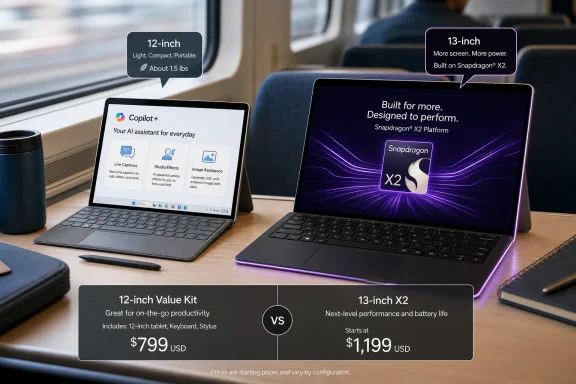
Microsoft’s 12-inch Surface Pro remains the more compelling Surface buy after the June 16 Snapdragon X2 launch because it delivers the same Copilot+ PC baseline, a lighter 2-in-1 body, and a much lower entry price than the new 13-inch models. The X2 machines are faster and flashier, but Microsoft has made the price gap wide enough that performance is no longer the whole story. For students, commuters, and Windows users who want a real tablet-first PC rather than a spec-sheet trophy, the quieter Surface is the one that better understands the assignment.
The Surface line has always lived in the tension between aspiration and utility. Microsoft wants Surface to define what a Windows PC can be, but buyers tend to ask a less romantic question: what do I actually get for the money once the keyboard, warranty, charger, and storage decisions are done?
That question became sharper after Microsoft’s June 16 refresh. The new 13-inch Surface Pro with Snapdragon X2 silicon gives the lineup a performance story again, especially around graphics and on-device AI throughput. But it also starts around the same $1,499.99 territory that makes shoppers pause before they even get to the accessory page.
That is where the 12-inch Surface Pro becomes awkward for Microsoft’s own marketing. It is not the fastest Surface Pro. It is not the one that will headline launch coverage. Yet at roughly $1,049.99 for the 16GB model described in the retail configurations, and with lower-priced 8GB options now appearing in the channel, it is the model that makes the cleanest case for what Surface was supposed to be.
A detachable Windows PC should be easy to carry, credible as a laptop, and modern enough not to feel compromised the moment Windows lights up its newest features. The 12-inch Surface Pro clears that bar without demanding that buyers pay flagship money for a device category that still requires a separately purchased keyboard to behave like a laptop.
A $450 difference between a 12-inch Snapdragon X Plus configuration and a 13-inch X Plus or X2-class Surface Pro is not a rounding error. It is the price of the keyboard, a protection plan, a USB-C charger if you need one, and possibly a chunk of Microsoft 365. In other words, the money Microsoft asks for the bigger machine is also the money required to turn the smaller machine into the complete device most people actually meant to buy.
That matters because Surface pricing has always had a small print problem. The tablet price is the headline, but the laptop experience sits behind accessories. A Surface Pro without a keyboard may be a wonderful slab of engineering, but most WindowsForum readers know exactly how often Windows is used with a hardware keyboard, a trackpad, and a desk full of peripherals.
Microsoft is not alone here. Apple has made an art form of selling a tablet separately from the keyboard case that makes it plausible as a work machine. But Surface began life as Microsoft’s argument that the tablet and PC worlds could merge more naturally, and every accessory upsell weakens that message a little.
The 12-inch model softens the blow. Even after adding a keyboard and, for cautious buyers, Microsoft Complete, it can still land below the starting point of the new 13-inch Surface Pro. That is not a small distinction in a year when premium Windows laptops are getting squeezed by higher component costs, AI branding, and a market that keeps asking whether Arm PCs are finally ready for everyone.
The 12-inch Surface Pro’s key trick is that it does not fall below Microsoft’s modern AI floor. With a Qualcomm Hexagon NPU rated at 45 TOPS in the Snapdragon X Plus platform, it qualifies for the same class of Copilot+ experiences Microsoft has been attaching to Windows 11’s future. That includes features such as Live Captions translation, Studio Effects, Cocreator-style image assistance, and the still-controversial Recall experience where available and enabled.
There are reasons to be skeptical of Microsoft’s AI packaging. Some Copilot+ features are useful, some are demos in search of habits, and some raise privacy questions that administrators will treat with due caution. But the important point for hardware buyers is narrower: Microsoft is not reserving the Windows AI feature gate for the $1,499.99 machine.
That makes the 12-inch Surface Pro different from yesterday’s “cheap Surface.” It is not a device that saves money by sitting outside the feature roadmap. It is cheaper because it has a smaller LCD panel, a lower-tier Snapdragon X Plus chip, and a more portable chassis.
For many buyers, that is the right compromise. On-device AI acceleration is becoming less of a novelty and more of a platform requirement, but CPU core count still has diminishing returns for web work, Office, video calls, note-taking, and light creative tasks. The 12-inch Surface Pro gives those users the Windows feature baseline without charging them for a performance ceiling they may never touch.
But the existence of a better chip does not automatically make the older one obsolete. This is the trap that launch-week coverage often falls into. A new processor arrives, the old model becomes “last gen,” and the buying advice starts to sound like a moral judgment instead of a workload analysis.
Most Surface Pro buyers are not compiling Chromium on battery in a coffee shop. They are carrying lecture notes, Outlook, Teams, OneNote, Edge, PDFs, remote desktop sessions, browser-based admin consoles, and a scattering of Windows apps that may or may not be Arm-native. For that world, the difference between fast enough and flagship is real money.
The X2 model buys headroom. The 12-inch model buys mobility and value. Microsoft may prefer reviewers to dwell on the first point, but the second is what will decide more purchases.
There is also a thermal and ergonomic angle. A detachable tablet can only dissipate so much heat before performance, comfort, or noise becomes part of the equation. Qualcomm’s efficiency has helped Windows on Arm escape the worst memories of earlier Surface Pro X-era compromises, but a thin tablet remains a thin tablet. For a machine this compact, balance matters more than peak bragging rights.
At around 1.5 pounds before the keyboard, the 12-inch Surface Pro moves closer to the tablet end of the 2-in-1 promise. That is a meaningful shift for anyone who has tried to use a 13-inch detachable one-handed on a train, in a lecture hall, at a conference, or while walking between meetings. There is a point where a Windows tablet becomes theoretically portable but practically annoying.
The smaller footprint also changes how the device competes. It is not trying to be a workstation. It is trying to be the Windows machine you can keep with you without making a whole event out of carrying it. That is a narrow but valuable lane, and Microsoft has often been at its best when Surface products occupy a specific lane rather than trying to satisfy every premium buyer at once.
The display trade-off is obvious. A 12-inch PixelSense LCD is not the same pitch as a larger OLED-equipped Surface Pro. Users who edit color-critical photos, watch a lot of HDR video, or simply want the richest panel should not pretend otherwise.
But screens are not judged in isolation. A smaller, good LCD in a device you actually carry may be more valuable than a gorgeous larger panel you leave at home because the total package feels too expensive or too cumbersome. The 12-inch Surface Pro wins by making the machine feel less precious and more usable.
Microsoft’s decision not to include a charger will annoy first-time Surface buyers, even if USB-C charging makes the omission more defensible than it would have been a decade ago. Many people already own a suitable adapter, and standardizing around USB-C is the right direction. Still, a device that starts above the impulse-buy tier should not make buyers feel as though they are assembling the basics from a parts bin.
The keyboard is the bigger issue. Surface Pro’s keyboard has always been treated as an accessory, but for most buyers it is functionally part of the computer. The distinction may make sense for Microsoft’s SKU strategy; it makes less sense for a student who simply wants to know how much the laptop costs.
This is where the 12-inch model’s lower base price does important damage control. Add the keyboard, and the value case survives. Add a pen, and it gets tighter but still plausible. Add Microsoft Complete, and the machine begins to creep toward the psychological territory where conventional laptops look simpler.
That does not ruin the recommendation. It clarifies it. The Surface Pro 12-inch is a strong value only if buyers price the complete kit before deciding. A $1,049.99 tablet can quickly become a roughly $1,250-to-$1,300 working setup, depending on accessories and coverage. That is still below the new 13-inch starting point, but it is not the same thing as a cheap PC.
For web-first users, students, Microsoft 365 households, Teams regulars, and people who live inside modern browsers, the Arm transition has become far less dramatic. Native Arm64 apps are more common, emulation has improved, and Qualcomm’s Snapdragon X generation gave Microsoft a hardware platform capable of making the experience feel intentional rather than experimental.
But WindowsForum readers know where the bodies are buried. Old VPN clients, device utilities, niche security tools, printer software, audio plugins, custom line-of-business apps, and x86 drivers can still turn an Arm PC from elegant to aggravating. The issue is not whether the Surface Pro 12-inch is powerful enough; it is whether the software stack around a particular user is modern enough.
That distinction is especially important for small businesses. A Surface Pro for Business SKU with Windows 11 Pro may look like an easy fleet option, and for some organizations it will be. But administrators should validate management agents, endpoint security, peripherals, and any weird legacy dependencies before treating Arm as interchangeable with Intel or AMD.
For consumers, the test is simpler. If your work happens in Edge, Chrome, Office, Teams, Zoom, Slack, Notion, Spotify, streaming apps, and a normal spread of Store or Arm-native software, the 12-inch Surface Pro is unlikely to feel exotic. If your workflow starts with “I have this old utility,” pause before buying.
The X2 Surface Pro is the flagship story: faster silicon, more AI headroom, premium positioning, and a price that says Microsoft still sees Surface as a halo brand. The 12-inch Surface Pro is the mobility story: a smaller Windows tablet that keeps the Copilot+ credential and cuts enough cost to look practical. The business Surface story is the manageability story: Windows 11 Pro, enterprise buying channels, and hardware choices shaped by IT policy rather than gadget lust.
Those stories overlap, but they do not serve the same buyer. Trouble begins when Microsoft markets them as a clean ladder where spending more is always the right move. That framing undersells the 12-inch model and overstates what a faster chip does for the average Surface Pro workload.
The 12-inch Surface Pro is compelling precisely because it resists the ladder. It says the best Surface for you may not be the most expensive Surface. That is a healthier message for the Windows ecosystem, which has spent years watching premium PC makers chase MacBook-style pricing while the mainstream market waits for better value.
Microsoft’s student bundle through June 30 reinforces that point. Promotions are temporary, and buyers should check the current terms before assuming anything. But the existence of the offer suggests Microsoft understands that the 12-inch Surface Pro needs to be seen not as a diminished flagship, but as the accessible Surface that can bring people into the ecosystem.
At around $1,000 to $1,300 once configured properly, the 12-inch Surface Pro competes with excellent ultraportable laptops, discounted previous-generation premium machines, iPads with keyboards, and a growing class of Windows on Arm clamshells. Some of those alternatives will offer better keyboards, larger screens, more ports, or simpler ownership. Some will come with the charger and keyboard in the same box, because they are laptops and not philosophical exercises.
The Surface Pro’s answer is form factor. If you do not care about the detachable tablet mode, do not buy a Surface Pro. A conventional laptop will usually be the more comfortable typing machine, and a larger display will usually make long work sessions easier.
But if you do care about the detachable mode, the 12-inch model becomes much more interesting. It is closer to the idea of a digital notebook that can become a PC when needed. It suits students marking up PDFs, consultants moving between meetings, travelers who want one entertainment and work slab, and sysadmins who need a lightweight Windows endpoint for dashboards, documentation, remote access, and emergency fixes.
That is not every buyer. It is enough buyers to make the smaller Surface more than a footnote.
If your work depends on a larger canvas, the 13-inch Surface Pro will simply feel better. If you want OLED, higher-end configurations, more storage, or the newest Snapdragon X2 platform, the smaller model cannot fake those advantages. If you expect to keep the device for many years and know your workloads will grow heavier, the X2 machine’s headroom may age better.
Creative professionals should be particularly careful. Lightroom, Photoshop, DaVinci Resolve, large RAW libraries, external display workflows, and color-sensitive tasks change the equation. A lighter tablet is pleasant until it starts slowing down the work that pays for it.
Developers are another split audience. Web developers working in remote environments or cloud IDEs may do well on the 12-inch Surface Pro. Developers who rely on local virtualization, heavy container stacks, obscure build chains, or x86-only tools should be more skeptical. A Surface Pro can be a clever portable terminal; it is not automatically a workstation because the product page says “Pro.”
The right reading is not “the 12-inch Surface Pro beats the 13-inch Surface Pro.” It is that the 13-inch Surface Pro must justify its premium buyer by buyer. The X2 launch gives Microsoft a stronger flagship, but it also makes the smaller model look unusually disciplined.
The 13-inch Surface Pro bets that buyers want the best detachable Windows PC Microsoft can sell them. The 12-inch Surface Pro bets that buyers want a modern, portable Windows tablet that does not punish them for skipping the flagship. In 2026, that second bet may be the more important one.
Microsoft has spent the past two years trying to make Copilot+ PCs feel like a platform shift rather than a marketing badge. For that to work, the feature set cannot live only in expensive machines. It has to appear in devices that students, mobile workers, and normal households might actually consider.
That is why the 12-inch Surface Pro matters beyond its own spec sheet. It is the kind of device that could make Windows on Arm feel ordinary. Not breathtaking. Not revolutionary. Ordinary in the good sense: reliable, portable, good enough, and present in daily life.
The X2 models will generate the performance charts. The 12-inch model may generate the repeat buyers.
First, price the tablet, keyboard, pen if needed, charger if needed, warranty if desired, and storage tier. Then compare that complete number against the 13-inch Surface Pro and against normal laptops. The 12-inch Surface Pro looks strongest when evaluated as a finished portable kit, not as a bare tablet or as a pretend workstation.
It also deserves a workload audit. Buyers should check whether their essential Windows apps run well on Arm, whether their peripherals need special drivers, and whether they actually want a detachable tablet. If the answers are yes, the Surface Pro 12-inch is more than a consolation prize.
There is a broader lesson here for Microsoft. The company does not need every Surface to be a halo machine. Sometimes the best product in the lineup is the one that makes the fewest grand claims and solves the most common problems at the least offensive price.
 Microsoft’s New Flagship Makes the Smaller Surface Look Smarter
The Surface line has always lived in the tension between aspiration and utility. Microsoft wants Surface to define what a Windows PC can be, but buyers tend to ask a less romantic question: what do I actually get for the money once the keyboard, warranty, charger, and storage decisions are done?That question became sharper after Microsoft’s June 16 refresh. The new 13-inch Surface Pro with Snapdragon X2 silicon gives the lineup a performance story again, especially around graphics and on-device AI throughput. But it also starts around the same $1,499.99 territory that makes shoppers pause before they even get to the accessory page.
That is where the 12-inch Surface Pro becomes awkward for Microsoft’s own marketing. It is not the fastest Surface Pro. It is not the one that will headline launch coverage. Yet at roughly $1,049.99 for the 16GB model described in the retail configurations, and with lower-priced 8GB options now appearing in the channel, it is the model that makes the cleanest case for what Surface was supposed to be.
A detachable Windows PC should be easy to carry, credible as a laptop, and modern enough not to feel compromised the moment Windows lights up its newest features. The 12-inch Surface Pro clears that bar without demanding that buyers pay flagship money for a device category that still requires a separately purchased keyboard to behave like a laptop.
The Price Gap Is the Product Story
The Gadgeteer’s framing gets the most important thing right: the 12-inch Surface Pro is not winning because it beats the X2 Surface Pro in raw performance. It wins because Microsoft’s own pricing stack makes the upgrade feel like a luxury tax for many ordinary users.A $450 difference between a 12-inch Snapdragon X Plus configuration and a 13-inch X Plus or X2-class Surface Pro is not a rounding error. It is the price of the keyboard, a protection plan, a USB-C charger if you need one, and possibly a chunk of Microsoft 365. In other words, the money Microsoft asks for the bigger machine is also the money required to turn the smaller machine into the complete device most people actually meant to buy.
That matters because Surface pricing has always had a small print problem. The tablet price is the headline, but the laptop experience sits behind accessories. A Surface Pro without a keyboard may be a wonderful slab of engineering, but most WindowsForum readers know exactly how often Windows is used with a hardware keyboard, a trackpad, and a desk full of peripherals.
Microsoft is not alone here. Apple has made an art form of selling a tablet separately from the keyboard case that makes it plausible as a work machine. But Surface began life as Microsoft’s argument that the tablet and PC worlds could merge more naturally, and every accessory upsell weakens that message a little.
The 12-inch model softens the blow. Even after adding a keyboard and, for cautious buyers, Microsoft Complete, it can still land below the starting point of the new 13-inch Surface Pro. That is not a small distinction in a year when premium Windows laptops are getting squeezed by higher component costs, AI branding, and a market that keeps asking whether Arm PCs are finally ready for everyone.
Copilot+ Changes the Minimum Viable Surface
The old Surface buying advice was simple: buy the Pro if you need the best screen and CPU, buy the Go if you want portability, and accept that the cheaper device will come with obvious compromises. Copilot+ complicates that hierarchy.The 12-inch Surface Pro’s key trick is that it does not fall below Microsoft’s modern AI floor. With a Qualcomm Hexagon NPU rated at 45 TOPS in the Snapdragon X Plus platform, it qualifies for the same class of Copilot+ experiences Microsoft has been attaching to Windows 11’s future. That includes features such as Live Captions translation, Studio Effects, Cocreator-style image assistance, and the still-controversial Recall experience where available and enabled.
There are reasons to be skeptical of Microsoft’s AI packaging. Some Copilot+ features are useful, some are demos in search of habits, and some raise privacy questions that administrators will treat with due caution. But the important point for hardware buyers is narrower: Microsoft is not reserving the Windows AI feature gate for the $1,499.99 machine.
That makes the 12-inch Surface Pro different from yesterday’s “cheap Surface.” It is not a device that saves money by sitting outside the feature roadmap. It is cheaper because it has a smaller LCD panel, a lower-tier Snapdragon X Plus chip, and a more portable chassis.
For many buyers, that is the right compromise. On-device AI acceleration is becoming less of a novelty and more of a platform requirement, but CPU core count still has diminishing returns for web work, Office, video calls, note-taking, and light creative tasks. The 12-inch Surface Pro gives those users the Windows feature baseline without charging them for a performance ceiling they may never touch.
The X2 Launch Is About Headroom, Not Necessity
The Snapdragon X2 Surface Pro is not pointless. For users who push graphics workloads, want more memory headroom, or expect a detachable PC to carry heavier creative and development tasks, the new 13-inch model has a stronger claim. The X2 generation’s higher NPU rating and improved GPU story are meaningful, especially if Microsoft and third-party developers continue moving more work onto local accelerators.But the existence of a better chip does not automatically make the older one obsolete. This is the trap that launch-week coverage often falls into. A new processor arrives, the old model becomes “last gen,” and the buying advice starts to sound like a moral judgment instead of a workload analysis.
Most Surface Pro buyers are not compiling Chromium on battery in a coffee shop. They are carrying lecture notes, Outlook, Teams, OneNote, Edge, PDFs, remote desktop sessions, browser-based admin consoles, and a scattering of Windows apps that may or may not be Arm-native. For that world, the difference between fast enough and flagship is real money.
The X2 model buys headroom. The 12-inch model buys mobility and value. Microsoft may prefer reviewers to dwell on the first point, but the second is what will decide more purchases.
There is also a thermal and ergonomic angle. A detachable tablet can only dissipate so much heat before performance, comfort, or noise becomes part of the equation. Qualcomm’s efficiency has helped Windows on Arm escape the worst memories of earlier Surface Pro X-era compromises, but a thin tablet remains a thin tablet. For a machine this compact, balance matters more than peak bragging rights.
The 12-Inch Body Is the Feature Microsoft Underplays
Surface Pro has never been merely a spec platform. The kickstand, aspect ratio, pen support, and detachable keyboard are the identity of the product. That is why the 12-inch model’s weight matters more than Microsoft’s launch copy sometimes admits.At around 1.5 pounds before the keyboard, the 12-inch Surface Pro moves closer to the tablet end of the 2-in-1 promise. That is a meaningful shift for anyone who has tried to use a 13-inch detachable one-handed on a train, in a lecture hall, at a conference, or while walking between meetings. There is a point where a Windows tablet becomes theoretically portable but practically annoying.
The smaller footprint also changes how the device competes. It is not trying to be a workstation. It is trying to be the Windows machine you can keep with you without making a whole event out of carrying it. That is a narrow but valuable lane, and Microsoft has often been at its best when Surface products occupy a specific lane rather than trying to satisfy every premium buyer at once.
The display trade-off is obvious. A 12-inch PixelSense LCD is not the same pitch as a larger OLED-equipped Surface Pro. Users who edit color-critical photos, watch a lot of HDR video, or simply want the richest panel should not pretend otherwise.
But screens are not judged in isolation. A smaller, good LCD in a device you actually carry may be more valuable than a gorgeous larger panel you leave at home because the total package feels too expensive or too cumbersome. The 12-inch Surface Pro wins by making the machine feel less precious and more usable.
The Accessory Tax Still Haunts the Value Pitch
The strongest argument against the 12-inch Surface Pro is not the Snapdragon X Plus. It is the checkout page.Microsoft’s decision not to include a charger will annoy first-time Surface buyers, even if USB-C charging makes the omission more defensible than it would have been a decade ago. Many people already own a suitable adapter, and standardizing around USB-C is the right direction. Still, a device that starts above the impulse-buy tier should not make buyers feel as though they are assembling the basics from a parts bin.
The keyboard is the bigger issue. Surface Pro’s keyboard has always been treated as an accessory, but for most buyers it is functionally part of the computer. The distinction may make sense for Microsoft’s SKU strategy; it makes less sense for a student who simply wants to know how much the laptop costs.
This is where the 12-inch model’s lower base price does important damage control. Add the keyboard, and the value case survives. Add a pen, and it gets tighter but still plausible. Add Microsoft Complete, and the machine begins to creep toward the psychological territory where conventional laptops look simpler.
That does not ruin the recommendation. It clarifies it. The Surface Pro 12-inch is a strong value only if buyers price the complete kit before deciding. A $1,049.99 tablet can quickly become a roughly $1,250-to-$1,300 working setup, depending on accessories and coverage. That is still below the new 13-inch starting point, but it is not the same thing as a cheap PC.
Windows on Arm Is No Longer the Dealbreaker, but It Remains the Fine Print
The 12-inch Surface Pro’s value depends on a premise that would have been risky a few years ago: Windows on Arm is now normal enough for mainstream buyers. That premise is mostly true, but not universally true.For web-first users, students, Microsoft 365 households, Teams regulars, and people who live inside modern browsers, the Arm transition has become far less dramatic. Native Arm64 apps are more common, emulation has improved, and Qualcomm’s Snapdragon X generation gave Microsoft a hardware platform capable of making the experience feel intentional rather than experimental.
But WindowsForum readers know where the bodies are buried. Old VPN clients, device utilities, niche security tools, printer software, audio plugins, custom line-of-business apps, and x86 drivers can still turn an Arm PC from elegant to aggravating. The issue is not whether the Surface Pro 12-inch is powerful enough; it is whether the software stack around a particular user is modern enough.
That distinction is especially important for small businesses. A Surface Pro for Business SKU with Windows 11 Pro may look like an easy fleet option, and for some organizations it will be. But administrators should validate management agents, endpoint security, peripherals, and any weird legacy dependencies before treating Arm as interchangeable with Intel or AMD.
For consumers, the test is simpler. If your work happens in Edge, Chrome, Office, Teams, Zoom, Slack, Notion, Spotify, streaming apps, and a normal spread of Store or Arm-native software, the 12-inch Surface Pro is unlikely to feel exotic. If your workflow starts with “I have this old utility,” pause before buying.
Microsoft Is Selling Three Different Surface Stories at Once
The oddity of the 2026 Surface lineup is that Microsoft is not telling one story. It is telling at least three.The X2 Surface Pro is the flagship story: faster silicon, more AI headroom, premium positioning, and a price that says Microsoft still sees Surface as a halo brand. The 12-inch Surface Pro is the mobility story: a smaller Windows tablet that keeps the Copilot+ credential and cuts enough cost to look practical. The business Surface story is the manageability story: Windows 11 Pro, enterprise buying channels, and hardware choices shaped by IT policy rather than gadget lust.
Those stories overlap, but they do not serve the same buyer. Trouble begins when Microsoft markets them as a clean ladder where spending more is always the right move. That framing undersells the 12-inch model and overstates what a faster chip does for the average Surface Pro workload.
The 12-inch Surface Pro is compelling precisely because it resists the ladder. It says the best Surface for you may not be the most expensive Surface. That is a healthier message for the Windows ecosystem, which has spent years watching premium PC makers chase MacBook-style pricing while the mainstream market waits for better value.
Microsoft’s student bundle through June 30 reinforces that point. Promotions are temporary, and buyers should check the current terms before assuming anything. But the existence of the offer suggests Microsoft understands that the 12-inch Surface Pro needs to be seen not as a diminished flagship, but as the accessible Surface that can bring people into the ecosystem.
The Real Competition Is Not Just Another Surface
It is tempting to compare the 12-inch Surface Pro only with the new 13-inch Surface Pro. That is Microsoft’s preferred arena. The harder comparison is against everything else a buyer can purchase for roughly the same money.At around $1,000 to $1,300 once configured properly, the 12-inch Surface Pro competes with excellent ultraportable laptops, discounted previous-generation premium machines, iPads with keyboards, and a growing class of Windows on Arm clamshells. Some of those alternatives will offer better keyboards, larger screens, more ports, or simpler ownership. Some will come with the charger and keyboard in the same box, because they are laptops and not philosophical exercises.
The Surface Pro’s answer is form factor. If you do not care about the detachable tablet mode, do not buy a Surface Pro. A conventional laptop will usually be the more comfortable typing machine, and a larger display will usually make long work sessions easier.
But if you do care about the detachable mode, the 12-inch model becomes much more interesting. It is closer to the idea of a digital notebook that can become a PC when needed. It suits students marking up PDFs, consultants moving between meetings, travelers who want one entertainment and work slab, and sysadmins who need a lightweight Windows endpoint for dashboards, documentation, remote access, and emergency fixes.
That is not every buyer. It is enough buyers to make the smaller Surface more than a footnote.
The 13-Inch Surface Pro Is Still the Right Answer for Some People
The case for the 12-inch model should not become reverse snobbery. There are buyers who should spend more.If your work depends on a larger canvas, the 13-inch Surface Pro will simply feel better. If you want OLED, higher-end configurations, more storage, or the newest Snapdragon X2 platform, the smaller model cannot fake those advantages. If you expect to keep the device for many years and know your workloads will grow heavier, the X2 machine’s headroom may age better.
Creative professionals should be particularly careful. Lightroom, Photoshop, DaVinci Resolve, large RAW libraries, external display workflows, and color-sensitive tasks change the equation. A lighter tablet is pleasant until it starts slowing down the work that pays for it.
Developers are another split audience. Web developers working in remote environments or cloud IDEs may do well on the 12-inch Surface Pro. Developers who rely on local virtualization, heavy container stacks, obscure build chains, or x86-only tools should be more skeptical. A Surface Pro can be a clever portable terminal; it is not automatically a workstation because the product page says “Pro.”
The right reading is not “the 12-inch Surface Pro beats the 13-inch Surface Pro.” It is that the 13-inch Surface Pro must justify its premium buyer by buyer. The X2 launch gives Microsoft a stronger flagship, but it also makes the smaller model look unusually disciplined.
The Sleeper Surface Wins by Refusing to Be the Flagship
The clearest way to understand the 12-inch Surface Pro is to stop treating it as a compromised version of the 13-inch model. It is a different bet.The 13-inch Surface Pro bets that buyers want the best detachable Windows PC Microsoft can sell them. The 12-inch Surface Pro bets that buyers want a modern, portable Windows tablet that does not punish them for skipping the flagship. In 2026, that second bet may be the more important one.
Microsoft has spent the past two years trying to make Copilot+ PCs feel like a platform shift rather than a marketing badge. For that to work, the feature set cannot live only in expensive machines. It has to appear in devices that students, mobile workers, and normal households might actually consider.
That is why the 12-inch Surface Pro matters beyond its own spec sheet. It is the kind of device that could make Windows on Arm feel ordinary. Not breathtaking. Not revolutionary. Ordinary in the good sense: reliable, portable, good enough, and present in daily life.
The X2 models will generate the performance charts. The 12-inch model may generate the repeat buyers.
The Buying Advice Hides in the Checkout Math
The useful conclusion is not that everyone should rush to buy the smaller Surface. It is that Surface shoppers should do the arithmetic in the right order.First, price the tablet, keyboard, pen if needed, charger if needed, warranty if desired, and storage tier. Then compare that complete number against the 13-inch Surface Pro and against normal laptops. The 12-inch Surface Pro looks strongest when evaluated as a finished portable kit, not as a bare tablet or as a pretend workstation.
It also deserves a workload audit. Buyers should check whether their essential Windows apps run well on Arm, whether their peripherals need special drivers, and whether they actually want a detachable tablet. If the answers are yes, the Surface Pro 12-inch is more than a consolation prize.
There is a broader lesson here for Microsoft. The company does not need every Surface to be a halo machine. Sometimes the best product in the lineup is the one that makes the fewest grand claims and solves the most common problems at the least offensive price.
The Surface That Makes the X2 Upgrade Earn Its Keep
The 12-inch Surface Pro’s value case is concrete, but it depends on buyers understanding exactly what they are getting.- The 12-inch Surface Pro keeps the Copilot+ PC baseline while costing substantially less than the new 13-inch Snapdragon X2 Surface Pro.
- The lighter 1.5-pound tablet body is not a minor convenience; it is the feature that makes the detachable form factor feel honest again.
- The keyboard, pen, charger, and protection plan can change the real purchase price, so the base price should never be treated as the final cost.
- The Snapdragon X2 Surface Pro is the better fit for buyers who need more performance headroom, richer display options, or heavier creative and development workflows.
- Windows on Arm is ready for many mainstream users, but IT departments and power users still need to validate legacy apps, drivers, VPNs, and management tools before standardizing on it.
- Microsoft’s temporary promotions can tilt the value equation, but the durable reason to consider the 12-inch model is its balance of portability, price, and modern Windows feature support.
References
- Primary source: The Gadgeteer
Published: Wed, 24 Jun 2026 18:30:31 GMT
Why the Surface Pro 12-inch Still Wins After the X2 Launch - The Gadgeteer
The most interesting Surface Pro in Microsoft's 2026 lineup isn't the X2-equipped 13-inch model that grabbed the headlines last week. It's the 12-inch Surfacethe-gadgeteer.com - Related coverage: windowscentral.com
Microsoft knows its new Surface PCs are too expensive: Combats skyrocketing prices with new 8GB RAM models that start at $849 | Windows Central
Surface Pro 12-inch and Surface Laptop 13-inch have been updated with new 8GB RAM configurations that bring prices back down to earth.www.windowscentral.com - Related coverage: gizmochina.com
Microsoft launches new Surface Pro and Surface Laptop with Snapdragon X2 chips - Gizmochina
Microsoft launches Surface Pro 13-inch and Surface Laptop with Snapdragon X2 chips, AI-ready 80 TOPS NPU, OLED option, and prices starting at $1,499. www.gizmochina.com
- Related coverage: tomshardware.com
Microsoft debuts Surface Pro and Surface Laptop with new jade green color and Qualcomm Snapdragon X2 chips — refreshed devices start at $1,499 with 16GB of RAM | Tom's Hardware
The Laptop features Microsoft's new haptic touchpad.www.tomshardware.com - Related coverage: techspot.com
Microsoft refreshes Surface Pro and Surface Laptop with Snapdragon X2 chips, longer battery life, and higher prices | TechSpot
The new Surface Pro is the 13-inch 12th Edition model, while the Surface Laptop is now in its 8th Edition and remains available in 13.8-inch and 15-inch...www.techspot.com - Official source: microsoft.com
- Official source: blogs.windows.com
Introducing the next Surface Pro and Surface Laptop, built for performance and flexibility
For more than 13 years, Surface has been shaped by the people who use it. Architects sketch buildings, developers train models, students build startups and field engineers solve problems that rarely make headlines. We didn't intend to design for onblogs.windows.com - Official source: news.microsoft.com
- Official source: 9to5google.com
Microsoft launches new Surface Laptop, Pro with Snapdragon X2
Roughly two years after the last generation debuted, Microsoft is today unveiling its new Surface Laptop and Surface Pro models,...9to5google.com - Related coverage: phonearena.com
A new Surface Pro with Snapdragon X2 Elite power leaks in great detail ahead of June 16 launch - PhoneArena
Microsoft's next-gen 13-inch flagship will be considerably faster than its predecessor and last longer between charges.www.phonearena.com - Related coverage: gadgets360.com
- Related coverage: petri.com
Microsoft's Surface Pro, Surface Laptop Debut with Snapdragon X2 Chips
Microsoft launches new Surface Pro and Surface Laptop models powered by Snapdragon X2 processors with improved performance. petri.com
- Related coverage: techradar.com
Microsoft reveals new Surface Pro and Surface Laptop with big graphics upgrades from Snapdragon X2 CPUs — but they're seriously pricey | TechRadar
Around an up to 50% boost in graphics performancewww.techradar.com - Related coverage: stuff.tv
New Microsoft Surface Pro and Laptop models add Snapdragon X2 at a serious cost | Stuff
Microsoft has announced the latest Surface Pro and Surface Laptop modelswww.stuff.tv

