

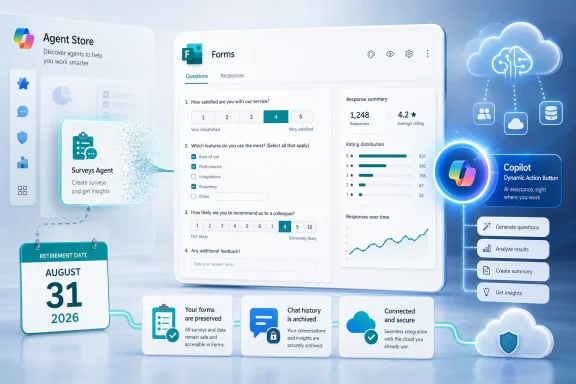
Microsoft will remove Surveys Agent from the Microsoft 365 Copilot Agent Store on August 31, 2026, and direct users to Microsoft Forms for future AI-assisted survey work. Existing forms will remain accessible, prior Surveys Agent history will remain available in Microsoft 365 Copilot, and the integrated Forms capability will require no additional license or IT configuration. The practical change is the entry point: users should open Microsoft Forms and use the floating Copilot Dynamic Action Button.
Its separate identity created two possible starting points for a survey task. A user could begin in Microsoft Forms, where the survey itself lived, or enter Microsoft 365 Copilot and work through Surveys Agent. Microsoft’s retirement plan resolves that choice by making Forms the destination for future AI-assisted survey work.
That does not establish that the replacement will reproduce every screen, prompt, command, or conversational behavior of the standalone agent. Microsoft says the relevant capabilities are being integrated into Forms, but users should expect the interface and sequence of actions to reflect the Forms environment rather than assume exact parity with the retiring agent.
The operational direction is nevertheless clear. Someone beginning a new AI-assisted survey after August 31, 2026, should open Microsoft Forms and use the floating Copilot Dynamic Action Button. Administrators should avoid documenting unverified menu paths through Settings, the Microsoft 365 admin center, or other navigation layers.
The transition also reduces the importance of the Surveys Agent name. The durable business object is the form, and Forms remains the application responsible for that object. Microsoft 365 Copilot retains the user’s previous interaction history, while Forms becomes the location for starting new work.
Neowin characterized the change as Microsoft killing off an AI agent, but that framing needs an important qualification. The standalone Surveys Agent listing is going away, yet the retirement notice says its capabilities are being integrated into Forms. Existing forms and prior history are also being retained.
The confirmed change is therefore narrower than the phrase “product shutdown” might suggest. Microsoft is changing where users initiate AI-assisted survey work and how the experience is presented.
The qualifications in the table matter. “Integrated into Forms” does not necessarily mean that every feature will appear in the same place, retain the same label, or follow the same conversational sequence. Distribution, reminders, and Excel-related workflows should not be documented as unchanged until administrators can verify the production experience.
Microsoft has provided enough information to explain the destination, but not enough to justify invented click-by-click instructions. Internal guidance should use the confirmed wording: open Microsoft Forms and use the floating Copilot Dynamic Action Button.
Previous Surveys Agent history will also remain available in Microsoft 365 Copilot. That gives users a way to refer back to prior interactions even after they can no longer launch the agent as a separate destination.
Those are two different forms of continuity:
The unified Forms capability may organize AI assistance around the form currently open, the user’s stage of work, or actions presented by the floating button. That would naturally differ from opening a separately named agent from the Agent Store.
For most users, the clearest internal message is straightforward:
That is a meaningful distinction between technical migration and organizational preparation.
The technical transition is being handled by Microsoft: the standalone listing will disappear, existing forms will remain available, previous history will remain in Microsoft 365 Copilot, and users will be directed to the Forms-based experience.
The organizational transition still belongs to customers. Help desks, trainers, departmental technology leads, and Microsoft 365 administrators may need to revise instructions and answer questions from users who were taught to look for Surveys Agent.
The statement that no additional license is required should be communicated as written. It should not be weakened with unsupported licensing caveats, but it also should not be expanded into claims about unrelated Copilot products or features. For this integrated capability and this retirement transition, Microsoft says there is no additional licensing requirement.
Similarly, “no IT configuration required” means organizations do not need to configure the integrated capability as part of this change. It does not prevent an organization from reviewing its own training, data-handling guidance, or acceptable-use policies.
A configuration-free transition can still generate support tickets if employees see a familiar agent disappear without explanation. The practical administrative task is to make the new starting point clear before the removal date.
Instead, administrators should identify places where the Surveys Agent name or Agent Store entry point has been documented. These may include:
Administrators should not replace one unsupported navigation path with another. Unless Microsoft provides a more specific verified procedure, the instruction should remain concise: open Microsoft Forms and use the floating Copilot Dynamic Action Button.
Organizations may also want to test the experience before publishing detailed training. The purpose of that review is not to enable the feature—Microsoft says no additional IT configuration is needed—but to see how the integrated experience is presented to users and which prior workflows require revised instructions.
For example, a team may have written a guide that tells employees to open Surveys Agent, enter a prompt, request distribution, send reminders, and export results. The revised guide should not simply substitute “Forms” for “Surveys Agent” while preserving every old step. The capabilities are moving into Forms, but the exact placement and sequence may differ.
Existing forms remain accessible. Previous Surveys Agent history remains available in Microsoft 365 Copilot. New AI-assisted survey work begins in Microsoft Forms through the floating Copilot Dynamic Action Button.
That does not mean users should ignore the deadline. The forms and history may remain, but saved instructions and employee habits can still break when the named agent disappears. A user who expects to find Surveys Agent in the Agent Store may not know that the workflow has moved into Forms.
Organizations should therefore communicate the change before August 31, 2026, even though there is no emergency export or migration requirement.
Survey owners with especially important workflows may also choose to confirm that they can locate their forms and relevant Copilot history. That is a sensible readiness check, not evidence that Microsoft expects data loss.
Administrators should avoid telling users to copy every old conversation into another system unless their own records policies require it. Microsoft’s transition information says previous history will remain accessible in Microsoft 365 Copilot. Unnecessary exports could create duplicate records or move information into locations with different retention and access controls.
The same restraint applies to existing forms. There is no stated need to rebuild them merely because the standalone agent is being removed.
This distinction is especially relevant to distribution, reminders, and Excel-related workflows.
Surveys Agent was described as supporting work beyond initial question generation. Users could work through multiple stages of a survey process, including preparing the survey, reaching participants, following up, and working with collected results.
The Forms integration may support those activities, but the retirement notice alone should not be used to promise that:
This is not merely editorial caution. Enterprise support material often turns a broad product statement into highly specific instructions, and those instructions can become wrong as soon as a button moves or a command is renamed.
For now, the verified user path is enough: open Microsoft Forms and use the floating Copilot Dynamic Action Button.
That is useful from a support perspective even without making broader claims about Microsoft’s agent strategy. Employees no longer need to be taught that a survey task starts in a separately named agent while the resulting object is stored and managed in another application.
The revised model can be explained in terms users already understand:
Microsoft has not said that every specialized agent will follow the same path. Some agents may continue to exist as independent destinations, particularly when their work crosses several applications or does not belong naturally inside one product. The Surveys Agent transition should therefore be evaluated on its own confirmed details.
In this case, the created artifact is already a Microsoft Form. Directing future AI-assisted survey work to Forms gives administrators a stable application name to use in training and support documentation.
Users remain responsible for confirming that a survey:
Greater visibility may lead more employees to use the capability. Administrators and governance teams should therefore ensure that existing rules for survey data and generative AI remain easy to find.
“No IT configuration required” should not be confused with “no organizational guidance required.” Microsoft is removing the technical setup burden, but each organization remains responsible for deciding what information its employees may place in surveys and AI-assisted workflows.
Those measures reduce the risk of the transition.
The remaining risk is confusion. Microsoft promoted a named agent and is now asking users to begin the same category of work somewhere else. Even when the underlying capabilities continue, a changed entry point can disrupt training, bookmarks, screenshots, help-desk scripts, and employee habits.
Microsoft and administrators should therefore use precise language:
The most effective preparation is modest:
If important actions become harder to locate or behave differently without adequate guidance, users may experience the transition as a loss even though their forms and history remain available. That is why Microsoft’s continuity promises and each organization’s communication plan matter more than the branding change itself.
For now, the confirmed outcome is straightforward: Surveys Agent leaves the Microsoft 365 Copilot Agent Store on August 31, 2026; existing forms remain accessible; previous history remains in Microsoft 365 Copilot; and new AI-assisted survey work moves to Microsoft Forms through the floating Copilot Dynamic Action Button, with no additional license or IT configuration required.
What users and admins should do now
- Continue using existing forms; they will remain accessible after Surveys Agent is removed.
- Use Microsoft 365 Copilot to review prior Surveys Agent history.
- After August 31, 2026, start new AI-assisted survey work by opening Microsoft Forms and using the floating Copilot Dynamic Action Button.
- Do not plan a technical migration, additional license purchase, or new IT configuration for the integrated capability.
- Update internal documentation that identifies Surveys Agent as the place to begin survey work.
 Transition summary
- Surveys Agent: The standalone agent being retired.
- Microsoft 365 Copilot Agent Store: Surveys Agent will be removed from this location.
- August 31, 2026: The scheduled removal date.
- Microsoft Forms: The destination for new AI-assisted survey work after the transition.
- Copilot Dynamic Action Button: The floating button users will use to access the integrated capability in Forms.
- Existing forms: They will remain accessible.
- Copilot history: Previous Surveys Agent history will remain available in Microsoft 365 Copilot.
- Licensing: No additional license is required for the integrated capability described by Microsoft.
- IT configuration: No additional configuration is required to enable the integrated capability.
Surveys Agent Moves Back to the Application That Owns the Work
Surveys Agent was presented as a specialized Microsoft 365 Copilot experience for creating and managing surveys through natural-language interaction. It helped users begin with an idea, develop survey questions, refine wording, and work with the resulting form.Its separate identity created two possible starting points for a survey task. A user could begin in Microsoft Forms, where the survey itself lived, or enter Microsoft 365 Copilot and work through Surveys Agent. Microsoft’s retirement plan resolves that choice by making Forms the destination for future AI-assisted survey work.
That does not establish that the replacement will reproduce every screen, prompt, command, or conversational behavior of the standalone agent. Microsoft says the relevant capabilities are being integrated into Forms, but users should expect the interface and sequence of actions to reflect the Forms environment rather than assume exact parity with the retiring agent.
The operational direction is nevertheless clear. Someone beginning a new AI-assisted survey after August 31, 2026, should open Microsoft Forms and use the floating Copilot Dynamic Action Button. Administrators should avoid documenting unverified menu paths through Settings, the Microsoft 365 admin center, or other navigation layers.
The transition also reduces the importance of the Surveys Agent name. The durable business object is the form, and Forms remains the application responsible for that object. Microsoft 365 Copilot retains the user’s previous interaction history, while Forms becomes the location for starting new work.
The Floating Copilot Button Becomes the New Entry Point
According to Microsoft’s Message Center post MC1421920, Surveys Agent will be removed from the Microsoft 365 Copilot Agent Store on August 31, 2026. Users will instead be directed to the unified Microsoft Forms experience, where Copilot is available through the floating Copilot Dynamic Action Button, also described as the DAB.Neowin characterized the change as Microsoft killing off an AI agent, but that framing needs an important qualification. The standalone Surveys Agent listing is going away, yet the retirement notice says its capabilities are being integrated into Forms. Existing forms and prior history are also being retained.
The confirmed change is therefore narrower than the phrase “product shutdown” might suggest. Microsoft is changing where users initiate AI-assisted survey work and how the experience is presented.
| Workflow element | Standalone Surveys Agent | Microsoft Forms after the transition |
|---|---|---|
| Primary entry point | Microsoft 365 Copilot Agent Store | Microsoft Forms |
| AI access | Separate Surveys Agent | Floating Copilot Dynamic Action Button |
| Survey creation and refinement | Available through the agent | Included in the integrated Forms capability |
| Distribution and reminders | Associated with the Surveys Agent workflow | Capabilities are moving into Forms, but exact interface and behavior should not be assumed to be identical |
| Results and Excel-related work | Supported by Surveys Agent | Integration is expected within the Forms experience, but organizations should verify the final workflow before documenting exact steps |
| Existing forms | Created forms remain Microsoft Forms artifacts | Existing forms remain accessible |
| Previous conversations | Available through Surveys Agent and Copilot history | Prior history remains available in Microsoft 365 Copilot |
| Status after August 31, 2026 | Removed from the Agent Store | Forms becomes the destination for new AI-assisted survey work |
| Additional licensing | No new requirement stated for this transition | No additional license required for the integrated capability |
| IT setup | Agent-based entry point | No additional IT configuration required |
Microsoft has provided enough information to explain the destination, but not enough to justify invented click-by-click instructions. Internal guidance should use the confirmed wording: open Microsoft Forms and use the floating Copilot Dynamic Action Button.
What Is—and Is Not—Changing
The most important continuity promise concerns the work users have already created. Forms made with Surveys Agent will remain accessible after the Agent Store listing is removed. Organizations do not need to rebuild those forms solely because the standalone agent is being retired.Previous Surveys Agent history will also remain available in Microsoft 365 Copilot. That gives users a way to refer back to prior interactions even after they can no longer launch the agent as a separate destination.
Those are two different forms of continuity:
- Artifact continuity: The actual forms remain available.
- History continuity: Previous Surveys Agent interactions remain available in Microsoft 365 Copilot.
The unified Forms capability may organize AI assistance around the form currently open, the user’s stage of work, or actions presented by the floating button. That would naturally differ from opening a separately named agent from the Agent Store.
For most users, the clearest internal message is straightforward:
That explanation avoids two common sources of confusion. First, it does not suggest that Microsoft Forms itself is being retired. Second, it does not promise that the replacement will look or behave exactly like Surveys Agent.Your existing forms are not being deleted. Your previous Surveys Agent history will remain in Microsoft 365 Copilot. For new AI-assisted survey work after August 31, 2026, open Microsoft Forms and use the floating Copilot Dynamic Action Button.
No Technical Migration or Additional Purchase Is Required
Microsoft says no additional license or IT configuration is required for the integrated Forms capability covered by this transition. Administrators therefore do not need to deploy a replacement agent, purchase a migration product, or configure a new service simply because the Agent Store listing is being removed.That is a meaningful distinction between technical migration and organizational preparation.
The technical transition is being handled by Microsoft: the standalone listing will disappear, existing forms will remain available, previous history will remain in Microsoft 365 Copilot, and users will be directed to the Forms-based experience.
The organizational transition still belongs to customers. Help desks, trainers, departmental technology leads, and Microsoft 365 administrators may need to revise instructions and answer questions from users who were taught to look for Surveys Agent.
The statement that no additional license is required should be communicated as written. It should not be weakened with unsupported licensing caveats, but it also should not be expanded into claims about unrelated Copilot products or features. For this integrated capability and this retirement transition, Microsoft says there is no additional licensing requirement.
Similarly, “no IT configuration required” means organizations do not need to configure the integrated capability as part of this change. It does not prevent an organization from reviewing its own training, data-handling guidance, or acceptable-use policies.
A configuration-free transition can still generate support tickets if employees see a familiar agent disappear without explanation. The practical administrative task is to make the new starting point clear before the removal date.
Admin Work Shifts From Deployment to Communication
The lack of a technical migration makes this a relatively manageable Microsoft 365 change. There is no indication that administrators must export all surveys, recreate forms, transfer ownership, install a replacement package, or run a tenant-wide conversion.Instead, administrators should identify places where the Surveys Agent name or Agent Store entry point has been documented. These may include:
- Help-desk knowledge articles
- Employee onboarding material
- Copilot training presentations
- Departmental survey procedures
- Approved-tool catalogs
- Recorded demonstrations
- Internal screenshots
- AI governance documentation
- Links or instructions embedded in Teams channels, SharePoint pages, or intranet portals
Administrators should not replace one unsupported navigation path with another. Unless Microsoft provides a more specific verified procedure, the instruction should remain concise: open Microsoft Forms and use the floating Copilot Dynamic Action Button.
Organizations may also want to test the experience before publishing detailed training. The purpose of that review is not to enable the feature—Microsoft says no additional IT configuration is needed—but to see how the integrated experience is presented to users and which prior workflows require revised instructions.
For example, a team may have written a guide that tells employees to open Surveys Agent, enter a prompt, request distribution, send reminders, and export results. The revised guide should not simply substitute “Forms” for “Surveys Agent” while preserving every old step. The capabilities are moving into Forms, but the exact placement and sequence may differ.
Action checklist for admins
- Identify documentation that presents Surveys Agent as a separate destination.
- Tell affected users that Surveys Agent will leave the Microsoft 365 Copilot Agent Store on August 31, 2026.
- Emphasize that existing forms will remain accessible.
- Explain that prior Surveys Agent history will remain available in Microsoft 365 Copilot.
- Direct new AI-assisted survey work to Microsoft Forms and the floating Copilot Dynamic Action Button.
- Remove links, screenshots, or instructions that depend on the retiring Agent Store listing.
- Do not invent a Settings, admin-center, or menu-click path that Microsoft has not confirmed.
- Test the integrated Forms experience before publishing detailed workflow instructions.
- Review guides covering distribution, reminders, and Excel-related work rather than assuming interface parity.
- Communicate that no additional license or IT configuration is required for the integrated capability.
- Keep existing organizational rules for sensitive, confidential, regulated, or personal data visible in survey guidance.
- Prepare the help desk to distinguish the retirement of Surveys Agent from the continued availability of Microsoft Forms.
Existing Forms and Copilot History Remain Available
The preservation of existing content is the strongest part of the transition plan. When an AI product or interface is retired, users typically have three immediate questions:- Will the work I created still exist?
- Can I still review how that work was created?
- Where do I begin the next time I need to do the same job?
Existing forms remain accessible. Previous Surveys Agent history remains available in Microsoft 365 Copilot. New AI-assisted survey work begins in Microsoft Forms through the floating Copilot Dynamic Action Button.
That does not mean users should ignore the deadline. The forms and history may remain, but saved instructions and employee habits can still break when the named agent disappears. A user who expects to find Surveys Agent in the Agent Store may not know that the workflow has moved into Forms.
Organizations should therefore communicate the change before August 31, 2026, even though there is no emergency export or migration requirement.
Survey owners with especially important workflows may also choose to confirm that they can locate their forms and relevant Copilot history. That is a sensible readiness check, not evidence that Microsoft expects data loss.
Administrators should avoid telling users to copy every old conversation into another system unless their own records policies require it. Microsoft’s transition information says previous history will remain accessible in Microsoft 365 Copilot. Unnecessary exports could create duplicate records or move information into locations with different retention and access controls.
The same restraint applies to existing forms. There is no stated need to rebuild them merely because the standalone agent is being removed.
The Unified Experience May Not Be Interface-Identical
Microsoft describes the Surveys Agent capabilities as being integrated into Forms, which supports the conclusion that users will continue to have AI assistance for survey work. It does not establish that every substantial capability will be exposed through an identical interface or that old conversations can continue without any change in behavior.This distinction is especially relevant to distribution, reminders, and Excel-related workflows.
Surveys Agent was described as supporting work beyond initial question generation. Users could work through multiple stages of a survey process, including preparing the survey, reaching participants, following up, and working with collected results.
The Forms integration may support those activities, but the retirement notice alone should not be used to promise that:
- Every old prompt will produce the same result.
- Distribution controls will remain in the same location.
- Reminder behavior will be unchanged.
- Excel export will use the same commands or sequence.
- Previous agent conversations will continue as active sessions.
- Suggested prompts and contextual actions will be identical.
- The Forms interface will reproduce the standalone agent screen.
This is not merely editorial caution. Enterprise support material often turns a broad product statement into highly specific instructions, and those instructions can become wrong as soon as a button moves or a command is renamed.
For now, the verified user path is enough: open Microsoft Forms and use the floating Copilot Dynamic Action Button.
Forms Becomes the Clear Starting Point
The transition gives users a simpler answer to the question of where to begin. The survey itself lives in Microsoft Forms, and future AI-assisted survey work will also begin there.That is useful from a support perspective even without making broader claims about Microsoft’s agent strategy. Employees no longer need to be taught that a survey task starts in a separately named agent while the resulting object is stored and managed in another application.
The revised model can be explained in terms users already understand:
- Microsoft Forms holds the survey.
- Copilot provides AI assistance within Forms.
- The floating Dynamic Action Button opens that assistance.
- Microsoft 365 Copilot retains prior Surveys Agent history.
Microsoft has not said that every specialized agent will follow the same path. Some agents may continue to exist as independent destinations, particularly when their work crosses several applications or does not belong naturally inside one product. The Surveys Agent transition should therefore be evaluated on its own confirmed details.
In this case, the created artifact is already a Microsoft Form. Directing future AI-assisted survey work to Forms gives administrators a stable application name to use in training and support documentation.
Human Review Still Matters
Moving AI assistance into Forms does not change the need for users to review generated survey content. A faster survey-building process can save time, but it can also make unclear, leading, repetitive, or poorly targeted questions easier to distribute.Users remain responsible for confirming that a survey:
- Has a clearly defined purpose
- Uses language appropriate for its audience
- Avoids leading or biased wording
- Does not request unnecessary sensitive information
- Includes suitable response options
- Reaches the intended recipients
- Complies with organizational data-handling requirements
- Produces results that can be interpreted responsibly
Greater visibility may lead more employees to use the capability. Administrators and governance teams should therefore ensure that existing rules for survey data and generative AI remain easy to find.
“No IT configuration required” should not be confused with “no organizational guidance required.” Microsoft is removing the technical setup burden, but each organization remains responsible for deciding what information its employees may place in surveys and AI-assisted workflows.
A Better Retirement Pattern Depends on Clear Communication
From an enterprise perspective, preserving forms and history is more important than preserving the Surveys Agent name. Microsoft is maintaining the business artifacts, keeping previous Copilot history available, providing a new destination, and avoiding an additional licensing or configuration requirement.Those measures reduce the risk of the transition.
The remaining risk is confusion. Microsoft promoted a named agent and is now asking users to begin the same category of work somewhere else. Even when the underlying capabilities continue, a changed entry point can disrupt training, bookmarks, screenshots, help-desk scripts, and employee habits.
Microsoft and administrators should therefore use precise language:
- Surveys Agent is being removed from the Agent Store.
- Microsoft Forms is not being retired.
- Existing forms will remain accessible.
- Previous Surveys Agent history will remain in Microsoft 365 Copilot.
- New AI-assisted survey work will begin in Forms.
- The floating Copilot Dynamic Action Button is the new access point.
- No additional license or IT configuration is required for the integrated capability.
- Exact interface parity with the retiring agent should not be assumed.
What Happens Next
Until August 31, 2026, organizations have time to identify affected users, update internal guidance, and examine the integrated Microsoft Forms experience. There is no stated requirement for a large migration project, but waiting until the Agent Store listing disappears could create unnecessary support demand.The most effective preparation is modest:
- Tell users what is changing.
- Reassure them about existing forms and Copilot history.
- Replace the old starting point in internal documentation.
- Avoid promising unchanged distribution, reminder, or Excel workflows until those details are verified.
- Direct future work to Microsoft Forms and the floating Copilot Dynamic Action Button.
If important actions become harder to locate or behave differently without adequate guidance, users may experience the transition as a loss even though their forms and history remain available. That is why Microsoft’s continuity promises and each organization’s communication plan matter more than the branding change itself.
For now, the confirmed outcome is straightforward: Surveys Agent leaves the Microsoft 365 Copilot Agent Store on August 31, 2026; existing forms remain accessible; previous history remains in Microsoft 365 Copilot; and new AI-assisted survey work moves to Microsoft Forms through the floating Copilot Dynamic Action Button, with no additional license or IT configuration required.
References
- Primary source: Neowin
Published: 2026-07-10T13:50:08.524675
Microsoft is killing off an AI agent a year after reveal, but users shouldn't worry - Neowin
Microsoft is saying goodbye to a year old Copilot AI tool, but users are not actually losing its most useful features. www.neowin.net
- Official source: learn.microsoft.com
Agent Store in Microsoft 365 Copilot | Microsoft Learn
Learn about Agent Store in Microsoft 365 Copilot.learn.microsoft.com - Official source: support.microsoft.com
The Copilot Dynamic Action Button in Word Excel and PowerPoint | Microsoft Support
Learn about the Copilot Dynamic Action Button (DAB) in Word, Excel, and PowerPoint - how to open Copilot, dock the button, and find it if it's missing.support.microsoft.com - Official source: devblogs.microsoft.com
Introducing the Agent Store: Build, publish, and discover agents in Microsoft 365 Copilot
The Agent Store offers a new, immersive experience within Microsoft 365 Copilot that enables users to browse, install, and try agents tailored to their needs.devblogs.microsoft.com - Official source: techcommunity.microsoft.com
- Official source: marketplace.microsoft.com
Microsoft Marketplace | cloud solutions, AI apps, and agents
marketplace.microsoft.com
- Official source: adoption.microsoft.com
- Official source: marketingassets.microsoft.com
- Official source: news.microsoft.com
- Official source: info.microsoft.com
- Official source: download.microsoft.com
- Official source: microsoft.com