

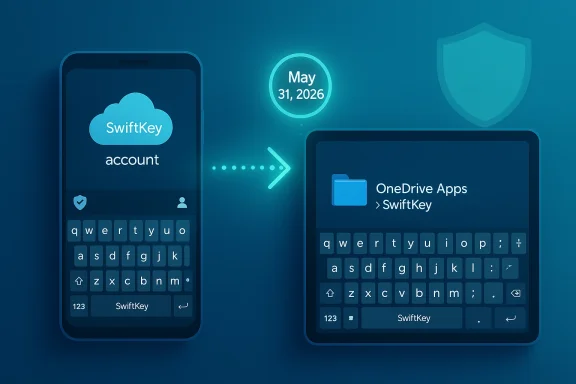
Microsoft is retiring standalone SwiftKey accounts on May 31, 2026, and the change is bigger than a simple login tweak. The company is moving backup and sync to Microsoft Account sign-in and storing personalized typing data in OneDrive, which means users who stay on Apple, Google, or other non-Microsoft sign-ins risk losing cloud sync and, for legacy account data, losing access entirely after the cutoff. Microsoft says the shift is about privacy, transparency, and easier access across devices, but for many users it will feel like another step in the company’s long campaign to pull everyday tools deeper into its account ecosystem.
SwiftKey has always been more than a keyboard app. Long before Microsoft bought it in 2016, it earned a loyal following because it learned how people actually type, then used that knowledge to improve prediction, autocorrect, and swipe input over time. That core promise is what made SwiftKey sticky: the app became better the longer people used it, especially when its learned words and typing model could follow them across devices.
Microsoft’s acquisition turned SwiftKey into something strategic. Instead of being just a best-in-class typing tool, it became part of a broader identity and services story that included OneDrive, Microsoft Rewards, and cross-device continuity. The recent support changes make that direction explicit, because Microsoft now says SwiftKey stores personalized typing data directly in a user’s own OneDrive folder and that backup and sync will be fully rolled out by 31st May 2026. (support.microsoft.com)
The company’s support pages also show that this is not just a cosmetic account renaming exercise. Microsoft states plainly that SwiftKey accounts will be retired on 31st May 2026, and that users should sign in with a Microsoft Account to keep syncing data across devices. In other words, the old standalone SwiftKey identity layer is going away, and Microsoft is replacing it with its own account infrastructure as the default path forward. (support.microsoft.com)
This is happening in a broader period of platform consolidation across Microsoft’s consumer software stack. The company has spent the last couple of years tightening account integration in Windows, Microsoft 365, and other products, pushing users toward a single identity that can move between devices and services. SwiftKey is simply the latest place where that strategy has become visible to ordinary users.
What makes the SwiftKey change especially notable is that keyboards are deeply personal tools. They are not just apps; they are memory systems for names, slang, work jargon, and habits. When Microsoft moves that memory into OneDrive, it is making a statement about where that data should live, who should control it, and how tightly it should be bound to the Microsoft ecosystem. That is a practical engineering decision, but it is also a policy choice.
Microsoft’s own SwiftKey OneDrive page adds a useful detail: the company now stores your personalized dictionary and typing model in OneDrive, and the folder is accessible through the Apps > SwiftKey path in your OneDrive account. The same page says you can view, export, and delete the data there, which is an important transparency claim even if the migration itself feels abrupt to users. (support.microsoft.com)
Microsoft says the benefit is stronger privacy protection, easier device-to-device access, and a more transparent user experience. Those are reasonable benefits, and they are backed by the company’s description of OneDrive as a personal folder under the user’s control. Still, control here is conditional: the control is strongest if you are willing to use Microsoft’s identity system in the first place. (support.microsoft.com)
A lot of online reposts have repeated an earlier date incorrectly, but the Microsoft support pages are the authoritative source here. That matters because users who wait for the wrong deadline could lose the chance to move their data cleanly. In this case, the safer interpretation is that Microsoft’s own support language controls the schedule, not third-party summaries. (support.microsoft.com)
The more severe concern is legacy account data. Microsoft and related coverage indicate that old SwiftKey account data is slated for deletion after the retirement window, unless users retrieve it through the designated data portal or migrate to Microsoft sign-in. That is why this story is not just about a feature change; it is about data continuity and the risk of permanently losing personalized typing history.
There is also a strategic reason. Microsoft likes identity because identity creates continuity, and continuity creates dependency. A user who signs into SwiftKey with a Microsoft Account is more likely to stay inside Microsoft’s cloud, use OneDrive, and connect to the rest of the company’s services. That is not inherently sinister, but it is clearly intentional.
The upside is convenience. The downside is that the user’s working memory becomes part of a platform strategy. Once that happens, changes in account policy can feel less like product improvements and more like service coercion, even when the technical justification is sound. (support.microsoft.com)
Still, privacy is not only about access; it is also about dependency. If your typing model is stored in OneDrive, then your keyboard memory now depends on a Microsoft login, Microsoft cloud availability, and Microsoft policy decisions. That is a narrower kind of privacy than some users want, especially those who prefer local-only data or who are cautious about putting too much behavioral data into cloud accounts.
The result is a trade-off rather than a clean win. Users who want seamless typing across devices get cloud dependency. Users who want cloud minimization get fragmentation. In practice, Microsoft is giving users a choice, but the choice is between convenience and control. (support.microsoft.com)
Users who do not want to migrate should still consider exporting their data. Microsoft points to a SwiftKey data portal and says users can access their account-related information there. Third-party coverage also indicates that the portal is where you should go if you want to retrieve data before the deletion deadline.
Microsoft seems to understand this, which is why it emphasizes continuity, “full control,” and seamless sync. The company knows that users do not want to re-train a keyboard from scratch. A typing model is accumulated convenience, and accumulated convenience is hard to replace once it is gone. (support.microsoft.com)
There is also the issue of messaging. Microsoft’s support pages are clear, but support pages are not the same as a proactive in-app migration flow. When a company changes the identity model of a core app, the quality of the transition experience determines whether users feel informed or ambushed. (support.microsoft.com)
The market implication is subtle but important: Microsoft is signaling that ecosystem integration matters more than standalone portability. That may be efficient for Microsoft, but it also means SwiftKey competes less on being the most independent keyboard and more on being the best keyboard inside Microsoft’s cloud world.
The risk for Microsoft is that a keyboard is one of the few apps people use constantly enough to notice policy drift quickly. If the account change produces even a modest wave of friction, the emotional cost will be outsized compared with the engineering benefit. That is why this story matters beyond SwiftKey itself. It is a test of how much user trust Microsoft can ask for in exchange for convenience. (support.microsoft.com)
For consumers, though, this is more personal and more annoying. Home users are the ones who feel forced into an account they may not want, and they are the ones most likely to resent being told that their keyboard memory is now contingent on a broader cloud platform. The same policy that looks tidy to an IT admin can look coercive to an everyday user.
That is why the same SwiftKey change can be framed as a security enhancement in one context and a control grab in another. Both readings are plausible. The deciding factor is not the technology itself but who is being asked to adapt and how much power they have to refuse. (support.microsoft.com)
The bigger question is whether SwiftKey becomes a template for other Microsoft consumer services. Once OneDrive-backed identity becomes the default answer for personalized data, the company can apply the same model elsewhere with less friction. That may be efficient for Microsoft, but it also means more of its products will be judged by how much control users think they are surrendering. (support.microsoft.com)
Source: Neowin PSA: Microsoft is deleting SwiftKey accounts this month, here is what you need to do
 Background
SwiftKey has always been more than a keyboard app. Long before Microsoft bought it in 2016, it earned a loyal following because it learned how people actually type, then used that knowledge to improve prediction, autocorrect, and swipe input over time. That core promise is what made SwiftKey sticky: the app became better the longer people used it, especially when its learned words and typing model could follow them across devices.Microsoft’s acquisition turned SwiftKey into something strategic. Instead of being just a best-in-class typing tool, it became part of a broader identity and services story that included OneDrive, Microsoft Rewards, and cross-device continuity. The recent support changes make that direction explicit, because Microsoft now says SwiftKey stores personalized typing data directly in a user’s own OneDrive folder and that backup and sync will be fully rolled out by 31st May 2026. (support.microsoft.com)
The company’s support pages also show that this is not just a cosmetic account renaming exercise. Microsoft states plainly that SwiftKey accounts will be retired on 31st May 2026, and that users should sign in with a Microsoft Account to keep syncing data across devices. In other words, the old standalone SwiftKey identity layer is going away, and Microsoft is replacing it with its own account infrastructure as the default path forward. (support.microsoft.com)
This is happening in a broader period of platform consolidation across Microsoft’s consumer software stack. The company has spent the last couple of years tightening account integration in Windows, Microsoft 365, and other products, pushing users toward a single identity that can move between devices and services. SwiftKey is simply the latest place where that strategy has become visible to ordinary users.
What makes the SwiftKey change especially notable is that keyboards are deeply personal tools. They are not just apps; they are memory systems for names, slang, work jargon, and habits. When Microsoft moves that memory into OneDrive, it is making a statement about where that data should live, who should control it, and how tightly it should be bound to the Microsoft ecosystem. That is a practical engineering decision, but it is also a policy choice.
What Microsoft actually changed
The core of the update is simple: SwiftKey Accounts are being retired, and Microsoft wants users to move to Microsoft Accounts to preserve sync and backup. The support wording is direct, saying that users can continue backing up and syncing data seamlessly by signing in with a Microsoft Account in SwiftKey, and that OneDrive will be used for secure, accessible storage across devices. (support.microsoft.com)Microsoft’s own SwiftKey OneDrive page adds a useful detail: the company now stores your personalized dictionary and typing model in OneDrive, and the folder is accessible through the Apps > SwiftKey path in your OneDrive account. The same page says you can view, export, and delete the data there, which is an important transparency claim even if the migration itself feels abrupt to users. (support.microsoft.com)
Why the storage model matters
The shift to OneDrive changes the relationship between the app and the data. Instead of an app maintaining its own cloud service or a standalone account backend, SwiftKey’s user memory now sits inside Microsoft’s broader personal cloud layer. That may improve maintainability and security, but it also means the keyboard is no longer a small, self-contained product in any meaningful sense.Microsoft says the benefit is stronger privacy protection, easier device-to-device access, and a more transparent user experience. Those are reasonable benefits, and they are backed by the company’s description of OneDrive as a personal folder under the user’s control. Still, control here is conditional: the control is strongest if you are willing to use Microsoft’s identity system in the first place. (support.microsoft.com)
- SwiftKey account retirement date: 31st May 2026
- Data location after migration: OneDrive Apps > SwiftKey
- Data types involved: personalized dictionary and typing model
- Fallback if you do nothing: local-only use, no cross-device sync
- Reported incentive for switching: 1,000 Microsoft Rewards points (support.microsoft.com)
The real deadline users need to remember
There are effectively two deadlines in play, and that is part of why the story is confusing for casual users. Microsoft’s support pages say SwiftKey accounts retire on 31st May 2026, and the OneDrive backup rollout will be fully completed by that date. That means the practical cutoff for account-based continuity is at the end of May, not the end of March. (support.microsoft.com)A lot of online reposts have repeated an earlier date incorrectly, but the Microsoft support pages are the authoritative source here. That matters because users who wait for the wrong deadline could lose the chance to move their data cleanly. In this case, the safer interpretation is that Microsoft’s own support language controls the schedule, not third-party summaries. (support.microsoft.com)
What happens if you ignore the change
If you do nothing, SwiftKey still works locally, but the cloud benefits disappear. Microsoft says you can keep using the keyboard normally without opting in to Backup & Sync, yet your data will remain on the device and will not sync across devices. That is a meaningful downgrade for anyone who depends on a consistent typing experience on phone and tablet, or on Android and iOS at the same time. (support.microsoft.com)The more severe concern is legacy account data. Microsoft and related coverage indicate that old SwiftKey account data is slated for deletion after the retirement window, unless users retrieve it through the designated data portal or migrate to Microsoft sign-in. That is why this story is not just about a feature change; it is about data continuity and the risk of permanently losing personalized typing history.
Why Microsoft is doing this now
From Microsoft’s point of view, the shift is rational. Maintaining multiple account systems for a single consumer app adds engineering overhead, support complexity, and privacy-policy fragmentation. If SwiftKey is already being tied to OneDrive, then moving all account logic under Microsoft Accounts simplifies the stack and makes the service easier to explain.There is also a strategic reason. Microsoft likes identity because identity creates continuity, and continuity creates dependency. A user who signs into SwiftKey with a Microsoft Account is more likely to stay inside Microsoft’s cloud, use OneDrive, and connect to the rest of the company’s services. That is not inherently sinister, but it is clearly intentional.
The ecosystem logic
This move fits Microsoft’s broader pattern of turning isolated utilities into ecosystem nodes. The company has done this with Windows, Microsoft 365, OneDrive, and Copilot, all of which benefit when users remain signed in and synchronized. SwiftKey is simply one of the more intimate examples, because a keyboard sees your language habits at a very granular level.The upside is convenience. The downside is that the user’s working memory becomes part of a platform strategy. Once that happens, changes in account policy can feel less like product improvements and more like service coercion, even when the technical justification is sound. (support.microsoft.com)
- Fewer account systems to support
- More consistent backup behavior
- Better OneDrive integration
- Easier cross-device continuity
- Stronger Microsoft ecosystem lock-in
What this means for privacy and control
Microsoft is trying to present the OneDrive move as a privacy-positive change. The support page says the data lives in the user’s own OneDrive folder, where it can be viewed, exported, and deleted. That is an important claim because it means the data is not being hidden away in a black box with no user access. (support.microsoft.com)Still, privacy is not only about access; it is also about dependency. If your typing model is stored in OneDrive, then your keyboard memory now depends on a Microsoft login, Microsoft cloud availability, and Microsoft policy decisions. That is a narrower kind of privacy than some users want, especially those who prefer local-only data or who are cautious about putting too much behavioral data into cloud accounts.
Local-first users will notice the difference
For privacy-conscious users, the local-only option is simultaneously reassuring and limiting. Microsoft says you can keep using SwiftKey without OneDrive, but then you lose synchronization. That means the “privacy-friendly” path is also the less convenient one, which is a recurring pattern in modern software design.The result is a trade-off rather than a clean win. Users who want seamless typing across devices get cloud dependency. Users who want cloud minimization get fragmentation. In practice, Microsoft is giving users a choice, but the choice is between convenience and control. (support.microsoft.com)
What users should do before the cutoff
The most important thing users can do is not panic, but act early. Microsoft’s own guidance makes it clear that if you want to keep backup and sync, you should sign into SwiftKey with a Microsoft Account and make sure your data is available in OneDrive before the retirement date. That is the safest path for people who rely on personalized predictions and cross-device continuity. (support.microsoft.com)Users who do not want to migrate should still consider exporting their data. Microsoft points to a SwiftKey data portal and says users can access their account-related information there. Third-party coverage also indicates that the portal is where you should go if you want to retrieve data before the deletion deadline.
Practical migration checklist
- Open SwiftKey on each device you use.
- Check which account is currently signed in.
- Connect or switch to your Microsoft Account if you want sync.
- Confirm that Backup & Sync is enabled.
- Verify that your data appears in OneDrive > Apps > SwiftKey.
- Export or download any important data before the deadline if you do not want to stay in Microsoft’s ecosystem.
The user experience angle
The weird thing about SwiftKey is that it succeeds because it disappears into the background. People only notice it when it stops suggesting the right name, the right emoji, or the right phrase. So any change to its memory system has an outsized impact on daily frustration, even if the app itself remains installed and functional.Microsoft seems to understand this, which is why it emphasizes continuity, “full control,” and seamless sync. The company knows that users do not want to re-train a keyboard from scratch. A typing model is accumulated convenience, and accumulated convenience is hard to replace once it is gone. (support.microsoft.com)
Why the rollout may feel harsher than it is
A migration like this is technically straightforward, but psychologically it can feel like a forced reset. Users who signed up with Google or Apple accounts may see the move as Microsoft changing the deal after the fact. That perception matters even if the end state is more secure or more maintainable for Microsoft.There is also the issue of messaging. Microsoft’s support pages are clear, but support pages are not the same as a proactive in-app migration flow. When a company changes the identity model of a core app, the quality of the transition experience determines whether users feel informed or ambushed. (support.microsoft.com)
Competitive and market implications
SwiftKey is no longer the default keyboard conversation winner it once was, but it remains a meaningful competitor in the mobile input market. Any policy change that risks user churn gives rivals a chance to recruit dissatisfied users, especially when alternatives like Gboard or the built-in iOS keyboard are already one tap away.The market implication is subtle but important: Microsoft is signaling that ecosystem integration matters more than standalone portability. That may be efficient for Microsoft, but it also means SwiftKey competes less on being the most independent keyboard and more on being the best keyboard inside Microsoft’s cloud world.
What rivals can exploit
Competitors do not need to outbuild SwiftKey’s prediction engine to benefit from this announcement. They just need to offer a lower-friction migration story. If they can promise local-only storage, simpler sign-in, or easier privacy controls, some users will move, especially those who never wanted cloud sync in the first place.The risk for Microsoft is that a keyboard is one of the few apps people use constantly enough to notice policy drift quickly. If the account change produces even a modest wave of friction, the emotional cost will be outsized compared with the engineering benefit. That is why this story matters beyond SwiftKey itself. It is a test of how much user trust Microsoft can ask for in exchange for convenience. (support.microsoft.com)
- Potential user churn to built-in keyboards
- Opportunity for privacy-focused keyboard apps
- More pressure on Microsoft to improve migration tools
- Greater skepticism toward Microsoft account requirements
- Higher visibility for OneDrive as a personal data store
Enterprise vs consumer impact
For enterprise users, the SwiftKey change is mostly a governance story. Companies that manage mobile devices centrally will care less about the nostalgia of a standalone SwiftKey account and more about whether the new account structure creates compliance, authentication, or data-retention issues. Microsoft’s move to OneDrive may even be attractive to IT teams that already standardize on Microsoft identities and storage.For consumers, though, this is more personal and more annoying. Home users are the ones who feel forced into an account they may not want, and they are the ones most likely to resent being told that their keyboard memory is now contingent on a broader cloud platform. The same policy that looks tidy to an IT admin can look coercive to an everyday user.
Different expectations, same product
This split is not unusual. Microsoft products often have one story for managed environments and another for individuals, and the tension between those two worlds is obvious here. Enterprises want predictability and policy consistency; consumers want autonomy and simplicity.That is why the same SwiftKey change can be framed as a security enhancement in one context and a control grab in another. Both readings are plausible. The deciding factor is not the technology itself but who is being asked to adapt and how much power they have to refuse. (support.microsoft.com)
Strengths and Opportunities
Microsoft’s move has some real strengths, and those deserve to be acknowledged. If the transition is handled cleanly, users may get a more transparent and resilient storage model than the older standalone account system provided. The key is whether Microsoft can turn a potentially annoying migration into a visibly better experience.- OneDrive-backed storage could make backup and recovery more understandable.
- Cross-device sync becomes more consistent under a single Microsoft identity.
- Data transparency is improved if users can view, export, and delete their files.
- Account simplification reduces confusion between Apple, Google, and Microsoft sign-ins.
- Ecosystem continuity may benefit users who already rely on Microsoft services.
- Security messaging is easier when the data lives under a known cloud framework.
- Rewards points may soften resistance for some casual users.
Risks and Concerns
The risks are equally real, and they are mostly about trust. Users are being asked to accept a cloud migration that changes how their typing memory is stored, accessed, and potentially deleted. Even if the policy is defensible, it still introduces a new point of failure and a new sense of dependence.- Data loss risk for users who miss the migration deadline.
- Forced ecosystem dependence for people who do not want a Microsoft Account.
- Reduced portability if users prefer Apple or Google sign-ins.
- Local-only downgrade if users refuse OneDrive, but still want the app.
- Support confusion because different summaries have cited different dates.
- Privacy concerns around storing language habits in the cloud.
- Perception risk that Microsoft is tightening control rather than improving utility.
Looking Ahead
The next few weeks will show whether Microsoft treats this as a quiet backend migration or a user-facing product moment. If the company makes the switch painless, most SwiftKey users will probably comply and move on. If the process is clumsy, however, the story will become another example of Microsoft pushing account centralization a little too aggressively.The bigger question is whether SwiftKey becomes a template for other Microsoft consumer services. Once OneDrive-backed identity becomes the default answer for personalized data, the company can apply the same model elsewhere with less friction. That may be efficient for Microsoft, but it also means more of its products will be judged by how much control users think they are surrendering. (support.microsoft.com)
- Watch for in-app migration prompts and updated support messaging.
- Confirm whether Microsoft expands the OneDrive model to other personalized services.
- Monitor user feedback on whether the transition actually preserves learned typing data.
- Look for competing keyboard apps to use privacy and local storage as selling points.
- Track whether Microsoft keeps adding account requirements across more consumer products.
Source: Neowin PSA: Microsoft is deleting SwiftKey accounts this month, here is what you need to do
