

Microsoft has moved Sysmon, the Sysinternals system-monitoring tool long used by defenders and incident responders, into Windows 11 as an optional built-in feature in 2026, letting users enable it through Windows Features and complete setup with the
Task Manager is the tool most Windows users reach for because it is immediate, familiar, and blunt. It tells you what is running now, what is consuming memory now, what is hammering the CPU now, and which startup entries might be slowing the machine down. For everyday troubleshooting, that is enough.
But security incidents rarely arrange themselves around a user staring at Task Manager. Malware launches and exits. Scripts spawn a command shell for half a second. A legitimate-looking process reaches across the network, drops a file, changes a timestamp, and disappears before anyone has time to right-click anything.
That is the gap Sysmon fills. It does not replace the live dashboard; it creates a record. Instead of asking “what is running?” it asks “what happened, in what order, under which process, with what parentage, and with what artifacts left behind?”
That distinction matters because modern Windows troubleshooting has shifted from observation to reconstruction. The old model assumed a suspicious program would still be visible when the user looked. The newer model assumes the suspicious behavior may already be gone, leaving only traces in logs, hashes, command lines, registry changes, network connections, and parent-child process relationships.
But being a separate download also meant Sysmon lived outside the normal Windows setup story. Administrators had to fetch it, deploy it, maintain configurations, handle updates, and explain why a Microsoft security tool was not actually present on a clean Microsoft installation. In small shops, that friction often meant Sysmon simply never arrived.
By making Sysmon an optional Windows feature, Microsoft changes its status. It is still disabled by default, and it still requires intentional setup. But it is now part of the operating-system inventory, visible through Windows Features and installable through the same servicing mindset administrators already use for other Windows components.
That matters for enterprises because deployment friction is security debt. A tool that requires a separate download, separate validation, and separate packaging becomes something only mature environments consistently adopt. A tool that can be enabled as part of a Windows baseline has a much better chance of becoming ordinary.
That assumption has been building for years. Windows has accumulated stronger defaults around virtualization-based security, attack surface reduction, memory integrity, Smart App Control, controlled folder access, and Defender integration. Some of those features are visible to users; many are not. Sysmon fits into the quieter side of that trend: Windows as a platform that can tell a defensible story about what happened on an endpoint.
The difference is that Sysmon has credibility with practitioners. It is not a glossy security center screen that reassures consumers with a green checkmark. It is a dense event stream that can make an analyst’s day better or worse depending on the quality of the configuration.
That is why Microsoft’s move is not just a convenience play. It is a cultural one. The company is effectively saying that forensic-grade logging is no longer an exotic add-on for blue teams; it is part of the Windows toolbox.
That richness is why defenders like it. A suspicious executable name is useful, but a process tree is better. A process tree plus command-line arguments is better still. Add hashes, parent processes, user context, destination IPs, and timestamps, and you have the start of an investigation rather than a hunch.
It is also why Sysmon is not a toy. A poorly configured deployment can generate too much noise, bury useful signals, and consume storage or analyst attention. Sysmon does not magically decide what is malicious. It records events according to rules, and those rules need to reflect what the organization wants to see.
That is the point XDA’s useful consumer-facing piece gestures toward but cannot fully unpack: Sysmon logs far more than Task Manager, but more is not automatically better. Security telemetry becomes valuable only when someone knows what questions to ask of it.
That last caveat is not glamorous, but it is exactly the kind of operational detail that determines whether a security feature succeeds in the real world. Windows shops already wrestle with overlapping agents, conflicting baselines, multiple update channels, and inconsistent device states. A built-in Sysmon reduces one source of friction, but it does not eliminate lifecycle management.
For home users, the new path is approachable enough: enable Sysmon, install the driver, open Event Viewer, and inspect the Operational log under Microsoft’s Sysmon channel. For IT teams, the more relevant question is how this fits into an endpoint logging strategy. Are events forwarded? Are they normalized into a SIEM? Is there a configuration standard? Who owns tuning?
That is where the “built into Windows” headline meets the boring discipline of administration. Sysmon is powerful because it is precise, but precision has to be maintained.
Event Viewer is not fashionable software. It is dense, old-school, and frequently hostile to casual inspection. But it remains one of the places where Windows tells the truth in timestamped form.
Sysmon improves that truth by adding context. A process launch event is not just “something started.” It can include the image path, command line, user, parent process, process GUID, hash, and other metadata that help distinguish a normal administrative action from a suspicious chain of execution.
The process GUID is particularly important in busy systems, because process IDs are reused. A PID can mislead an investigator after the fact; a GUID gives Sysmon a more stable way to correlate events across a timeline. That kind of detail is invisible in Task Manager and invaluable when reconstructing activity.
That does not mean casual Windows enthusiasts should ignore it. On a personal machine, Sysmon can help explain strange behavior: unexpected processes, recurring scripts, suspicious network connections, or persistence mechanisms that do not show up in a friendly startup-app list. It can also make malware cleanup less dependent on vibes.
But Sysmon’s output can overwhelm users who are not prepared for normal Windows noise. Modern Windows is busy. Browsers spawn many processes. Update services perform background work. Drivers load. Scheduled tasks run. Applications talk to cloud endpoints constantly.
That makes interpretation the real skill. Sysmon will show activity that looks strange until you understand the baseline. It will also show activity that looks ordinary until you understand the sequence. The tool raises the ceiling on what Windows can reveal, but it does not lower the floor for analysis as much as some headlines imply.
That makes Sysmon both less automated and more flexible. It does not replace Microsoft Defender. It does not quarantine files. It does not pop a warning when it sees a suspicious command line. It creates telemetry that other tools, analysts, and rules can use.
In a mature environment, Sysmon events may feed detection logic. A security team might use those logs to identify encoded PowerShell, suspicious process injection, unusual parent-child process chains, unexpected outbound connections, or tampering patterns. In a less mature environment, the same logs may sit unread until an incident.
That split is important. Built-in Sysmon gives Windows a better native sensor, but a sensor is not a security program by itself. Microsoft has provided the instrumentation; organizations still need the orchestra.
By making it optional, Microsoft gives power users and administrators a supported path without forcing a forensic logging model onto every consumer PC. That keeps Sysmon in the realm of intentional security posture rather than background surveillance surprise.
The optional model also protects Microsoft from one of Windows’ chronic product tensions. Consumers want simplicity. Administrators want control. Security teams want telemetry. Privacy-minded users want minimization. Sysmon cannot satisfy all four groups if it is silently enabled everywhere.
As an optional feature, it can be exactly what it should be: available, supported, scriptable, and out of the way until someone needs it.
But Task Manager is not failing at its job. It was never designed to be a forensic recorder. Its value is immediacy: kill a hung app, inspect startup impact, identify a runaway process, check memory pressure, or see whether a GPU workload is active.
Sysmon’s value is chronology. It tells you what happened before you knew to look. That is a fundamentally different category of tool.
The better comparison is not “Task Manager versus Sysmon” but “live observation versus durable telemetry.” Windows users need both. The mistake is assuming one can do the other’s job.
That legacy matters here. Microsoft has spent years trying to make Windows friendlier, safer, and more managed. But the people who troubleshoot Windows at depth often still reach for Sysinternals because the standard interface hides too much.
Bringing Sysmon into Windows acknowledges that the operating system’s serious users need first-class access to low-level evidence. It also hints at a future where the boundary between Sysinternals and Windows itself becomes more porous.
That would be a good thing if Microsoft preserves the character of the tools. Sysinternals works because it respects expert users. It does not bury mechanisms under marketing language. It exposes enough rope, and assumes the operator knows why rope can be useful.
That does not mean every organization will rush to enable it. Many already have commercial EDR agents, SIEM pipelines, and telemetry strategies. Some have deployed Sysmon for years using community configurations or internal baselines. Others avoid extra endpoint logging because they lack staff to tune and review it.
But native availability changes the default conversation. Instead of asking whether the organization should introduce a new tool, administrators can ask whether to enable an existing Windows capability. That is a smaller political and operational lift.
The support angle matters during incidents, too. When Microsoft support, security teams, or third-party responders can assume Sysmon is available or easily enabled, investigations can start from a more consistent foundation. Even if it is not active everywhere, its presence in the platform reduces the distance between suspicion and evidence.
Microsoft’s decision to keep Sysmon optional helps, but administrators still need policies. What is collected? How long is it retained? Who can query it? Is it forwarded off-device? Are sensitive command lines filtered? Are logs protected from tampering but also from casual internal misuse?
Those questions are not anti-security. They are part of doing security properly. The same telemetry that helps identify malware can also expose business activity, employee behavior, or personal data if mishandled.
The Windows community should resist the lazy binary in which logging is either heroic defense or sinister surveillance. It is infrastructure. Like all infrastructure, its value depends on design, transparency, access control, and accountability.
A developer workstation, a domain controller, a kiosk, a school laptop, and a gaming PC do not have the same normal behavior. The same event that is suspicious on one machine may be routine on another. Logging everything without tuning is the fastest way to teach people to ignore logs.
This is where administrators should be sober. Built-in Sysmon makes deployment easier, not analysis. It removes the “how do I get the tool onto the box?” problem, but it does not solve detection engineering.
The best use of Sysmon is iterative. Start with a defensible configuration, collect baselines, review noise, tune carefully, and integrate the output where someone will actually look at it. The worst use is to enable it everywhere, declare victory, and rediscover during an incident that nobody knows what the logs mean.
Still, Microsoft cannot turn every home user into a security analyst. The company’s consumer security strategy has mostly emphasized defaults: Defender, SmartScreen, hardware-backed protections, account warnings, and safer app execution. Sysmon is different because it gives motivated users a professional-grade lens.
That matters for Windows enthusiasts. The same people who once learned Windows by opening Device Manager, Registry Editor, and Task Manager now have a built-in path into event-based investigation. Sysmon can become a learning tool as much as a defensive tool.
But it should be presented honestly. Sysmon will not tell a novice “this is malware” in plain English. It will provide clues. The learning curve is part of the bargain.
Sysmon helps close that gap. It gives Windows a more complete local memory of execution, communication, and system change. That is useful for security, but also for troubleshooting, compliance, and post-incident learning.
This fits a broader reality: endpoints are no longer isolated personal computers in the old sense. They are identity terminals, cloud clients, development environments, collaboration hubs, and attack surfaces. A Windows PC now participates in a larger system, and larger systems need evidence.
Task Manager belongs to the era of the PC as a machine in front of you. Sysmon belongs to the era of the PC as a node in a contested network. Both eras still exist, but the second one is increasingly dominant.
But the checkbox is not the achievement. The achievement is a repeatable operating model. Administrators should decide whether Sysmon belongs in their baseline, what configuration to use, whether logs are forwarded, and how they interact with existing Defender or EDR telemetry.
Home enthusiasts should decide whether they want the noise and learning curve. If they do, Sysmon is one of the better ways to understand what Windows processes are actually doing. If they do not, Task Manager remains the right tool for ordinary “what is slowing this down?” work.
The new built-in status lowers the barrier. It does not remove the responsibility.
That contrast is worth noticing. Microsoft’s consumer story for Windows 11 has often revolved around polish, productivity, and AI-era positioning. But the operating system’s long-term credibility among professionals depends on whether it remains inspectable, manageable, and defensible.
Sysmon strengthens that credibility. It tells administrators that Microsoft still understands the value of low-level operational truth. It gives enthusiasts a path beyond screenshots and guesses. It gives incident responders another reason to prefer systems with disciplined logging over systems that only reveal the present tense.
That shift will expose uneven maturity. Some organizations will fold built-in Sysmon into clean baselines and detection pipelines. Some will enable it in a panic after a compromise. Some will leave it disabled forever because nobody owns the logs.
For WindowsForum readers, the practical message is clear:
sysmon -i command. That sounds like a small packaging change, but it is more consequential than another checkbox in Settings. Microsoft is turning one of Windows’ most trusted forensic utilities from a download for specialists into an operating-system capability. The result is not that Task Manager becomes obsolete; it is that Windows finally admits Task Manager was never the right witness for serious security work.
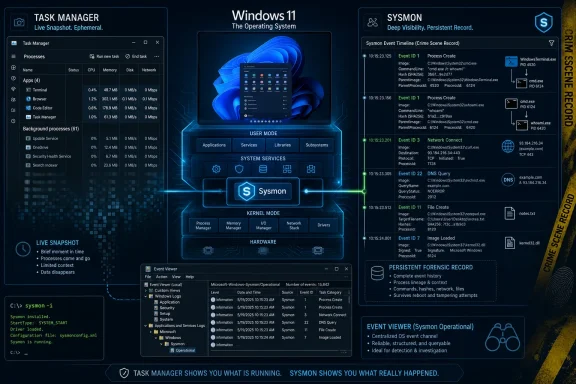 Task Manager Shows the Moment, Sysmon Preserves the Crime Scene
Task Manager is the tool most Windows users reach for because it is immediate, familiar, and blunt. It tells you what is running now, what is consuming memory now, what is hammering the CPU now, and which startup entries might be slowing the machine down. For everyday troubleshooting, that is enough.But security incidents rarely arrange themselves around a user staring at Task Manager. Malware launches and exits. Scripts spawn a command shell for half a second. A legitimate-looking process reaches across the network, drops a file, changes a timestamp, and disappears before anyone has time to right-click anything.
That is the gap Sysmon fills. It does not replace the live dashboard; it creates a record. Instead of asking “what is running?” it asks “what happened, in what order, under which process, with what parentage, and with what artifacts left behind?”
That distinction matters because modern Windows troubleshooting has shifted from observation to reconstruction. The old model assumed a suspicious program would still be visible when the user looked. The newer model assumes the suspicious behavior may already be gone, leaving only traces in logs, hashes, command lines, registry changes, network connections, and parent-child process relationships.
Microsoft Turns a Specialist Tool Into a First-Class Windows Citizen
Sysmon has been part of the Sysinternals universe since Microsoft acquired Winternals in 2006, bringing Mark Russinovich and Bryce Cogswell’s toolset under the Microsoft umbrella. For years, that arrangement was both a strength and a limitation. Sysinternals tools were beloved precisely because they were powerful, portable, and not buried in Windows’ consumer-facing settings.But being a separate download also meant Sysmon lived outside the normal Windows setup story. Administrators had to fetch it, deploy it, maintain configurations, handle updates, and explain why a Microsoft security tool was not actually present on a clean Microsoft installation. In small shops, that friction often meant Sysmon simply never arrived.
By making Sysmon an optional Windows feature, Microsoft changes its status. It is still disabled by default, and it still requires intentional setup. But it is now part of the operating-system inventory, visible through Windows Features and installable through the same servicing mindset administrators already use for other Windows components.
That matters for enterprises because deployment friction is security debt. A tool that requires a separate download, separate validation, and separate packaging becomes something only mature environments consistently adopt. A tool that can be enabled as part of a Windows baseline has a much better chance of becoming ordinary.
The New Location Is Less Important Than the New Assumption
The consumer framing is simple: Sysmon is now “built into Windows 11 for free.” That is true, but it risks underselling the more interesting shift. Sysmon was already free. What changed is the assumption that deep endpoint telemetry belongs in Windows itself.That assumption has been building for years. Windows has accumulated stronger defaults around virtualization-based security, attack surface reduction, memory integrity, Smart App Control, controlled folder access, and Defender integration. Some of those features are visible to users; many are not. Sysmon fits into the quieter side of that trend: Windows as a platform that can tell a defensible story about what happened on an endpoint.
The difference is that Sysmon has credibility with practitioners. It is not a glossy security center screen that reassures consumers with a green checkmark. It is a dense event stream that can make an analyst’s day better or worse depending on the quality of the configuration.
That is why Microsoft’s move is not just a convenience play. It is a cultural one. The company is effectively saying that forensic-grade logging is no longer an exotic add-on for blue teams; it is part of the Windows toolbox.
The Power Comes From Detail, and So Does the Danger
Sysmon’s value lies in the events Task Manager was never designed to show. It can log process creation, process termination, driver loading, file creation, raw disk access, registry activity, DNS queries, network connections, remote thread creation, image loading, clipboard changes, named pipe activity, and attempts to manipulate file creation times. Depending on configuration, it can produce a remarkably rich timeline of system behavior.That richness is why defenders like it. A suspicious executable name is useful, but a process tree is better. A process tree plus command-line arguments is better still. Add hashes, parent processes, user context, destination IPs, and timestamps, and you have the start of an investigation rather than a hunch.
It is also why Sysmon is not a toy. A poorly configured deployment can generate too much noise, bury useful signals, and consume storage or analyst attention. Sysmon does not magically decide what is malicious. It records events according to rules, and those rules need to reflect what the organization wants to see.
That is the point XDA’s useful consumer-facing piece gestures toward but cannot fully unpack: Sysmon logs far more than Task Manager, but more is not automatically better. Security telemetry becomes valuable only when someone knows what questions to ask of it.
The Built-In Version Still Requires an Administrator’s Mindset
Enabling the Windows feature is only the first step. Users must still complete installation from PowerShell or Command Prompt withsysmon -i, and serious deployments will use a configuration file rather than the bare default. Microsoft’s documentation also notes that systems with the standalone Sysinternals version installed should remove that version before enabling the built-in feature.That last caveat is not glamorous, but it is exactly the kind of operational detail that determines whether a security feature succeeds in the real world. Windows shops already wrestle with overlapping agents, conflicting baselines, multiple update channels, and inconsistent device states. A built-in Sysmon reduces one source of friction, but it does not eliminate lifecycle management.
For home users, the new path is approachable enough: enable Sysmon, install the driver, open Event Viewer, and inspect the Operational log under Microsoft’s Sysmon channel. For IT teams, the more relevant question is how this fits into an endpoint logging strategy. Are events forwarded? Are they normalized into a SIEM? Is there a configuration standard? Who owns tuning?
That is where the “built into Windows” headline meets the boring discipline of administration. Sysmon is powerful because it is precise, but precision has to be maintained.
Event Viewer Becomes a Window Into What Windows Usually Hides
One of Sysmon’s odd strengths is that it does not require a new interface. Its events land in Windows Event Viewer, under Applications and Services Logs, Microsoft, Windows, Sysmon, Operational. That makes it feel native even when the data is far richer than ordinary user-facing Windows telemetry.Event Viewer is not fashionable software. It is dense, old-school, and frequently hostile to casual inspection. But it remains one of the places where Windows tells the truth in timestamped form.
Sysmon improves that truth by adding context. A process launch event is not just “something started.” It can include the image path, command line, user, parent process, process GUID, hash, and other metadata that help distinguish a normal administrative action from a suspicious chain of execution.
The process GUID is particularly important in busy systems, because process IDs are reused. A PID can mislead an investigator after the fact; a GUID gives Sysmon a more stable way to correlate events across a timeline. That kind of detail is invisible in Task Manager and invaluable when reconstructing activity.
The Security Win Is For Administrators First, Enthusiasts Second
The most immediate beneficiaries are not ordinary users wondering why their laptop fan is loud. They are administrators, managed service providers, incident responders, and power users who already understand that Windows security depends on evidence. Sysmon gives them more evidence without having to bolt on a third-party agent just to begin collecting it.That does not mean casual Windows enthusiasts should ignore it. On a personal machine, Sysmon can help explain strange behavior: unexpected processes, recurring scripts, suspicious network connections, or persistence mechanisms that do not show up in a friendly startup-app list. It can also make malware cleanup less dependent on vibes.
But Sysmon’s output can overwhelm users who are not prepared for normal Windows noise. Modern Windows is busy. Browsers spawn many processes. Update services perform background work. Drivers load. Scheduled tasks run. Applications talk to cloud endpoints constantly.
That makes interpretation the real skill. Sysmon will show activity that looks strange until you understand the baseline. It will also show activity that looks ordinary until you understand the sequence. The tool raises the ceiling on what Windows can reveal, but it does not lower the floor for analysis as much as some headlines imply.
This Is Not Microsoft Defender, and That Is the Point
It is tempting to compare Sysmon to antivirus or endpoint detection and response software, but that comparison can obscure its role. Defender and EDR platforms try to detect, prevent, classify, and respond. Sysmon records.That makes Sysmon both less automated and more flexible. It does not replace Microsoft Defender. It does not quarantine files. It does not pop a warning when it sees a suspicious command line. It creates telemetry that other tools, analysts, and rules can use.
In a mature environment, Sysmon events may feed detection logic. A security team might use those logs to identify encoded PowerShell, suspicious process injection, unusual parent-child process chains, unexpected outbound connections, or tampering patterns. In a less mature environment, the same logs may sit unread until an incident.
That split is important. Built-in Sysmon gives Windows a better native sensor, but a sensor is not a security program by itself. Microsoft has provided the instrumentation; organizations still need the orchestra.
The Optional Feature Model Keeps Microsoft Out of a Fight It Does Not Need
Sysmon being disabled by default is not a failure. It is a sensible compromise. Turning on detailed system monitoring for every Windows 11 machine would create predictable complaints about storage, privacy, noise, performance, and enterprise policy interactions.By making it optional, Microsoft gives power users and administrators a supported path without forcing a forensic logging model onto every consumer PC. That keeps Sysmon in the realm of intentional security posture rather than background surveillance surprise.
The optional model also protects Microsoft from one of Windows’ chronic product tensions. Consumers want simplicity. Administrators want control. Security teams want telemetry. Privacy-minded users want minimization. Sysmon cannot satisfy all four groups if it is silently enabled everywhere.
As an optional feature, it can be exactly what it should be: available, supported, scriptable, and out of the way until someone needs it.
The Task Manager Comparison Is Useful, But Incomplete
The headline contrast between Task Manager and Sysmon is effective because everyone understands Task Manager. It is the glass window into the running machine. Sysmon is the black box recorder.But Task Manager is not failing at its job. It was never designed to be a forensic recorder. Its value is immediacy: kill a hung app, inspect startup impact, identify a runaway process, check memory pressure, or see whether a GPU workload is active.
Sysmon’s value is chronology. It tells you what happened before you knew to look. That is a fundamentally different category of tool.
The better comparison is not “Task Manager versus Sysmon” but “live observation versus durable telemetry.” Windows users need both. The mistake is assuming one can do the other’s job.
The Sysinternals Legacy Still Shapes Windows’ Serious Side
Sysinternals tools have always occupied a peculiar place in the Windows ecosystem. They are Microsoft tools that often feel more candid than Microsoft’s polished administrative interfaces. Process Explorer, Autoruns, ProcMon, PsExec, TCPView, and Sysmon became trusted because they exposed what Windows was really doing.That legacy matters here. Microsoft has spent years trying to make Windows friendlier, safer, and more managed. But the people who troubleshoot Windows at depth often still reach for Sysinternals because the standard interface hides too much.
Bringing Sysmon into Windows acknowledges that the operating system’s serious users need first-class access to low-level evidence. It also hints at a future where the boundary between Sysinternals and Windows itself becomes more porous.
That would be a good thing if Microsoft preserves the character of the tools. Sysinternals works because it respects expert users. It does not bury mechanisms under marketing language. It exposes enough rope, and assumes the operator knows why rope can be useful.
Enterprise IT Will Care About Supportability More Than Novelty
For enterprise administrators, the most interesting word is not “free.” It is “supported.” A tool available through Windows’ own feature mechanisms can fit into procurement, compliance, update, and support conversations more easily than a separately downloaded executable.That does not mean every organization will rush to enable it. Many already have commercial EDR agents, SIEM pipelines, and telemetry strategies. Some have deployed Sysmon for years using community configurations or internal baselines. Others avoid extra endpoint logging because they lack staff to tune and review it.
But native availability changes the default conversation. Instead of asking whether the organization should introduce a new tool, administrators can ask whether to enable an existing Windows capability. That is a smaller political and operational lift.
The support angle matters during incidents, too. When Microsoft support, security teams, or third-party responders can assume Sysmon is available or easily enabled, investigations can start from a more consistent foundation. Even if it is not active everywhere, its presence in the platform reduces the distance between suspicion and evidence.
Built-In Logging Raises Privacy and Governance Questions
Deeper logging is not automatically benign just because defenders like it. Sysmon can record information that reveals user behavior, application usage, network destinations, file paths, and execution patterns. In enterprise environments, that may be appropriate and governed. On shared or personal devices, it requires judgment.Microsoft’s decision to keep Sysmon optional helps, but administrators still need policies. What is collected? How long is it retained? Who can query it? Is it forwarded off-device? Are sensitive command lines filtered? Are logs protected from tampering but also from casual internal misuse?
Those questions are not anti-security. They are part of doing security properly. The same telemetry that helps identify malware can also expose business activity, employee behavior, or personal data if mishandled.
The Windows community should resist the lazy binary in which logging is either heroic defense or sinister surveillance. It is infrastructure. Like all infrastructure, its value depends on design, transparency, access control, and accountability.
Configuration Is Where Sysmon Becomes Useful or Useless
A default Sysmon installation is a beginning, not a strategy. The tool’s real strength comes from configuration: deciding which events matter, which noise should be excluded, and which patterns deserve attention. Community projects have long provided starting points, but no universal configuration fits every environment.A developer workstation, a domain controller, a kiosk, a school laptop, and a gaming PC do not have the same normal behavior. The same event that is suspicious on one machine may be routine on another. Logging everything without tuning is the fastest way to teach people to ignore logs.
This is where administrators should be sober. Built-in Sysmon makes deployment easier, not analysis. It removes the “how do I get the tool onto the box?” problem, but it does not solve detection engineering.
The best use of Sysmon is iterative. Start with a defensible configuration, collect baselines, review noise, tune carefully, and integrate the output where someone will actually look at it. The worst use is to enable it everywhere, declare victory, and rediscover during an incident that nobody knows what the logs mean.
Microsoft’s Move Fits the Slow Professionalization of Windows Home Security
There is also a consumer story here, though it is subtler than the enthusiast headline. Windows home users have become more security-aware, partly because attacks have become more personal. Credential stealers, malicious browser extensions, fake installers, crypto drainers, and remote-access scams do not only target enterprises.Still, Microsoft cannot turn every home user into a security analyst. The company’s consumer security strategy has mostly emphasized defaults: Defender, SmartScreen, hardware-backed protections, account warnings, and safer app execution. Sysmon is different because it gives motivated users a professional-grade lens.
That matters for Windows enthusiasts. The same people who once learned Windows by opening Device Manager, Registry Editor, and Task Manager now have a built-in path into event-based investigation. Sysmon can become a learning tool as much as a defensive tool.
But it should be presented honestly. Sysmon will not tell a novice “this is malware” in plain English. It will provide clues. The learning curve is part of the bargain.
The Real Story Is Windows Becoming More Observable
The most important word in this whole development may be observability. In cloud infrastructure, observability is a default expectation: logs, metrics, traces, alerts, dashboards, and correlation. On individual Windows endpoints, especially unmanaged ones, observability has often been patchy.Sysmon helps close that gap. It gives Windows a more complete local memory of execution, communication, and system change. That is useful for security, but also for troubleshooting, compliance, and post-incident learning.
This fits a broader reality: endpoints are no longer isolated personal computers in the old sense. They are identity terminals, cloud clients, development environments, collaboration hubs, and attack surfaces. A Windows PC now participates in a larger system, and larger systems need evidence.
Task Manager belongs to the era of the PC as a machine in front of you. Sysmon belongs to the era of the PC as a node in a contested network. Both eras still exist, but the second one is increasingly dominant.
The Windows Feature Checkbox Is the Beginning of the Work
The practical setup path is straightforward enough to summarize. On supported Windows 11 builds, Sysmon can be enabled from the Windows Features interface or through deployment tooling, then installed with the command-line step Microsoft documents. Logs appear in Event Viewer under the Sysmon Operational channel.But the checkbox is not the achievement. The achievement is a repeatable operating model. Administrators should decide whether Sysmon belongs in their baseline, what configuration to use, whether logs are forwarded, and how they interact with existing Defender or EDR telemetry.
Home enthusiasts should decide whether they want the noise and learning curve. If they do, Sysmon is one of the better ways to understand what Windows processes are actually doing. If they do not, Task Manager remains the right tool for ordinary “what is slowing this down?” work.
The new built-in status lowers the barrier. It does not remove the responsibility.
The Sysmon Era Arrives Quietly, Which Is How Serious Windows Features Often Do
Windows’ flashiest changes tend to arrive with marketing: redesigned menus, AI buttons, Copilot surfaces, taskbar tweaks, and new Settings pages. Sysmon arriving as an optional feature is quieter. It is also more meaningful for the people who keep Windows estates alive.That contrast is worth noticing. Microsoft’s consumer story for Windows 11 has often revolved around polish, productivity, and AI-era positioning. But the operating system’s long-term credibility among professionals depends on whether it remains inspectable, manageable, and defensible.
Sysmon strengthens that credibility. It tells administrators that Microsoft still understands the value of low-level operational truth. It gives enthusiasts a path beyond screenshots and guesses. It gives incident responders another reason to prefer systems with disciplined logging over systems that only reveal the present tense.
A Small Checkbox Changes the Default Security Conversation
The most concrete lesson is not that everyone should enable Sysmon immediately. It is that Windows now has fewer excuses for shallow endpoint visibility. When a forensic-grade logging tool is sitting inside the OS, the question shifts from availability to intent.That shift will expose uneven maturity. Some organizations will fold built-in Sysmon into clean baselines and detection pipelines. Some will enable it in a panic after a compromise. Some will leave it disabled forever because nobody owns the logs.
For WindowsForum readers, the practical message is clear:
- Sysmon is now available as an optional built-in Windows 11 feature on supported 2026 builds, rather than only as a separate Sysinternals download.
- Task Manager remains useful for live troubleshooting, but it cannot reconstruct short-lived or historical activity the way Sysmon can.
- Sysmon becomes valuable when paired with a thoughtful configuration, because raw event volume can overwhelm users and administrators.
- Existing standalone Sysinternals deployments need care, because Microsoft’s built-in version should not simply be layered over an already installed copy.
- The biggest beneficiaries are IT teams, responders, and power users who can turn detailed logs into decisions rather than just more data.
- Built-in logging improves security visibility, but it also demands governance around retention, access, forwarding, and privacy.
References
- Primary source: XDA
Published: Mon, 29 Jun 2026 16:30:23 GMT
SysMon logs everything Task Manager misses, and it's now built into Windows 11 for free
Task Manager is good for basic system monitoring, but if you want a truly detailed look at your system, SysMon is the way to go. www.xda-developers.com
- Official source: learn.microsoft.com
Enable and configure Sysmon in Windows | Microsoft Learn
Learn how to enable and configure Sysmon to collect detailed security telemetry on Windows systems for enhanced monitoring and forensics.learn.microsoft.com - Related coverage: pcworld.com
Meet the hidden Windows 11 tool that reveals what Task Manager misses | PCWorld
Until now, anyone wanting to know exactly which processes Windows loads at start-up had to use the external tool Sysmon. Microsoft is now integrating this feature directly into the operating system.www.pcworld.com - Related coverage: techspot.com
Microsoft is baking Sysmon directly into Windows 11 and Windows Server | TechSpot
Russinovich recently announced that Sysmon will be available as a native Windows feature starting next year. The tool is part of the renowned Sysinternals suite of troubleshooting...www.techspot.com - Related coverage: turbogeek.co.uk
Windows 11 Built-In Sysmon: What Sysadmins Need to Know
Microsoft KB5079473 adds Sysmon as a native Windows 11 feature. Learn how to enable it via DISM, GPO, or Intune and deploy across your estate.www.turbogeek.co.uk - Related coverage: windowscentral.com
Microsoft quietly shipped 9 meaningful Windows 11 improvements this year, and they actually make the OS feel more polished | Windows Central
No flashy redesigns, just welcome additions. These are the Windows 11 changes that actually matter in 2026 so far.www.windowscentral.com
- Related coverage: allthings.how
Windows 11 KB5077241 brings internet speed tests and native Sysmon support
The February 2026 preview update adds taskbar network tools, Emoji 16.0, and pan-tilt camera controls.allthings.how - Related coverage: windowsforum.com
Windows 11 Adds Sysmon as Inbox Optional Feature in Insider Builds | Windows Forum
Microsoft has quietly folded Sysmon — the long-favored Sysinternals system-monitoring tool — into Windows 11 as an optional, inbox feature, delivering it...windowsforum.com - Related coverage: thecommunity.ru
Microsoft интегрировала инструмент Sysmon в инсайдерские сборки Windows 11 » thecommunity.ru | Community
В ноябре 2025 года Microsoft объявила о планах интегрировать инструмент Sysmon из набора Sysinternals в состав операционных систем Windows 11 и Windows Server 2025. Ожидалось, что это произойдёт в течение 2026 года, но точные сроки не назывались. Теперь команда Windows Insider сообщила, что Sysmonthecommunity.ru - Related coverage: techzine.eu
Windows 11 gets built-in Sysmon for security detection - Techzine Global
Microsoft integrates Sysmon into Windows 11 for better threat detection. No more manual deployment, updates via Windows Update. www.techzine.eu
- Official source: microsoft.com
- Related coverage: networkforensic.dk
