

TCL’s Note A1 NXTPAPER is staking a claim as an Android 14 tablet for productivity that deliberately trades the Kindle Scribe’s appliance-like simplicity for an open, “bring your own app” workflow—giving professionals native cloud access, real multitasking, and the option to choose their own AI tooling instead of being boxed into a single vendor’s stack.
The tablet market for serious note‑taking and document work has bifurcated: on one side are focused e‑ink appliances such as the Kindle Scribe that excel at long-form reading and distraction‑free writing; on the other are larger, more general-purpose tablets that prioritize app breadth and connectivity. TCL’s Note A1 sits between these poles by combining a matte, paper‑like NXTPAPER display with the flexibility of Android and a heavy emphasis on AI features and cloud integration. TCL’s s have been explicit about Microsoft Copilot and Azure ties, while independent press coverage highlights the hardware and multitasking capabilities that distinguish it from pure e‑ink competitors.
This piece explains why an open Android 14 tablet like the Note A1 can be the better choice for productivity users, where the Kindle Scribe’s “walled garden” is an intentional design tradeoff that becomes a real limitation for complex file workflows and multi‑app work.
Contrast that with a tablet that embraces a BYOA (Bring Your Own App) philosophy: you can install your preferred editors, sync providers, transcription tools, and AI assistants, and map cloud or NAS storage directly into the device’s filesystem. For knowledge workers who value digital sovereignty—the ability to choose where their data lives and which services process it—that freedom is transformational.
Cautionary note on conflicting SKU claims: some outlets report different SoC/OS details depending on SKU and region—press copy and hands‑on impressions vary between “simplified Android without full Google Play” and “full Android with Google services.” That matters greatly for productivity buyers who rely on Play Store apps or Google account integration; I’ll unpack this divergence below.
Real‑world implications:
The TCL Note A1 NXTPAPER demonstrates that eye‑friendly displays and pen fidelity no longer require surrendering app choice or cloud freedom. For professionals who want a portable, paper‑like canvas that plugs into the tools they already use—or the freedom to change those tools—the Note A1’s BYOA promise is compelling. Just confirm the SKU details before you buy, and treat vendor AI partnerships as optional accelerants rather than fixed dependencies. The walled garden remains comfortable for readers; for deep, connected work in 2026, the open tool tends to win.
Source: vernonchan.com Android 14 Tablet For Productivity: Why The TCL Note A1 Beats Kindle’s Walled Garden
 Background
The tablet market for serious note‑taking and document work has bifurcated: on one side are focused e‑ink appliances such as the Kindle Scribe that excel at long-form reading and distraction‑free writing; on the other are larger, more general-purpose tablets that prioritize app breadth and connectivity. TCL’s Note A1 sits between these poles by combining a matte, paper‑like NXTPAPER display with the flexibility of Android and a heavy emphasis on AI features and cloud integration. TCL’s s have been explicit about Microsoft Copilot and Azure ties, while independent press coverage highlights the hardware and multitasking capabilities that distinguish it from pure e‑ink competitors. This piece explains why an open Android 14 tablet like the Note A1 can be the better choice for productivity users, where the Kindle Scribe’s “walled garden” is an intentional design tradeoff that becomes a real limitation for complex file workflows and multi‑app work.
The “Tenant” Problem: Why Walled Gardens Matter
For many professionals the frustration isn’t about hardware; it’s about control. With devices built around a single ecosystem—Amazon’s Kindle platform being the classic example—users often feel like tenants: the hardware is theirs, but the OS and workflows are controlled by the vendor.- Conversion friction: Sideloaded PDFs or non‑Kindle formats commonly require conversion pipelines or email‑based delivery. That adds steps and delay when you need a quick reference or must annotate a contract.
- Export pain: Exporting handwriting or annotations to external knowledge managers such as Notion or Obsidian can be clumsy or require email-based roundtrips that interrupt the flow of work.
- Limited app choice: You can’t pick the best tool for a job if the platform won’t run it.
Contrast that with a tablet that embraces a BYOA (Bring Your Own App) philosophy: you can install your preferred editors, sync providers, transcription tools, and AI assistants, and map cloud or NAS storage directly into the device’s filesystem. For knowledge workers who value digital sovereignty—the ability to choose where their data lives and which services process it—that freedom is transformational.
What the TCL Note A1 Offers (and what’s verified)
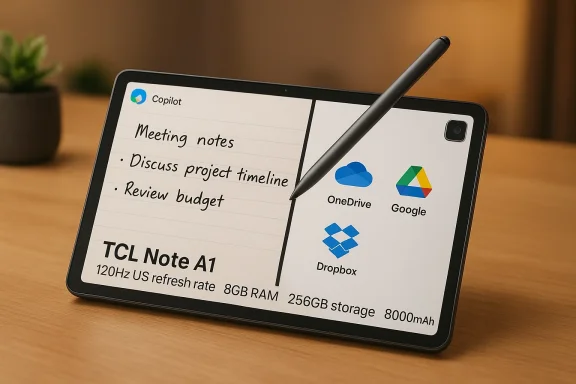
TCL’s product messaging and multiple independent reports converge on a core set of features that define the Note A1’s appeal for productivity use:- NXTPAPER Pure display, 120Hz refresh: The Note A1 uses an 11–11.5‑inch matte display that TCL positions as “paper‑like,” with a 120Hz refresh rate to make pen and gesture interactions feel responsive and to reduce perceived latency. This is a key hardware differentiator versus e‑ink tablets that refresh slowly by comparison.
- T‑Pen Pro stylus: High‑resolution stylus input with very low latency and many pressure levels (TCL advertises 8,192 pressure levels and sub‑5ms latency on the T‑Pen Pro). This is aimed at replicating pen‑on‑paper feel while providing full handwriting recognition and conversion.
- Camera and OCR: Unlike many e‑ink devices, the Note A1 includes a 13MP rear camera—handy for scanning paper documents with on‑device OCR so you can convert a physical contract into an editable PDF and sign it with the pen. Multiple hardware summaries confirm the presence of a 13MP rear camera and built‑in OCR/scan capabilities.
- Hardware, battery, memory: TCL lists an 8,000mAh battery, slim aluminum body (roughly 5.5mm, ~500 g), and a configuration with 8GB RAM and 256GB storage in consumer materials and press coverage—numbers that position the Note A1 as a capable productivity slate rather than a basic ereader.
- AI tools and Microsoft partnership: TCL has showcased Microsoft Copilot and Azure‑backed services integrated into the Note A1’s workflow in CES demos and press releases; TCL pitches features like real‑time transcription, automatic summaries, and handwriting‑to‑text powered by AI. That Microsoft relationship underpins much of TCL’s productivity messaging.
Cautionary note on conflicting SKU claims: some outlets report different SoC/OS details depending on SKU and region—press copy and hands‑on impressions vary between “simplified Android without full Google Play” and “full Android with Google services.” That matters greatly for productivity buyers who rely on Play Store apps or Google account integration; I’ll unpack this divergence below.
BYOA vs. Appliance: The Practical Differences for Productivity
When you choose an Android 14 tablet for productivity rather than a closed ereader, several practical advantages show up immediately in real work:- Native cloud mapping: On Android you can mount and access OneDrive, Google Drive, Dropbox, or a Synology NAS through standard apps or file‑management tools. No more “Send to Kindle” middleman. This drastically shortens the path from a desktop file to annotated document. Many Note A1 hands‑on reports emphasize direct LAN/cloud file transfer and split‑screen file access.
- Sideloading and app choice: Need Obsidian, Notion, a specialized PDF editor, or a custom transcription client? Install it. Kindle’s model makes such installs impractical; you often have to rely on Amazon’s choices or convoluted email conversions. The Note A1’s Android base removes that friction—provided the SKU you buy includes the app frameworks you need (see the caveat below). ([theverge.com](Kindle Scribe (2024) review: nothing to write home about that works:** Real multitasking matters when you’re doing research plus note taking. Split‑screen, floating windows, and fast app switching let you keep reference material visible while writing. Multiple outlets call out split‑screen and 120Hz responsiveness as a major step up from E‑ink alternatives.
- Hardware leverage: The Note A1’s eight‑microphone array and good audio capture enable local or cloud transcription workflows with your chosen provider (e.g., Otter.ai, local speech engines, or a private LLM pipeline). TCL’s microphone and audio claims are repeated in product materials and press coverage.
- Document scanner + sign + share: A rapid capture‑OCR‑annotate path lets you turn a paper contract into an editable document in under a minute, sign with the T‑Pen, and send back via Slack or email—an actual mobile office workflow that the Kindle Scribe cannot match natively.
The “Copilot” Question: Is This AI Bloatware or Useful Tooling?
TCL has leaned into an “AI tablet” narrative, emphasizing Microsoft Copilot integration in demos and marketing. That’s a double‑edged sword.- The upside: Copilot and Azure‑backed services promise smoother meeting transcription, automated summaries, and cloud‑assisted writing tools. When implemented with transparency and local processing options, those features can accelerate repetitive work and surface useful insights. TCL’s demos and awards mention Copilot integration as a headline capability.
- The downside: Bundling a single, system‑level AI makes vendor lock‑in real again—users may have privacy concerns, or simply prefer a different assistant (OpenAI, Anthropic, local LLMs). The important distinction with a full Android tablet is that you can replace or disable the bundled AI features if you prefer another stack.
- Disable system shortcuts and remove intrusive widgets if you dislikstant.
- Install your preferred transcription, drafting, or LLM client from Google Play or sideload an APK.
- Route microphones and local storage to your chosen toolchain—use Otter.ai, a private API, or a locally‑run model depending on privacy and latency requirements.
The Important Caveats: SKU, OS, and Regional Differences
Here’s where buyers must be careful. Multiple credible outlets report inconsistencies in software packaging and the presence of Google services across SKUs and regions:- Some hands‑on reports state the Note A1 runs a simplified Android variant without the Google Play Store, shipped with a curated app set including Microsoft Edge and Outlook—mirroring a more appliance‑like configuration in some regions.
- Other outlets and TCL press materials emphasize Android 14 compatibility, full app support, and the ability to use cloud services like Google Drive and Dropbox.
- Confirm the SKU you are buying—ask the retailer or check the product page for “Google Play” or “GMS” (Google Mobile Services) markers.
- If the SKU lacks Play Store access, verify whether the device permits sideloading of APKs and whether key apps (Obsidian, Notion, Otter.ai, your LLM client) function on the supplied OS.
3ecurity support windows—Android update commitments vary widely by OEM and SKU, and long‑term firmware support matters for security and longevity.
Performance, Battery, and Real‑World Use
TCL’s quoted specs (8GB RAM, 256GB storage, 8,000mAh battery) and the 120Hz NXTPAPER display suggest a device that can sustain long writing sessions and decent multitasking without being a hot‑rod performance tablet. Independent press coverage confirms those headline specs and the device’s ergonomics and battery claims in preview pieces.Real‑world implications:
- Expect better responsiveness than E‑ink devices for app switching and split‑screen work, thanks to higher refresh and more memory.
- Battery life will depend heavily on whether you run the display at 120Hz constantly and whether you use cloud‑AI features in real time—both factors that can increase power draw. Verify measured battery tests once full reviews publish.
- The inclusion of an 8‑mic array and good audio capture supports hands‑free transcription for meetings; that reduces the need for a separate recorder or conference mic.
Security, Privacy, and Update Concerns
Two productivity‑critical considerations when you pick an Android 14 tablet:- Updates: Android update policies vary by OEM and region. TCL’s promises at launch are one thing; the real test is the device’s update cadence over months and years. Independent community threads and prior device histories suggest buyers should insist on clear update promises or choose SKUs with known GMS support and update lanes.
- AI data handling: If the device routes transcriptions or handwriting conversion through a cloud AI, understand where that data goes—Microsoft Azure? A local processing pipeline? TCL has publicly demoed Copilot and Azure usage, but implementation details and regional cloud endpoints will dictate privacy behavior. Demand transparency and, where possible, on‑device processing options.
A Practical Buyer’s Checklist: Is the Note A1 Right for You?
- Define your core workflows. If your day is research + note taking + document signing, an open Android device is likely better.
- Confirm SKU and Play Store availability before purchase. If Play Store is absent, verify sideloading and app compatibility.
- Test your essential apps (Obsidian, Notion, PDF expert, Otter.ai) on the device in a return window—or read hands‑on reviews that test these apps.
- Verify update policy: ask how many Android version upgrades and how many years of security patches TCL promises for the specific SKU.
5.camera behavior in independent reviews if transcription and OCR are critical—those features matter for real productivity gains.
Where the Kindle Scribe Still Wins
This is not a blanket dismissal of the Kindle Scribe. There are use cases where a walled gaMinimalist reading and distraction‑free writing: If you simply want the best possible reading surface with an excellent ebook store, Kindle remains hard to beat.- Battery efficiency for pure reading: E‑ink devices can have exceptional standby and reading runtimes because they don’t refresh like LCDs.
- Simplicity: For users who never want to manage apps, updates, or permissions, an appliance that “just works” is a feature, not a bug.
The Verdict: Tool vs. Appliance
The choice between TCL’s Note A1 NXTPAPER and a Kindle Scribe boils down to the question: do you want an appliance that excels at a narrow set of tasks, or a tool that adapts to many?- The Kindle Scribe is an excellent appliance for reading-first workflows and users who prize extreme simplicity.
- The TCL Note A1 is a tool—it’s designed to be shaped by your software choices and cloud connections. For professionals who juggle reference material, note‑taking, scanning, signing, and need real-time transcription or multi‑app setups, an open Android 14 tablet with NXTPAPER hardware is the more productive platform—provided you confirm the SKU supports the app ecosystem you depend on. Multiple independent press pieces and TCL’s own materials corroborate the Note A1’s paper‑like screen, pen responsiveness, camera/OCR capability, and AI focus; but they also show variation in software packaging that buyers must verify.
Final Recommendations for WindowsForum Readers
- If you live in the Microsoft ecosystem and want Copilot‑style integration, the Note A1’s Microsoft partnership is compelling—just confirm where data is processed and whether Copilot features can be disabled or replaced with your preferred stack.
- If you want maximum control and plan to run a personal stack (Obsidian + Otter.ai + a private LLM), insist on a Play Store‑enabled SKU or confirm sideloading and app behavior in your market.
- For enterprise deployments, check MDM and management features; Android can be managed effectively, but vendor update promises are part of the total cost of ownership.
- Wait for full hands‑on reviews before making a definitive buy if your workflow depends on a small set of mission‑critical apps—real world performance, update cadence, and software packaging will determine whether the Note A1 truly delivers on the BYOA promise in your region.
The TCL Note A1 NXTPAPER demonstrates that eye‑friendly displays and pen fidelity no longer require surrendering app choice or cloud freedom. For professionals who want a portable, paper‑like canvas that plugs into the tools they already use—or the freedom to change those tools—the Note A1’s BYOA promise is compelling. Just confirm the SKU details before you buy, and treat vendor AI partnerships as optional accelerants rather than fixed dependencies. The walled garden remains comfortable for readers; for deep, connected work in 2026, the open tool tends to win.
Source: vernonchan.com Android 14 Tablet For Productivity: Why The TCL Note A1 Beats Kindle’s Walled Garden
