

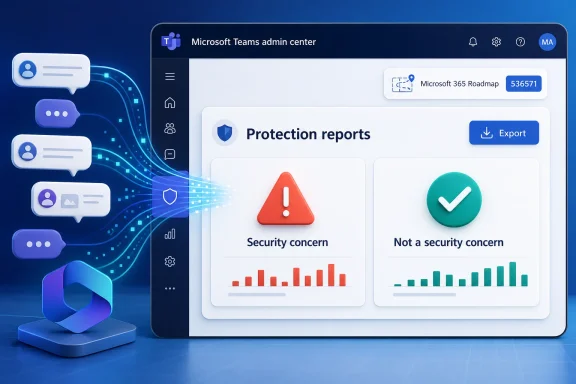
Microsoft has launched Microsoft 365 Roadmap ID 536571 for Microsoft Teams, bringing user-reported security signals into Teams admin center Protection reports for worldwide standard multi-tenant customers after general availability in April 2026 and a July 6 roadmap update. The change sounds modest: another report, another export button, another surface inside an already crowded admin portal. But for Teams administrators, it marks a more important shift in Microsoft’s collaboration-security strategy: user judgment is being pulled out of the helpdesk queue and into the operational telemetry layer.
As described in the Microsoft 365 Roadmap and reflected in Microsoft’s Teams admin release notes, admins can now view and download signals from messages users report as a security concern or as not a security concern inside TAC Protection reports. Microsoft Learn documentation already framed the underlying workflow around end-user reporting in Teams, Defender for Office 365, and the Teams admin center. What is new is the TAC-centered visibility: the administrative plane for Teams is no longer merely where policy is configured, but where user feedback on those policies becomes measurable.
That matters because Teams has become one of the places where enterprise security controls meet real human ambiguity. A malicious link in chat is not quite email, not quite endpoint telemetry, and not quite a classic collaboration-governance problem. It is a message in the middle of work, and Microsoft is now betting that the people closest to that work can help tune the machine.
For years, Microsoft’s security posture around collaboration has been anchored in Defender for Office 365, Microsoft Defender XDR, Purview, and the broader security portal ecosystem. Teams administrators, meanwhile, have lived in a separate operating rhythm: meetings, messaging policies, calling, lifecycle settings, external access, compliance controls, app governance, and the occasional emergency caused by someone discovering federation settings too late.
This update narrows that separation. User reports about suspicious or incorrectly flagged Teams messages are now visible and downloadable in Teams admin center Protection reports, not just in the security workflows where SecOps teams typically triage submissions. The immediate beneficiary is the admin who needs to know whether a Teams messaging policy is generating useful signal, user confusion, or both.
Microsoft’s Learn documentation describes two related reporting experiences. Users can report a Teams message as a security concern, such as suspected spam, phishing, or malicious content. They can also report a message as not a security concern when Microsoft’s Link Protection or related security controls have flagged something incorrectly. Those two directions are equally important. One tells the organization what users fear; the other tells it where the defensive layer may be overreaching.
The roadmap language is careful: admins can “view and download signals,” not necessarily inspect every detail of every message from every angle inside TAC. That phrasing matters. Microsoft is positioning Teams admin center as a reporting and trend surface, while Defender remains the deeper triage and incident-response environment. The division is sensible, but it also exposes how complicated Microsoft 365 security administration has become: the same user click may create value in Teams admin center, Defender submissions, alert policies, reporting mailboxes, and downstream SIEM or SOAR workflows.
The practical win is that Teams administrators no longer have to wait for anecdote. If users repeatedly report messages as security concerns in specific collaboration patterns, or repeatedly mark Microsoft’s detections as wrong, that is operational feedback. It is not just a security event; it is a product-management signal for the tenant.
That is why the “not a security concern” side of this update deserves as much attention as the suspicious-message side. Microsoft Learn documentation notes that users can report messages in Teams chats or channels that were incorrectly flagged as containing malicious URLs. This is not simply a complaint button. At scale, it becomes a rough measurement of trust between the tenant’s users and Microsoft’s protection stack.
The industry has spent decades telling users to report suspicious messages, with mixed results. The more interesting maturity test is whether organizations also listen when users say the security system got it wrong. If false positives pile up and nothing changes, users learn to route around protection. If reports disappear into a black box, administrators lose one of the few direct measurements of user-facing friction.
Teams makes this harder because communication is faster and more contextual than email. A link from a colleague in a project channel may be benign, but if it trips a policy, the user’s next action depends on trust: trust in the colleague, trust in Microsoft, trust in the warning, and trust that reporting the issue will not waste time. Surfacing these signals in TAC gives Teams admins a chance to observe whether that trust is holding.
There is a broader philosophical change here. Microsoft is treating end-user reporting not merely as an input to threat analysis, but as an input to policy calibration. That is the right direction. A protection system that cannot hear from users when it is wrong is not adaptive; it is just loud.
That does not mean TAC replaces Defender. Microsoft’s own documentation still points administrators to Defender for Office 365 and the Microsoft Defender portal for user-reported submissions, alert policies, and deeper triage. Reported Teams items can generate alerts such as a Teams message reported by a user as a security risk or as not a security risk. Microsoft’s Security Operations Guide for Teams protection also says SecOps teams should start triage and investigation from the Defender incidents queue or from SIEM and SOAR integrations.
But the center of gravity is shifting. Teams admins increasingly need security literacy, and security teams increasingly need Teams context. A report of a suspicious message is more meaningful when paired with the surrounding collaboration pattern: was it in a one-to-one chat, a channel, a shared channel, an external collaboration space, or a recurring community where guests have access? Defender can process the artifact, but Teams admin center is where tenant-level behavior becomes visible to the people who manage the collaboration environment.
The export function matters because reporting without extraction is often reporting without accountability. Admins need to compare signal over time, correlate spikes with policy changes, hand data to security teams, and document whether user reports led to action. A dashboard is useful during an incident; a downloadable dataset is useful after one.
This is also a concession to how enterprise administration actually works. In many organizations, Teams admins are not the same people as security analysts. They may not have broad Defender permissions, and they may not be invited into every incident channel. By putting summarized user reporting signals into TAC Protection reports, Microsoft is giving those admins enough visibility to participate in the conversation without necessarily granting them the keys to the entire security kingdom.
For messages reported as a security concern, Microsoft says the Teams admin center setting controls whether users can report messages from Teams. It is on by default in the Teams admin center, according to Microsoft Learn. But for user-reported messages to show up correctly on the User reported tab in Defender, the corresponding setting in the Defender portal also needs to be enabled, especially for existing tenants.
The “not a security concern” path has its own controls. Microsoft Learn describes a Teams admin center setting for reporting incorrect security detections, found under Messaging safety, and a Defender portal setting that is on by default for new tenants but may need enabling in existing ones. That distinction is exactly the kind of detail that creates uneven rollouts in real enterprises. Newer tenants may appear to work out of the box; older tenants may require deliberate review.
This is where the roadmap entry is both useful and incomplete. It tells admins that the reporting signals are now available in TAC Protection reports, but it does not by itself guarantee that a tenant is configured to generate meaningful data. Admins should treat launch as a prompt to validate the pipeline, not a reason to assume the job is done.
There is also a permissions question lurking beneath the surface. Microsoft Learn says modifying the Defender portal setting for monitoring reported Teams items requires membership in appropriate role groups such as Organization Management or Security Administrator. Teams administrators who own messaging policies may not have those rights. If the organization has separated Teams administration from security administration — as it should in many cases — rollout becomes a coordination exercise.
That is not a flaw in the feature. It is a reminder that Microsoft 365 administration is now policy choreography. A setting in Teams, a setting in Defender, alert behavior in XDR, user education, and reporting exports all have to align before “end user security reporting” becomes operationally useful.
But user reporting is noisy by nature. Some users will report aggressively because they have been trained to err on the side of caution. Others will never report anything because they distrust the process, do not know the button exists, or assume someone else is responsible. Some reports will reflect real attacks. Others will reflect confusing security UI, overzealous Safe Links behavior, or simple frustration with blocked workflows.
The value of this feature, then, is not in treating every report as ground truth. It is in aggregating reports into patterns that administrators can challenge. A sudden rise in “security concern” reports after a guest-access expansion may mean attackers are probing new collaboration paths. A sudden rise in “not a security concern” reports after a policy change may mean a legitimate business workflow is being throttled. A low reporting rate across a high-risk tenant may mean the feature is hidden, disabled, or poorly explained to users.
Microsoft’s Security Operations Guide for Teams protection says user-reported Teams messages and calls can generate alerts and be correlated to Defender incidents, but also notes that these alerts currently do not generate automated investigation and response investigations. That is a meaningful boundary. User reports can initiate or enrich triage, but they are not a substitute for a mature investigation process.
The temptation will be to automate too much too quickly. If enough users report a message, should the tenant automatically block a sender, purge content, quarantine a URL, or open an incident? Maybe — but only with strong safeguards. Collaboration environments are full of social and operational complexity, and user reports can be weaponized, misunderstood, or biased by training campaigns.
The better use is more humble. Treat the reports as leading indicators. Let them inform policy, highlight training gaps, and guide investigation. Do not treat them as a democratic vote on what is malicious.
The important phrase is “control plane.” Microsoft wants administrators to manage risk where work happens, but also to route deep investigation through Defender and XDR. Teams admin center is becoming the collaboration control plane. Defender is the security operations control plane. Purview is the compliance and governance control plane. The more Microsoft 365 matures, the more every serious administrative task crosses at least two of them.
That is powerful when the integration works and exhausting when it does not. Admins have to know where a setting lives, where a signal appears, where an alert is generated, and where an investigation is supposed to begin. The TAC Protection reports update reduces one kind of fragmentation by putting user-reported security trends in front of Teams administrators. It does not eliminate the underlying sprawl.
For small and midsize organizations, the change may be most useful as a visibility upgrade. A single admin wearing the Teams, security, and compliance hats can now see user-reported message trends without constantly pivoting between portals. For larger enterprises, the impact is more organizational: Teams admins can bring data to SecOps rather than anecdotes.
The more subtle benefit is feedback to policy owners. If a policy change produces a wave of “not a security concern” reports, that is a signal that policy has become too blunt or that users were not prepared for the change. If a training campaign produces more “security concern” reports without a matching increase in confirmed threats, that may indicate awareness is up but precision is still low. Either way, the data makes the conversation less theological.
This is where Microsoft has an opportunity to do more. TAC Protection reports should not merely show volume. The long-term value would come from trend baselines, segmentation by policy scope, clearer handoff into Defender incidents, and enough privacy-preserving context to understand which parts of the tenant are generating the most useful signal. A CSV export is a start. A coherent feedback loop is the prize.
The first skepticism should be about completeness. Roadmap ID 536571 is listed for worldwide standard multi-tenant cloud customers, with General Availability and Targeted Release rings. It does not list every sovereign cloud or special environment. Organizations outside standard commercial Microsoft 365 should verify availability through their own message center, tenant experience, or Microsoft account team rather than assuming parity.
The second skepticism should be about who sees what. User-reported security signals can be sensitive even when message content is not fully exposed in a report. The fact that a user reported a colleague’s message, a guest’s link, or a shared-channel item can carry internal political and privacy implications. Admins should understand role assignments, retention practices, and export handling before turning a useful report into a spreadsheet that travels too far.
The third skepticism should be about user education. A reporting button that users do not understand creates weak data. If “security concern” means phishing to one employee, harassment to another, and “I don’t like this message” to a third, the resulting signal is messy. Microsoft’s UI distinguishes security reporting from other reporting paths, but tenants still need plain-language guidance.
The fourth skepticism should be about response obligations. Once admins can see and download these signals in TAC, ignoring them becomes harder to defend. A report creates a record. A trend creates evidence. Organizations should decide who reviews the data, how often, what counts as escalation-worthy, and how feedback reaches the teams that own Defender policies.
None of this makes the feature unwelcome. It makes it administrative infrastructure. Infrastructure is valuable when it has owners.
If Microsoft follows through, this could become one of the more practical security additions to Teams: not dramatic, not flashy, but close to the everyday friction that determines whether protections are trusted or bypassed. The next step should be richer correlation between TAC trend reporting and Defender investigation outcomes, so admins can see not just what users reported, but which reports proved useful. In modern collaboration security, the winning platform will not be the one that shouts the loudest about AI-powered detection; it will be the one that learns fastest when humans say, “this looks wrong,” or just as importantly, “your system got this one wrong.”
As described in the Microsoft 365 Roadmap and reflected in Microsoft’s Teams admin release notes, admins can now view and download signals from messages users report as a security concern or as not a security concern inside TAC Protection reports. Microsoft Learn documentation already framed the underlying workflow around end-user reporting in Teams, Defender for Office 365, and the Teams admin center. What is new is the TAC-centered visibility: the administrative plane for Teams is no longer merely where policy is configured, but where user feedback on those policies becomes measurable.
That matters because Teams has become one of the places where enterprise security controls meet real human ambiguity. A malicious link in chat is not quite email, not quite endpoint telemetry, and not quite a classic collaboration-governance problem. It is a message in the middle of work, and Microsoft is now betting that the people closest to that work can help tune the machine.
 Microsoft Moves the Security Conversation Back Into Teams
For years, Microsoft’s security posture around collaboration has been anchored in Defender for Office 365, Microsoft Defender XDR, Purview, and the broader security portal ecosystem. Teams administrators, meanwhile, have lived in a separate operating rhythm: meetings, messaging policies, calling, lifecycle settings, external access, compliance controls, app governance, and the occasional emergency caused by someone discovering federation settings too late.This update narrows that separation. User reports about suspicious or incorrectly flagged Teams messages are now visible and downloadable in Teams admin center Protection reports, not just in the security workflows where SecOps teams typically triage submissions. The immediate beneficiary is the admin who needs to know whether a Teams messaging policy is generating useful signal, user confusion, or both.
Microsoft’s Learn documentation describes two related reporting experiences. Users can report a Teams message as a security concern, such as suspected spam, phishing, or malicious content. They can also report a message as not a security concern when Microsoft’s Link Protection or related security controls have flagged something incorrectly. Those two directions are equally important. One tells the organization what users fear; the other tells it where the defensive layer may be overreaching.
The roadmap language is careful: admins can “view and download signals,” not necessarily inspect every detail of every message from every angle inside TAC. That phrasing matters. Microsoft is positioning Teams admin center as a reporting and trend surface, while Defender remains the deeper triage and incident-response environment. The division is sensible, but it also exposes how complicated Microsoft 365 security administration has become: the same user click may create value in Teams admin center, Defender submissions, alert policies, reporting mailboxes, and downstream SIEM or SOAR workflows.
The practical win is that Teams administrators no longer have to wait for anecdote. If users repeatedly report messages as security concerns in specific collaboration patterns, or repeatedly mark Microsoft’s detections as wrong, that is operational feedback. It is not just a security event; it is a product-management signal for the tenant.
The False Positive Is Finally Treated as First-Class Telemetry
Security products love to talk about detections. Administrators spend almost as much time living with the consequences of bad ones. A false positive in email is irritating; a false positive in Teams can interrupt live work, block a link in the middle of a customer escalation, or teach users that the warning layer is arbitrary.That is why the “not a security concern” side of this update deserves as much attention as the suspicious-message side. Microsoft Learn documentation notes that users can report messages in Teams chats or channels that were incorrectly flagged as containing malicious URLs. This is not simply a complaint button. At scale, it becomes a rough measurement of trust between the tenant’s users and Microsoft’s protection stack.
The industry has spent decades telling users to report suspicious messages, with mixed results. The more interesting maturity test is whether organizations also listen when users say the security system got it wrong. If false positives pile up and nothing changes, users learn to route around protection. If reports disappear into a black box, administrators lose one of the few direct measurements of user-facing friction.
Teams makes this harder because communication is faster and more contextual than email. A link from a colleague in a project channel may be benign, but if it trips a policy, the user’s next action depends on trust: trust in the colleague, trust in Microsoft, trust in the warning, and trust that reporting the issue will not waste time. Surfacing these signals in TAC gives Teams admins a chance to observe whether that trust is holding.
There is a broader philosophical change here. Microsoft is treating end-user reporting not merely as an input to threat analysis, but as an input to policy calibration. That is the right direction. A protection system that cannot hear from users when it is wrong is not adaptive; it is just loud.
Teams Admin Center Becomes a More Serious Security Console
The Teams admin center has never been a toy, but it has often felt like an administrative console adjacent to security rather than part of the security fabric itself. This update moves it closer to the latter. Protection reports inside TAC now carry user security signals that administrators can view and export, giving Teams owners a more direct role in understanding how messaging protections are behaving.That does not mean TAC replaces Defender. Microsoft’s own documentation still points administrators to Defender for Office 365 and the Microsoft Defender portal for user-reported submissions, alert policies, and deeper triage. Reported Teams items can generate alerts such as a Teams message reported by a user as a security risk or as not a security risk. Microsoft’s Security Operations Guide for Teams protection also says SecOps teams should start triage and investigation from the Defender incidents queue or from SIEM and SOAR integrations.
But the center of gravity is shifting. Teams admins increasingly need security literacy, and security teams increasingly need Teams context. A report of a suspicious message is more meaningful when paired with the surrounding collaboration pattern: was it in a one-to-one chat, a channel, a shared channel, an external collaboration space, or a recurring community where guests have access? Defender can process the artifact, but Teams admin center is where tenant-level behavior becomes visible to the people who manage the collaboration environment.
The export function matters because reporting without extraction is often reporting without accountability. Admins need to compare signal over time, correlate spikes with policy changes, hand data to security teams, and document whether user reports led to action. A dashboard is useful during an incident; a downloadable dataset is useful after one.
This is also a concession to how enterprise administration actually works. In many organizations, Teams admins are not the same people as security analysts. They may not have broad Defender permissions, and they may not be invited into every incident channel. By putting summarized user reporting signals into TAC Protection reports, Microsoft is giving those admins enough visibility to participate in the conversation without necessarily granting them the keys to the entire security kingdom.
The Button Only Works If the Tenant Plumbing Is Right
The risk with a feature like this is that organizations assume the presence of a report means the reporting pipeline is healthy. Microsoft’s documentation suggests otherwise. User reporting for Teams messages depends on settings in both Teams admin center and the Microsoft Defender portal, and the relationship between them is easy to misunderstand.For messages reported as a security concern, Microsoft says the Teams admin center setting controls whether users can report messages from Teams. It is on by default in the Teams admin center, according to Microsoft Learn. But for user-reported messages to show up correctly on the User reported tab in Defender, the corresponding setting in the Defender portal also needs to be enabled, especially for existing tenants.
The “not a security concern” path has its own controls. Microsoft Learn describes a Teams admin center setting for reporting incorrect security detections, found under Messaging safety, and a Defender portal setting that is on by default for new tenants but may need enabling in existing ones. That distinction is exactly the kind of detail that creates uneven rollouts in real enterprises. Newer tenants may appear to work out of the box; older tenants may require deliberate review.
This is where the roadmap entry is both useful and incomplete. It tells admins that the reporting signals are now available in TAC Protection reports, but it does not by itself guarantee that a tenant is configured to generate meaningful data. Admins should treat launch as a prompt to validate the pipeline, not a reason to assume the job is done.
There is also a permissions question lurking beneath the surface. Microsoft Learn says modifying the Defender portal setting for monitoring reported Teams items requires membership in appropriate role groups such as Organization Management or Security Administrator. Teams administrators who own messaging policies may not have those rights. If the organization has separated Teams administration from security administration — as it should in many cases — rollout becomes a coordination exercise.
That is not a flaw in the feature. It is a reminder that Microsoft 365 administration is now policy choreography. A setting in Teams, a setting in Defender, alert behavior in XDR, user education, and reporting exports all have to align before “end user security reporting” becomes operationally useful.
The Human Sensor Network Has Limits
Microsoft’s move fits a wider pattern across enterprise security: users are being treated as sensors. That is not wrong. Users see suspicious chats, odd links, impersonation attempts, and context-breaking messages before automated systems always understand them. In collaboration tools, especially, context often lives in the user’s head before it is encoded in metadata.But user reporting is noisy by nature. Some users will report aggressively because they have been trained to err on the side of caution. Others will never report anything because they distrust the process, do not know the button exists, or assume someone else is responsible. Some reports will reflect real attacks. Others will reflect confusing security UI, overzealous Safe Links behavior, or simple frustration with blocked workflows.
The value of this feature, then, is not in treating every report as ground truth. It is in aggregating reports into patterns that administrators can challenge. A sudden rise in “security concern” reports after a guest-access expansion may mean attackers are probing new collaboration paths. A sudden rise in “not a security concern” reports after a policy change may mean a legitimate business workflow is being throttled. A low reporting rate across a high-risk tenant may mean the feature is hidden, disabled, or poorly explained to users.
Microsoft’s Security Operations Guide for Teams protection says user-reported Teams messages and calls can generate alerts and be correlated to Defender incidents, but also notes that these alerts currently do not generate automated investigation and response investigations. That is a meaningful boundary. User reports can initiate or enrich triage, but they are not a substitute for a mature investigation process.
The temptation will be to automate too much too quickly. If enough users report a message, should the tenant automatically block a sender, purge content, quarantine a URL, or open an incident? Maybe — but only with strong safeguards. Collaboration environments are full of social and operational complexity, and user reports can be weaponized, misunderstood, or biased by training campaigns.
The better use is more humble. Treat the reports as leading indicators. Let them inform policy, highlight training gaps, and guide investigation. Do not treat them as a democratic vote on what is malicious.
The Teams Security Story Is Really About Control Planes
This update lands in the middle of Microsoft’s larger effort to make Teams a protected collaboration surface rather than a loosely monitored chat app. Defender for Office 365 has been expanding Teams protections, including Safe Links integration, reporting workflows, and SecOps guidance. Microsoft has also been tightening the relationship between collaboration data, security portals, and administrative controls.The important phrase is “control plane.” Microsoft wants administrators to manage risk where work happens, but also to route deep investigation through Defender and XDR. Teams admin center is becoming the collaboration control plane. Defender is the security operations control plane. Purview is the compliance and governance control plane. The more Microsoft 365 matures, the more every serious administrative task crosses at least two of them.
That is powerful when the integration works and exhausting when it does not. Admins have to know where a setting lives, where a signal appears, where an alert is generated, and where an investigation is supposed to begin. The TAC Protection reports update reduces one kind of fragmentation by putting user-reported security trends in front of Teams administrators. It does not eliminate the underlying sprawl.
For small and midsize organizations, the change may be most useful as a visibility upgrade. A single admin wearing the Teams, security, and compliance hats can now see user-reported message trends without constantly pivoting between portals. For larger enterprises, the impact is more organizational: Teams admins can bring data to SecOps rather than anecdotes.
The more subtle benefit is feedback to policy owners. If a policy change produces a wave of “not a security concern” reports, that is a signal that policy has become too blunt or that users were not prepared for the change. If a training campaign produces more “security concern” reports without a matching increase in confirmed threats, that may indicate awareness is up but precision is still low. Either way, the data makes the conversation less theological.
This is where Microsoft has an opportunity to do more. TAC Protection reports should not merely show volume. The long-term value would come from trend baselines, segmentation by policy scope, clearer handoff into Defender incidents, and enough privacy-preserving context to understand which parts of the tenant are generating the most useful signal. A CSV export is a start. A coherent feedback loop is the prize.
Where Administrators Should Be Skeptical
There is a danger in reading this feature as a complete security upgrade. It is not. It is a reporting integration that can improve visibility and policy tuning if the underlying protections, permissions, and operational processes are already in decent shape.The first skepticism should be about completeness. Roadmap ID 536571 is listed for worldwide standard multi-tenant cloud customers, with General Availability and Targeted Release rings. It does not list every sovereign cloud or special environment. Organizations outside standard commercial Microsoft 365 should verify availability through their own message center, tenant experience, or Microsoft account team rather than assuming parity.
The second skepticism should be about who sees what. User-reported security signals can be sensitive even when message content is not fully exposed in a report. The fact that a user reported a colleague’s message, a guest’s link, or a shared-channel item can carry internal political and privacy implications. Admins should understand role assignments, retention practices, and export handling before turning a useful report into a spreadsheet that travels too far.
The third skepticism should be about user education. A reporting button that users do not understand creates weak data. If “security concern” means phishing to one employee, harassment to another, and “I don’t like this message” to a third, the resulting signal is messy. Microsoft’s UI distinguishes security reporting from other reporting paths, but tenants still need plain-language guidance.
The fourth skepticism should be about response obligations. Once admins can see and download these signals in TAC, ignoring them becomes harder to defend. A report creates a record. A trend creates evidence. Organizations should decide who reviews the data, how often, what counts as escalation-worthy, and how feedback reaches the teams that own Defender policies.
None of this makes the feature unwelcome. It makes it administrative infrastructure. Infrastructure is valuable when it has owners.
The April Launch Turns User Reports Into an Admin Habit
The concrete lesson from this roadmap item is that Teams security reporting has matured from a user-facing action into an administrative dataset. That should change how tenants approach both policy and training. The signal is only useful if admins make it part of their regular operating rhythm.- Organizations should verify that both Teams admin center and Defender portal settings are aligned for reporting security concerns and reporting incorrect detections.
- Teams administrators should review TAC Protection reports after major messaging, Safe Links, external access, or guest collaboration policy changes.
- Security teams should treat spikes in user-reported Teams messages as triage prompts rather than automatic proof of compromise.
- Tenant owners should define who is allowed to export user-reported security signal data and how those exports are stored or shared.
- User education should explain both reporting paths, because “this looks dangerous” and “this was wrongly blocked” are different kinds of security intelligence.
- Older tenants should be checked especially carefully, because Microsoft’s documentation distinguishes default behavior for new tenants from settings that existing tenants may need to enable.
If Microsoft follows through, this could become one of the more practical security additions to Teams: not dramatic, not flashy, but close to the everyday friction that determines whether protections are trusted or bypassed. The next step should be richer correlation between TAC trend reporting and Defender investigation outcomes, so admins can see not just what users reported, but which reports proved useful. In modern collaboration security, the winning platform will not be the one that shouts the loudest about AI-powered detection; it will be the one that learns fastest when humans say, “this looks wrong,” or just as importantly, “your system got this one wrong.”
References
- Primary source: Microsoft 365 Roadmap
Published: 2026-07-06T23:00:50.6928566Z
Loading…
www.microsoft.com