

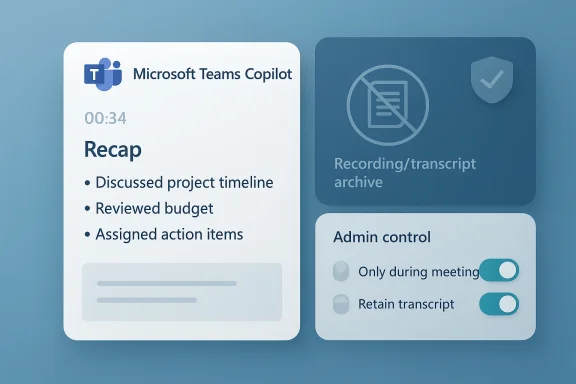
Microsoft Teams is headed into a meaningful compliance shift that will matter far more to IT admins than to casual users. Microsoft is changing how Copilot-generated meeting recaps work so organizations can keep AI meeting summaries even when they do not want to retain recordings or saved transcripts. For regulated businesses, that is a big deal: it moves Teams closer to a model where AI assistance and long-term retention can be governed separately, rather than treated as one bundled decision. Microsoft’s own documentation already shows the company has been refining that separation, but this new change pushes the policy boundary further than before. (learn.microsoft.com)
The immediate significance is straightforward. Microsoft Teams has traditionally tied rich post-meeting experiences to transcript or recording artifacts, because those artifacts are what fuel recaps, summaries, and searchable intelligence. In Microsoft’s current documentation, organizers can set Copilot to work “during and after” a meeting when transcription is available, or “only during the meeting” when the organization wants temporary speech-to-text processing without persistence after the call ends. (learn.microsoft.com)
What appears to be changing is the default and the policy envelope around those experiences. According to Microsoft’s own support content, Copilot can run without saving a transcript, but the resulting post-meeting recap is unavailable if no transcript is kept. That is exactly the point of tension the new change is trying to resolve: compliance teams want the productivity boost of AI recaps, but they do not want the retention footprint of a permanent meeting artifact.
For enterprise IT, this is not merely a user-interface tweak. It is a governance question about data retention, discoverability, legal hold exposure, and internal policy consistency. Microsoft explicitly says admins can manage Copilot behavior in the Teams admin center or via PowerShell, and that policy values determine whether organizers can choose temporary or retained speech-to-text processing. The new change reinforces that this is an admin-led control surface, not just a meeting organizer preference. (learn.microsoft.com)
The move also reflects a broader pattern in Microsoft’s AI strategy: the company wants Copilot in the flow of work, but it also wants customers to trust that Copilot can operate inside existing Microsoft 365 security and compliance boundaries. That balance has become central to Microsoft’s enterprise pitch, especially as customers compare Teams to alternative collaboration stacks that are adding their own AI note-taking and transcription features.
That created a structural limitation for customers in regulated industries. If a company wanted post-meeting AI summaries, it often had to accept the existence of saved recordings or transcripts. If it wanted to prevent storage of those artifacts, it often lost the richer recap experience. Microsoft’s current support pages acknowledge this dependency plainly: Copilot can work with temporary speech-to-text data during the meeting, but once the meeting ends, the data disappears if the organizer chose the temporary mode.
Microsoft has already tried to give administrators more control over this tradeoff. The Teams admin documentation shows multiple policy states, including On, On with saved transcript required, On with transcript saved by default, and Off. That tells us Microsoft has been moving toward policy granularity for some time, and the new compliance change is really the latest step in a longer evolution rather than an isolated one-off announcement. (learn.microsoft.com)
The context matters because compliance requirements differ sharply by sector. Financial firms, healthcare organizations, defense contractors, and public-sector bodies frequently operate under retention rules that are more restrictive than the default productivity-first posture of typical office software. In those environments, being able to say “use AI recaps, but do not keep the underlying transcript” is not a convenience feature; it is a permission structure that can determine whether a rollout happens at all.
The new change also fits the product direction Microsoft has been telegraphing elsewhere. Microsoft has been adding AI features that can be controlled by policy, tenant settings, and organizer choices rather than by hard-coded defaults. That is a necessary move if Microsoft wants Copilot adoption to spread in enterprises that have strict governance teams and detailed retention matrices. (learn.microsoft.com)
Microsoft’s current guidance already says Copilot can run in a temporary mode called Only during the meeting, where speech-to-text data is not saved after the meeting ends. However, it also states that Copilot cannot be accessed after the meeting in that mode. The new behavior described in the latest change appears designed to preserve recap generation in a more policy-friendly way, so the organization can get the benefits of AI output without preserving the raw meeting data indefinitely.
This is why Microsoft is framing the change as a compliance win. A company may be comfortable with transient processing if its governance policy forbids long-lived retention of conversation artifacts. In that model, AI needs to behave like a live assistant, not like an auto-archivist. That distinction is subtle, but in regulated IT it is often the difference between approval and rejection.
A few practical implications stand out:
A non-retained recap model could reduce risk in several ways. It can minimize the volume of stored meeting data, reduce the number of artifacts that must be governed, and simplify policy decisions for organizations that prefer short-lived processing. But it also raises questions about auditability, because a recap without a preserved transcript can be harder to validate later if a business dispute arises.
There is also a subtle policy design question here. If the transcript is not saved, the recap becomes the primary post-meeting artifact. That can be a benefit for users who want concise action items, but it may be a double-edged sword for regulated sectors that need human-readable evidence trails. The summary may be accurate, but it is still a summary.
That licensing structure narrows the immediate impact. Many organizations still run Teams without Copilot licenses for every user, so this change will primarily affect companies already investing in the broader Microsoft 365 AI stack. But for those customers, the new compliance behavior could be a decisive factor in whether they expand license counts or restrict Copilot to specific teams.
The pricing context also matters because a $30-per-seat-per-month AI add-on creates a high bar for broad deployment. That encourages selective adoption in high-value workflows such as leadership meetings, project reviews, or regulated client calls. In other words, the organizations most likely to care about this compliance change are also the ones most likely to scrutinize its operational details.
The staged rollout also signals caution. Microsoft usually uses targeted release to gather feedback, validate policy behavior, and make sure admin settings behave consistently across tenants before general availability. For a compliance-sensitive feature, that pacing is especially sensible because a broken policy default in one tenant could have legal consequences.
It is also worth noting that the feature spans every major Teams client. That reduces the risk of policy drift, where one platform generates persistent artifacts while another does not. In compliance work, uniformity is not a nice-to-have; it is a basic requirement.
By giving customers a way to separate recap generation from transcript retention, Microsoft is strengthening one of its classic enterprise advantages: admin control. Rivals can offer AI notes too, but Microsoft can argue that its implementation is closer to existing Microsoft 365 compliance and retention controls, which many large customers already understand. That is a meaningful sales and retention advantage. (learn.microsoft.com)
A few strategic consequences follow:
In practice, helpdesks will need to answer questions like: Why did a recap appear but no transcript exist? Why is Copilot available in one meeting but not another? Why can an organizer turn something on or off when policy says otherwise? Those questions are predictable, and they tend to flood support channels the first time a policy-sensitive feature rolls out. (learn.microsoft.com)
Microsoft will also need to be careful about messaging. The company must make it unmistakably clear when Copilot output is ephemeral, when it is retained, and what the organizer or admin can override. In enterprise software, clarity is compliance, and ambiguity is where support tickets and governance concerns grow.
Source: Neowin Microsoft is making a "major" compliance change in Teams
 Overview
The immediate significance is straightforward. Microsoft Teams has traditionally tied rich post-meeting experiences to transcript or recording artifacts, because those artifacts are what fuel recaps, summaries, and searchable intelligence. In Microsoft’s current documentation, organizers can set Copilot to work “during and after” a meeting when transcription is available, or “only during the meeting” when the organization wants temporary speech-to-text processing without persistence after the call ends. (learn.microsoft.com)What appears to be changing is the default and the policy envelope around those experiences. According to Microsoft’s own support content, Copilot can run without saving a transcript, but the resulting post-meeting recap is unavailable if no transcript is kept. That is exactly the point of tension the new change is trying to resolve: compliance teams want the productivity boost of AI recaps, but they do not want the retention footprint of a permanent meeting artifact.
For enterprise IT, this is not merely a user-interface tweak. It is a governance question about data retention, discoverability, legal hold exposure, and internal policy consistency. Microsoft explicitly says admins can manage Copilot behavior in the Teams admin center or via PowerShell, and that policy values determine whether organizers can choose temporary or retained speech-to-text processing. The new change reinforces that this is an admin-led control surface, not just a meeting organizer preference. (learn.microsoft.com)
The move also reflects a broader pattern in Microsoft’s AI strategy: the company wants Copilot in the flow of work, but it also wants customers to trust that Copilot can operate inside existing Microsoft 365 security and compliance boundaries. That balance has become central to Microsoft’s enterprise pitch, especially as customers compare Teams to alternative collaboration stacks that are adding their own AI note-taking and transcription features.
Background
Teams has spent the last several years evolving from a simple chat-and-meetings product into a compliance-aware collaboration platform. Early meeting experiences centered on recordings and transcripts as explicit artifacts that users could store, share, and search later. As Microsoft layered in intelligent recap and then Microsoft 365 Copilot, the company made the transcript increasingly central to what the AI could do after a meeting ends.That created a structural limitation for customers in regulated industries. If a company wanted post-meeting AI summaries, it often had to accept the existence of saved recordings or transcripts. If it wanted to prevent storage of those artifacts, it often lost the richer recap experience. Microsoft’s current support pages acknowledge this dependency plainly: Copilot can work with temporary speech-to-text data during the meeting, but once the meeting ends, the data disappears if the organizer chose the temporary mode.
Microsoft has already tried to give administrators more control over this tradeoff. The Teams admin documentation shows multiple policy states, including On, On with saved transcript required, On with transcript saved by default, and Off. That tells us Microsoft has been moving toward policy granularity for some time, and the new compliance change is really the latest step in a longer evolution rather than an isolated one-off announcement. (learn.microsoft.com)
The context matters because compliance requirements differ sharply by sector. Financial firms, healthcare organizations, defense contractors, and public-sector bodies frequently operate under retention rules that are more restrictive than the default productivity-first posture of typical office software. In those environments, being able to say “use AI recaps, but do not keep the underlying transcript” is not a convenience feature; it is a permission structure that can determine whether a rollout happens at all.
Why this change matters now
Microsoft appears to be responding to a real market demand: customers increasingly want AI that is useful in the moment, but they do not want every input and output to become an archival record. That tension is not unique to Teams, but Teams is especially sensitive because it sits at the intersection of meetings, communications, identity, and compliance. The platform’s post-meeting outputs are visible in Recap, which makes retention decisions highly practical, not abstract.The new change also fits the product direction Microsoft has been telegraphing elsewhere. Microsoft has been adding AI features that can be controlled by policy, tenant settings, and organizer choices rather than by hard-coded defaults. That is a necessary move if Microsoft wants Copilot adoption to spread in enterprises that have strict governance teams and detailed retention matrices. (learn.microsoft.com)
What Microsoft is changing
The central update is that organizations will be able to generate AI meeting recaps without keeping the recording or saved transcript that usually underpins them. In practical terms, that means Microsoft is separating the value of the summary from the permanence of the source materials. For compliance teams, that is the key architectural shift.Microsoft’s current guidance already says Copilot can run in a temporary mode called Only during the meeting, where speech-to-text data is not saved after the meeting ends. However, it also states that Copilot cannot be accessed after the meeting in that mode. The new behavior described in the latest change appears designed to preserve recap generation in a more policy-friendly way, so the organization can get the benefits of AI output without preserving the raw meeting data indefinitely.
This is why Microsoft is framing the change as a compliance win. A company may be comfortable with transient processing if its governance policy forbids long-lived retention of conversation artifacts. In that model, AI needs to behave like a live assistant, not like an auto-archivist. That distinction is subtle, but in regulated IT it is often the difference between approval and rejection.
The admin control model
Microsoft says admins can handle this in the Teams admin center or via PowerShell policy settings. The documentation shows that meeting policy values govern whether Copilot defaults to temporary mode, transcript-backed mode, or no Copilot at all. That means the new change will likely be rolled out in a way that preserves the familiar enterprise control plane, which is exactly what large customers want. (learn.microsoft.com)A few practical implications stand out:
- Tenant-level control will matter more than individual meeting preference.
- Meeting organizers may still be able to override defaults in some policy states.
- Helpdesk scripts will need updating so support teams can explain the difference between recaps, transcripts, and recordings.
- Compliance teams will need to decide whether temporary AI processing is acceptable under their retention rules.
- Training materials will need to clarify what happens when transcription is off, on, or forced by policy. (learn.microsoft.com)
Compliance implications
This is the section that will matter most to enterprise customers, because the new capability is really about separating AI utility from data retention. For years, those two things were effectively bundled in many Teams workflows. Once the transcript existed, it could become subject to retention policies, eDiscovery, legal hold, and internal access controls. Microsoft’s own support pages on recap and audio recap emphasize the dependence on transcripts and recordings, and that dependence is exactly what compliance teams often scrutinize.A non-retained recap model could reduce risk in several ways. It can minimize the volume of stored meeting data, reduce the number of artifacts that must be governed, and simplify policy decisions for organizations that prefer short-lived processing. But it also raises questions about auditability, because a recap without a preserved transcript can be harder to validate later if a business dispute arises.
Retention, legal hold, and discoverability
Enterprises do not just think in terms of convenience. They think in terms of whether a meeting artifact can be discovered, retained, deleted, or excluded under policy. A recap that is generated from ephemeral speech-to-text data may satisfy one control objective while weakening another, especially if a department later needs to reconstruct what was said. That is why this change is likely to trigger careful review by legal, records-management, and security teams.There is also a subtle policy design question here. If the transcript is not saved, the recap becomes the primary post-meeting artifact. That can be a benefit for users who want concise action items, but it may be a double-edged sword for regulated sectors that need human-readable evidence trails. The summary may be accurate, but it is still a summary.
The Copilot licensing angle
This feature is not universal, and that fact matters. Microsoft says a Microsoft 365 Copilot license is required for Teams Copilot features like this, which places the capability in the premium enterprise tier rather than the base Teams experience. In the current Microsoft support materials, Copilot-enabled meeting features are explicitly tied to the Microsoft 365 Copilot licensing model.That licensing structure narrows the immediate impact. Many organizations still run Teams without Copilot licenses for every user, so this change will primarily affect companies already investing in the broader Microsoft 365 AI stack. But for those customers, the new compliance behavior could be a decisive factor in whether they expand license counts or restrict Copilot to specific teams.
Enterprise versus consumer reality
For consumers and small businesses, the story is simpler: if you do not have the license, the feature is irrelevant. For enterprises, however, the licensing question is bound up with governance strategy. An organization might be willing to pay for Copilot but unwilling to let it create durable artifacts in sensitive meetings, and this change gives it a more nuanced path forward. (learn.microsoft.com)The pricing context also matters because a $30-per-seat-per-month AI add-on creates a high bar for broad deployment. That encourages selective adoption in high-value workflows such as leadership meetings, project reviews, or regulated client calls. In other words, the organizations most likely to care about this compliance change are also the ones most likely to scrutinize its operational details.
Rollout timing and platform scope
Microsoft says the change is coming first through targeted release and then later through general availability, with support across Windows, Mac, web, and mobile. That broad platform coverage is important because enterprise meetings are now device-agnostic, and governance features that work only on one client quickly become an IT support headache.The staged rollout also signals caution. Microsoft usually uses targeted release to gather feedback, validate policy behavior, and make sure admin settings behave consistently across tenants before general availability. For a compliance-sensitive feature, that pacing is especially sensible because a broken policy default in one tenant could have legal consequences.
Why rollout sequencing matters
A staggered release gives Microsoft room to observe how customers interpret the new defaults. It also gives IT departments time to test whether the new behavior aligns with existing retention labels, meeting templates, and transcription policies. That kind of staging is boring on paper, but in enterprise software it is often the difference between smooth adoption and a support storm. (learn.microsoft.com)It is also worth noting that the feature spans every major Teams client. That reduces the risk of policy drift, where one platform generates persistent artifacts while another does not. In compliance work, uniformity is not a nice-to-have; it is a basic requirement.
Competitive implications
Microsoft’s move is not happening in a vacuum. Collaboration platforms from Zoom to Google Workspace are all racing to add AI meeting summaries, note-taking, and action-item generation. The market is no longer just about whether AI can summarize a meeting; it is about whether the summary can be trusted, governed, and retained in line with enterprise policy.By giving customers a way to separate recap generation from transcript retention, Microsoft is strengthening one of its classic enterprise advantages: admin control. Rivals can offer AI notes too, but Microsoft can argue that its implementation is closer to existing Microsoft 365 compliance and retention controls, which many large customers already understand. That is a meaningful sales and retention advantage. (learn.microsoft.com)
What rivals will have to answer
Competitors will now need to answer a harder question than simply “Do you have AI notes?” They will need to explain whether their AI features can be configured to respect strict retention requirements without removing the user benefit entirely. In enterprises, that often becomes the real buying criterion.A few strategic consequences follow:
- Microsoft is making Teams more attractive to regulated industries.
- Rivals will be pressured to expose more granular governance controls.
- AI meeting assistants are shifting from novelty features to compliance-native workflow tools.
- Customers may view Microsoft’s stack as less risky if they already rely on Purview and Microsoft 365 retention policies.
- Procurement teams will increasingly ask whether AI summaries require durable recordings or transcripts.
IT admin and support impact
The real work begins after the announcement. Microsoft has already urged admins to review their compliance posture and update internal guidance. That is not just boilerplate language; it is a warning that rollout success will depend on whether IT teams explain the setting clearly to users and support staff.In practice, helpdesks will need to answer questions like: Why did a recap appear but no transcript exist? Why is Copilot available in one meeting but not another? Why can an organizer turn something on or off when policy says otherwise? Those questions are predictable, and they tend to flood support channels the first time a policy-sensitive feature rolls out. (learn.microsoft.com)
Operational preparation checklist
A sensible rollout plan will likely include the following steps:- Review the tenant policy defaults for Copilot and transcription.
- Map meetings by sensitivity level so the right default applies to the right audience.
- Update internal documentation for organizers, managers, and helpdesk staff.
- Test recap behavior in pilot groups before enabling broad access.
- Confirm alignment with retention, eDiscovery, and legal-hold policies. (learn.microsoft.com)
Strengths and Opportunities
This change gives Microsoft a much stronger compliance story for Teams Copilot, and it does so in a way that fits the company’s broader enterprise identity. For organizations already committed to Microsoft 365, it can reduce friction between AI adoption and retention policy, which is exactly the sort of problem that stalls deployments in large companies. It also gives admins more confidence that AI can be deployed selectively rather than all-or-nothing.- Better fit for regulated industries that cannot keep meeting artifacts indefinitely.
- More separation between AI usefulness and data retention.
- Stronger enterprise trust in Microsoft 365 governance controls.
- Lower barrier to adopting Copilot in sensitive meetings.
- Better alignment with existing tenant policy and PowerShell administration.
- Clearer positioning against rival collaboration platforms.
- Potentially faster enterprise rollout of AI meeting workflows. (learn.microsoft.com)
Risks and Concerns
The biggest risk is that customers may assume “no transcript” means “no compliance exposure,” which is not necessarily true. Even transient processing can still raise policy questions, and a recap without a durable transcript may reduce the organization’s ability to reconstruct what happened later. There is also a chance that admins will misconfigure the setting or that users will not understand the difference between temporary AI processing and stored artifacts.- Possible confusion between temporary processing and saved data.
- Harder post-incident reconstruction if no transcript is retained.
- Training burden for admins and meeting organizers.
- Policy drift if defaults differ across departments or meeting templates.
- Risk of accidental overreliance on AI summaries instead of source material.
- Potential mismatch with existing retention and legal-hold rules.
- Support complexity during the rollout window.
Looking Ahead
The next few months will show whether Microsoft’s change is a true compliance unlock or just a more flexible version of an old tradeoff. If enterprises embrace it, expect broader Copilot rollout discussions in industries that previously balked at transcript retention. If they do not, the feature may remain a niche control for specific teams rather than a mainstream default.Microsoft will also need to be careful about messaging. The company must make it unmistakably clear when Copilot output is ephemeral, when it is retained, and what the organizer or admin can override. In enterprise software, clarity is compliance, and ambiguity is where support tickets and governance concerns grow.
- Watch for updates to Teams admin center guidance.
- Monitor whether Microsoft revises meeting policy defaults again.
- Look for changes in Purview, retention, or eDiscovery documentation.
- Expect competing vendors to highlight similar AI governance controls.
- Pay attention to how Microsoft explains the feature in the Message Center and support pages. (learn.microsoft.com)
Source: Neowin Microsoft is making a "major" compliance change in Teams
