

Microsoft 365 administrators should prepare a small, tightly scoped pilot for Teams Copilot screen analysis before its expected August 2026 rollout, not enable it broadly on day one. The useful question is not whether Copilot can summarize a slide deck or explain a dashboard; it is whether the organization can control what becomes visible, what Copilot can infer from it, and where those prompts and answers persist afterward.
Microsoft’s Microsoft 365 Roadmap lists “Copilot in Teams can analyze content shared on-screen during a meeting” as in development, with rollout beginning in August 2026. Microsoft also cautions that roadmap dates are estimates, but the entry is enough to make screen sharing a near-term Copilot governance concern rather than a distant product concept.
The feature extends Copilot’s useful context beyond chat, files, meeting transcripts, and recordings. It also creates a separate exposure surface: whatever a presenter visibly places on a shared application window or desktop. That distinction matters because the screen may contain a live dashboard, a customer environment, an external SaaS application, a notification banner, or material that is never uploaded to Microsoft 365.
A sensible pilot should begin with meeting types that have limited, predictable visual material: internal project reviews using approved presentation templates, training sessions using sanitized demonstration tenants, or operational reviews where a single approved application is shared.
Do not start with executive meetings, incident-response calls, customer demonstrations, financial reviews, HR discussions, legal matters, vendor negotiations, or sessions involving production consoles. The issue is not simply that those meetings may contain sensitive information. It is that their visual content is often dynamic, unpredictable, and difficult to classify before someone starts sharing.
Use a pilot plan that makes the exposure boundary explicit:
A shared application may show content from systems outside the usual Microsoft 365 information architecture. A sales dashboard might display live customer metrics. A support tool might reveal account identifiers. A browser tab can surface external portals, embedded media, or a notification from another service. Even a carefully prepared PowerPoint can be interrupted by a calendar reminder or chat banner when the presenter shares the desktop instead of the presentation window.
That makes visual context more like a temporary meeting disclosure than a conventional document permission problem. The relevant control is often not “Who can access this file?” but “What was visible for a moment, and what did Copilot derive from it?”
This is also why Microsoft’s statement that Microsoft 365 Copilot operates inside the Microsoft 365 trust boundary and does not use customer files or communications to train foundation models is important but incomplete for a pilot decision. It addresses a foundational data-handling concern. It does not answer the operational questions an administrator needs to test: whether Copilot recognizes visible information correctly, whether a user can prompt it toward sensitive visual details, and what durable record is created from that exchange.
WindowsForum readers following Microsoft’s earlier Teams Copilot screen-analysis delay have already seen the feature’s timeline move. The practical lesson is to prepare governance and test cases now, while treating August as a planned rollout window rather than a fixed deployment date.
Test these categories deliberately, using non-production data where possible:
A warning is also not the same thing as prevention. The pilot should document who receives the alert, what they are expected to do, and whether the meeting organizer has a clear authority to stop sharing or redirect the presenter. For high-risk meetings, the preferred control is still exclusion from the feature and disciplined application-only sharing.
Administrators should validate their own tenant’s behavior rather than assuming that a screen-derived answer has one simple storage location. The same meeting can generate a prompt, a Copilot response, a transcript reference, a recording, a recap, a follow-up message, and downloaded or copied content. Each may have a different compliance path.
The point is not to demand that every artifact be retained forever. It is to make sure retention, deletion, legal hold, and eDiscovery outcomes match the organization’s policy. A prompt such as “Summarize the revenue figures on that screen” may itself reveal that sensitive financial data was shown, even if the visible slide is no longer accessible.
This is where a pilot should involve Purview and legal or records-management stakeholders early. A Teams administrator can configure sharing habits and meeting scope, but cannot independently declare that a screen-derived answer is compliant merely because it appears within the Microsoft 365 boundary.
A mature rollout can support both positions at once: use screen analysis in controlled internal sessions where it reduces repetitive explanation, and keep it out of meetings involving regulated data, privileged discussion, credentials, production administration, personnel matters, or externally sourced confidential material.
The same distinction applies to Windows workflows. An administrator sharing a single management console can contain exposure more effectively than someone sharing an entire desktop full of messaging, browser tabs, password-manager prompts, and secondary-monitor content. The technical control is modest, but the operational difference is large.
Microsoft says Microsoft 365 Copilot operates within the Microsoft 365 trust boundary and does not use customer files or communications to train foundation models. That assurance does not remove the need to test prompts, responses, and retained meeting artifacts.
Should every Teams meeting use application-only sharing?
Application-only sharing is especially appropriate for pilot meetings and any session where unrelated desktop content could be exposed. Microsoft warns that sharing the whole screen increases the likelihood of revealing an email or open document.
Does Teams Premium sensitive-content detection make screen analysis safe for sensitive meetings?
No. It can identify items such as credit-card and account numbers and notify the presenter and organizer, but organizations should test its coverage and response process rather than assume it catches every sensitive visual element.
What should trigger a pilot rollback?
A rollback should follow any result showing that a prohibited meeting type, sensitive visual category, or retention outcome cannot be controlled or understood under the organization’s current policies.
Microsoft’s August 2026 target gives IT teams time to treat screen-aware Copilot as a governance exercise rather than a feature toggle. The organizations best positioned to benefit will be the ones that first establish which screens Copilot may analyze, which meetings remain off-limits, and what evidence they need when a temporary image becomes a durable answer.
Microsoft’s Microsoft 365 Roadmap lists “Copilot in Teams can analyze content shared on-screen during a meeting” as in development, with rollout beginning in August 2026. Microsoft also cautions that roadmap dates are estimates, but the entry is enough to make screen sharing a near-term Copilot governance concern rather than a distant product concept.
The feature extends Copilot’s useful context beyond chat, files, meeting transcripts, and recordings. It also creates a separate exposure surface: whatever a presenter visibly places on a shared application window or desktop. That distinction matters because the screen may contain a live dashboard, a customer environment, an external SaaS application, a notification banner, or material that is never uploaded to Microsoft 365.
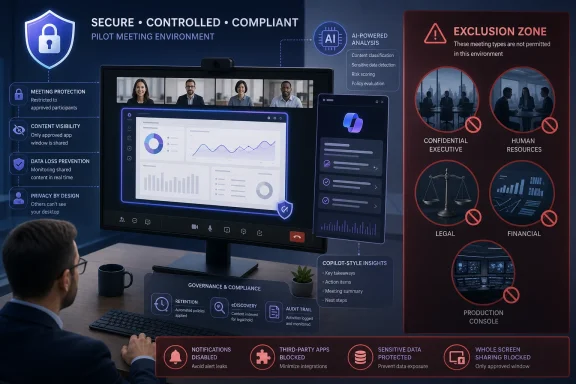 Start With a Controlled Meeting-Type Pilot
A sensible pilot should begin with meeting types that have limited, predictable visual material: internal project reviews using approved presentation templates, training sessions using sanitized demonstration tenants, or operational reviews where a single approved application is shared.Do not start with executive meetings, incident-response calls, customer demonstrations, financial reviews, HR discussions, legal matters, vendor negotiations, or sessions involving production consoles. The issue is not simply that those meetings may contain sensitive information. It is that their visual content is often dynamic, unpredictable, and difficult to classify before someone starts sharing.
Use a pilot plan that makes the exposure boundary explicit:
- Select a small group of trained presenters, organizers, compliance staff, and support personnel rather than enabling the capability across a department.
- Restrict pilot meetings to named scenarios with an agreed set of applications, slides, dashboards, and demonstration data.
- Require presenters to share a single application window, not their entire desktop. Microsoft specifically warns that whole-screen sharing increases the chance of revealing an email, open document, or other unintended material.
- Build test meetings around deliberately varied content, including ordinary slides, approved sensitive-looking test data, browser notifications, dashboards, pop-up dialogs, and third-party applications.
- Record what Copilot is asked, what it returns, what meeting artifacts are created, and how those items appear in the organization’s retention and eDiscovery processes.
- Establish a rollback condition before the pilot begins. If a test reveals that a disallowed category of material is exposed or retained in an unacceptable way, remove that meeting type from scope rather than trying to explain the result away.
A Shared Screen Is Not Just Another Copilot Data Source
Most Microsoft 365 Copilot governance work has focused on Microsoft Graph-grounded content: SharePoint sites, OneDrive libraries, Exchange mailboxes, Teams chats, and other tenant data that already has an owner, permissions, and a retention story. Screen sharing is different.A shared application may show content from systems outside the usual Microsoft 365 information architecture. A sales dashboard might display live customer metrics. A support tool might reveal account identifiers. A browser tab can surface external portals, embedded media, or a notification from another service. Even a carefully prepared PowerPoint can be interrupted by a calendar reminder or chat banner when the presenter shares the desktop instead of the presentation window.
That makes visual context more like a temporary meeting disclosure than a conventional document permission problem. The relevant control is often not “Who can access this file?” but “What was visible for a moment, and what did Copilot derive from it?”
This is also why Microsoft’s statement that Microsoft 365 Copilot operates inside the Microsoft 365 trust boundary and does not use customer files or communications to train foundation models is important but incomplete for a pilot decision. It addresses a foundational data-handling concern. It does not answer the operational questions an administrator needs to test: whether Copilot recognizes visible information correctly, whether a user can prompt it toward sensitive visual details, and what durable record is created from that exchange.
WindowsForum readers following Microsoft’s earlier Teams Copilot screen-analysis delay have already seen the feature’s timeline move. The practical lesson is to prepare governance and test cases now, while treating August as a planned rollout window rather than a fixed deployment date.
Test the Content People Actually Leak During Presentations
A pilot that uses only polished, static slides will produce a false sense of security. The useful tests are the moments presenters normally try to avoid in real meetings: a browser notification appearing over a dashboard, an account number in a table, an email preview on a second monitor, or a sensitive value visible in an open application.Test these categories deliberately, using non-production data where possible:
- Approved internal presentation content should establish whether Copilot can provide useful summaries and answers from visual material without requiring presenters to narrate every detail.
- Sensitive-looking identifiers, such as test credit-card and account numbers, should be used to evaluate whether Teams Premium sensitive-content detection alerts the presenter and organizer during screen sharing.
- Live dashboards should test whether labels, figures, charts, filters, and visible drill-down details lead Copilot to generate usable but potentially over-detailed answers.
- Notification banners and application overlays should show whether momentary visual disclosures can affect the meeting’s Copilot interaction.
- Third-party web applications should be included because they may display information that is neither stored in Microsoft 365 nor governed like a SharePoint file.
A warning is also not the same thing as prevention. The pilot should document who receives the alert, what they are expected to do, and whether the meeting organizer has a clear authority to stop sharing or redirect the presenter. For high-risk meetings, the preferred control is still exclusion from the feature and disciplined application-only sharing.
Retention Testing Must Follow the Insight, Not Just the Meeting
The most important pilot artifact may be a retention matrix. Microsoft Purview retention for Microsoft 365 Copilot covers user prompts and responses, but screen-aware Copilot adds a question that ordinary chat governance does not fully answer: where does a visual insight appear after the meeting ends?Administrators should validate their own tenant’s behavior rather than assuming that a screen-derived answer has one simple storage location. The same meeting can generate a prompt, a Copilot response, a transcript reference, a recording, a recap, a follow-up message, and downloaded or copied content. Each may have a different compliance path.
| Artifact to validate | Pilot question |
|---|---|
| Copilot prompt | Does the retained prompt reveal the sensitive visual subject even if the screen itself is not preserved? |
| Copilot response | Does the response restate a visible account value, dashboard figure, or other detail that should not be durable? |
| Meeting transcript | Does the transcript contain spoken context that makes a Copilot answer more revealing when viewed together? |
| Recording | Does the recording preserve the shared screen, and does its retention treatment align with the meeting policy? |
| Meeting recap | Does the recap repeat or summarize screen-derived findings? |
| eDiscovery workflow | Can compliance staff locate and review the relevant prompts, responses, meeting artifacts, and associated content coherently? |
This is where a pilot should involve Purview and legal or records-management stakeholders early. A Teams administrator can configure sharing habits and meeting scope, but cannot independently declare that a screen-derived answer is compliant merely because it appears within the Microsoft 365 boundary.
Exclusions Are a Sign of Maturity, Not a Failure of Adoption
Organizations should define “no screen-aware Copilot” meeting categories before enabling the feature. The exclusion list will vary, but it should generally cover sessions where accidental visual disclosure is difficult to prevent or where the consequences of a derived summary are unacceptable.A mature rollout can support both positions at once: use screen analysis in controlled internal sessions where it reduces repetitive explanation, and keep it out of meetings involving regulated data, privileged discussion, credentials, production administration, personnel matters, or externally sourced confidential material.
The same distinction applies to Windows workflows. An administrator sharing a single management console can contain exposure more effectively than someone sharing an entire desktop full of messaging, browser tabs, password-manager prompts, and secondary-monitor content. The technical control is modest, but the operational difference is large.
Frequently Asked Questions
Will Teams Copilot use shared-screen material to train Microsoft’s foundation models?Microsoft says Microsoft 365 Copilot operates within the Microsoft 365 trust boundary and does not use customer files or communications to train foundation models. That assurance does not remove the need to test prompts, responses, and retained meeting artifacts.
Should every Teams meeting use application-only sharing?
Application-only sharing is especially appropriate for pilot meetings and any session where unrelated desktop content could be exposed. Microsoft warns that sharing the whole screen increases the likelihood of revealing an email or open document.
Does Teams Premium sensitive-content detection make screen analysis safe for sensitive meetings?
No. It can identify items such as credit-card and account numbers and notify the presenter and organizer, but organizations should test its coverage and response process rather than assume it catches every sensitive visual element.
What should trigger a pilot rollback?
A rollback should follow any result showing that a prohibited meeting type, sensitive visual category, or retention outcome cannot be controlled or understood under the organization’s current policies.
Microsoft’s August 2026 target gives IT teams time to treat screen-aware Copilot as a governance exercise rather than a feature toggle. The organizations best positioned to benefit will be the ones that first establish which screens Copilot may analyze, which meetings remain off-limits, and what evidence they need when a temporary image becomes a durable answer.
References
- Primary source: learn.microsoft.com
Learn about retention for Copilot and AI apps | Microsoft Learn
Learn about Microsoft 365 retention policies that apply to Copilot and AI apps so you can automatically retain or delete Copilot messages for your organization.learn.microsoft.com - Independent coverage: microsoft.com
Microsoft 365 Roadmap | Microsoft 365
The Microsoft 365 Roadmap lists updates that are currently planned for applicable subscribers. Check here for more information on the status of new features and updates.www.microsoft.com
- Independent coverage: support.microsoft.com
What's new in Microsoft Teams | Microsoft Support
Get the latest info on new features for Microsoft Teams with these regularly updated release notes.support.microsoft.com - Primary source: WindowsForum
Microsoft Copilot Risks: Managing Data Oversharing Effectively | Windows Forum
If you've been keeping an eye on Microsoft's developments or have a checklist titled "Innovation Wishlist for 2025,” you've likely come across their...windowsforum.com
