

Microsoft has cancelled Microsoft 365 Roadmap item 325873, so IT teams should stop preparing for Teams Copilot to analyze ordinary desktop screen shares in August 2026. Administrators should verify the item’s cancelled status in the Microsoft 365 Roadmap, remove it from the change calendar, and require both a new roadmap entry and supporting Microsoft Learn documentation before reopening the project.
The roadmap status changed on July 16, 2026, when Microsoft said it had decided not to move forward with the change at that time. As WindowsForum users reported in the discussion titled “Teams Copilot Screen-Share Analysis Cancelled Before August 2026,” the planned feature would have allowed Copilot to analyze material shared from a participant’s desktop during recorded Teams meetings. Its cancellation creates a practical no-go decision for administrators, security teams, and business units preparing screen-aware meeting workflows.
Roadmap ID 325873 had described a substantial expansion of Copilot in Teams meetings. When a participant shared a desktop, the proposed capability would have analyzed displayed material alongside the meeting transcript and chat, enabling questions about information that appeared on screen.
The planned scope went beyond presentations. Microsoft’s roadmap description referred to ordinary desktop sharing involving documents, slides, spreadsheets, websites, and content from other applications, regardless of the application or platform presenting it.
Organizations may therefore have designed August testing around scenarios such as asking Copilot about a spreadsheet shown during a demonstration, extracting details from an internal website, or connecting spoken feedback with a document displayed on screen. Those tests no longer have a scheduled feature to validate.
The roadmap had listed an August 2026 rollout through Targeted Release and General Availability across Teams desktop, web, Mac, Android, and iOS. Those milestones should be removed from deployment calendars, training plans, user communications, and acceptance criteria.
A sensible unwind plan is straightforward:
An administrator should not promise that Copilot can answer a question merely because the answer appeared in a shared window. If a presenter opens a spreadsheet, points to a number without saying it aloud, and moves on, the safe operating assumption is that Roadmap ID 325873 will not make that number available to Copilot.
The same caution applies to process demonstrations. A presenter may click through an application while showing fields, menus, warnings, and values. Without the cancelled screen-analysis feature, teams should not design a workflow that depends on Copilot reconstructing those visually demonstrated steps.
For dependable meeting processes, presenters should state important information aloud when transcription is enabled and place decisions, assignments, or authoritative values in an approved system of record. This is less ambitious than a screen-aware assistant, but it gives support teams a clear operational rule: information that matters should be entered through a documented and approved channel rather than left only on a briefly shared screen.
This does not mean organizations should make desktop sharing unrestricted. A user may choose not to expose certain material while presenting, such as credentials, customer information, personal messages, unrelated browser tabs, internal dashboards, or notifications. These are examples of content an organization may consider sensitive during a desktop share; they are not established consequences of the cancelled Copilot feature.
A separate WindowsForum user report, “Microsoft 365 Copilot in PowerPoint Live: Real-Time Slide Explanations,” described a June 2026 experience in which attendees could select slide text and ask Copilot for an explanation. That report is useful context, but it is not, by itself, sufficient documentation for administrator guidance. Before advertising, enabling, or supporting any such behavior, IT teams should confirm it in primary Microsoft documentation for their tenant, licensing arrangement, and release channel.
Even if a documented PowerPoint Live interaction is available, it does not demonstrate that Teams Copilot can inspect every spreadsheet cell, application window, notification, or browser page visible in a desktop share. Help-desk articles should therefore distinguish presentation-specific functionality from the cancelled screen-analysis proposal.
The cancellation also eliminates the immediate need for an August test lab focused on desktop-share capture, optical character recognition, or screen-derived Copilot output. IT teams may preserve draft test cases as a dormant template, but they should not describe them as pending production validation.
If Microsoft revives the concept, administrators must start with the replacement announcement rather than assuming Roadmap ID 325873 will return unchanged. Confirm the new identifier, scope, platforms, rollout phases, documentation, controls, and tenant availability before scheduling another pilot.
They do not change the Teams decision.
Copilot Vision and Microsoft Teams are separate product contexts. A capability described for a Windows Copilot experience is not evidence that Teams Copilot can analyze content displayed during a meeting. Administrators should not use Windows Insider reports, demonstrations of Copilot Vision, or similarly named features to fill the gap left by the cancelled Teams roadmap item.
This distinction belongs in support documentation because users may reasonably ask why an assistant can appear to work with a screen in one Microsoft product but not in another. The answer should be based on product boundaries: availability in one experience does not establish availability, governance, or support in Teams.
They should also avoid claiming that existing compliance configurations have been validated for screen-derived Copilot content. There is no announced August feature against which to perform that validation.
Some work prompted by the proposal may remain useful. Organizations can retain general presenter guidance, meeting-classification rules, least-exposure sharing practices, and procedures for placing important decisions in approved systems. These controls have value without assuming that Copilot reads desktop pixels.
The revised exposure model can therefore be concise:
It did not justify making screen analysis a dependency for an August business-process launch.
Projects that rely on roadmap features should maintain a gate between preliminary planning and production commitment. At minimum, that gate should require an active roadmap entry, primary Microsoft documentation, observed tenant availability, confirmed administrative requirements, and successful testing under the organization’s own policies.
For Roadmap ID 325873, the gate is closed. There is no August screen-share feature to approve, no rollout ring to authorize, and no documented production behavior for administrators to support.
Teams owners should monitor the Microsoft 365 Roadmap and Microsoft Learn for a replacement announcement. Until both a new roadmap item and supporting documentation exist, do not reopen the project or restore its August milestones.
The roadmap status changed on July 16, 2026, when Microsoft said it had decided not to move forward with the change at that time. As WindowsForum users reported in the discussion titled “Teams Copilot Screen-Share Analysis Cancelled Before August 2026,” the planned feature would have allowed Copilot to analyze material shared from a participant’s desktop during recorded Teams meetings. Its cancellation creates a practical no-go decision for administrators, security teams, and business units preparing screen-aware meeting workflows.
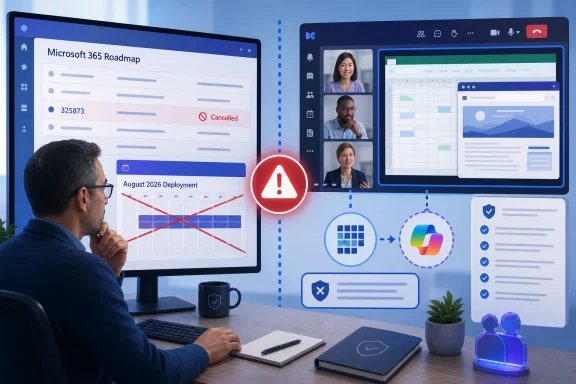 Remove Screen Analysis From the August Plan
Roadmap ID 325873 had described a substantial expansion of Copilot in Teams meetings. When a participant shared a desktop, the proposed capability would have analyzed displayed material alongside the meeting transcript and chat, enabling questions about information that appeared on screen.The planned scope went beyond presentations. Microsoft’s roadmap description referred to ordinary desktop sharing involving documents, slides, spreadsheets, websites, and content from other applications, regardless of the application or platform presenting it.
Organizations may therefore have designed August testing around scenarios such as asking Copilot about a spreadsheet shown during a demonstration, extracting details from an internal website, or connecting spoken feedback with a document displayed on screen. Those tests no longer have a scheduled feature to validate.
The roadmap had listed an August 2026 rollout through Targeted Release and General Availability across Teams desktop, web, Mac, Android, and iOS. Those milestones should be removed from deployment calendars, training plans, user communications, and acceptance criteria.
A sensible unwind plan is straightforward:
- Open the Microsoft 365 Roadmap and verify the status of Roadmap ID 325873.
- Record the cancellation in the project’s decision log.
- Remove the item from August 2026 change calendars, rollout dashboards, and release communications.
- Cancel pilot groups created specifically to test Copilot analysis of ordinary desktop shares.
- Rewrite documentation claiming that text visible in a desktop share will become searchable or usable in Copilot prompts.
- Delete test cases expecting Copilot to extract values, labels, instructions, or other details solely from screen pixels.
- Review automations, meeting templates, and business processes for dependencies on screen-derived output.
- Preserve useful governance work that applies independently to recording, transcription, and other approved meeting features.
- Keep the project closed unless Microsoft publishes a new roadmap entry and corresponding Microsoft Learn documentation.
A Shared Screen Is Not a Supported Copilot Knowledge Source
The cancellation highlights a boundary that rollout plans could easily blur: displaying information during a Teams meeting does not establish that Copilot can interpret it as meeting knowledge.An administrator should not promise that Copilot can answer a question merely because the answer appeared in a shared window. If a presenter opens a spreadsheet, points to a number without saying it aloud, and moves on, the safe operating assumption is that Roadmap ID 325873 will not make that number available to Copilot.
The same caution applies to process demonstrations. A presenter may click through an application while showing fields, menus, warnings, and values. Without the cancelled screen-analysis feature, teams should not design a workflow that depends on Copilot reconstructing those visually demonstrated steps.
For dependable meeting processes, presenters should state important information aloud when transcription is enabled and place decisions, assignments, or authoritative values in an approved system of record. This is less ambitious than a screen-aware assistant, but it gives support teams a clear operational rule: information that matters should be entered through a documented and approved channel rather than left only on a briefly shared screen.
This does not mean organizations should make desktop sharing unrestricted. A user may choose not to expose certain material while presenting, such as credentials, customer information, personal messages, unrelated browser tabs, internal dashboards, or notifications. These are examples of content an organization may consider sensitive during a desktop share; they are not established consequences of the cancelled Copilot feature.
Keep PowerPoint Live Claims Separate
PowerPoint Live should not be treated as proof that Copilot can analyze an ordinary desktop share. Roadmap ID 325873 concerned material displayed through desktop screen sharing, while its proposal treated PowerPoint Live and Whiteboard as separate capability areas.A separate WindowsForum user report, “Microsoft 365 Copilot in PowerPoint Live: Real-Time Slide Explanations,” described a June 2026 experience in which attendees could select slide text and ask Copilot for an explanation. That report is useful context, but it is not, by itself, sufficient documentation for administrator guidance. Before advertising, enabling, or supporting any such behavior, IT teams should confirm it in primary Microsoft documentation for their tenant, licensing arrangement, and release channel.
Even if a documented PowerPoint Live interaction is available, it does not demonstrate that Teams Copilot can inspect every spreadsheet cell, application window, notification, or browser page visible in a desktop share. Help-desk articles should therefore distinguish presentation-specific functionality from the cancelled screen-analysis proposal.
The cancellation also eliminates the immediate need for an August test lab focused on desktop-share capture, optical character recognition, or screen-derived Copilot output. IT teams may preserve draft test cases as a dormant template, but they should not describe them as pending production validation.
If Microsoft revives the concept, administrators must start with the replacement announcement rather than assuming Roadmap ID 325873 will return unchanged. Confirm the new identifier, scope, platforms, rollout phases, documentation, controls, and tenant availability before scheduling another pilot.
Do Not Substitute Copilot Vision for Teams Documentation
WindowsForum users have also discussed Copilot Vision in reports about AI-assisted screen sharing, real-time desktop collaboration, and voice interaction in Windows. Those discussions show why teams may expect Microsoft’s products to converge around screen-aware assistance.They do not change the Teams decision.
Copilot Vision and Microsoft Teams are separate product contexts. A capability described for a Windows Copilot experience is not evidence that Teams Copilot can analyze content displayed during a meeting. Administrators should not use Windows Insider reports, demonstrations of Copilot Vision, or similarly named features to fill the gap left by the cancelled Teams roadmap item.
This distinction belongs in support documentation because users may reasonably ask why an assistant can appear to work with a screen in one Microsoft product but not in another. The answer should be based on product boundaries: availability in one experience does not establish availability, governance, or support in Teams.
Narrow the Security Project Instead of Inventing Controls
The proposal raised legitimate questions about what organizations allow presenters to expose while sharing a desktop. With Roadmap ID 325873 cancelled, security teams should not purchase controls, assign rollout resources, or amend compliance policy solely to govern screen-derived Teams Copilot answers expected in August.They should also avoid claiming that existing compliance configurations have been validated for screen-derived Copilot content. There is no announced August feature against which to perform that validation.
Some work prompted by the proposal may remain useful. Organizations can retain general presenter guidance, meeting-classification rules, least-exposure sharing practices, and procedures for placing important decisions in approved systems. These controls have value without assuming that Copilot reads desktop pixels.
The revised exposure model can therefore be concise:
- Ordinary desktop pixels are not a supported Teams Copilot knowledge source under Roadmap ID 325873.
- Information that must be retained or acted upon should be deliberately entered into an approved, documented workflow.
- Presenters should minimize unrelated or sensitive material visible during desktop sharing according to organizational policy.
- Product-specific behavior should be verified through current primary Microsoft documentation, not inferred from another Copilot product.
Roadmaps Are Planning Signals, Not Deployment Contracts
The reversal is a reminder that a Microsoft 365 Roadmap date is not a deployment guarantee. Roadmap ID 325873 included enough detail to justify preliminary evaluation: named platforms, Targeted Release and General Availability phases, an August 2026 window, and examples involving documents, slides, spreadsheets, and websites.It did not justify making screen analysis a dependency for an August business-process launch.
Projects that rely on roadmap features should maintain a gate between preliminary planning and production commitment. At minimum, that gate should require an active roadmap entry, primary Microsoft documentation, observed tenant availability, confirmed administrative requirements, and successful testing under the organization’s own policies.
For Roadmap ID 325873, the gate is closed. There is no August screen-share feature to approve, no rollout ring to authorize, and no documented production behavior for administrators to support.
Teams owners should monitor the Microsoft 365 Roadmap and Microsoft Learn for a replacement announcement. Until both a new roadmap item and supporting documentation exist, do not reopen the project or restore its August milestones.
Frequently Asked Questions
Is Teams Copilot screen-share analysis still scheduled for August 2026?
No. Microsoft cancelled Roadmap ID 325873 and said it would not move forward with the change at that time. Remove the item from August deployment plans.What should administrators do first?
Verify Roadmap ID 325873 in the Microsoft 365 Roadmap, capture its status in the project record, and remove it from the organization’s change calendar. Notify pilot participants and business owners that the project is closed.Can Copilot now read information shown in an ordinary Teams desktop share?
Do not plan or document that capability. The roadmap item intended to introduce it was cancelled, so ordinary desktop pixels should not be treated as a supported Copilot knowledge source.Does a Copilot Vision feature in Windows mean the Teams feature is available?
No. WindowsForum users have reported on Copilot Vision desktop-sharing developments, but those reports concern a different product experience. They do not establish availability or support in Teams.What about PowerPoint Live?
Treat PowerPoint Live as a separate product surface. A WindowsForum report described slide-text selection and Copilot explanations, but administrators should verify any such functionality in primary Microsoft documentation before adding it to support guidance.When should the organization reopen the project?
Only after Microsoft publishes a new roadmap entry and corresponding Microsoft Learn documentation. Administrators should then evaluate the new scope from the beginning rather than relying on the cancelled item’s schedule, platforms, or proposed behavior.References
- Primary source: learn.microsoft.com
Intelligent recap for Teams calls, meetings, and events - Microsoft Teams | Microsoft Learn
Learn how to manage intelligent recap for Teams calls, meetings, and events. Understand the licenses your users need to use intelligent recap for VoIP and PSTN calls and audio recap.learn.microsoft.com - Independent coverage: microsoft.com
Microsoft 365 Roadmap | Microsoft 365
The Microsoft 365 Roadmap lists updates that are currently planned for applicable subscribers. Check here for more information on the status of new features and updates.www.microsoft.com
- Independent coverage: techcommunity.microsoft.com
Loading…
techcommunity.microsoft.com - Independent coverage: support.microsoft.com
Loading…
support.microsoft.com - Independent coverage: mc.merill.net
Loading…
mc.merill.net - Independent coverage: app.cloudscout.one
Loading…
app.cloudscout.one