

Microsoft Teams has launched one-time email passcodes for anonymous external presenters in Teams events, a desktop feature listed on the Microsoft 365 Roadmap as generally available in April 2026 and last updated on July 7, 2026. The change gives Teams administrators and event organizers a new identity checkpoint for webinars, town halls, and other managed events where outside speakers are invited without being fully inside the host tenant. Microsoft’s own roadmap entry and Teams admin documentation frame it as a convenience feature, but the more important story is governance: Teams is slowly closing the gap between “someone has the link” and “someone is the person we expected.”
That gap has mattered for years because Teams events often sit at the awkward edge of enterprise identity. A company wants an analyst, partner, customer, agency contractor, or conference speaker to present, but does not necessarily want to create a guest account, establish cross-tenant trust, or force the presenter through a full Microsoft account workflow. The one-time passcode is Microsoft’s compromise: a lightweight proof-of-control over an email inbox, visible to the organizer as a “Verified” tag, without pretending that the presenter has become a managed internal identity.
The old Teams event problem was not that external presenters existed. It was that the meeting link often carried too much authority on its own. In many organizations, once a link escaped into an inbox thread, a forwarded calendar invite, or a partner distribution list, the organizer’s practical confidence in who would show up could degrade quickly.
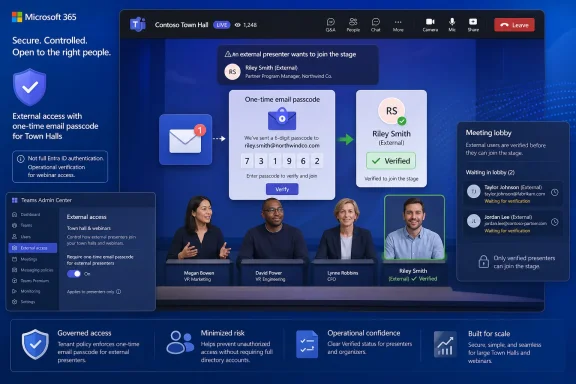
Microsoft’s new feature inserts a small but consequential checkpoint before an anonymous external presenter joins. According to Microsoft’s Teams admin release notes and the Microsoft 365 Roadmap, anonymous external presenters are prompted for a one-time email passcode before entering the event, and after successful verification they appear with a “Verified” tag next to their name.
That is not the same as full authentication through Microsoft Entra ID, and Microsoft does not claim otherwise. If an external presenter has a personal Microsoft account or a work or school account, Microsoft says Teams will ask them to sign in with that account rather than rely on the emailed passcode. The passcode path is for the remaining class of presenter: invited, external, and otherwise anonymous.
This distinction is the product design in miniature. Microsoft is not replacing identity federation with email codes; it is adding an intermediate rung below federation and above anonymous display-name entry. That rung matters because event presenters are not just attendees. They can speak, share content, influence the flow of the event, and in some formats become the public face of the host organization.
But that critique misses why the feature will probably be useful. In live operations, organizers do not merely need perfect identity; they need better signals under time pressure. A “Verified” label beside an external presenter gives producers, moderators, and event staff a quick way to distinguish a presenter who completed the expected flow from someone who simply arrived through a link.
That can reduce the most common class of event chaos: the mystery joiner with a plausible display name. Teams has long allowed people to type names that look official. In a small meeting, the organizer may know everyone by voice and context. In a large webinar or town hall with multiple speakers, agencies, rehearsal sessions, and last-minute substitutions, that confidence becomes harder to maintain.
The badge therefore functions as an operational cue. It says, in effect, that this person has satisfied the event’s configured verification requirement. It does not say the person is safe. It does not say the person should automatically be trusted with sensitive material. It says the presenter is no longer merely a typed display name attached to a meeting link.
That split reflects how Teams governance usually works in the real world. Central IT owns risk posture, but event organizers own context. A global town hall with outside board members is not the same as a customer webinar with a marketing partner, and neither is the same as a small training event with a vendor instructor.
When verification is required by policy, organizers can choose among tighter and looser admission options for external presenters. Microsoft’s documentation describes a strict mode that verifies external presenters and only allows invited accounts to join, and a more flexible mode that verifies external presenters while allowing uninvited users with the link to wait in the lobby. If the tenant policy does not require verification, organizers may also have a “No verification needed” option.
That last condition is important. Microsoft is preserving an escape hatch for organizations that prioritize frictionless events, but it is allowing administrators to remove that escape hatch where the risk justifies it. This is a familiar Microsoft 365 pattern: give the tenant a policy boundary, then let business users operate inside it.
A presenter blocked ten minutes before a webinar because a code landed in quarantine is not a theoretical problem. It is the kind of operational failure that creates executive escalations, help desk tickets, and public embarrassment. Microsoft knows this, which is why the feature is framed as a control administrators can enforce rather than a hard new baseline for every tenant.
The default also reflects the uneven maturity of external collaboration across Microsoft 365 tenants. Some organizations have carefully curated external access policies, verified domains, guest lifecycle rules, and conditional access templates. Others still run on forwarded invites and heroic event producers. A mandatory verification change across all Teams events would have punished the latter group quickly.
Still, defaults have a way of becoming policy by inertia. Organizations that care about event integrity should not assume that “launched” means “protected.” The feature’s availability is only the beginning; the meaningful step is deciding which users, departments, or event types should be covered by an enforced Teams Events policy.
The new roadmap item is narrower and more event-specific. It is about external presenters in Teams events, not every anonymous attendee in every meeting. That matters because presenter risk is different from attendee risk. An attendee can disrupt, record, impersonate, or observe; a presenter can also take the stage.
Microsoft’s documentation for anonymous participant access also notes that some Teams Premium capabilities apply to meeting verification. The event presenter passcode feature, as described in the roadmap and Teams admin release notes, is positioned in the Teams events administration surface rather than as a generic meeting attendee control. Admins should be careful not to conflate the two when writing policy or explaining behavior to users.
This is one of those places where Microsoft’s product taxonomy can be maddening. Meetings, webinars, town halls, live events, external access, guest access, anonymous join, and presenter roles all overlap in the user’s mind, but they are governed by different policy surfaces. The practical advice is simple: test the exact event type your organization uses, with the exact presenter identity type you expect to invite.
But “good enough” has boundaries. Email verification proves that the person can receive a message sent to the invited address. It does not prove that the mailbox is secure, that the presenter is still employed by the partner organization, or that the invitation was not forwarded to someone with delegated access. In regulated or sensitive contexts, that may not be sufficient.
Microsoft’s broader Entra External ID guidance has long treated email one-time passcodes as a fallback authentication method for B2B collaboration users who cannot authenticate through stronger means such as Entra ID, Microsoft accounts, or other identity providers. The Teams event feature fits that same philosophy. It is a fallback, not the destination.
For routine webinars and partner presentations, that fallback may be exactly right. For earnings calls, legal briefings, executive town halls, incident response meetings, healthcare sessions, or anything involving confidential data, organizations should be looking beyond passcodes toward managed guest identities, cross-tenant access settings, lobby enforcement, meeting roles, sensitivity labels, and recording restrictions.
A strict invited-only model treats the event roster as authoritative. If the person was not invited as an external presenter, they do not get to become one simply by obtaining the link and passing an email challenge. That is the right posture for high-profile or tightly produced events.
The more flexible model recognizes how events actually unfold. Speakers change. Agencies substitute producers. A panelist forwards the link to an assistant. A customer’s email alias differs from the one on the original invite. The lobby lets the organizer preserve human discretion without letting the meeting link act as a skeleton key.
This is where Teams is becoming less binary. The old mental model was “anonymous allowed” versus “anonymous blocked.” The newer model is layered: anonymous users may be allowed, but verification may be required; verified external presenters may still be held in the lobby; and only certain invited identities may be admitted directly. That is more complex, but it is also closer to how enterprise collaboration actually works.
The highest-friction scenario is predictable: an external presenter joins minutes before a live event, uses a different browser profile or Teams client state than expected, and discovers that Teams wants either account sign-in or an emailed code. If that email is delayed, quarantined, sent to a monitored distribution list, or inaccessible from the presenter’s production machine, the event team suddenly owns an identity problem on a broadcast clock.
That does not make the feature bad. It means the feature belongs in the runbook. External presenters should be told in advance that they may need access to the invited inbox immediately before joining. Rehearsals should use the same account and device path as the live event. Organizers should avoid inviting generic aliases unless they understand who can receive and act on the passcode.
There is also a communications issue. “Verified” sounds stronger than it is. Event staff should understand that the label means the presenter completed Microsoft’s configured verification flow, not that the person has been vetted by Microsoft or authenticated with enterprise-grade assurance. Over-reading the badge would be as dangerous as ignoring it.
The right question is not whether every external presenter should always be forced through email passcodes. The right question is which event categories carry enough reputational, operational, or data risk to justify verification as a baseline. A marketing webinar may tolerate more flexibility than an internal leadership broadcast with external consultants. A public training session may need bot and disruption controls more than presenter identity controls.
Administrators should also map this feature against existing Teams settings. Anonymous join, lobby bypass, who can present, who can request control, external access relationships, guest access, webinar registration, and town hall policies all shape the actual risk. A verified presenter who is automatically admitted and allowed to share anything is still a powerful participant.
The feature also creates an audit and support consideration. Help desks will need to know whether a presenter failed because the tenant policy required verification, because the organizer selected a stricter option, because the presenter used the wrong account, or because email delivery failed. Without that knowledge, the first wave of incidents will be misdiagnosed as “Teams is broken.”
The external presenter passcode feature belongs to that broader cleanup. It is not a grand security architecture announcement. It is a small control inserted into a high-consequence workflow, designed to reduce ambiguity at the moment someone outside the tenant is about to become visible and audible inside an organized event.
The timing is also notable because Microsoft has been moving Teams events toward newer formats such as town halls while older live event experiences are being retired. As event tooling consolidates, the identity model around presenters becomes more important. The more Teams becomes the default corporate broadcast platform, the less acceptable it is for presenter identity to rest on a name typed into a join screen.
This is the same tension running across Microsoft 365: collaboration wants low barriers, security wants durable identity, and administrators are asked to reconcile both. Email passcodes are not elegant, but they are pragmatic. Microsoft is betting that a little friction at the presenter door is preferable to a lot of uncertainty once the event is live.
That gap has mattered for years because Teams events often sit at the awkward edge of enterprise identity. A company wants an analyst, partner, customer, agency contractor, or conference speaker to present, but does not necessarily want to create a guest account, establish cross-tenant trust, or force the presenter through a full Microsoft account workflow. The one-time passcode is Microsoft’s compromise: a lightweight proof-of-control over an email inbox, visible to the organizer as a “Verified” tag, without pretending that the presenter has become a managed internal identity.
 Microsoft Is Turning Event Links Into Identity Claims
The old Teams event problem was not that external presenters existed. It was that the meeting link often carried too much authority on its own. In many organizations, once a link escaped into an inbox thread, a forwarded calendar invite, or a partner distribution list, the organizer’s practical confidence in who would show up could degrade quickly.Microsoft’s new feature inserts a small but consequential checkpoint before an anonymous external presenter joins. According to Microsoft’s Teams admin release notes and the Microsoft 365 Roadmap, anonymous external presenters are prompted for a one-time email passcode before entering the event, and after successful verification they appear with a “Verified” tag next to their name.
That is not the same as full authentication through Microsoft Entra ID, and Microsoft does not claim otherwise. If an external presenter has a personal Microsoft account or a work or school account, Microsoft says Teams will ask them to sign in with that account rather than rely on the emailed passcode. The passcode path is for the remaining class of presenter: invited, external, and otherwise anonymous.
This distinction is the product design in miniature. Microsoft is not replacing identity federation with email codes; it is adding an intermediate rung below federation and above anonymous display-name entry. That rung matters because event presenters are not just attendees. They can speak, share content, influence the flow of the event, and in some formats become the public face of the host organization.
The “Verified” Badge Solves a Human Problem Before a Cryptographic One
A one-time email passcode is a modest security primitive. It verifies access to a mailbox at a moment in time, not employment status, contractual legitimacy, or physical identity. An attacker with access to the presenter’s mailbox, a compromised forwarding rule, or a successfully phished account can still pass the check.But that critique misses why the feature will probably be useful. In live operations, organizers do not merely need perfect identity; they need better signals under time pressure. A “Verified” label beside an external presenter gives producers, moderators, and event staff a quick way to distinguish a presenter who completed the expected flow from someone who simply arrived through a link.
That can reduce the most common class of event chaos: the mystery joiner with a plausible display name. Teams has long allowed people to type names that look official. In a small meeting, the organizer may know everyone by voice and context. In a large webinar or town hall with multiple speakers, agencies, rehearsal sessions, and last-minute substitutions, that confidence becomes harder to maintain.
The badge therefore functions as an operational cue. It says, in effect, that this person has satisfied the event’s configured verification requirement. It does not say the person is safe. It does not say the person should automatically be trusted with sensitive material. It says the presenter is no longer merely a typed display name attached to a meeting link.
Admins Get the Policy Lever, Organizers Get the Event-Level Judgment
The strongest part of the implementation is that Microsoft did not make this solely an organizer preference. Microsoft’s documentation says tenant administrators can manage external presenter join verification through the Teams admin center or PowerShell, using the Events policy setting for external presenter join verification. The PowerShell parameter Microsoft documents isExternalPresenterJoinVerification, with policy values that require verification through EOTP or allow no verification by default.That split reflects how Teams governance usually works in the real world. Central IT owns risk posture, but event organizers own context. A global town hall with outside board members is not the same as a customer webinar with a marketing partner, and neither is the same as a small training event with a vendor instructor.
When verification is required by policy, organizers can choose among tighter and looser admission options for external presenters. Microsoft’s documentation describes a strict mode that verifies external presenters and only allows invited accounts to join, and a more flexible mode that verifies external presenters while allowing uninvited users with the link to wait in the lobby. If the tenant policy does not require verification, organizers may also have a “No verification needed” option.
That last condition is important. Microsoft is preserving an escape hatch for organizations that prioritize frictionless events, but it is allowing administrators to remove that escape hatch where the risk justifies it. This is a familiar Microsoft 365 pattern: give the tenant a policy boundary, then let business users operate inside it.
The Default Tells You Microsoft Still Fears Friction
Microsoft’s documentation indicates that “No verification needed” is the default policy value for external presenter join verification. That may disappoint security teams, but it is not surprising. Teams events are public-facing workflows, and public-facing workflows are allergic to friction.A presenter blocked ten minutes before a webinar because a code landed in quarantine is not a theoretical problem. It is the kind of operational failure that creates executive escalations, help desk tickets, and public embarrassment. Microsoft knows this, which is why the feature is framed as a control administrators can enforce rather than a hard new baseline for every tenant.
The default also reflects the uneven maturity of external collaboration across Microsoft 365 tenants. Some organizations have carefully curated external access policies, verified domains, guest lifecycle rules, and conditional access templates. Others still run on forwarded invites and heroic event producers. A mandatory verification change across all Teams events would have punished the latter group quickly.
Still, defaults have a way of becoming policy by inertia. Organizations that care about event integrity should not assume that “launched” means “protected.” The feature’s availability is only the beginning; the meaningful step is deciding which users, departments, or event types should be covered by an enforced Teams Events policy.
This Is Not the Same Feature as Anonymous Meeting Verification
Microsoft has already offered related verification controls for anonymous meeting participants, especially in Teams Premium scenarios. Its Teams admin documentation describes policies where anonymous users can verify themselves with an email code before joining meetings, and it distinguishes unverified anonymous users from users who have completed email verification.The new roadmap item is narrower and more event-specific. It is about external presenters in Teams events, not every anonymous attendee in every meeting. That matters because presenter risk is different from attendee risk. An attendee can disrupt, record, impersonate, or observe; a presenter can also take the stage.
Microsoft’s documentation for anonymous participant access also notes that some Teams Premium capabilities apply to meeting verification. The event presenter passcode feature, as described in the roadmap and Teams admin release notes, is positioned in the Teams events administration surface rather than as a generic meeting attendee control. Admins should be careful not to conflate the two when writing policy or explaining behavior to users.
This is one of those places where Microsoft’s product taxonomy can be maddening. Meetings, webinars, town halls, live events, external access, guest access, anonymous join, and presenter roles all overlap in the user’s mind, but they are governed by different policy surfaces. The practical advice is simple: test the exact event type your organization uses, with the exact presenter identity type you expect to invite.
Email Passcodes Are a Middle Layer, Not an Identity Strategy
The passcode model is attractive because everyone understands email. It does not require the external presenter to install an authenticator app, accept a guest invitation, enroll in device management, or navigate cross-tenant access settings. It is exactly the kind of “good enough” control that business users will tolerate.But “good enough” has boundaries. Email verification proves that the person can receive a message sent to the invited address. It does not prove that the mailbox is secure, that the presenter is still employed by the partner organization, or that the invitation was not forwarded to someone with delegated access. In regulated or sensitive contexts, that may not be sufficient.
Microsoft’s broader Entra External ID guidance has long treated email one-time passcodes as a fallback authentication method for B2B collaboration users who cannot authenticate through stronger means such as Entra ID, Microsoft accounts, or other identity providers. The Teams event feature fits that same philosophy. It is a fallback, not the destination.
For routine webinars and partner presentations, that fallback may be exactly right. For earnings calls, legal briefings, executive town halls, incident response meetings, healthcare sessions, or anything involving confidential data, organizations should be looking beyond passcodes toward managed guest identities, cross-tenant access settings, lobby enforcement, meeting roles, sensitivity labels, and recording restrictions.
The Lobby Becomes the Real Control Plane
The most interesting organizer option is not merely “verify or do not verify.” It is whether verified external presenters must match the invited accounts or whether uninvited users with the event link may still enter the lobby. That choice reveals the real philosophy of the feature.A strict invited-only model treats the event roster as authoritative. If the person was not invited as an external presenter, they do not get to become one simply by obtaining the link and passing an email challenge. That is the right posture for high-profile or tightly produced events.
The more flexible model recognizes how events actually unfold. Speakers change. Agencies substitute producers. A panelist forwards the link to an assistant. A customer’s email alias differs from the one on the original invite. The lobby lets the organizer preserve human discretion without letting the meeting link act as a skeleton key.
This is where Teams is becoming less binary. The old mental model was “anonymous allowed” versus “anonymous blocked.” The newer model is layered: anonymous users may be allowed, but verification may be required; verified external presenters may still be held in the lobby; and only certain invited identities may be admitted directly. That is more complex, but it is also closer to how enterprise collaboration actually works.
Event Producers Will Feel the Change First
For IT administrators, the feature is a policy toggle and a PowerShell parameter. For event producers, it is a rehearsal item. The people who run webinars and town halls will need to know which presenters will be prompted, what the prompt looks like, and how to recover when a code does not arrive.The highest-friction scenario is predictable: an external presenter joins minutes before a live event, uses a different browser profile or Teams client state than expected, and discovers that Teams wants either account sign-in or an emailed code. If that email is delayed, quarantined, sent to a monitored distribution list, or inaccessible from the presenter’s production machine, the event team suddenly owns an identity problem on a broadcast clock.
That does not make the feature bad. It means the feature belongs in the runbook. External presenters should be told in advance that they may need access to the invited inbox immediately before joining. Rehearsals should use the same account and device path as the live event. Organizers should avoid inviting generic aliases unless they understand who can receive and act on the passcode.
There is also a communications issue. “Verified” sounds stronger than it is. Event staff should understand that the label means the presenter completed Microsoft’s configured verification flow, not that the person has been vetted by Microsoft or authenticated with enterprise-grade assurance. Over-reading the badge would be as dangerous as ignoring it.
Security Teams Should Treat This as a Policy Hygiene Moment
For security teams, the launch is an opportunity to revisit a neglected corner of Teams governance. Many organizations hardened chat, file sharing, guest access, and conditional access before they ever looked closely at the messy realities of Teams events. The result is often a policy posture that is strict on paper and improvisational on stage.The right question is not whether every external presenter should always be forced through email passcodes. The right question is which event categories carry enough reputational, operational, or data risk to justify verification as a baseline. A marketing webinar may tolerate more flexibility than an internal leadership broadcast with external consultants. A public training session may need bot and disruption controls more than presenter identity controls.
Administrators should also map this feature against existing Teams settings. Anonymous join, lobby bypass, who can present, who can request control, external access relationships, guest access, webinar registration, and town hall policies all shape the actual risk. A verified presenter who is automatically admitted and allowed to share anything is still a powerful participant.
The feature also creates an audit and support consideration. Help desks will need to know whether a presenter failed because the tenant policy required verification, because the organizer selected a stricter option, because the presenter used the wrong account, or because email delivery failed. Without that knowledge, the first wave of incidents will be misdiagnosed as “Teams is broken.”
Microsoft Is Still Cleaning Up the Post-Pandemic Collaboration Model
Teams grew explosively because it was easy to invite people. That ease was the product’s superpower during the remote-work surge, but it also left administrators with a sprawling external collaboration surface. Microsoft has spent the years since trying to put better boundaries around that surface without killing the spontaneity that made Teams useful.The external presenter passcode feature belongs to that broader cleanup. It is not a grand security architecture announcement. It is a small control inserted into a high-consequence workflow, designed to reduce ambiguity at the moment someone outside the tenant is about to become visible and audible inside an organized event.
The timing is also notable because Microsoft has been moving Teams events toward newer formats such as town halls while older live event experiences are being retired. As event tooling consolidates, the identity model around presenters becomes more important. The more Teams becomes the default corporate broadcast platform, the less acceptable it is for presenter identity to rest on a name typed into a join screen.
This is the same tension running across Microsoft 365: collaboration wants low barriers, security wants durable identity, and administrators are asked to reconcile both. Email passcodes are not elegant, but they are pragmatic. Microsoft is betting that a little friction at the presenter door is preferable to a lot of uncertainty once the event is live.
The Small Code That Changes the Event Checklist
The practical impact of this launch is concrete, even if the underlying technology is familiar. Organizations do not need to redesign their identity architecture to benefit from it, but they do need to decide where the control belongs and how to explain it.- Teams now supports one-time email passcodes for anonymous external presenters in Teams events on desktop, with Microsoft listing the feature as launched and generally available from April 2026.
- Verified anonymous external presenters receive a visible “Verified” tag after completing the process, giving organizers a clearer signal during event admission and production.
- Tenant administrators can require verification through Teams Events policies, including through the Teams admin center or PowerShell.
- Organizers may be able to choose stricter invited-only verification or a more flexible model that lets uninvited link holders wait in the lobby, depending on the tenant policy.
- Email passcodes improve confidence in presenter identity, but they do not replace stronger controls such as guest accounts, cross-tenant access, conditional access, sensitivity labels, and careful lobby management.
References
- Primary source: Microsoft 365 Roadmap
Published: 2026-07-07T23:01:01.6729014Z
Loading…
www.microsoft.com - Official source: learn.microsoft.com
Email one-time passcode authentication - Microsoft Entra External ID | Microsoft Learn
Learn how to enable and use email one-time passcode authentication for B2B guest users in Microsoft Entra External ID. This feature provides a seamless fallback authentication method for sign-in.learn.microsoft.com - Official source: support.microsoft.com
Allow anonymous presenters in a live event in Microsoft Teams | Microsoft Support
Learn how you can give an anonymous person permission to present content in a meeting on some platforms in Microsoft Teams.support.microsoft.com - Related coverage: petri.com
SharePoint One‑Time Passcodes Retiring as External Access Moves to Entra B2B
Microsoft is getting ready to retire SharePoint One‑Time Passcodes as external access shifts to Entra B2B guest accounts. petri.com
- Official source: techcommunity.microsoft.com
- Official source: cdn-dynmedia-1.microsoft.com
- Related coverage: techriver.com
- Related coverage: learningservices.mgcafe.uky.edu
- Official source: microsoft-assessment.com
- Official source: cdn.techcommunity.microsoft.com