

Microsoft plans to add private message reminders to Teams in September 2026, letting users create, update, complete, and delete reminders directly from chat and channel messages across desktop, web, Mac, iOS, and Android, with government clouds included in the planned general release. Roadmap ID 565869 describes a deceptively modest feature: turn a message into something that can return at the moment it becomes actionable. The larger significance is that Teams is finally addressing one of workplace chat’s oldest failures—the assumption that seeing a message is the same thing as being ready to deal with it. If Microsoft gets the interaction right, reminders could become one of Teams’ most useful everyday features; if it gets them wrong, the new Reminders view will simply become another neglected inbox.
Modern workplace messaging compresses several different activities into one interface. A colleague can ask a question, assign an informal task, share a document, announce a deadline, request an approval, or flag a problem using the same stream of visually similar chat bubbles.
That makes Teams effective as a transmission system but unreliable as a memory system. Messages arrive according to the sender’s schedule, while the recipient may need to act hours or days later, after a meeting, once another person responds, or when a deadline is close enough to matter.
Microsoft’s planned personal message reminders create a bridge between those two moments. According to the Microsoft 365 Roadmap entry, a user will be able to set a reminder directly on a chat or channel message, receive a notification when it becomes due, and return to the original item with its context intact.
That last detail is important. A generic calendar reminder saying “check budget” may be nearly useless if the user must then search for the relevant conversation, identify which budget was being discussed, and reconstruct what changed since the reminder was created. A reminder tied to a specific message can bring the user back to the source instead of preserving only a manually written summary.
The feature is also explicitly personal. Reminders will be private to each user rather than visible to everyone in the conversation, meaning that setting one should not alter the message, notify its author, or create the impression that the organization has formally assigned a task.
This is personal attention management, not shared project management. That distinction keeps the feature lightweight enough to use frequently, but it also limits what organizations should expect it to accomplish.
Microsoft also provides a more structured route: creating a Planner task from a Teams message. Its support documentation says users can open a message’s actions, create a task, and place it either among private tasks or in a plan, adding details such as a due date, notes, priority, progress, bucket, or assignment where applicable.
That is valuable when a message represents actual work that needs to be tracked. It is excessive when the user merely needs to revisit a question after lunch, respond when a meeting ends, check whether someone supplied a missing number, or reread an announcement before a stated date.
The difference is not cosmetic. Creating a task asks the user to classify work, decide where it belongs, name it, and potentially expose it to a broader task-management process. A reminder asks only when the original message should return.
Teams has long needed this middle layer. Saving or favoriting information helps with retrieval, while Planner helps manage durable work; neither perfectly serves the everyday instruction to “bring this exact message back to me later.”
Message reminders should therefore be judged less as a stripped-down task manager than as a delayed resurfacing mechanism. Their job is not to replace task ownership, status tracking, dependencies, recurring work, or team reporting. Their job is to prevent a message from disappearing merely because it arrived at an inconvenient time.
That simplicity could also make reminders more widely used than formal task creation. Knowledge workers routinely resist workflows that demand several fields and decisions for every small follow-up, especially when the underlying action may take less time than documenting it.
A reminder attached through a message menu can reduce that friction. The user does not need to rewrite the request, paste a link, remember who sent it, or decide which plan owns it. The message itself becomes the reminder’s payload.
Microsoft says users will be able to create, update, complete, and delete reminders. Those verbs imply a basic lifecycle rather than a one-shot alert: a reminder can be changed when plans move, marked complete when the associated action is handled, or deleted when the original message no longer matters.
That lifecycle turns the feature into a small personal queue embedded inside Teams. It is still lighter than Planner, but it is more deliberate than simply generating another notification that disappears into the activity feed.
The design also acknowledges that due times are rarely permanent. A reminder set for Friday morning may become irrelevant on Thursday, need to move to Monday, or be completed before its notification fires. Without management controls, users would either receive obsolete alerts or stop trusting the system.
Trust is the central problem for any reminder product. A user must believe that the reminder was saved, that it will appear at the expected time, and that selecting it will reopen enough context to understand the intended action.
Teams complicates that problem because the originating message may live in several types of conversation and may be accessed from several platforms. It could be a direct chat, a group conversation, a channel post, or part of an active thread whose surrounding discussion continues after the reminder is set.
Microsoft’s roadmap wording says reminders include message context, but it does not define precisely how much context will be shown in the notification or Reminders view. The safest expectation is that Teams will preserve a meaningful connection to the source message, not that it will generate a full summary of everything that happened afterward.
That boundary will determine how useful the feature feels. Returning users to an isolated sentence may be sufficient for a simple request, but ambiguous messages often depend on replies, attachments, quoted material, or the identity of the conversation.
The broad client list is the right ambition because reminders become unreliable if users can create or manage them only from a particular device. Someone may set a reminder from a phone while commuting, later review it in a browser, and finally complete the associated work in the desktop client.
Cross-client consistency is therefore part of the core feature, not an optional polish item. Microsoft must keep reminder state synchronized so that an item updated or completed on one device does not continue appearing as active elsewhere.
Mobile support is especially significant. The moment when a user realizes that a message cannot be handled immediately often occurs away from the desk, and forcing that person to remember to create a reminder later would recreate the exact prospective-memory problem the feature is supposed to solve.
The inclusion of both channel and chat messages is equally important. Teams has historically contained overlapping communication models, and features have not always arrived with identical behavior everywhere. A reminder system limited to chats would fail for organizations whose durable work happens in channels, while a channel-only system would miss the rapid requests exchanged through direct and group chats.
The government-cloud listing also gives the roadmap item unusually broad intended scope. It does not guarantee that every environment will receive the feature simultaneously, and the entry does not provide separate rollout dates for each cloud, but Microsoft is at least presenting reminders as a general Teams capability rather than a commercial-only experiment.
Admins should still avoid translating “included” into “available everywhere on the first day.” Microsoft 365 roadmap dates are planning targets, and staged deployments can create a period during which tenants, users, or client platforms show different behavior.
Those dates offer a planning window, not a guaranteed launch day. The roadmap gives only a month for general availability and does not identify an exact September date, the beginning of Targeted Release, or the sequence in which supported clients and cloud environments will receive the feature.
That ambiguity matters because organizations often treat Microsoft 365 roadmap months as if they were traditional software release dates. Cloud features are commonly deployed in stages, and a feature’s visibility can depend on tenant selection, release preferences, service-side activation, and client readiness.
The fact that the item was updated less than a month after its creation suggests that Microsoft was actively maintaining the entry, but the supplied roadmap information does not describe what changed. It would be speculation to interpret that revision as either a delay, an acceleration, or a change in scope.
The September target should therefore guide preparation without encouraging premature promises. Help desks can anticipate questions, pilot users can watch for the feature, and governance teams can decide how to explain it, but administrators should not tell employees that reminders will appear on a specific day unless Microsoft later supplies a more precise rollout notice.
July 10, 2026 — Microsoft recorded the roadmap item’s latest listed update, while its status remained in development.
September 2026 — Microsoft targets general availability across the listed Teams clients, release rings, and cloud instances.
Roadmap status should remain the governing signal. Until the entry changes from in development and Microsoft communicates rollout details, the feature is planned rather than delivered.
Privacy also makes experimentation safer. A user can set several reminders while triaging a busy conversation without advertising to colleagues that the messages have been postponed or implying that other participants must wait until the selected due time.
Yet “private” does not mean “outside the organization’s data environment,” and Microsoft’s short roadmap description does not spell out the compliance architecture. Administrators should not invent conclusions about retention, eDiscovery, auditing, storage location, or legal discoverability until Microsoft publishes supporting documentation.
The source message and the reminder are conceptually different objects. A message may belong to a chat or channel governed by established Microsoft 365 policies, while the reminder may represent personal metadata pointing back to that content.
Questions follow naturally. What happens if the source message is edited or deleted? What does the reminder display if the user loses access to the team or chat? Does completion remove the reminder from active lists while retaining a record, or does it merely change state? Can administrators disable the feature or govern it through a policy?
Roadmap ID 565869 does not answer those questions. That is not a defect in the entry—it is a planning summary rather than full product documentation—but it means regulated organizations should resist filling the gaps with assumptions.
The word “private” should be communicated in a narrowly accurate way: other conversation participants are not supposed to see a user’s reminder. It should not be casually expanded into claims about confidentiality from administrators, compliance systems, or Microsoft itself.
That overstates what private reminders can do. A reminder records one recipient’s intention to revisit a message; it does not prove ownership, create a shared deadline, provide status visibility, or tell the sender whether anyone accepted responsibility.
Consider a channel post asking someone to review a document. Three people might independently set private reminders, each assuming another person owns the review. Alternatively, everyone may read the post and nobody may create one.
The feature improves personal follow-through only after an individual chooses to use it. It cannot repair ambiguous assignments, weak management practices, or an organizational habit of treating every chat message as an implicit task.
Formal work should still be recorded in a system that supports ownership and shared status. Microsoft’s existing ability to create a Planner task from a Teams message remains the more appropriate route when an action must be assigned, prioritized, reported, or coordinated with others.
The distinction can be expressed simply: remind me belongs in message reminders; assign this work belongs in a task system. Users will sometimes move from the first category to the second after reassessing the message, but the two should not be treated as interchangeable.
This is also why reminders should not become an excuse for indiscriminate messaging. Senders still need to use clear requests, identify owners, include deadlines where necessary, and choose channels rather than direct chats when the work requires broader visibility.
A private reminder can protect the recipient from interruption. It cannot rescue a poorly constructed request from its own ambiguity.
The company’s redesigned chat and channels experience has emphasized bringing conversations together and helping users organize what matters. Microsoft has also documented scheduled chat messages, allowing a sender to choose when a message will be delivered rather than sending it immediately.
Message reminders solve the opposite timing problem. Scheduled send asks, “When should the other person receive this?” A personal reminder asks, “When should this return to me?”
Those features look similar because both involve a date and time, but they govern different sides of asynchronous collaboration. Scheduled sending protects the recipient from badly timed communication; reminders protect the recipient from losing a request that arrived at a time when it could not be handled.
Microsoft’s support material for creating Planner tasks from Teams messages supplies another adjacent workflow. Together, scheduled sending, message-to-task conversion, conversation organization, and private reminders suggest that Microsoft is treating messages as actionable objects rather than disposable lines in a chronological feed.
That evolution is overdue. Teams has accumulated meetings, files, apps, tasks, chats, channels, notifications, and AI-assisted experiences, but the fundamental unit connecting many of those systems remains the message.
A message may contain the decision that changes a project, the approval that unlocks a purchase, or the instruction needed before a deadline. Making that message easier to resurface is less glamorous than adding another major app or AI layer, but it addresses a failure users experience every day.
The feature’s strategic value lies precisely in its ordinariness. It requires no new project methodology and no organization-wide migration. A user encounters a message, chooses a future time, and continues working.
A reminder should be distinct enough to convey that it was explicitly requested. If it looks identical to routine Teams activity, users may dismiss it without recognizing that it represents a deliberate earlier decision.
At the same time, reminders cannot become so aggressive that they interrupt users everywhere. A person signed in on desktop, web, and phone does not need several competing alerts for the same item, particularly after completing it on one device.
Microsoft has not provided the detailed notification behavior in the roadmap description. It is therefore too early to say whether reminders will support snoozing, repeated alerts, custom recurrence, priority levels, or device-specific delivery.
Those omissions should temper expectations. The confirmed functionality is the ability to set and manage message reminders, receive notifications when due, and use a dedicated Reminders view. Anything beyond that remains unconfirmed by the supplied roadmap material.
The Reminders view can compensate for imperfect notification delivery if it provides a trustworthy list. Users who miss an alert should still be able to find the due item rather than relying on notification history.
But a list can also become a graveyard. If Teams allows users to create reminders faster than they complete or delete them, the queue may accumulate stale requests until its numbers cease to mean anything.
Good product design can reduce that risk through clear status, easy completion, and painless rescheduling. The roadmap confirms those basic management actions, which is a promising foundation, but the ultimate behavior will depend on interface details Microsoft has not yet revealed.
The administrative work is mostly about expectations, support, governance, and workflow boundaries. Users need to know what a reminder does, what it does not do, and when a message should instead become a Planner task or another formal record.
Support teams should also anticipate client-consistency questions. During a staged rollout, one user may see reminder actions while another does not, or the feature may become visible on the web before a particular installed client reflects the same controls.
Admins should avoid recommending reinstallations or broad client resets merely because a roadmap feature has not yet appeared. First confirm that Microsoft has announced rollout for the tenant and environment, then check release preferences, client currency, and service health information.
Government organizations should pay particular attention to cloud-specific communication. GCC, GCC High, and DoD are listed in the roadmap, but that inclusion should not be used to infer identical timing without a deployment notice.
That is harder than it sounds. Conversations evolve, channel threads expand, files are revised, and participants make decisions in later replies. A reminder created on Monday may point to a message whose meaning has changed by Thursday.
Teams should therefore make it obvious when users are returning to an old message and give them an easy path into the surrounding conversation. The reminder must serve as an entry point, not an artificial snapshot pretending that the discussion stopped when the reminder was created.
There is also a difference between message context and task context. The surrounding thread can explain what people said, but it may not show whether a related action was completed elsewhere. Users will still need judgment rather than assuming every due reminder represents unfinished work.
Deletion presents another edge case. If the original author removes a message or an administrator’s policies make it unavailable, the reminder may no longer have anything useful to reopen. Microsoft has not described that behavior, so organizations should wait for documentation and testing rather than assume the reminder preserves a separate copy.
Access changes create a similar problem. A user might leave a team, lose access to a channel, or move between organizational roles after setting a reminder. A robust implementation should fail clearly instead of opening an empty view or generating a cryptic error.
These are not reasons to dismiss the feature. They are the practical details that determine whether reminders become infrastructure users trust or another menu command they try once.
That reduces the pressure to answer immediately. The psychological effect could be substantial in organizations where Teams messages are treated as demands for instant response, even when the work would be better handled in a focused block.
Private reminders also give users a way to distinguish acknowledgment from completion. Someone can read a message, understand it, and schedule action without leaving it unread merely as a crude memory aid.
Many workers already misuse unread status this way. They mark messages unread, leave browser tabs open, email links to themselves, take screenshots, write notes, or create calendar appointments whose only purpose is to preserve a pointer to a conversation.
Those improvised systems work until they do not. They separate the reminder from its source, scatter obligations across applications, and force users to remember which memory aid they used.
A native feature can consolidate that behavior without forcing every small follow-up into a formal task database. The dedicated view then provides a single place inside Teams to inspect deferred messages.
The danger is that Microsoft may bury the feature under several menu layers or overload the view with unrelated reminder types. The roadmap does not reveal the final interface, so ease of use remains an open question.
For reminder creation to become habitual, it must take less effort than the workaround it replaces. For reminder completion to remain trustworthy, clearing an item must be immediate and synchronized. For reminder notifications to matter, they must be recognizable without becoming noisy.
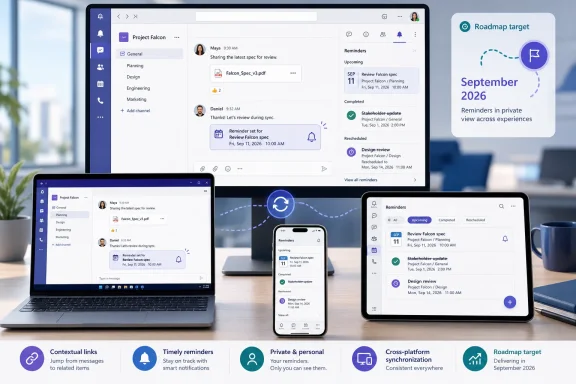 Teams Finally Separates Reading a Message From Acting on It
Modern workplace messaging compresses several different activities into one interface. A colleague can ask a question, assign an informal task, share a document, announce a deadline, request an approval, or flag a problem using the same stream of visually similar chat bubbles.That makes Teams effective as a transmission system but unreliable as a memory system. Messages arrive according to the sender’s schedule, while the recipient may need to act hours or days later, after a meeting, once another person responds, or when a deadline is close enough to matter.
Microsoft’s planned personal message reminders create a bridge between those two moments. According to the Microsoft 365 Roadmap entry, a user will be able to set a reminder directly on a chat or channel message, receive a notification when it becomes due, and return to the original item with its context intact.
That last detail is important. A generic calendar reminder saying “check budget” may be nearly useless if the user must then search for the relevant conversation, identify which budget was being discussed, and reconstruct what changed since the reminder was created. A reminder tied to a specific message can bring the user back to the source instead of preserving only a manually written summary.
The feature is also explicitly personal. Reminders will be private to each user rather than visible to everyone in the conversation, meaning that setting one should not alter the message, notify its author, or create the impression that the organization has formally assigned a task.
This is personal attention management, not shared project management. That distinction keeps the feature lightweight enough to use frequently, but it also limits what organizations should expect it to accomplish.
The Missing Middle Between a Saved Message and a Planner Task
Teams already offers ways to keep hold of information, but they tend to sit at opposite ends of the workflow. Users can organize conversations, follow activity, search for messages, or use the surrounding chat and channel interface to make important discussions easier to find.Microsoft also provides a more structured route: creating a Planner task from a Teams message. Its support documentation says users can open a message’s actions, create a task, and place it either among private tasks or in a plan, adding details such as a due date, notes, priority, progress, bucket, or assignment where applicable.
That is valuable when a message represents actual work that needs to be tracked. It is excessive when the user merely needs to revisit a question after lunch, respond when a meeting ends, check whether someone supplied a missing number, or reread an announcement before a stated date.
The difference is not cosmetic. Creating a task asks the user to classify work, decide where it belongs, name it, and potentially expose it to a broader task-management process. A reminder asks only when the original message should return.
Teams has long needed this middle layer. Saving or favoriting information helps with retrieval, while Planner helps manage durable work; neither perfectly serves the everyday instruction to “bring this exact message back to me later.”
Message reminders should therefore be judged less as a stripped-down task manager than as a delayed resurfacing mechanism. Their job is not to replace task ownership, status tracking, dependencies, recurring work, or team reporting. Their job is to prevent a message from disappearing merely because it arrived at an inconvenient time.
That simplicity could also make reminders more widely used than formal task creation. Knowledge workers routinely resist workflows that demand several fields and decisions for every small follow-up, especially when the underlying action may take less time than documenting it.
A reminder attached through a message menu can reduce that friction. The user does not need to rewrite the request, paste a link, remember who sent it, or decide which plan owns it. The message itself becomes the reminder’s payload.
Microsoft Is Building a Private Queue Inside a Shared Workspace
The dedicated Reminders view may ultimately matter more than the notification. Notifications are momentary; a managed list gives users somewhere to review what is upcoming, overdue, completed, or no longer relevant.Microsoft says users will be able to create, update, complete, and delete reminders. Those verbs imply a basic lifecycle rather than a one-shot alert: a reminder can be changed when plans move, marked complete when the associated action is handled, or deleted when the original message no longer matters.
That lifecycle turns the feature into a small personal queue embedded inside Teams. It is still lighter than Planner, but it is more deliberate than simply generating another notification that disappears into the activity feed.
The design also acknowledges that due times are rarely permanent. A reminder set for Friday morning may become irrelevant on Thursday, need to move to Monday, or be completed before its notification fires. Without management controls, users would either receive obsolete alerts or stop trusting the system.
Trust is the central problem for any reminder product. A user must believe that the reminder was saved, that it will appear at the expected time, and that selecting it will reopen enough context to understand the intended action.
Teams complicates that problem because the originating message may live in several types of conversation and may be accessed from several platforms. It could be a direct chat, a group conversation, a channel post, or part of an active thread whose surrounding discussion continues after the reminder is set.
Microsoft’s roadmap wording says reminders include message context, but it does not define precisely how much context will be shown in the notification or Reminders view. The safest expectation is that Teams will preserve a meaningful connection to the source message, not that it will generate a full summary of everything that happened afterward.
That boundary will determine how useful the feature feels. Returning users to an isolated sentence may be sufficient for a simple request, but ambiguous messages often depend on replies, attachments, quoted material, or the identity of the conversation.
One Reminder System Must Work Across Five Client Families
Roadmap ID 565869 covers Android, desktop, iOS, Mac, and web clients. It is also listed for Worldwide standard multi-tenant organizations and the GCC, GCC High, and DoD cloud environments, through both Targeted Release and General Availability rings.| Deployment dimension | Included variants | Planned state |
|---|---|---|
| Computer clients | Desktop, Mac | In development |
| Browser access | Web | In development |
| Mobile clients | Android, iOS | In development |
| Commercial cloud | Worldwide standard multi-tenant | Planned |
| Government clouds | GCC, GCC High, DoD | Planned |
| Release rings | Targeted Release, General Availability | September 2026 GA target |
Cross-client consistency is therefore part of the core feature, not an optional polish item. Microsoft must keep reminder state synchronized so that an item updated or completed on one device does not continue appearing as active elsewhere.
Mobile support is especially significant. The moment when a user realizes that a message cannot be handled immediately often occurs away from the desk, and forcing that person to remember to create a reminder later would recreate the exact prospective-memory problem the feature is supposed to solve.
The inclusion of both channel and chat messages is equally important. Teams has historically contained overlapping communication models, and features have not always arrived with identical behavior everywhere. A reminder system limited to chats would fail for organizations whose durable work happens in channels, while a channel-only system would miss the rapid requests exchanged through direct and group chats.
The government-cloud listing also gives the roadmap item unusually broad intended scope. It does not guarantee that every environment will receive the feature simultaneously, and the entry does not provide separate rollout dates for each cloud, but Microsoft is at least presenting reminders as a general Teams capability rather than a commercial-only experiment.
Admins should still avoid translating “included” into “available everywhere on the first day.” Microsoft 365 roadmap dates are planning targets, and staged deployments can create a period during which tenants, users, or client platforms show different behavior.
The September Date Is a Target, Not an Appointment
Microsoft lists general availability as September 2026 and marks the feature as in development. The roadmap entry was created on June 15, 2026, and last updated on July 10, 2026.Those dates offer a planning window, not a guaranteed launch day. The roadmap gives only a month for general availability and does not identify an exact September date, the beginning of Targeted Release, or the sequence in which supported clients and cloud environments will receive the feature.
That ambiguity matters because organizations often treat Microsoft 365 roadmap months as if they were traditional software release dates. Cloud features are commonly deployed in stages, and a feature’s visibility can depend on tenant selection, release preferences, service-side activation, and client readiness.
The fact that the item was updated less than a month after its creation suggests that Microsoft was actively maintaining the entry, but the supplied roadmap information does not describe what changed. It would be speculation to interpret that revision as either a delay, an acceleration, or a change in scope.
The September target should therefore guide preparation without encouraging premature promises. Help desks can anticipate questions, pilot users can watch for the feature, and governance teams can decide how to explain it, but administrators should not tell employees that reminders will appear on a specific day unless Microsoft later supplies a more precise rollout notice.
Timeline
June 15, 2026 — Microsoft created Microsoft 365 Roadmap item 565869 for personal message reminders in Teams.July 10, 2026 — Microsoft recorded the roadmap item’s latest listed update, while its status remained in development.
September 2026 — Microsoft targets general availability across the listed Teams clients, release rings, and cloud instances.
Roadmap status should remain the governing signal. Until the entry changes from in development and Microsoft communicates rollout details, the feature is planned rather than delivered.
Private Reminders Reduce Noise but Create Governance Questions
Making reminders private is the correct default. If every personal follow-up became visible in a channel, users would generate social noise, expose their working habits, and potentially confuse a private intention with a formal commitment.Privacy also makes experimentation safer. A user can set several reminders while triaging a busy conversation without advertising to colleagues that the messages have been postponed or implying that other participants must wait until the selected due time.
Yet “private” does not mean “outside the organization’s data environment,” and Microsoft’s short roadmap description does not spell out the compliance architecture. Administrators should not invent conclusions about retention, eDiscovery, auditing, storage location, or legal discoverability until Microsoft publishes supporting documentation.
The source message and the reminder are conceptually different objects. A message may belong to a chat or channel governed by established Microsoft 365 policies, while the reminder may represent personal metadata pointing back to that content.
Questions follow naturally. What happens if the source message is edited or deleted? What does the reminder display if the user loses access to the team or chat? Does completion remove the reminder from active lists while retaining a record, or does it merely change state? Can administrators disable the feature or govern it through a policy?
Roadmap ID 565869 does not answer those questions. That is not a defect in the entry—it is a planning summary rather than full product documentation—but it means regulated organizations should resist filling the gaps with assumptions.
The word “private” should be communicated in a narrowly accurate way: other conversation participants are not supposed to see a user’s reminder. It should not be casually expanded into claims about confidentiality from administrators, compliance systems, or Microsoft itself.
Reminders Will Not Turn Informal Requests Into Accountable Work
There is a tempting but dangerous interpretation of this feature: that once users can remind themselves about messages, fewer requests will be missed and Teams will become a reliable work-tracking system.That overstates what private reminders can do. A reminder records one recipient’s intention to revisit a message; it does not prove ownership, create a shared deadline, provide status visibility, or tell the sender whether anyone accepted responsibility.
Consider a channel post asking someone to review a document. Three people might independently set private reminders, each assuming another person owns the review. Alternatively, everyone may read the post and nobody may create one.
The feature improves personal follow-through only after an individual chooses to use it. It cannot repair ambiguous assignments, weak management practices, or an organizational habit of treating every chat message as an implicit task.
Formal work should still be recorded in a system that supports ownership and shared status. Microsoft’s existing ability to create a Planner task from a Teams message remains the more appropriate route when an action must be assigned, prioritized, reported, or coordinated with others.
The distinction can be expressed simply: remind me belongs in message reminders; assign this work belongs in a task system. Users will sometimes move from the first category to the second after reassessing the message, but the two should not be treated as interchangeable.
This is also why reminders should not become an excuse for indiscriminate messaging. Senders still need to use clear requests, identify owners, include deadlines where necessary, and choose channels rather than direct chats when the work requires broader visibility.
A private reminder can protect the recipient from interruption. It cannot rescue a poorly constructed request from its own ambiguity.
The Feature Fits Microsoft’s Broader Rebuilding of Conversation Management
Microsoft has been reshaping Teams around the reality that chat and channels are no longer merely places where conversations happen. They have become the operating surface for a large portion of office work, which means users need ways to sort, revisit, schedule, and convert messages rather than merely read them.The company’s redesigned chat and channels experience has emphasized bringing conversations together and helping users organize what matters. Microsoft has also documented scheduled chat messages, allowing a sender to choose when a message will be delivered rather than sending it immediately.
Message reminders solve the opposite timing problem. Scheduled send asks, “When should the other person receive this?” A personal reminder asks, “When should this return to me?”
Those features look similar because both involve a date and time, but they govern different sides of asynchronous collaboration. Scheduled sending protects the recipient from badly timed communication; reminders protect the recipient from losing a request that arrived at a time when it could not be handled.
Microsoft’s support material for creating Planner tasks from Teams messages supplies another adjacent workflow. Together, scheduled sending, message-to-task conversion, conversation organization, and private reminders suggest that Microsoft is treating messages as actionable objects rather than disposable lines in a chronological feed.
That evolution is overdue. Teams has accumulated meetings, files, apps, tasks, chats, channels, notifications, and AI-assisted experiences, but the fundamental unit connecting many of those systems remains the message.
A message may contain the decision that changes a project, the approval that unlocks a purchase, or the instruction needed before a deadline. Making that message easier to resurface is less glamorous than adding another major app or AI layer, but it addresses a failure users experience every day.
The feature’s strategic value lies precisely in its ordinariness. It requires no new project methodology and no organization-wide migration. A user encounters a message, chooses a future time, and continues working.
Notifications Are Useful Only When Teams Respects Their Timing
Microsoft says users will receive timely notifications when reminders become due. That sounds straightforward until it meets the realities of Teams notification settings, multiple signed-in devices, quiet hours, mobile operating-system restrictions, and users who already ignore a crowded activity feed.A reminder should be distinct enough to convey that it was explicitly requested. If it looks identical to routine Teams activity, users may dismiss it without recognizing that it represents a deliberate earlier decision.
At the same time, reminders cannot become so aggressive that they interrupt users everywhere. A person signed in on desktop, web, and phone does not need several competing alerts for the same item, particularly after completing it on one device.
Microsoft has not provided the detailed notification behavior in the roadmap description. It is therefore too early to say whether reminders will support snoozing, repeated alerts, custom recurrence, priority levels, or device-specific delivery.
Those omissions should temper expectations. The confirmed functionality is the ability to set and manage message reminders, receive notifications when due, and use a dedicated Reminders view. Anything beyond that remains unconfirmed by the supplied roadmap material.
The Reminders view can compensate for imperfect notification delivery if it provides a trustworthy list. Users who miss an alert should still be able to find the due item rather than relying on notification history.
But a list can also become a graveyard. If Teams allows users to create reminders faster than they complete or delete them, the queue may accumulate stale requests until its numbers cease to mean anything.
Good product design can reduce that risk through clear status, easy completion, and painless rescheduling. The roadmap confirms those basic management actions, which is a promising foundation, but the ultimate behavior will depend on interface details Microsoft has not yet revealed.
Admins Need Guidance More Than They Need a Deployment Project
This feature should not require the kind of infrastructure planning associated with a major Teams migration. It is a service capability planned across existing clients and cloud environments, and the roadmap material identifies no prerequisite deployment package or administrative configuration.The administrative work is mostly about expectations, support, governance, and workflow boundaries. Users need to know what a reminder does, what it does not do, and when a message should instead become a Planner task or another formal record.
Support teams should also anticipate client-consistency questions. During a staged rollout, one user may see reminder actions while another does not, or the feature may become visible on the web before a particular installed client reflects the same controls.
Admins should avoid recommending reinstallations or broad client resets merely because a roadmap feature has not yet appeared. First confirm that Microsoft has announced rollout for the tenant and environment, then check release preferences, client currency, and service health information.
Government organizations should pay particular attention to cloud-specific communication. GCC, GCC High, and DoD are listed in the roadmap, but that inclusion should not be used to infer identical timing without a deployment notice.
Action checklist for admins
- Track Roadmap ID 565869 and watch for a corresponding Microsoft 365 Message Center announcement.
- Treat September 2026 as a general-availability target, not a guaranteed tenant activation date.
- Test reminder creation, editing, completion, deletion, notification delivery, and source-message reopening during Targeted Release.
- Verify behavior across desktop, web, Mac, Android, and iOS before publishing internal instructions.
- Tell users that reminders are private personal follow-ups, not visible task assignments or shared commitments.
- Keep Planner or the organization’s approved work-management system as the standard for assigned and reportable work.
- Review Microsoft’s eventual compliance and administrative documentation before making retention, auditing, or eDiscovery claims.
- Update help-desk scripts to distinguish message reminders, scheduled messages, saved information, and Planner tasks.
The Real Test Is Whether Context Survives Time
The promise of a reminder attached to a message is not merely that Teams will generate an alert. The promise is that a user can recover the mental state that made the message important in the first place.That is harder than it sounds. Conversations evolve, channel threads expand, files are revised, and participants make decisions in later replies. A reminder created on Monday may point to a message whose meaning has changed by Thursday.
Teams should therefore make it obvious when users are returning to an old message and give them an easy path into the surrounding conversation. The reminder must serve as an entry point, not an artificial snapshot pretending that the discussion stopped when the reminder was created.
There is also a difference between message context and task context. The surrounding thread can explain what people said, but it may not show whether a related action was completed elsewhere. Users will still need judgment rather than assuming every due reminder represents unfinished work.
Deletion presents another edge case. If the original author removes a message or an administrator’s policies make it unavailable, the reminder may no longer have anything useful to reopen. Microsoft has not described that behavior, so organizations should wait for documentation and testing rather than assume the reminder preserves a separate copy.
Access changes create a similar problem. A user might leave a team, lose access to a channel, or move between organizational roles after setting a reminder. A robust implementation should fail clearly instead of opening an empty view or generating a cryptic error.
These are not reasons to dismiss the feature. They are the practical details that determine whether reminders become infrastructure users trust or another menu command they try once.
A Small Feature Could Change How People Triage Teams
If reminder creation is fast, the feature may alter the first few seconds after every important message arrives. Instead of choosing between interrupting current work and hoping to remember later, a user can deliberately defer the message.That reduces the pressure to answer immediately. The psychological effect could be substantial in organizations where Teams messages are treated as demands for instant response, even when the work would be better handled in a focused block.
Private reminders also give users a way to distinguish acknowledgment from completion. Someone can read a message, understand it, and schedule action without leaving it unread merely as a crude memory aid.
Many workers already misuse unread status this way. They mark messages unread, leave browser tabs open, email links to themselves, take screenshots, write notes, or create calendar appointments whose only purpose is to preserve a pointer to a conversation.
Those improvised systems work until they do not. They separate the reminder from its source, scatter obligations across applications, and force users to remember which memory aid they used.
A native feature can consolidate that behavior without forcing every small follow-up into a formal task database. The dedicated view then provides a single place inside Teams to inspect deferred messages.
The danger is that Microsoft may bury the feature under several menu layers or overload the view with unrelated reminder types. The roadmap does not reveal the final interface, so ease of use remains an open question.
For reminder creation to become habitual, it must take less effort than the workaround it replaces. For reminder completion to remain trustworthy, clearing an item must be immediate and synchronized. For reminder notifications to matter, they must be recognizable without becoming noisy.
What Teams Users Should Carry Into September
The feature described by Roadmap ID 565869 is narrow, but the workflow it addresses is universal: an important message arrives before the recipient can act. Microsoft’s answer is a private, contextual reminder that can be managed inside Teams rather than reconstructed later in another application.- General availability is targeted for September 2026, with no exact launch day listed.
- The roadmap status is in development, so timing and rollout details may still change.
- Reminders are planned for chat and channel messages on Android, desktop, iOS, Mac, and web.
- Worldwide, GCC, GCC High, and DoD cloud instances are listed in the planned scope.
- Users will be able to create, update, complete, and delete reminders in a dedicated Reminders view.
- Reminders are private and should not be confused with shared assignments or formal Planner tasks.
References
- Primary source: Microsoft 365 Roadmap
Published: 2026-07-10T21:58:35.1674832Z
Microsoft 365 Roadmap | Microsoft 365
The Microsoft 365 Roadmap lists updates that are currently planned for applicable subscribers. Check here for more information on the status of new features and updates.www.microsoft.com
- Official source: support.microsoft.com
Create a task from a Teams message | Microsoft Support
Learn how to create a task from a Teams message.support.microsoft.com - Official source: devblogs.microsoft.com
Change Notifications for Microsoft Teams Messages now Generally Available - Microsoft 365 Developer Blog
Back in February we announced the public preview of change notifications for Teams messages and we are excited to share we have now moved the changedevblogs.microsoft.com - Related coverage: mc.merill.net
MC1188222 - Microsoft Teams: Private chat for organizers and presenters in structured meetings, webinars, and town halls | Microsoft 365 Message Center Archive
Microsoft Teams will introduce a private chat for organizers, co-organizers, and presenters in structured meetings, webinars, and town halls, unifying backroom chat behavior.…mc.merill.net - Official source: techcommunity.microsoft.com
- Official source: adoption.microsoft.com
- Official source: learn.microsoft.com
Create plannerTaskChatMessage - Microsoft Graph beta | Microsoft Learn
Create a new chat message on a planner task.learn.microsoft.com - Official source: download.microsoft.com
- Related coverage: windowscentral.com
Microsoft will finally add this Teams feature to channels | Windows Central
Microsoft Teams on the desktop will soon support scheduling messages within channels. The feature is already available in chats, but should roll out to channels in the coming months.www.windowscentral.com - Related coverage: slack.com
Slack vs Microsoft Teams: Compare Features, Pricing & Security | Slack
Looking for a Teams alternative? Slack delivers a smoother experience with native AI, easy automation, a clean and delightful UI, third-party integrations, and an ease of use that keeps teams focused.slack.com - Official source: cdn-dynmedia-1.microsoft.com
- Related coverage: office365itpros.com
- Related coverage: techradar.com
Asana vs. Microsoft Teams vs. Slack | TechRadar
Choosing the right project management tool can improve a team's productivity and collaboration. Which wins for Asana, Microsoft Teams, and Slack?www.techradar.com