

Microsoft launched support for adding Teams apps—tabs, bots, and message extensions—directly to Private Channels for worldwide standard Microsoft 365 tenants in January 2026, with the roadmap item updated on June 24, 2026, for Teams desktop clients on Windows and Mac. The change looks small only if you think of Teams channels as chat rooms with a files tab bolted on. In practice, it closes one of the more persistent gaps between how organizations wanted to use Private Channels and what Teams actually allowed them to do. Microsoft is not merely adding convenience here; it is admitting that the private channel has become a serious work surface, not a side compartment.
Private Channels have always carried an awkward promise. They let a subset of a team collaborate away from the larger group, but they often denied that subset the same app-driven workflows available in a standard channel. That meant the most sensitive or focused collaboration space in Teams could also be the least capable one.
The new app support changes that equation by allowing channel owners to add apps directly to a specific private channel. Tabs can pin workspaces and dashboards where the conversation happens. Bots can participate in the channel context. Message extensions can bring outside records, actions, and search results into the compose box without forcing users to leave the thread.
That matters because Teams has evolved from a chat client into Microsoft’s front door for work. If the front door only worked properly in standard channels, private collaboration always required compromise. Users could protect the audience for a discussion, or they could keep the integrated workflow, but too often they could not have both.
The update also lands at a moment when Microsoft is pushing Teams, Copilot, agents, and third-party app integrations as a single productivity fabric. In that world, denying Private Channels access to the same extensibility model was not just a missing feature. It was a structural contradiction.
A department might create a whole new team for a confidential project because the private channel inside the existing team could not host the app experience it needed. A project group might keep sensitive planning in a group chat while tracking work in a separate app tab somewhere else. A vendor-facing group might split files, messages, and task updates across multiple surfaces because the secure channel boundary was not enough.
This is where Microsoft’s change is more than a feature checkbox. It nudges organizations back toward a cleaner model: keep the team as the broad container, use private channels for bounded work, and attach the relevant apps at the channel level. That is closer to how administrators want collaboration to be structured, because the permissions boundary and the work context finally line up.
But the cleanup is not automatic. Existing tenants may already have years of Teams architecture built around the old limitation. The organizations that benefit most will be the ones willing to revisit whether duplicate teams and private chats still need to exist now that Private Channels can carry more of the workload.
For users, this is exactly how the feature should work. The legal review channel needs different tooling than the marketing launch channel, even if both live inside the same broader team. A channel for an incident response group may need a ticketing bot, a status dashboard, and a message extension for pulling incident records. The rest of the team does not need those tools cluttering its workspace.
For administrators, the same specificity creates new review points. App permission policies, tenant settings, third-party app approval, guest access, external access, and data handling rules all matter more when apps can operate in smaller, more sensitive spaces. The old mental model of “this app is installed for the team” is not enough if the app’s actual value and risk now sit inside a private channel.
The channel owner also becomes more consequential. Microsoft’s phrasing gives channel owners the ability to add apps to the private channel, subject to policy. That is good for agility, but it also means governance must be clear enough that owners do not accidentally build compliance problems while trying to reduce context switching.
Any app that treats team membership as equivalent to channel membership can break the privacy model. A task assignment app that lists every member of the parent team, a reporting tool that aggregates private channel activity into a team-wide dashboard, or a bot that sends proactive messages to people outside the channel can all turn a useful integration into a leak vector. Microsoft’s developer guidance has been moving toward exactly this distinction: apps must understand the current channel context, membership, tenant identity, and storage boundary.
Files are part of the same story. Private Channels use separate SharePoint-backed storage from the standard channel structure. Apps that assume one team equals one document location can fail in subtle ways, especially when they retrieve files, render previews, or synchronize records into external systems. The private channel’s value depends on the app honoring that separate boundary.
This is why the update is not simply “all Teams apps now work everywhere.” Developers still need to test apps across standard, shared, and private channel scenarios. The apps most likely to need scrutiny are the ones that deal with membership, permissions, file access, reporting, external participants, or workflow automation.
External users may be present through guest access or shared collaboration patterns, depending on the tenant configuration and the channel type involved. Apps have to handle identity carefully, especially when authentication, single sign-on, files, or user lookups are involved. A tab that works perfectly for employees can become brittle when the user belongs to another tenant.
This is where Microsoft’s broader Teams strategy meets the practical caution of enterprise IT. The company wants Teams to be the place where people work with colleagues, partners, vendors, and customers. Security teams want to know exactly which data crosses which boundary, which app can see it, and which user identity is being evaluated at the moment of access.
The new Private Channel app support does not remove that tension. It concentrates it. Organizations can now make private collaboration more productive, but they also need to treat those app-enabled channels as governed collaboration spaces, not informal side rooms.
The hard cases are the apps that made assumptions because Teams historically allowed those assumptions to survive. If an app was built around the standard channel model, it may assume that the team roster is the relevant audience, that the team’s SharePoint site is the file home, or that tenant identity is simple. Private channel support forces those assumptions into the open.
That is healthy for the platform. Teams is no longer just a collection of conversation surfaces; it is a matrix of scopes, identities, storage locations, and app capabilities. Developers who want their apps to feel native in Teams have to behave like good citizens inside that matrix.
There is also a competitive angle. Apps that support Private Channels cleanly will be easier for organizations to adopt in sensitive workflows. Apps that fail there may increasingly look unfinished, even if they work in standard channels. As Microsoft pushes Teams as an app and agent hub, compatibility with private and shared collaboration spaces becomes part of the enterprise readiness checklist.
Administrators should start by reviewing app permission policies and app setup policies. If a third-party app is allowed broadly, it may now show up in places that carry more sensitive conversations. If channel owners can add approved apps without much oversight, that may be acceptable for low-risk tooling but less so for apps that process regulated data.
The second review should focus on owner education. Private channel owners need to understand that an app added to a private channel is part of the channel’s trust boundary. They should know when to involve IT, when to avoid an app, and when to check whether external participants can see or interact with app content.
The third review belongs to data protection teams. Private channels often exist because the work is confidential, time-sensitive, or restricted. Adding apps can improve the workflow, but it can also introduce export paths, notifications, logs, and external service processing that did not exist when the channel was mostly messages and files.
Putting tabs, bots, and message extensions into Private Channels brings the work back into the conversation. A private launch group can pin a planning board. A finance review channel can use a bot to surface approvals. An engineering escalation channel can insert records through a message extension without pasting stale screenshots or asking everyone to open another system.
That does not magically make Teams elegant. The app still has its share of navigation overload, notification fatigue, and administrative complexity. But this particular change attacks a real pain point: the mismatch between the privacy of the conversation and the availability of the tools needed to complete the work.
Microsoft’s best Teams updates are often the ones that remove arbitrary distinctions. Users do not think, “This is a private channel, so my workflow should be degraded.” They think, “This is where the right people are, so this is where the work should happen.”
Private Channel app support is not as flashy as AI recap or Copilot agents, but it may prove more important for daily operations. Enterprise productivity often improves less through spectacular new interfaces than through the removal of small blockers that shape behavior at scale. When a blocker has existed for years, its removal can quietly change how teams are designed.
It also helps Microsoft defend Teams against the perception that it is powerful but inconsistent. Teams has long suffered from feature fragmentation: something works in chat but not channels, standard channels but not private channels, desktop but not mobile, internal meetings but not external ones. Each exception trains users to distrust the platform.
By extending app support into Private Channels on desktop and Mac, Microsoft narrows one of those gaps. The platform still has exceptions, and mobile parity remains an obvious question for organizations with frontline or highly mobile users. But the direction is toward fewer dead ends inside the collaboration model.
Still, Teams is not only a desktop product. Frontline workers, field staff, executives, and mobile-heavy teams rely on phones and tablets. If a private channel becomes the operational hub for a project, uneven app availability across devices can recreate the same fragmentation this update is trying to solve.
Microsoft often rolls features across clients over time, and roadmap entries do not always tell the full story of client parity. But administrators should avoid assuming that “launched” means “identical everywhere.” Testing on the actual clients used by the organization remains the only safe approach.
That caveat is especially important for message extensions and bot interactions. A workflow that feels seamless on Windows or Mac may behave differently on mobile, or may not expose the same interaction surface. The more business-critical the private channel workflow, the more important that client testing becomes.
Good channel design still matters. A private channel should have a clear purpose, a bounded audience, and a small set of tools that serve the work. Otherwise, the feature that reduces context switching can become another form of clutter.
This is where channel owners need taste as much as permission. A tab for the system of record may be useful. Three redundant dashboards are not. A bot that handles channel-specific alerts may be valuable. A bot that sprays notifications into a sensitive discussion may make the channel less useful than before.
Microsoft is giving teams more power at the channel level. The organizations that benefit will pair that power with norms: when to create a private channel, when to add an app, when to remove one, and when a separate team is still the better structure.
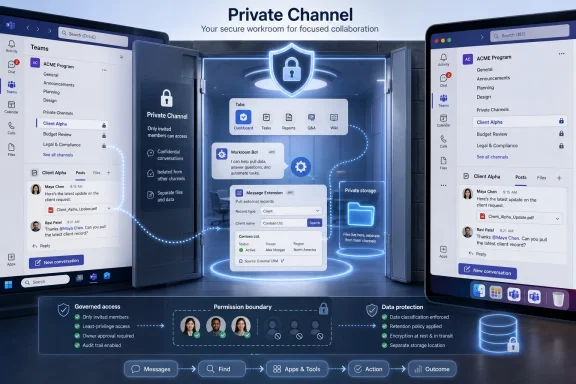 Microsoft Finally Lets the Locked Room Have Tools
Private Channels have always carried an awkward promise. They let a subset of a team collaborate away from the larger group, but they often denied that subset the same app-driven workflows available in a standard channel. That meant the most sensitive or focused collaboration space in Teams could also be the least capable one.The new app support changes that equation by allowing channel owners to add apps directly to a specific private channel. Tabs can pin workspaces and dashboards where the conversation happens. Bots can participate in the channel context. Message extensions can bring outside records, actions, and search results into the compose box without forcing users to leave the thread.
That matters because Teams has evolved from a chat client into Microsoft’s front door for work. If the front door only worked properly in standard channels, private collaboration always required compromise. Users could protect the audience for a discussion, or they could keep the integrated workflow, but too often they could not have both.
The update also lands at a moment when Microsoft is pushing Teams, Copilot, agents, and third-party app integrations as a single productivity fabric. In that world, denying Private Channels access to the same extensibility model was not just a missing feature. It was a structural contradiction.
The Old Limitation Encouraged Bad Architecture
The absence of full app support in Private Channels did not stop organizations from trying to work privately. It just pushed them toward messier designs. Teams sprawl, duplicate teams, shadow chats, and workaround SharePoint permissions often grew out of one basic need: a smaller group needed to collaborate with the same tools as the larger one.A department might create a whole new team for a confidential project because the private channel inside the existing team could not host the app experience it needed. A project group might keep sensitive planning in a group chat while tracking work in a separate app tab somewhere else. A vendor-facing group might split files, messages, and task updates across multiple surfaces because the secure channel boundary was not enough.
This is where Microsoft’s change is more than a feature checkbox. It nudges organizations back toward a cleaner model: keep the team as the broad container, use private channels for bounded work, and attach the relevant apps at the channel level. That is closer to how administrators want collaboration to be structured, because the permissions boundary and the work context finally line up.
But the cleanup is not automatic. Existing tenants may already have years of Teams architecture built around the old limitation. The organizations that benefit most will be the ones willing to revisit whether duplicate teams and private chats still need to exist now that Private Channels can carry more of the workload.
Channel-Level Apps Make Ownership More Powerful and More Complicated
The most important governance shift is that apps are being added to the private channel, not merely inherited from the parent team. That distinction is easy to miss, but it changes the control plane. A private channel is no longer just a membership boundary inside a team; it becomes an app boundary as well.For users, this is exactly how the feature should work. The legal review channel needs different tooling than the marketing launch channel, even if both live inside the same broader team. A channel for an incident response group may need a ticketing bot, a status dashboard, and a message extension for pulling incident records. The rest of the team does not need those tools cluttering its workspace.
For administrators, the same specificity creates new review points. App permission policies, tenant settings, third-party app approval, guest access, external access, and data handling rules all matter more when apps can operate in smaller, more sensitive spaces. The old mental model of “this app is installed for the team” is not enough if the app’s actual value and risk now sit inside a private channel.
The channel owner also becomes more consequential. Microsoft’s phrasing gives channel owners the ability to add apps to the private channel, subject to policy. That is good for agility, but it also means governance must be clear enough that owners do not accidentally build compliance problems while trying to reduce context switching.
Private Channels Are Not Just Smaller Standard Channels
A standard channel assumes broad team membership. A private channel assumes selected membership. That difference sounds administrative, but it has deep consequences for app behavior.Any app that treats team membership as equivalent to channel membership can break the privacy model. A task assignment app that lists every member of the parent team, a reporting tool that aggregates private channel activity into a team-wide dashboard, or a bot that sends proactive messages to people outside the channel can all turn a useful integration into a leak vector. Microsoft’s developer guidance has been moving toward exactly this distinction: apps must understand the current channel context, membership, tenant identity, and storage boundary.
Files are part of the same story. Private Channels use separate SharePoint-backed storage from the standard channel structure. Apps that assume one team equals one document location can fail in subtle ways, especially when they retrieve files, render previews, or synchronize records into external systems. The private channel’s value depends on the app honoring that separate boundary.
This is why the update is not simply “all Teams apps now work everywhere.” Developers still need to test apps across standard, shared, and private channel scenarios. The apps most likely to need scrutiny are the ones that deal with membership, permissions, file access, reporting, external participants, or workflow automation.
External Collaboration Raises the Stakes
The roadmap language explicitly points to collaborators from other teams or organizations, subject to admin policy. That phrase is doing a lot of work. It reminds administrators that the private channel is not always an internal-only room, and app behavior in cross-tenant scenarios can be more complicated than a normal channel tab.External users may be present through guest access or shared collaboration patterns, depending on the tenant configuration and the channel type involved. Apps have to handle identity carefully, especially when authentication, single sign-on, files, or user lookups are involved. A tab that works perfectly for employees can become brittle when the user belongs to another tenant.
This is where Microsoft’s broader Teams strategy meets the practical caution of enterprise IT. The company wants Teams to be the place where people work with colleagues, partners, vendors, and customers. Security teams want to know exactly which data crosses which boundary, which app can see it, and which user identity is being evaluated at the moment of access.
The new Private Channel app support does not remove that tension. It concentrates it. Organizations can now make private collaboration more productive, but they also need to treat those app-enabled channels as governed collaboration spaces, not informal side rooms.
Developers Get a Small Manifest Change With Big Implications
For some Teams apps, supporting private channels may be relatively straightforward. Microsoft’s platform guidance points developers toward declaring support for channel features and validating behavior. Apps that do not depend heavily on membership, storage location, or cross-channel data may need only modest work.The hard cases are the apps that made assumptions because Teams historically allowed those assumptions to survive. If an app was built around the standard channel model, it may assume that the team roster is the relevant audience, that the team’s SharePoint site is the file home, or that tenant identity is simple. Private channel support forces those assumptions into the open.
That is healthy for the platform. Teams is no longer just a collection of conversation surfaces; it is a matrix of scopes, identities, storage locations, and app capabilities. Developers who want their apps to feel native in Teams have to behave like good citizens inside that matrix.
There is also a competitive angle. Apps that support Private Channels cleanly will be easier for organizations to adopt in sensitive workflows. Apps that fail there may increasingly look unfinished, even if they work in standard channels. As Microsoft pushes Teams as an app and agent hub, compatibility with private and shared collaboration spaces becomes part of the enterprise readiness checklist.
Admins Should Treat This as a Governance Event, Not a Feature Toggle
The tempting reaction is to celebrate the end-user win and move on. That would be a mistake. This update changes where apps can appear, who can add them, and what collaboration spaces can become operationally important.Administrators should start by reviewing app permission policies and app setup policies. If a third-party app is allowed broadly, it may now show up in places that carry more sensitive conversations. If channel owners can add approved apps without much oversight, that may be acceptable for low-risk tooling but less so for apps that process regulated data.
The second review should focus on owner education. Private channel owners need to understand that an app added to a private channel is part of the channel’s trust boundary. They should know when to involve IT, when to avoid an app, and when to check whether external participants can see or interact with app content.
The third review belongs to data protection teams. Private channels often exist because the work is confidential, time-sensitive, or restricted. Adding apps can improve the workflow, but it can also introduce export paths, notifications, logs, and external service processing that did not exist when the channel was mostly messages and files.
The User Benefit Is Real Because Context Switching Is Real
For all the governance caveats, the user-facing improvement is obvious. Teams users live in a constant battle against context switching. The more sensitive or cross-functional the work, the more likely it is to sprawl across chats, files, browser tabs, project tools, and email.Putting tabs, bots, and message extensions into Private Channels brings the work back into the conversation. A private launch group can pin a planning board. A finance review channel can use a bot to surface approvals. An engineering escalation channel can insert records through a message extension without pasting stale screenshots or asking everyone to open another system.
That does not magically make Teams elegant. The app still has its share of navigation overload, notification fatigue, and administrative complexity. But this particular change attacks a real pain point: the mismatch between the privacy of the conversation and the availability of the tools needed to complete the work.
Microsoft’s best Teams updates are often the ones that remove arbitrary distinctions. Users do not think, “This is a private channel, so my workflow should be degraded.” They think, “This is where the right people are, so this is where the work should happen.”
The January Launch Fits Microsoft’s Bigger Teams Rebuild
This update should also be read against the broader rebuild of Teams over the past several years. Microsoft has been trying to make Teams faster, more coherent, more extensible, and more central to Microsoft 365. The new Teams client, the unified chat and channels experience, Copilot integration, and the platform’s agent ambitions all point in the same direction.Private Channel app support is not as flashy as AI recap or Copilot agents, but it may prove more important for daily operations. Enterprise productivity often improves less through spectacular new interfaces than through the removal of small blockers that shape behavior at scale. When a blocker has existed for years, its removal can quietly change how teams are designed.
It also helps Microsoft defend Teams against the perception that it is powerful but inconsistent. Teams has long suffered from feature fragmentation: something works in chat but not channels, standard channels but not private channels, desktop but not mobile, internal meetings but not external ones. Each exception trains users to distrust the platform.
By extending app support into Private Channels on desktop and Mac, Microsoft narrows one of those gaps. The platform still has exceptions, and mobile parity remains an obvious question for organizations with frontline or highly mobile users. But the direction is toward fewer dead ends inside the collaboration model.
The Desktop-First Scope Leaves a Familiar Caveat
The roadmap item lists Desktop and Mac, which is both unsurprising and limiting. Many Teams app experiences are richest on desktop, especially tabs and complex message extensions. For knowledge workers, that is probably where the immediate value sits.Still, Teams is not only a desktop product. Frontline workers, field staff, executives, and mobile-heavy teams rely on phones and tablets. If a private channel becomes the operational hub for a project, uneven app availability across devices can recreate the same fragmentation this update is trying to solve.
Microsoft often rolls features across clients over time, and roadmap entries do not always tell the full story of client parity. But administrators should avoid assuming that “launched” means “identical everywhere.” Testing on the actual clients used by the organization remains the only safe approach.
That caveat is especially important for message extensions and bot interactions. A workflow that feels seamless on Windows or Mac may behave differently on mobile, or may not expose the same interaction surface. The more business-critical the private channel workflow, the more important that client testing becomes.
The App Store Inside the Private Room Needs Restraint
There is another risk: Teams can become noisy when every channel accumulates tabs and bots. Private Channels may now inherit that problem. The ability to add apps does not mean every private channel should become a miniature portal.Good channel design still matters. A private channel should have a clear purpose, a bounded audience, and a small set of tools that serve the work. Otherwise, the feature that reduces context switching can become another form of clutter.
This is where channel owners need taste as much as permission. A tab for the system of record may be useful. Three redundant dashboards are not. A bot that handles channel-specific alerts may be valuable. A bot that sprays notifications into a sensitive discussion may make the channel less useful than before.
Microsoft is giving teams more power at the channel level. The organizations that benefit will pair that power with norms: when to create a private channel, when to add an app, when to remove one, and when a separate team is still the better structure.
The Real Win Is Fewer Workarounds in Sensitive Work
The practical significance of this launch is that it lets Private Channels become first-class workspaces instead of protected corners with missing furniture. The feature is not glamorous, but it is the sort of platform repair that changes everyday behavior when deployed carefully.- Microsoft has launched support for tabs, bots, and message extensions inside Teams Private Channels for worldwide standard Microsoft 365 tenants on Windows and Mac desktop clients.
- Channel owners can add apps to specific private channels, but tenant policy and app governance still determine what is allowed.
- Developers should test whether their apps respect private channel membership, separate storage, guest users, external users, and channel-specific context.
- Administrators should review app policies, owner permissions, and data protection rules before encouraging broad adoption.
- The biggest user benefit is reduced context switching for confidential, cross-functional, or partner-facing work that previously had to live across multiple tools.
- The launch reduces a long-standing Teams inconsistency, but organizations still need to validate client behavior and avoid turning every private channel into an overbuilt app portal.
References
- Primary source: Microsoft 365 Roadmap
Published: 2026-06-24T23:15:55.6812517Z
Microsoft 365 Roadmap | Microsoft 365
The Microsoft 365 Roadmap lists updates that are currently planned for applicable subscribers. Check here for more information on the status of new features and updates.www.microsoft.com
- Official source: support.microsoft.com
Standard, private, or shared channels in Microsoft Teams | Microsoft Support
Learn about channels in Microsoft Teams. Standard channels are available to all team members in Teams. Most channels are standard channels. If you need a smaller, specific audience for a particular subject, you can use a private channel. Shared channels are for collaborating with people inside...support.microsoft.com - Official source: learn.microsoft.com
IT Admins - Private channels in Microsoft Teams - Microsoft Teams | Microsoft Learn
Learn how to use and manage private channels in Microsoft Teams.learn.microsoft.com - Related coverage: supersimple365.com
Rollout paused: App support is coming to Private Channels - Super Simple 365
Short VersionMicrosoft Teams will soon support apps in Private channels - including bots, tabs, and message extensions. Rollout paused 17th March 2026. Details Key points: Support for apps in Private Channels aligns with the experience for apps in shared channels. Only apps marked to work in... supersimple365.com
- Related coverage: it.osu.edu
Fresh Features, Smarter Tools: Microsoft 365 Updates | Office of Technology and Digital Innovation
Over the coming months, Microsoft 365 will continue rolling out updates designed to simplify how people work, collaborate, and plan. These enhancements focus onit.osu.edu
- Official source: techcommunity.microsoft.com
What’s New in Microsoft Teams | January 2026 – ISE Edition | Microsoft Community Hub
Welcome to 2026! This first ’What’s new in Teams’ of the year is a “2-in-1” edition. We’re not only introducing the usual monthly range of new features and... techcommunity.microsoft.com
- Related coverage: kbworks.eu
Teams Private Channels: Finally Getting Full App Support (Planner, Jira, and More) - KbWorks - SharePoint and Teams Specialist
For a long time, Private Channels in Microsoft Teams felt like a restricted island. While they provided necessary privacy, they lacked the app integrationskbworks.eu - Related coverage: windowscentral.com
4 new Microsoft Teams features coming in April 2026 | Windows Central
Four new features are headed to Teams next month, including AI-powered video recaps and a UI tweak that finally lets you hide the meeting toolbar.www.windowscentral.com - Official source: adoption.microsoft.com
- Official source: cdn-dynmedia-1.microsoft.com
- Official source: download.microsoft.com
- Related coverage: troutman.com
