

A veteran tinkerer has taken Windows 7 and stripped it down to an almost absurd extreme — a bootable x86 image that reports an on-disk size of just 69.0 MB — a proof‑of‑concept that vividly demonstrates the technical boundary between what an operating system needs to boot and what it needs to be useful.
Windows has always been a layered platform: a compact kernel and a set of core services on top of which sits a large, complex user‑mode runtime and a sprawling Component Store (WinSxS). Over the past decade hobbyists, sysadmins, and the occasional researcher have methodically shown how far the upper layers can be pruned while still producing a bootable system. Community projects such as Tiny11 and Nano11 applied scripted removals plus aggressive compression to reduce Windows 11 installs down into the low‑gigabyte range; the 69 MB Windows 7 build is the same idea pushed into extreme territory for an older OS.
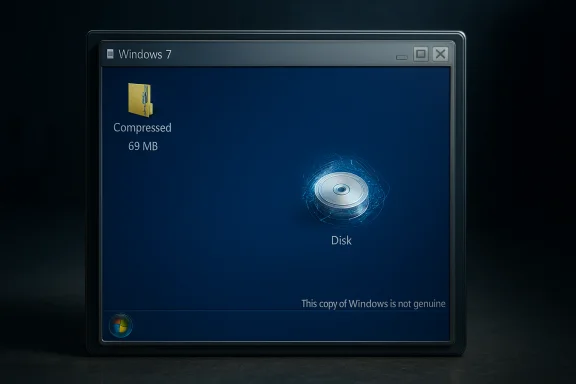
The artifact published by the builder (known as Xeno or XenoPanther) is distributed as a small compressed archive that contains a VMware virtual disk and a VM configuration file rather than a full ISO or installer. The author is explicit: this is a fun proof of concept, not a usable desktop replacement. In screenshots shared by the author the system boots to a Windows‑like desktop and still triggers the “This copy of Windows is not genuine” activation banner — a telling detail that shows some activation/licensing checks remain intact even after extreme pruning. Independent coverage from technical outlets confirms the basic claims: the image boots, it’s tiny, and it’s deliberately crippled so that “virtually nothing can run.”
Could some minimal console utilities work? Potentially — a statically linked or tiny PE that relies only on ntdll.dll, kernel32.dll and a minimal CRT can sometimes run — but the published image reportedly also omits standard CRTs, so even simple CLI programs may require manual scavenging and careful placement of DLLs. That manual restoration is error‑prone and often raises licensing concerns if files are redistributed rather than rebuilt from an official ISO.
Real progress for users who want a lean but secure Windows would look like:
As a practical system it is deliberately crippled. The combination of removed runtime libraries, absent servicing scaffolding, and stripped drivers means the image is unsafe for production or networked use. The responsible path forward for anyone inspired by this work is clear: rebuild from official media, publish reproducible scripts, run experiments inside isolated VMs, and document every change. Those practices preserve both the pedagogical value of minimalism and the legal and security safeguards that protect real users.
Source: PC Gamer Lone developer shrinks Window 7 down to 69 MB, claims 'virtually nothing can run' but that it does actually boot
 Background and overview
Windows has always been a layered platform: a compact kernel and a set of core services on top of which sits a large, complex user‑mode runtime and a sprawling Component Store (WinSxS). Over the past decade hobbyists, sysadmins, and the occasional researcher have methodically shown how far the upper layers can be pruned while still producing a bootable system. Community projects such as Tiny11 and Nano11 applied scripted removals plus aggressive compression to reduce Windows 11 installs down into the low‑gigabyte range; the 69 MB Windows 7 build is the same idea pushed into extreme territory for an older OS.The artifact published by the builder (known as Xeno or XenoPanther) is distributed as a small compressed archive that contains a VMware virtual disk and a VM configuration file rather than a full ISO or installer. The author is explicit: this is a fun proof of concept, not a usable desktop replacement. In screenshots shared by the author the system boots to a Windows‑like desktop and still triggers the “This copy of Windows is not genuine” activation banner — a telling detail that shows some activation/licensing checks remain intact even after extreme pruning. Independent coverage from technical outlets confirms the basic claims: the image boots, it’s tiny, and it’s deliberately crippled so that “virtually nothing can run.”
What exactly was published
- The distributed package is a compressed archive (mirrors reported a ~40.4 MB 7‑zip) that contains:
- A small VMware disk image that holds the pruned Windows 7 runtime.
- A VM configuration file so the image can be booted as a disposable virtual machine.
- The builder reports the image’s on‑disk size as 69.0 MB. That figure is the most attention‑grabbing metric, but it represents a highly pruned and compressed runtime, not the footprint one would need for everyday use.
- The system reaches a desktop shell on boot, and screenshots show the Windows activation/genuine check remains present — the desktop watermark “This copy of Windows is not genuine” was visible in published images. That observation is easy to reproduce in a lab and underscores that some activation‑related subsystems are still reachable.
- Crucial caveat from the author: “Virtually nothing can run” without manually restoring missing runtime libraries and plumbing. The builder’s release includes a file list for inspection but not the large user‑mode DLLs or CRTs needed by most Win32 apps. The author explicitly instructs anyone experimenting to supply their own system files if they want to make the image remotely functional.
The two engineering levers: pruning and compression
Two predictable engineering levers explain how a mainstream OS can be reduced to tens of megabytes:- Surgical pruning
- Remove inbox apps, optional services, fonts and language packs, user‑mode runtime libraries, shell helpers, and driver stacks that are not strictly required to initialize a kernel and paint windows.
- Trimming WinSxS servicing metadata and manifests (or omitting it entirely) cuts enormous amounts of administrative overhead and bytes but destroys normal servicing and updates.
- Aggressive compression
- Use high‑ratio export/compression modes (LZX/LZMS or CompactOS‑style techniques) to store binaries compressed on disk and rely on decompression at runtime or servicing time.
- That trade-off buys on‑disk savings at the cost of CPU/RAM during expansion and often complicates repair and updates.
What’s missing — and why “virtually nothing can run”
Booting a kernel and drawing a desktop requires a surprisingly small set of components. Running arbitrary Windows applications requires a far broader API surface. In the 69 MB Windows 7 image, the most consequential absences are:- Common dialog plumbing and common controls (e.g., comdlg32, comctl32) — breaks Open/Save dialogs and many widgets.
- Shell libraries (shell32 and related DLLs) — breaks Explorer extensions and shell behaviors most UI code expects.
- CRTs and runtime libraries (MSVCRT variants) — most compiled Win32 apps will fail to start without these.
- WinSxS servicing scaffolding and component manifests — without them the system cannot be serviced or updated normally.
- Driver stacks (audio, GPU acceleration, Wi‑Fi, etc. — hardware compatibility is dramatically reduced.
Could some minimal console utilities work? Potentially — a statically linked or tiny PE that relies only on ntdll.dll, kernel32.dll and a minimal CRT can sometimes run — but the published image reportedly also omits standard CRTs, so even simple CLI programs may require manual scavenging and careful placement of DLLs. That manual restoration is error‑prone and often raises licensing concerns if files are redistributed rather than rebuilt from an official ISO.
Activation, licensing, and legal points
One of the striking details in the build’s screenshots is that the Windows genuine/activation check still triggers, showing “This copy of Windows is not genuine.” That’s telling for two reasons:- It demonstrates that the elements of the system responsible for activation detection remain present and functional enough to produce the watermark. The pruned image is still detectable as Windows at a level where licensing checks operate.
- It underscores that extreme pruning is not a workaround for licensing: stripping files does not magically produce a free or perpetual license. Distribution of Microsoft's copyrighted binaries remains legally sensitive. Responsible builders typically provide scripts and a reproducible pipeline that start from an official Microsoft ISO rather than redistributing trimmed Windows binaries. If an archive includes Microsoft DLLs, redistributors may face takedown requests or legal exposure.
Use cases where a tiny image makes sense — and where it does not
A 69 MB Windows image will not replace a daily‑driver desktop. But the stunt has legitimate, narrow uses:- Educational laboratories: a deterministic artifact that shows the minimum binary set required to boot a kernel and present a GUI is a powerful teaching tool for Windows internals and reverse‑engineering.
- Micro‑VM test harnesses and CI: extremely small, reproducible images reduce storage and snapshot costs for ephemeral testing where feature completeness is unnecessary.
- Retro/legacy testing: a carefully augmented tiny image that restores a curated set of runtime DLLs could act as a compact platform for legacy games or old installers, if constructed from an official ISO and with the proper compatibility libraries added back. Community builders have entertained this possibility in follow‑ups to extreme builds.
- Embedded/offline appliances: in tightly controlled, air‑gapped appliances where updates and security are centrally managed, a compact image reduces storage footprint and boot time — but only with a disciplined rebuild and update pipeline.
- Production desktops or hardware that must remain secure and updatable.
- Network‑connected systems that must receive security patches; many tiny builds intentionally remove Windows Update and servicing scaffolding.
Security, updateability, and supply‑chain risks
The downsides of aggressive trimming are not theoretical — they are operational realities:- No normal security patching if the servicing stack or Windows Update plumbing is removed. An image that cannot receive cumulative updates via Microsoft channels will remain permanently exposed unless rebuilt to include patches.
- Removal of antimalware components (Windows Defender) is common in such builds; without a maintained replacement, a system is unprotected. This increases the danger of running modified images that are downloaded from unvetted hosts.
- Driver and hardware fragility: trimming drivers breaks audio, GPU acceleration, Wi‑Fi, and peripheral support — making physical deployments brittle. Tiny builds are far better suited to VMs.
- Supply‑chain risk: downloading prebuilt, heavily modified images from the internet can be dangerous; malicious actors could slip compromised binaries into seemingly‑harmless artifacts. Community best practice is to run experiments in isolated VMs, use snapshots, and rebuild from official ISOs using published scripts.
How this compares to related projects and Microsoft’s small‑footprint work
This extreme Windows 7 experiment sits at one end of a broader continuum:- Microsoft’s Nano lineage: Microsoft experimented with Nano Server for server/container scenarios (the historic Nano Server experiments and later container base images were targeted, headless, and supported for very specific API surfaces). Those vendor‑side images were still hundreds of megabytes rather than tens and were designed with serviceability in mind. The Tiny7 stunt is a different class of artifact — experimental and non‑serviceable.
- Tiny11 / Nano11 community projects: the enthusiast community has already shown it’s possible to trim Windows 11 into the low‑single‑gigabyte range by removing inbox apps, Xbox integrations, and other consumer bloat. Those projects typically aim for a pragmatic balance: small size while retaining some updateability and compatibility. The 69 MB Windows 7 build is more of a minimal kernel+shell demonstration.
- Other recent stunts: builders have circulated Windows 11 images reduced to ~100 MB by removing GUI elements entirely and exposing a DOS‑era interface; those are comparable as engineering demonstrations but different in goals and usability. Community work like nano11 (a trimmed Windows 11 that aims for a usable ~2.29 GB install) remains the more practical route for users who want a compact but serviceable OS.
Responsible experimentation: a practical checklist
For hobbyists and researchers who want to explore a similar experiment safely:- Start from an official Windows ISO and verify checksums.
- Work in an isolated VM with snapshots and no network access during initial exploration.
- Publish reproducible build scripts rather than redistributing trimmed Microsoft binaries.
- Document every removal and test recovery/repair scenarios.
- Never deploy an unserviceable image on production hardware or on network‑connected systems that need security updates.
- If you need a tiny but usable runtime, restore a minimal set of CRTs, common controls, and device drivers and keep a patch/rebuild process in place.
Critical analysis: novelty, strengths, and where it falls short
Strengths and educational value- The 69 MB Windows 7 image is a clear, reproducible demonstration of how small the kernel+shell boot surface can be. It isolates dependencies in a way that’s pedagogically valuable for anyone studying Windows internals or OS servicing.
- The project reignites useful conversations about minimalism and the trade‑offs between convenience, updatability, and privacy/control. It prompts thoughtful design questions: which APIs are truly essential? Which inbox components belong in a default consumer image?
- The image is intentionally non‑serviceable. That eliminates standard security updates and antimalware protections, making it unsuitable beyond offline lab use. That’s not a minor inconvenience; it is a structural trade‑off with real risk.
- Restoring functionality typically requires extracting Microsoft system files from a licensed installation. Redistributing such files is legally fraught; expecting users to fetch or copy DLLs raises licensing and provenance questions.
- The project’s headline number — 69 MB — is rhetorically powerful but can be misleading. Size alone does not equal usefulness. That message matters because readers sometimes conflate minimal size with practical success. Responsible coverage must flag the difference clearly.
- On its stated terms — a fun technical stunt and educational artifact — the experiment succeeds brilliantly. It forces an explicit mapping between boot dependency and everyday functionality.
- As a candidate for practical deployment it fails by design: the removal of servicing, security and runtime libraries makes real‑world use unsafe and impractical. The work is valuable as a demonstration and a conversation starter, not as a product.
Implications for the Windows ecosystem and next steps
The Tiny7 stunt is symptomatic of a broader tension: many users and builders feel Microsoft’s consumer images bundle features not everyone wants. Community tooling (DISM, CompactOS, WIM export modes) makes checking that box technically feasible. The challenge is balancing three competing priorities: minimal size, functional compatibility, and maintainable security.Real progress for users who want a lean but secure Windows would look like:
- Formalized, supported minimal profiles from vendors (Microsoft‑backed small ISO profiles with defined service paths).
- Community projects that emphasize reproducible scripts and incremental profiles — a “Tiny” profile that keeps updateability and a “Nano” profile that is explicitly for lab/embedded uses.
- Clear licensing guidance that avoids redistributing Microsoft binaries and instead documents reproducible build instructions starting from official media.
Conclusion
The 69 MB Windows 7 build is a striking engineering stunt: a compact, reproducible demonstration that illuminates the line between kernel+shell bootability and practical operating system functionality. As an educational artifact and provocation, it is highly successful — it teaches where the real costs live in a modern OS and invites a useful debate about what should ship by default.As a practical system it is deliberately crippled. The combination of removed runtime libraries, absent servicing scaffolding, and stripped drivers means the image is unsafe for production or networked use. The responsible path forward for anyone inspired by this work is clear: rebuild from official media, publish reproducible scripts, run experiments inside isolated VMs, and document every change. Those practices preserve both the pedagogical value of minimalism and the legal and security safeguards that protect real users.
Source: PC Gamer Lone developer shrinks Window 7 down to 69 MB, claims 'virtually nothing can run' but that it does actually boot
