

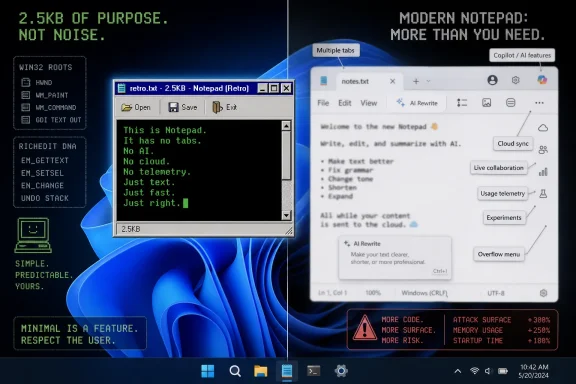
TinyRetroPad matters because Notepad is no longer merely Notepad. Over the last several Windows 11 release cycles, Microsoft has turned the once-austere plain-text scratchpad into a Store-updated, cloud-aware, AI-adjacent, Markdown-capable writing surface. Some users like the convenience. But Plummer’s tiny editor lands because it gives a name, a file size, and a working executable to a complaint that has been building for years: Windows’ smallest tools are being asked to carry Microsoft’s biggest product strategy.
TinyRetroPad Turns Minimalism Into a Rebuttal
There is a long tradition of tiny Windows programs that exist partly to prove a point. Developers have been squeezing Win32 applications into absurdly small executables since the platform’s early days, helped by the fact that Windows already provides a vast amount of machinery through system DLLs. TinyRetroPad sits in that lineage, but it arrives with unusually sharp timing.
Plummer’s pitch is almost aggressively plain: no bloat, no telemetry, no nonsense, and an old-school Windows feel. The key technical trick is that TinyRetroPad is not trying to reimplement an entire editing engine. It is essentially a small native wrapper around the Windows RichEdit control, relying on components already present in the operating system rather than bundling a modern app framework, analytics plumbing, cloud affordances, or a design system’s worth of dependencies.
That is why the 2.5KB figure has rhetorical force. The number is not a fair engineering comparison against a modern Store app with accessibility hooks, localization, settings, crash reporting, security hardening, and integration with newer Windows shell conventions. But it is a devastatingly effective comparison against the idea that every inbox utility must become a platform.
TinyRetroPad is also not a serious replacement for every Notepad user. A sysadmin editing a log file, a developer jotting down a snippet, and a writer drafting Markdown all have different expectations. The point is that enough people still want the first version of that experience — a window, a text area, Open, Save, Exit — that an ex-Microsoft engineer can make news by resurrecting it in miniature.
Notepad Became a Strategy Container
The modern Notepad story is not one of sudden corruption. Microsoft has been adding useful features to Notepad for years, and many of them were overdue. Better line-ending support, dark mode, multi-level undo, improved search, tabs, autosave, spell check, and session restore are not inherently villainous. For many users, they make Notepad less fragile and more humane.
The problem is accumulation. A tool that wins trust by being predictable can lose that trust by becoming clever in too many directions at once. Windows users have a particularly low tolerance for surprises in utilities that sit near the operating system’s muscle memory.
That is the paradox Microsoft now faces. Every individual Notepad feature can be defended. Tabs help users keep multiple scratch files together. Autosave prevents accidental data loss. Spell check helps nontechnical users. Markdown formatting makes sense in a world where plain text is often structured text. AI rewriting and summarization fit Microsoft’s broader Copilot push. Each step is understandable; the destination is what feels strange.
Notepad used to be the app you opened when you did not want an app experience. It was the place where formatting disappeared, where copied web text got laundered into plain text, where a batch file or registry note could be edited without ceremony. The more Notepad asks users to notice its interface, its cloud hooks, its writing tools, and its evolving identity, the more it erodes the very reason people trusted it.
WordPad’s Death Left a Product Gap Microsoft Filled the Wrong Way
The removal of WordPad was the turning point. Microsoft had an old, unloved, imperfect middle child sitting between Notepad and Word for decades. It could open and edit rich text, handle basic formatting, and serve users who needed more than plain text but less than Office. It was never glamorous, but it had a clear job.
When Microsoft deprecated and then removed WordPad from newer Windows releases, the company recommended Notepad for plain text and Word for rich text documents. That advice made sense on a product matrix. It made less sense in the everyday lives of users who had relied on WordPad precisely because they did not want Word.
Notepad then began to inherit the gravitational pull of the missing middle. Richer editing affordances, formatting-adjacent features, AI writing tools, and Markdown support all make more sense if Microsoft is trying to give the default Windows install a lightweight writing surface. But that is also exactly why longtime users bristle. The app called Notepad is being asked to absorb the job of the app Microsoft killed.
This is not just nostalgia. Product boundaries matter. A plain-text editor that occasionally gains conveniences is one thing. A plain-text editor slowly becoming a mini writing environment is another. Microsoft could have revived WordPad as a modern lightweight editor, shipped a separate “Windows Notes” app, or made AI writing an optional install. Instead, it chose to keep stretching Notepad because Notepad is already there.
That decision reveals the real strategic tension in Windows 11. Microsoft wants fewer legacy components, more Store-serviced inbox apps, more AI surfaces, and more consistency across its software. Users want the small things to stay small. TinyRetroPad is a tiny binary standing in the gap between those impulses.
The File Size Is a Symbol, Not a Benchmark
It is tempting to treat TinyRetroPad’s 2.5KB footprint as a dunk on Microsoft engineering. That would be too easy and not entirely fair. Modern Windows apps carry obligations that classic Win32 samples did not: accessibility, internationalization, security mitigations, high-DPI support, crash diagnostics, enterprise policy support, and compatibility with modern deployment pipelines. A tiny assembly program can skip a lot of that.
But symbols matter in software because users do not experience architectural nuance. They experience launch time, visual noise, prompts, settings toggles, background updates, unexplained behavior, and the uneasy feeling that a local action may have become part of a cloud workflow. When the app in question is Notepad, even small changes feel larger than they would elsewhere.
The phrase “2.5KB Notepad” works because it compresses a broad complaint into a number anyone can understand. A few kilobytes suggests immediacy, transparency, and restraint. A modern Store-delivered Notepad with AI writing tools suggests product management, telemetry pipelines, account entitlements, and experiments. The comparison may be technically unfair, but it is emotionally precise.
There is also an educational value here. TinyRetroPad reminds users that much of Windows’ power lives below the glossy layer. The Win32 API remains capable of producing fast, native, small utilities with minimal ceremony. That heritage is one of Windows’ greatest strengths, even as Microsoft spends more energy trying to wrap the platform in modern frameworks and cloud-connected experiences.
The irony is that Microsoft benefits from both worlds. Windows remains attractive to enterprises and power users because old-school native software still runs. Yet Microsoft’s own inbox apps increasingly model a different future: serviced, integrated, instrumented, and strategically aligned with Microsoft 365 and Copilot. TinyRetroPad is a love letter to the former and a jab at the latter.
Telemetry Anxiety Has Become a Design Problem
Plummer’s “no telemetry” line is doing a lot of work. It does not necessarily prove that modern Notepad is doing anything nefarious, and users should be careful not to treat every diagnostic pathway as surveillance. Microsoft, like every major software vendor, collects diagnostic data under various settings and policies, and enterprise administrators can manage much of that behavior.
But the anxiety is real, and Microsoft has earned some of it. Windows 10 and Windows 11 normalized a relationship in which the operating system is constantly communicating, recommending, syncing, indexing, updating, measuring, and nudging. Even when the behavior is benign, the cumulative feel is that Windows is less a local environment than a managed service with a desktop attached.
That perception changes how users interpret features. A spell checker in a local text editor might once have seemed harmless. An AI rewrite button in a Microsoft-account-aware Windows app now prompts a different chain of questions. Is the text sent to the cloud? Is it retained? Is it governed by enterprise policy? Is it disabled by default? Does it require Copilot credits? Does the button remain visible if I never intend to use it?
Microsoft has documentation and controls for some of these scenarios, and on newer AI PCs the company has been moving some AI features toward local models. But product trust is not built only by having an answer buried in settings or support pages. It is built by designing the default experience so users do not feel ambushed.
TinyRetroPad’s appeal is that it collapses those questions. It does not want an account, does not want to summarize your notes, does not want to sync anything, and does not want to be a beachhead for a platform strategy. It edits text. That austerity is not merely technical; it is political in the small-p sense. It says the user’s intent should define the tool, not the vendor’s roadmap.
The Old Notepad Was Useful Because It Was Dumb
There is a virtue in dumb software. Dumb software does not predict, rewrite, categorize, sync, or optimize. It waits. It performs a narrow task repeatedly and boringly. In infrastructure, boring is often the highest compliment.
Classic Notepad was one of Windows’ great dumb tools. It was not the best editor, and power users frequently replaced it with Notepad++, Vim, Emacs, Visual Studio Code, or any number of specialized alternatives. But it was always there, and its limitations were part of the contract. If something looked wrong in Notepad, you knew the file probably was wrong. If formatting vanished, that was the point.
That contract made Notepad valuable in support work. Help desk technicians could ask a user to paste something into Notepad to strip formatting. Administrators could use it as a neutral view of configuration files. Developers could rely on it as a lowest-common-denominator editor on a machine where nothing else was installed. Its lack of ambition was a feature.
Modern Notepad’s new abilities complicate that identity. Tabs and autosave can change expectations about whether a file is actually saved. Formatting conveniences can blur the line between plain text and rendered text. AI tools introduce a distinction between the user’s words and machine-transformed words. None of this makes Notepad unusable, but it makes Notepad less obviously dumb.
The tech industry often treats “smart” as an automatic upgrade. In tools, smartness has a cost. It creates states, dependencies, interpretations, and failure modes. TinyRetroPad’s retro posture resonates because it reminds Windows users that not every surface needs to become smart to remain useful.
Microsoft’s Inbox Apps Now Carry Too Much Corporate Ambition
Notepad is not an isolated case. Windows 11’s inbox experience has increasingly become a showcase for Microsoft’s broader priorities: Microsoft accounts, OneDrive backup, Edge integration, widgets, ads or recommendations depending on one’s tolerance for euphemism, Teams-era communication surfaces, and Copilot-branded or Copilot-adjacent features. The operating system is still powerful, but it often feels less neutral than it once did.
This is the context in which a tiny Notepad clone becomes news. Users are not simply objecting to one toolbar button. They are reacting to a pattern in which every quiet corner of Windows seems available for monetization, measurement, or strategic alignment. The Start menu promotes. Settings suggests. Edge insists. Search blends local and web expectations. Even Notepad evolves toward AI writing assistance.
For Microsoft, this is rational. Windows is not just a boxed operating system anymore; it is an endpoint in a services ecosystem. The company has to compete with Apple’s integrated devices, Google’s cloud-native productivity stack, and a software market where AI features are rapidly becoming table stakes. Leaving Notepad untouched may look, inside Redmond, like neglect.
For users, especially the WindowsForum crowd of enthusiasts, administrators, repair techs, and power users, the calculus is different. They do not judge Notepad by whether it advances Microsoft’s AI story. They judge it by whether it opens instantly, leaves their text alone, behaves predictably under pressure, and stays out of the way. That is why Microsoft’s improvements can be both defensible and resented.
The company has never been great at distinguishing between features users welcome and features users merely tolerate. With Notepad, that distinction is especially unforgiving. If the app becomes even slightly too needy, users will go looking for something that remembers how to be invisible.
TinyRetroPad Is Also a Windows Success Story
There is a counterintuitive reading of this episode: TinyRetroPad proves Windows still works. An individual developer can write a minuscule native program, call long-standing system APIs, and produce a functional desktop editor that runs on modern Windows. That continuity is not trivial. It is one of the reasons Windows remains indispensable despite decades of predictions about its decline.
The Win32 programming model is often mocked as ancient, inconsistent, and overloaded with historical baggage. All true, to some degree. But it is also stable, well-understood, fast, and astonishingly capable. The same platform that can host heavyweight Electron apps and cloud-managed enterprise agents can also host a few kilobytes of assembly that summon a window and edit text.
That breadth is the Windows bargain. Microsoft can modernize the shell, ship AI features, push developers toward newer frameworks, and repackage inbox apps through the Store. But beneath that, the old machinery persists. Developers who know where to look can still build software that feels like it came from a different philosophy of computing.
TinyRetroPad therefore should not be read only as anti-Microsoft. It is anti-modern-bloat, certainly. It is anti-unnecessary-telemetry, at least in spirit. It is anti-Notepad-as-platform. But it is also deeply pro-Windows. It celebrates the native substrate that made Windows the default environment for generations of personal computing.
That is what gives the project its bite. The critique is not coming from someone rejecting Windows for a minimalist Unix desktop or a locked-down appliance model. It is coming from inside the Windows tradition. TinyRetroPad says the platform already had the tools to do this simply, and maybe Microsoft should remember that more often.
The Enterprise Lesson Is Control, Not Nostalgia
For enterprise IT, the TinyRetroPad story is less about whether administrators should deploy a 2.5KB hobby editor and more about the governance problem created by fast-changing inbox apps. Notepad used to be a stable assumption. Now it is a Store-updated component whose features can shift outside the old cadence of monolithic Windows releases.
That matters in managed environments. AI writing features raise policy questions. Autosave and session restore raise data-handling questions. Cloud-connected assistance raises compliance questions. Even benign UI changes can disrupt training materials, automation assumptions, or support scripts. The smaller the tool, the more irritating it is when it becomes another thing to manage.
Microsoft has enterprise controls for many Windows experiences, but the burden keeps moving outward. Administrators are no longer just patching vulnerabilities and configuring the OS. They are adjudicating which consumer-facing conveniences belong in regulated, locked-down, or highly standardized workplaces. A text editor becoming part of that conversation is absurd only until it happens.
The practical response is not to freeze Windows in amber. Organizations need modern security, modern management, and updated inbox components. But they also need Microsoft to treat minimal modes as first-class outcomes, not grudging concessions. If Notepad is going to have AI, there should be a clean, policy-friendly way to remove or hide it. If session restore is present, its behavior should be explicit and controllable. If Markdown or formatting features arrive, plain-text fidelity should remain sacred.
Power users understand this instinctively. They do not necessarily want fewer features for everyone. They want boundaries, defaults, and switches that respect different contexts. A school laptop, a developer workstation, a hospital kiosk, and a home gaming PC should not all inherit the same assumptions about what a text editor is for.
Microsoft Should Split the Difference Before Users Split It for Them
The answer is not for Microsoft to abandon Notepad improvements. Some modern features are genuinely useful, and a surprising number of mainstream users probably prefer the Windows 11 version to the older one. The answer is for Microsoft to stop pretending one app can satisfy every text-editing philosophy under the same brand without tension.
There are obvious ways out. Microsoft could introduce a “Classic mode” that strips Notepad down to plain-text basics and hides AI, formatting, autosave, and session restoration. It could make AI writing tools an optional component rather than a visible default surface. It could revive the spirit of WordPad as a separate lightweight rich-text or Markdown editor. It could ship a “Notepad Classic” alongside modern Notepad, the way Windows has often carried legacy tools during transitions.
The company may resist that because duplication looks messy. But Windows is already messy, and its users often prefer explicit mess to hidden complexity. A separate tool with a clear job is easier to trust than a single tool with multiple personalities.
Microsoft also needs to be more honest about why features are being added. If Notepad gains AI because Microsoft believes every writing surface should expose Copilot-class assistance, say that. If Markdown support is meant to make Notepad more useful to developers and writers, say that. If WordPad’s removal changed Notepad’s roadmap, admit the product gap. Users may still disagree, but they dislike being treated as if every strategic insertion is merely a little convenience.
TinyRetroPad’s popularity, however niche, is an early warning that users will create their own product boundaries when Microsoft blurs them. That is healthy for the ecosystem, but it is also a sign of avoidable mistrust.
The Smallest Editor Carries the Loudest Message
TinyRetroPad’s concrete lessons are simple, which is exactly why they are difficult for a platform company to absorb. The app does not need to become the next Notepad++ or Visual Studio Code to matter. It only needs to remind Windows users that restraint is still possible.
- Microsoft’s modern Notepad has become more capable, but each new capability weakens its old identity as the simplest possible plain-text editor.
- WordPad’s removal left a middle-ground editing gap that Microsoft appears to be filling by stretching Notepad beyond its original role.
- TinyRetroPad’s 2.5KB size is less important as an engineering benchmark than as a symbol of how much users miss software that opens quickly and stays quiet.
- AI writing tools in inbox apps create trust and governance questions even when the underlying implementation is documented or controllable.
- Enterprise administrators need clear policy controls for Notepad’s modern features because even small utilities can become compliance surfaces.
- Microsoft would reduce backlash by separating classic plain-text editing from richer writing features instead of forcing both identities into one app.
The broader lesson is that Windows users are not rejecting progress. They are rejecting the feeling that progress must always arrive as another layer on top of a tool that was useful because it had almost no layers at all.
TinyRetroPad will not change Microsoft’s AI roadmap, and it probably will not become the default editor on millions of PCs. But it has already succeeded as an argument: the future of Windows does not have to make every small thing large. If Microsoft wants enthusiasts and administrators to trust the next generation of Windows utilities, it should treat simplicity not as a legacy constraint, but as a feature worth designing, preserving, and defending.