

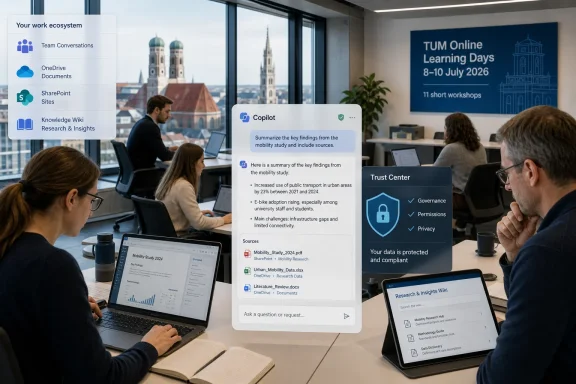
From July 8 to 10, 2026, the Technical University of Munich will run Online Learning Days for employees, offering eleven short workshops on artificial intelligence and digital-work tools, organized by Dr. Kristin Knipfer’s team at the TUM Institute for Lifelong Learning. The event is modest in format but revealing in meaning. AI adoption is moving from strategy decks and pilot projects into the everyday routines of administrators, research managers, and support staff. That is where the real workplace transformation begins.
The interesting part of TUM’s announcement is not that a major university is holding AI workshops. By 2026, that is practically table stakes. The interesting part is the framing: employees are not being told to “learn AI” as a single competency, pass a course, and move on.
Knipfer’s message is closer to the reality most IT departments already know. Digital work now changes too quickly for periodic reskilling rituals to keep up. A new collaboration feature, a revised privacy control, a Copilot capability, or an internal knowledge-management workflow can alter how staff handle routine tasks within months.
That makes learning less like certification and more like hygiene. You do it regularly, in small doses, before the gap becomes painful. TUM’s 75-minute workshop model is a clear bet on applied fluency rather than abstract awareness.
This is also a quiet rebuke to the idea that AI transformation is primarily about buying a tool. The university is emphasizing practice, questions, and guided exploration. In other words, the tool only becomes useful when the organization builds a culture around trying it safely.
This changes the meaning of digital literacy. In the Office era, competence meant knowing where features lived and how to produce a document, spreadsheet, slide deck, or email. In the Copilot era, competence also means knowing how to ask, constrain, verify, and safely reuse machine-generated output.
That is a much harder skill to standardize. A prompt that works well for summarizing meeting notes may be dangerous when applied to confidential student records, HR material, legal drafts, or unpublished research data. The same assistant that speeds up administrative work can also expose sloppy permissions, stale SharePoint structures, or ambiguous data-governance rules.
This is why TUM’s focus on employees in administration, research management, and research-supporting roles matters. These are not fringe users. They sit at the junction between institutional knowledge, process, compliance, and human judgment.
TUM’s Learning Days appear designed around that messiness. The program spans AI and digital work rather than treating AI as a separate magic layer. That is the right instinct, because AI assistants do not operate in a vacuum; they sit on top of calendars, files, wikis, identity systems, permissions, and institutional habits.
The inclusion of tools such as the TUM Trust Center and TUM Wiki alongside Microsoft Copilot is therefore more than scheduling variety. It reflects a practical truth: generative AI is only as useful as the information environment around it. If internal knowledge is disorganized, permissions are chaotic, or trust guidance is unclear, AI will amplify those weaknesses.
That is the lesson many enterprises learned the hard way in the first wave of Microsoft 365 Copilot deployments. The assistant can summarize, draft, and search, but it also reveals how much information governance was being held together by social convention. AI does not create every access problem, but it makes forgotten access problems much easier to notice.
That is where compact training has an advantage. It can meet employees at the moment of use. It can also reduce the fear factor that keeps many workers from experimenting until they are forced to.
The hands-on framing is important. AI training that never lets people touch the tool tends to produce either exaggerated confidence or exaggerated fear. A guided session can show both the productivity gain and the boundary conditions: where the assistant helps, where it hallucinates, where human review is mandatory, and where sensitive information should not be entered at all.
This is also where peer learning matters. Knipfer’s point about asking colleagues is not just a friendly aside. In practice, many of the best AI workflows emerge locally, inside teams that understand the peculiar shape of their documents, deadlines, and risks.
Microsoft’s enterprise pitch for Copilot rests heavily on security, compliance, tenant boundaries, identity, and existing permissions. That is reassuring, but it is not a substitute for local policy. If an organization’s files are over-shared, poorly labeled, or inconsistently governed, an AI assistant can make those conditions more consequential.
For universities, the stakes are particularly awkward. Research environments prize openness and collaboration, while administrative environments require strong controls over personal and institutional data. The same campus may need to support open scientific exchange, confidential grant reviews, student support workflows, protected HR discussions, and sensitive contract negotiations.
That mixture makes blanket rules difficult. “Use AI everywhere” is reckless. “Ban AI until everything is perfect” is unrealistic. The more useful middle path is structured experimentation: approved tools, clear boundaries, practical training, and a feedback loop between users and IT.
TUM’s Learning Days are not, by themselves, a governance framework. But they are the visible part of one. When employees are taught which tools exist, how to use them, and where to ask questions, the institution is doing more than boosting productivity; it is reducing the odds that shadow AI becomes the default.
AI can draft a memo, summarize a long document, produce a first-pass translation, generate meeting follow-ups, or help navigate an internal knowledge base. Those are meaningful gains, especially for staff drowning in email, documentation, and coordination work. But the danger is that first drafts start to look like finished work.
That is why practical AI education must include skepticism. Employees need to learn not only how to prompt, but how to inspect. They need to recognize when a summary has omitted a qualification, when a polished paragraph invents certainty, or when a generated answer is plausible but institutionally wrong.
This is not a minor caveat. In many organizations, AI’s first big impact is not replacing jobs; it is increasing the volume of text that humans must evaluate. The bottleneck shifts from production to judgment.
For Windows users and IT pros, this shift has a familiar shape. The PC made everyone a publisher. Email made everyone a correspondent. Collaboration platforms made everyone a node in a permanent meeting. AI now threatens to make everyone an editor of machine output.
Research management staff prepare proposals, route approvals, track deadlines, summarize guidelines, coordinate stakeholders, and translate institutional requirements into action. Administrative employees manage procedures, documentation, communication, and records. These are exactly the workflows where a capable assistant can remove friction.
But these are also workflows where mistakes propagate. A wrong interpretation of a funding requirement, a careless summary of a policy, or an exposed confidential document can create real damage. The productivity upside and the risk profile are inseparable.
That is why TUM’s “no prior knowledge required” positioning is significant. The AI transition cannot be left to enthusiasts. If only power users learn the tools, organizations get uneven adoption, informal workarounds, and hidden dependencies on a few internal champions.
Broad participation is not just inclusive. It is operationally necessary.
This is why universities and enterprises cannot treat Copilot as just another app. It touches the information layer. When a user asks a question, summarizes a thread, or drafts from organizational context, the assistant is drawing meaning from systems IT has spent years trying to secure and rationalize.
That makes adoption a WindowsForum kind of story, even when the setting is a German university rather than a Windows release. The future of Windows work is not only the desktop shell or the next hardware cycle. It is the managed cloud identity, the document permissions, the compliance labels, and the AI interface that sits over them.
The practical question for IT is no longer whether employees will use AI. They will. The question is whether they will use approved tools with enterprise protections and institutional guidance, or whether they will paste work into whatever consumer chatbot happens to be convenient.
TUM’s program implicitly chooses the first path. It brings AI into the institutional learning environment instead of pretending employees will wait for perfect clarity.
This can be exhausting. Workers are already dealing with digital fatigue, meeting overload, fragmented communication, and constant platform churn. AI arrives promising relief but often introduces another layer to learn, evaluate, and govern.
That is why small, scheduled learning sessions may be more humane than grand mandates. They acknowledge that employees have real jobs. They also create permission to learn during work rather than forcing people to absorb another technological shift on their own time.
The best version of this model treats learning as part of operations. Not an optional perk. Not a remedial measure. Not a once-a-year compliance ritual. A recurring maintenance window for human capability.
 TUM Treats AI as a Habit, Not a One-Time Training Event
The interesting part of TUM’s announcement is not that a major university is holding AI workshops. By 2026, that is practically table stakes. The interesting part is the framing: employees are not being told to “learn AI” as a single competency, pass a course, and move on.Knipfer’s message is closer to the reality most IT departments already know. Digital work now changes too quickly for periodic reskilling rituals to keep up. A new collaboration feature, a revised privacy control, a Copilot capability, or an internal knowledge-management workflow can alter how staff handle routine tasks within months.
That makes learning less like certification and more like hygiene. You do it regularly, in small doses, before the gap becomes painful. TUM’s 75-minute workshop model is a clear bet on applied fluency rather than abstract awareness.
This is also a quiet rebuke to the idea that AI transformation is primarily about buying a tool. The university is emphasizing practice, questions, and guided exploration. In other words, the tool only becomes useful when the organization builds a culture around trying it safely.
The Copilot Era Has Made Digital Literacy a Moving Target
For WindowsForum readers, the mention of Microsoft Copilot is the obvious hook. Copilot is no longer a futuristic sidebar in Microsoft’s product story; it is increasingly woven through Microsoft 365, Teams, Edge, Windows, and enterprise search. That means employees will encounter AI whether or not they set out to become “AI users.”This changes the meaning of digital literacy. In the Office era, competence meant knowing where features lived and how to produce a document, spreadsheet, slide deck, or email. In the Copilot era, competence also means knowing how to ask, constrain, verify, and safely reuse machine-generated output.
That is a much harder skill to standardize. A prompt that works well for summarizing meeting notes may be dangerous when applied to confidential student records, HR material, legal drafts, or unpublished research data. The same assistant that speeds up administrative work can also expose sloppy permissions, stale SharePoint structures, or ambiguous data-governance rules.
This is why TUM’s focus on employees in administration, research management, and research-supporting roles matters. These are not fringe users. They sit at the junction between institutional knowledge, process, compliance, and human judgment.
Universities Are Becoming Test Beds for the AI Office
Universities are unusually revealing places to watch AI adoption because they contain almost every knowledge-work problem in miniature. They have researchers, teachers, administrators, communications staff, finance teams, procurement workflows, legal constraints, sensitive personal data, and sprawling internal documentation. If AI is going to change office work, it will show up here early and messily.TUM’s Learning Days appear designed around that messiness. The program spans AI and digital work rather than treating AI as a separate magic layer. That is the right instinct, because AI assistants do not operate in a vacuum; they sit on top of calendars, files, wikis, identity systems, permissions, and institutional habits.
The inclusion of tools such as the TUM Trust Center and TUM Wiki alongside Microsoft Copilot is therefore more than scheduling variety. It reflects a practical truth: generative AI is only as useful as the information environment around it. If internal knowledge is disorganized, permissions are chaotic, or trust guidance is unclear, AI will amplify those weaknesses.
That is the lesson many enterprises learned the hard way in the first wave of Microsoft 365 Copilot deployments. The assistant can summarize, draft, and search, but it also reveals how much information governance was being held together by social convention. AI does not create every access problem, but it makes forgotten access problems much easier to notice.
The Short Workshop Is Becoming the New Enterprise Control Surface
A 75-minute workshop sounds small, almost quaint, compared with the scale of the AI hype cycle. But it may be a better model for real adoption than the grand transformation program. Most employees do not need a philosophical seminar on artificial general intelligence. They need to know what happens when they paste a draft into Copilot, ask for a summary of internal material, or search across institutional documents.That is where compact training has an advantage. It can meet employees at the moment of use. It can also reduce the fear factor that keeps many workers from experimenting until they are forced to.
The hands-on framing is important. AI training that never lets people touch the tool tends to produce either exaggerated confidence or exaggerated fear. A guided session can show both the productivity gain and the boundary conditions: where the assistant helps, where it hallucinates, where human review is mandatory, and where sensitive information should not be entered at all.
This is also where peer learning matters. Knipfer’s point about asking colleagues is not just a friendly aside. In practice, many of the best AI workflows emerge locally, inside teams that understand the peculiar shape of their documents, deadlines, and risks.
Governance Is the Difference Between Enablement and Chaos
There is a reason the Trust Center belongs in the same conversation as Copilot. Enterprise AI adoption is not simply an educational challenge; it is a governance challenge disguised as a productivity upgrade.Microsoft’s enterprise pitch for Copilot rests heavily on security, compliance, tenant boundaries, identity, and existing permissions. That is reassuring, but it is not a substitute for local policy. If an organization’s files are over-shared, poorly labeled, or inconsistently governed, an AI assistant can make those conditions more consequential.
For universities, the stakes are particularly awkward. Research environments prize openness and collaboration, while administrative environments require strong controls over personal and institutional data. The same campus may need to support open scientific exchange, confidential grant reviews, student support workflows, protected HR discussions, and sensitive contract negotiations.
That mixture makes blanket rules difficult. “Use AI everywhere” is reckless. “Ban AI until everything is perfect” is unrealistic. The more useful middle path is structured experimentation: approved tools, clear boundaries, practical training, and a feedback loop between users and IT.
TUM’s Learning Days are not, by themselves, a governance framework. But they are the visible part of one. When employees are taught which tools exist, how to use them, and where to ask questions, the institution is doing more than boosting productivity; it is reducing the odds that shadow AI becomes the default.
The Real AI Skill Is Knowing When Not to Automate
The phrase “AI is fundamentally changing the way we work” is easy to dismiss because it has become a corporate slogan. But the change is real when it alters the employee’s judgment about what deserves time, attention, and verification.AI can draft a memo, summarize a long document, produce a first-pass translation, generate meeting follow-ups, or help navigate an internal knowledge base. Those are meaningful gains, especially for staff drowning in email, documentation, and coordination work. But the danger is that first drafts start to look like finished work.
That is why practical AI education must include skepticism. Employees need to learn not only how to prompt, but how to inspect. They need to recognize when a summary has omitted a qualification, when a polished paragraph invents certainty, or when a generated answer is plausible but institutionally wrong.
This is not a minor caveat. In many organizations, AI’s first big impact is not replacing jobs; it is increasing the volume of text that humans must evaluate. The bottleneck shifts from production to judgment.
For Windows users and IT pros, this shift has a familiar shape. The PC made everyone a publisher. Email made everyone a correspondent. Collaboration platforms made everyone a node in a permanent meeting. AI now threatens to make everyone an editor of machine output.
The Administrative Back Office Is Where AI Either Pays Off or Fails
It is tempting to focus AI debates on developers, researchers, and executives. But the administrative back office may be where the return on investment is most visible. These teams perform large amounts of repetitive knowledge work that is important, time-sensitive, and often underappreciated.Research management staff prepare proposals, route approvals, track deadlines, summarize guidelines, coordinate stakeholders, and translate institutional requirements into action. Administrative employees manage procedures, documentation, communication, and records. These are exactly the workflows where a capable assistant can remove friction.
But these are also workflows where mistakes propagate. A wrong interpretation of a funding requirement, a careless summary of a policy, or an exposed confidential document can create real damage. The productivity upside and the risk profile are inseparable.
That is why TUM’s “no prior knowledge required” positioning is significant. The AI transition cannot be left to enthusiasts. If only power users learn the tools, organizations get uneven adoption, informal workarounds, and hidden dependencies on a few internal champions.
Broad participation is not just inclusive. It is operationally necessary.
Microsoft’s AI Stack Is Becoming Campus Infrastructure
For many institutions, Microsoft 365 is already the substrate of daily work. Email, calendars, Teams, OneDrive, SharePoint, Office documents, identity, and compliance tooling form the practical operating system of the modern organization. Copilot extends that substrate into language-based interaction.This is why universities and enterprises cannot treat Copilot as just another app. It touches the information layer. When a user asks a question, summarizes a thread, or drafts from organizational context, the assistant is drawing meaning from systems IT has spent years trying to secure and rationalize.
That makes adoption a WindowsForum kind of story, even when the setting is a German university rather than a Windows release. The future of Windows work is not only the desktop shell or the next hardware cycle. It is the managed cloud identity, the document permissions, the compliance labels, and the AI interface that sits over them.
The practical question for IT is no longer whether employees will use AI. They will. The question is whether they will use approved tools with enterprise protections and institutional guidance, or whether they will paste work into whatever consumer chatbot happens to be convenient.
TUM’s program implicitly chooses the first path. It brings AI into the institutional learning environment instead of pretending employees will wait for perfect clarity.
Lifelong Learning Stops Being a Slogan
Universities have long spoken the language of lifelong learning, but AI gives the phrase sharper teeth. It is no longer just about career development or intellectual enrichment. It is about maintaining baseline competence in a workplace where the tools themselves keep changing.This can be exhausting. Workers are already dealing with digital fatigue, meeting overload, fragmented communication, and constant platform churn. AI arrives promising relief but often introduces another layer to learn, evaluate, and govern.
That is why small, scheduled learning sessions may be more humane than grand mandates. They acknowledge that employees have real jobs. They also create permission to learn during work rather than forcing people to absorb another technological shift on their own time.
The best version of this model treats learning as part of operations. Not an optional perk. Not a remedial measure. Not a once-a-year compliance ritual. A recurring maintenance window for human capability.
The Campus AI Playbook Is Starting to Come Into Focus
TUM’s Learning Days are a small event with a large signal. They show how serious institutions are beginning to normalize AI without pretending it is simple. The concrete lesson is that adoption works best when it is practical, bounded, and connected to the tools employees already use.- TUM’s Online Learning Days run from July 8 to 10, 2026, and are aimed at helping employees use digital-work and AI tools in everyday tasks.
- The program offers eleven short workshops, including sessions connected to Microsoft Copilot, the TUM Wiki, and the TUM Trust Center.
- The strongest feature of the format is its emphasis on hands-on use rather than passive awareness.
- The most important audience may be administrative, research-management, and support staff, because their workflows are rich in documents, deadlines, and institutional risk.
- The larger lesson for IT teams is that AI rollout requires training, governance, permissions hygiene, and local support at the same time.
- The safest adoption strategy is not to freeze AI out, but to give employees approved tools, clear rules, and repeated chances to practice.
References
- Primary source: Mirage News
Published: 2026-06-29T05:16:12.744565
"AI Is Fundamentally Changing Way We Work" | Mirage News
TUM is enables its employees to navigate everyday life with artificial intelligence. From July 8 to 10, 2026, employees can familiarize themselveswww.miragenews.com - Related coverage: techtarget.com
How does enterprise data protection in Copilot work? | TechTarget
Under enterprise data protection, Microsoft promises not to train Copilot on data that users submit in their queries. Learn more.www.techtarget.com - Official source: techcommunity.microsoft.com
Employees can bring Copilot from their personal Microsoft 365 plans to work - what it means for IT | Microsoft Community Hub
Today, we made some exciting announcements for Microsoft 365 Personal, Family and the new Premium plans. Among them is how employees can use Copilot from... techcommunity.microsoft.com
