

As of June 19, 2026, Ubisoft Connect is the best all-around publisher launcher for PC players who judge by resource use and interface discipline, while EA App wins on subscription breadth and Battle.net remains indispensable for Blizzard communities. That answer is less satisfying than a single crown, but it is the honest one. These are not neutral storefronts competing for affection; they are toll booths attached to franchises. The real contest is which toll booth wastes the least time, memory, and money once it has already been made unavoidable.
The old dream of PC gaming was that the platform won because it was open. The modern reality is that openness often means a Windows desktop littered with authentication clients, update agents, web wrappers, overlays, and friends lists that do not talk to one another. EA App, Ubisoft Connect, and Battle.net are not merely launchers in 2026; they are publisher operating systems in miniature.
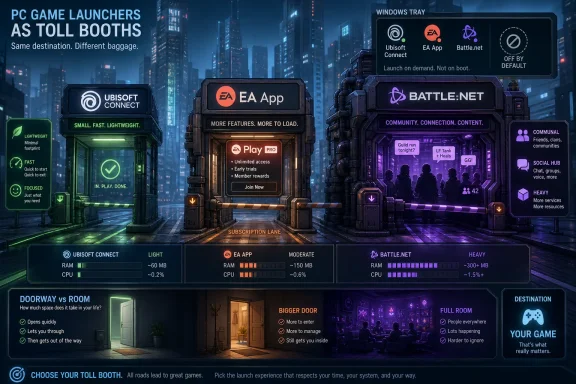
That distinction matters because the comparison is not really about which icon looks better in the tray. It is about which company has built the least obnoxious layer between a player and a game they already paid for. Ubisoft Connect does best on that narrow but important test. It is relatively light, starts quickly, and has a loyalty system that at least tries to return something to the player.
EA App is the comeback story, but comeback stories carry baggage. It replaced Origin after years of accumulated resentment, and the newer 64-bit client is plainly better than what came before. Yet it still inherits EA’s old problem: players rarely open it because they want to browse a store; they open it because Battlefield, The Sims, Mass Effect, Dragon Age, or EA Sports has demanded paperwork.
Battle.net is the opposite case. It is the heaviest and least flexible of the three, but also the only one whose social layer still feels genuinely native to the games it serves. If your PC gaming life revolves around World of Warcraft, Diablo IV, Overwatch 2, Hearthstone, or StarCraft II, Battle.net is less a launcher than a clubhouse with an update daemon attached.
The EA App, officially launched as the Origin replacement in 2022 and rolled out more aggressively afterward, is cleaner and faster. EA’s own positioning has long been that the newer app is lighter and more reliable, and the shift to a modern 64-bit client was overdue. On current Windows 10 and Windows 11 machines, the app generally behaves like a contemporary publisher launcher rather than a relic from the early digital-distribution wars.
That does not mean trust has been restored. Trust in launcher software is unusually brittle because users remember failures at the point of play. A game that will not launch on a Friday night leaves more of an impression than six months of uneventful background updates.
EA App’s advantage in 2026 is library gravity. EA owns or publishes across sports, shooters, RPGs, life simulation, racing, and legacy PC franchises. A player can plausibly bounce from EA Sports FC to The Sims 4, from Apex Legends to Mass Effect Legendary Edition, from Battlefield to Dragon Age, all under the same account system.
That breadth makes EA Play Pro the most interesting subscription in this comparison. At $16.99 monthly or $119.99 annually, it is not cheap, but the annual price converts into roughly $10 a month for access to EA’s larger PC catalog and new releases. For a player who buys multiple EA Sports titles or wants day-one PC access to EA’s big releases, the math can flip quickly from “another subscription” to “the least bad way to consume EA.”
The base EA Play tier is different. At $5.99 monthly or $39.99 annually, it is a useful back-catalog and trial service, especially because it is bundled into Xbox Game Pass Ultimate. But it is not the same product as EA Play Pro, and EA still suffers from naming confusion that feels engineered by committee. A casual user should not need a product taxonomy lesson to understand whether new releases are included.
The client’s most distinctive feature is Ubisoft’s Units rewards system. Players earn currency through challenges and can spend it on cosmetics, account items, and discounts. It is not revolutionary, and it does not erase the irritation of mandatory authentication for Steam purchases, but it gives Ubisoft Connect a feedback loop the other two lack.
Ubisoft+ Premium is the sharper strategic play. At $17.99 a month, it is the most expensive active publisher subscription in this group, but it also promises access to a broad Ubisoft catalog and day-one availability for many major releases, often including higher-tier editions. For the kind of player who treats Assassin’s Creed, Far Cry, Rainbow Six, The Division, and Anno as an annual rotation, that can be rational.
For everyone else, the price is a warning label. Ubisoft’s catalog has enormous hours-per-dollar potential, but it also has a house style. If the company’s open-world loop works for you, Ubisoft+ can feel like a buffet. If it does not, 100-plus games can blur into a wall of map icons, XP boosters, and deluxe-edition entitlements.
The 2026 cloud angle also shows the risk of tying access to shifting platform partnerships. Amazon Luna’s April 2026 retreat from third-party game stores and subscriptions did not kill Ubisoft+ on PC, but it did narrow one of the service’s more visible external channels. That is the recurring problem with subscription ecosystems: the advertised value often depends on integrations the subscriber does not control.
Ubisoft Connect’s weakness is offline tolerance. A short offline cache is workable for a weekend, but it is less reassuring for travel, deployments, dorm networks, unreliable broadband, or anyone who still expects single-player PC games to behave like durable local software. Ubisoft’s launcher is efficient, but its leash is shorter.
That is why Battle.net’s heavier footprint is easier to understand, if not always easier to forgive. It does more in the background, supports a tighter community model, and remains the only gateway for several Blizzard pillars. World of Warcraft and StarCraft II are still Battle.net-native in a way that cannot be replicated by simply adding a shortcut to Steam.
Microsoft’s ownership has complicated the picture without erasing Battle.net’s role. Since the Activision Blizzard acquisition closed in 2023, Microsoft has shown a clear appetite for broader distribution, and newer Blizzard titles such as Overwatch 2 and Diablo IV have appeared on Steam. But Steam availability is not the same thing as independence. Battle.net account authentication remains part of the experience, which means the launcher’s shadow follows the game even when the sale happens elsewhere.
Battle.net also wins the free-to-play argument. Overwatch 2, Hearthstone, StarCraft II, Diablo Immortal, and Heroes of the Storm make the client unusually welcoming for a player who wants meaningful content without immediately paying. The quality and fairness of each game’s monetization model is a separate debate, but the amount of accessible play is real.
Its subscription model, however, is fragmented. There is no Battle.net-wide equivalent to EA Play Pro or Ubisoft+ Premium. World of Warcraft has its own subscription, Diablo IV has box-price and seasonal monetization, and Blizzard’s free-to-play titles each run their own economies. This makes Battle.net feel less like a subscription platform and more like a federation of very powerful game-specific businesses.
That federation works if you are already inside Blizzard culture. It works less well if you are evaluating launchers as software. Battle.net is slower to start, uses more memory, and feels larger than its active title count should require. Its best defense is that for Blizzard players, the launcher is not the product’s wrapper; it is part of the product’s social spine.
On 8GB systems, the story changes. Windows 11 is not shy about memory, browsers are effectively operating systems, Discord is often open, RGB utilities and motherboard agents add their own cruft, and suddenly a few publisher launchers can become the difference between smooth paging and a stuttery mess. Battle.net’s heavier background profile is most visible in that environment.
The bigger issue is not steady-state RAM. It is opportunistic activity: update scans, overlay hooks, web views refreshing store content, cloud sync checks, notification systems, and background services deciding that now is a fine time to wake up. Even brief CPU spikes can irritate players chasing frame consistency.
The practical answer is boring but effective. None of these launchers should start with Windows unless you play their games daily. None of them should live permanently in the tray out of politeness. If a publisher wants to own background residency on your PC, it should earn that privilege with a game you are actively playing.
Overlay overhead is similarly manageable but not imaginary. EA, Ubisoft, and Blizzard all provide overlays with social, achievement, screenshot, or store-adjacent features. Players who chase competitive latency or run older hardware should disable what they do not use, because every overlay is another injected layer in a stack already crowded by Steam, Discord, GeForce Experience, Radeon Software, Xbox Game Bar, and capture tools.
Ubisoft Connect is less generous. Its offline behavior is good enough for short interruptions, but not comforting for longer disconnected periods. That matters because Ubisoft publishes plenty of games that are, in ordinary player language, single-player games. A launcher that treats offline play as a temporary exception rather than a normal mode tells users something about who controls access.
Battle.net is hardest to generalize because the games differ so sharply. World of Warcraft and Overwatch 2 are online services by design, so offline mode is irrelevant. StarCraft II and parts of other Blizzard experiences have different assumptions. Battle.net’s offline story is therefore less a launcher feature than a game-by-game negotiation.
This is where the “which wins” question becomes philosophical. Ubisoft Connect may be the best software client, but EA App gives more reassurance to a traveler with single-player games installed. Battle.net may have the best community tools, but those tools presume connectivity. The launcher that wins at home may not be the launcher that wins on a train, in a hotel, or behind a flaky dorm firewall.
This is not merely DRM in the old sense. It is account identity, cross-progression, cloud saves, social graphs, subscriptions, entitlement checks, and storefront logic. Publishers want the sale, but they also want the relationship after the sale. Steam can take the money and provide the library shelf; the publisher launcher often still controls the door to the room.
For players, this produces the worst kind of duplication. You buy on Steam for convenience, controller support, refunds, library management, and the social layer, only to watch another client wake up because the publisher needs its own account involved. The result is not competition. It is layering.
Playnite, GOG Galaxy-style aggregation, Steam shortcuts, and Linux tools such as Lutris or Heroic can make this tolerable. They do not remove the underlying clients. They simply restore a sane front end to a PC library that publishers have chopped into branded silos.
The Steam Deck makes this contradiction more obvious. None of the three launchers is a native Linux citizen, but Proton and community tooling can push many games into working shape. That is a triumph of the PC community, not of the publishers. A launcher that works on Steam Deck only because users and compatibility layers wrestle it into place should not get too much credit.
EA has the cleanest broad subscription proposition. EA Play Pro’s annual pricing is compelling if you reliably play new EA releases, and the base EA Play tier gains reach through Xbox Game Pass Ultimate. That Microsoft bundle matters because it turns EA’s back catalog into part of a larger subscription habit rather than a separate decision.
Ubisoft has the most aggressive premium-edition pitch. Ubisoft+ Premium can be good value if you were already going to buy deluxe or ultimate editions of new Ubisoft games. The trap is that subscriptions encourage grazing, and grazing can make even expensive services feel cheaper than they are. A player who subscribes for one launch and forgets to cancel has not beaten the system.
Battle.net remains more old-fashioned and more fragmented. World of Warcraft still justifies a monthly fee for millions of players because it is a living world, not a rotating catalog. But Blizzard does not offer a single monthly product that says, “Here is the Blizzard library.” That absence is surprising under Microsoft, a company otherwise obsessed with subscription packaging.
The best value therefore depends on whether you are buying breadth, freshness, or belonging. EA sells breadth. Ubisoft sells day-one access to its specific house style. Blizzard sells worlds and communities that are deep enough to make library count almost meaningless.
That asymmetry matters. EA can keep its launcher while letting Microsoft subsidize discovery through Game Pass. Blizzard can keep Battle.net while Microsoft decides, title by title, how much to embrace Steam, Xbox, and other platforms. Ubisoft has to make Ubisoft+ feel valuable on its own terms.
This is why Ubisoft Connect’s efficiency is important. Ubisoft does not have the same cushion. If the launcher is mandatory, it must at least avoid becoming another reason for players to hesitate. If the subscription is expensive, the client around it must feel polished enough to support the price.
EA’s pending ownership shift adds a different kind of uncertainty. A $55 billion take-private deal involving PIF, Silver Lake, and Affinity Partners is not a minor corporate footnote. It does not mean EA App changes tomorrow, but it does mean EA’s digital platform strategy will be evaluated through the lens of private ownership, debt, growth, and recurring revenue. Launchers are not just software in that world; they are monetization surfaces.
Battle.net’s uncertainty is more strategic than financial. Microsoft could keep it as Blizzard’s identity layer indefinitely, or gradually reduce its exclusivity where Steam and Xbox make more sense. The likely future is hybrid: Battle.net remains essential for core Blizzard services while individual games spread across more storefronts.
That approach sounds hostile, but it is actually the fairest reading of what these apps are good at. EA App is good at entitlements, downloads, cloud saves, and EA Play. Ubisoft Connect is good at Ubisoft account services, rewards, and subscription access. Battle.net is good at Blizzard identity, updates, chat, and community infrastructure. None of them needs to be your PC’s social hub unless your games demand it.
Players should also separate storefront choice from launcher reality. Buying an EA or Ubisoft game on Steam may improve library management, refund rights, controller configuration, or Deck workflows, but it often does not eliminate the publisher client. The cleanest purchase path is not always the cleanest runtime path.
For administrators and power users managing shared gaming machines, labs, LAN spaces, or family PCs, the advice is even simpler. Do not allow every launcher to auto-start by default. Keep updates scheduled or manually triggered where possible. Document which games require which account systems before the user sits down to play.
That sounds like enterprise thinking applied to games, but modern PC gaming has earned it. The home rig now has enough resident agents, background services, and cross-store entitlements to resemble a small unmanaged fleet. Treating launcher sprawl as an operations problem is not overkill; it is self-defense.
 The Winner Is the Launcher You Can Close
The old dream of PC gaming was that the platform won because it was open. The modern reality is that openness often means a Windows desktop littered with authentication clients, update agents, web wrappers, overlays, and friends lists that do not talk to one another. EA App, Ubisoft Connect, and Battle.net are not merely launchers in 2026; they are publisher operating systems in miniature.That distinction matters because the comparison is not really about which icon looks better in the tray. It is about which company has built the least obnoxious layer between a player and a game they already paid for. Ubisoft Connect does best on that narrow but important test. It is relatively light, starts quickly, and has a loyalty system that at least tries to return something to the player.
EA App is the comeback story, but comeback stories carry baggage. It replaced Origin after years of accumulated resentment, and the newer 64-bit client is plainly better than what came before. Yet it still inherits EA’s old problem: players rarely open it because they want to browse a store; they open it because Battlefield, The Sims, Mass Effect, Dragon Age, or EA Sports has demanded paperwork.
Battle.net is the opposite case. It is the heaviest and least flexible of the three, but also the only one whose social layer still feels genuinely native to the games it serves. If your PC gaming life revolves around World of Warcraft, Diablo IV, Overwatch 2, Hearthstone, or StarCraft II, Battle.net is less a launcher than a clubhouse with an update daemon attached.
Origin’s Ghost Still Haunts EA App
EA App’s central achievement is that it is no longer Origin. That sounds glib, but for many PC players it is the whole story. Origin spent more than a decade building a reputation for getting in the way at precisely the wrong moments: failed logins, awkward Steam handoffs, cloud save weirdness, missing libraries, and a general sense that EA had built a client because everyone else had one.The EA App, officially launched as the Origin replacement in 2022 and rolled out more aggressively afterward, is cleaner and faster. EA’s own positioning has long been that the newer app is lighter and more reliable, and the shift to a modern 64-bit client was overdue. On current Windows 10 and Windows 11 machines, the app generally behaves like a contemporary publisher launcher rather than a relic from the early digital-distribution wars.
That does not mean trust has been restored. Trust in launcher software is unusually brittle because users remember failures at the point of play. A game that will not launch on a Friday night leaves more of an impression than six months of uneventful background updates.
EA App’s advantage in 2026 is library gravity. EA owns or publishes across sports, shooters, RPGs, life simulation, racing, and legacy PC franchises. A player can plausibly bounce from EA Sports FC to The Sims 4, from Apex Legends to Mass Effect Legendary Edition, from Battlefield to Dragon Age, all under the same account system.
That breadth makes EA Play Pro the most interesting subscription in this comparison. At $16.99 monthly or $119.99 annually, it is not cheap, but the annual price converts into roughly $10 a month for access to EA’s larger PC catalog and new releases. For a player who buys multiple EA Sports titles or wants day-one PC access to EA’s big releases, the math can flip quickly from “another subscription” to “the least bad way to consume EA.”
The base EA Play tier is different. At $5.99 monthly or $39.99 annually, it is a useful back-catalog and trial service, especially because it is bundled into Xbox Game Pass Ultimate. But it is not the same product as EA Play Pro, and EA still suffers from naming confusion that feels engineered by committee. A casual user should not need a product taxonomy lesson to understand whether new releases are included.
Ubisoft Connect Wins by Doing Less Damage
Ubisoft Connect is the least dramatic of the three, which is why it comes out ahead as a launcher. It starts quickly, usually sits below the others in idle memory use, and its interface has settled into a reasonably coherent blend of store, library, overlay, achievements, and rewards. Nobody should mistake that for love, but in launcher terms, inoffensive is close to praise.The client’s most distinctive feature is Ubisoft’s Units rewards system. Players earn currency through challenges and can spend it on cosmetics, account items, and discounts. It is not revolutionary, and it does not erase the irritation of mandatory authentication for Steam purchases, but it gives Ubisoft Connect a feedback loop the other two lack.
Ubisoft+ Premium is the sharper strategic play. At $17.99 a month, it is the most expensive active publisher subscription in this group, but it also promises access to a broad Ubisoft catalog and day-one availability for many major releases, often including higher-tier editions. For the kind of player who treats Assassin’s Creed, Far Cry, Rainbow Six, The Division, and Anno as an annual rotation, that can be rational.
For everyone else, the price is a warning label. Ubisoft’s catalog has enormous hours-per-dollar potential, but it also has a house style. If the company’s open-world loop works for you, Ubisoft+ can feel like a buffet. If it does not, 100-plus games can blur into a wall of map icons, XP boosters, and deluxe-edition entitlements.
The 2026 cloud angle also shows the risk of tying access to shifting platform partnerships. Amazon Luna’s April 2026 retreat from third-party game stores and subscriptions did not kill Ubisoft+ on PC, but it did narrow one of the service’s more visible external channels. That is the recurring problem with subscription ecosystems: the advertised value often depends on integrations the subscriber does not control.
Ubisoft Connect’s weakness is offline tolerance. A short offline cache is workable for a weekend, but it is less reassuring for travel, deployments, dorm networks, unreliable broadband, or anyone who still expects single-player PC games to behave like durable local software. Ubisoft’s launcher is efficient, but its leash is shorter.
Battle.net Is Bloated Because Blizzard Still Builds Around Community
Battle.net has the strangest profile here because it is both the oldest and, in some ways, the most justified. Blizzard’s online identity systems predate the modern launcher era by decades. The client’s deeper social features are not ornamental; they grew alongside games where guilds, clans, raids, ladders, seasons, and persistent friends lists are core infrastructure.That is why Battle.net’s heavier footprint is easier to understand, if not always easier to forgive. It does more in the background, supports a tighter community model, and remains the only gateway for several Blizzard pillars. World of Warcraft and StarCraft II are still Battle.net-native in a way that cannot be replicated by simply adding a shortcut to Steam.
Microsoft’s ownership has complicated the picture without erasing Battle.net’s role. Since the Activision Blizzard acquisition closed in 2023, Microsoft has shown a clear appetite for broader distribution, and newer Blizzard titles such as Overwatch 2 and Diablo IV have appeared on Steam. But Steam availability is not the same thing as independence. Battle.net account authentication remains part of the experience, which means the launcher’s shadow follows the game even when the sale happens elsewhere.
Battle.net also wins the free-to-play argument. Overwatch 2, Hearthstone, StarCraft II, Diablo Immortal, and Heroes of the Storm make the client unusually welcoming for a player who wants meaningful content without immediately paying. The quality and fairness of each game’s monetization model is a separate debate, but the amount of accessible play is real.
Its subscription model, however, is fragmented. There is no Battle.net-wide equivalent to EA Play Pro or Ubisoft+ Premium. World of Warcraft has its own subscription, Diablo IV has box-price and seasonal monetization, and Blizzard’s free-to-play titles each run their own economies. This makes Battle.net feel less like a subscription platform and more like a federation of very powerful game-specific businesses.
That federation works if you are already inside Blizzard culture. It works less well if you are evaluating launchers as software. Battle.net is slower to start, uses more memory, and feels larger than its active title count should require. Its best defense is that for Blizzard players, the launcher is not the product’s wrapper; it is part of the product’s social spine.
The Benchmark Story Is Really a Low-End PC Story
On a modern 16GB or 32GB gaming rig, launcher memory usage is mostly an irritation rather than a crisis. Whether Ubisoft Connect idles around the lower end, EA App lands slightly above it, or Battle.net consumes noticeably more, the difference is rarely decisive once a GPU-bound game is running. The Windows desktop can absorb a few hundred megabytes of launcher sprawl without falling apart.On 8GB systems, the story changes. Windows 11 is not shy about memory, browsers are effectively operating systems, Discord is often open, RGB utilities and motherboard agents add their own cruft, and suddenly a few publisher launchers can become the difference between smooth paging and a stuttery mess. Battle.net’s heavier background profile is most visible in that environment.
The bigger issue is not steady-state RAM. It is opportunistic activity: update scans, overlay hooks, web views refreshing store content, cloud sync checks, notification systems, and background services deciding that now is a fine time to wake up. Even brief CPU spikes can irritate players chasing frame consistency.
The practical answer is boring but effective. None of these launchers should start with Windows unless you play their games daily. None of them should live permanently in the tray out of politeness. If a publisher wants to own background residency on your PC, it should earn that privilege with a game you are actively playing.
Overlay overhead is similarly manageable but not imaginary. EA, Ubisoft, and Blizzard all provide overlays with social, achievement, screenshot, or store-adjacent features. Players who chase competitive latency or run older hardware should disable what they do not use, because every overlay is another injected layer in a stack already crowded by Steam, Discord, GeForce Experience, Radeon Software, Xbox Game Bar, and capture tools.
Offline Mode Exposes the Philosophy Gap
Offline support is where launcher marketing meets the old expectations of PC ownership. EA App is the strongest of the three here because its authentication window is comparatively forgiving for supported offline-capable games. If you sign in before a trip, a single-player EA game is more likely to remain playable without drama.Ubisoft Connect is less generous. Its offline behavior is good enough for short interruptions, but not comforting for longer disconnected periods. That matters because Ubisoft publishes plenty of games that are, in ordinary player language, single-player games. A launcher that treats offline play as a temporary exception rather than a normal mode tells users something about who controls access.
Battle.net is hardest to generalize because the games differ so sharply. World of Warcraft and Overwatch 2 are online services by design, so offline mode is irrelevant. StarCraft II and parts of other Blizzard experiences have different assumptions. Battle.net’s offline story is therefore less a launcher feature than a game-by-game negotiation.
This is where the “which wins” question becomes philosophical. Ubisoft Connect may be the best software client, but EA App gives more reassurance to a traveler with single-player games installed. Battle.net may have the best community tools, but those tools presume connectivity. The launcher that wins at home may not be the launcher that wins on a train, in a hotel, or behind a flaky dorm firewall.
Steam Availability Has Not Ended Publisher Control
One of the more misleading comfort blankets in PC gaming is the belief that Steam availability solves launcher fragmentation. It helps, but it does not solve it. Many EA, Ubisoft, and Blizzard games sold on Steam still invoke publisher account systems, background clients, or authentication handoffs.This is not merely DRM in the old sense. It is account identity, cross-progression, cloud saves, social graphs, subscriptions, entitlement checks, and storefront logic. Publishers want the sale, but they also want the relationship after the sale. Steam can take the money and provide the library shelf; the publisher launcher often still controls the door to the room.
For players, this produces the worst kind of duplication. You buy on Steam for convenience, controller support, refunds, library management, and the social layer, only to watch another client wake up because the publisher needs its own account involved. The result is not competition. It is layering.
Playnite, GOG Galaxy-style aggregation, Steam shortcuts, and Linux tools such as Lutris or Heroic can make this tolerable. They do not remove the underlying clients. They simply restore a sane front end to a PC library that publishers have chopped into branded silos.
The Steam Deck makes this contradiction more obvious. None of the three launchers is a native Linux citizen, but Proton and community tooling can push many games into working shape. That is a triumph of the PC community, not of the publishers. A launcher that works on Steam Deck only because users and compatibility layers wrestle it into place should not get too much credit.
Subscriptions Turn Launchers Into Accounting Problems
The old launcher debate was about annoyance. The new one is about recurring revenue. EA App, Ubisoft Connect, and Battle.net increasingly exist to frame the user’s relationship with a publisher as an ongoing account rather than a series of purchases.EA has the cleanest broad subscription proposition. EA Play Pro’s annual pricing is compelling if you reliably play new EA releases, and the base EA Play tier gains reach through Xbox Game Pass Ultimate. That Microsoft bundle matters because it turns EA’s back catalog into part of a larger subscription habit rather than a separate decision.
Ubisoft has the most aggressive premium-edition pitch. Ubisoft+ Premium can be good value if you were already going to buy deluxe or ultimate editions of new Ubisoft games. The trap is that subscriptions encourage grazing, and grazing can make even expensive services feel cheaper than they are. A player who subscribes for one launch and forgets to cancel has not beaten the system.
Battle.net remains more old-fashioned and more fragmented. World of Warcraft still justifies a monthly fee for millions of players because it is a living world, not a rotating catalog. But Blizzard does not offer a single monthly product that says, “Here is the Blizzard library.” That absence is surprising under Microsoft, a company otherwise obsessed with subscription packaging.
The best value therefore depends on whether you are buying breadth, freshness, or belonging. EA sells breadth. Ubisoft sells day-one access to its specific house style. Blizzard sells worlds and communities that are deep enough to make library count almost meaningless.
Microsoft’s Shadow Falls Differently Over EA, Ubisoft, and Blizzard
Microsoft is not a launcher in this comparison, but it is everywhere around it. EA Play’s inclusion in Game Pass Ultimate gives EA reach that Ubisoft cannot easily match. Battle.net exists inside Microsoft’s gaming empire after the Activision Blizzard deal. Ubisoft’s subscription, meanwhile, must fight for attention in a market where Game Pass has trained users to expect enormous catalogs for one monthly fee.That asymmetry matters. EA can keep its launcher while letting Microsoft subsidize discovery through Game Pass. Blizzard can keep Battle.net while Microsoft decides, title by title, how much to embrace Steam, Xbox, and other platforms. Ubisoft has to make Ubisoft+ feel valuable on its own terms.
This is why Ubisoft Connect’s efficiency is important. Ubisoft does not have the same cushion. If the launcher is mandatory, it must at least avoid becoming another reason for players to hesitate. If the subscription is expensive, the client around it must feel polished enough to support the price.
EA’s pending ownership shift adds a different kind of uncertainty. A $55 billion take-private deal involving PIF, Silver Lake, and Affinity Partners is not a minor corporate footnote. It does not mean EA App changes tomorrow, but it does mean EA’s digital platform strategy will be evaluated through the lens of private ownership, debt, growth, and recurring revenue. Launchers are not just software in that world; they are monetization surfaces.
Battle.net’s uncertainty is more strategic than financial. Microsoft could keep it as Blizzard’s identity layer indefinitely, or gradually reduce its exclusivity where Steam and Xbox make more sense. The likely future is hybrid: Battle.net remains essential for core Blizzard services while individual games spread across more storefronts.
The Best Setup Is Deliberately Anti-Launcher
The smartest PC setup in 2026 treats publisher launchers like device drivers: necessary for specific hardware, unwelcome as lifestyle software. Install the one your games require. Disable startup. Turn off unnecessary overlays. Let a neutral library manager or Steam shortcut system handle the front door.That approach sounds hostile, but it is actually the fairest reading of what these apps are good at. EA App is good at entitlements, downloads, cloud saves, and EA Play. Ubisoft Connect is good at Ubisoft account services, rewards, and subscription access. Battle.net is good at Blizzard identity, updates, chat, and community infrastructure. None of them needs to be your PC’s social hub unless your games demand it.
Players should also separate storefront choice from launcher reality. Buying an EA or Ubisoft game on Steam may improve library management, refund rights, controller configuration, or Deck workflows, but it often does not eliminate the publisher client. The cleanest purchase path is not always the cleanest runtime path.
For administrators and power users managing shared gaming machines, labs, LAN spaces, or family PCs, the advice is even simpler. Do not allow every launcher to auto-start by default. Keep updates scheduled or manually triggered where possible. Document which games require which account systems before the user sits down to play.
That sounds like enterprise thinking applied to games, but modern PC gaming has earned it. The home rig now has enough resident agents, background services, and cross-store entitlements to resemble a small unmanaged fleet. Treating launcher sprawl as an operations problem is not overkill; it is self-defense.
The 2026 Scorecard Belongs to Players Who Refuse the Tray
The verdict is less about declaring a beloved champion than about minimizing damage. Ubisoft Connect wins the general launcher contest because it is lean, fast, and more polished than its rivals. EA App wins when subscription breadth and offline tolerance matter. Battle.net wins when community depth outweighs software overhead.- Ubisoft Connect is the best default pick if you care most about resource efficiency, startup speed, and a launcher that generally stays out of the way.
- EA App is the better value engine for players who regularly consume EA’s sports, shooter, simulation, and RPG catalog through EA Play Pro.
- Battle.net is still unmatched for Blizzard players because its social systems, group identity, and franchise integration are materially useful rather than decorative.
- None of the three should run at Windows startup unless you use its games almost every day.
- Steam availability reduces storefront friction, but it often does not remove publisher authentication or background client requirements.
- The best PC gaming library in 2026 is organized around the games you play, not the launchers publishers wish you would inhabit.
References
- Primary source: tech-insider.org
Published: 2026-06-19T12:17:14.640069
EA App Wins: 3 PC Launchers Compared [2026]
EA App, Ubisoft Connect, and Battle.net head-to-head — library size, speed, and price compared. EA App wins in 2026 for most PC gamers.tech-insider.org - Related coverage: techspot.com
Blizzard Battle.Net Download Free - 2.51.6.17477 | TechSpot
Download Blizzard Battle.Net - Blizzard Battle.net is an Internet-based online gaming, social networking, digital distribution, and digital rights management platform developed by Blizzard Entertainment.www.techspot.com - Related coverage: store.ubisoft.com
- Related coverage: subger.com
Ubisoft+ Subscription — Plans from $7.99/mo (2026) | Subger
Ubisoft+ plans from $7.99/mo (2026). Features, pricing tiers, cancel guides, discounts, and alternatives — all tracked by Subger.subger.com - Related coverage: majorgeeks.com
Download Blizzard Battle.Net 2.51.6.17477 - MajorGeeks
Blizzard Battle.Net is the game downloader for Blizzard games including World of Warcraft, Diablo III, StarCraft II, Hearthstone, Heroes of the Storm, Overwatch, Destiny 2, and other Classic Games. The client is uncluttered and simple to use. All available games can be found on the left, and...www.majorgeeks.com - Related coverage: download.battle.net
Download Battle.net for Windows and Mac | Battle.net
Download Battle.net to connect with friends and launch games.download.battle.net
- Related coverage: lowermysubs.com
Ubisoft+ for Less — Classics Tier vs Premium Compared
Ubisoft+ costs $17.99/mo. The Classics tier is $7.99/mo with 100+ games. Cancel between releases and only subscribe when new titles drop.www.lowermysubs.com
- Related coverage: ad-hoc-news.de
Subscription twist, Ubisoft+ Premium adds Assassin’s Creed Shadows on day one
Ubisoft is pushing its own subscription hard: the Ubisoft+ Premium service will include day-one access to Assassin’s Creed Shadows, bundling the new samurai stealth epic with a rotating catalog of major franchises across PC and consoles.www.ad-hoc-news.de - Related coverage: ubisoft.com
- Related coverage: t3.com
Amazon will soon block you from games you bought – but there's a cheeky workaround | T3
Major changes are coming to Amazon Luna, with the cloud gaming service moving away from third-party game storeswww.t3.com
