

Microsoft’s Xbox app is being challenged on Windows handheld gaming PCs by Winhanced, an early-access controller-first launcher that unifies Xbox, Steam, Epic, GOG, cloud gaming, and remote-play libraries into one console-style interface for devices such as the ROG Xbox Ally X. The sharp edge of the story is not that a hobbyist project looks polished. It is that Microsoft’s own answer to the handheld PC problem still feels like a company trying to wrap Windows in Xbox branding rather than rethinking the experience from the controller outward.
That matters because handheld PCs have exposed Windows at its most awkward and most strategically important. Microsoft wants Windows to be the default operating system for portable PC gaming, but the Steam Deck proved that players do not judge handhelds by whether they can technically run everything. They judge them by whether they feel coherent when the keyboard and mouse disappear.
The most damning thing about Winhanced is not that it does more than the Xbox app. It is that it appears to understand the assignment more clearly.
According to Windows Central’s hands-on account, Winhanced brings together libraries from Xbox, Steam, Epic, and GOG, while also supporting Xbox Game Pass, Xbox Cloud Gaming, Xbox Remote Play, PlayStation Remote Play, and NVIDIA GeForce NOW. That is exactly the kind of fragmented reality Windows handheld owners actually live in. Their game libraries are not neat product silos; they are a decade of sales, subscriptions, bundles, freebies, and platform experiments scattered across storefronts.
Microsoft’s Xbox app, by contrast, has always carried the gravitational pull of Microsoft’s own ecosystem. It can show PC Game Pass, manage Xbox installs, and increasingly act as the front door for Xbox-branded handhelds. But the handheld PC buyer is often not buying an Xbox. They are buying a small Windows machine with a controller bolted around it, and they expect Steam, Epic, Battle.net, emulators, remote streaming, local installs, and cloud services to coexist without making them feel as if they are constantly exiting one world to enter another.
That is where Winhanced’s premise lands. It is not merely a launcher. It is an argument that the “home screen” of a Windows gaming handheld should belong to the user’s library, not to any one store’s business model.
The irony is hard to miss. Microsoft has spent years pitching Windows as the open gaming platform, but openness becomes a liability when every session begins with launcher archaeology. Winhanced treats that sprawl as the product problem. Microsoft too often treats it as an ecosystem talking point.
That is progress. It is also an admission.
For years, PC gaming handhelds have survived on vendor overlays and community hacks. ASUS has Armoury Crate. Lenovo has Legion Space. MSI has its own control software. Steam Deck users who want Windows often stack third-party tools on top of Microsoft’s operating system just to make sleep, controls, performance profiles, and launchers behave acceptably. The operating system can run the games, but the experience around the games has been outsourced to everyone else.
Xbox Mode is Microsoft’s attempt to reclaim that layer. The ROG Xbox Ally line made the ambition explicit: a Windows handheld that borrows the Xbox name and tries to boot users into something more appliance-like. Yet early impressions across the enthusiast press and user communities have been mixed because the experience still depends on an Xbox app that was never originally designed to be the single console shell for all PC gaming.
That distinction is important. A full-screen app is not the same thing as a handheld operating environment. A controller-friendly home screen is not the same thing as a console experience. If the user still tumbles into desktop prompts, launcher updates, store authentication, resolution weirdness, and inconsistent exit behavior, the illusion breaks.
Winhanced benefits from lower expectations. It is early access, Patreon-backed, and openly unfinished. But that also gives it a freedom Microsoft does not seem to have: it can behave like a front end for the whole PC instead of a storefront with platform ambitions.
Handheld PCs change the terrain. On a desktop, launcher sprawl is annoying but manageable. You have a keyboard, a mouse, a second monitor, and the patience that comes from already sitting at a desk. On a handheld, every extra launcher becomes physical friction: thumbstick cursor movement, tiny text, awkward text entry, focus problems, and update dialogs that feel absurd on a seven-inch screen.
That is why Winhanced’s unified-library approach feels larger than a convenience feature. It attacks the point where PC openness becomes user-hostile. A handheld does not need fewer ecosystems; it needs a better layer above them.
Valve understood this with SteamOS. The Steam Deck is not great because Linux suddenly became invisible magic. It is great because Valve made Steam the operating surface, then handled the messy compatibility work underneath. Bazzite and similar community distributions have extended that idea for users who want a SteamOS-like experience on non-Valve hardware.
Microsoft’s position is more complicated. Windows cannot simply become XboxOS without sacrificing the compatibility that makes Windows valuable in the first place. But it also cannot keep pretending that a desktop OS plus a full-screen launcher equals a handheld console. The winning layer is the one that makes complexity feel optional.
That is why the comparison to Playnite matters. Playnite became beloved among PC enthusiasts because it took the launcher problem seriously without pretending users lived in one store. Winhanced appears to be pushing that idea into a more controller-first, handheld-native direction. If it succeeds, it will not be because it replaces Windows. It will be because it makes Windows feel less like Windows at the exact moment users want to play.
But the deeper problem is trust. Handheld users need to trust that the interface they boot into will respect the way they actually play. If they open the home screen and see a carefully curated Microsoft funnel while half their library lives elsewhere, they know who the interface is really serving.
This is the same tension that has haunted Windows for years. Microsoft wants Windows to be neutral infrastructure, a storefront, a subscription vehicle, a cloud endpoint, an AI surface, and an Xbox companion all at once. Sometimes those goals align. Often they compete.
On a gaming handheld, the conflict is unusually visible. A player does not want corporate architecture. They want my games, my saves, my controls, my battery life, and my session resumed where I left it. If the device feels like it is negotiating with Microsoft’s priorities before serving the player’s, alternatives become attractive very quickly.
Winhanced, precisely because it is small, can make a simpler promise. It can say: bring your libraries here and play them. That promise is powerful because it fits the handheld form factor. The device is already a compromise between PC flexibility and console convenience. The interface should reduce that compromise, not advertise it.
Microsoft has the harder job, but it also has the larger obligation. If it wants Xbox-branded Windows handhelds to be more than niche enthusiast machines, the Xbox app has to become a truly cross-store, cross-service, controller-native home. Anything less leaves room for community projects to define the experience Microsoft should have owned.
Desktop gaming performance is usually framed around frame rates, resolution, and GPU settings. Handheld gaming adds a second axis: watts. A game running beautifully at 25W may be useless on a train ride if it drains the battery before the second act. A game capped at 40 fps with a sane power profile may feel better in practice than one chasing desktop-style benchmarks.
This is where Windows remains poorly matched to the category. Power plans, vendor utilities, in-game settings, driver overlays, and frame limiters all interact in ways that can confuse even experienced PC users. On a handheld, those controls need to feel immediate and predictable. They are not advanced settings; they are part of the basic play loop.
Valve solved much of this by putting performance controls directly into the Steam Deck experience. ASUS, Lenovo, and others have tried to fill the same gap on Windows. Microsoft’s newer default game profiles for Xbox Ally devices show that it understands the need, but the limitation is revealing: platform-level intelligence is only transformative if it applies broadly enough to match the user’s library.
If Winhanced can make performance tuning feel automatic across more games and more launchers, it is not just adding a feature. It is moving into territory that should arguably belong to the operating system. Battery-aware gaming, controller navigation, suspend behavior, and launcher aggregation are not side quests on a handheld. They are the platform.
That is the uncomfortable lesson for Microsoft. The more third-party shells solve these problems, the more Windows becomes the substrate rather than the experience. Microsoft may still win the install base while losing the relationship.
That matters because handheld users are less forgiving than desktop users. A desktop user may tolerate a broken overlay because Alt-Tab and Task Manager are second nature. A handheld user sitting on a couch with no keyboard nearby has a much lower threshold for weirdness. The same bug feels worse when the device itself promised console-style simplicity.
Still, early access cuts both ways. Winhanced’s unfinished state is a risk, but it also makes its lead over the Xbox app more embarrassing. When a small team working in spare time can produce a front end that some users already prefer to Microsoft’s official app, the issue is not engineering capacity. It is product framing.
Microsoft has spent enormous effort on Xbox branding, Game Pass distribution, cloud streaming, Windows gaming optimizations, and hardware partnerships. Yet the everyday home-screen experience on a Windows handheld still feels unsettled. That leaves a vacuum, and enthusiast communities are exceptionally good at filling vacuums.
The question is whether Microsoft sees projects like Winhanced as niche hobbyist competition or as market research with a download button. The smarter response would be humility. Users are showing exactly what they want: unified libraries, controller-first navigation, fewer desktop leaks, sensible power behavior, and no sense that the interface is punishing them for buying games outside the Microsoft Store.
A handheld PC is still a PC, but it is also an appliance. It needs to update without drama, sleep reliably, resume quickly, scale text correctly, launch games cleanly, manage power intelligently, and hide the plumbing until the user asks for it. That is not how classic Windows was built.
Microsoft’s challenge is that it cannot simply copy SteamOS. Windows must support anti-cheat systems, launchers, productivity apps, peripherals, mods, cloud saves, external displays, and the entire messy advantage of PC compatibility. The answer cannot be to wall off the machine. But it also cannot be to drop users at a desktop and hope the Xbox app creates enough vibes to cover the seams.
This is where Winhanced’s existence becomes strategically useful. It demonstrates that the right abstraction layer may not be a stripped-down Windows SKU or a console dashboard clone. It may be a user-controlled gaming shell that accepts Windows’ messiness underneath while presenting a coherent surface above it.
That should sound familiar to longtime Windows users. The Start menu, taskbar, system tray, and File Explorer were all once attempts to tame complexity rather than eliminate it. On handhelds, the launcher is becoming the new shell. Whoever owns that shell owns the user’s sense of what the device is.
Winhanced is not magic. It is not finished. It may stumble as it scales, especially if platform APIs, storefront restrictions, authentication flows, or cloud-service changes make integration harder. But its direction is right in a way that users can feel immediately.
The Windows handheld market does not need another launcher that says “look at this store.” It needs a living-room-grade interface that says “pick up where you left off.” Those are different philosophies.
If Microsoft wants to win this category, it should stop measuring success by whether the Xbox app can run full screen and start measuring it by whether users forget they are navigating Windows at all. That does not require hiding PC freedom. It requires making freedom legible through a controller.
Source: Windows Central https://www.windowscentral.com/hard...box-app-feel-outdated-on-handheld-gaming-pcs/
That matters because handheld PCs have exposed Windows at its most awkward and most strategically important. Microsoft wants Windows to be the default operating system for portable PC gaming, but the Steam Deck proved that players do not judge handhelds by whether they can technically run everything. They judge them by whether they feel coherent when the keyboard and mouse disappear.
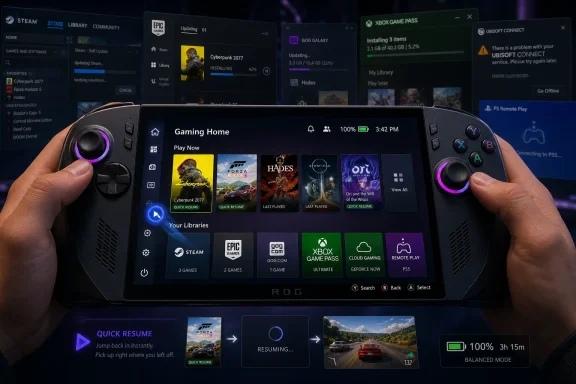 Winhanced Understands the Handheld Before Windows Does
The most damning thing about Winhanced is not that it does more than the Xbox app. It is that it appears to understand the assignment more clearly.According to Windows Central’s hands-on account, Winhanced brings together libraries from Xbox, Steam, Epic, and GOG, while also supporting Xbox Game Pass, Xbox Cloud Gaming, Xbox Remote Play, PlayStation Remote Play, and NVIDIA GeForce NOW. That is exactly the kind of fragmented reality Windows handheld owners actually live in. Their game libraries are not neat product silos; they are a decade of sales, subscriptions, bundles, freebies, and platform experiments scattered across storefronts.
Microsoft’s Xbox app, by contrast, has always carried the gravitational pull of Microsoft’s own ecosystem. It can show PC Game Pass, manage Xbox installs, and increasingly act as the front door for Xbox-branded handhelds. But the handheld PC buyer is often not buying an Xbox. They are buying a small Windows machine with a controller bolted around it, and they expect Steam, Epic, Battle.net, emulators, remote streaming, local installs, and cloud services to coexist without making them feel as if they are constantly exiting one world to enter another.
That is where Winhanced’s premise lands. It is not merely a launcher. It is an argument that the “home screen” of a Windows gaming handheld should belong to the user’s library, not to any one store’s business model.
The irony is hard to miss. Microsoft has spent years pitching Windows as the open gaming platform, but openness becomes a liability when every session begins with launcher archaeology. Winhanced treats that sprawl as the product problem. Microsoft too often treats it as an ecosystem talking point.
The Xbox App Still Carries Desktop Assumptions in a Controller Suit
Microsoft is not blind to the issue. The Xbox full-screen experience, now commonly referred to as Xbox Mode, exists precisely because Windows on a handheld is a mismatch of tiny dialogs, focus-stealing windows, background services, and desktop-era interaction models. On supported Windows 11 gaming devices, Xbox Mode can start a gaming home app in full screen, reduce some background friction, and make the PC feel more console-like.That is progress. It is also an admission.
For years, PC gaming handhelds have survived on vendor overlays and community hacks. ASUS has Armoury Crate. Lenovo has Legion Space. MSI has its own control software. Steam Deck users who want Windows often stack third-party tools on top of Microsoft’s operating system just to make sleep, controls, performance profiles, and launchers behave acceptably. The operating system can run the games, but the experience around the games has been outsourced to everyone else.
Xbox Mode is Microsoft’s attempt to reclaim that layer. The ROG Xbox Ally line made the ambition explicit: a Windows handheld that borrows the Xbox name and tries to boot users into something more appliance-like. Yet early impressions across the enthusiast press and user communities have been mixed because the experience still depends on an Xbox app that was never originally designed to be the single console shell for all PC gaming.
That distinction is important. A full-screen app is not the same thing as a handheld operating environment. A controller-friendly home screen is not the same thing as a console experience. If the user still tumbles into desktop prompts, launcher updates, store authentication, resolution weirdness, and inconsistent exit behavior, the illusion breaks.
Winhanced benefits from lower expectations. It is early access, Patreon-backed, and openly unfinished. But that also gives it a freedom Microsoft does not seem to have: it can behave like a front end for the whole PC instead of a storefront with platform ambitions.
The Launcher War Has Moved From Stores to Surfaces
For much of the last decade, the PC launcher debate was framed around stores. Steam had the library. Epic had the exclusives and giveaways. GOG had the DRM-free pitch. Xbox had Game Pass. Publishers had their own launchers because, for reasons known only to quarterly strategy decks, everyone wanted to own the login screen.Handheld PCs change the terrain. On a desktop, launcher sprawl is annoying but manageable. You have a keyboard, a mouse, a second monitor, and the patience that comes from already sitting at a desk. On a handheld, every extra launcher becomes physical friction: thumbstick cursor movement, tiny text, awkward text entry, focus problems, and update dialogs that feel absurd on a seven-inch screen.
That is why Winhanced’s unified-library approach feels larger than a convenience feature. It attacks the point where PC openness becomes user-hostile. A handheld does not need fewer ecosystems; it needs a better layer above them.
Valve understood this with SteamOS. The Steam Deck is not great because Linux suddenly became invisible magic. It is great because Valve made Steam the operating surface, then handled the messy compatibility work underneath. Bazzite and similar community distributions have extended that idea for users who want a SteamOS-like experience on non-Valve hardware.
Microsoft’s position is more complicated. Windows cannot simply become XboxOS without sacrificing the compatibility that makes Windows valuable in the first place. But it also cannot keep pretending that a desktop OS plus a full-screen launcher equals a handheld console. The winning layer is the one that makes complexity feel optional.
That is why the comparison to Playnite matters. Playnite became beloved among PC enthusiasts because it took the launcher problem seriously without pretending users lived in one store. Winhanced appears to be pushing that idea into a more controller-first, handheld-native direction. If it succeeds, it will not be because it replaces Windows. It will be because it makes Windows feel less like Windows at the exact moment users want to play.
Microsoft’s Strategic Problem Is Not Features, It Trust
It would be too easy to reduce this to a checklist. Winhanced supports this service. Xbox supports that mode. One has automatic TDP adjustment. The other has deeper Game Pass integration. One has a friends list in testing. The other has the Microsoft account graph and platform resources.But the deeper problem is trust. Handheld users need to trust that the interface they boot into will respect the way they actually play. If they open the home screen and see a carefully curated Microsoft funnel while half their library lives elsewhere, they know who the interface is really serving.
This is the same tension that has haunted Windows for years. Microsoft wants Windows to be neutral infrastructure, a storefront, a subscription vehicle, a cloud endpoint, an AI surface, and an Xbox companion all at once. Sometimes those goals align. Often they compete.
On a gaming handheld, the conflict is unusually visible. A player does not want corporate architecture. They want my games, my saves, my controls, my battery life, and my session resumed where I left it. If the device feels like it is negotiating with Microsoft’s priorities before serving the player’s, alternatives become attractive very quickly.
Winhanced, precisely because it is small, can make a simpler promise. It can say: bring your libraries here and play them. That promise is powerful because it fits the handheld form factor. The device is already a compromise between PC flexibility and console convenience. The interface should reduce that compromise, not advertise it.
Microsoft has the harder job, but it also has the larger obligation. If it wants Xbox-branded Windows handhelds to be more than niche enthusiast machines, the Xbox app has to become a truly cross-store, cross-service, controller-native home. Anything less leaves room for community projects to define the experience Microsoft should have owned.
Performance Controls Are the New Start Menu
One of the more interesting Winhanced details in the Windows Central report is automatic TDP adjustment. That may sound like enthusiast trivia, but on a handheld PC it sits close to the heart of the experience.Desktop gaming performance is usually framed around frame rates, resolution, and GPU settings. Handheld gaming adds a second axis: watts. A game running beautifully at 25W may be useless on a train ride if it drains the battery before the second act. A game capped at 40 fps with a sane power profile may feel better in practice than one chasing desktop-style benchmarks.
This is where Windows remains poorly matched to the category. Power plans, vendor utilities, in-game settings, driver overlays, and frame limiters all interact in ways that can confuse even experienced PC users. On a handheld, those controls need to feel immediate and predictable. They are not advanced settings; they are part of the basic play loop.
Valve solved much of this by putting performance controls directly into the Steam Deck experience. ASUS, Lenovo, and others have tried to fill the same gap on Windows. Microsoft’s newer default game profiles for Xbox Ally devices show that it understands the need, but the limitation is revealing: platform-level intelligence is only transformative if it applies broadly enough to match the user’s library.
If Winhanced can make performance tuning feel automatic across more games and more launchers, it is not just adding a feature. It is moving into territory that should arguably belong to the operating system. Battery-aware gaming, controller navigation, suspend behavior, and launcher aggregation are not side quests on a handheld. They are the platform.
That is the uncomfortable lesson for Microsoft. The more third-party shells solve these problems, the more Windows becomes the substrate rather than the experience. Microsoft may still win the install base while losing the relationship.
Early Access Is a Warning Label, Not a Dismissal
None of this means Winhanced is ready to replace the Xbox app for everyone. Windows Central’s piece is clear that the tested experience is based on early-access features, some of which are currently tied to Patreon support. Bugs remain. Graphical glitches, download hiccups, and game-closing issues are exactly the kind of rough edges that can turn a console-like dream back into PC troubleshooting.That matters because handheld users are less forgiving than desktop users. A desktop user may tolerate a broken overlay because Alt-Tab and Task Manager are second nature. A handheld user sitting on a couch with no keyboard nearby has a much lower threshold for weirdness. The same bug feels worse when the device itself promised console-style simplicity.
Still, early access cuts both ways. Winhanced’s unfinished state is a risk, but it also makes its lead over the Xbox app more embarrassing. When a small team working in spare time can produce a front end that some users already prefer to Microsoft’s official app, the issue is not engineering capacity. It is product framing.
Microsoft has spent enormous effort on Xbox branding, Game Pass distribution, cloud streaming, Windows gaming optimizations, and hardware partnerships. Yet the everyday home-screen experience on a Windows handheld still feels unsettled. That leaves a vacuum, and enthusiast communities are exceptionally good at filling vacuums.
The question is whether Microsoft sees projects like Winhanced as niche hobbyist competition or as market research with a download button. The smarter response would be humility. Users are showing exactly what they want: unified libraries, controller-first navigation, fewer desktop leaks, sensible power behavior, and no sense that the interface is punishing them for buying games outside the Microsoft Store.
The Handheld PC Is Becoming the Test Case for Windows Itself
The stakes extend beyond handheld gaming. Windows has spent decades assuming that the desktop is the center of gravity. Even tablets, convertibles, living-room PCs, and touch-first experiments have mostly been forced to orbit that assumption. Handheld gaming PCs are different because they are popular enough, expensive enough, and demanding enough to expose the cost of that legacy.A handheld PC is still a PC, but it is also an appliance. It needs to update without drama, sleep reliably, resume quickly, scale text correctly, launch games cleanly, manage power intelligently, and hide the plumbing until the user asks for it. That is not how classic Windows was built.
Microsoft’s challenge is that it cannot simply copy SteamOS. Windows must support anti-cheat systems, launchers, productivity apps, peripherals, mods, cloud saves, external displays, and the entire messy advantage of PC compatibility. The answer cannot be to wall off the machine. But it also cannot be to drop users at a desktop and hope the Xbox app creates enough vibes to cover the seams.
This is where Winhanced’s existence becomes strategically useful. It demonstrates that the right abstraction layer may not be a stripped-down Windows SKU or a console dashboard clone. It may be a user-controlled gaming shell that accepts Windows’ messiness underneath while presenting a coherent surface above it.
That should sound familiar to longtime Windows users. The Start menu, taskbar, system tray, and File Explorer were all once attempts to tame complexity rather than eliminate it. On handhelds, the launcher is becoming the new shell. Whoever owns that shell owns the user’s sense of what the device is.
The Community Is Building the Xbox Handheld Microsoft Promised
The lesson from Winhanced is blunt, but not hostile. Microsoft has the services, the OS, the hardware partners, and the brand. What it lacks, at least in the current Xbox app experience, is the willingness to treat the handheld PC as its own category rather than a small screen for existing Windows and Xbox assumptions.Winhanced is not magic. It is not finished. It may stumble as it scales, especially if platform APIs, storefront restrictions, authentication flows, or cloud-service changes make integration harder. But its direction is right in a way that users can feel immediately.
The Windows handheld market does not need another launcher that says “look at this store.” It needs a living-room-grade interface that says “pick up where you left off.” Those are different philosophies.
If Microsoft wants to win this category, it should stop measuring success by whether the Xbox app can run full screen and start measuring it by whether users forget they are navigating Windows at all. That does not require hiding PC freedom. It requires making freedom legible through a controller.
The Upgrade Path Is Written in the Friction
For handheld owners watching Winhanced from the sidelines, the practical message is more nuanced than “replace the Xbox app today.” The sharper takeaway is that the center of handheld PC software is shifting away from individual storefronts and toward controller-first aggregation.- Winhanced is compelling because it treats Steam, Xbox, Epic, GOG, cloud gaming, and remote play as parts of one library rather than rival destinations.
- The Xbox app’s full-screen experience is a necessary step, but it still feels constrained by Microsoft’s ecosystem priorities and desktop inheritance.
- Automatic power and performance handling may become as important to handheld software as library management, because battery life is part of playability.
- Early-access bugs make Winhanced a better fit for enthusiasts than for users who expect console-level reliability today.
- Microsoft’s biggest opportunity is to learn from these community front ends before they become the default layer serious handheld users recommend.
Source: Windows Central https://www.windowscentral.com/hard...box-app-feel-outdated-on-handheld-gaming-pcs/
