

Canonical has begun publishing Ubuntu Desktop 26.10 “Stonking Stingray” daily build images for 64-bit PCs, alongside early ARM and RISC-V images, ahead of the interim Ubuntu release scheduled for October 15, 2026. The headline is not that another Ubuntu ISO exists; it is that Canonical is using this short-lived release to test the boundaries of what the Linux desktop is supposed to become. Stonking Stingray looks less like a routine post-LTS cleanup and more like a staging area for RISC-V desktops, accessibility work, multimedia plumbing, and identity features aimed directly at users living in Microsoft’s world.
That makes these daily builds unusually interesting, and unusually unsuitable for casual use. Ubuntu 26.10 will not be the version most people deploy on production machines. But for developers, hardware vendors, enterprise testers, accessibility engineers, and WindowsForum readers curious about where desktop operating systems are heading, this is the cycle worth watching.
Ubuntu daily builds are usually the most ordinary part of the development calendar. They appear, they break, they get rebuilt, and most users wisely ignore them until beta. This time, the sequence has been awkward enough to be revealing: early desktop images surfaced first for AArch64, the first public snapshot arrived without the expected 64-bit desktop image for ordinary PCs, and only now has the familiar amd64 desktop path settled into place.
That matters because Ubuntu’s daily ISO is not just a convenience download. It is the public face of a development cycle, the first place where Canonical shows which platforms it believes are worth exercising before the release machinery hardens. When a cycle begins with ARM and RISC-V making noise before the classic PC image feels fully normalized, it says something about the company’s priorities.
For years, Ubuntu Desktop has had a split personality. It is the Linux desktop most likely to be recommended to a newcomer, yet it is also Canonical’s test vehicle for server-adjacent technologies, packaging experiments, cloud identity assumptions, and hardware enablement work that is anything but beginner-friendly. Ubuntu 26.10 appears to be leaning into the second identity.
The result is a release that looks consumer-facing on the surface but developer-facing underneath. The daily builds are available to download, boot, and install, but the real audience is not the person who wants a quiet laptop. It is the person who wants to see which bets Canonical is placing before those bets become policy.
That does not mean RISC-V is suddenly ready to replace x86 gaming rigs or Arm laptops. It means Canonical is beginning to treat the architecture as something that needs a graphical desktop experience, application testing, accessibility behavior, multimedia paths, and end-user polish. That is a very different bar from proving that a shell prompt boots on a development board.
Canonical has already been tightening its RISC-V baseline around newer ISA profiles, particularly RVA23-class hardware. The practical effect is blunt: Ubuntu wants to support the RISC-V hardware that is arriving, not preserve compatibility with every early board that happened to ship while the ecosystem was still finding itself. That decision will frustrate hobbyists with older boards, but it is defensible if the goal is a usable desktop rather than a museum of partial support.
The current RISC-V desktop image still comes with caveats that would scare off normal users. Testing on real hardware may require bringing your own first-stage bootloader and Device Tree Blobs, then modifying the ISO before boot. That is not “download, flash, install” in the consumer sense. It is a reminder that RISC-V remains a hardware ecosystem where firmware conventions, board support, and operating system assumptions have not yet converged the way they have on PCs.
Still, the presence of a desktop image changes the conversation. It gives app developers, toolkit maintainers, distro engineers, and hardware vendors a common artifact to test against. It also gives Canonical a way to discover the unglamorous failures that only appear when a platform is asked to render a modern desktop all day instead of compiling benchmarks in a terminal.
The LTS releases are where enterprises want predictability, OEMs want certification, and administrators want the fewest possible surprises. Interim releases serve a different function. They are where the distribution absorbs new GNOME releases, newer kernels, toolchain changes, plumbing shifts, and desktop experiments before a future LTS inherits the survivors.
That is why Stonking Stingray’s nine-month support window should be read as a feature, not a flaw. If a RISC-V desktop image exposes painful bootloader assumptions, if the accessibility work reveals regressions, if new multimedia components need a cycle of hardening, or if identity integrations prove too clever by half, the damage is bounded. The release gives Canonical a public test bed without asking conservative users to bet their fleet on it.
For Windows administrators looking across the fence, this model should feel familiar. Microsoft has spent years trying to separate broad deployment channels from preview rings, Insider builds, enablement packages, and staged rollouts. Canonical’s daily builds are less choreographed and less consumer-marketed, but the underlying principle is similar: the future arrives first in places where breakage is tolerated.
The difference is cultural. Windows previews often feel like a product channel. Ubuntu daily builds feel like a construction site with a public entrance. That can be off-putting, but it is also honest.
GNOME is not merely a shell or a visual style. It shapes how Ubuntu handles settings, accessibility, input methods, notifications, display behavior, applications, and the basic feeling of the desktop. When Ubuntu takes a new GNOME release late in the cycle, it is taking on a large integration surface at precisely the moment a distribution wants to become boring.
That is one reason daily builds matter. Desktop regressions are not always dramatic failures. They are often small irritants that accumulate: a display setting that no longer persists, a fractional scaling edge case, a screen reader interaction that becomes unreliable, a Wayland behavior that differs from what an application expected. Those problems need time and real users.
The GNOME 51 expectation also reinforces the point that Ubuntu 26.10 is not a destination release for most people. It is a bridge between the freshly released LTS line and whatever Canonical wants the next stable era of Ubuntu Desktop to become. The daily builds are where that bridge begins to creak.
For desktop users, the kernel is often invisible until it fails them. A laptop that wakes reliably feels like an operating system feature, even if the fix lives deep in power management code. A GPU that supports the right acceleration path feels like a desktop feature, even if the enabling work sits in DRM drivers and Mesa coordination. A RISC-V board that can boot a graphical session depends on layers of kernel support that most users will never read about.
Linux 7.2 also fits the release’s character. It is a forward-looking target for a forward-looking Ubuntu cycle. If the kernel lands on schedule and stabilizes in time, Ubuntu 26.10 gets a hardware enablement story that matters for newer PCs and non-x86 systems alike.
The risk is obvious. Newer kernels bring newer regressions, and daily builds are where those regressions are supposed to be found. Anyone installing Stonking Stingray on a spare laptop should do so with the expectation that hardware support may improve one week and break the next.
Accessibility cannot be bolted on at the end of a release. It touches toolkits, input methods, window management, contrast, keyboard navigation, screen readers, installer flows, and application frameworks. When a distribution claims progress toward a modern accessibility standard, it is implicitly claiming that multiple layers of the desktop are becoming more consistent.
The Flutter angle is especially notable because Ubuntu has used Flutter in parts of its desktop experience, including installer work. Flutter gives developers a modern cross-platform toolkit, but cross-platform toolkits can become accessibility traps if platform integration is shallow. Making Flutter-based desktop components behave properly for assistive technologies is not glamorous, but it is essential if Ubuntu wants to keep using that stack without creating a parallel universe of inaccessible UI.
This is one area where Linux desktops have often suffered from fragmentation. Individual applications can be excellent, but the experience across the system can feel uneven. A settings panel, an installer step, and a third-party app may all expose accessibility information differently. Users who depend on assistive technology experience that inconsistency as friction, not philosophy.
If Ubuntu 26.10 materially improves this, it will be more important than any wallpaper refresh. Accessibility work is infrastructure for human use. It is also one of the places where desktop Linux must compete not with other distributions, but with the expectations set by Windows, macOS, iOS, Android, and the web.
GStreamer has long been one of the quiet load-bearing beams of the Linux desktop. It sits beneath applications users actually name. When it improves, the effect is often indirect: fewer playback failures, better codec handling, more reliable capture, safer plugin behavior, or new paths for hardware acceleration.
The Rust component is not just fashionable language adoption. Multimedia parsing is exactly the kind of area where memory safety matters, because media files and streams are exposed to hostile input by design. Moving more plugin work toward Rust has the potential to reduce entire classes of defects, provided the integration remains mature and performance holds up.
For Windows users evaluating Linux as a daily driver, multimedia remains one of the practical fault lines. A desktop can be elegant and still fail the migration test if video calls are flaky, capture devices are inconsistent, or playback support depends on tribal knowledge. Ubuntu’s historical advantage has been that it usually makes these things less painful than many alternatives. Stonking Stingray appears to continue that work in the plumbing rather than the marketing layer.
But local speech-to-text is one of the places where the AI label can be justified without contortion. If implemented well, it can improve accessibility, enable dictation, support hands-free input, and reduce dependence on cloud transcription services. The key phrase is on-device.
That local processing distinction matters for privacy and latency. Voice input is intimate data. Sending it to a remote service may be acceptable in some contexts, but an operating system-level input method should not assume that every spoken word belongs in a cloud pipeline. For Linux users who value control, on-device speech recognition is not just a feature; it is a boundary.
The integration point also matters. A speech-to-text engine that behaves as a native input method can work across applications rather than living as a novelty in one app. That is the difference between a demo and a platform feature. If Canonical gets the input plumbing right, the payoff could be broader than the first release suggests.
The caution is that speech recognition quality varies wildly by language, accent, microphone quality, domain vocabulary, and hardware capability. Local models also raise packaging and performance questions. A feature that feels magical on a modern workstation may feel unusable on a low-end laptop. Ubuntu 26.10 will need testers precisely because the edge cases are the product.
That is a big deal because identity has become one of the strongest forms of platform gravity. A decade ago, switching operating systems mostly meant moving files and finding replacement apps. Today it can mean disentangling device sign-in, passwordless flows, MFA prompts, cloud storage, browser profiles, enterprise access policies, conditional access rules, and app authentication expectations.
For businesses, identity is not optional. A Linux desktop that cannot participate cleanly in Microsoft-oriented authentication workflows is a nonstarter in many environments, regardless of how good the kernel or desktop shell may be. The same is increasingly true for power users whose personal and professional lives are anchored in Microsoft accounts, Entra ID, Microsoft 365, and MFA habits.
The interesting part is not that Ubuntu is trying to become Windows. It is that Canonical appears to recognize that the desktop migration problem has moved up the stack. File managers, panels, and package managers still matter, but identity is now part of the operating system experience. If Linux wants to win converts from Windows, it has to meet users where their credentials already live.
There is also risk here. Microsoft authentication flows are security-sensitive, policy-sensitive, and subject to change. A half-working integration can be worse than none, because it creates false confidence for users and extra support burden for administrators. Canonical will need to be careful not to market this as a magic bridge before the behavior is documented, supportable, and predictable.
Users do not switch because an operating system is ideologically pure. They switch when their work still works. That means authentication, browser compatibility, conferencing, printing, GPU support, battery life, application packaging, accessibility, and update behavior matter more than slogans.
Ubuntu 26.10’s feature mix reflects that reality. RISC-V support is about future hardware markets. GNOME and kernel updates are about everyday device behavior. GStreamer work is about media reliability. Accessibility improvements are about making the desktop usable by more people. On-device speech-to-text is about input. Microsoft authentication is about continuity.
This is the part Windows professionals should watch closely. Canonical is not competing with Windows by cloning its Start menu. It is competing by attacking the practical blockers that keep users from even trying Linux on serious machines. That is a slower strategy than a flashy redesign, but probably a more credible one.
At the same time, the daily build status cannot be overstated. Nothing about Stonking Stingray should be read as an invitation to replace a stable Windows workstation today. It is an invitation to test whether tomorrow’s Linux desktop removes more of yesterday’s reasons not to switch.
The right way to approach Ubuntu 26.10 daily builds is with disposable hardware, virtual machines, backups, and a clear purpose. If you are testing an app against GNOME 51-era libraries, validating a driver path, experimenting with RISC-V hardware, or checking accessibility behavior, the daily image is useful. If you simply want a stable desktop, Ubuntu 26.04 LTS or another supported stable release is the sane choice.
That is not a criticism of Canonical. It is the contract of a development image. Daily builds are meant to expose broken assumptions early, before beta freezes and release candidates turn those assumptions into release notes. The people who test them productively are not thrill-seekers; they are contributors to the boring reliability everyone else later enjoys.
For sysadmins, the value is mostly observational at this stage. Watch the identity work. Watch the RISC-V baseline. Watch the kernel target. Watch whether accessibility bugs get treated as release-critical or nice-to-have. Those signals will say more about Ubuntu’s direction than any single daily ISO.
That makes these daily builds unusually interesting, and unusually unsuitable for casual use. Ubuntu 26.10 will not be the version most people deploy on production machines. But for developers, hardware vendors, enterprise testers, accessibility engineers, and WindowsForum readers curious about where desktop operating systems are heading, this is the cycle worth watching.
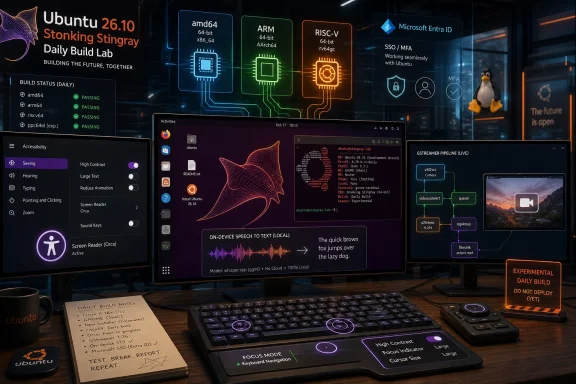 Canonical Turns the Daily ISO Into a Statement of Intent
Ubuntu daily builds are usually the most ordinary part of the development calendar. They appear, they break, they get rebuilt, and most users wisely ignore them until beta. This time, the sequence has been awkward enough to be revealing: early desktop images surfaced first for AArch64, the first public snapshot arrived without the expected 64-bit desktop image for ordinary PCs, and only now has the familiar amd64 desktop path settled into place.That matters because Ubuntu’s daily ISO is not just a convenience download. It is the public face of a development cycle, the first place where Canonical shows which platforms it believes are worth exercising before the release machinery hardens. When a cycle begins with ARM and RISC-V making noise before the classic PC image feels fully normalized, it says something about the company’s priorities.
For years, Ubuntu Desktop has had a split personality. It is the Linux desktop most likely to be recommended to a newcomer, yet it is also Canonical’s test vehicle for server-adjacent technologies, packaging experiments, cloud identity assumptions, and hardware enablement work that is anything but beginner-friendly. Ubuntu 26.10 appears to be leaning into the second identity.
The result is a release that looks consumer-facing on the surface but developer-facing underneath. The daily builds are available to download, boot, and install, but the real audience is not the person who wants a quiet laptop. It is the person who wants to see which bets Canonical is placing before those bets become policy.
The RISC-V Desktop Is No Longer a Slide Deck
The most consequential addition is not the amd64 image, even though that is the one most readers can run today. The bigger signal is the presence of a RISC-V desktop image, because it moves Ubuntu’s RISC-V story from “server boards and embedded curiosity” toward something that can plausibly be called a desktop platform.That does not mean RISC-V is suddenly ready to replace x86 gaming rigs or Arm laptops. It means Canonical is beginning to treat the architecture as something that needs a graphical desktop experience, application testing, accessibility behavior, multimedia paths, and end-user polish. That is a very different bar from proving that a shell prompt boots on a development board.
Canonical has already been tightening its RISC-V baseline around newer ISA profiles, particularly RVA23-class hardware. The practical effect is blunt: Ubuntu wants to support the RISC-V hardware that is arriving, not preserve compatibility with every early board that happened to ship while the ecosystem was still finding itself. That decision will frustrate hobbyists with older boards, but it is defensible if the goal is a usable desktop rather than a museum of partial support.
The current RISC-V desktop image still comes with caveats that would scare off normal users. Testing on real hardware may require bringing your own first-stage bootloader and Device Tree Blobs, then modifying the ISO before boot. That is not “download, flash, install” in the consumer sense. It is a reminder that RISC-V remains a hardware ecosystem where firmware conventions, board support, and operating system assumptions have not yet converged the way they have on PCs.
Still, the presence of a desktop image changes the conversation. It gives app developers, toolkit maintainers, distro engineers, and hardware vendors a common artifact to test against. It also gives Canonical a way to discover the unglamorous failures that only appear when a platform is asked to render a modern desktop all day instead of compiling benchmarks in a terminal.
A Short-Lived Release Becomes the Safest Place to Break Things
Ubuntu 26.10 is an interim release, not a long-term support release. That distinction is not bureaucratic trivia. It is the reason Canonical can afford to make this cycle more aggressive.The LTS releases are where enterprises want predictability, OEMs want certification, and administrators want the fewest possible surprises. Interim releases serve a different function. They are where the distribution absorbs new GNOME releases, newer kernels, toolchain changes, plumbing shifts, and desktop experiments before a future LTS inherits the survivors.
That is why Stonking Stingray’s nine-month support window should be read as a feature, not a flaw. If a RISC-V desktop image exposes painful bootloader assumptions, if the accessibility work reveals regressions, if new multimedia components need a cycle of hardening, or if identity integrations prove too clever by half, the damage is bounded. The release gives Canonical a public test bed without asking conservative users to bet their fleet on it.
For Windows administrators looking across the fence, this model should feel familiar. Microsoft has spent years trying to separate broad deployment channels from preview rings, Insider builds, enablement packages, and staged rollouts. Canonical’s daily builds are less choreographed and less consumer-marketed, but the underlying principle is similar: the future arrives first in places where breakage is tolerated.
The difference is cultural. Windows previews often feel like a product channel. Ubuntu daily builds feel like a construction site with a public entrance. That can be off-putting, but it is also honest.
GNOME 51 Gives Ubuntu a Deadline It Does Not Control
Ubuntu 26.10 is expected to ship with GNOME 51, assuming the upstream desktop lands on its planned September schedule and Ubuntu’s integration work follows in time for the October release. That dependency is one of the defining rhythms of Ubuntu’s six-month cadence. Canonical gets the benefit of shipping a modern desktop quickly, but it also inherits the pressure of another project’s calendar.GNOME is not merely a shell or a visual style. It shapes how Ubuntu handles settings, accessibility, input methods, notifications, display behavior, applications, and the basic feeling of the desktop. When Ubuntu takes a new GNOME release late in the cycle, it is taking on a large integration surface at precisely the moment a distribution wants to become boring.
That is one reason daily builds matter. Desktop regressions are not always dramatic failures. They are often small irritants that accumulate: a display setting that no longer persists, a fractional scaling edge case, a screen reader interaction that becomes unreliable, a Wayland behavior that differs from what an application expected. Those problems need time and real users.
The GNOME 51 expectation also reinforces the point that Ubuntu 26.10 is not a destination release for most people. It is a bridge between the freshly released LTS line and whatever Canonical wants the next stable era of Ubuntu Desktop to become. The daily builds are where that bridge begins to creak.
Linux 7.2 Is the Hardware Bet Under the Desktop Bet
Canonical’s kernel team has identified Linux 7.2 as the target kernel for Ubuntu 26.10. That is more than version chasing. Kernel selection determines how well new laptops suspend, which GPUs behave, which Wi-Fi chips work without rituals, and how quickly emerging architectures like RISC-V can become practical rather than theoretical.For desktop users, the kernel is often invisible until it fails them. A laptop that wakes reliably feels like an operating system feature, even if the fix lives deep in power management code. A GPU that supports the right acceleration path feels like a desktop feature, even if the enabling work sits in DRM drivers and Mesa coordination. A RISC-V board that can boot a graphical session depends on layers of kernel support that most users will never read about.
Linux 7.2 also fits the release’s character. It is a forward-looking target for a forward-looking Ubuntu cycle. If the kernel lands on schedule and stabilizes in time, Ubuntu 26.10 gets a hardware enablement story that matters for newer PCs and non-x86 systems alike.
The risk is obvious. Newer kernels bring newer regressions, and daily builds are where those regressions are supposed to be found. Anyone installing Stonking Stingray on a spare laptop should do so with the expectation that hardware support may improve one week and break the next.
Accessibility Moves From Checkbox to Architecture
One of the more important promises around Ubuntu 26.10 is improved compliance with WCAG 2.2 AA and broader accessibility work in the Flutter ecosystem. That may sound like a policy footnote, but it has real architectural consequences for the Linux desktop.Accessibility cannot be bolted on at the end of a release. It touches toolkits, input methods, window management, contrast, keyboard navigation, screen readers, installer flows, and application frameworks. When a distribution claims progress toward a modern accessibility standard, it is implicitly claiming that multiple layers of the desktop are becoming more consistent.
The Flutter angle is especially notable because Ubuntu has used Flutter in parts of its desktop experience, including installer work. Flutter gives developers a modern cross-platform toolkit, but cross-platform toolkits can become accessibility traps if platform integration is shallow. Making Flutter-based desktop components behave properly for assistive technologies is not glamorous, but it is essential if Ubuntu wants to keep using that stack without creating a parallel universe of inaccessible UI.
This is one area where Linux desktops have often suffered from fragmentation. Individual applications can be excellent, but the experience across the system can feel uneven. A settings panel, an installer step, and a third-party app may all expose accessibility information differently. Users who depend on assistive technology experience that inconsistency as friction, not philosophy.
If Ubuntu 26.10 materially improves this, it will be more important than any wallpaper refresh. Accessibility work is infrastructure for human use. It is also one of the places where desktop Linux must compete not with other distributions, but with the expectations set by Windows, macOS, iOS, Android, and the web.
The Multimedia Stack Keeps Moving Beneath Everyone’s Feet
Ubuntu 26.10 is also expected to pick up GStreamer 1.30, including new Rust-based plugins for audio and video handling. That sounds like a developer detail until you remember how much of a modern desktop is media: browser playback, screen recording, conferencing, accessibility audio cues, camera support, media indexing, streaming, and content creation.GStreamer has long been one of the quiet load-bearing beams of the Linux desktop. It sits beneath applications users actually name. When it improves, the effect is often indirect: fewer playback failures, better codec handling, more reliable capture, safer plugin behavior, or new paths for hardware acceleration.
The Rust component is not just fashionable language adoption. Multimedia parsing is exactly the kind of area where memory safety matters, because media files and streams are exposed to hostile input by design. Moving more plugin work toward Rust has the potential to reduce entire classes of defects, provided the integration remains mature and performance holds up.
For Windows users evaluating Linux as a daily driver, multimedia remains one of the practical fault lines. A desktop can be elegant and still fail the migration test if video calls are flaky, capture devices are inconsistent, or playback support depends on tribal knowledge. Ubuntu’s historical advantage has been that it usually makes these things less painful than many alternatives. Stonking Stingray appears to continue that work in the plumbing rather than the marketing layer.
On-Device Speech Recognition Is the AI Feature That Actually Fits the Desktop
The most buzzword-friendly part of the Ubuntu 26.10 story is the plan to ship AI tools for voice interaction through an on-device speech-to-text engine integrated as a native desktop input method. The phrase “AI tools” invites skepticism, and it should. Desktop operating systems are currently drowning in AI branding, much of it vague, cloud-dependent, and only loosely connected to user benefit.But local speech-to-text is one of the places where the AI label can be justified without contortion. If implemented well, it can improve accessibility, enable dictation, support hands-free input, and reduce dependence on cloud transcription services. The key phrase is on-device.
That local processing distinction matters for privacy and latency. Voice input is intimate data. Sending it to a remote service may be acceptable in some contexts, but an operating system-level input method should not assume that every spoken word belongs in a cloud pipeline. For Linux users who value control, on-device speech recognition is not just a feature; it is a boundary.
The integration point also matters. A speech-to-text engine that behaves as a native input method can work across applications rather than living as a novelty in one app. That is the difference between a demo and a platform feature. If Canonical gets the input plumbing right, the payoff could be broader than the first release suggests.
The caution is that speech recognition quality varies wildly by language, accent, microphone quality, domain vocabulary, and hardware capability. Local models also raise packaging and performance questions. A feature that feels magical on a modern workstation may feel unusable on a low-end laptop. Ubuntu 26.10 will need testers precisely because the edge cases are the product.
Microsoft Identity Comes to the Linux Desktop Through the Side Door
Perhaps the most WindowsForum-relevant promise is support for Microsoft password and MFA authentication for Windows users who want to switch to Linux. The wording is broad, and the details will matter enormously, but the direction is unmistakable: Ubuntu wants to reduce the identity shock of moving from a Microsoft-centered environment to a Linux desktop.That is a big deal because identity has become one of the strongest forms of platform gravity. A decade ago, switching operating systems mostly meant moving files and finding replacement apps. Today it can mean disentangling device sign-in, passwordless flows, MFA prompts, cloud storage, browser profiles, enterprise access policies, conditional access rules, and app authentication expectations.
For businesses, identity is not optional. A Linux desktop that cannot participate cleanly in Microsoft-oriented authentication workflows is a nonstarter in many environments, regardless of how good the kernel or desktop shell may be. The same is increasingly true for power users whose personal and professional lives are anchored in Microsoft accounts, Entra ID, Microsoft 365, and MFA habits.
The interesting part is not that Ubuntu is trying to become Windows. It is that Canonical appears to recognize that the desktop migration problem has moved up the stack. File managers, panels, and package managers still matter, but identity is now part of the operating system experience. If Linux wants to win converts from Windows, it has to meet users where their credentials already live.
There is also risk here. Microsoft authentication flows are security-sensitive, policy-sensitive, and subject to change. A half-working integration can be worse than none, because it creates false confidence for users and extra support burden for administrators. Canonical will need to be careful not to market this as a magic bridge before the behavior is documented, supportable, and predictable.
The Windows Migration Story Is Becoming Less Romantic and More Practical
Linux advocacy has often framed Windows migration as a moral or philosophical decision: escape telemetry, escape licensing, escape vendor control, escape the forced march of updates. Those arguments still resonate with some users, especially after years of Windows 11 hardware requirements and cloud-account nudges. But the successful migration story in 2026 is more practical than romantic.Users do not switch because an operating system is ideologically pure. They switch when their work still works. That means authentication, browser compatibility, conferencing, printing, GPU support, battery life, application packaging, accessibility, and update behavior matter more than slogans.
Ubuntu 26.10’s feature mix reflects that reality. RISC-V support is about future hardware markets. GNOME and kernel updates are about everyday device behavior. GStreamer work is about media reliability. Accessibility improvements are about making the desktop usable by more people. On-device speech-to-text is about input. Microsoft authentication is about continuity.
This is the part Windows professionals should watch closely. Canonical is not competing with Windows by cloning its Start menu. It is competing by attacking the practical blockers that keep users from even trying Linux on serious machines. That is a slower strategy than a flashy redesign, but probably a more credible one.
At the same time, the daily build status cannot be overstated. Nothing about Stonking Stingray should be read as an invitation to replace a stable Windows workstation today. It is an invitation to test whether tomorrow’s Linux desktop removes more of yesterday’s reasons not to switch.
Daily Builds Are for Finding Broken Assumptions, Not Proving Loyalty
There is a recurring mistake in enthusiast circles: treating early builds as badges of courage. Installing a daily ISO on your main PC does not make you a better Linux user. It mostly makes you the unpaid owner of whatever regression landed that morning.The right way to approach Ubuntu 26.10 daily builds is with disposable hardware, virtual machines, backups, and a clear purpose. If you are testing an app against GNOME 51-era libraries, validating a driver path, experimenting with RISC-V hardware, or checking accessibility behavior, the daily image is useful. If you simply want a stable desktop, Ubuntu 26.04 LTS or another supported stable release is the sane choice.
That is not a criticism of Canonical. It is the contract of a development image. Daily builds are meant to expose broken assumptions early, before beta freezes and release candidates turn those assumptions into release notes. The people who test them productively are not thrill-seekers; they are contributors to the boring reliability everyone else later enjoys.
For sysadmins, the value is mostly observational at this stage. Watch the identity work. Watch the RISC-V baseline. Watch the kernel target. Watch whether accessibility bugs get treated as release-critical or nice-to-have. Those signals will say more about Ubuntu’s direction than any single daily ISO.
The Stingray’s Early Lessons Are Already Visible
Ubuntu 26.10 is still months from release, and the daily builds will change constantly. Even so, the shape of the cycle is clear enough to draw several practical conclusions.- Ubuntu Desktop 26.10 is best understood as a development proving ground, not a production recommendation.
- The arrival of amd64 daily builds restores the familiar PC testing path after an unusually uneven start to the cycle.
- The RISC-V desktop image is the most strategically important artifact because it turns architecture support into a graphical desktop problem.
- The expected GNOME 51 and Linux 7.2 combination makes this release a hardware and desktop integration test bed.
- Accessibility, multimedia, local speech input, and Microsoft authentication all point toward a Linux desktop that is trying to remove practical migration barriers.
- Anyone testing Stonking Stingray should use spare hardware or virtual machines and expect breakage as part of the bargain.
References
- Primary source: 9to5Linux
Published: 2026-06-14T04:50:09.193384
- Related coverage: ubuntupit.com
- Related coverage: ubuntu.com
Download Canonical-built Ubuntu for RISC-V Platforms | Ubuntu
Use Ubuntu on RISC-V platforms for the familiar developer experience and an accelerated path to production ubuntu.com
- Related coverage: linuxiac.com
Ubuntu 26.10 Stonking Stingray Officially Announced for October 15 Release
Canonical has confirmed Ubuntu 26.10 will carry the Stonking Stingray codename and is scheduled to launch on October 15, 2026.linuxiac.com - Related coverage: warp2search.net
Ubuntu Linux 26.10 Stonking Stingray Ships October 15
Canonical has announced that Ubuntu 26.10, codenamed Stonking Stingray, will be released on October 15, 2026, adhering to its regular six-month development cycle.www.warp2search.net - Related coverage: documentation.ubuntu.com
Ubuntu 26.10 release notes
These release notes cover new features and changes in Ubuntu 26.10 (Stonking Stingray). For the release schedule of Ubuntu 26.10, refer to: Release schedule. Support lifespan: Upgrades: New feature...documentation.ubuntu.com
- Related coverage: linuxmag.nl
- Related coverage: cdimage.ubuntu.com
- Related coverage: discourse.ubuntu.com
Announcing 7.2 Kernel for Ubuntu 26.10 Stonking Stingray - Kernel - Ubuntu Community Hub
The Canonical Kernel Team is pleased to share that the 7.2 Linux kernel has been selected as the target version for the upcoming Ubuntu 26.10 Stonking Stingray release. Based on the current Linux release predictions, th… discourse.ubuntu.com
- Related coverage: lists.ubuntu.com
- Related coverage: certification.canonical.com

