

Canonical’s new Ubuntu on Windows Community Preview places a sandboxed, fast-moving Ubuntu build into the hands of WSL users so the community can test onboarding, Windows Terminal theming, and a new configuration tool before those features reach the store’s stable LTS images.
Over the past several years Microsoft and the Linux ecosystem have steadily tightened their integration, with Windows Subsystem for Linux (WSL, now widely used in its WSL 2 form) becoming a mainstream developer platform on Windows. Canonical’s decision to publish a dedicated Community Preview for Ubuntu on WSL continues that trend by providing a deliberately experimental channel that ships newer Ubuntu components and integration work more rapidly than the enterprise-oriented Long Term Support releases. The Community Preview is not a replacement for the stable Ubuntu on Windows packages; it is explicitly aimed at advanced users and contributors who want to test features, report bugs, and help shape the integration experience. Canonical warns this preview is not recommended for daily production use because it will be updated frequently and can contain rough edges.
However, subiquity was designed for real hardware and cloud images; running it in WSL requires adaptations (mount handling, pty behavior, and display/graphics considerations for the OOBE UI). There are known edge cases — the Ubuntu desktop team and WSL packaging contributors have already discussed modifications and pull requests to make the OOBE behave well inside the WSL environment. This will be a continuous engineering effort.
For anyone who values being on the cutting edge of WSL integration — and who is willing to treat the preview as a laboratory rather than a primary work environment — this is precisely the kind of release to install, exercise, and report on. For everyone else, the right, safer place to stay is the established Ubuntu LTS images in the Microsoft Store until features have been matured through community feedback and formal release channels.
Source: BetaNews Ubuntu on Windows Community Preview is a special sandboxed build for testing new features on Windows Subsystem for Linux (WSL)
 Background
Over the past several years Microsoft and the Linux ecosystem have steadily tightened their integration, with Windows Subsystem for Linux (WSL, now widely used in its WSL 2 form) becoming a mainstream developer platform on Windows. Canonical’s decision to publish a dedicated Community Preview for Ubuntu on WSL continues that trend by providing a deliberately experimental channel that ships newer Ubuntu components and integration work more rapidly than the enterprise-oriented Long Term Support releases. The Community Preview is not a replacement for the stable Ubuntu on Windows packages; it is explicitly aimed at advanced users and contributors who want to test features, report bugs, and help shape the integration experience. Canonical warns this preview is not recommended for daily production use because it will be updated frequently and can contain rough edges. What Canonical shipped — headline features
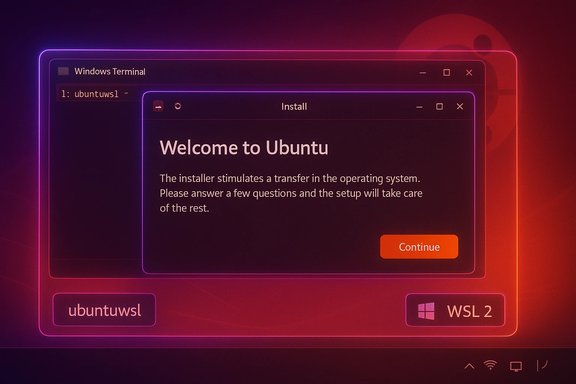
Canonical’s announcement and the published preview image highlight a small set of target features that are both practical and strategic for the Ubuntu-on-WSL experience:- Ubuntu WSL Out‑Of‑Box Experience (OOBE) — a first-run setup UI based on subiquity (the installer used by Ubuntu Server) that lets users perform initial configuration and optional customization during the first launch.
- ubuntuwsl — a new command‑line utility intended to make it simpler to configure the WSL distro and toggles for Windows integration.
- Windows Terminal Fragment Extension / Theme — a work-in-progress integration and official Ubuntu theme for Windows Terminal so Ubuntu’s look-and-feel can extend into the Windows Terminal experience.
- Ubuntu Cooker & new image tooling — backend automation (referred to as Ubuntu Cooker) used to produce the preview images and to explore new image creation techniques for WSL.
Why this matters: strategic context
Faster community-driven iteration
Canonical has historically limited store-distributed Ubuntu images to LTS releases for stability and enterprise support. The Community Preview signals a shift toward a multi-channel model for Linux on Windows: users who want the latest integration work can opt into a preview channel, while enterprise and conservative users remain on LTS images. This mirrors the distribution strategy common in major OS ecosystems (stable/LTS vs. preview/insider channels) and enables Canonical to test ideas at a faster cadence.Tightening UI/UX integration with Windows
The OOBE based on subiquity and the Windows Terminal theme demonstrate a push beyond a mere command-line subsystem. Canonical is trying to make the WSL experience feel like a first-class Ubuntu on Windows experience — one that delivers a guided first-run setup and consistent visuals in Windows Terminal. Those are the kinds of polish features that raise WSL from “developer convenience” to something organizations may consider deploying more broadly.Tooling improvements for administration and automation
The ubuntuwsl command and the Ubuntu Cooker pipeline aim to reduce the manual steps required to configure, package, and ship WSL images. That’s important to system integrators, power users, and Canonical itself: better reproducible builds and turnkey configuration paths make internal testing and external adoption far easier.Hands-on: obtaining and running the Community Preview
Distribution method and caution
The preview is intentionally not discoverable via normal Microsoft Store search. Canonical’s blog and announcements state the Community Preview is accessible only via a direct link to the Microsoft Store; users must reset the app through Windows Settings to refresh to the latest cached image, a process that will wipe data in that WSL instance if not exported first. That raises two practical points: (1) the preview is deliberately gated to avoid accidental installs, and (2) users must take care to backup any important files (for example, withwsl --export) before resetting or switching images. Basic setup flow
On first launch the OOBE runs (subiquity-based), prompting initial configuration items. The ubuntuwsl utility provides additional configuration options afterward, and Windows Terminal will show a themed entry or fragment if the preview’s Terminal integration is active. Because the image is frequently updated, users should expect occasional changes in behavior and UI during subsequent updates.Practical recommendations before installing
- Export any existing WSL distro you may have (
wsl --export) to preserve data. - Install the preview only on test machines or secondary user profiles.
- Verify Windows and WSL prerequisites (WSL 2 enabled, Windows Terminal up to date, appropriate Windows build).
- Be prepared to file feedback and bugs to Launchpad as Canonical requested; the preview exists specifically to collect that input.
Technical analysis: what’s under the hood
Subiquity as OOBE — pros and cons
Subiquity brings an interactive, modern installer to the WSL environment. The advantage is clear: a guided flow is more approachable than a bare rootfs extraction. Subiquity also supports advanced configuration options typical in server installs, which becomes useful for tailored developer or CI environments.However, subiquity was designed for real hardware and cloud images; running it in WSL requires adaptations (mount handling, pty behavior, and display/graphics considerations for the OOBE UI). There are known edge cases — the Ubuntu desktop team and WSL packaging contributors have already discussed modifications and pull requests to make the OOBE behave well inside the WSL environment. This will be a continuous engineering effort.
ubuntuwsl — simplifying distro configuration
Theubuntuwsl tool is presented as a lightweight management layer for common distro adjustments. A focused utility can greatly simplify tasks like default user management, locale, and integration toggles. The risk to watch is feature creep: if ubuntuwsl becomes a catch-all, it could duplicate functionality already present in wsl.exe or other tooling, creating confusion and fragmentation. Canonical’s design choices and CLI UX will heavily influence whether ubuntuwsl is an elegant helper or a source of overlapping functionality. Windows Terminal integration and theming
An official Ubuntu theme for Windows Terminal helps create a visually consistent experience. That’s low risk and high reward from a UX standpoint. The experimental Fragment Extension approach suggests Canonical is exploring more than just color schemes — possibly shell profile registration and richer integrations. These are surface-level integrations but are important for perceived polish. Expect iteration on theming and the integration APIs that Windows Terminal exposes.Security, stability, and enterprise considerations
Stability and update cadence
The Community Preview is explicitly designed for rapid updates and experimentation. That means:- Frequent image pushes and cached updates that may change behavior without typical enterprise predictability.
- Resetting the app to get the latest preview state can purge local files, so data persistence must be treated carefully.
Security surface area
The preview explores integration points between Windows and Linux, which by design increase the interoperability surface area. This can include tighter authentication flows, inter-process communication (WSLENV, mount sharing), and richer graphics/terminal integration with WSLg and Windows Terminal. Each of those areas introduces potential vectors for misconfiguration or vulnerabilities if not carefully reviewed — particularly when experimental features are enabled. Administrators should isolate preview installations from production networks or sensitive credentials.Compliance and manageability
For organizations that manage endpoints at scale, the preview is not a supported channel for enterprise deployment. The canonical guidance to keep the enterprise on LTS releases is sensible: preview channels trade predictability for innovation. Where organizations want to evaluate upcoming features, they should do so in test environments and assess management implications (images, update policies, backup/restore) before any broader rollout.Community, feedback loops, and contribution paths
Canonical built the Community Preview explicitly to collect community feedback through Launchpad and Ubuntu community channels. The company pointed users to multiple Launchpad projects for reporting issues related to the OOBE, WSL integrations, and thewslu tooling. This is a canonical open-source approach: surface experimental work to a community of contributors and iterate rapidly on real-world usage. Active community participation — reporting bugs, sharing reproducible test cases, and proposing patches — can directly influence which features graduate to stable releases. For WSL users, this preview channel is therefore a chance to help define how Ubuntu behaves on Windows rather than passively consuming the results.The Windows Hello mention — clarify what’s official vs. community-driven
The conversation around using Windows Hello inside WSL has been active in the community, but it is important to distinguish official platform support from community-built integrations. Several community projects (for example, “WSL Hello sudo” and other helper utilities) demonstrate that Windows Hello can be used to authenticate sudo and SSH operations in WSL by bridging Windows Hello’s TPM-backed key material into a PAM flow inside WSL. These implementations are third‑party and experimental. They are not the same as an official, built-in WSL feature delivered by Microsoft or Canonical. Readers should treat Windows Hello integrations for WSL as community efforts unless an official announcement proves otherwise. Where the user text implies Microsoft “made it possible” to use Windows Hello in WSL, that can be interpreted in two ways: (A) Microsoft provides platform APIs and WSL interoperability primitives that enable such integrations, or (B) Microsoft and Canonical jointly shipped an official Windows Hello integration into WSL. Available evidence supports the former — platform capabilities and community projects enable Hello-based flows — while the latter (an official, supported product feature) is not substantiated in Canonical’s Ubuntu on Windows Community Preview announcement. Treat any claims of official Hello integration as unverified until confirmed by Microsoft or Canonical in an explicit product release.Comparative view: how this differs from stock Ubuntu on WSL images
- Stable Ubuntu in the Microsoft Store: LTS-focused, curated for stability and enterprise deployments, discoverable via store search, receives longer support windows.
- Community Preview: bleeding-edge components (developer branch), not searchable in the store, requires a special link, intended for testing the OOBE, ubuntuwsl, and terminal theming, and has a higher update cadence.
Risks, limitations, and unresolved questions
- Data loss during resets: The preview’s update/reset behavior can wipe distro data; careless users can lose work. Backup procedures are mandatory.
- Unclear upgrade path: How and when specific preview features will graduate to LTS images is not rigidly defined in the announcement; the timeline and compatibility guarantees are therefore uncertain.
- Interoperability edge cases: Subiquity, originally built for server installs, may surface WSL-specific bugs that require bespoke fixes; expect iteration cycles and occasional regressions.
- Security review for deep integrations: Any new integration between Windows and Linux (authentication, filesystem, graphics) must be carefully audited before enterprise consumption. Experimental builds are not substitutes for security validation.
Practical recommendations
- Use the Community Preview only on non-production systems and after exporting any important WSL instances.
- File clear, reproducible reports to Launchpad, attaching logs and steps-to-reproduce — this accelerates fixes and feature acceptance.
- Keep a stable LTS Ubuntu WSL image available for work that cannot tolerate interruptions.
- Treat platform-level claims (like official Windows Hello support) with caution until a vendor confirms them; community projects are valuable but not the same as vendor-backed features.
Conclusion
The Ubuntu on Windows Community Preview is a purposeful, well-scoped experiment: Canonical wants to move faster in delivering better onboarding, tighter Windows Terminal integration, and new administration tooling for Ubuntu on WSL, while preserving the stable LTS experience for conservative users and enterprises. For developers, system integrators, and power users the preview offers an important early look at how Ubuntu might feel on Windows in the near future — but it comes with the usual trade-offs of a fast-moving channel: higher churn, occasional instability, and the need for careful data hygiene.For anyone who values being on the cutting edge of WSL integration — and who is willing to treat the preview as a laboratory rather than a primary work environment — this is precisely the kind of release to install, exercise, and report on. For everyone else, the right, safer place to stay is the established Ubuntu LTS images in the Microsoft Store until features have been matured through community feedback and formal release channels.
Source: BetaNews Ubuntu on Windows Community Preview is a special sandboxed build for testing new features on Windows Subsystem for Linux (WSL)
