

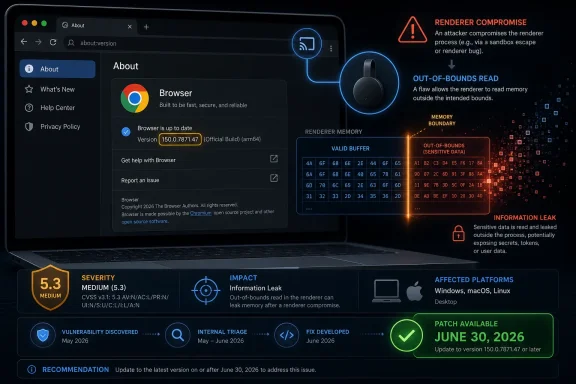
Google fixed CVE-2026-13890 in Chrome 150.0.7871.47 for Windows and Mac on June 30, 2026, closing a medium-severity out-of-bounds read in the browser’s Chromecast component that could let an attacker who had already compromised the renderer process read sensitive memory through a crafted HTML page. The flaw is not the kind of Chrome bug that should trigger panic by itself, but it is exactly the kind that keeps browser security teams awake: a post-compromise information leak sitting inside a sprawling feature surface most users never think about. As documented by Google’s Chrome Releases blog and the National Vulnerability Database, the practical lesson is less “Chromecast is broken” than “modern browsers are now operating systems with address bars.” For Windows admins, the answer is straightforward: get Chrome to 150.0.7871.47 or later, then make sure the policy machinery that got you there will work next time.
CVE-2026-13890 is classified by Chromium as medium severity, and CISA’s ADP scoring gives it a CVSS 3.1 base score of 5.3. That sounds modest beside the critical use-after-free bugs and sandbox-escape candidates that populate the same Chrome 150 release. But the interesting part of this vulnerability is not its label; it is its position in the attack chain.
The NVD description says exploitation requires a remote attacker who has already compromised the renderer process. In ordinary English, the bug is not described as a one-click full browser takeover. It is a memory disclosure primitive that becomes useful after an attacker has gained a foothold inside Chrome’s renderer sandbox, likely through another vulnerability or exploit stage.
That distinction matters. Chrome’s security model assumes that renderer compromise is possible and tries to contain it. A renderer is where hostile web content is expected to run, and the sandbox is the wall that should keep a malicious page from learning too much about the wider browser and operating system. A vulnerability that helps leak process memory can make that wall more transparent.
Information leaks are often treated as secondary bugs because they do not, on their own, execute code. But modern exploitation frequently depends on learning addresses, object layouts, secrets, tokens, or other memory-resident state. In that context, a medium-severity out-of-bounds read can become the supporting actor that makes a higher-severity exploit reliable.
That matters for enterprise Windows fleets because features do not have to be front-and-center to be part of the attack surface. A user may never click the Cast menu, never stream a tab to a conference-room display, and never own a Google TV device. The code paths still exist in the browser build, and the security update still matters.
Google’s own stable-channel post placed CVE-2026-13890 among hundreds of fixes in the Chrome 150 desktop release. The company said Chrome 150 was promoted to stable for Windows, Mac, and Linux on June 30, with Windows and Mac receiving 150.0.7871.46/.47 and Linux receiving 150.0.7871.46. NVD’s entry, meanwhile, identifies Chrome prior to 150.0.7871.47 as affected for this CVE.
That slight version-number awkwardness is typical of Chrome security bookkeeping and platform-specific packaging. For WindowsForum readers, the operative number is the fixed Windows/Mac build called out by NVD and the CVE text: 150.0.7871.47. If your desktop Chrome reports that version or newer, this specific issue should be closed.
The advisory lists a long run of critical, high, medium, and low vulnerabilities across components such as Extensions, GPU, ANGLE, Dawn, Skia, WebUSB, Bluetooth, Chromoting, V8, Blink, Canvas, WebAppInstalls, and Chromecast. The Chromecast cluster is especially notable because CVE-2026-13890 sits alongside other Chromecast-related flaws, including high-severity integer overflows, input-validation bugs, heap buffer overflows, and use-after-free issues in the same release train.
This does not mean every one of those bugs is independently exploitable in the wild. Chrome’s security notes are deliberately terse, and Google routinely restricts bug details until most users have updated. But it does mean the browser’s defensive perimeter is being patched in bulk, across subsystems that touch media, graphics, device access, identity, network behavior, extensions, and UI surfaces.
The release is a reminder that “the browser” is no longer a page renderer. It is a hardware-accelerated application platform, a password manager, a video stack, a USB and Bluetooth broker, a PDF viewer, a WebAuthn client, a sync endpoint, and a casting controller. Every one of those jobs adds utility. Every one also adds code that has to parse untrusted or semi-trusted input.
Classic endpoint security models treated the browser as another application to harden. In practice, it is now the primary ingress layer for many users. SaaS dashboards, identity providers, collaboration tools, AI assistants, document previews, internal portals, webmail, and support consoles all live inside it. If a user’s day is mostly tabs, then browser patch latency is exposure time.
The required renderer compromise means CVE-2026-13890 is not being presented as a drive-by solo act. But exploit chains are precisely chains because one vulnerability opens a door and another makes the hallway navigable. A memory disclosure flaw can help defeat mitigations, recover data, or stabilize a second stage.
This is also where Chrome’s sandboxing success creates a subtle communications problem. Because the sandbox works often enough to be trusted, bugs that assume a compromised renderer can sound academic. They are not. They are the class of bugs attackers look for when the first exploit gives them code execution in the least-privileged part of the browser and they need to learn enough to go further.
That mismatch is exactly the sort of thing that makes vulnerability-management dashboards noisy. CPEs are supposed to turn human-readable advisories into machine-readable matching rules. When the version boundary differs from the CVE text or when platform-specific Chrome builds use slightly different version numbers, scanners can produce false positives, false negatives, or confusing “affected” records.
The safest interpretation is to privilege the vendor advisory and the CVE description over a mechanically generated CPE boundary when they differ. Google’s release notes identify the Chrome 150 desktop promotion and NVD’s description names 150.0.7871.47 as the relevant fixed threshold. For Windows endpoints, administrators should verify Chrome has reached 150.0.7871.47 or later rather than assuming that a scanner’s CPE expression tells the whole story.
This is not a condemnation of NVD. It is a reminder that vulnerability data is an ecosystem, not an oracle. CVE records, vendor release notes, CISA enrichment, scanner logic, and enterprise asset inventories all have to line up before a patch report becomes reality.
The exploit path is remote and web-delivered, but not frictionless. A user must interact with malicious content, and the attacker must already have compromised the renderer process. The payoff is confidentiality: reading memory that should not be readable. The bug is not described as changing files, installing malware, or crashing systems.
CISA’s SSVC entry is also telling. It lists no known exploitation, not automatable, and partial technical impact. That puts the issue below the emergency tier reserved for actively exploited zero-days. But it does not put it below the patching tier for managed browsers, especially because it is bundled into a large stable-channel update with many more severe fixes.
For IT teams, that means the right response is disciplined urgency rather than alarm. There is no public signal in the provided data that CVE-2026-13890 is being exploited in the wild. There is also no good reason to leave a browser memory disclosure bug unpatched when the fixed build is already on the stable channel.
When a browser vendor publishes a patch, attackers diff the old and new code. They look for the fix, infer the bug, and build a proof of concept. The more detail a vendor releases before update adoption is high, the easier that job becomes. With Chrome’s user base, even a small percentage of lagging systems can represent a vast target pool.
The practical effect is that defenders often have to patch before they fully understand. That is uncomfortable but not unusual. In browser security, waiting for the postmortem can be the wrong instinct, because the public technical explanation may arrive only after the window of greatest patch value has begun to close.
CVE-2026-13890 is a good example of that asymmetry. We know the component, the weakness class, the affected versions, the prerequisite renderer compromise, and the memory-disclosure outcome. We do not know the exact code path or exploitability boundaries. For patch prioritization, that is enough.
Google’s enterprise materials describe stable-channel updates as a regular cadence, with minor releases arriving frequently and major releases arriving on a predictable cycle. That cadence is useful only if organizations actually let it work. A browser that is pinned, blocked by a broken updater, trapped behind change-control inertia, or excluded from inventory is an unmanaged exposure surface.
The Windows-specific concern is not just Google Chrome. Microsoft Edge shares the Chromium engine, though CVE applicability depends on whether Microsoft ships the affected code and has integrated the relevant fixes. Admins should watch Microsoft’s Edge release notes and security update guidance separately rather than assuming Chrome version numbers map one-to-one onto Edge builds.
For Chrome itself, the immediate check is mundane: visit the About Chrome page, confirm the version, and relaunch. At scale, the better answer is policy-backed update enforcement, reporting, and exception handling. A browser update that requires heroic manual effort is a process failure waiting to become an incident.
Enterprise administrators have a tendency to govern obvious risks first. Extensions get allowlists. Password managers get policy. Download behavior gets controlled. But casting, local network discovery, media routes, and device-facing APIs can sit in a gray zone because they feel like convenience features rather than security-relevant capabilities.
That view is outdated. Anything that brokers communication between web content, browser internals, local devices, and user-visible media sessions is security-relevant. Even if a feature is not directly exposed to every page in its most powerful form, the surrounding code still handles state, permissions, and inputs that attackers may try to influence.
Organizations that do not use casting should consider whether it should be disabled or constrained by policy. That is not because CVE-2026-13890 alone demands a lockdown. It is because unused feature surface is all downside: no business value, no user benefit, and still some share of the patching and attack-surface burden.
But exploitation is often a game of reducing uncertainty. Attackers may need to know where useful objects are in memory, whether mitigations have randomized an address, what secrets are present in a process, or how a target’s state differs from a lab machine. An information leak can answer those questions.
This is why confidentiality-only bugs deserve respect. A leak that exposes process memory may reveal fragments of documents, tokens, browsing state, internal URLs, cookies, or implementation details. The exact risk depends heavily on the process boundary and the data present at the time, but the category is not theoretical.
The renderer-compromise prerequisite in CVE-2026-13890 narrows the scenario. It also clarifies why the bug is useful. Once hostile code is already running in the renderer, the attacker’s next problem is how to learn, pivot, and survive mitigations. A memory read in a browser-adjacent component can be part of that answer.
Google’s June 30 stable-channel announcement says Chrome 150 was rolling out over coming days and weeks. That staged rollout language is normal for consumer software, but enterprise risk management often needs a firmer line. If a vulnerability record says “prior to 150.0.7871.47,” then “eventually rolling out” is not a compliance state.
This is where Windows management tooling earns its keep. Whether an organization uses Chrome Browser Cloud Management, Group Policy, Intune, third-party patching tools, EDR inventory, or a vulnerability scanner, it should be able to answer three questions quickly: which machines have Chrome installed, which exact version is running, and which machines have not relaunched since update download.
The relaunch point is easy to overlook. Chrome can stage an update while old processes remain alive. A user who never closes the browser can appear nearly patched while still running vulnerable code. Good reporting distinguishes downloaded, installed, and active versions.
That creates a race in which patch adoption is itself a defensive control. The details of CVE-2026-13890 may be restricted, but the existence of a Chromecast out-of-bounds read fixed in a specific build is public. For a sophisticated attacker, that is enough to begin hunting through Chromium changes and issue references where available.
The race is not always won by the fastest reverse engineer. It is often won by the organization with the least friction between advisory publication and endpoint update. That is the security argument for browser auto-update, even in environments that otherwise dislike automatic software change.
There is a legitimate counterargument: browser updates can break applications. Reports around any major Chrome release often include compatibility complaints, especially around media, extensions, or enterprise web apps. But the answer to that risk is staged rings and rapid rollback planning, not indefinite deferral.
That does not mean every downstream browser is automatically affected in the same way. Components can be enabled, disabled, modified, or patched on different schedules. Chromecast-specific code is especially worth checking because downstream browsers may not expose identical casting behavior. Still, the prudent move for Windows users is to watch each browser vendor’s update channel rather than treating Chrome’s fix as the end of the matter.
For Microsoft Edge, admins should validate the Edge stable version and Microsoft’s own security notes. Edge’s update mechanism and enterprise controls are separate from Chrome’s, even when the underlying engine lineage overlaps. In mixed-browser environments, one patched browser does not imply another is safe.
The broader WindowsForum takeaway is that Chromium has become infrastructure. A bug in a media or casting component can matter to a Windows desktop because the browser is the interface through which identity, work, entertainment, and administration all pass. The old boundary between “web bug” and “system risk” has eroded.
The fix is already available in the Chrome 150 stable line. The affected condition is well bounded. The exploitability is constrained but meaningful. The component name is unusual enough to be memorable, but not unusual enough to dismiss.
 A Medium Chrome Bug Can Still Matter When It Lives After the First Breach
CVE-2026-13890 is classified by Chromium as medium severity, and CISA’s ADP scoring gives it a CVSS 3.1 base score of 5.3. That sounds modest beside the critical use-after-free bugs and sandbox-escape candidates that populate the same Chrome 150 release. But the interesting part of this vulnerability is not its label; it is its position in the attack chain.The NVD description says exploitation requires a remote attacker who has already compromised the renderer process. In ordinary English, the bug is not described as a one-click full browser takeover. It is a memory disclosure primitive that becomes useful after an attacker has gained a foothold inside Chrome’s renderer sandbox, likely through another vulnerability or exploit stage.
That distinction matters. Chrome’s security model assumes that renderer compromise is possible and tries to contain it. A renderer is where hostile web content is expected to run, and the sandbox is the wall that should keep a malicious page from learning too much about the wider browser and operating system. A vulnerability that helps leak process memory can make that wall more transparent.
Information leaks are often treated as secondary bugs because they do not, on their own, execute code. But modern exploitation frequently depends on learning addresses, object layouts, secrets, tokens, or other memory-resident state. In that context, a medium-severity out-of-bounds read can become the supporting actor that makes a higher-severity exploit reliable.
Chromecast Is Not Just the Dongle Behind the Television
The word “Chromecast” invites a misleading mental picture. Many users will read the CVE name and think of a small HDMI puck in a living room, not a component inside the desktop browser they use all day. Chrome, however, has long carried casting and media-routing capabilities as part of its broader ecosystem role.That matters for enterprise Windows fleets because features do not have to be front-and-center to be part of the attack surface. A user may never click the Cast menu, never stream a tab to a conference-room display, and never own a Google TV device. The code paths still exist in the browser build, and the security update still matters.
Google’s own stable-channel post placed CVE-2026-13890 among hundreds of fixes in the Chrome 150 desktop release. The company said Chrome 150 was promoted to stable for Windows, Mac, and Linux on June 30, with Windows and Mac receiving 150.0.7871.46/.47 and Linux receiving 150.0.7871.46. NVD’s entry, meanwhile, identifies Chrome prior to 150.0.7871.47 as affected for this CVE.
That slight version-number awkwardness is typical of Chrome security bookkeeping and platform-specific packaging. For WindowsForum readers, the operative number is the fixed Windows/Mac build called out by NVD and the CVE text: 150.0.7871.47. If your desktop Chrome reports that version or newer, this specific issue should be closed.
The Real Signal Is the Size of the Chrome 150 Security Drop
CVE-2026-13890 did not arrive alone. Google’s Chrome Releases blog says the Chrome 150 stable-channel update includes 433 security fixes. That is a staggering number even in a browser world where security churn is normal.The advisory lists a long run of critical, high, medium, and low vulnerabilities across components such as Extensions, GPU, ANGLE, Dawn, Skia, WebUSB, Bluetooth, Chromoting, V8, Blink, Canvas, WebAppInstalls, and Chromecast. The Chromecast cluster is especially notable because CVE-2026-13890 sits alongside other Chromecast-related flaws, including high-severity integer overflows, input-validation bugs, heap buffer overflows, and use-after-free issues in the same release train.
This does not mean every one of those bugs is independently exploitable in the wild. Chrome’s security notes are deliberately terse, and Google routinely restricts bug details until most users have updated. But it does mean the browser’s defensive perimeter is being patched in bulk, across subsystems that touch media, graphics, device access, identity, network behavior, extensions, and UI surfaces.
The release is a reminder that “the browser” is no longer a page renderer. It is a hardware-accelerated application platform, a password manager, a video stack, a USB and Bluetooth broker, a PDF viewer, a WebAuthn client, a sync endpoint, and a casting controller. Every one of those jobs adds utility. Every one also adds code that has to parse untrusted or semi-trusted input.
The Attack Chain Starts With a Page, Not a Phishing Attachment
The NVD language for CVE-2026-13890 says the attacker could use a crafted HTML page. That is the part that should sharpen attention for Windows administrators. The browser remains the place where corporate users are expected to encounter untrusted content by design.Classic endpoint security models treated the browser as another application to harden. In practice, it is now the primary ingress layer for many users. SaaS dashboards, identity providers, collaboration tools, AI assistants, document previews, internal portals, webmail, and support consoles all live inside it. If a user’s day is mostly tabs, then browser patch latency is exposure time.
The required renderer compromise means CVE-2026-13890 is not being presented as a drive-by solo act. But exploit chains are precisely chains because one vulnerability opens a door and another makes the hallway navigable. A memory disclosure flaw can help defeat mitigations, recover data, or stabilize a second stage.
This is also where Chrome’s sandboxing success creates a subtle communications problem. Because the sandbox works often enough to be trusted, bugs that assume a compromised renderer can sound academic. They are not. They are the class of bugs attackers look for when the first exploit gives them code execution in the least-privileged part of the browser and they need to learn enough to go further.
NVD’s CPE Entry Is Awkward, but the Remediation Is Not
The user-facing NVD page raises an almost bureaucratic question: are we missing a CPE here? In the change history, NIST’s initial analysis added a CPE configuration for Google Chrome versions up to, but excluding, 150.0.7871.46, paired with operating-system CPEs for Windows, Linux, and macOS. The CVE description, however, says Chrome prior to 150.0.7871.47.That mismatch is exactly the sort of thing that makes vulnerability-management dashboards noisy. CPEs are supposed to turn human-readable advisories into machine-readable matching rules. When the version boundary differs from the CVE text or when platform-specific Chrome builds use slightly different version numbers, scanners can produce false positives, false negatives, or confusing “affected” records.
The safest interpretation is to privilege the vendor advisory and the CVE description over a mechanically generated CPE boundary when they differ. Google’s release notes identify the Chrome 150 desktop promotion and NVD’s description names 150.0.7871.47 as the relevant fixed threshold. For Windows endpoints, administrators should verify Chrome has reached 150.0.7871.47 or later rather than assuming that a scanner’s CPE expression tells the whole story.
This is not a condemnation of NVD. It is a reminder that vulnerability data is an ecosystem, not an oracle. CVE records, vendor release notes, CISA enrichment, scanner logic, and enterprise asset inventories all have to line up before a patch report becomes reality.
CISA’s Scoring Captures the Shape of the Risk
CISA’s ADP enrichment assigns CVE-2026-13890 a medium CVSS score with network attack vector, high attack complexity, no privileges required, user interaction required, unchanged scope, high confidentiality impact, and no integrity or availability impact. That is a compact description of the bug’s practical shape.The exploit path is remote and web-delivered, but not frictionless. A user must interact with malicious content, and the attacker must already have compromised the renderer process. The payoff is confidentiality: reading memory that should not be readable. The bug is not described as changing files, installing malware, or crashing systems.
CISA’s SSVC entry is also telling. It lists no known exploitation, not automatable, and partial technical impact. That puts the issue below the emergency tier reserved for actively exploited zero-days. But it does not put it below the patching tier for managed browsers, especially because it is bundled into a large stable-channel update with many more severe fixes.
For IT teams, that means the right response is disciplined urgency rather than alarm. There is no public signal in the provided data that CVE-2026-13890 is being exploited in the wild. There is also no good reason to leave a browser memory disclosure bug unpatched when the fixed build is already on the stable channel.
Chrome’s Restricted Bug Details Are a Feature, Not a Cover-Up
Google’s advisory repeats a familiar sentence: access to bug details and links may remain restricted until a majority of users are updated. This frustrates researchers, journalists, and defenders who want the full technical story immediately. It is also one of the more defensible forms of opacity in security disclosure.When a browser vendor publishes a patch, attackers diff the old and new code. They look for the fix, infer the bug, and build a proof of concept. The more detail a vendor releases before update adoption is high, the easier that job becomes. With Chrome’s user base, even a small percentage of lagging systems can represent a vast target pool.
The practical effect is that defenders often have to patch before they fully understand. That is uncomfortable but not unusual. In browser security, waiting for the postmortem can be the wrong instinct, because the public technical explanation may arrive only after the window of greatest patch value has begun to close.
CVE-2026-13890 is a good example of that asymmetry. We know the component, the weakness class, the affected versions, the prerequisite renderer compromise, and the memory-disclosure outcome. We do not know the exact code path or exploitability boundaries. For patch prioritization, that is enough.
Windows Admins Should Treat Browser Updates Like OS Updates
Windows environments often have mature processes for Patch Tuesday and less mature processes for browser drift. That gap is increasingly hard to justify. Chrome, Edge, and other Chromium-based browsers are high-frequency security products installed on systems that may otherwise be tightly managed.Google’s enterprise materials describe stable-channel updates as a regular cadence, with minor releases arriving frequently and major releases arriving on a predictable cycle. That cadence is useful only if organizations actually let it work. A browser that is pinned, blocked by a broken updater, trapped behind change-control inertia, or excluded from inventory is an unmanaged exposure surface.
The Windows-specific concern is not just Google Chrome. Microsoft Edge shares the Chromium engine, though CVE applicability depends on whether Microsoft ships the affected code and has integrated the relevant fixes. Admins should watch Microsoft’s Edge release notes and security update guidance separately rather than assuming Chrome version numbers map one-to-one onto Edge builds.
For Chrome itself, the immediate check is mundane: visit the About Chrome page, confirm the version, and relaunch. At scale, the better answer is policy-backed update enforcement, reporting, and exception handling. A browser update that requires heroic manual effort is a process failure waiting to become an incident.
The Chromecast Cluster Shows Why Optional Features Need Governance
The Chrome 150 advisory includes multiple Chromecast-related vulnerabilities beyond CVE-2026-13890. That does not prove a single systemic failure in casting code, but it does show that media-routing and device-integration features deserve the same attention as JavaScript engines and graphics libraries.Enterprise administrators have a tendency to govern obvious risks first. Extensions get allowlists. Password managers get policy. Download behavior gets controlled. But casting, local network discovery, media routes, and device-facing APIs can sit in a gray zone because they feel like convenience features rather than security-relevant capabilities.
That view is outdated. Anything that brokers communication between web content, browser internals, local devices, and user-visible media sessions is security-relevant. Even if a feature is not directly exposed to every page in its most powerful form, the surrounding code still handles state, permissions, and inputs that attackers may try to influence.
Organizations that do not use casting should consider whether it should be disabled or constrained by policy. That is not because CVE-2026-13890 alone demands a lockdown. It is because unused feature surface is all downside: no business value, no user benefit, and still some share of the patching and attack-surface burden.
Memory Disclosure Is the Quiet Partner in Browser Exploitation
Out-of-bounds reads are less cinematic than remote code execution. They do not sound like a shell popping or a ransomware note landing on a desktop. They sound like a program reading past the edge of a buffer and returning data it was never meant to expose.But exploitation is often a game of reducing uncertainty. Attackers may need to know where useful objects are in memory, whether mitigations have randomized an address, what secrets are present in a process, or how a target’s state differs from a lab machine. An information leak can answer those questions.
This is why confidentiality-only bugs deserve respect. A leak that exposes process memory may reveal fragments of documents, tokens, browsing state, internal URLs, cookies, or implementation details. The exact risk depends heavily on the process boundary and the data present at the time, but the category is not theoretical.
The renderer-compromise prerequisite in CVE-2026-13890 narrows the scenario. It also clarifies why the bug is useful. Once hostile code is already running in the renderer, the attacker’s next problem is how to learn, pivot, and survive mitigations. A memory read in a browser-adjacent component can be part of that answer.
The Version Number Is the Message
Chrome 150.0.7871.47 is an unmemorable string, but it is the most important operational fact in this story. Security teams should resist the temptation to reduce this to “Chrome 150” in dashboards and tickets. The milestone is not precise enough.Google’s June 30 stable-channel announcement says Chrome 150 was rolling out over coming days and weeks. That staged rollout language is normal for consumer software, but enterprise risk management often needs a firmer line. If a vulnerability record says “prior to 150.0.7871.47,” then “eventually rolling out” is not a compliance state.
This is where Windows management tooling earns its keep. Whether an organization uses Chrome Browser Cloud Management, Group Policy, Intune, third-party patching tools, EDR inventory, or a vulnerability scanner, it should be able to answer three questions quickly: which machines have Chrome installed, which exact version is running, and which machines have not relaunched since update download.
The relaunch point is easy to overlook. Chrome can stage an update while old processes remain alive. A user who never closes the browser can appear nearly patched while still running vulnerable code. Good reporting distinguishes downloaded, installed, and active versions.
The Browser Supply Chain Now Includes Disclosure Timing
One uncomfortable part of Chrome security is that defenders and attackers receive much of the same public information at the same time. Google posts a terse advisory. NVD enriches it. CISA adds scoring and SSVC context. Security vendors ingest the record. Attackers do, too.That creates a race in which patch adoption is itself a defensive control. The details of CVE-2026-13890 may be restricted, but the existence of a Chromecast out-of-bounds read fixed in a specific build is public. For a sophisticated attacker, that is enough to begin hunting through Chromium changes and issue references where available.
The race is not always won by the fastest reverse engineer. It is often won by the organization with the least friction between advisory publication and endpoint update. That is the security argument for browser auto-update, even in environments that otherwise dislike automatic software change.
There is a legitimate counterargument: browser updates can break applications. Reports around any major Chrome release often include compatibility complaints, especially around media, extensions, or enterprise web apps. But the answer to that risk is staged rings and rapid rollback planning, not indefinite deferral.
Edge, Chromium, and the WindowsForum Angle
Windows users increasingly live in a Chromium monoculture, even when they do not use Google Chrome. Microsoft Edge, Brave, Vivaldi, Opera, and other browsers build on Chromium foundations to varying degrees. A Chromium vulnerability may therefore be a Google Chrome story first, but it is rarely a Google-only story for long.That does not mean every downstream browser is automatically affected in the same way. Components can be enabled, disabled, modified, or patched on different schedules. Chromecast-specific code is especially worth checking because downstream browsers may not expose identical casting behavior. Still, the prudent move for Windows users is to watch each browser vendor’s update channel rather than treating Chrome’s fix as the end of the matter.
For Microsoft Edge, admins should validate the Edge stable version and Microsoft’s own security notes. Edge’s update mechanism and enterprise controls are separate from Chrome’s, even when the underlying engine lineage overlaps. In mixed-browser environments, one patched browser does not imply another is safe.
The broader WindowsForum takeaway is that Chromium has become infrastructure. A bug in a media or casting component can matter to a Windows desktop because the browser is the interface through which identity, work, entertainment, and administration all pass. The old boundary between “web bug” and “system risk” has eroded.
The Practical Meaning of This Particular Patch
The most useful way to read CVE-2026-13890 is as a small but concrete example of a larger operational rule. Browser vulnerabilities do not need celebrity status to deserve prompt remediation. Medium severity, no known exploitation, and a renderer-compromise prerequisite still add up to “patch in the normal urgent browser window.”The fix is already available in the Chrome 150 stable line. The affected condition is well bounded. The exploitability is constrained but meaningful. The component name is unusual enough to be memorable, but not unusual enough to dismiss.
- Chrome on Windows and Mac should be updated to 150.0.7871.47 or later to address CVE-2026-13890 as described by NVD and Google’s release notes.
- The vulnerability is an out-of-bounds read in Chrome’s Chromecast component, classified by Chromium as medium severity and mapped to CWE-125.
- Exploitation requires a compromised renderer process and user interaction with a crafted HTML page, making this a likely chain component rather than a standalone catastrophe.
- CISA’s enrichment reports no known exploitation and no automation signal, but assigns high confidentiality impact under CVSS 3.1.
- The CPE and version-boundary details in vulnerability feeds may be confusing, so administrators should verify exact installed browser versions rather than relying on summary labels.
- Organizations that do not need casting features should review Chrome and Edge policies for whether those capabilities should be limited, disabled, or at least inventoried.
References
- Primary source: NVD / Chromium
Published: 2026-07-03T07:00:12-07:00
NVD - CVE-2026-13890
 nvd.nist.gov
- Security advisory: MSRC
Published: 2026-07-03T07:00:12-07:00
Original feed URL
Security Update Guide - Microsoft Security Response Center
 msrc.microsoft.com
- Related coverage: cvefeed.io
CVE-2026-13890 - Google Chrome Out-of-Bounds Read
Out of bounds read in Chromecast in Google Chrome prior to 150.0.7871.47 allowed a remote attacker who had compromised the renderer process to obtain potentially sensitive information from process memory via a crafted HTML page. (Chromium security severity: Medium)cvefeed.io - Related coverage: radar.offseq.com
CVE-2026-13890: Out of bounds read in Google Chrome - Live Threat Intelligence - Threat Radar | OffSeq.com
Detailed information about CVE-2026-13890: Out of bounds read in Google Chrome affecting Google Chrome. Get real-time updates, technical details, and mitigationradar.offseq.com
