

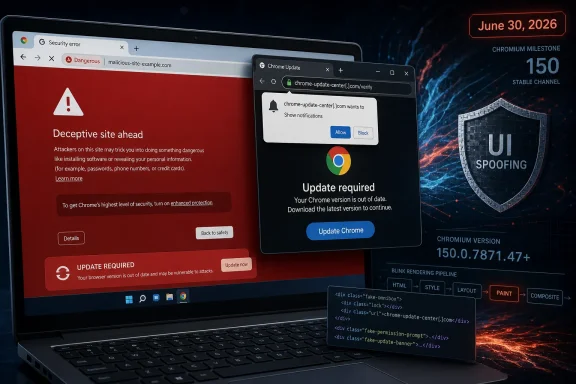
Google Chrome before version 150.0.7871.47 contains CVE-2026-13979, a medium-severity Chromium Paint flaw disclosed on June 30, 2026, that can let a remote attacker spoof browser UI through a crafted HTML page after convincing a user to visit it. The National Vulnerability Database now lists the bug with CISA’s ADP assessment, while Google’s Chrome Releases blog ties the fix to the late-June Stable Channel desktop update. The short version is simple: this is not a remote-code-execution fire alarm, but it is exactly the kind of browser weakness that makes phishing sharper, credential theft cleaner, and user judgment less reliable. For Windows users and administrators, the practical answer is less glamorous than the CVE entry: get Chrome to 150.0.7871.47 or later, then verify that your Chromium-based fleet is not lagging behind Google’s patch train.
Security teams often triage browser bugs by looking first for the words every defender dreads: use after free, sandbox escape, V8, GPU, or actively exploited. CVE-2026-13979 does not arrive wearing that costume. It is described as an “inappropriate implementation in Paint,” and the known impact is UI spoofing rather than arbitrary code execution.
That makes it tempting to downplay. But browsers are not just document viewers anymore; they are password managers, identity brokers, payment surfaces, passkey portals, SSO launchpads, and enterprise app containers. A bug that helps a hostile page lie more convincingly about what the browser is showing can be less dramatic than a memory-corruption exploit and still be useful to attackers.
The NVD entry says Chrome versions prior to 150.0.7871.47 are affected, and CISA’s ADP enrichment assigns a CVSS 3.1 score of 4.3, with network attack vector, low attack complexity, no privileges required, and user interaction required. That combination tells the story: the attacker does not need a foothold on the victim machine, but the victim has to be lured into the page where the deception happens.
This is why UI spoofing keeps returning as a browser security theme. Attackers rarely need to defeat every layer of a modern browser if they can instead persuade the user that the wrong page, prompt, origin, permission surface, or visual cue is trustworthy. The exploit target is not only code; it is attention.
That context matters because administrators may not notice this CVE by name. In a release with more severe bugs, a medium UI-spoofing issue can disappear behind higher-priority memory-safety flaws. Malwarebytes highlighted the scale of the update and called out other Chrome issues as more obviously dangerous, including bugs with sandbox-escape implications.
Yet Chrome patching is cumulative in the way that matters to users. You do not patch CVE-2026-13979 as a bespoke operation; you move the browser to the fixed Stable Channel build. The useful question for WindowsForum readers is therefore not whether this one CVE is the scariest item in the release, but whether the machine in front of you is still running a pre-150.0.7871.47 Chrome build.
For unmanaged personal systems, Chrome’s auto-update process usually does the right thing eventually. For managed Windows environments, “eventually” is not a control. Version pinning, testing rings, application-control rules, VDI images, kiosk devices, and third-party Chromium browsers can all turn a theoretically automatic patch into an operational backlog.
That distinction is important because the vulnerability is not a Windows desktop app bug wearing a Chrome label. It is a browser-rendering issue in Chromium, which means the attack surface begins with web content. A crafted HTML page is enough to trigger the relevant behavior, according to the CVE description.
The public description is intentionally sparse, as Chrome security bugs often remain restricted until users have had time to update. Google’s issue tracker link for the bug is present in the NVD record, but access to the detailed Chromium issue may be limited. That is normal for browser vulnerabilities and should not be mistaken for a sign that the issue is theoretical.
The security model here is also subtle. Chrome’s rendering engine is supposed to draw web content while preserving trustworthy browser boundaries: the address bar, permission prompts, security indicators, tab UI, page information, and other cues that help users understand where they are and what they are approving. UI spoofing bugs live in the cracks between what the page can paint and what the browser must protect from imitation.
The danger is not that a spoofed interface magically steals a password. The danger is that it makes the next step more plausible. A malicious page can become more convincing if it can visually imitate browser chrome, hide origin context, counterfeit a permission flow, or nudge the user into trusting attacker-controlled content.
Modern phishing campaigns already invest heavily in realism. They clone Microsoft 365 login pages, reproduce corporate SSO branding, insert fake CAPTCHA gates, abuse push-notification prompts, and route victims through link-shortening or redirect chains. A browser UI misrepresentation bug gives that social engineering pipeline a sharper edge.
That is why medium-severity browser bugs often deserve a different reading from medium-severity server bugs. The browser is where technical trust and human trust meet. Anything that corrupts that boundary can amplify attacks that are otherwise “just phishing.”
That score lands at 4.3, squarely in medium territory. The absence of confidentiality impact in the scoring does not mean a successful real-world campaign could never lead to credential theft. It means the vulnerability itself is assessed as a UI deception issue rather than a direct data disclosure primitive.
This is a distinction defenders need to keep straight. CVSS measures the vulnerability, not the full attack chain a criminal might build around it. A UI spoofing flaw can be the opening act in a credential-harvesting campaign even if the CVE’s direct technical impact is limited to misleading what the user sees.
The SSVC details in the NVD change history are also worth noting. CISA’s coordinator assessment lists exploitation as “none,” automatable as “no,” and technical impact as “partial.” That is reassuring as far as it goes, but it should be read as a current public assessment, not a permanent guarantee.
UI spoofing exploits that environment. They do not need to smash the sandbox if they can cause a victim to click through a fake flow. They do not need to read arbitrary memory if they can get the user to type secrets into the wrong place. They do not need persistence if they can hijack a single high-value authentication moment.
That is why browser makers treat visual integrity as a security property. The address bar is security UI. A permission prompt is security UI. A certificate warning is security UI. Even the spacing, layering, clipping, and timing of painted elements can become security-relevant when an attacker controls the page underneath.
CVE-2026-13979’s public wording does not say which exact visual boundary failed. But the component and weakness classification are enough to infer the broad category: Chrome drew or allowed content to be drawn in a way that could misrepresent critical UI information. That is exactly the class of bug that browser vendors prefer to fix quietly and quickly before exploit writeups become phishing templates.
The fixed version here is Chrome 150.0.7871.47 or later on Windows. Users can check by opening Chrome’s menu, going to Help, then About Google Chrome. That page should trigger an update check and show the installed version; if an update is applied, Chrome usually needs a relaunch before the fixed build is actually running.
Administrators have a larger problem. They need inventory. A policy that “allows Chrome to update” is not the same thing as proof that Chrome updated across laptops, shared workstations, conference-room PCs, jump boxes, lab machines, and persistent VDI desktops. Browser drift is real, especially where users postpone restarts.
The Windows ecosystem also includes Chromium-based browsers that are not Google Chrome. Microsoft Edge, Brave, Vivaldi, Opera, and others consume Chromium code on their own schedules and ship their own builds. The presence of a Chromium CVE does not automatically mean every downstream browser is vulnerable in the same way at the same moment, but it does mean administrators should check vendor advisories rather than assume Google’s version number maps cleanly to every browser.
But browser security updates are a bad place to let testing rings become a holding pattern. Chrome is one of the most exposed applications in the enterprise estate. It parses hostile content all day, by design, from networks the organization does not control.
The right compromise is not “patch everything instantly with no testing” or “wait two weeks because that is the browser ring policy.” The right compromise is a fast validation lane for security-only browser updates, plus telemetry that proves rollout. If the patch breaks something, the organization should know quickly; if the patch does not deploy, it should know faster.
CVE-2026-13979 is a useful test case because it is not spectacular. If a fleet cannot move promptly for a medium UI-spoofing issue bundled into a major Chrome security update, it probably will not move cleanly when the next actively exploited Chrome zero-day appears. Medium bugs expose process debt before critical bugs punish it.
So are we missing a CPE? Based on the NVD change history provided, a Chrome CPE was added on July 2, 2026: cpe:2.3:a:google:chrome:::::::: with the vulnerable range ending before 150.0.7871.47. If the page still shows a loading or placeholder message in one section, that looks more like a presentation or enrichment lag than evidence that Chrome lacks a CPE assignment.
This matters because vulnerability management tools ingest this metadata differently. Some scanners match on CPEs, some on vendor advisories, some on installed software inventory, and some on their own plugin logic. A temporary mismatch between CVE text, CPE configuration, and scanner content can produce both false comfort and false alarms.
For administrators, the safer operational control is direct version verification. If Chrome on Windows is below 150.0.7871.47, treat it as vulnerable to this CVE. If it is at or above that build, the specific Google Chrome exposure described in the CVE is addressed, subject to the usual caveat that downstream Chromium browsers need their own vendor confirmation.
But no known exploitation is not the same as no exploitation, and it is certainly not the same as no future exploitation. Browser bugs can move from obscure to operationally useful once patches land and attackers begin diffing builds. UI-spoofing issues may be particularly attractive because they can be integrated into social-engineering kits without requiring a full exploit chain.
The public bug details are limited today, which reduces immediate copycat risk. Over time, more technical detail may emerge through Chromium commits, issue tracker changes, security research, or downstream advisories. The window between patch availability and broad deployment is where attackers often look for laggards.
That is why the fix should be treated as routine but not optional. The absence of emergency language is not permission to defer indefinitely. It is an opportunity to patch before the bug becomes more widely understood.
This is especially true in organizations that have reduced password exposure through SSO and MFA but still rely heavily on user approval. A convincing fake sign-in page can harvest session credentials, recovery codes, or second-factor prompts. A deceptive permission experience can trick users into granting notification access or downloading payloads.
Passkeys and phishing-resistant MFA help, but they do not eliminate the problem. Users still interpret browser surfaces. They still decide whether a prompt is real, whether a domain looks right, whether a page is part of the login flow, and whether a message from the browser or site deserves action.
CVE-2026-13979 therefore belongs in the same conversation as security awareness, identity hardening, and browser management. It is not only a patch item. It is a reminder that the human-facing layer of security is software too, and software has bugs.
That does not diminish this CVE; it places it correctly. Patch management should not become a CVE beauty contest where only the scariest-sounding bug gets attention. When a browser release fixes hundreds of defects, the release itself is the unit of action.
For Windows administrators, the practical dashboard view should be simple: Chrome version distribution by device, relaunch-pending status, update policy health, and exceptions. The organization should know which machines are still below 150.0.7871.47 and why. “User has not relaunched browser” is an explanation, not an excuse.
There is also a communications angle. Telling users “a medium Paint bug was fixed” will confuse them. Telling them “Chrome needs to restart to finish an important security update” is clearer and more effective. The goal is not to teach every employee Chromium internals; it is to close the exposure window.
Microsoft Edge users should look for Microsoft’s own release notes and version guidance. Brave, Vivaldi, Opera, and other Chromium-based browsers likewise need vendor-specific confirmation. In some cases, a browser may not include the affected code path in the same way; in others, it may be affected until its next Chromium rebase.
This is where consumer advice and enterprise advice diverge. A consumer can usually update whichever browser they use and move on. An enterprise needs an inventory of all installed browsers, including “secondary” browsers that users installed for testing, compatibility, or personal preference.
Ignoring those secondary browsers is a common blind spot. Attackers do not care which browser is officially blessed by IT if another vulnerable browser is installed and can reach the internet. Application control and software inventory are not glamorous, but they are what make browser CVEs manageable.
The operational lesson is refreshingly concrete:
A medium UI-spoofing bug in Chrome’s Paint machinery is the kind of vulnerability that reminds us how much security now depends on pixels being honest. Google has shipped the fix, NVD has mapped the affected Chrome range, and CISA’s enrichment frames the issue as limited but real. The remaining risk sits where it so often does in Windows environments: unverified versions, postponed restarts, unmanaged browsers, and the dangerous assumption that “automatic update” means “already protected.” As browser security keeps moving toward faster release cycles and quieter fixes, the organizations that fare best will be the ones that treat browser currency as a live security control, not a help-desk afterthought.
 A Medium Chrome Bug Still Deserves More Than Medium Attention
Security teams often triage browser bugs by looking first for the words every defender dreads: use after free, sandbox escape, V8, GPU, or actively exploited. CVE-2026-13979 does not arrive wearing that costume. It is described as an “inappropriate implementation in Paint,” and the known impact is UI spoofing rather than arbitrary code execution.That makes it tempting to downplay. But browsers are not just document viewers anymore; they are password managers, identity brokers, payment surfaces, passkey portals, SSO launchpads, and enterprise app containers. A bug that helps a hostile page lie more convincingly about what the browser is showing can be less dramatic than a memory-corruption exploit and still be useful to attackers.
The NVD entry says Chrome versions prior to 150.0.7871.47 are affected, and CISA’s ADP enrichment assigns a CVSS 3.1 score of 4.3, with network attack vector, low attack complexity, no privileges required, and user interaction required. That combination tells the story: the attacker does not need a foothold on the victim machine, but the victim has to be lured into the page where the deception happens.
This is why UI spoofing keeps returning as a browser security theme. Attackers rarely need to defeat every layer of a modern browser if they can instead persuade the user that the wrong page, prompt, origin, permission surface, or visual cue is trustworthy. The exploit target is not only code; it is attention.
The Patch Landed Inside a Much Bigger Chrome Security Dump
Google’s Chrome Releases blog announced the relevant Stable Channel update for desktop on June 30, 2026. The release moved Windows and macOS to 150.0.7871.46/.47 and Linux to 150.0.7871.46, according to Google’s release notes and subsequent coverage from Malwarebytes and TechRepublic. The same update cycle attracted attention because it reportedly bundled hundreds of security fixes, making CVE-2026-13979 one entry in a very crowded patch ledger.That context matters because administrators may not notice this CVE by name. In a release with more severe bugs, a medium UI-spoofing issue can disappear behind higher-priority memory-safety flaws. Malwarebytes highlighted the scale of the update and called out other Chrome issues as more obviously dangerous, including bugs with sandbox-escape implications.
Yet Chrome patching is cumulative in the way that matters to users. You do not patch CVE-2026-13979 as a bespoke operation; you move the browser to the fixed Stable Channel build. The useful question for WindowsForum readers is therefore not whether this one CVE is the scariest item in the release, but whether the machine in front of you is still running a pre-150.0.7871.47 Chrome build.
For unmanaged personal systems, Chrome’s auto-update process usually does the right thing eventually. For managed Windows environments, “eventually” is not a control. Version pinning, testing rings, application-control rules, VDI images, kiosk devices, and third-party Chromium browsers can all turn a theoretically automatic patch into an operational backlog.
Paint Is Not MS Paint, and That Distinction Matters
The word “Paint” in this CVE is easy to misread on Windows. This is not about Microsoft Paint, the inbox drawing app. In Chromium terminology, Paint refers to part of the browser’s rendering pipeline — the machinery that turns page layout, styles, graphical primitives, and composited content into pixels on the screen.That distinction is important because the vulnerability is not a Windows desktop app bug wearing a Chrome label. It is a browser-rendering issue in Chromium, which means the attack surface begins with web content. A crafted HTML page is enough to trigger the relevant behavior, according to the CVE description.
The public description is intentionally sparse, as Chrome security bugs often remain restricted until users have had time to update. Google’s issue tracker link for the bug is present in the NVD record, but access to the detailed Chromium issue may be limited. That is normal for browser vulnerabilities and should not be mistaken for a sign that the issue is theoretical.
The security model here is also subtle. Chrome’s rendering engine is supposed to draw web content while preserving trustworthy browser boundaries: the address bar, permission prompts, security indicators, tab UI, page information, and other cues that help users understand where they are and what they are approving. UI spoofing bugs live in the cracks between what the page can paint and what the browser must protect from imitation.
UI Spoofing Is the Browser Version of Forged Letterhead
A UI-spoofing bug is not necessarily about taking over the browser. It is about making a user see the wrong thing at the wrong time. CWE-451, the weakness category assigned by CISA’s ADP entry, is “User Interface Misrepresentation of Critical Information,” which is an awkward formal phrase for a familiar attack: a system presents security-relevant information in a way that can be faked, obscured, confused, or misread.The danger is not that a spoofed interface magically steals a password. The danger is that it makes the next step more plausible. A malicious page can become more convincing if it can visually imitate browser chrome, hide origin context, counterfeit a permission flow, or nudge the user into trusting attacker-controlled content.
Modern phishing campaigns already invest heavily in realism. They clone Microsoft 365 login pages, reproduce corporate SSO branding, insert fake CAPTCHA gates, abuse push-notification prompts, and route victims through link-shortening or redirect chains. A browser UI misrepresentation bug gives that social engineering pipeline a sharper edge.
That is why medium-severity browser bugs often deserve a different reading from medium-severity server bugs. The browser is where technical trust and human trust meet. Anything that corrupts that boundary can amplify attacks that are otherwise “just phishing.”
The CVSS Vector Says “User Interaction,” Not “No Risk”
CISA’s ADP vector for CVE-2026-13979 is CVSS:3.1/AV:N/AC:L/PR:N/UI:R/S:U/C:N/I:L/A:N. In plain English, the bug is reachable over the network, does not require high attack complexity, does not require attacker privileges, does require user interaction, does not cross a CVSS scope boundary, and has low integrity impact with no rated confidentiality or availability impact.That score lands at 4.3, squarely in medium territory. The absence of confidentiality impact in the scoring does not mean a successful real-world campaign could never lead to credential theft. It means the vulnerability itself is assessed as a UI deception issue rather than a direct data disclosure primitive.
This is a distinction defenders need to keep straight. CVSS measures the vulnerability, not the full attack chain a criminal might build around it. A UI spoofing flaw can be the opening act in a credential-harvesting campaign even if the CVE’s direct technical impact is limited to misleading what the user sees.
The SSVC details in the NVD change history are also worth noting. CISA’s coordinator assessment lists exploitation as “none,” automatable as “no,” and technical impact as “partial.” That is reassuring as far as it goes, but it should be read as a current public assessment, not a permanent guarantee.
Chrome’s Security Model Keeps Improving Because the Web Keeps Cheating
Chrome’s security story has always been a race between isolation and interaction. Site isolation, sandboxing, memory-safety work, permission hardening, Safe Browsing, HTTPS-first defaults, and stricter extension policies all try to limit what hostile content can do. But the web’s economic engine rewards engagement, interruption, persuasion, and imitation — the same ingredients attackers use.UI spoofing exploits that environment. They do not need to smash the sandbox if they can cause a victim to click through a fake flow. They do not need to read arbitrary memory if they can get the user to type secrets into the wrong place. They do not need persistence if they can hijack a single high-value authentication moment.
That is why browser makers treat visual integrity as a security property. The address bar is security UI. A permission prompt is security UI. A certificate warning is security UI. Even the spacing, layering, clipping, and timing of painted elements can become security-relevant when an attacker controls the page underneath.
CVE-2026-13979’s public wording does not say which exact visual boundary failed. But the component and weakness classification are enough to infer the broad category: Chrome drew or allowed content to be drawn in a way that could misrepresent critical UI information. That is exactly the class of bug that browser vendors prefer to fix quietly and quickly before exploit writeups become phishing templates.
Windows Users Should Check the Browser, Not Just Windows Update
For many Windows users, “patching” still means opening Windows Update and waiting for Microsoft to do its thing. That is necessary, but it is not sufficient. Chrome ships on its own channel, with its own updater, its own enterprise policies, and its own release cadence.The fixed version here is Chrome 150.0.7871.47 or later on Windows. Users can check by opening Chrome’s menu, going to Help, then About Google Chrome. That page should trigger an update check and show the installed version; if an update is applied, Chrome usually needs a relaunch before the fixed build is actually running.
Administrators have a larger problem. They need inventory. A policy that “allows Chrome to update” is not the same thing as proof that Chrome updated across laptops, shared workstations, conference-room PCs, jump boxes, lab machines, and persistent VDI desktops. Browser drift is real, especially where users postpone restarts.
The Windows ecosystem also includes Chromium-based browsers that are not Google Chrome. Microsoft Edge, Brave, Vivaldi, Opera, and others consume Chromium code on their own schedules and ship their own builds. The presence of a Chromium CVE does not automatically mean every downstream browser is vulnerable in the same way at the same moment, but it does mean administrators should check vendor advisories rather than assume Google’s version number maps cleanly to every browser.
Enterprise Rings Can Turn Fast Patches Into Slow Exposure
Enterprise patching exists because change can break things. That is not paranoia; it is lived experience. A browser update can affect line-of-business apps, old intranet portals, brittle identity flows, kiosk behavior, accessibility tooling, automation scripts, and extensions.But browser security updates are a bad place to let testing rings become a holding pattern. Chrome is one of the most exposed applications in the enterprise estate. It parses hostile content all day, by design, from networks the organization does not control.
The right compromise is not “patch everything instantly with no testing” or “wait two weeks because that is the browser ring policy.” The right compromise is a fast validation lane for security-only browser updates, plus telemetry that proves rollout. If the patch breaks something, the organization should know quickly; if the patch does not deploy, it should know faster.
CVE-2026-13979 is a useful test case because it is not spectacular. If a fleet cannot move promptly for a medium UI-spoofing issue bundled into a major Chrome security update, it probably will not move cleanly when the next actively exploited Chrome zero-day appears. Medium bugs expose process debt before critical bugs punish it.
The CPE Confusion Is a Symptom of a Larger Metadata Problem
The user-supplied NVD text asks, “Are we missing a CPE here?” That line appears in NVD’s affected software configuration area when the database is still presenting or enriching platform data. In the change history, NIST’s initial analysis added a CPE configuration for Google Chrome with versions up to, but excluding, 150.0.7871.47.So are we missing a CPE? Based on the NVD change history provided, a Chrome CPE was added on July 2, 2026: cpe:2.3:a:google:chrome:::::::: with the vulnerable range ending before 150.0.7871.47. If the page still shows a loading or placeholder message in one section, that looks more like a presentation or enrichment lag than evidence that Chrome lacks a CPE assignment.
This matters because vulnerability management tools ingest this metadata differently. Some scanners match on CPEs, some on vendor advisories, some on installed software inventory, and some on their own plugin logic. A temporary mismatch between CVE text, CPE configuration, and scanner content can produce both false comfort and false alarms.
For administrators, the safer operational control is direct version verification. If Chrome on Windows is below 150.0.7871.47, treat it as vulnerable to this CVE. If it is at or above that build, the specific Google Chrome exposure described in the CVE is addressed, subject to the usual caveat that downstream Chromium browsers need their own vendor confirmation.
The “No Known Exploitation” Line Should Not Become a Sedative
CISA’s SSVC entry says exploitation is “none,” and there is no public indication in the supplied NVD data that CVE-2026-13979 is being actively exploited in the wild. That is good news. It should influence prioritization, especially in environments drowning in CVEs.But no known exploitation is not the same as no exploitation, and it is certainly not the same as no future exploitation. Browser bugs can move from obscure to operationally useful once patches land and attackers begin diffing builds. UI-spoofing issues may be particularly attractive because they can be integrated into social-engineering kits without requiring a full exploit chain.
The public bug details are limited today, which reduces immediate copycat risk. Over time, more technical detail may emerge through Chromium commits, issue tracker changes, security research, or downstream advisories. The window between patch availability and broad deployment is where attackers often look for laggards.
That is why the fix should be treated as routine but not optional. The absence of emergency language is not permission to defer indefinitely. It is an opportunity to patch before the bug becomes more widely understood.
Browser Trust Is Now Part of Identity Security
The enterprise identity perimeter has moved into the browser. Microsoft Entra ID, Okta, Google Workspace, Salesforce, ServiceNow, GitHub, AWS, Azure, VPN portals, and internal dashboards all rely on the browser to present trustworthy origin and authentication context. When the browser’s UI can be spoofed, identity security absorbs the risk.This is especially true in organizations that have reduced password exposure through SSO and MFA but still rely heavily on user approval. A convincing fake sign-in page can harvest session credentials, recovery codes, or second-factor prompts. A deceptive permission experience can trick users into granting notification access or downloading payloads.
Passkeys and phishing-resistant MFA help, but they do not eliminate the problem. Users still interpret browser surfaces. They still decide whether a prompt is real, whether a domain looks right, whether a page is part of the login flow, and whether a message from the browser or site deserves action.
CVE-2026-13979 therefore belongs in the same conversation as security awareness, identity hardening, and browser management. It is not only a patch item. It is a reminder that the human-facing layer of security is software too, and software has bugs.
Security Teams Should Watch the Whole Chrome 150 Update, Not One CVE
The June 30 Chrome Stable Channel update was broader than CVE-2026-13979. Reporting from Malwarebytes said the update included a very large number of fixes, and Google’s release notes listed many vulnerabilities across Chromium components. Some of those issues may carry higher direct technical risk than a medium UI-spoofing bug.That does not diminish this CVE; it places it correctly. Patch management should not become a CVE beauty contest where only the scariest-sounding bug gets attention. When a browser release fixes hundreds of defects, the release itself is the unit of action.
For Windows administrators, the practical dashboard view should be simple: Chrome version distribution by device, relaunch-pending status, update policy health, and exceptions. The organization should know which machines are still below 150.0.7871.47 and why. “User has not relaunched browser” is an explanation, not an excuse.
There is also a communications angle. Telling users “a medium Paint bug was fixed” will confuse them. Telling them “Chrome needs to restart to finish an important security update” is clearer and more effective. The goal is not to teach every employee Chromium internals; it is to close the exposure window.
Downstream Chromium Browsers Need Their Own Receipts
Chromium’s shared codebase is both a strength and a complication. A vulnerability found in Chromium can affect multiple browsers, but each vendor decides how quickly to merge, test, and ship the fix. Google Chrome’s fixed build number is definitive for Chrome, not automatically definitive for every Chromium derivative.Microsoft Edge users should look for Microsoft’s own release notes and version guidance. Brave, Vivaldi, Opera, and other Chromium-based browsers likewise need vendor-specific confirmation. In some cases, a browser may not include the affected code path in the same way; in others, it may be affected until its next Chromium rebase.
This is where consumer advice and enterprise advice diverge. A consumer can usually update whichever browser they use and move on. An enterprise needs an inventory of all installed browsers, including “secondary” browsers that users installed for testing, compatibility, or personal preference.
Ignoring those secondary browsers is a common blind spot. Attackers do not care which browser is officially blessed by IT if another vulnerable browser is installed and can reach the internet. Application control and software inventory are not glamorous, but they are what make browser CVEs manageable.
The Real Fix Is Faster Browser Hygiene, Not CVE Memorization
CVE-2026-13979 is unlikely to be remembered as the defining Chrome vulnerability of 2026. It does not have the immediate drama of a zero-day, and the public description is too spare to sustain much technical theater. Its value is as a signal: even the medium bugs in browser rendering can undermine user trust in ways that attackers know how to monetize.The operational lesson is refreshingly concrete:
- Chrome on Windows should be updated to 150.0.7871.47 or later to address the CVE-2026-13979 exposure described by NVD and Google’s Stable Channel release.
- The vulnerability requires user interaction, but that requirement fits normal phishing and malvertising workflows rather than excluding real-world risk.
- The CPE data appears to have been added by NIST for Google Chrome versions before 150.0.7871.47, so version-based inventory is the most reliable immediate check.
- Administrators should verify relaunch completion, because a downloaded browser update does not fully protect a running pre-update browser session.
- Chromium-based browsers other than Google Chrome should be checked against their own vendor advisories instead of assuming Google’s fixed build number applies directly.
- The broader June 30 Chrome update deserves fleet-level attention because CVE-2026-13979 shipped alongside many other security fixes.
A medium UI-spoofing bug in Chrome’s Paint machinery is the kind of vulnerability that reminds us how much security now depends on pixels being honest. Google has shipped the fix, NVD has mapped the affected Chrome range, and CISA’s enrichment frames the issue as limited but real. The remaining risk sits where it so often does in Windows environments: unverified versions, postponed restarts, unmanaged browsers, and the dangerous assumption that “automatic update” means “already protected.” As browser security keeps moving toward faster release cycles and quieter fixes, the organizations that fare best will be the ones that treat browser currency as a live security control, not a help-desk afterthought.
References
- Primary source: NVD / Chromium
Published: 2026-07-03T07:00:23-07:00
NVD - CVE-2026-13979
 nvd.nist.gov
- Security advisory: MSRC
Published: 2026-07-03T07:00:23-07:00
Original feed URL
Security Update Guide - Microsoft Security Response Center
 msrc.microsoft.com
