

Windows error codes often feel like random hexadecimal noise, but that frustration comes from the way Windows has layered several error systems over decades rather than from the codes themselves. Microsoft’s Error Lookup Tool, better known as ERR.exe, is the old but still useful utility that translates those codes into readable names and descriptions, and Microsoft’s own documentation now points users to it as a recommended way to investigate system error codes. (learn.microsoft.com)
Windows error codes have never been especially user-friendly because they were not designed primarily for casual users. Microsoft’s documentation says system error codes can appear in many places, are often far removed from the code handling the failure, and require investigation in the programmatic and runtime context where they occurred. That is a very different design goal from “make this easy to understand at a glance.” (learn.microsoft.com)
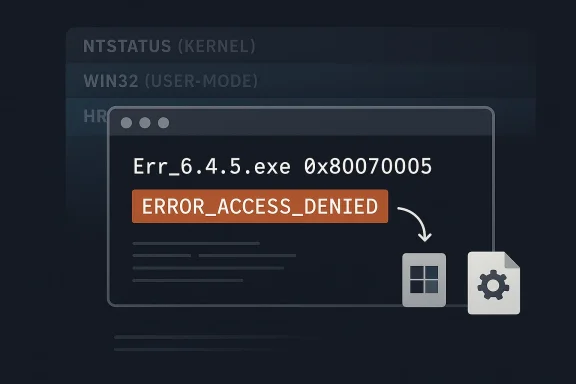
Under the hood, Windows still uses multiple overlapping systems: NTSTATUS at the kernel level, Win32 error codes in the API layer, and HRESULT values in COM and related components. Microsoft’s own MS-ERREF specification explicitly covers all three families, which is a strong clue that the mess is structural, not accidental. If one number can mean different things depending on the subsystem, then a simple web search is often too blunt an instrument. (learn.microsoft.com)
That is where ERR.exe earns its keep. The Microsoft Error Lookup Tool is a small command-line utility that shows the message text associated with a hexadecimal status code or other code, pulling from multiple Microsoft header files such as Winerror.h and Setupapi.h. Microsoft also notes that the tool is digitally signed and can be run without installation, which makes it portable enough for support work, recovery media, and quick diagnostics. (learn.microsoft.com)
The tool also reflects a more old-school Microsoft support culture. It is not flashy, it has no modern GUI, and it behaves like a utility that assumed the person using it already knew how to open a terminal. That can feel intimidating to newcomers, but it also makes the tool fast, scriptable, and surprisingly elegant in the way only a tiny internal utility can be. Sometimes the best troubleshooting tools are the ones that never tried to be consumer software in the first place.
Microsoft’s documentation also calls the tool a point-in-time decoder, which matters more than it sounds. Error codes evolve as Windows evolves, so a lookup utility compiled against one snapshot of the headers can fall behind newer releases. That means the tool is best understood as a high-quality reference, not a permanent oracle. (learn.microsoft.com)
That context loss is why random search results can mislead. Many online explanations treat an error code as if it has one fixed meaning everywhere, when in reality the same numeric value can map to different symbolic names or different layers of the Windows stack. ERR.exe is useful precisely because it searches for all relevant matches rather than pretending there is only one. (learn.microsoft.com)
That layered model explains why searching by plain number can produce vague or contradictory answers. It also explains why support engineers and administrators have long favored tools that decode both the symbolic name and the originating header file. In practice, those two details often matter more than the text description itself. A code is rarely just a code; it is usually a breadcrumb.
The hidden advantage is that ERR.exe acts as a map, not just a dictionary. When it returns
Microsoft’s own example output shows why that matters. A lookup for
That is especially valuable in enterprise environments, where administrators may see the same numeric code in logs, installers, scripts, and event traces. The tool helps them identify whether they are dealing with a system-wide Win32 code, a COM failure, or a low-level status value. The faster that distinction is made, the faster the next step becomes obvious.
It is also worth stressing that Microsoft’s page says you do not need to expand or install the executable. You download it, place it somewhere convenient, and run it from Command Prompt. If you put it in a folder on the system path, it becomes available anywhere. That makes it a perfect portable utility for support kits and recovery drives. (learn.microsoft.com)
The practical workflow is this: identify the code from the dialog, event log, installer output, or crash screen; run the lookup; note the symbolic name and header; then search around that specific terminology rather than the raw number. That sequence is much more efficient than dumping the entire error code into a web search and hoping the internet guesses your exact scenario.
The tool is especially helpful in mixed environments where different layers of software produce different styles of failure. Microsoft’s own system error guidance points users to the lookup tool, debugging tools, and the MS-ERREF reference together, which is a strong sign that the company expects professionals to combine sources rather than rely on one. (learn.microsoft.com)
The Exchange-Server association is a good example of how niche tools get mislabeled. Some third-party and older references described the tool as exchange-specific, but Microsoft’s current documentation treats it as a broad Windows error lookup utility with system-wide applicability. That is the more accurate reading, and it aligns with the fact that it decodes codes from multiple Windows header families. (learn.microsoft.com)
That is a subtle but important shift in thinking. ERR.exe is not a consumer-friendly replacement for troubleshooting; it is the first bridge between a mysterious code and a meaningful support workflow. For IT pros, that difference matters.
It also explains why there is no polished GUI from Microsoft itself. A graphical shell would likely encourage casual use, but the utility is more useful to the people who live in terminals, logs, scripts, and support cases. The lack of polish is almost a clue to its purpose.
The symbolic name is especially useful because it is searchable. Searching
For consumer users, the value is more situational. Most people will not decode errors every day, but when a stubborn installer, update, or boot failure appears, a tool like ERR.exe can save time and reduce guesswork. It is still a command-line tool, though, so the barrier to entry is higher than Microsoft’s built-in Settings app or generic search.
The tool is also a reminder that some Windows problems are best understood before they are fixed. Once you know whether the failure is permissions, device access, or a process termination, the likely remedies narrow sharply. That is what makes the tool feel powerful even though it is technically simple.
Another limitation is the point-in-time nature of the database. Microsoft says new Windows releases add new event and error codes, which means older versions of the tool can lag behind the latest platform changes. So if you rely on it heavily, keeping a fresh copy matters. (learn.microsoft.com)
It cannot tell you whether a permission issue is local, policy-based, or inherited.
It cannot tell you whether an HRESULT came from your app, a COM component, or a remote dependency.
It cannot tell you whether the fix is one registry key, one permission change, or a clean reinstall.
That is not a criticism so much as a reminder of the tool’s job. ERR.exe is for translation, not diagnosis. The diagnosis still depends on the rest of the evidence trail.
The other practical issue is usability. A command-line interface is perfect for professionals and awkward for casual users who are not already comfortable in Command Prompt or Windows Terminal. That is why many people still end up searching the web first, even when a better internal tool exists. Convenience and correctness are not always aligned.
That tension matters because Windows still serves two very different audiences. One group wants a simple interface that mostly stays out of the way. The other needs enough detail to diagnose failures at the system, driver, and enterprise-policy levels. ERR.exe survives because it serves the second group exceptionally well.
That is why this tiny utility still feels modern in its own way. It does not try to simplify the platform; it reveals the platform honestly. And sometimes honesty is exactly what troubleshooting needs.
It also helps explain why third-party sites keep revisiting the same topic. The frustration never really leaves, because the underlying architecture never really changed. Microsoft has improved the guidance around error lookup, but the codes themselves remain as cryptic as ever to anyone without the right decoder.
It also shines in environments where consistency matters. A shared tool that returns the same symbolic labels for everyone is a better foundation for internal documentation than a dozen different search results with slightly different explanations.
There is also a documentation risk. Because search engines and community posts often repeat simplified explanations, an error code can become “understood” in the popular sense while still being misunderstood in the technical sense. That is exactly the kind of confusion ERR.exe is meant to reduce, but it cannot eliminate it by itself.
The final concern is that a command-line tool will always be underused by the people who might benefit from it most. That is not a flaw in the utility; it is a limitation of human habit. Most users go to the browser first, even when the better answer is sitting in Microsoft’s own toolbox.
I suspect the future will be less about replacing ERR.exe and more about wrapping it in friendlier surfaces. Windows already leans heavily on guided support, built-in troubleshooters, and documentation hubs. A native, more discoverable bridge from code to explanation would fit that direction better than a ground-up reinvention.
Source: MakeUseOf Windows error codes finally make sense thanks to this decades-old Microsoft tool
 Background
Windows error codes have never been especially user-friendly because they were not designed primarily for casual users. Microsoft’s documentation says system error codes can appear in many places, are often far removed from the code handling the failure, and require investigation in the programmatic and runtime context where they occurred. That is a very different design goal from “make this easy to understand at a glance.” (learn.microsoft.com)Under the hood, Windows still uses multiple overlapping systems: NTSTATUS at the kernel level, Win32 error codes in the API layer, and HRESULT values in COM and related components. Microsoft’s own MS-ERREF specification explicitly covers all three families, which is a strong clue that the mess is structural, not accidental. If one number can mean different things depending on the subsystem, then a simple web search is often too blunt an instrument. (learn.microsoft.com)
That is where ERR.exe earns its keep. The Microsoft Error Lookup Tool is a small command-line utility that shows the message text associated with a hexadecimal status code or other code, pulling from multiple Microsoft header files such as Winerror.h and Setupapi.h. Microsoft also notes that the tool is digitally signed and can be run without installation, which makes it portable enough for support work, recovery media, and quick diagnostics. (learn.microsoft.com)
The tool also reflects a more old-school Microsoft support culture. It is not flashy, it has no modern GUI, and it behaves like a utility that assumed the person using it already knew how to open a terminal. That can feel intimidating to newcomers, but it also makes the tool fast, scriptable, and surprisingly elegant in the way only a tiny internal utility can be. Sometimes the best troubleshooting tools are the ones that never tried to be consumer software in the first place.
Microsoft’s documentation also calls the tool a point-in-time decoder, which matters more than it sounds. Error codes evolve as Windows evolves, so a lookup utility compiled against one snapshot of the headers can fall behind newer releases. That means the tool is best understood as a high-quality reference, not a permanent oracle. (learn.microsoft.com)
Why Windows Error Codes Still Feel Cryptic
The core reason Windows error codes frustrate people is that they often arrive stripped of context. A code like0x80070005 may be technically accurate, but it does not tell you whether the failure came from permissions, policy, service state, or a specific subsystem. Microsoft’s own guidance warns that system error descriptions cannot be very specific because the same code can surface in many locations across the system. (learn.microsoft.com)That context loss is why random search results can mislead. Many online explanations treat an error code as if it has one fixed meaning everywhere, when in reality the same numeric value can map to different symbolic names or different layers of the Windows stack. ERR.exe is useful precisely because it searches for all relevant matches rather than pretending there is only one. (learn.microsoft.com)
The three-layer problem
At the lowest level, NTSTATUS values are often the most revealing for kernel or driver issues. Above that, Win32 codes are the broad user-mode translation layer most people encounter in dialogs, logs, and installers. Above that again, HRESULT values show up in COM and many Microsoft APIs, which is why a code that looks similar may need a different way of thinking depending on where it came from. (learn.microsoft.com)That layered model explains why searching by plain number can produce vague or contradictory answers. It also explains why support engineers and administrators have long favored tools that decode both the symbolic name and the originating header file. In practice, those two details often matter more than the text description itself. A code is rarely just a code; it is usually a breadcrumb.
The hidden advantage is that ERR.exe acts as a map, not just a dictionary. When it returns
ERROR_ACCESS_DENIED, STATUS_SYSTEM_PROCESS_TERMINATED, or another symbolic label, you get a clue about scope and subsystem, not merely a generic sentence. That narrows the troubleshooting path before you even touch the system. (learn.microsoft.com)What ERR.exe Actually Does
ERR.exe is a lookup utility, not a fixer. It does not repair files, restart services, or diagnose root causes by itself. Its value comes from translating opaque numeric codes into usable vocabulary, which is the first step in any sane Windows troubleshooting workflow. (learn.microsoft.com)Microsoft’s own example output shows why that matters. A lookup for
c000021a returns STATUS_SYSTEM_PROCESS_TERMINATED with its associated text, while 7b can return multiple matches such as INACCESSIBLE_BOOT_DEVICE and ERROR_INVALID_NAME depending on interpretation and context. The tool’s output makes the ambiguity visible instead of hiding it. (learn.microsoft.com)Why multiple matches are a feature
Multiple matches are not a bug in the tool. They are a reminder that Windows error spaces overlap and that context determines meaning. A plain search engine often collapses that nuance into one answer, which is convenient but frequently wrong. (learn.microsoft.com)That is especially valuable in enterprise environments, where administrators may see the same numeric code in logs, installers, scripts, and event traces. The tool helps them identify whether they are dealing with a system-wide Win32 code, a COM failure, or a low-level status value. The faster that distinction is made, the faster the next step becomes obvious.
It is also worth stressing that Microsoft’s page says you do not need to expand or install the executable. You download it, place it somewhere convenient, and run it from Command Prompt. If you put it in a folder on the system path, it becomes available anywhere. That makes it a perfect portable utility for support kits and recovery drives. (learn.microsoft.com)
How to Use It Effectively
Using ERR.exe is straightforward, but it works best when you treat it as part of a process rather than a magic answer generator. Microsoft’s syntax is simple: runErr_6.4.5.exe <error code> from a command prompt, replacing the placeholder with the hex value you want to look up. Microsoft even gives examples for common codes. (learn.microsoft.com)The practical workflow is this: identify the code from the dialog, event log, installer output, or crash screen; run the lookup; note the symbolic name and header; then search around that specific terminology rather than the raw number. That sequence is much more efficient than dumping the entire error code into a web search and hoping the internet guesses your exact scenario.
A simple troubleshooting sequence
- Copy the code exactly as shown, including leading zeros if present.
- Run the code through ERR.exe from a terminal.
- Note the symbolic name, header file, and any repeated matches.
- Use those names to search support articles, logs, and vendor documentation.
- Match the result to the subsystem that actually failed.
80070005 becoming ERROR_ACCESS_DENIED instantly redirects attention toward permissions, policy, ACLs, or security context. Instead of investigating Windows Update itself, you start investigating why the process lacks access. (learn.microsoft.com)The tool is especially helpful in mixed environments where different layers of software produce different styles of failure. Microsoft’s own system error guidance points users to the lookup tool, debugging tools, and the MS-ERREF reference together, which is a strong sign that the company expects professionals to combine sources rather than rely on one. (learn.microsoft.com)
Why Microsoft Kept This Tool in the Background
ERR.exe is not hidden in the sense of being unavailable; it is hidden in the sense that Microsoft never positioned it as a mass-market utility. That makes sense when you look at the intended audience. Microsoft’s documentation frames the tool in terms of business environments, authorization concerns, and specialized storage locations, which tells you it is meant for admins and support staff first. (learn.microsoft.com)The Exchange-Server association is a good example of how niche tools get mislabeled. Some third-party and older references described the tool as exchange-specific, but Microsoft’s current documentation treats it as a broad Windows error lookup utility with system-wide applicability. That is the more accurate reading, and it aligns with the fact that it decodes codes from multiple Windows header families. (learn.microsoft.com)
The support-engineering mindset
Microsoft’s documentation is also telling in how it frames the tool alongside other diagnostics. It lists the Error Lookup Tool, the Debugging Tools for Windows!err command, and the MS-ERREF specification as complementary resources. In other words, Microsoft expects the real answer to emerge from a toolchain, not a single app. (learn.microsoft.com)That is a subtle but important shift in thinking. ERR.exe is not a consumer-friendly replacement for troubleshooting; it is the first bridge between a mysterious code and a meaningful support workflow. For IT pros, that difference matters.
It also explains why there is no polished GUI from Microsoft itself. A graphical shell would likely encourage casual use, but the utility is more useful to the people who live in terminals, logs, scripts, and support cases. The lack of polish is almost a clue to its purpose.
What It Means for IT Pros
For administrators, service desk staff, and system engineers, ERR.exe compresses the first phase of triage. It reduces the time spent translating a raw number into a clue, which is often the most annoying and error-prone part of incident handling. That makes it particularly useful for recurring platform issues where the same few codes show up over and over again. (learn.microsoft.com)The symbolic name is especially useful because it is searchable. Searching
ERROR_ACCESS_DENIED or STATUS_SYSTEM_PROCESS_TERMINATED is far more productive than searching a hexadecimal string, because the symbolic name ties directly back to Microsoft’s headers, protocol docs, and support material. The lookup tool is effectively a bridge between end-user symptom and developer vocabulary. (learn.microsoft.com)Enterprise value versus consumer value
For enterprise users, the tool’s value is amplified by scale. A help desk can script around it, document it, or standardize it inside a troubleshooting playbook, which means fewer inconsistent interpretations across technicians. That consistency is often worth more than raw speed.For consumer users, the value is more situational. Most people will not decode errors every day, but when a stubborn installer, update, or boot failure appears, a tool like ERR.exe can save time and reduce guesswork. It is still a command-line tool, though, so the barrier to entry is higher than Microsoft’s built-in Settings app or generic search.
The tool is also a reminder that some Windows problems are best understood before they are fixed. Once you know whether the failure is permissions, device access, or a process termination, the likely remedies narrow sharply. That is what makes the tool feel powerful even though it is technically simple.
Limitations You Should Not Ignore
The biggest limitation is that ERR.exe does not replace context. Microsoft explicitly says system errors can occur across many places in the system and need investigation in the context in which they occurred. If you ignore that, you can still chase the wrong subsystem even with a correct symbolic name. (learn.microsoft.com)Another limitation is the point-in-time nature of the database. Microsoft says new Windows releases add new event and error codes, which means older versions of the tool can lag behind the latest platform changes. So if you rely on it heavily, keeping a fresh copy matters. (learn.microsoft.com)
What the tool cannot tell you
It cannot tell you which driver caused the failure.It cannot tell you whether a permission issue is local, policy-based, or inherited.
It cannot tell you whether an HRESULT came from your app, a COM component, or a remote dependency.
It cannot tell you whether the fix is one registry key, one permission change, or a clean reinstall.
That is not a criticism so much as a reminder of the tool’s job. ERR.exe is for translation, not diagnosis. The diagnosis still depends on the rest of the evidence trail.
The other practical issue is usability. A command-line interface is perfect for professionals and awkward for casual users who are not already comfortable in Command Prompt or Windows Terminal. That is why many people still end up searching the web first, even when a better internal tool exists. Convenience and correctness are not always aligned.
Why This Matters in 2026
The fact that this tool is still relevant in 2026 says something important about Windows itself. Despite the polish of modern Windows builds, the operating system still produces low-level codes that are most legible to engineers, not everyday users. Microsoft has improved the surfaces around Windows, but it has not removed the need for technical decoding. (learn.microsoft.com)That tension matters because Windows still serves two very different audiences. One group wants a simple interface that mostly stays out of the way. The other needs enough detail to diagnose failures at the system, driver, and enterprise-policy levels. ERR.exe survives because it serves the second group exceptionally well.
Historical continuity
The tool also shows how much of Windows support still depends on old ideas that never fully went away. Headers, symbolic names, status families, and diagnostic layers are all artifacts of a system that grew by accretion. Rather than being replaced, many of those layers were merely wrapped in friendlier surfaces.That is why this tiny utility still feels modern in its own way. It does not try to simplify the platform; it reveals the platform honestly. And sometimes honesty is exactly what troubleshooting needs.
It also helps explain why third-party sites keep revisiting the same topic. The frustration never really leaves, because the underlying architecture never really changed. Microsoft has improved the guidance around error lookup, but the codes themselves remain as cryptic as ever to anyone without the right decoder.
Strengths and Opportunities
ERR.exe has stayed useful because it solves a real, persistent problem rather than inventing a new one. It is small, portable, signed by Microsoft, and aligned with the way Windows error data is actually structured. For technicians, that combination is hard to beat.- Portable and lightweight: no installer, no background service, no clutter.
- Official Microsoft tooling: better trust than random web lookups.
- Broad coverage: Win32, NTSTATUS, HRESULT, and related codes.
- Searchable symbolic names: makes follow-up research much easier.
- Useful in scripts and playbooks: good fit for support teams.
- Works offline: ideal for recovery environments and air-gapped systems.
- Fast triage: turns opaque numbers into actionable clues.
Where it shines most
It is strongest when you are dealing with an unfamiliar code in a log, installer, or crash message and need to know what family it belongs to. That first translation step can save a surprising amount of time. In practice, that often means the difference between a vague hunch and a credible troubleshooting path.It also shines in environments where consistency matters. A shared tool that returns the same symbolic labels for everyone is a better foundation for internal documentation than a dozen different search results with slightly different explanations.
Risks and Concerns
The main concern with ERR.exe is not that it is unreliable, but that users may overestimate what it can do. A correct code lookup is only the beginning of troubleshooting, and if you stop there you can still fix the wrong layer of the problem.- No root-cause analysis: it explains codes, not failures.
- Context still required: the same code can mean different things.
- Older builds can lag: the database is point-in-time, not live.
- Terminal barrier: many users will find the interface intimidating.
- False confidence: symbolic names can look definitive when they are not.
- Over-searching the code alone: people may ignore logs and surrounding symptoms.
- Version drift: new Windows codes can outpace the tool.
The human risk
The most important risk is cognitive. Once a code has a neat name, people often assume the mystery is solved. In reality, the symbolic name is just a category label, and categories are not remedies. The code says where to look, not what to click.There is also a documentation risk. Because search engines and community posts often repeat simplified explanations, an error code can become “understood” in the popular sense while still being misunderstood in the technical sense. That is exactly the kind of confusion ERR.exe is meant to reduce, but it cannot eliminate it by itself.
The final concern is that a command-line tool will always be underused by the people who might benefit from it most. That is not a flaw in the utility; it is a limitation of human habit. Most users go to the browser first, even when the better answer is sitting in Microsoft’s own toolbox.
Looking Ahead
Microsoft is unlikely to replace the need for error decoding anytime soon, because the complexity is built into Windows, not just the support experience. As long as the platform continues to expose layered status systems and code-rich diagnostics, a utility like ERR.exe will remain relevant. The bigger question is whether Microsoft will make that decoding easier to discover and more integrated into modern workflows.I suspect the future will be less about replacing ERR.exe and more about wrapping it in friendlier surfaces. Windows already leans heavily on guided support, built-in troubleshooters, and documentation hubs. A native, more discoverable bridge from code to explanation would fit that direction better than a ground-up reinvention.
What to watch next
- Whether Microsoft keeps updating the tool in lockstep with Windows releases.
- Whether more Microsoft docs continue to recommend ERR.exe explicitly.
- Whether support workflows begin surfacing symbolic names automatically.
- Whether Windows Terminal and PowerShell integrations make lookup easier.
- Whether more admins standardize the tool in incident-response playbooks.
Source: MakeUseOf Windows error codes finally make sense thanks to this decades-old Microsoft tool
Last edited:
